1. Background: How to read the source code of a closed npm package?
Claude Code (@anthropic-ai/claude-code) is Anthropic's famous AI coding agent tool, distributed as npm package. Special point: Anthropic does not open the original TypeScript source code --- they only ship a bundle that has been built with Bun.
1.1. Why is npm bundle readable?
Bun bundle Claude Code in tree-shaken ESM style --- without using heavy obfuscator like Terser with maximum mangling. Result: function names, variable names, and module structure are almost intact. Comments in the TypeScript source also remain intact after the build process.
npm install @anthropic-ai/claude-code
# → Unpacked: 43MB, only 19 files, main bundle ~40MB
Overview extraction pipeline:
flowchart LR
    A["npm registry\n@anthropic-ai/claude-code\nv2.1.89"] -->|npm install| B["Bundle Bun\n~40MB .js"]
    B -->|"AST parse\n(acorn/babel)"| C["Module graph\nphục hồi"]
    C -->|"Rename vars\ndựa trên context"| D["TypeScript gốc\n~90% readable"]
    D -->|"Đọc comments\n+ types"| E["Source code\ncó thể phân tích"]

    style A fill:#e8f4f8
    style E fill:#e8f8e8
Result: hundreds of files .ts / .tsx with clear directory structure, intact technical comments, and complete type annotations. It's very rare for a closed-source npm package to reveal so much.
Technical note: This is not a hack. When you publish to npm, the code is a public artifact. Reverse engineering an npm package is legal as long as you do not violate the ToS or copyright when using the results.
1.2. Recovered folder structure
claude-code-code/
├── main.tsx ← Main entry point
├── QueryEngine.ts ← Core conversation loop
├── buddy/ ← 🐾 Virtual pet system (NEW!)
│ ├── companion.ts ← Roll logic (PRNG + rarity)
│ ├── CompanionSprite.tsx ← ASCII renderer (Ink/React)
│ ├── sprites.ts ← 18 species × 3 frames
│ ├── types.ts ← Species/Rarity/Stats types
│ ├── prompt.ts ← LLM companion intro
│ └── useBuddyNotification.tsx ← Teaser window
├── bridge/ ← Remote session system
│ ├── bridgeMain.ts ← Bridge loop (reconnect/backoff)
│ ├── sessionRunner.ts ← Child process spawner
│ ├── workSecret.ts ← JWT + WebSocket URLs
│ └── types.ts ← Protocol types
├── commands/
│ ├── ultraplan.tsx ← 🚀 Multi-agent planning
│ ├── stickers/ ← Easter egg: StickerMule
│ └── [35+ commands]
├── coordinator/
│ └── coordinatorMode.ts ← Multi-agent coordinator
└── tasks/
    ├── LocalAgentTask/ ← Sub-agent (local)
    ├── RemoteAgentTask/ ← Sub-agent (cloud CCR)
    ├── DreamTask/ ← Background async task
    └── InProcessTeammateTask/ ← In-process agent
2. Claude Code overall architecture
2.1. Technology stack
Before going into specific features, it is necessary to clearly understand what Claude Code is built on:
graph TB
    subgraph "Runtime Layer"
        BUN["⚡ Bun Runtime\n(không phải Node.js)"]
        BUNDLE["Bun Bundle\n(tree-shaken ESM)"]
    end

    subgraph "UI Layer"
        INK["Ink (React cho terminal)\nvadimdemedes/ink"]
        RC["React Compiler\nreact/compiler-runtime"]
        INK --> RC
    end

    subgraph "Core Engine"
        QE["QueryEngine.ts\nConversation loop"]
        TOOLS["40+ Tools\nBash/File/Web/Agent..."]
        CMDS["35+ Commands\n/slash commands"]
    end

    subgraph "Infrastructure"
        GW["GrowthBook\nFeature flags + A/B"]
        DD["Datadog\nAnalytics + tracing"]
        ZOD["Zod v4\nRuntime validation"]
    end

    subgraph "Remote"
        BRIDGE["Bridge System\nRemote sessions"]
        CCR["Cloud Code REPL\n(CCR) server-side"]
    end

    BUN --> INK
    INK --> QE
    QE --> TOOLS
    QE --> CMDS
    QE --> GW
    QE --> BRIDGE
    BRIDGE --> CCR
2.2. Startup optimization --- down to every millisecond
Look at the beginning of the file main.tsx:
// Side-effects chạy NGAY khi file được import:
// 1. profileCheckpoint --- bắt đầu đo thời gian
// 2. startMdmRawRead --- fire MDM subprocesses (plutil/reg query) song song
//    với 135ms còn lại của import chain
// 3. startKeychainPrefetch --- fire cả 2 macOS keychain reads song song
//    (~65ms tiết kiệm trên mỗi lần khởi động macOS)

profileCheckpoint('main_tsx_entry');
startMdmRawRead();        // parallel: đọc MDM config
startKeychainPrefetch();  // parallel: đọc keychain OAuth tokens
This is "speculative execution" for I/O: as soon as the file starts loading, the 3 side effects are fired in parallel --- all running while the JS is parsing the remaining 135ms import chain. Once the import is complete, the result is ready.
gantt
    title Startup Timeline Claude Code (macOS, ước tính)
    dateFormat X
    axisFormat %Lms

    section Sequential (cũ)
    Parse imports          : 0, 135
    Keychain read #1       : 135, 200
    Keychain read #2       : 200, 265
    MDM read               : 265, 310
    App ready              : 310, 315

    section Parallel (thực tế)
    Parse imports          : 0, 135
    Keychain #1 + #2 + MDM : crit, 0, 65
    App ready              : 135, 140
Result: ~175ms saved per boot. With developer typing claude dozens of times every day --- this is real UX win.
3. Hidden feature #1: "Buddy" system --- Virtual pet in terminal
This is the most shocking discovery. Hidden deep in the folder buddy/ is a complete virtual pet companion system, embedded directly into the terminal.
3.1. What does Buddy look like?
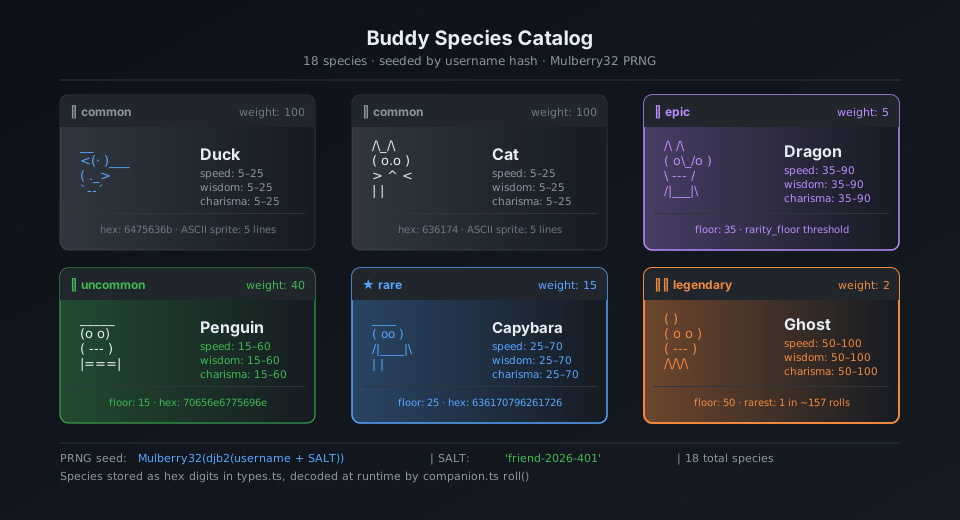
Companion sits next to the input box and sometimes a speech bubble appears. The entire UI is rendered using ASCII art via Ink (React terminal):
╭─────────────────────────────────╮
│ coding this is fun actually :3 │
╰─────────────────────────────────╯
              │
    __
  <(· )___    ← companion (duck, frame 0)
   (  ._>
    `--´
───────────────────────────────────
  > |                              ← input cursor
Ba frame idle animation (tick mỗi 500ms):
Frame 0 (rest):    Frame 1 (fidget):   Frame 2 (move):
    __                 __                  __
  <(· )___           <(· )___            <(· )___
   (  ._>             (  ._>              (  .__>
    `--´               `--´~              `--´
3.2. 18 species with their own sprites
mindmap
  root((18 Species))
    Birds
      duck
      goose
      owl
      penguin
    Fantasy
      dragon
      ghost
      blob
      chonk
    Animals
      cat
      rabbit
      turtle
      snail
      capybara
      axolotl
    Objects
      robot
      cactus
      mushroom
      octopus
Each species has a sprite set of 5 lines × 12 characters × 3 frames. Goose example:
Frame 0: Frame 1: Frame 2:
     ({E}> ({E}> ({E}>>
     ||               ||               ||
   _(__)_ _(__)_ _(__)_
    ^^^^ ^^^^ ^^^^
({E} is a placeholder for eyes --- replaced by eye type character when rendering)
3.3. Pipeline birth companion --- Detailed analysis
This is the most important technical part. Each user has a permanent companion, identified entirely by their userId:
flowchart TD
    A["userId (lấy từ Claude account)"] -->|"+ SALT 'friend-2026-401'"| B["key string"]
    B -->|"FNV-1a hash\n(fallback: Bun.hash)"| C["32-bit integer seed"]
    C -->|"Mulberry32 PRNG\ninitialize"| D["rng() function\n→ [0, 1) deterministic"]

    D -->|"rollRarity(rng)"| E{"Rarity Roll\n(weighted)"}
    E -->|"weighted table"| F["Rarity\ncommon/uncommon/\nrare/epic/legendary"]

    D -->|"pick(rng, SPECIES)"| G["Species\n(18 loài)"]
    D -->|"pick(rng, EYES)"| H["Eye type\n·✦×◉@°"]
    D -->|"if rarity != common"| I["Hat type"]
    D -->|"rng() < 0.01"| J{"Shiny?\n1% chance"}
    D -->|"rollStats(rng, rarity)"| K["Stats RPG\npeak/dump/normal"]
    D -->|"Math.floor(rng() * 1e9)"| L["inspirationSeed\n(cho lời thoại)"]

    F --> M["CompanionBones"]
    G --> M
    H --> M
    I --> M
    J --> M
    K --> M
    L --> M

    M -->|"getGlobalConfig()\n.companion?"| N{Đã hatched?}
    N -->|"Chưa"| O["/buddy → Hatch companion\nlưu vào config"]
    N -->|"Rồi"| P["Load companion\ntừ global config"]

    style J fill:#ffe8cc
    style O fill:#e8ffe8
3.4. Mulberry32 PRNG --- Why choose it?
function mulberry32(seed: number): () => number {
  let a = seed >>> 0
  return function () {
    a |= 0
    a = (a + 0x6d2b79f5) | 0          // additive step
    let t = Math.imul(a ^ (a >>> 15), 1 | a)
    t = (t + Math.imul(t ^ (t >>> 7), 61 | t)) ^ t
    return ((t ^ (t >>> 14)) >>> 0) / 4294967296
  }
}
Why Mulberry32 instead Math.random()?
Math.random() | Mulberry32 | |
|---|---|---|
| Seed | ❌ Impossible | ✅ Yes |
| Deterministic | ❌ | ✅ Same seed → same result |
| Size | built-in | ~10 lines of code |
| Speed | fast | equivalent fast |
| Use cases | general random | seeded roll |
With Math.random(), every time you restart Claude Code you will get a different companion. With Mulberry32 + userId seed, the companion is yours forever --- like an avatar.
3.5. Rarity System --- Probability decoding
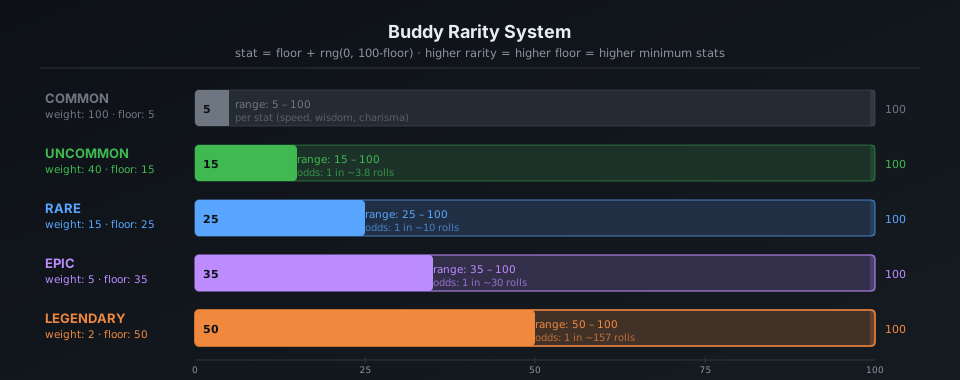
The source code does not declare RARITY_WEIGHTS directly, but from floor values and rollRarity logic, we can infer the distribution:
pie title Phân phối Rarity (ước tính từ code)
    "Common" : 50
    "Uncommon" : 30
    "Rare" : 12
    "Epic" : 6
    "Legendary" : 2
Stats floor by ratio:
common ░░░░░░░░░░ floor: 5 (stats range: 5-75)
uncommon ░░░░░░░░░░░░░░░ floor: 15 (stats range: 15-85)
rare ░░░░░░░░░░░░░░░░░░░░ floor: 25 (stats range: 25-95)
epic ░░░░░░░░░░░░░░░░░░░░░░░░░ floor: 35 (stats range: 35-100)
legendary ░░░░░░░░░░░░░░░░░░░░░░░░░░░░░░ floor: 50 (stats range: 50-100)
Legendary peak stat can be reached min(100, 50 + 50 + rand*30) = 100 --- cap out!
3.6. Speech bubble and interactive system
How speech bubble render (CompanionSprite.tsx):

  ╭──────────────────────────────────╮
  │ Wrap content at 30 chars/line. │
  │ Italic text, dimColor when fading │
  ╰──────────────────────────────────╯
               ↑ tail: "top" or "bottom"

Bubble lifecycle:
  ┌─────────────┐ ┌────────────────────┐ ┌──────────────┐
  │ addNotif │───▶│ BUBBLE_SHOW = 20 │───▶│ FADE_WINDOW │
  │ (trigger) │ │ ticks (~10 seconds) │ │ = 6 ticks │
  └─────────────┘ └────────────────────┘ └──────┬───────┘
                                                       │ dimColor=true
                                                       ▼
                                                 ┌──────────────┐
                                                 │ hidden bubble │
                                                 └──────────────┘
When the user calls the companion by name in chat, LLM is injected with a system prompt:
`When the user addresses ${name} directly (by name),
its bubble will answer. Your job in that moment is to
stay out of the way: respond in ONE line or less.
Don't explain that you're not ${name} --- they know.`
Clever design: Claude (main LLM) does not pretend to be a companion --- he only "silences" when the user talks to the companion. Companion responds via its own speech bubble, driven by another prompt context.
3.7. /buddy pet --- 5 floating heart animation frames
const PET_HEARTS = [
  `   ♥    ♥   `,   // frame 0: 2 tim xa nhau
  `  ♥  ♥   ♥  `,   // frame 1: tim dày hơn
  ` ♥   ♥  ♥   `,   // frame 2: tim trải rộng
  `♥  ♥      ♥ `,   // frame 3: tim bay ra hai bên
  '·    ·   ·  ',   // frame 4: fade thành dấu chấm
];
// PET_BURST_MS = 2500ms tổng → ~500ms/frame
Visualized:
t=0ms: t=500ms: t=1000ms: t=1500ms: t=2000ms:
  ♥ ♥ ♥ ♥ ♥ ♥ ♥ ♥ ♥ ♥ ♥ · · ·
  companion sprite below
3.8. Teaser window and rollout logic
// Local date, not UTC --- 24h rolling wave across timezones.
// Teaser window: April 1-7, 2026 only. Command stays live forever after.
export function isBuddyTeaserWindow(): boolean {
  if ("external" === 'ant') return true;  // Anthropic internal: luôn true
  const d = new Date();
  return d.getFullYear() === 2026 && d.getMonth() === 3 && d.getDate() <= 7;
}
Here's a very interesting design decision about rollout:
timeline
    title Buddy Rollout Timeline
    Apr 1 : isBuddyTeaserWindow() = true
           : Rainbow /buddy teaser xuất hiện lúc boot
           : 15000ms xong rồi tắt
    Apr 1-7 : User thấy teaser mỗi lần mở Claude Code
             : /buddy command hoạt động
    Apr 7 : Teaser window đóng
           : Nhưng /buddy vẫn live (isBuddyLive() = true mãi mãi)
    Mãi mãi : Companion feature live forever
Reason for using local time instead of UTC: if using UTC, all users globally receive the teaser at the same UTC time → spike the server load. Use local time → load evenly over 24 hours continuously.
4. Hidden feature #2: UltraPlan --- Multi-agent Planning Engine
4.1. What is UltraPlan?
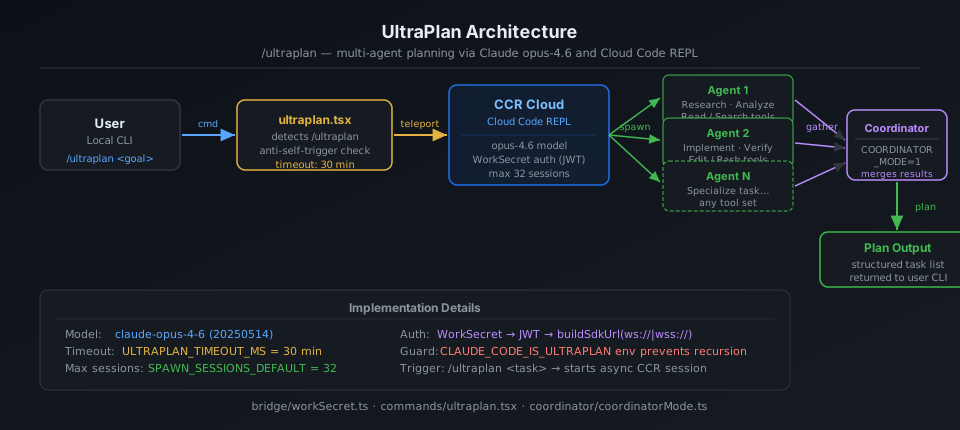
/ultraplan is Claude Code's strongest slash command, but the most hidden. Instead of Claude Code planning itself, it teleports the task to the cloud, where multiple agents run in parallel for up to 30 minutes to create a comprehensive plan.
sequenceDiagram
    participant U as User
    participant CC as Claude Code (local)
    participant CCR as Cloud Code REPL (CCR)
    participant A1 as Agent 1
    participant A2 as Agent 2
    participant AN as Agent N

    U->>CC: /ultraplan "refactor auth system"
    CC->>CC: checkRemoteAgentEligibility()
    CC->>CC: Lấy seed_plan + blurb từ context
    CC->>CCR: teleportToRemote() via WebSocket
    Note over CCR: session_ingress_token auth
    CCR->>A1: Spawn agent (opus-4.6)
    CCR->>A2: Spawn agent (opus-4.6)
    CCR->>AN: Spawn agent N
    par Parallel exploration
        A1->>A1: Explore approach A
        A2->>A2: Explore approach B
        AN->>AN: Explore approach N
    end
    Note over CCR: Coordinator tổng hợp
    CCR-->>CC: pollForApprovedExitPlanMode()
    Note right of CC: Timeout: 30 phút
    CC-->>U: Kế hoạch hoàn chỉnh
4.2. CCR Session architecture
flowchart TD
    subgraph "Local Machine"
        CLI["Claude Code CLI\nultraplan.tsx"]
        RC["Remote Control\n/bridge/bridgeMain.ts"]
    end

    subgraph "CCR Server (Cloud)"
        INGRESS["session-ingress\nWebSocket endpoint"]
        COORD["Coordinator\ncoordinatorMode.ts"]
        W1["Worker Agent 1\n(opus-4.6)"]
        W2["Worker Agent 2\n(opus-4.6)"]
        WN["Worker Agent N"]
        TEAM["TeamCreate/TeamDelete Tools\n(multi-agent coordination)"]
    end

    CLI -->|"teleportToRemote()\nwork_secret (base64url JWT)"| INGRESS
    INGRESS --> COORD
    COORD -->|"TEAM_CREATE_TOOL"| W1
    COORD -->|"TEAM_CREATE_TOOL"| W2
    COORD -->|"TEAM_CREATE_TOOL"| WN
    W1 -->|"SEND_MESSAGE_TOOL"| COORD
    W2 -->|"SEND_MESSAGE_TOOL"| COORD
    WN -->|"SEND_MESSAGE_TOOL"| COORD
    COORD -->|"EXIT_PLAN_MODE"| RC
    RC -->|"pollForApprovedExitPlanMode()"| CLI

    style COORD fill:#fff3e0
    style CLI fill:#e8f4f8
4.3. WorkSecret --- Session authentication mechanism
type WorkSecret = {
  version: number
  session_ingress_token: string  // JWT cho WebSocket auth
  api_base_url: string           // CCR server URL
  sources: Array<{
    type: string
    git_info?: { type: string; repo: string; ref?: string; token?: string }
  }>
  auth: Array<{ type: string; token: string }>
  claude_code_args?: Record<string, string> | null
  mcp_config?: unknown | null
  environment_variables?: Record<string, string> | null
  use_code_sessions?: boolean   // CCR v2 selector
}
WorkSecret is base64url-encoded and passed through --work-secret flag when spawning child process. Flow:
1. /ultraplan trigger
2. CLI retrieves work_secret from bridge API
3. Decode base64url → JSON → validate version === 1
4. buildSdkUrl(api_base_url, sessionId)
   → wss://host/v1/session_ingress/ws/{id} (production)
   → ws://host/v2/session_ingress/ws/{id} (localhost)
5. Connect WebSocket with session_ingress_token
4.4. Anti-self-trigger technique
// Phrasing deliberately avoids the feature name because
// the remote CCR CLI runs keyword detection on raw input before
// any tag stripping, and a bare "ultraplan" in the prompt would
// self-trigger as /ultraplan, which is filtered out of headless mode
// as "Unknown skill"

// prompt.txt là <system-reminder> để CCR browser ẩn scaffolding
// nhưng model vẫn thấy full text
const _rawPrompt = require('../utils/ultraplan/prompt.txt');
Problem: CCR runs a different Claude Code CLI (headless). If the prompt contains the word "ultraplan", the CLI will trigger /ultraplan on itself → infinite loop. Solution: wrap prompt in <system-reminder> tags and phrasing avoid keywords.
User → /ultraplan "build auth"
         │
         ▼
CCR (headless CC) receives prompt:
  <system-reminder>
    Create a detailed plan for: build auth
    [Do not use the word "ultraplan" here]
  </system-reminder>
         │
         ▼ CCR browser strips <system-reminder> from UI
  Model sees: "Create a detailed plan..."
  CCR filter: sees "ultraplan" → filtered reason "Unknown skill"? Are not!
              because the word "ultraplan" is NOT in the actual prompt
5. Bridge System --- Remote Code Sessions
5.1. Overview
Bridge is a system that allows Claude Code to receive tasks from multiple sessions at the same time from the claude.ai web interface. A developer can assign multiple repo tasks to Claude Code running on the local machine.
flowchart LR
    subgraph "claude.ai (Web)"
        DASH["Dashboard"]
        SESS["Session Queue"]
    end

    subgraph "Local Machine"
        BRIDGE["Bridge Loop\nbridgeMain.ts"]
        SPAWNER["Session Spawner\nsessionRunner.ts"]
        subgraph "Sessions"
            S1["Session 1\n(git worktree A)"]
            S2["Session 2\n(git worktree B)"]
            S3["Session 3\n(same-dir)"]
        end
    end

    DASH -->|"assign task"| SESS
    SESS -->|"work poll\n(HTTP long-poll)"| BRIDGE
    BRIDGE -->|"spawn child\nprocess"| SPAWNER
    SPAWNER -->|"SpawnMode: worktree"| S1
    SPAWNER -->|"SpawnMode: worktree"| S2
    SPAWNER -->|"SpawnMode: same-dir"| S3
    S1 -->|"tool activity\nevents"| BRIDGE
    S2 -->|"tool activity\nevents"| BRIDGE
    BRIDGE -->|"session done"| SESS
5.2. SpawnMode --- 3 ways to manage working directory
type SpawnMode = 'single-session' | 'worktree' | 'same-dir'
| SpawnMode | Description | Use when |
|---|---|---|
single-session | 1 session in cwd, the bridge stops when the session is finished | Simple remote control |
worktree | Each session has a separate (isolated) git worktree | Safe parallel multi-task |
same-dir | All common sessions cwd | May conflict, use with caution |
5.3. Backoff & Reconnect logic
const DEFAULT_BACKOFF: BackoffConfig = {
  connInitialMs: 2_000,      // thử lại lần đầu sau 2s
  connCapMs: 120_000,        // tối đa wait 2 phút giữa các lần retry
  connGiveUpMs: 600_000,     // bỏ cuộc sau 10 phút
  generalInitialMs: 500,
  generalCapMs: 30_000,
  generalGiveUpMs: 600_000,  // 10 phút
}
More intelligent sleep detection:
function pollSleepDetectionThresholdMs(backoff: BackoffConfig): number {
  return backoff.connCapMs * 2  // = 240_000ms = 4 phút
}
If the gap between 2 polls exceeds 4 minutes → the system assumes the machine has gone to sleep. When wake up, error budget is reset instead of accumulating.
5.4. Session ID compatibility layer
// CCR v2 compat layer gây ra mismatch session IDs:
// - công việc poll trả về "session_xxxx" (v1 format)
// - worker thực tế dùng "cse_xxxx" (v2 format)
// Cả hai cùng UUID body, chỉ khác prefix

export function sameSessionId(a: string, b: string): boolean {
  if (a === b) return true
  const aBody = a.slice(a.lastIndexOf('_') + 1)
  const bBody = b.slice(b.lastIndexOf('_') + 1)
  return aBody.length >= 4 && aBody === bBody
}
For example: session_abc123 and cse_staging_abc123 considered same session.
6. Task System --- Multi-agent architecture
6.1. All Task types
classDiagram
    class TaskState {
        <<union>>
    }
    class LocalShellTask {
        +status: running|done
        +command: string
    }
    class LocalAgentTask {
        +status: running|pending|done
        +isBackgrounded: boolean
        +agentId: string
    }
    class RemoteAgentTask {
        +status: running|pending|done
        +sessionId: string
        +bridgeConnection
    }
    class InProcessTeammateTask {
        +status: running|done
        +teamId: string
    }
    class LocalWorkflowTask {
        +nodes: WorkflowNode[]
        +status
    }
    class DreamTask {
        +status
        +dreamContent
    }
    class MonitorMcpTask {
        +mcpServer: string
        +status
    }

    TaskState <|-- LocalShellTask
    TaskState <|-- LocalAgentTask
    TaskState <|-- RemoteAgentTask
    TaskState <|-- InProcessTeammateTask
    TaskState <|-- LocalWorkflowTask
    TaskState <|-- DreamTask
    TaskState <|-- MonitorMcpTask
6.2. Coordinator Mode --- Multi-agent coordination
export function isCoordinatorMode(): boolean {
  if (feature('COORDINATOR_MODE')) {
    return isEnvTruthy(process.env.CLAUDE_CODE_COORDINATOR_MODE)
  }
  return false
}
Coordinator mode is a special mode where a Claude Code instance plays the role of orchestrator --- it is used TeamCreateTool to generate worker agents, SendMessageTool to communicate with them, and TeamDeleteTool to cleanup.
Coordinator (CLAUDE_CODE_COORDINATOR_MODE=1)
    │
    ├─ TEAM_CREATE_TOOL → spawn Worker 1
    ├─ TEAM_CREATE_TOOL → spawn Worker 2
    │
    ├─ SEND_MESSAGE_TOOL → "Research approach A"
    ├─ SEND_MESSAGE_TOOL → "Research approach B"
    │
    │ [Workers operate in parallel]
    │
    ├─ receive results from Worker 1
    ├─ receive results from Worker 2
    │
    ├─ synthesis
    ├─ TEAM_DELETE_TOOL → cleanup Worker 1
    ├─ TEAM_DELETE_TOOL → cleanup Worker 2
    └─ return final plan
7. Anti-Canary Obfuscation --- Internal codename protection technique
7.1. Problem
Anthropic has a CI/CD pipeline that runs canary detection: scan output bundle to detect if internal model codename (like tengu, opus46, etc.) leaked into the public artifact.
Problem: A species name in the Buddy system matches an internal model codename. If you leave the string literal, the scanner will report an error every time you build.
7.2. Solution
// buddy/types.ts
const c = String.fromCharCode

// Mỗi species được encode bằng hex charcode
export const duck     = c(0x64,0x75,0x63,0x6b)             as 'duck'
export const goose    = c(0x67,0x6f,0x6f,0x73,0x65)         as 'goose'
export const octopus  = c(0x6f,0x63,0x74,0x6f,0x70,0x75,0x73) as 'octopus'
// ... 18 species đều bị encode tương tự
Why encode ALL 18 species, not just the conflicted one?
// Comment giải thích:
// "All species encoded uniformly; `as` casts are type-position only (erased pre-bundle)."
If we only encode one species, we immediately know which species is the internal codename → reverse engineer the model codename. Encode all the same → can't tell which one is in conflict.
7.3. Mechanism diagram
flowchart LR
    subgraph "Source TypeScript"
        S1["const duck = 'duck'  ← String literal"]
        S2["const X = 'codename' ← Model codename!!"]
    end

    subgraph "Canary Scanner"
        GREP["grep build output\nfor excluded-strings.txt"]
        ALERT["🚨 Alert: codename leaked!"]
    end

    subgraph "Bundle Output"
        B1["const duck = 'duck'"]
        B2["const X = 'codename'  ← FOUND!"]
    end

    S1 --> B1
    S2 --> B2
    B2 -->|"grep matches"| GREP
    GREP --> ALERT

    style ALERT fill:#ffcccc
    style S2 fill:#ffeeee
    style B2 fill:#ffeeee
flowchart LR
    subgraph "Source TypeScript (fixed)"
        F1["const c = String.fromCharCode\nconst duck = c(0x64,0x75,...)\nconst X = c(0x63,0x6f,...)"]
    end

    subgraph "Canary Scanner"
        GREP["grep build output\nfor excluded-strings.txt"]
        OK["✅ No literal found"]
    end

    subgraph "Bundle Output"
        B1["const duck = c(0x64,...)  ← No literal!"]
        B2["SYNTHETIC_OUTPUT = 'SynOut'"]
    end

    F1 --> B1
    B1 -->|"grep: string không tìm thấy\nvì là runtime-constructed"| GREP
    GREP --> OK

    style OK fill:#ccffcc
The Canary check still works for the actual codename (which is still a string literal elsewhere), while the species animal is encoded to avoid false positives.
8. Full list of hidden slash commands
commands/
├── ultraplan.tsx 🚀 Multi-agent planning (30 min cloud)
├── buddy/ 🐾 Virtual pet system
├── stickers/ 🎨 StickerMule redirect
├── teleport/ 📡 Teleport session to remote
├── voice/ 🎤 Voice input
├── thinkback/ 🔄 Replay thinking steps
├── thinkback-play/ ▶️ Play back thinking animation
├── bughunter/ 🐛 Auto bug hunting agent
├── ctx_viz/ 📊 Context window visualization
├── heapdump/ 🔍 V8 heap dump (debug memory)
├── perf-issue/ ⚡ Report perf issue with profile
├── sandbox-toggle/ 🔒 Toggle sandbox mode
├── rewind/ ⏪ Rewind conversation to checkpoint
├── dream/ 💭 (DreamTask system)
├── share/ 🔗 Share session
├── insights/ 📈 Usage insights
├── brief/ 📝 Summarize conversation
├── compact/ 🗜️ Compact context window
├── ultraplan.tsx 📋 UltraPlan
├── advisor/ 🤖 Model advisor setting
├── desktop/ 🖥️ Desktop integration
├── mobile/ 📱 Mobile companion
├── good-claude/ 👍 Mark good response
├── ant-trace/ 🔬 Internal Anthropic tracing
└── ...
Special: /stickers
export async function call(): Promise<LocalCommandResult> {
  const url = 'https://www.stickermule.com/claudecode'
  await openBrowser(url)
  return { type: 'text', value: 'Opening sticker page in browser...' }
}
A gentle marketing Easter Egg. Type /stickers → browser opens Claude Code sticker shop.
9. Feature Flag System --- GrowthBook + Statsig
9.1. Two parallel feature flags systems
flowchart TD
    subgraph "Feature Flag Sources"
        GB["GrowthBook\n(primary - A/B testing\n+ gradual rollout)"]
        ST["Statsig\n(secondary - gates)"]
        ENV["Env override\nHAS_GB_ENV_OVERRIDE"]
    end

    subgraph "Gate Types"
        CACHED["checkGate_CACHED_OR_BLOCKING\n(fast path: disk cache\nslow path: server fetch)"]
        STALE["checkStatsigFeatureGate\n_CACHED_MAY_BE_STALE\n(cache only)"]
    end

    subgraph "Gated Features"
        BUDDY["BUDDY feature\nisBuddyLive()"]
        MULTI["tengu_ccr_bridge\n_multi_session\n(32 parallel sessions)"]
        ULTRA["tengu_ultraplan_model\nopus46 default"]
        SCRATCH["tengu_scratch\nscratchpad mode"]
        COORD["COORDINATOR_MODE"]
    end

    GB --> CACHED
    ST --> STALE
    ENV --> GB
    CACHED --> BUDDY
    CACHED --> MULTI
    CACHED --> ULTRA
    STALE --> SCRATCH
    ENV --> COORD
9.2. Rollout strategy for multi-session Bridge
/**
 * GrowthBook gate cho multi-session spawn modes.
 * Rollout staged via targeting rules: ants first, then gradual external.
 * Uses BLOCKING check (không dùng stale cache) để không từ chối nhầm.
 */
async function isMultiSessionSpawnEnabled(): Promise<boolean> {
  return checkGate_CACHED_OR_BLOCKING('tengu_ccr_bridge_multi_session')
}

const SPAWN_SESSIONS_DEFAULT = 32  // max 32 sessions song song
Anthropic rolls out multi-session to internal users ("ants") first, then gradually rolls out to external users. This is best practice: Anthropic himself was the first guinea pig.
10. Implementation details worth learning
10.1. safeFilenameId --- Path traversal prevention
export function safeFilenameId(id: string): string {
  // Sanitize session ID cho filename, ngăn path traversal (../, /)
  return id.replace(/[^a-zA-Z0-9_-]/g, '_')
}
Simple but true. Session IDs from the server are not trusted --- must be sanitized before being used as a file name.
10.2. PermissionRequest --- Per-invocation tool permission
// Control request từ child CLI khi cần permission cho tool cụ thể
type PermissionRequest = {
  type: 'control_request'
  request_id: string
  request: {
    subtype: 'can_use_tool'
    tool_name: string
    input: Record<string, unknown>  // Parameters của tool call
    tool_use_id: string
  }
}
Bridge forward permission request to the server (claude.ai UI) for the user to approve/deny each specific tool invocation, not the entire tool class. Granular permission model.
10.3. SessionActivity --- Real-time status display
const TOOL_VERBS: Record<string, string> = {
  Read: 'Reading',
  Write: 'Writing',
  Edit: 'Editing',
  MultiEdit: 'Editing',
  Bash: 'Running',
  Glob: 'Searching',
  Grep: 'Searching',
  WebFetch: 'Fetching',
  WebSearch: 'Searching',
  Task: 'Running task',
}
// STATUS_UPDATE_INTERVAL_MS = 1_000
Dashboard updates every 1 second with processing verbs: "Reading package.json", "Editing src/auth.ts" --- Small UX but worth learning.
11. Conclusion: Lessons learned
About product design
Buddy/Companion is an example of smart gamification: not a discrete mini-game, but a companion that integrates naturally into the workflow. Roll from userId → permanent companion → user has attachment. Rarity system → social sharing ("I have legendary capybara"). Speech bubble → companion feeling of "presence" without ruin focus.
Technically
3 techniques you should apply immediately:
-
Speculative I/O: Kick off async operations as soon as the app starts loading, before the results are needed. Claude Code saves 175ms/startup this way.
-
Seeded PRNG for deterministic randomness: When you want random but reproducible (avatar, companion, test data), Mulberry32 + userId seed is the correct pattern.
-
Canary detection in CI/CD: Scanning build artifacts for leaked secrets/codenames is an effective and cheap layer of protection.
About security
Guidelines: Code in the npm package is public. No matter how minified or obfuscated, it can still be reverse engineered.
Anthropic knows this---that's why:
- Secrets are in the server-side config (GrowthBook), not in the bundle
- Session tokens are fetched dynamically, no hard-code
- Canary detection CI pipeline
If you are shipping an npm package with sensitive business logic: assume that the adversary can read your code and design the appropriate security model.
The article is based on direct analysis of source code extracted from npm package @anthropic-ai/claude-code v2.1.89 (released March 31, 2026). All code snippets are from public artifacts on npm registry.