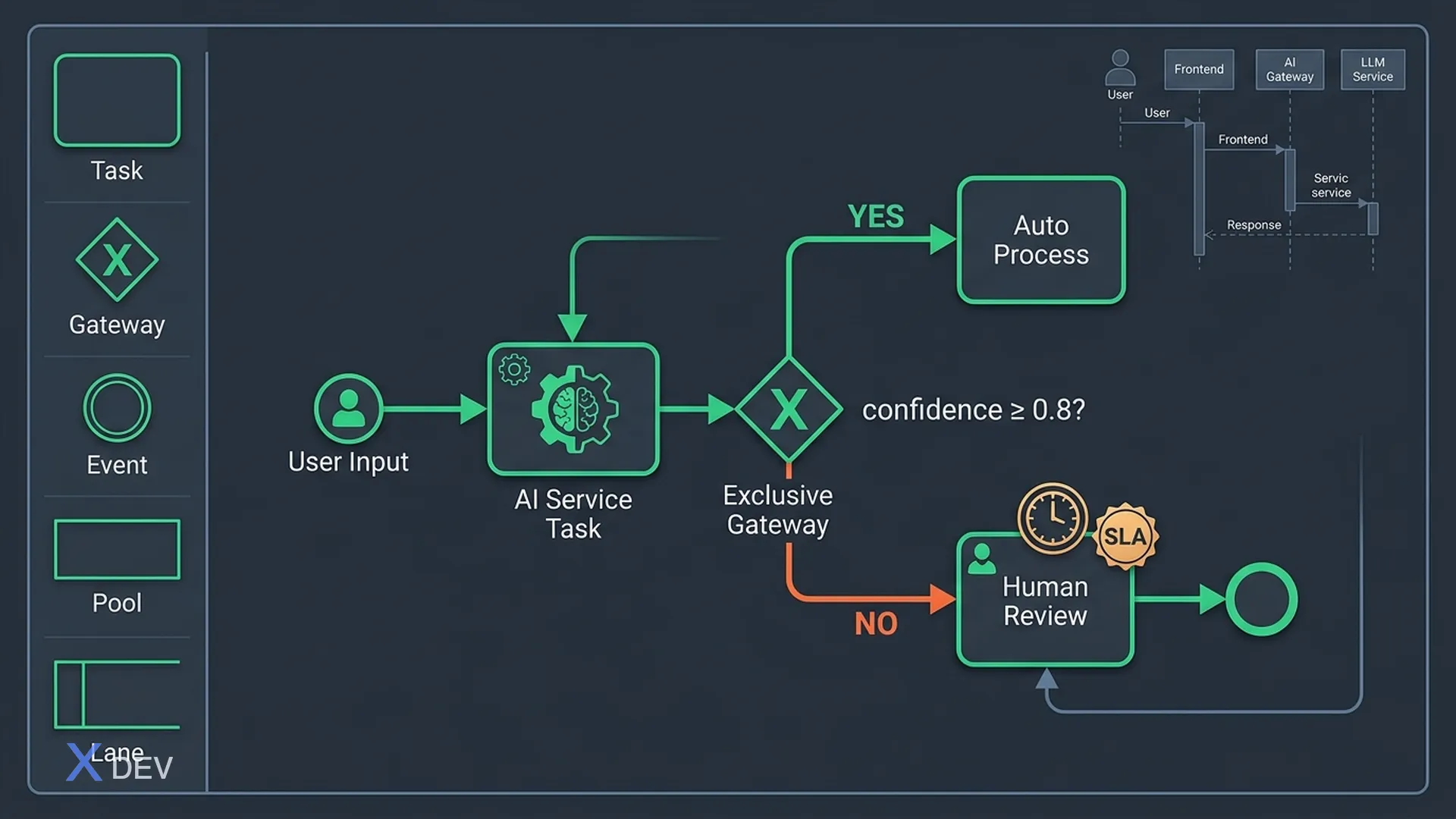
When you diagram an AI-assisted feature, you'll encounter questions that traditional UML/BPMN don't answer: Is AI an actor or service? Where does the flow go when AI isn't confident? Who handles when AI gets it wrong?
This guide addresses exactly those issues.
1. Why Traditional BPMN Falls Short for AI
BPMN 2.0 has the basics: Pool, Lane, Task, Gateway, Event. But AI introduces 3 elements that old diagrams can't capture:
- Probabilistic output — AI doesn't return true/false but returns confidence score
- Fallback / escalation — When AI isn't confident enough, there's an alternative path
- Human-in-the-loop — Humans intervene at specific points, not the entire flow
2. Extended Notation for AI in BPMN
No need to create new symbols — use standard BPMN with annotations:
| Element | Used For | Notes |
|---|---|---|
| Service Task (gear icon) | AI service call | Label: "AI: [model/service name]" |
| Exclusive Gateway (X) | Branch by confidence | Label: "confidence ≥ threshold?" |
| Intermediate Boundary Event | AI timeout / error | Type: Error or Timer |
| User Task | Human review/override | Lane: Agent / Reviewer |
| Data Object | Confidence score, AI response | Annotate with threshold value |
| Text Annotation | Note threshold, SLA | Example: "threshold = 0.75" |
3. Pattern: AI with Confidence Threshold
This is the most common pattern when BA designs AI features:
[User Input]
    ↓
[AI Service Task]
    ↓
{Confidence ≥ 0.8?}
    ├── Yes → [Auto Process] → [Notify User] → END
    └── No  → [Queue to Human Review]
                   ↓
              [Agent Reviews]
                   ↓
              {Agent Decision}
                   ├── Approve → [Process] → [Notify User] → END
                   └── Reject  → [Notify Rejection] → END
Key points when diagramming:
- Threshold must be explicit (0.8 not "high confidence")
- Human review lane must be clear — who? (Agent? Supervisor? Domain expert?)
- SLA for human task must be visible (e.g., "max 4 business hours")
4. Pattern: Human-in-the-Loop Escalation
When AI fails or encounters out-of-distribution cases:
[User Request]
    ↓
[AI Classifier]
    ↓
{Case type?}
    ├── Standard → [AI Auto-Handle]
    ├── Complex  → [AI Draft + Human Review]
    └── Unknown  → [Escalate to Senior Agent]
                         ↓
                   [Agent Handles]
                         ↓
                   [Log to Training Data]  ← Important feedback loop!
BA must capture:
- What defines "Standard / Complex / Unknown" specifically
- Who is "Senior Agent"? Any SLA?
- Training data log: who approves before adding to feedback loop?
5. Use Case Diagram for AI Features
Use Case Diagram clarifies what each actor does with the AI system. Actors:
- End User: Primary interaction
- AI System: Non-human actor
- Human Agent: Handles escalations
- Admin / Data Steward: Configures thresholds, reviews training data
- External System: APIs, database, knowledge base
Example for AI chatbot customer service:
[End User]     ──→ Submit question
[AI System]    ──→ Process question
               ──→ Provide answer
               ──→ Escalate to agent
[Human Agent]  ──→ Receive escalation
               ──→ Override AI response
[Admin]        ──→ Configure confidence threshold
               ──→ Review performance metrics
               ──→ Approve training data
6. Sequence Diagram for AI Interaction
Sequence diagrams show call order between systems — very useful with engineering:
User          Frontend     AI Gateway    LLM Service   Database
 |                |              |              |           |
 |—— submit ———→  |              |              |           |
 |                |—— request ——→|              |           |
 |                |              |—— prompt ——→ |           |
 |                |              |              |—— RAG ——→ |
 |                |              |              |←— docs ——  |
 |                |              |←—response——  |           |
 |                |              | (score:0.85) |           |
 |                |←—— result ——  |              |           |
 |←— display ——   |              |              |           |
Points BA must watch when reviewing:
- Timeout at which step? How handled when LLM is slow?
- RAG retrieval fails → AI has fallback?
- Response goes through content filter?
- Where is audit log written?
7. Checklist for Diagramming AI-Assisted Flows
BEFORE DRAWING
☐ Define: Is AI automatic or recommend-only?
☐ Define confidence threshold (specific number)
☐ Define escalation path and owner

WHILE DRAWING
☐ AI service task clearly labeled with model/service
☐ Confidence gateway has threshold annotation
☐ Human-in-the-loop has separate lane with SLA
☐ Error path (AI timeout/fail) drawn explicitly, not omitted
☐ Audit/log step drawn (not implicit understanding)

AFTER DRAWING
☐ Dev confirms sequence diagram reflects architecture accurately
☐ Business confirms happy path follows business logic
☐ QA confirms can test each branch
☐ Compliance confirms audit logging is sufficient
8. Recommended Tools
| Tool | Purpose | Notes |
|---|---|---|
| Lucidchart | Complete BPMN + UML | Has AI workflow templates |
| draw.io / diagrams.net | Free, offline, all diagrams | Export XML, Confluence integration |
| Miro | Workshop with stakeholders | Easy real-time collaboration |
| PlantUML | Sequence diagrams as code | Good for version control |
| Figma | Wireframe + user flow | Works well with UI design |
Summary
BA doesn't need to understand AI algorithms, but must diagram AI flows accurately enough so that:
- Engineering builds correctly
- QA tests all branches (including AI failure paths)
- Business understands when AI handles automatically vs. when human intervenes