1. What is Keycloak?
Keycloak is an open source Identity and Access Management (IAM) solution, originally developed by Red Hat and now a CNCF Incubation (Cloud Native Computing Foundation) project. Keycloak provides Single Sign-On (SSO), identity management, and application security for web systems and RESTful web services.
Keycloak's goal is to make security simple — security features that developers would typically have to write themselves are available out-of-the-box and customizable to organizational requirements.
Development history
2014: Keycloak was born as a JBoss/Red Hat project
2018: Keycloak 4.0 — supports Authorization Services, UMA 2.0
2020: Keycloak.X (Quarkus-based) preview
2022: Keycloak 20 — WildFly distribution removed, officially switched to Quarkus
2024: Keycloak becomes CNCF Incubation project
2026: Keycloak 26.5.x — current version with Workflows, Passkeys, MCP support
2. Why do we need Identity and Access Management?
In modern enterprise systems, identity and access management becomes complicated when:
Multiple apps need shared authentication (SSO)
Requires integration with external Identity Providers (Google, Azure AD, LDAP)
Needs Multi-Factor Authentication (MFA) for high security
Complicated permission management (RBAC, ABAC, fine-grained permissions)
Compliant with security standards (OAuth 2.0, OIDC, SAML 2.0, FAPI 2.0)
Multi-tenancy cho SaaS applications
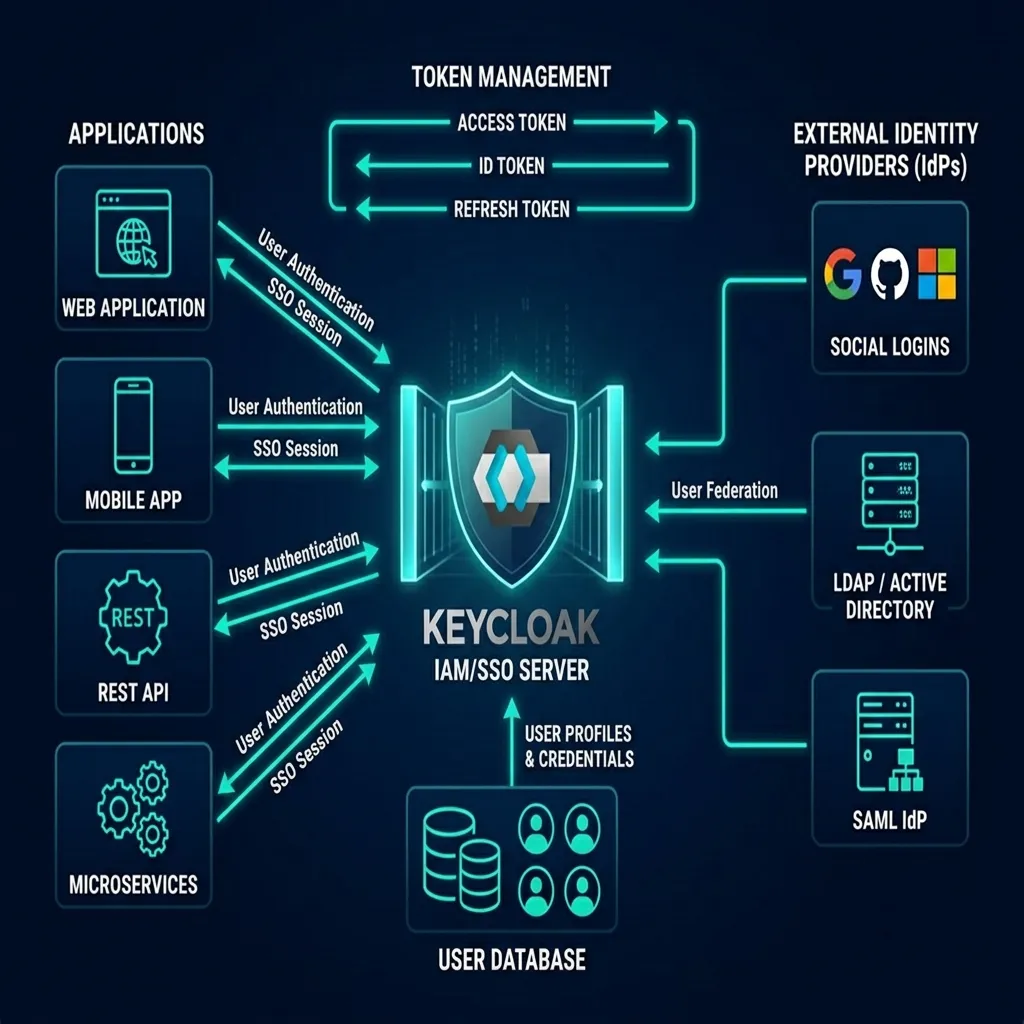
Keycloak IAM/SSO Overview: Apps → Keycloak → Identity Providers
3. Keycloak
Key FeaturesSingle Sign-On (SSO) and Single Sign-Out for browser applications
OpenID Connect and OAuth 2.0 support
SAML 2.0 support
Identity Brokering — authenticate via external OIDC or SAML Identity Providers
Social Login — sign in with Google, GitHub, Facebook, Apple, Microsoft
User Federation — synchronize users from LDAP and Active Directory
Kerberos bridge — automatically authenticates users logged into the Kerberos server
Admin Console — centralized management of users, roles, clients, configuration
Account Console — allows users to manage their own accounts
Theme support — customize login, account, admin, email interface
Two-factor Authentication — TOTP/HOTP, WebAuthn, Passkeys
Authorization Services — detailed authorization with policies and permissions
Organizations — multi-tenancy cho CIAM (B2B, B2B2C)
Workflows — administrative automation (IGA)
Token Mappers — customize claims in tokens
Events & Auditing — audit logging and event listeners
4. Core concepts
Realms
Realm manages a collection of users, credentials, roles and groups. Each user belongs to and is logged into a realm. Realms are isolated from each other — only users belonging to that realm can be managed and authenticated.
Clients
Clients are entities (applications, services) that require Keycloak to authenticate users. Clients can be web apps, mobile apps, REST APIs, or services that need tokens to call other services.
Users
Users are entities that can log into the system. Users have attributes (email, username, phone, etc.), belong to groups and are assigned roles.
Roles
Roles identifies the type or category of the user (Admin, User, Manager). The application assigns access rights based on roles instead of individual users.
Groups
Groups manages user groups. Groups have attributes and role mappings. Users inherit attributes and role mappings from group.
Sessions
When a user logs in, a session is created to manage the login session, including information about the login time and applications that participated in SSO.
5. Keycloak Architecture on Quarkus
From version 20+, Keycloak runs entirely on the Quarkus framework, providing:
Ultra-fast startup time — suitable for containers and serverless
Small memory footprint — optimized for cloud-native deployments
Build-time optimization — precompiled configuration
Native image support — ability to run GraalVM native
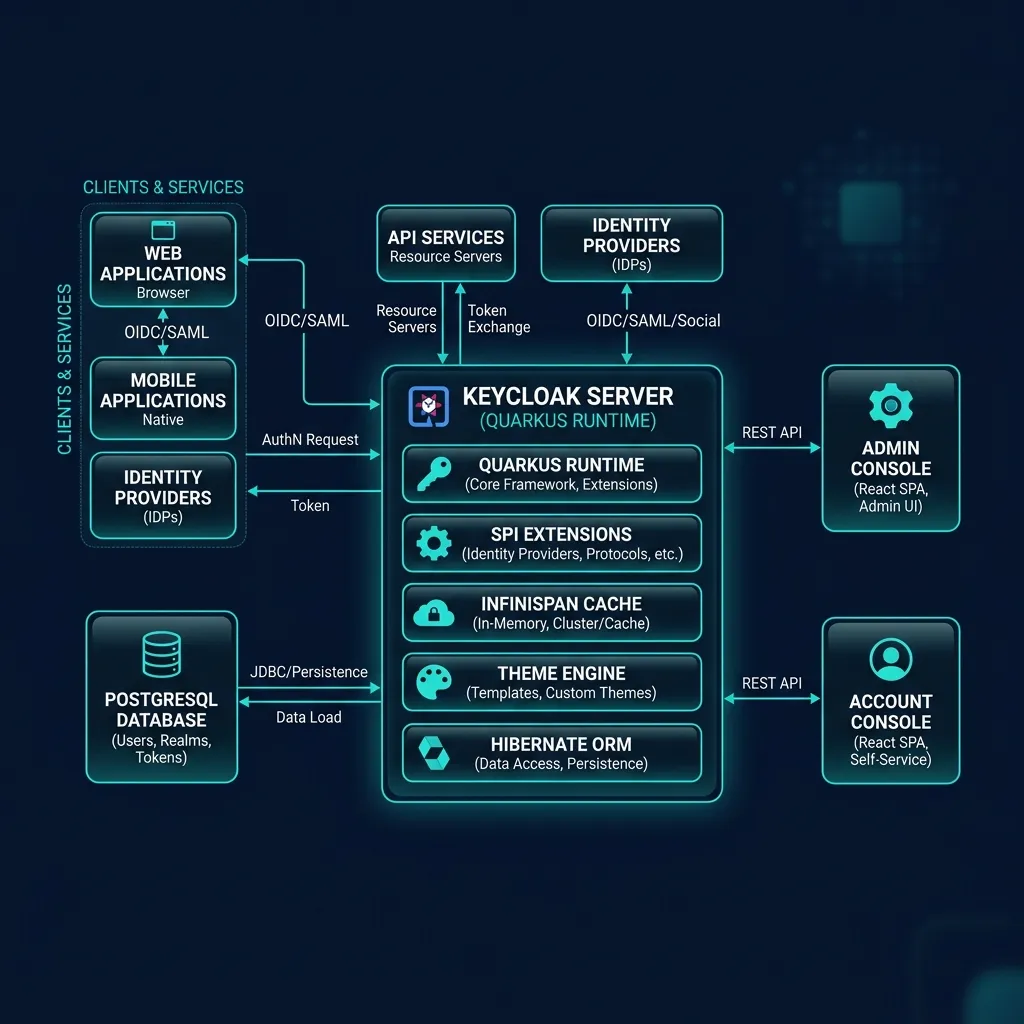
Keycloak Architecture: Quarkus Runtime, Infinispan Cache, Hibernate ORM, Admin/Account Console
| Component | Description |
|---|---|
| Quarkus Runtime | Application server (replaces WildFly) |
| Infinispan | Distributed cache cho sessions, tokens |
| Hibernate ORM | ORM layer cho database persistence |
| Database | PostgreSQL (recommended), MySQL, MariaDB, Oracle, MSSQL |
| Admin Console | React-based SPA (PatternFly 5) |
| Account Console | React-based SPA cho user self-service |
6. Compare Keycloak vs Auth0 vs Okta vs Azure AD
| Criteria | Keycloak | Auth0 | Okta | Azure AD |
|---|---|---|---|---|
| License | Apache 2.0 (FOSS) | Commercial | Commercial | Commercial |
| Deployment | Self-hosted | Cloud SaaS | Cloud SaaS | Cloud SaaS |
| Cost | Free (self-operated) | From $35/month | From $2/user/month | From $6/user/month |
| Customization | Very high (open source) | Average | Average | Low |
| OIDC/OAuth2 | Full | Full | Full | Full |
| SAML | Full | Yes | Full | Full |
| LDAP/AD | Full | Enterprise | Full | Native |
| MFA | TOTP, WebAuthn, Passkeys | Full | Full | Full |
7. Actual use cases
Enterprise SSO: Single sign-on for all internal applications
Customer IAM (CIAM): Managing customer identities with Organizations
API Security: Secure REST APIs with OAuth 2.0 tokens
Microservices Authentication: Service-to-service authentication with client credentials
Social Login: Allows users to log in with Google, Facebook, GitHub
LDAP/AD Federation: Integrate existing directory system
MFA for Compliance: Meets PCI-DSS, HIPAA, SOC requirements 2
8. Course overview
The course includes 25 lessons divided into 7 parts, covering all modules of Keycloak 26.x:
Part 1: Platform (Realms, Users, Groups, Roles, Permissions)
Part 2: SSO Protocols (OIDC, SAML, Client Scopes, Tokens, DPoP)
Part 3: Authentication & MFA (Flows, OTP, WebAuthn, Passkeys, Identity Brokering)
Part 4: Federation & Authorization (LDAP/AD, Organizations, Authorization Services, Workflows)
Part 5: Security & Customization (Themes, Events, Hardening, Vault)
Part 6: Practical Integration (Spring Boot, React/Angular, Node.js, API Gateway)
Part 7: Production Operations (Deployment, HA, Kubernetes, Monitoring)