ConfigMaps and Secrets in Kubernetes__HTMLTAG_1___
In a production environment, the application needs to read the configuration from the external environment instead of hardcoding it into the container image. Kubernetes provides two specialized mechanisms: ConfigMap for common configuration data and Secret for sensitive data. This lesson dives into both, including at-rest encryption and integration with external secret management systems.
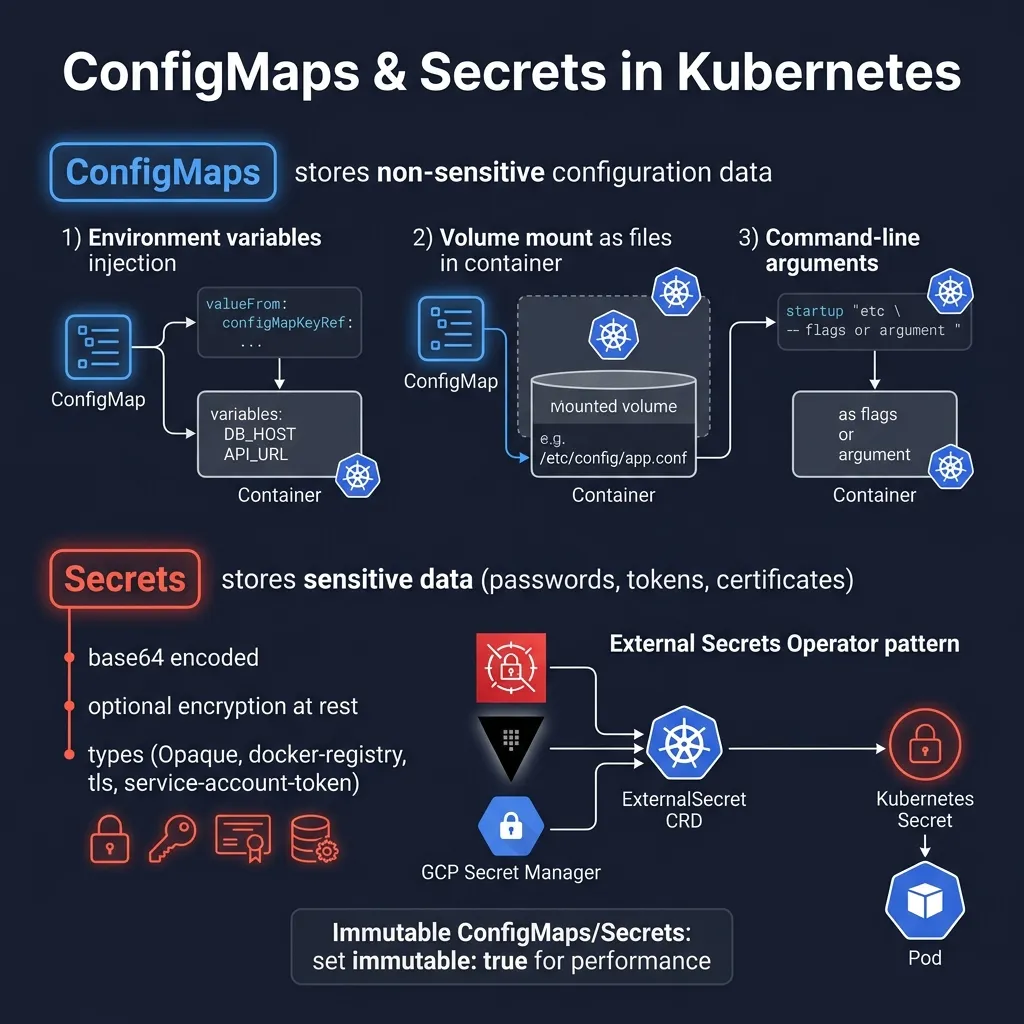
ConfigMaps: Managing Configuration Data
What is ConfigMap?
ConfigMap is a Kubernetes object that stores key-value configuration data. This data is completely isolated from the container image, allowing you to change configuration without rebuilding the image. ConfigMap can contain simple strings, multi-line configuration files, or even entire file contents.
ConfigMap matches:
- Application environment variables (database host, port, feature flags)
- Content of configuration file (nginx.conf, application.properties)
- Command-line arguments for container__HTMLTAG_23___
- Other non-sensitive configuration__HTMLTAG_25___
Create ConfigMap from Literal Values
# Tạo ConfigMap từ literal values
kubectl create configmap app-config \
  --from-literal=APP_ENV=production \
  --from-literal=APP_PORT=8080 \
  --from-literal=DB_HOST=postgres.default.svc.cluster.local \
  --from-literal=DB_PORT=5432

# Xem ConfigMap
kubectl get configmap app-config -o yaml
Create ConfigMap from File
# Tạo file cấu hình
cat > app.properties << 'EOF'
app.name=my-application
app.version=2.1.0
app.max-connections=100
app.timeout=30s
log.level=INFO
log.format=json
EOF

# Tạo ConfigMap từ file
kubectl create configmap app-properties --from-file=app.properties

# Tạo ConfigMap với custom key name
kubectl create configmap app-properties --from-file=config=app.properties
ConfigMap YAML Definition
apiVersion: v1
kind: ConfigMap
metadata:
  name: app-config
  namespace: default
  labels:
    app: my-app
    version: "2.1.0"
data:
  # Single-line values
  APP_ENV: "production"
  APP_PORT: "8080"
  DB_HOST: "postgres.default.svc.cluster.local"
  DB_PORT: "5432"
  CACHE_TTL: "300"

  # Multi-line file content
  nginx.conf: |
    server {
        listen 80;
        server_name example.com;

        location / {
            proxy_pass http://backend:8080;
            proxy_set_header Host $host;
            proxy_set_header X-Real-IP $remote_addr;
        }
    }

  application.yaml: |
    spring:
      application:
        name: my-service
      datasource:
        url: jdbc:postgresql://postgres:5432/mydb
    server:
      port: 8080
    logging:
      level:
        root: INFO
How to Use ConfigMap in Pod
1. Environment Variables from ConfigMap
apiVersion: apps/v1
kind: Deployment
metadata:
  name: my-app
spec:
  replicas: 3
  selector:
    matchLabels:
      app: my-app
  template:
    metadata:
      labels:
        app: my-app
    spec:
      containers:
      - name: app
        image: my-app:2.1.0
        # Inject từng key từ ConfigMap
        env:
        - name: APP_ENV
          valueFrom:
            configMapKeyRef:
              name: app-config
              key: APP_ENV
        - name: APP_PORT
          valueFrom:
            configMapKeyRef:
              name: app-config
              key: APP_PORT
        # Inject tất cả keys từ ConfigMap
        envFrom:
        - configMapRef:
            name: app-config
2. Volume Mount from ConfigMap
apiVersion: apps/v1
kind: Deployment
metadata:
  name: nginx-app
spec:
  replicas: 2
  selector:
    matchLabels:
      app: nginx-app
  template:
    metadata:
      labels:
        app: nginx-app
    spec:
      containers:
      - name: nginx
        image: nginx:1.27
        ports:
        - containerPort: 80
        volumeMounts:
        - name: nginx-config
          mountPath: /etc/nginx/conf.d
          readOnly: true
        - name: app-properties
          mountPath: /app/config
          readOnly: true
      volumes:
      - name: nginx-config
        configMap:
          name: app-config
          items:
          - key: nginx.conf
            path: default.conf
      - name: app-properties
        configMap:
          name: app-config
          items:
          - key: application.yaml
            path: application.yaml
          defaultMode: 0444
3. Command-Line Arguments from ConfigMap
apiVersion: v1
kind: Pod
metadata:
  name: app-with-args
spec:
  containers:
  - name: app
    image: my-app:2.1.0
    command: ["/app/server"]
    args:
    - "--port=$(APP_PORT)"
    - "--env=$(APP_ENV)"
    env:
    - name: APP_PORT
      valueFrom:
        configMapKeyRef:
          name: app-config
          key: APP_PORT
    - name: APP_ENV
      valueFrom:
        configMapKeyRef:
          name: app-config
          key: APP_ENV
Secrets: Managing Sensitive Data
What are Secrets and Why is Base64 NOT Encryption?
Secret in Kubernetes stores sensitive data such as passwords, tokens, and TLS certificates. One important thing to understand: Secrets by default are only base64 encoded, NOT encoded. Base64 is just an encoding for transmitting binary data over a text channel — anyone can decode it easily.
# Base64 encode
echo -n "my-password" | base64
# Output: bXktcGFzc3dvcmQ=

# Base64 decode - rất dễ dàng!
echo "bXktcGFzc3dvcmQ=" | base64 -d
# Output: my-password
This means that anyone with permission to read the Secret in etcd or via the Kubernetes API can see the actual value. Therefore additional layers of security are needed which we will discuss later.
Secret Types
1. Opaque (Generic) Secret
# Tạo Opaque secret từ literal
kubectl create secret generic db-credentials \
  --from-literal=username=postgres \
  --from-literal=password=S3cur3P@ssw0rd \
  --from-literal=host=postgres.default.svc.cluster.local

# Tạo từ file
kubectl create secret generic tls-cert \
  --from-file=tls.crt=./server.crt \
  --from-file=tls.key=./server.key
apiVersion: v1
kind: Secret
metadata:
name: db-credentials
namespace: default
type: Opaque
data:
# Values phải được base64 encoded
username: cG9zdGdyZXM=
password: UzNjdXIzUEBzc3cwcmQ=
host: cG9zdGdyZXMuZGVmYXVsdC5zdmMuY2x1c3Rlci5sb2NhbA==
stringData:
# stringData tự động encode - dễ đọc hơn khi viết YAML
connection-string: "postgresql://postgres:S3cur3P@ssw0rd@postgres:5432/mydb"2. TLS Secret
# Tạo TLS secret từ certificate files
kubectl create secret tls my-tls-secret \
  --cert=path/to/tls.crt \
  --key=path/to/tls.key
apiVersion: v1
kind: Secret
metadata:
name: my-tls-secret
type: kubernetes.io/tls
data:
tls.crt: LS0tLS1CRUdJTi... # base64 encoded certificate
tls.key: LS0tLS1CRUdJTi... # base64 encoded private key3. Docker Registry Secret
# Tạo Docker registry secret
kubectl create secret docker-registry regcred \
  --docker-server=registry.example.com \
  --docker-username=my-user \
  --docker-password=my-password \
  [email protected]
apiVersion: v1
kind: Secret
metadata:
name: regcred
type: kubernetes.io/dockerconfigjson
data:
.dockerconfigjson: eyJhdXRocyI6eyJyZWdpc3RyeS5leGFtcGxlLmNvbSI6eyJ1c2VybmFtZSI6Im15LXVzZXIiLCJwYXNzd29yZCI6Im15LXBhc3N3b3JkIn19fQ==Using Secrets in Pod
Mounting Secret as Environment Variables__HTMLTAG_62___
apiVersion: apps/v1
kind: Deployment
metadata:
  name: backend-app
spec:
  replicas: 3
  selector:
    matchLabels:
      app: backend
  template:
    metadata:
      labels:
        app: backend
    spec:
      containers:
      - name: backend
        image: backend:1.0.0
        env:
        - name: DB_USERNAME
          valueFrom:
            secretKeyRef:
              name: db-credentials
              key: username
        - name: DB_PASSWORD
          valueFrom:
            secretKeyRef:
              name: db-credentials
              key: password
        - name: DB_HOST
          valueFrom:
            secretKeyRef:
              name: db-credentials
              key: host
      imagePullSecrets:
      - name: regcred
apiVersion: apps/v1
kind: Deployment
metadata:
name: backend-app
spec:
replicas: 3
selector:
matchLabels:
app: backend
template:
metadata:
labels:
app: backend
spec:
containers:
- name: backend
image: backend:1.0.0
env:
- name: DB_USERNAME
valueFrom:
secretKeyRef:
name: db-credentials
key: username
- name: DB_PASSWORD
valueFrom:
secretKeyRef:
name: db-credentials
key: password
- name: DB_HOST
valueFrom:
secretKeyRef:
name: db-credentials
key: host
imagePullSecrets:
- name: regcredMounting Secret as Volume
apiVersion: apps/v1
kind: Deployment
metadata:
  name: secure-app
spec:
  replicas: 2
  selector:
    matchLabels:
      app: secure-app
  template:
    metadata:
      labels:
        app: secure-app
    spec:
      containers:
      - name: app
        image: secure-app:1.0.0
        volumeMounts:
        - name: secret-volume
          mountPath: /etc/secrets
          readOnly: true
        - name: tls-certs
          mountPath: /etc/tls
          readOnly: true
      volumes:
      - name: secret-volume
        secret:
          secretName: db-credentials
          defaultMode: 0400  # Chỉ owner có thể đọc
      - name: tls-certs
        secret:
          secretName: my-tls-secret
          items:
          - key: tls.crt
            path: server.crt
          - key: tls.key
            path: server.key
            mode: 0400
Immutable ConfigMaps and Secrets
Why Is Immutable?
In large clusters with thousands of Pods, each ConfigMap/Secret change triggers a watch event to all kubelets. This creates a significant load on kube-apiserver. Kubernetes 1.21+ supports immutable ConfigMaps and Secrets — an important optimization for production clusters.
Benefits of immutable:
- Offload kube-apiserver: kubelet no need to watch changes
- Increased stability: prevent accidental updates that can break applications
- Significantly better performance with large number of Pods__HTMLTAG_81___
apiVersion: v1
kind: ConfigMap
metadata:
  name: app-config-v2
  namespace: default
  labels:
    app: my-app
    version: "2.0.0"
data:
  APP_ENV: "production"
  APP_VERSION: "2.0.0"
  DB_POOL_SIZE: "20"
immutable: true  # Không thể thay đổi sau khi tạo
apiVersion: v1
kind: Secret
metadata:
name: api-keys-v1
namespace: default
type: Opaque
data:
stripe-key: c2tfdGVzdF8xMjM0NTY3ODkw
sendgrid-key: U0cuYWJjZGVmZ2hpams=
immutable: true # Secret không thể bị modify# Cố gắng update immutable ConfigMap sẽ fail
kubectl patch configmap app-config-v2 \
--patch '{"data":{"APP_ENV":"staging"}}'
# Error: configmap "app-config-v2" is immutable
# Để "update" immutable resource, tạo version mới
kubectl create configmap app-config-v3 \
--from-literal=APP_ENV=staging \
--from-literal=APP_VERSION=2.1.0
# Xóa version cũ sau khi migrate
kubectl delete configmap app-config-v2Secrets Encryption At Rest
Problems with Default Storage
By default, Secrets are saved in etcd as base64 plain text. Anyone with permission to read etcd or backup of etcd can see all secret values. This is a serious security risk in production.
EncryptionConfiguration
Kubernetes supports encryption at rest through EncryptionConfiguration — a configuration file for kube-apiserver that specifies how to encrypt resources before saving to etcd.
# /etc/kubernetes/encryption-config.yaml
apiVersion: apiserver.config.k8s.io/v1
kind: EncryptionConfiguration
resources:
  - resources:
    - secrets
    - configmaps  # Có thể mã hóa cả ConfigMaps
    providers:
    # AES-GCM: Khuyến nghị nhất - authenticated encryption
    - aescbc:
        keys:
        - name: key1
          secret:
    # AES-CBC: Legacy, vẫn supported
    - aesgcm:
        keys:
        - name: key1
          secret:
    # identity: không mã hóa - dùng để migrate hoặc decrypt
    - identity: {}
# Tạo encryption key
head -c 32 /dev/urandom | base64
# Output (ví dụ):
# 4MhFHOTCNF/i9C2BpZCUlFxH3MBXdFYn2JeUNuT4EQs=
# Cấu hình kube-apiserver sử dụng encryption config
# Thêm flag vào kube-apiserver manifest:
# --encryption-provider-config=/etc/kubernetes/encryption-config.yaml
# Verify encryption đang hoạt động
kubectl create secret generic test-secret \
--from-literal=key=my-secret-value
# Đọc trực tiếp từ etcd (không qua API)
ETCDCTL_API=3 etcdctl get \
--endpoints=https://127.0.0.1:2379 \
--cacert=/etc/kubernetes/pki/etcd/ca.crt \
--cert=/etc/kubernetes/pki/etcd/server.crt \
--key=/etc/kubernetes/pki/etcd/server.key \
/registry/secrets/default/test-secret | hexdump -C
# Nếu encrypted, output sẽ bắt đầu bằng "k8s:enc:aescbc:v1:key1:..."
# Thay vì plaintext base64
# Encrypt tất cả existing secrets
kubectl get secrets --all-namespaces -o json | kubectl replace -f -External Secrets Operator
Why do we need an External Secrets Operator?
Encryption at rest protects secrets in etcd, but there's still a problem: secrets are still managed in Kubernetes. In enterprise environments, secrets are often centrally managed at AWS Secrets Manager, HashiCorp Vault, GCP Secret Manager, Azure Key Vault. External Secrets Operator (ESO) solves this problem by automatically syncing secrets from external systems to Kubernetes Secrets.
Settings External Secrets Operator
# Cài ESO qua Helm
helm repo add external-secrets https://charts.external-secrets.io
helm repo update

helm install external-secrets \
  external-secrets/external-secrets \
  --namespace external-secrets \
  --create-namespace \
  --set installCRDs=true

# Verify installation
kubectl get pods -n external-secrets
kubectl get crd | grep external-secrets
SecretStore and ClusterSecretStore CRDs
ESO uses two main types of CRDs: SecretStore (namespace-scoped) and ClusterSecretStore (cluster-wide). This is where you configure the connection to the external secret backend.
ClusterSecretStore for AWS Secrets Manager__HTMLTAG_114___
apiVersion: external-secrets.io/v1beta1
kind: ClusterSecretStore
metadata:
  name: aws-secrets-manager
spec:
  provider:
    aws:
      service: SecretsManager
      region: ap-southeast-1
      auth:
        # Sử dụng IRSA (IAM Roles for Service Accounts)
        jwt:
          serviceAccountRef:
            name: external-secrets-sa
            namespace: external-secrets
# IAM Role với permission đọc secrets
# Attach policy: SecretsManagerReadWrite hoặc custom policy

# Service Account với IRSA annotation
apiVersion: v1
kind: ServiceAccount
metadata:
  name: external-secrets-sa
  namespace: external-secrets
  annotations:
    eks.amazonaws.com/role-arn: arn:aws:iam::123456789012:role/external-secrets-role
apiVersion: external-secrets.io/v1beta1
kind: ClusterSecretStore
metadata:
name: aws-secrets-manager
spec:
provider:
aws:
service: SecretsManager
region: ap-southeast-1
auth:
# Sử dụng IRSA (IAM Roles for Service Accounts)
jwt:
serviceAccountRef:
name: external-secrets-sa
namespace: external-secrets# IAM Role với permission đọc secrets
# Attach policy: SecretsManagerReadWrite hoặc custom policy
# Service Account với IRSA annotation
apiVersion: v1
kind: ServiceAccount
metadata:
name: external-secrets-sa
namespace: external-secrets
annotations:
eks.amazonaws.com/role-arn: arn:aws:iam::123456789012:role/external-secrets-roleExternalSecret to Sync from AWS Secrets Manager
apiVersion: external-secrets.io/v1beta1
kind: ExternalSecret
metadata:
  name: db-credentials
  namespace: production
spec:
  refreshInterval: 1h  # Sync mỗi 1 giờ
  secretStoreRef:
    name: aws-secrets-manager
    kind: ClusterSecretStore
  target:
    name: db-credentials  # Tên Kubernetes Secret sẽ được tạo
    creationPolicy: Owner
    template:
      type: Opaque
      data:
        # Có thể transform và combine nhiều external secrets
        connection-string: "postgresql://{{ .username }}:{{ .password }}@{{ .host }}:5432/mydb"
  data:
  - secretKey: username
    remoteRef:
      key: production/myapp/db
      property: username
  - secretKey: password
    remoteRef:
      key: production/myapp/db
      property: password
  - secretKey: host
    remoteRef:
      key: production/myapp/db
      property: host
Sync All AWS Secret
apiVersion: external-secrets.io/v1beta1
kind: ExternalSecret
metadata:
  name: app-secrets-full
  namespace: production
spec:
  refreshInterval: 30m
  secretStoreRef:
    name: aws-secrets-manager
    kind: ClusterSecretStore
  target:
    name: app-secrets
    creationPolicy: Owner
  # Sync toàn bộ secret object
  dataFrom:
  - extract:
      key: production/myapp/all-secrets
SecretStore for HashiCorp Vault
apiVersion: external-secrets.io/v1beta1
kind: ClusterSecretStore
metadata:
  name: vault-backend
spec:
  provider:
    vault:
      server: "https://vault.example.com:8200"
      path: "secret"
      version: "v2"  # KV v2
      auth:
        # Kubernetes Auth Method
        kubernetes:
          mountPath: "kubernetes"
          role: "my-app-role"
          serviceAccountRef:
            name: external-secrets-sa
            namespace: external-secrets
apiVersion: external-secrets.io/v1beta1
kind: ExternalSecret
metadata:
name: vault-secrets
namespace: production
spec:
refreshInterval: 15m
secretStoreRef:
name: vault-backend
kind: ClusterSecretStore
target:
name: vault-app-secrets
creationPolicy: Owner
data:
- secretKey: api-key
remoteRef:
key: secret/data/production/myapp
property: api-key
- secretKey: jwt-secret
remoteRef:
key: secret/data/production/myapp
property: jwt-secret
dataFrom:
- extract:
key: secret/data/production/database# Kiểm tra trạng thái sync
kubectl get externalsecret -n production
kubectl describe externalsecret db-credentials -n production
# Output mong đợi:
# Status:
# Binding:
# Name: db-credentials
# Conditions:
# Last Transition Time: 2026-03-30T10:00:00Z
# Message: Secret was synced
# Reason: SecretSynced
# Status: True
# Type: ReadyBest Practices for ConfigMaps and Secrets__HTMLTAG_122___
1. Don't Commit Secrets to Git
# .gitignore
*-secret.yaml
secrets/
*.env
.env.*

# Sử dụng git-secrets để prevent accidental commits
brew install git-secrets
git secrets --install
git secrets --register-aws
2. RBAC For Secrets
# Giới hạn quyền đọc secrets
apiVersion: rbac.authorization.k8s.io/v1
kind: Role
metadata:
  name: secret-reader
  namespace: production
rules:
- apiGroups: [""]
  resources: ["secrets"]
  verbs: ["get"]
  resourceNames: ["db-credentials", "api-keys"]  # Chỉ cho phép đọc specific secrets
---
apiVersion: rbac.authorization.k8s.io/v1
kind: RoleBinding
metadata:
  name: app-secret-binding
  namespace: production
subjects:
- kind: ServiceAccount
  name: my-app-sa
  namespace: production
roleRef:
  kind: Role
  name: secret-reader
  apiGroup: rbac.authorization.k8s.io
3. Secret Rotation
# Với External Secrets Operator, rotation tự động:
# 1. Update secret trong AWS Secrets Manager/Vault
# 2. ESO tự động sync vào Kubernetes Secret sau refreshInterval
# 3. Pods cần được restart để nhận secret mới (nếu dùng env vars)

# Với volume mount, secret updates được reflect tự động (sau sync period)
# Với env vars, cần restart pod

# Trigger restart
kubectl rollout restart deployment/my-app -n production
4. Secret Namespace Isolation
# Secrets chỉ accessible trong cùng namespace
# Để share secrets giữa namespaces, dùng ESO với ClusterSecretStore
# hoặc sync secret sang multiple namespaces

apiVersion: external-secrets.io/v1beta1
kind: ExternalSecret
metadata:
  name: shared-secret
  namespace: staging  # Deploy vào namespace staging
spec:
  refreshInterval: 1h
  secretStoreRef:
    name: vault-backend
    kind: ClusterSecretStore
  target:
    name: shared-api-keys
  dataFrom:
  - extract:
      key: secret/data/shared/api-keys
5. Audit Logging For Secret Access
# audit-policy.yaml
apiVersion: audit.k8s.io/v1
kind: Policy
rules:
# Log tất cả secret operations ở level Request
- level: Request
  verbs: ["get", "list", "watch", "create", "update", "patch", "delete"]
  resources:
  - group: ""
    resources: ["secrets"]
# Log metadata cho các operations khác
- level: Metadata
  resources:
  - group: ""
    resources: ["pods", "services"]
Summary
ConfigMaps and Secrets are the foundation of configuration management in Kubernetes. Important points to remember:
- ConfigMap for non-sensitive configuration, supports env vars, volume mounts, and command args
- Secret default only base64 encoding — NOT encryption, need additional security layer
- Immutable ConfigMaps/Secrets significantly improves performance in large clusters
- EncryptionConfiguration with AES-GCM/AES-CBC encrypt secrets at rest in etcd
- External Secrets Operator is the best solution for production: sync from Vault, AWS Secrets Manager, reduce attack surface__HTMLTAG_157___
- Always apply RBAC strictly, don't commit secrets to Git, and have a rotation plan