🎯 Lesson Objective
Understand how ReplicaSet ensures the number of Pod replicas, why Deployment is better than pure ReplicaSet, how to perform rolling updates and rollback safely, and common deployment strategies.
1. ReplicaSet
ReplicaSet ensures the specified number of Pod replicas are always running. If a Pod is deleted or crashes, ReplicaSet creates a new Pod to compensate.
apiVersion: apps/v1
kind: ReplicaSet
metadata:
  name: nginx-rs
spec:
  replicas: 3
  selector:
    matchLabels:
      app: nginx
  template:
    metadata:
      labels:
        app: nginx
    spec:
      containers:
      - name: nginx
        image: nginx:1.27
ReplicaSet uses label selectors to know which Pods it manages. However, you rarely create a ReplicaSet directly — instead use Deployment.
2. Deployment — Why is it better than ReplicaSet?
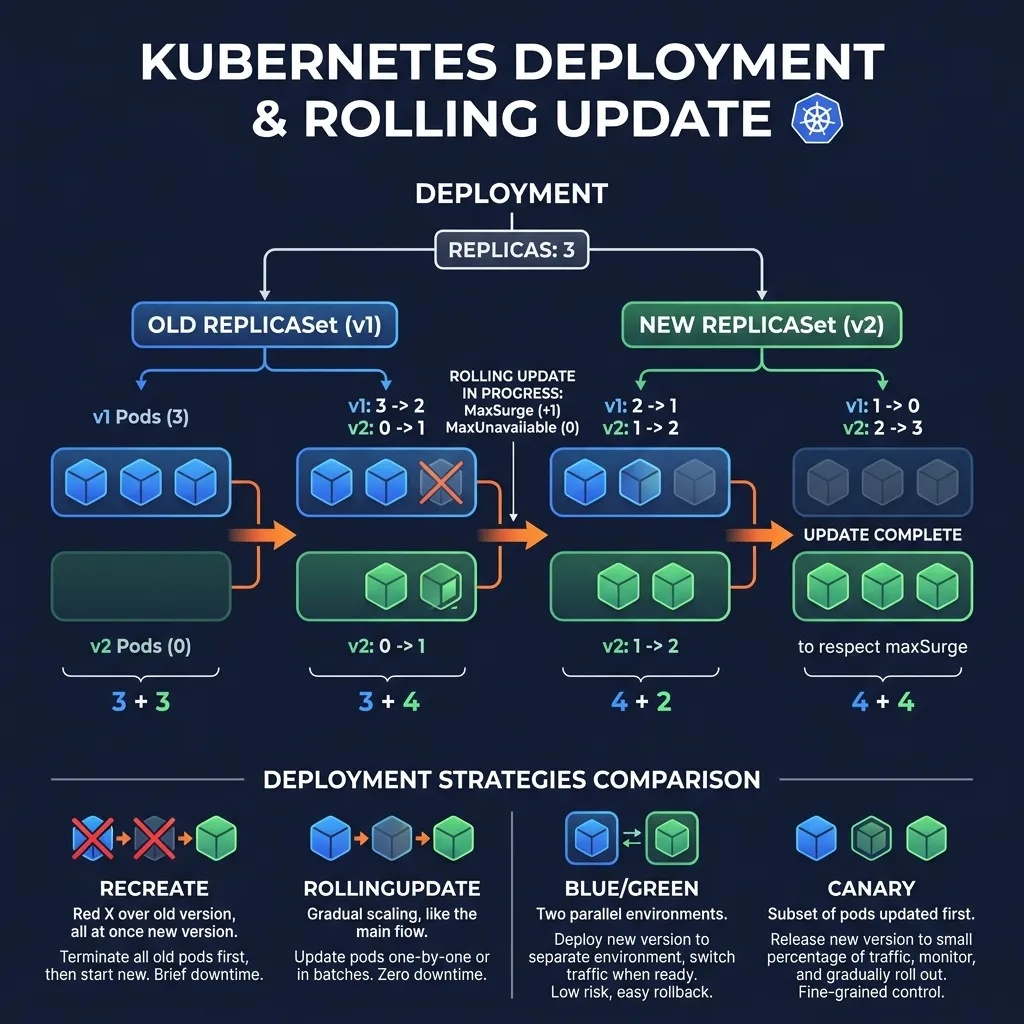
Deployment is a higher-level abstraction than ReplicaSet, allowing:
- Declarative updates: only declare the desired state, Deployment takes care of the rest
- Rolling updates: zero-downtime deployment
- Revision history: save updates history, allow rollback
- Pause/Resume: rollout can be paused
apiVersion: apps/v1
kind: Deployment
metadata:
  name: nginx-deploy
spec:
  replicas: 5
  selector:
    matchLabels:
      app: nginx
  strategy:
    type: RollingUpdate
    rollingUpdate:
      maxSurge: 2          # tối đa thêm 2 pods trong quá trình update
      maxUnavailable: 1    # tối đa 1 pod unavailable tại một thời điểm
  template:
    metadata:
      labels:
        app: nginx
    spec:
      containers:
      - name: nginx
        image: nginx:1.27
        resources:
          requests:
            cpu: "100m"
            memory: "128Mi"
          limits:
            cpu: "500m"
            memory: "256Mi"
3. Rolling Update
Rolling Update gradually replaces old Pods with new Pods, ensuring no downtime.
# Update image kubectl set image deployment/nginx-deploy nginx=nginx:1.28Hoặc edit trực tiếp
kubectl edit deployment nginx-deploy
Theo dõi rollout
kubectl rollout status deployment/nginx-deploy
Xem chi tiết
kubectl describe deployment nginx-deploy
With maxSurge: 2 and maxUnavailable: 1 on 5 replicas:
- Maximum 7 pods exist at the same time (5 + 2 surges)
- Minimum 4 pods available (5 - 1 unavailable)
- Kubernetes creates new Pods in parallel with terminating old Pods__HTMLTAG_51___
4. Recreate Strategy
Delete all old Pods before creating new Pods. There is downtime but it's simple and has no versioning conflict.
strategy:
  type: Recreate
Used when: database migration needs a single instance, does not accept 2 versions running in parallel.
5. Revision History and Rollback
# Xem revision history kubectl rollout history deployment/nginx-deployXem chi tiết revision cụ thể
kubectl rollout history deployment/nginx-deploy --revision=3
Rollback về revision trước
kubectl rollout undo deployment/nginx-deploy
Rollback về revision cụ thể
kubectl rollout undo deployment/nginx-deploy --to-revision=2
The number of revisions saved is controlled by spec.revisionHistoryLimit (default 10).
6. Pause and Resume Rollout
# Pause rollout (để kiểm tra pods mới trước khi tiếp tục) kubectl rollout pause deployment/nginx-deployUpdate image
kubectl set image deployment/nginx-deploy nginx=nginx:1.28
Pods mới bắt đầu tạo, kiểm tra chúng
kubectl get pods
Nếu ok, resume
kubectl rollout resume deployment/nginx-deploy
Nếu không ok, rollback
kubectl rollout undo deployment/nginx-deploy
7. Blue/Green Deployment
Deploy the new version in parallel with the old version, then transfer all traffic to the new version.
# Blue (phiên bản hiện tại)
apiVersion: apps/v1
kind: Deployment
metadata:
  name: nginx-blue
spec:
  replicas: 5
  selector:
    matchLabels:
      app: nginx
      version: blue
  template:
    metadata:
      labels:
        app: nginx
        version: blue
    spec:
      containers:
      - name: nginx
        image: nginx:1.27
---
# Service chỉ vào blue
apiVersion: v1
kind: Service
metadata:
  name: nginx-service
spec:
  selector:
    app: nginx
    version: blue   # chuyển sang "green" để switch traffic
  ports:
  - port: 80
# Sau khi deploy green và kiểm tra xong:
kubectl patch service nginx-service -p '{"spec":{"selector":{"version":"green"}}}'
8. Canary Deployment
Send a small portion of traffic to the new version for testing.
# Stable: 9 replicas
apiVersion: apps/v1
kind: Deployment
metadata:
  name: nginx-stable
spec:
  replicas: 9
  selector:
    matchLabels:
      app: nginx
      track: stable
  template:
    metadata:
      labels:
        app: nginx
        track: stable
    spec:
      containers:
      - name: nginx
        image: nginx:1.27
---
# Canary: 1 replica (~10% traffic)
apiVersion: apps/v1
kind: Deployment
metadata:
  name: nginx-canary
spec:
  replicas: 1
  selector:
    matchLabels:
      app: nginx
      track: canary
  template:
    metadata:
      labels:
        app: nginx
        track: canary
    spec:
      containers:
      - name: nginx
        image: nginx:1.28
---
# Service match cả hai
apiVersion: v1
kind: Service
metadata:
  name: nginx-service
spec:
  selector:
    app: nginx   # match cả stable và canary
9. Scaling
# Scale thủ công kubectl scale deployment nginx-deploy --replicas=10HPA tự động scale (xem bài Autoscaling)
kubectl autoscale deployment nginx-deploy --min=3 --max=10 --cpu-percent=70
10. Deployment Anti-patterns should be avoided
- ❌ Do not set resource requests/limits → Pod is evict when node pressure
- ❌ No readinessProbe → traffic to Pod is not ready
- ❌
maxUnavailable: 0andmaxSurge: 0at the same time → invalid - ❌ Use
latestimage tag → do not reproducible - ❌
revisionHistoryLimit: 0→ cannot rollback
Summary
- Deployment manages ReplicaSet, should not create ReplicaSet directly
- Rolling Update: zero-downtime, adjust maxSurge and maxUnavailable
- Rollback with
kubectl rollout undo - Blue/Green: instant switch, requires double resources__HTMLTAG_113___
- Canary: gradual rollout, control traffic % by number of replicas__HTMLTAG_115___