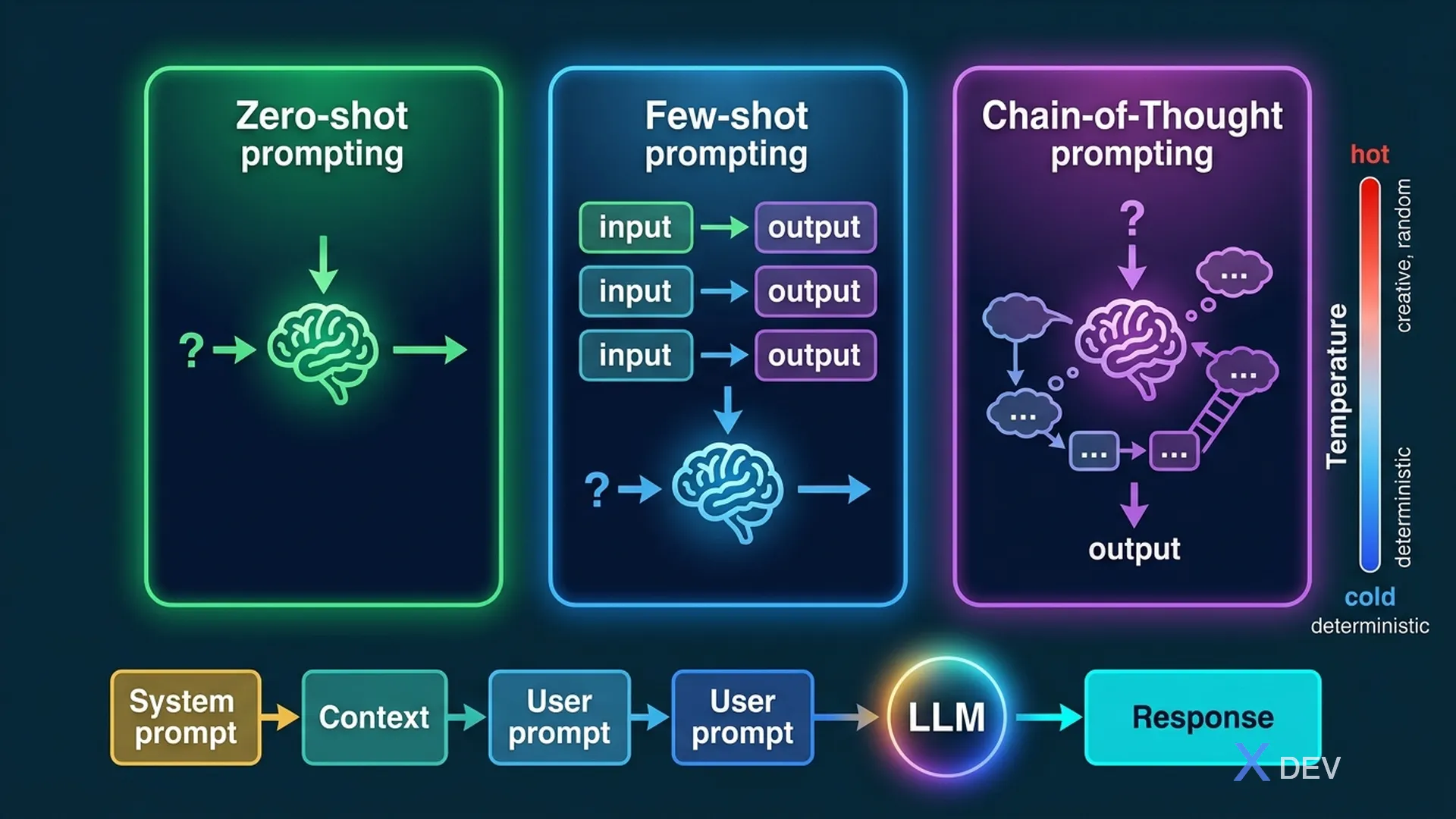
Prompt Engineering Techniques: Zero-shot, Few-shot, and Chain-of-Thought
1. What is Prompt Engineering?
Prompt Engineering is the art of designing input (prompts) to achieve desired outputs from Foundation Models. It is the cheapest and fastest way to customize FM behavior — no training or fine-tuning required.
1.1. Components of a Prompt
┌────────────────────────────────────────────┐
│  SYSTEM PROMPT (optional)                  │
│  "You are a helpful AWS solutions          │
│   architect. Answer concisely."            │
├────────────────────────────────────────────┤
│  CONTEXT (optional)                        │
│  Background info, documents, data          │
├────────────────────────────────────────────┤
│  USER PROMPT (required)                    │
│  The actual question or instruction        │
├────────────────────────────────────────────┤
│  EXAMPLES (optional, for few-shot)         │
│  Input → Output pairs                     │
├────────────────────────────────────────────┤
│  OUTPUT FORMAT (optional)                  │
│  "Respond in JSON", "Use bullet points"    │
└────────────────────────────────────────────┘
2. Prompting Techniques
2.1. Zero-shot Prompting
Send a prompt without any examples. The model relies entirely on its pre-trained knowledge.
Prompt: "Classify the sentiment of this review:
'The product arrived damaged and customer service was unhelpful.'

Sentiment:"

Output: "Negative"
When to use: Simple, well-defined tasks that the model already understands well.
2.2. Few-shot Prompting
Provide a few examples before presenting the actual task. This helps the model understand the expected format and logic.
Prompt: "Classify these reviews:

Review: 'Amazing quality, fast shipping!' → Positive
Review: 'Terrible experience, never again.' → Negative
Review: 'It's okay, nothing special.' → Neutral

Review: 'The product exceeded my expectations!' →"

Output: "Positive"
When to use: When you need the model to follow a specific format or logic pattern that zero-shot doesn't achieve with sufficient quality.
2.3. One-shot Prompting
A variation of few-shot that provides only 1 example. Used when you want to set a pattern but the context window is limited.
2.4. Chain-of-Thought (CoT) Prompting
Ask the model to think step-by-step before answering. Particularly effective for math, logic, and reasoning tasks.
WITHOUT CoT:
Q: "If a store has 3 boxes with 12 apples each, and gives
    away 15 apples, how many are left?"
A: "21" (might be wrong without reasoning)

WITH CoT:
Q: "Think step by step: If a store has 3 boxes with 12
    apples each, and gives away 15 apples, how many are left?"
A: "Step 1: Total apples = 3 × 12 = 36
    Step 2: After giving away = 36 - 15 = 21
    Answer: 21 apples"
Exam tip: "Which prompting technique improves reasoning accuracy?" → Chain-of-Thought. Key phrase: "think step by step" or "explain your reasoning".
3. System Prompts & Personas
System prompt defines the model's role, behavior, constraints, and output format. It "sets the stage" before user interaction.
System Prompt:
"You are a financial advisor AI for XYZ Bank.
Rules:
- Only answer questions about banking and investments
- Never provide specific stock recommendations
- Always include a disclaimer
- Respond in a professional tone
- If asked about non-financial topics, politely redirect"
System Prompt Best Practices:
| Practice | Why |
|---|---|
| Define a clear role | Constrains model behavior to a domain |
| Set boundaries | Prevents off-topic or harmful responses |
| Specify output format | Ensures consistent, parseable outputs |
| Include examples | Clarifies expected behavior |
| Add guardrails | Prevents misuse (PII, harmful content) |
4. Advanced Prompting Techniques
4.1. Negative Prompting
Explicitly specify what the model should NOT do. Especially useful in image generation.
Text generation:
"Summarize this article. Do NOT include opinions
or personal commentary. Do NOT exceed 100 words."

Image generation (Stable Diffusion):
Prompt: "Professional headshot, studio lighting"
Negative prompt: "blurry, cartoon, distorted, low quality"
4.2. Prompt Templates
Reusable prompt structures with placeholders for dynamic content:
Template:
"Given the following {document_type}:
---
{content}
---
Extract the following information:
- {field_1}
- {field_2}
- {field_3}
Respond in JSON format."
4.3. Prompt Chaining
Break complex tasks into multiple sequential prompts, where the output of the previous prompt becomes the input for the next one.
Step 1: "Extract key entities from this document: {doc}"
         → Output: list of entities

Step 2: "For each entity {entities}, find the sentiment
         expressed about it in this text: {doc}"
         → Output: entity-sentiment pairs

Step 3: "Create a summary report of sentiment analysis
         for these entities: {entity_sentiments}"
         → Output: Final report
5. Comparison Table for Exam
| Technique | Examples Given? | Best For | Exam Keyword |
|---|---|---|---|
| Zero-shot | None | Simple, well-known tasks | "no examples provided" |
| One-shot | 1 example | Setting format with minimal context | "single example" |
| Few-shot | 2-5 examples | Pattern following, classification | "examples provided", "demonstrations" |
| Chain-of-Thought | With reasoning steps | Math, logic, complex reasoning | "step by step", "reasoning" |
| Negative prompting | N/A | Avoiding unwanted outputs | "do not include", "avoid" |
| Prompt chaining | N/A | Complex multi-step tasks | "break into steps", "sequential" |
6. Inference Parameters Review
Prompt engineering also includes tuning inference parameters:
| Parameter | Low Value | High Value |
|---|---|---|
| Temperature | Deterministic, factual (0.0-0.3) | Creative, diverse (0.7-1.0) |
| Top-p | Focused vocabulary (0.1-0.3) | Diverse vocabulary (0.9-1.0) |
| Top-k | Limited choices (e.g., 10) | More choices (e.g., 250) |
| Max tokens | Short responses | Long responses |
| Stop sequences | Define when to stop generating | |
Exam tip: "A customer support chatbot gives inconsistent answers" → Lower temperature (closer to 0). "A creative writing app produces boring text" → Raise temperature (closer to 1).
7. Prompt Engineering Best Practices
- Be specific: "Summarize in 3 bullet points" > "Summarize this"
- Provide context: Include relevant background information
- Define output format: JSON, markdown, table, bullet points
- Use delimiters: Separate sections with --- or ``` to avoid prompt injection
- Iterate: Test and refine prompts based on outputs
- Avoid ambiguity: Don't assume the model knows your intent
- Use examples: When zero-shot doesn't work, add few-shot examples
8. Practice Questions
Q1: A developer is working on a classification task, but the model's zero-shot responses are inconsistent. Which prompting technique should the developer try NEXT?
- A) Reduce the temperature to 0
- B) Use few-shot prompting with example inputs and outputs ✓
- C) Fine-tune the model on custom data
- D) Switch to a different model provider
Explanation: Few-shot prompting is the logical next step after zero-shot fails — providing examples helps the model understand the expected pattern. Fine-tuning is more expensive and complex. Temperature adjustment alone may not fix classification logic.
Q2: A customer wants their AI application to solve complex mathematical word problems more accurately. Which prompting technique would MOST improve the results?
- A) Zero-shot prompting
- B) Negative prompting
- C) Chain-of-Thought prompting ✓
- D) Prompt chaining
Explanation: Chain-of-Thought prompting encourages the model to show its reasoning step by step, which significantly improves accuracy on mathematical and logical reasoning tasks.
Q3: Which of the following is a benefit of using a system prompt in a generative AI application?
- A) It eliminates the need for user input
- B) It reduces the model's inference cost
- C) It defines the model's role, behavior, and constraints ✓
- D) It replaces the need for fine-tuning
Explanation: System prompts set the model's role, behavioral constraints, and output format — establishing consistent behavior across all user interactions without any model training.