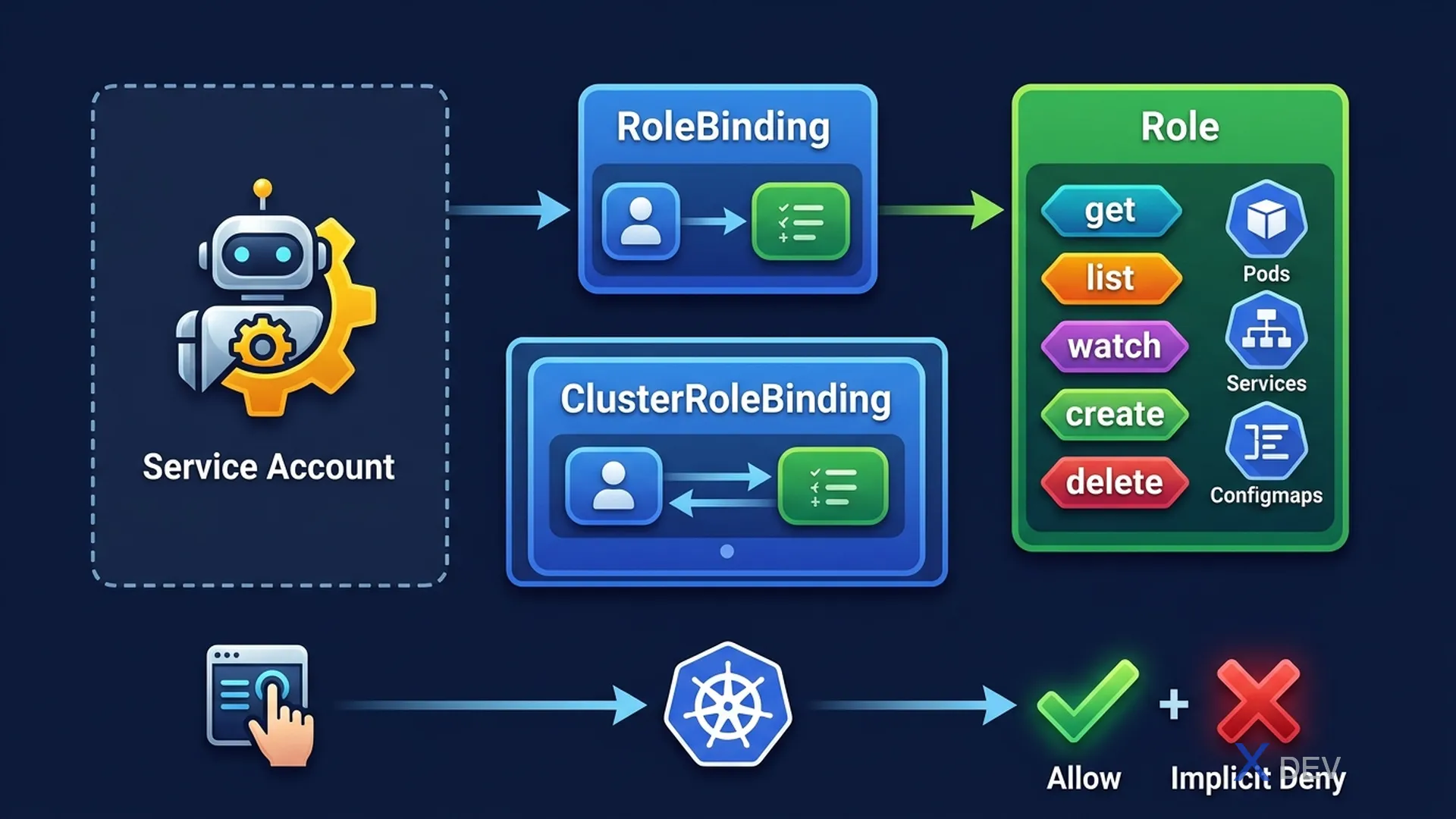
1. RBAC Concepts (CKA Depth)
CKA requires hands-on: create RBAC resources with kubectl, verify permissions, and debug access issues.
RBAC objects:
  Role          → namespaced permissions
  ClusterRole   → cluster-wide permissions
  RoleBinding   → bind Role or ClusterRole to Subject (in a namespace)
  ClusterRoleBinding → bind ClusterRole to Subject (cluster-wide)

Subject types:
  - User (string, no K8s object)
  - Group (string)
  - ServiceAccount (K8s object: namespace/name)
2. Creating RBAC Imperatively
# Create Role (namespaced)
kubectl create role pod-reader \
  --verb=get,list,watch \
  --resource=pods \
  --namespace=default

# Create RoleBinding
kubectl create rolebinding read-pods \
  --role=pod-reader \
  --user=jane \
  --namespace=default

# Create ClusterRole
kubectl create clusterrole secret-reader \
  --verb=get,list \
  --resource=secrets

# Create ClusterRoleBinding
kubectl create clusterrolebinding read-secrets \
  --clusterrole=secret-reader \
  --user=jane

# Bind ClusterRole to a single namespace (using RoleBinding!)
kubectl create rolebinding read-secrets-dev \
  --clusterrole=secret-reader \
  --user=jane \
  --namespace=dev
Exam tip: Use
--dry-run=client -o yamlto generate YAML, then edit. Much faster than writing from scratch. Example:kubectl create role myrole --verb=get --resource=pods --dry-run=client -o yaml > role.yaml
3. ServiceAccounts in CKA
# Create ServiceAccount
kubectl create serviceaccount monitoring-sa -n default

# Bind permissions
kubectl create clusterrole metrics-reader \
  --verb=get,list,watch \
  --resource=pods,nodes

kubectl create clusterrolebinding monitoring-binding \
  --clusterrole=metrics-reader \
  --serviceaccount=default:monitoring-sa

# Use SA in Pod spec
spec:
  serviceAccountName: monitoring-sa
4. Verify Permissions — kubectl auth can-i
# Check current user's permissions
kubectl auth can-i get pods
kubectl auth can-i delete pods --namespace=production
kubectl auth can-i '*' '*'  # Check all

# Check as another user (--as)
kubectl auth can-i get pods --as=jane
kubectl auth can-i get pods --as=jane --namespace=dev
kubectl auth can-i get secrets --as=system:serviceaccount:default:monitoring-sa
5. Certificate-Based Authentication
Create user with client certificate:
  1. Generate key: openssl genrsa -out alice.key 2048
  2. Create CSR: openssl req -new -key alice.key -out alice.csr -subj "/CN=alice/O=developers"
  3. Sign with K8s CA:
     # Create CertificateSigningRequest object
     kubectl apply -f alice-csr.yaml
     kubectl certificate approve alice
  4. Get signed cert: kubectl get csr alice -o jsonpath='{.status.certificate}' | base64 -d > alice.crt
  5. Add to kubeconfig
Exam tip: CKA often includes a task to "create a user with a certificate and bind RBAC". Remember the workflow: generate key → CSR → approve CSR → extract cert → kubeconfig. Use
kubectl auth can-ito verify.
6. Cheat Sheet
| Task | Command |
|---|---|
| Check what user can do | kubectl auth can-i --list --as=user |
| Check specific permission | kubectl auth can-i get secrets --as=user -n ns |
| Create serviceaccount | kubectl create sa SA-NAME -n NAMESPACE |
| Role binding to SA | --serviceaccount=ns:sa-name |
| Approve cert request | kubectl certificate approve NAME |
7. Practice Questions
Q1: A developer needs read-only access to all Pods and Services across the entire cluster. Which RBAC approach is most appropriate?
- A) Create a Role with get/list in the default namespace
- B) Create a ClusterRole with get/list on pods and services, then ClusterRoleBinding ✓
- C) Create a Role in each namespace
- D) Grant the developer cluster-admin access
Explanation: For cluster-wide access, use ClusterRole (defines permissions) + ClusterRoleBinding (grants cluster-wide). Creating Roles in each namespace is tedious and error-prone. cluster-admin is too broad.
Q2: After creating a ServiceAccount and RoleBinding for a monitoring application, you need to verify the SA can list pods in the "monitoring" namespace. Which command does this?
- A) kubectl get rolebinding -n monitoring
- B) kubectl describe serviceaccount monitoring-sa
- C) kubectl auth can-i list pods --as=system:serviceaccount:monitoring:monitoring-sa -n monitoring ✓
- D) kubectl auth check serviceaccount monitoring-sa
Explanation: kubectl auth can-i with --as=system:serviceaccount:NAMESPACE:NAME impersonates the ServiceAccount. This verifies the exact access path (SA → binding → role) rather than just inspecting the objects.
Q3: A ClusterRole named "pod-manager" exists. You want user "alice" to use this ClusterRole but ONLY within the "staging" namespace. What should you create?
- A) ClusterRoleBinding for alice → pod-manager
- B) RoleBinding in staging namespace for alice → pod-manager ✓
- C) A new Role in staging with the same permissions as pod-manager
- D) A new ClusterRole scoped to the staging namespace
Explanation: RoleBinding can reference a ClusterRole but constrains it to the binding's namespace. This reuses the ClusterRole definition without granting cluster-wide access. ClusterRoleBinding would grant access to all namespaces.