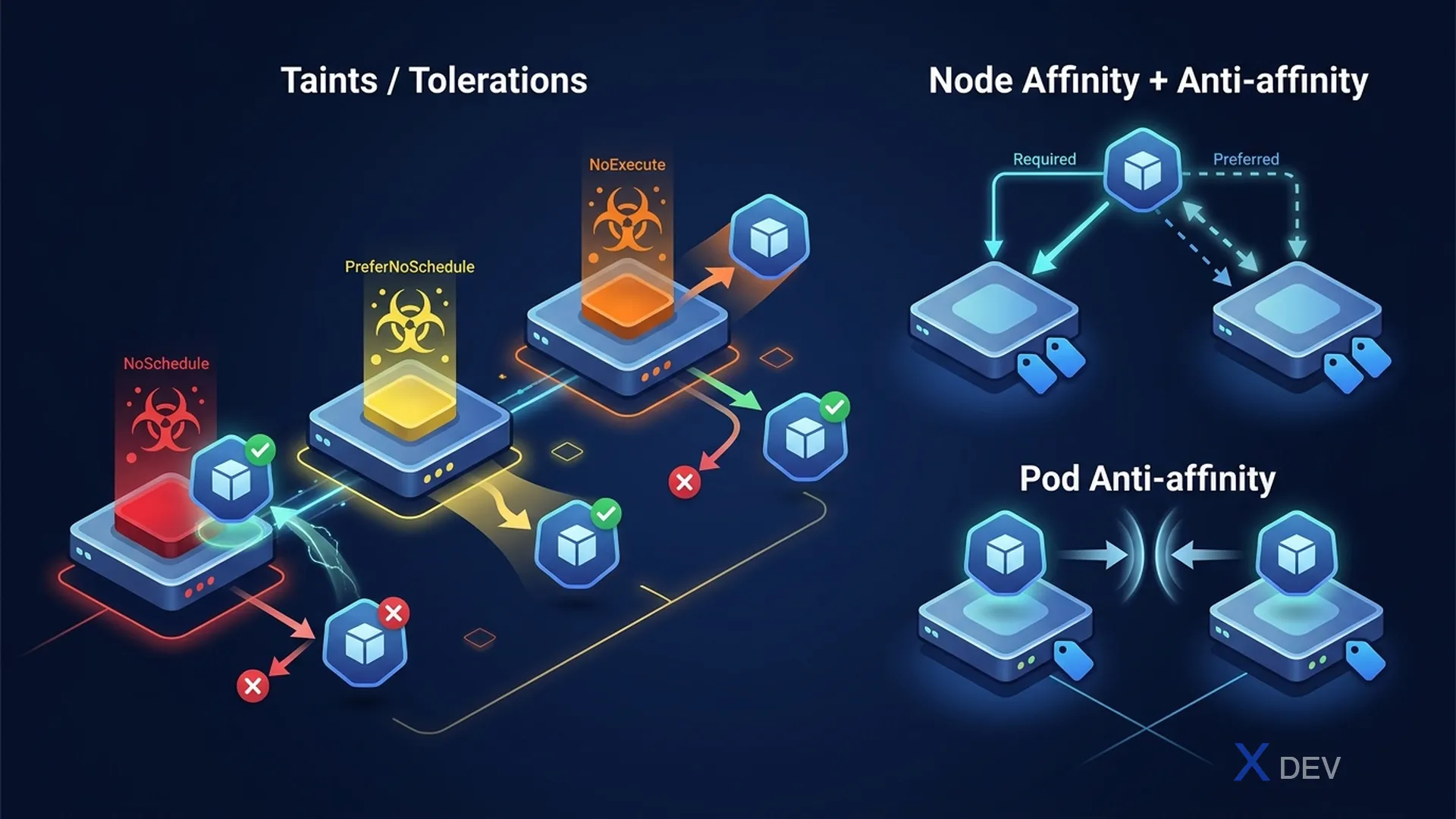
1. Taints & Tolerations
# Add taint to node
kubectl taint nodes node1 gpu=true:NoSchedule
kubectl taint nodes node1 gpu=true:PreferNoSchedule
kubectl taint nodes node1 gpu=true:NoExecute

# Remove taint
kubectl taint nodes node1 gpu=true:NoSchedule-

# View taints on node
kubectl describe node node1 | grep -A5 Taints| Taint Effect | Behavior |
|---|---|
| NoSchedule | Pods without matching toleration will not be scheduled |
| PreferNoSchedule | Scheduler tries to avoid, but not enforced |
| NoExecute | Evict existing pods + no new scheduling (can set tolerationSeconds) |
# Pod toleration
spec:
  tolerations:
  - key: "gpu"
    operator: "Equal"
    value: "true"
    effect: "NoSchedule"
  # OR tolerate all taints on a node:
  - operator: "Exists"
Exam tip: Taints/Tolerations = repulsion (node pushes pods away, pod tolerates). Node Affinity = attraction (pod prefers/requires certain nodes). You often need to combine both to ensure pods run only on desired nodes.
2. Node Affinity
spec:
  affinity:
    nodeAffinity:
      # HARD rule: Pod MUST be on matching node
      requiredDuringSchedulingIgnoredDuringExecution:
        nodeSelectorTerms:
        - matchExpressions:
          - key: disktype
            operator: In
            values: [ssd, nvme]
      # SOFT rule: prefer but not required
      preferredDuringSchedulingIgnoredDuringExecution:
      - weight: 100
        preference:
          matchExpressions:
          - key: zone
            operator: In
values: [us-east-1a]| Affinity Type | Scheduling | Running |
|---|---|---|
| requiredDuringSchedulingIgnoredDuringExecution | Hard requirement | Pod stays even if node label removed |
| preferredDuringSchedulingIgnoredDuringExecution | Best effort | Pod stays even if node label removed |
| requiredDuringSchedulingRequiredDuringExecution (future) | Hard | Evict if node no longer matches |
3. Pod Affinity & Anti-Affinity
# Pod anti-affinity: spread pods across nodes
spec:
  affinity:
    podAntiAffinity:
      requiredDuringSchedulingIgnoredDuringExecution:
      - labelSelector:
          matchLabels:
            app: frontend
        topologyKey: kubernetes.io/hostname  # 1 pod per node

# Pod affinity: co-locate pods (e.g., app + cache on same node)
spec:
  affinity:
    podAffinity:
      preferredDuringSchedulingIgnoredDuringExecution:
      - weight: 100
        podAffinityTerm:
          labelSelector:
            matchLabels:
              app: redis
          topologyKey: kubernetes.io/hostname
4. NodeSelector (Simple)
# Label node
kubectl label nodes node1 disktype=ssd

# Use in pod spec
spec:
  nodeSelector:
    disktype: ssd

# Schedule pod on specific node
spec:
  nodeName: node1  # Bypass scheduler entirely
5. Cheat Sheet
| Need | Solution |
|---|---|
| Dedicated GPU nodes | Taint node + Pod toleration |
| Pod must run on SSD nodes | Node affinity (required) or nodeSelector |
| Spread pods across nodes | Pod anti-affinity (required, topologyKey: hostname) |
| Co-locate app + cache | Pod affinity (preferred, topologyKey: hostname) |
| Schedule on specific node | spec.nodeName or nodeSelector |
6. Practice Questions
Q1: A node has been tainted with dedicated=database:NoExecute. A running Pod without tolerations is on this node. What happens?
- A) The Pod continues running; NoExecute only affects new Pods
- B) The Pod is evicted immediately ✓
- C) The Pod is evicted after 5 minutes
- D) The Pod gets an error but continues running
Explanation: NoExecute evicts existing Pods that don't tolerate the taint. The eviction is immediate unless the Pod has a toleration with tolerationSeconds (which allows it to remain for that duration before eviction).
Q2: You want Pods of "frontend" Deployment to never run on the same node as each other. Which configuration achieves this?
- A) Node affinity with required rule
- B) Taint each node after the first frontend Pod runs
- C) Pod anti-affinity with required rule and topologyKey: kubernetes.io/hostname ✓
- D) Use DaemonSet instead of Deployment
Explanation: Pod anti-affinity with requiredDuringScheduling and topologyKey of hostname ensures no two Pods with matching labels land on the same node. This is the preferred way to spread Pods for high availability.
Q3: A Pod has nodeAffinity with "requiredDuringSchedulingIgnoredDuringExecution" targeting nodes with label zone=east. After scheduling, the label is removed from the node. What happens to the running Pod?
- A) The Pod is immediately evicted
- B) The Pod continues running ✓
- C) The Pod restarts on a matching node
- D) The Pod enters Pending state
Explanation: "IgnoredDuringExecution" means the affinity rule only applies at scheduling time. Once running, removing the label doesn't affect the Pod. Future replacements (after crash/update) would fail to schedule if no matching node exists.