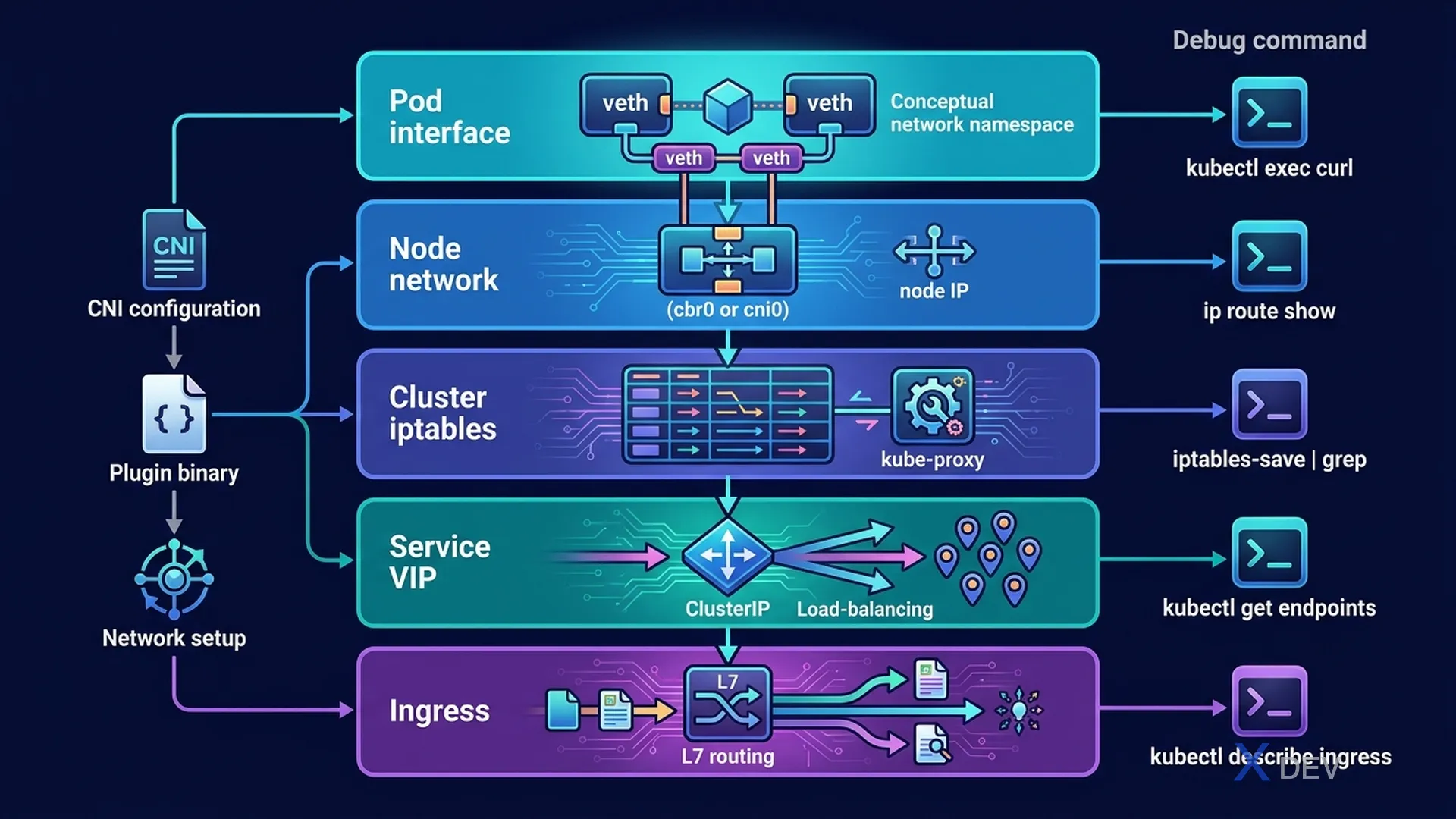
1. Network Troubleshooting Workflow
Network connectivity issue:
  Pod A cannot reach Pod B (or Service)

  Layer-by-layer debug:

  1. Same node, same namespace?
     kubectl exec pod-a -- ping POD_B_IP

  2. Different node?
     kubectl get pod pod-a pod-b -o wide  # Check node placement

  3. Via Service name (DNS)?
     kubectl exec pod-a -- nslookup my-service
     kubectl exec pod-a -- wget -qO- http://my-service:8080

  4. NetworkPolicy blocking?
     kubectl get networkpolicy -n NAMESPACE

  5. kube-proxy working?
     kubectl get pods -n kube-system -l k8s-app=kube-proxy
2. Full Network Flow Diagram
Client Pod ──(routes to)──► Service ClusterIP (iptables/ipvs)
                                │
                            kube-proxy routes to one of:
                           Pod IP 1 | Pod IP 2 | Pod IP 3
                                │
                          CNI (Calico/Flannel) routes to
                          correct node if cross-node
                                │
Container receives on containerPort| Component Fails | Symptom | Fix |
|---|---|---|
| CoreDNS | DNS resolution fails | Restart CoreDNS pods |
| kube-proxy | Service IPs unreachable | Restart kube-proxy DaemonSet |
| CNI plugin | Cross-node pod communication fails | Reinstall CNI or check CNI pods |
| NetworkPolicy | Specific traffic blocked | Review/delete blocking policies |
Exam tip: When debugging networking, start from inside the Pod (IP reachable?) → Service (DNS + Endpoints?) → Node (CNI routing?) → NetworkPolicy. Don't jump straight to kube-proxy without testing DNS first.
3. CKA Exam Strategy
| Tip | Details |
|---|---|
| Switch context immediately | Each question specifies a cluster → kubectl config use-context CLUSTER |
| Use --dry-run | kubectl create deploy --dry-run=client -o yaml > file.yaml to generate YAML |
| Use explain | kubectl explain pod.spec.containers.resources for field help |
| Bookmark quickly | Use Kubernetes docs search when you need a YAML template |
| Skip hard tasks | Mark and return; easy questions first (30% troubleshooting = most points) |
| Verify after completing | kubectl get/describe to confirm changes worked |
4. Essential kubectl Shortcuts
# Aliases to save time
alias k=kubectl
alias kgp='kubectl get pods'
alias kgs='kubectl get svc'
alias kns='kubectl config set-context --current --namespace'

# Resource short names
po  = pods
svc = services
deploy = deployments
ns  = namespaces
cm  = configmaps
pvc = persistentvolumeclaims
pv  = persistentvolumes
rs  = replicasets
sa  = serviceaccounts
no  = nodes

# Most-used flags
-n NAMESPACE    --namespace
-o wide         wider output (IP, Node)
-o yaml         full YAML output
-o jsonpath     extract specific field
--all-namespaces / -A   search all namespaces
5. Must-Know Commands for CKA
# Generate YAML with dry-run
kubectl run nginx --image=nginx --dry-run=client -o yaml > pod.yaml
kubectl create deployment myapp --image=myapp --replicas=3 --dry-run=client -o yaml

# Extract field
kubectl get node NODENAME -o jsonpath='{.status.capacity.cpu}'
kubectl get pod PODNAME -o jsonpath='{.status.podIP}'

# Sort by field
kubectl get events --sort-by='.lastTimestamp'
kubectl get pods --sort-by='.status.startTime'

# Watch resources
kubectl get pods -w

# All namespaces
kubectl get pods -A
kubectl get pods -A | grep CrashLoop
6. CKA Quick Reference
| Domain (Weight) | Key Topics |
|---|---|
| Cluster Architecture (25%) | kubeadm, static pods, kubeconfig, RBAC |
| Workloads (15%) | Deployments, rollout, DaemonSet, StatefulSet, scheduling |
| Services & Networking (20%) | Services, Ingress, NetworkPolicy, DNS |
| Storage (10%) | PV, PVC, StorageClass, volume mounts |
| Troubleshooting (30%) | Node, workload, network debug — HIGHEST WEIGHT |
7. Practice Questions
Q1: A Pod successfully pings another Pod's IP but cannot reach it via Service name. DNS resolution fails. CoreDNS Pods are running. What should you check?
- A) kube-proxy configuration
- B) The Pod's /etc/resolv.conf nameserver entry ✓
- C) The node's iptables rules
- D) The Service's targetPort
Explanation: If IP works but DNS doesn't, the Pod isn't using the CoreDNS server. Check /etc/resolv.conf inside the Pod — it should show the kube-dns ClusterIP as nameserver. If not, the Pod's dnsPolicy or dnsConfig may be overriding the default.
Q2: During the CKA exam, the first thing you always do when starting a new question is:
- A) Read Kubernetes documentation for the topic
- B) Switch to the correct cluster context using kubectl config use-context ✓
- C) Create a backup of the current cluster state
- D) Check existing resources in the cluster
Explanation: CKA uses multiple clusters. Each question specifies a cluster. Always switch context first — working on the wrong cluster will fail the task even if executed perfectly. This is the #1 exam mistake.
Q3: You need to expose a Deployment "webapp" on port 80 to external traffic using a NodePort Service. Which is the fastest approach?
- A) Write a Service YAML and kubectl apply it
- B) kubectl expose deployment webapp --type=NodePort --port=80 ✓
- C) kubectl create service nodeport webapp --tcp=80:80
- D) Edit the Deployment YAML to add a hostPort
Explanation: kubectl expose is the fastest — it creates a Service targeting the Deployment's Pods using the same selector. It requires no YAML editing. Option C works but doesn't use the Deployment's existing selector.