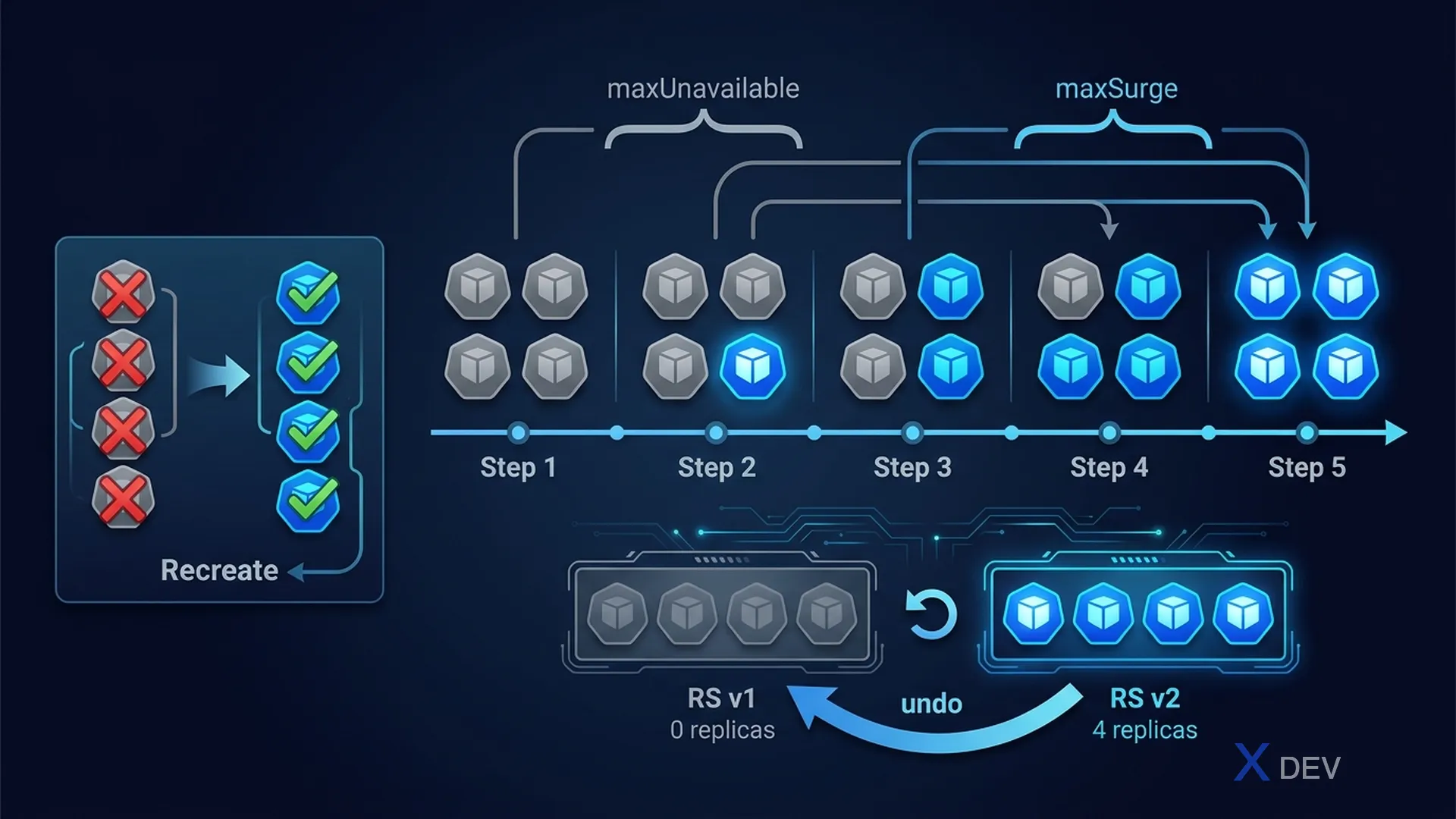
1. Deployment Strategies
| Strategy | How It Works | Downtime? | When to Use |
|---|---|---|---|
| RollingUpdate | Replaces pods gradually, maintains availability | No | Default, production |
| Recreate | Kills all old pods, then creates new ones | Yes | Dev/test, breaking changes |
spec:
  strategy:
    type: RollingUpdate
    rollingUpdate:
      maxUnavailable: 1   # OR "25%"  — Max pods unavailable during update
      maxSurge: 1         # OR "25%"  — Max extra pods above desired count

      ┌─────────────────────────────────────────────────┐
      │ Desired: 4 pods                                  │
      │                                                  │
      │ maxUnavailable: 1 → min 3 pods must be running  │
      │ maxSurge: 1       → max 5 pods total at once    │
      │                                                  │
      │ Step 1: Create 1 new pod (5 total = desired+surge)│
      │ Step 2: Terminate 1 old pod (4 total)           │
      │ Step 3: Repeat until all replaced               │
      └─────────────────────────────────────────────────┘
Exam tip:
maxUnavailableandmaxSurgeCANNOT both be 0 at the same time. For zero-downtime updates: setmaxUnavailable: 0andmaxSurge: 1(or higher).
2. kubectl rollout Commands
# Check rollout status
kubectl rollout status deployment/myapp

# View revision history
kubectl rollout history deployment/myapp
kubectl rollout history deployment/myapp --revision=2

# Rollback to the previous version
kubectl rollout undo deployment/myapp

# Rollback to a specific revision
kubectl rollout undo deployment/myapp --to-revision=2

# Pause a rollout
kubectl rollout pause deployment/myapp

# Resume a rollout
kubectl rollout resume deployment/myapp| Command | Purpose |
|---|---|
rollout status | Wait/show current rollout progress |
rollout history | List revision history |
rollout undo | Rollback to previous (or specific) revision |
rollout pause/resume | Pause for canary testing, then resume |
rollout restart | Force restart all pods (rolling) |
Exam tip: To save
CHANGE-CAUSEin revision history, add an annotation:kubectl annotate deployment/myapp kubernetes.io/change-cause="Updated image to v2"BEFORE updating. Or use the--recordflag (deprecated but still works in the exam).
3. Trigger & Monitor Update
# Update image (trigger rolling update)
kubectl set image deployment/myapp container-name=nginx:1.25

# View ReplicaSet history (each update creates a new RS)
kubectl get rs
# NAME              DESIRED   CURRENT   READY
# myapp-7d9b8c      4         4         4     ← current
# myapp-6f5a2b      0         0         0     ← old (kept for rollback)

# Scale deployment
kubectl scale deployment/myapp --replicas=6

# Edit deployment directly
kubectl edit deployment/myapp
4. Revision History Limit
spec:
  revisionHistoryLimit: 10  # Default: 10 old RS kept for rollback
                             # Set to 0 to disable rollback capability
5. Cheat Sheet
| Exam Scenario | Command |
|---|---|
| Update image | kubectl set image deploy/app c=image:v2 |
| Check rollout | kubectl rollout status deploy/app |
| Quick rollback | kubectl rollout undo deploy/app |
| Rollback to rev 3 | kubectl rollout undo deploy/app --to-revision=3 |
| Zero-downtime config | maxUnavailable: 0, maxSurge: 1 |
6. Practice Questions
Q1: A Deployment with 10 replicas is configured with maxUnavailable: 2 and maxSurge: 3. During a rolling update, what is the maximum number of pods that can exist at any given time?
- A) 10
- B) 12
- C) 13 ✓
- D) 15
Explanation: maxSurge=3 means up to 3 extra pods above the desired count (10) can exist simultaneously. So maximum = 10 + 3 = 13 pods. Meanwhile, maxUnavailable=2 means at least 8 pods must be available.
Q2: You updated a Deployment and then realized the new version has a bug. Which command quickly reverts to the previous working version?
- A)
kubectl delete deployment myapp && kubectl apply -f old.yaml - B)
kubectl rollout undo deployment/myapp✓ - C)
kubectl rollout history deployment/myapp - D)
kubectl set image deployment/myapp container=old-image
Explanation: rollout undo is the fastest way to revert to the previous revision. It creates a new rolling update back to the previous ReplicaSet. Option D also works but requires knowing the exact old image name.
Q3: A Deployment uses Recreate strategy. What is the expected behavior during an update?
- A) Pods are replaced one at a time with no downtime
- B) All existing pods are terminated before new pods are created, causing downtime ✓
- C) Half the pods are updated at once while the other half serve traffic
- D) New pods are created first, then old pods are terminated
Explanation: Recreate strategy terminates ALL existing pods at once (scale to 0), then creates the new pods. This causes downtime but ensures no two versions run simultaneously — suitable when old and new versions cannot coexist.