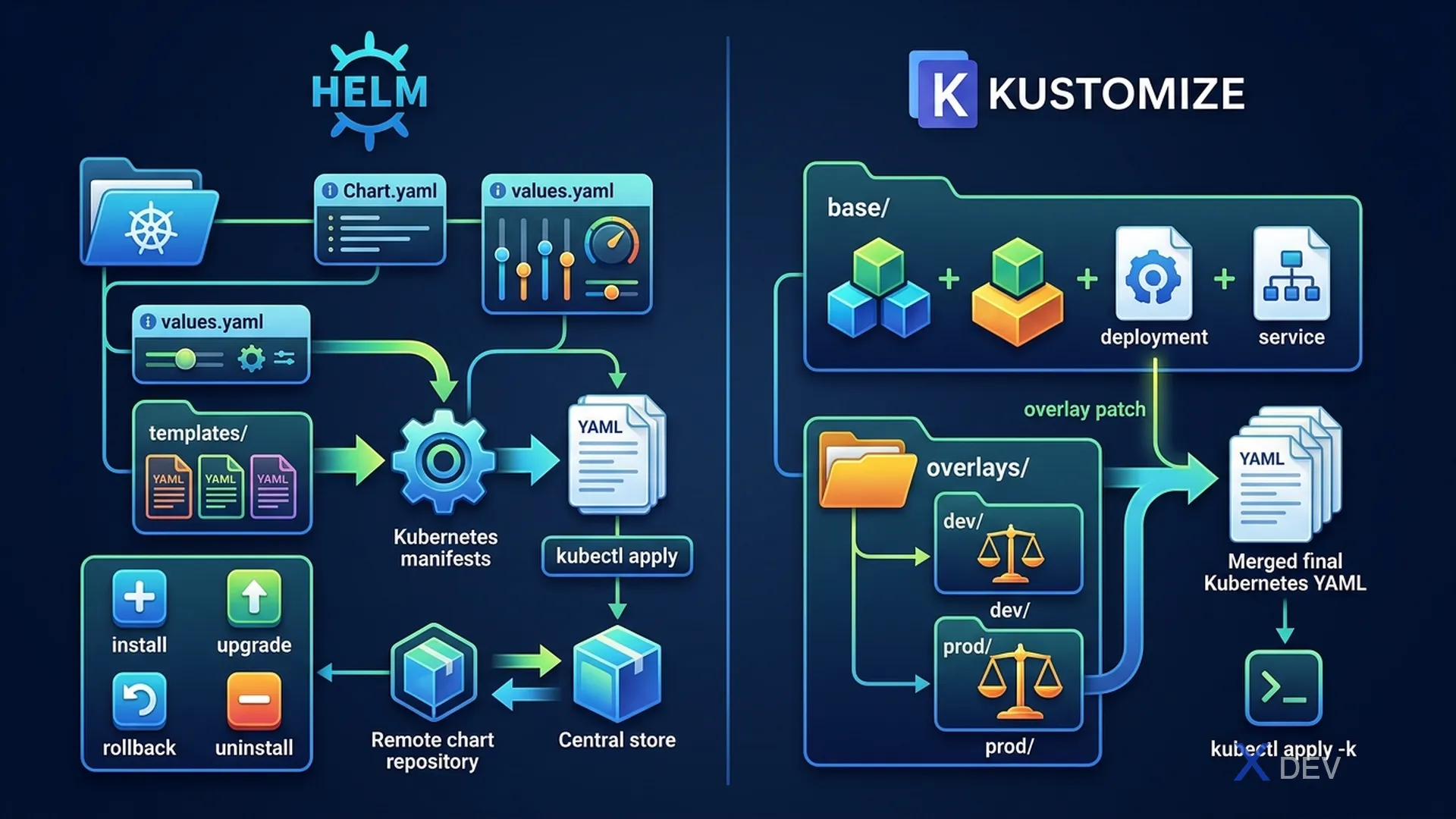
1. Helm Core Concepts
Helm is a Kubernetes package manager. It packages Kubernetes manifests into Charts and manages deployments as Releases.
Helm Architecture:

  values.yaml          Chart templates
       │                    │
       ▼                    ▼
  ┌──────────────────────────────┐
  │   Helm Template Engine       │
  │   Renders YAML manifests     │
  └──────────────┬───────────────┘
                 │
                 ▼ kubectl apply
         Kubernetes Cluster
(stored as Release)| Term | Definition |
|---|---|
| Chart | A Helm package — includes templates + default values |
| Release | An instance of a Chart deployed to a cluster |
| Repository | Where Charts are stored (like Artifact Hub, Bitnami) |
| Values | Configuration parameters to customize a Chart |
| Revision | Each install/upgrade creates a new revision |
2. Helm Commands
# Add repository
helm repo add bitnami https://charts.bitnami.com/bitnami
helm repo update

# Search charts
helm search repo bitnami/nginx
helm search hub wordpress

# Install chart
helm install my-release bitnami/nginx
helm install my-release bitnami/nginx --values custom-values.yaml
helm install my-release bitnami/nginx --set image.tag=1.25

# List releases
helm list
helm list -n production

# Upgrade release
helm upgrade my-release bitnami/nginx --set replicaCount=3

# Rollback to previous revision
helm rollback my-release 1   # rollback to revision 1
helm rollback my-release     # rollback to previous revision

# Uninstall
helm uninstall my-release

# View rendered templates (dry-run)
helm template my-release bitnami/nginx
helm install my-release bitnami/nginx --dry-run
Exam tip: CKAD frequently tests
helm installwith--setflag (override values directly) and--values file.yaml(override from a file). Also testshelm upgradeandhelm rollback. Remember that--setoverrides trump--valuesfile.
3. Kustomize
Kustomize is a tool built into kubectl that lets you customize Kubernetes manifests without templates or parameters. It uses an overlay pattern.
Kustomize Structure:
  base/
  ├── kustomization.yaml    # Base kustomization
  ├── deployment.yaml
  └── service.yaml

  overlays/
  ├── development/
  │   ├── kustomization.yaml  # Patches for dev
  │   └── replica-patch.yaml
  └── production/
      ├── kustomization.yaml  # Patches for prod
      └── replica-patch.yaml
# base/kustomization.yaml
apiVersion: kustomize.config.k8s.io/v1beta1
kind: Kustomization
resources:
- deployment.yaml
- service.yaml
# overlays/production/kustomization.yaml
apiVersion: kustomize.config.k8s.io/v1beta1
kind: Kustomization
bases:
- ../../base
patches:
- path: replica-patch.yaml
images:
- name: myapp
newTag: "2.0"# Apply with kustomize
kubectl apply -k overlays/production/
# Preview rendered output
kubectl kustomize overlays/production/4. Helm vs Kustomize
| Criteria | Helm | Kustomize |
|---|---|---|
| Approach | Template-based (Go templates) | Overlay/patching (plain YAML) |
| Learning curve | Higher (template syntax) | Lower (YAML patches) |
| Package mgmt | Yes (charts, repos, versioning) | No |
| Release history | Yes (upgrade/rollback) | No built-in |
| Built into kubectl | No (separate binary) | Yes (kubectl apply -k) |
| Best for | Distributing apps | Env-specific customization |
5. Cheat Sheet
| Task | Command |
|---|---|
| Install chart with custom values | helm install rel chart --values f.yaml |
| Override a single value | helm install rel chart --set key=val |
| Rollback Helm release | helm rollback release-name 2 |
| Apply kustomize overlay | kubectl apply -k overlays/prod/ |
| Preview kustomize output | kubectl kustomize overlays/prod/ |
6. Practice Questions
Q1: You need to deploy a Helm chart from the "stable" repo with a custom replica count of 5. Which command accomplishes this?
- A)
helm deploy myapp stable/nginx --replicas=5 - B)
helm install myapp stable/nginx --set replicaCount=5✓ - C)
helm install myapp stable/nginx -e replicaCount=5 - D)
helm apply myapp stable/nginx --values replicaCount=5
Explanation: helm install uses --set flag to override values. The syntax is --set key=value. The exact key name (replicaCount) depends on the chart's values.yaml, but --set is the correct flag for inline value overrides.
Q2: A team uses Kustomize with a base configuration and production/staging overlays. Which command applies the production overlay?
- A)
kubectl apply -f overlays/production/ - B)
kubectl kustomize overlays/production/ | kubectl apply -f - - C)
kubectl apply -k overlays/production/✓ - D)
kustomize apply overlays/production/
Explanation: kubectl apply -k (note -k not -f) is the built-in way to apply a kustomization directory. Option B also works but is more verbose. The -k flag tells kubectl to process the directory as a Kustomize configuration.
Q3: After a Helm upgrade introduces a bug, you need to revert to the previous working state. What is the correct approach?
- A) kubectl rollout undo deployment/myapp
- B) helm install --replace myapp stable/nginx
- C) helm rollback myapp ✓
- D) helm upgrade myapp --version=previous
Explanation: helm rollback reverts a release to a previous revision. Without specifying a revision number, it rolls back to the previous one. This undoes all the changes made by the failed upgrade, including ConfigMaps, Secrets, and other resources managed by the chart.