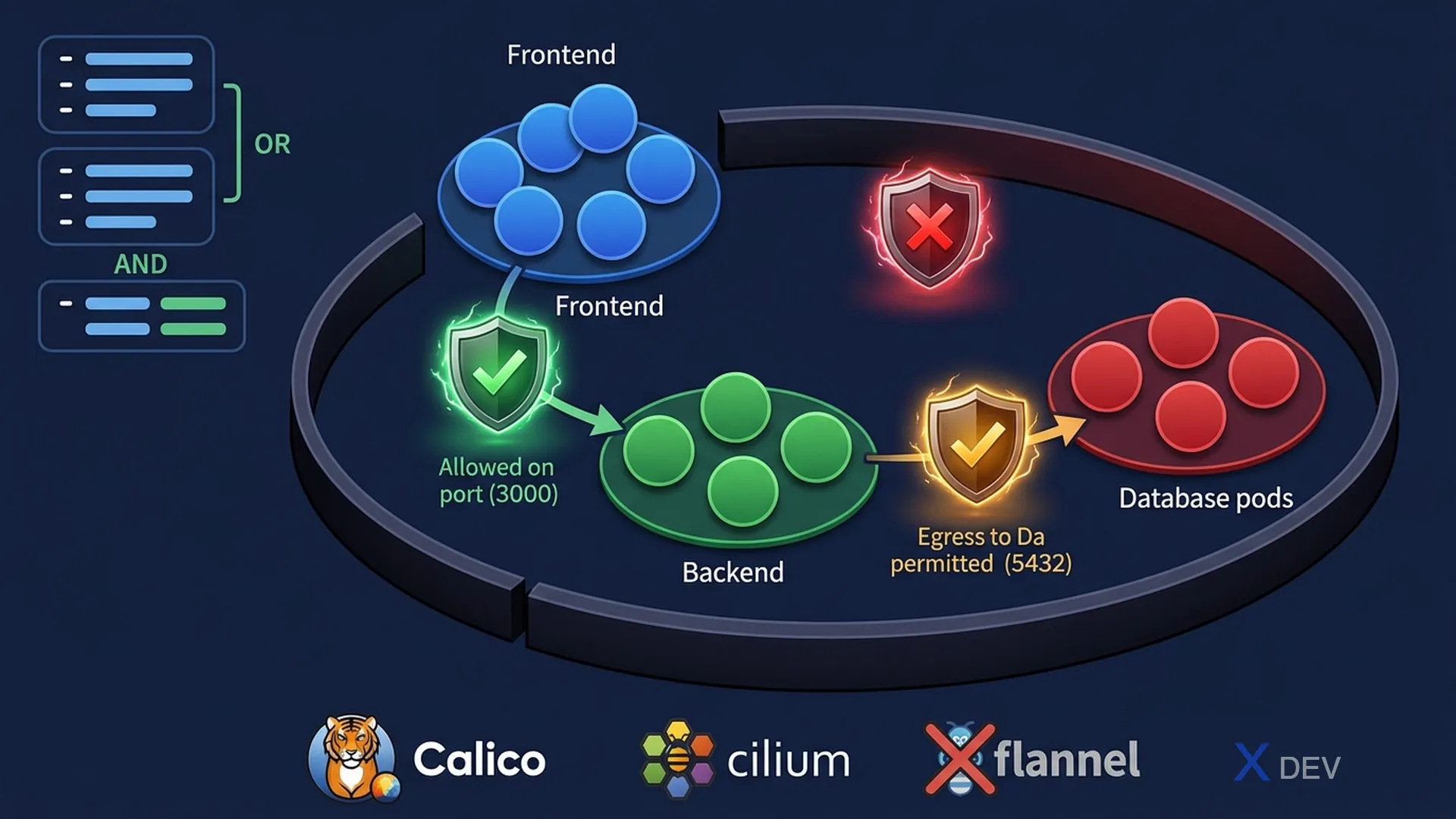
1. NetworkPolicy
By default, all Pods in a cluster can communicate with each other. NetworkPolicy restricts traffic based on labels.
Default: All pods can talk to all pods (no restriction)

After applying default-deny-all:
  Pod A ──✗──► Pod B (blocked)
  Pod A ──✗──► Pod C (blocked)

After applying allow policy:
  Pod A (app=frontend) ──✓──► Pod B (app=backend, port 3000)
  Pod A ──✗──► Pod C (app=database) (still blocked)
2. NetworkPolicy Syntax
apiVersion: networking.k8s.io/v1
kind: NetworkPolicy
metadata:
  name: backend-policy
  namespace: production
spec:
  podSelector:         # Applies to these pods (empty = all pods in ns)
    matchLabels:
      app: backend
  policyTypes:
  - Ingress            # Controls inbound traffic
  - Egress             # Controls outbound traffic
  ingress:
  - from:
    - podSelector:     # Allow from pods with this label
        matchLabels:
          app: frontend
    - namespaceSelector: # Allow from pods in these namespaces
        matchLabels:
          name: production
    ports:
    - protocol: TCP
      port: 3000
  egress:
  - to:
    - podSelector:
        matchLabels:
          app: database
    ports:
    - protocol: TCP
      port: 5432
Exam tip — AND vs OR in NetworkPolicy:
from: [{podSelector}, {namespaceSelector}]= OR (pod from either selector)
from: [{podSelector + namespaceSelector}]in the SAME item = AND (pod matching both)
This is one of the trickiest trap questions on the CKAD exam.
3. Common Patterns
Pattern 1: Default deny all ingress
---
apiVersion: networking.k8s.io/v1
kind: NetworkPolicy
metadata:
  name: default-deny-ingress
spec:
  podSelector: {}     # Empty = match ALL pods
  policyTypes:
  - Ingress
  # No ingress rules = deny all ingress

Pattern 2: Default deny all (both ingress + egress)
---
spec:
  podSelector: {}
  policyTypes:
  - Ingress
  - Egress
  # No rules = deny all

Pattern 3: Allow all ingress (override deny)
---
spec:
  podSelector: {}
  policyTypes:
  - Ingress
  ingress:
- {} # Empty rule = allow all ingress| Pattern | policyTypes | Rules | Effect |
|---|---|---|---|
| Deny all ingress | [Ingress] | No ingress rules | Block all inbound |
| Deny all egress | [Egress] | No egress rules | Block all outbound |
| Allow specific | [Ingress] | ingress rules listed | Allow matching only |
| Allow DNS egress | [Egress] | to port 53 (UDP+TCP) | Allow DNS queries |
Exam tip: NetworkPolicy only works if the CNI plugin supports it (Calico, Cilium, Weave). Flannel does NOT support NetworkPolicy! Ingress/Egress rules are additive — if multiple policies apply to the same Pod, Kubernetes ORs all rules together.
4. CKAD Exam Strategy
Exam information:
- 2 hours, ~15-20 hands-on tasks (performance-based)
- Each task has a different % value (prioritize high-value tasks first)
- Pass score: 66%
- Allowed docs: kubernetes.io/docs + helm.sh/docs

Important keyboard shortcuts:
  k = kubectl (export alias k=kubectl in exam, pre-configured)
  CTRL+R = search command history
  CTRL+A = go to beginning of line
Workflow for each task:
1. READ the task description carefully (pay attention to the namespace!)
2. Switch context if needed:
kubectl config use-context cluster-name
3. Set namespace shortcut:
export ns=target-namespace
alias kn="kubectl -n $ns"
4. Use --dry-run=client -o yaml to generate YAML:
kubectl run pod --image=nginx --dry-run=client -o yaml > pod.yaml
5. Edit YAML, apply, verify:
kubectl apply -f pod.yaml
kubectl get pods -n $ns5. --dry-run Pattern
# Generate YAML templates faster than writing by hand:

Pod:
  kubectl run nginx --image=nginx --dry-run=client -o yaml > pod.yaml

Deployment:
  kubectl create deployment myapp --image=nginx --replicas=3 \
    --dry-run=client -o yaml > deploy.yaml

Service (ClusterIP):
  kubectl create service clusterip myapp --tcp=80:8080 \
    --dry-run=client -o yaml > svc.yaml

ConfigMap:
  kubectl create configmap myconfig --from-literal=k=v \
    --dry-run=client -o yaml > cm.yaml

Secret:
  kubectl create secret generic mysecret --from-literal=pass=secret \
    --dry-run=client -o yaml > secret.yaml

Job:
  kubectl create job myjob --image=busybox -- echo hello \
    --dry-run=client -o yaml > job.yaml

CronJob:
  kubectl create cronjob mycron --image=busybox --schedule="*/1 * * * *" \
    -- echo hello --dry-run=client -o yaml > cron.yaml
6. Essential kubectl Shortcuts
| Full Command | Short Form |
|---|---|
kubectl get pods | k get po |
kubectl get deployments | k get deploy |
kubectl get services | k get svc |
kubectl get namespaces | k get ns |
kubectl get persistentvolumeclaims | k get pvc |
kubectl get configmaps | k get cm |
kubectl get serviceaccounts | k get sa |
kubectl get networkpolicies | k get netpol |
kubectl describe pod mypod | k describe po mypod |
kubectl delete pod mypod --force | k delete po mypod --force |
7. Final CKAD Cheat Sheet
| Domain | Key Topics | % Weight |
|---|---|---|
| App Design & Build | Multi-container, Init Containers, Jobs, CronJobs, volumes | 20% |
| App Deployment | Rolling updates, rollbacks, Helm, Kustomize | 20% |
| App Observability | Probes (liveness/readiness/startup), logs, debug | 15% |
| App Env/Config/Security | ConfigMaps, Secrets, SecurityContext, SA, Resources, QoS | 25% |
| Services & Networking | Services, Ingress, NetworkPolicies | 20% |
8. Practice Questions
Q1: You apply a NetworkPolicy with podSelector: {} and policyTypes: [Ingress] but no ingress rules. What happens?
- A) All ingress traffic is allowed (no rules = no restriction)
- B) All ingress traffic to ALL pods in the namespace is denied ✓
- C) All pods are deleted
- D) Only external ingress is denied; internal pod-to-pod traffic is allowed
Explanation: podSelector: {} matches ALL pods in the namespace. policyTypes: [Ingress] says this policy controls ingress. Having no ingress rules means zero traffic is allowed. This is the "default deny all ingress" pattern. Pod-to-pod traffic within the cluster is also denied because NetworkPolicy controls all ingress, regardless of source.
Q2: In a NetworkPolicy, what is the difference between these two from clauses?
Clause A: from: [{podSelector: {app: web}}, {namespaceSelector: {env: prod}}]
Clause B: from: [{podSelector: {app: web}, namespaceSelector: {env: prod}}]
- A) They are identical
- B) Clause A: allow from pods with app=web OR from any pod in env=prod namespace. Clause B: allow only from pods with app=web AND in env=prod namespace ✓
- C) Clause A uses AND logic, Clause B uses OR logic
- D) Clause B is invalid YAML syntax
Explanation: In NetworkPolicy, when podSelector and namespaceSelector are in SEPARATE list items (separated by -), they use OR logic. When they are in the SAME list item (same indentation level, no -), they use AND logic. This is a critical distinction and a common exam trap.
Q3: During the CKAD exam, you need to create a Deployment with a specific Pod spec. What is the fastest approach?
- A) Write the entire YAML from memory
- B) Search kubernetes.io docs and copy-paste example YAML
- C) Use kubectl create deployment --dry-run=client -o yaml to generate a template, then edit ✓
- D) Use helm to deploy a chart with default values
Explanation: The --dry-run=client -o yaml pattern generates valid YAML without creating resources. You redirect to a file, edit only the fields that differ, then apply. This is faster than manual YAML authoring and less likely to have syntax errors. Combining with > file.yaml lets you make precise edits.