1. 安全服務間通訊概述
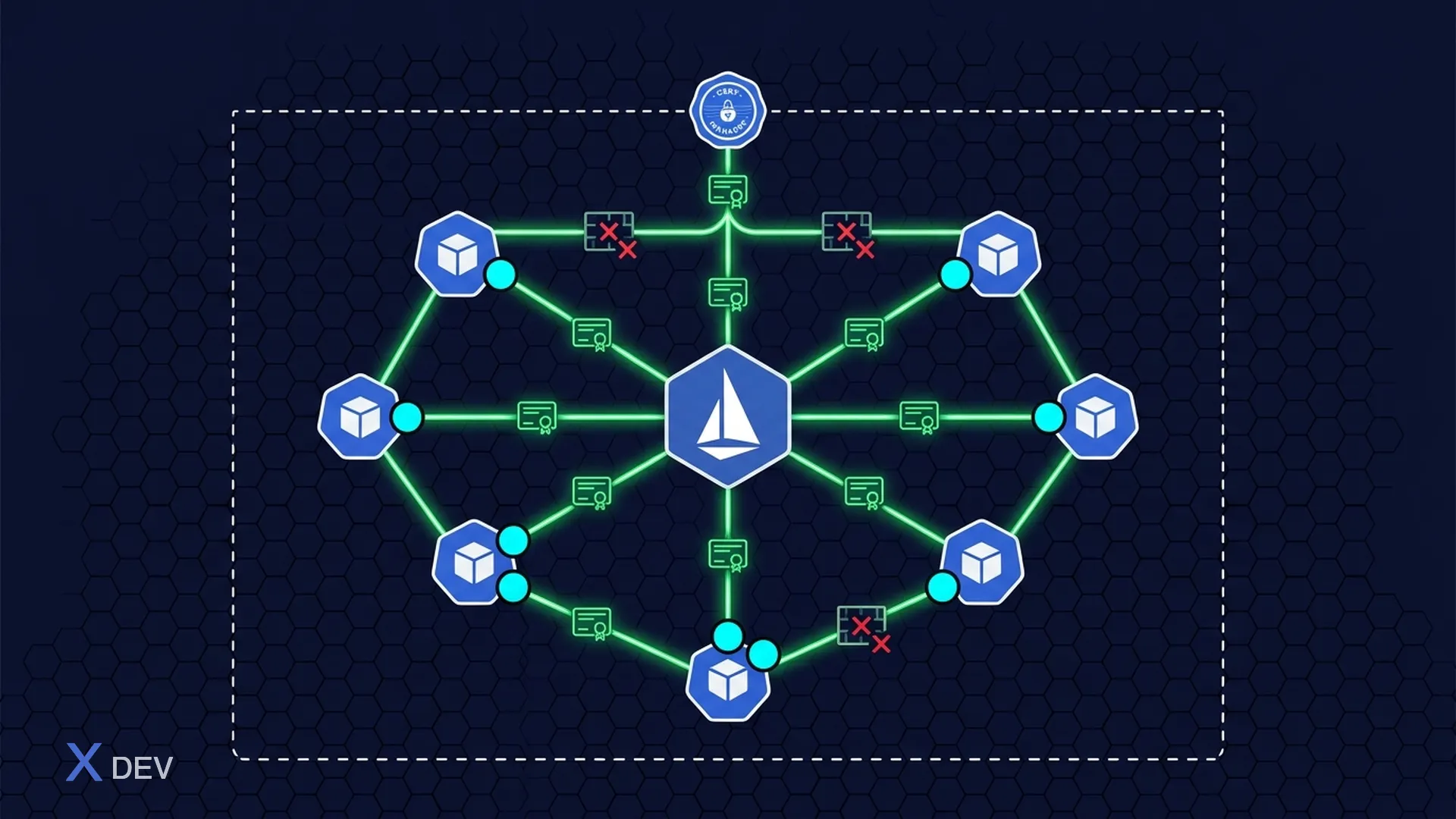
在醫療保健微服務架構中,服務透過網路相互通信,而網路永遠不值得信任。即使在內部網路中,攻擊者也可以:
- 竊聽:讀取服務之間的 PHI 資料(中間人)
- 類比:類比服務接收數據
- 篡改:修改服務之間的請求/回應
- 橫向移動:從一項受損服務存取另一項服務
mTLS和Service Mesh解決了上述所有問題。
1.1。服務間通訊的縱深防禦

5層保護:
- 第 1 層:網路策略 (Kubernetes) — 命名空間隔離、pod 到 pod 防火牆、出口限制
- 第 2 層:mTLS (Istio) — 自動憑證設定、24 小時輪替、相互驗證
- 第 3 層:授權策略 (Istio) — 服務到服務 ACL、基於路徑、基於 JWT 聲明
- 第 4 層:應用程式安全性 (Quarkus) — JWT 驗證、RBAC、業務邏輯授權
- 第 5 層:有效負載加密 (JWE) — 字段級加密、端對端加密
1.2。 mTLS 與單向 TLS
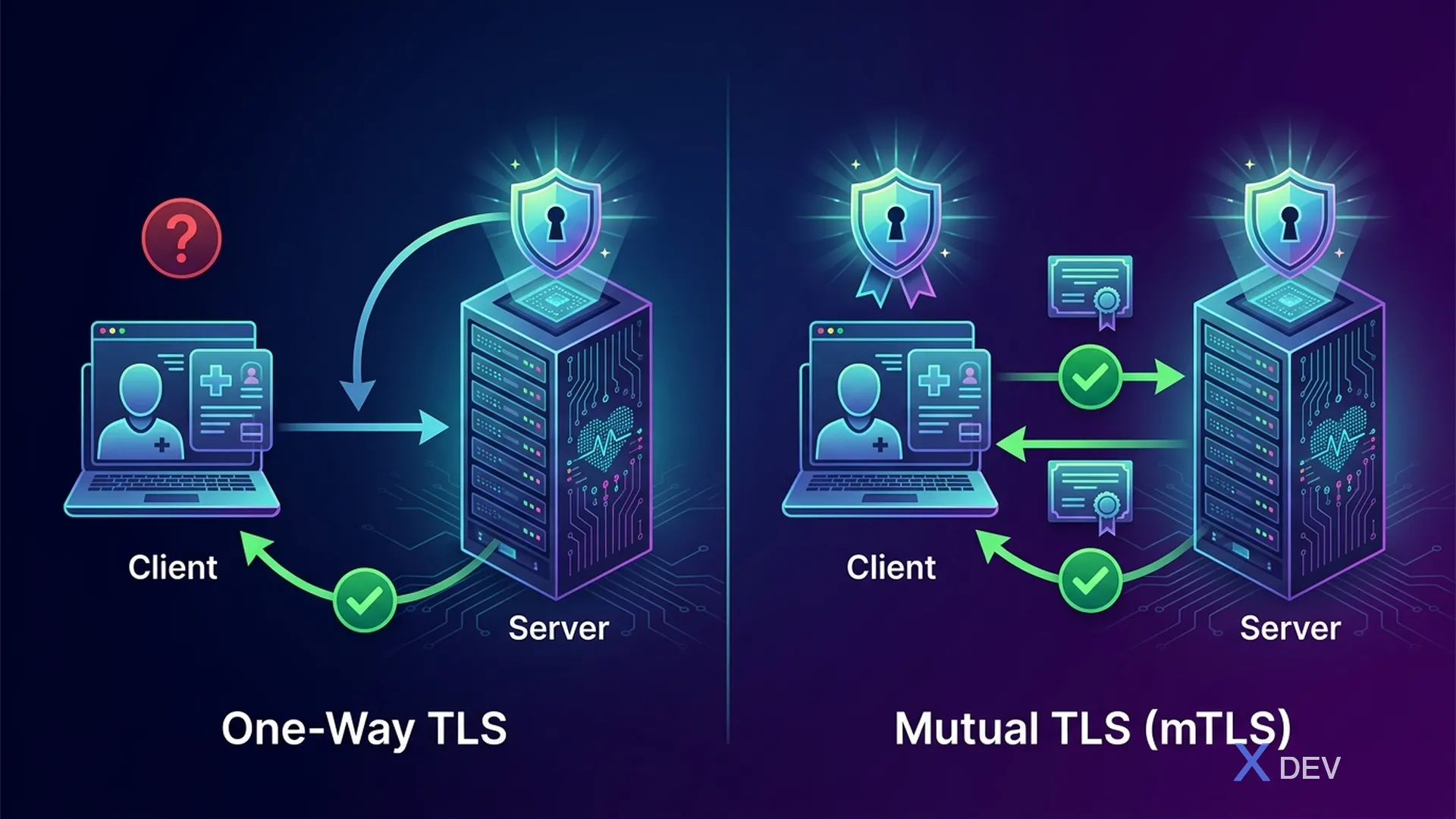
| 單向 TLS | 雙向 TLS (mTLS) | |
|---|---|---|
| 客戶端驗證伺服器 | ✓ | ✓ |
| 伺服器驗證客戶端 | ✗ | ✓ |
| 連線 | 任何用戶端都可以連線 | 兩者已驗證 |
| 傳輸通道 | 加密 | 加密+驗證 |
2. Quarkus 中的 mTLS 配置
2.1。 Quarkus mTLS 伺服器配置
# application.properties - Quarkus mTLS Server

# === TLS Server Configuration ===
quarkus.http.ssl.certificate.key-store-file=classpath:server-keystore.p12
quarkus.http.ssl.certificate.key-store-password=${KEYSTORE_PASSWORD}
quarkus.http.ssl.certificate.key-store-file-type=PKCS12

# === Client Certificate Verification (mTLS) ===
quarkus.http.ssl.client-auth=required
# Options: none (no mTLS), request (optional), required (mandatory)

# Trust store - chứa CA certificates được trust
quarkus.http.ssl.certificate.trust-store-file=classpath:server-truststore.p12
quarkus.http.ssl.certificate.trust-store-password=${TRUSTSTORE_PASSWORD}

# === TLS Protocol Configuration ===
quarkus.http.ssl.protocols=TLSv1.3,TLSv1.2
quarkus.http.ssl.cipher-suites=\
  TLS_AES_256_GCM_SHA384,\
  TLS_AES_128_GCM_SHA256,\
  TLS_CHACHA20_POLY1305_SHA256

# === HTTPS Only ===
quarkus.http.insecure-requests=disabled
quarkus.http.ssl-port=8443
2.2。證書產生腳本
#!/bin/bash
# generate-mtls-certs.sh
# Tạo CA và certificates cho mTLS giữa microservices

set -euo pipefail

CERT_DIR="./certs"
CA_PASSWORD="ca-password-change-me"
VALIDITY_DAYS=365

mkdir -p "$CERT_DIR"

# === 1. Create Root CA ===
echo "=== Creating Root CA ==="
openssl req -x509 -newkey rsa:4096 \
    -keyout "$CERT_DIR/ca-key.pem" \
    -out "$CERT_DIR/ca-cert.pem" \
    -days $VALIDITY_DAYS \
    -subj "/O=Hospital Internal/CN=Healthcare CA" \
    -passout "pass:$CA_PASSWORD"

# === 2. Create Service Certificates ===
create_service_cert() {
    local SERVICE_NAME=$1
    local DNS_NAMES=$2

    echo "=== Creating cert for $SERVICE_NAME ==="

    # Generate key + CSR
    openssl req -newkey rsa:2048 -nodes \
        -keyout "$CERT_DIR/${SERVICE_NAME}-key.pem" \
        -out "$CERT_DIR/${SERVICE_NAME}.csr" \
        -subj "/O=Hospital Internal/CN=${SERVICE_NAME}"

    # Create extensions file for SAN
    cat > "$CERT_DIR/${SERVICE_NAME}-ext.cnf" << EOF
authorityKeyIdentifier=keyid,issuer
basicConstraints=CA:FALSE
keyUsage = digitalSignature, keyEncipherment
extendedKeyUsage = serverAuth, clientAuth
subjectAltName = $DNS_NAMES
EOF

    # Sign with CA
    openssl x509 -req \
        -in "$CERT_DIR/${SERVICE_NAME}.csr" \
        -CA "$CERT_DIR/ca-cert.pem" \
        -CAkey "$CERT_DIR/ca-key.pem" \
        -CAcreateserial \
        -out "$CERT_DIR/${SERVICE_NAME}-cert.pem" \
        -days $VALIDITY_DAYS \
        -extfile "$CERT_DIR/${SERVICE_NAME}-ext.cnf" \
        -passin "pass:$CA_PASSWORD"

    # Create PKCS12 keystore (for Quarkus)
    openssl pkcs12 -export \
        -in "$CERT_DIR/${SERVICE_NAME}-cert.pem" \
        -inkey "$CERT_DIR/${SERVICE_NAME}-key.pem" \
        -certfile "$CERT_DIR/ca-cert.pem" \
        -out "$CERT_DIR/${SERVICE_NAME}-keystore.p12" \
        -name "$SERVICE_NAME" \
        -passout "pass:${SERVICE_NAME}-ks-password"

    echo "  Created $CERT_DIR/${SERVICE_NAME}-keystore.p12"
}

# Create certs for each microservice
create_service_cert "patient-service" \
    "DNS:patient-service,DNS:patient-service.healthcare.svc.cluster.local,DNS:localhost"

create_service_cert "lab-service" \
    "DNS:lab-service,DNS:lab-service.healthcare.svc.cluster.local,DNS:localhost"

create_service_cert "pharmacy-service" \
    "DNS:pharmacy-service,DNS:pharmacy-service.healthcare.svc.cluster.local,DNS:localhost"

create_service_cert "api-gateway" \
    "DNS:api-gateway,DNS:api.hospital.internal,DNS:localhost"

# === 3. Create Trust Store (chứa CA cert) ===
keytool -importcert -alias healthcare-ca \
    -file "$CERT_DIR/ca-cert.pem" \
    -keystore "$CERT_DIR/truststore.p12" \
    -storetype PKCS12 \
    -storepass "truststore-password" \
    -noprompt

echo ""
echo "=== Certificates created successfully ==="
echo "CA cert:     $CERT_DIR/ca-cert.pem"
echo "Trust store: $CERT_DIR/truststore.p12"
2.3。具有 mTLS 的 Quarkus REST 用戶端
package vn.hospital.client;

import jakarta.ws.rs.*;
import jakarta.ws.rs.core.MediaType;
import org.eclipse.microprofile.rest.client.inject.RegisterRestClient;

import java.util.List;
import java.util.UUID;

@RegisterRestClient(configKey = "lab-service")
@Path("/api/v1/lab-results")
@Produces(MediaType.APPLICATION_JSON)
@Consumes(MediaType.APPLICATION_JSON)
public interface LabServiceClient {

    @GET
    @Path("/patient/{patientId}")
    List<LabResultDTO> getByPatient(@PathParam("patientId") UUID patientId);
}
# REST Client mTLS Configuration
quarkus.rest-client.lab-service.url=https://lab-service.healthcare.svc.cluster.local:8443

# Client certificate (mTLS - prove our identity)
quarkus.rest-client.lab-service.key-store=classpath:patient-service-keystore.p12
quarkus.rest-client.lab-service.key-store-password=${PATIENT_KS_PASSWORD}

# Trust store (verify server certificate)
quarkus.rest-client.lab-service.trust-store=classpath:truststore.p12
quarkus.rest-client.lab-service.trust-store-password=${TRUSTSTORE_PASSWORD}

# Hostname verification
quarkus.rest-client.lab-service.hostname-verifier=DEFAULT
3. 使用 cert-manager 進行憑證管理
3.1。證書管理器安裝
# Install cert-manager trên Kubernetes
kubectl apply -f https://github.com/cert-manager/cert-manager/releases/download/v1.14.0/cert-manager.yaml

# Verify installation
kubectl get pods -n cert-manager
kubectl get crd | grep cert-manager
3.2。內部 CA 發行人
# cert-manager/internal-ca-issuer.yaml
# Secret chứa CA key pair
apiVersion: v1
kind: Secret
metadata:
  name: healthcare-ca-key-pair
  namespace: cert-manager
type: kubernetes.io/tls
data:
  tls.crt: <base64-encoded-ca-cert>
  tls.key: <base64-encoded-ca-key>
---
# ClusterIssuer sử dụng internal CA
apiVersion: cert-manager.io/v1
kind: ClusterIssuer
metadata:
  name: healthcare-internal-ca
spec:
  ca:
    secretName: healthcare-ca-key-pair
---
# Let's Encrypt cho external-facing services
apiVersion: cert-manager.io/v1
kind: ClusterIssuer
metadata:
  name: letsencrypt-prod
spec:
  acme:
    server: https://acme-v02.api.letsencrypt.org/directory
    email: [email protected]
    privateKeySecretRef:
      name: letsencrypt-prod-account
    solvers:
      - http01:
          ingress:
            class: nginx
3.3。服務證書
# cert-manager/patient-service-cert.yaml
apiVersion: cert-manager.io/v1
kind: Certificate
metadata:
  name: patient-service-tls
  namespace: healthcare
spec:
  secretName: patient-service-tls-secret
  duration: 720h      # 30 days
  renewBefore: 168h    # Renew 7 days before expiry
  isCA: false

  privateKey:
    algorithm: RSA
    size: 2048

  usages:
    - server auth
    - client auth     # Important for mTLS

  dnsNames:
    - patient-service
    - patient-service.healthcare
    - patient-service.healthcare.svc
    - patient-service.healthcare.svc.cluster.local

  issuerRef:
    name: healthcare-internal-ca
    kind: ClusterIssuer
    group: cert-manager.io
3.4。使用 cert-manager 憑證進行 Kubernetes 部署
# k8s/patient-service-deployment.yaml
apiVersion: apps/v1
kind: Deployment
metadata:
  name: patient-service
  namespace: healthcare
  labels:
    app: patient-service
    version: v1
spec:
  replicas: 3
  selector:
    matchLabels:
      app: patient-service
  template:
    metadata:
      labels:
        app: patient-service
        version: v1
    spec:
      serviceAccountName: patient-service-sa
      containers:
        - name: patient-service
          image: hospital.internal/patient-service:1.0.0
          ports:
            - containerPort: 8443
              name: https
          volumeMounts:
            - name: tls-certs
              mountPath: /etc/tls
              readOnly: true
            - name: truststore
              mountPath: /etc/truststore
              readOnly: true
          env:
            - name: QUARKUS_HTTP_SSL_CERTIFICATE_KEY_STORE_FILE
              value: /etc/tls/keystore.p12
            - name: QUARKUS_HTTP_SSL_CERTIFICATE_KEY_STORE_PASSWORD
              valueFrom:
                secretKeyRef:
                  name: patient-service-tls-password
                  key: password
            - name: QUARKUS_HTTP_SSL_CERTIFICATE_TRUST_STORE_FILE
              value: /etc/truststore/truststore.p12
          resources:
            requests:
              memory: "512Mi"
              cpu: "250m"
            limits:
              memory: "1Gi"
              cpu: "1000m"
          livenessProbe:
            httpGet:
              path: /q/health/live
              port: 8443
              scheme: HTTPS
            initialDelaySeconds: 30
          readinessProbe:
            httpGet:
              path: /q/health/ready
              port: 8443
              scheme: HTTPS
            initialDelaySeconds: 10
      volumes:
        - name: tls-certs
          secret:
            secretName: patient-service-tls-secret
        - name: truststore
          secret:
            secretName: healthcare-truststore
4. Istio 醫療保健服務網格
4.1。 Istio安裝
# Install Istio with "strict" mTLS profile
istioctl install --set profile=default \
    --set meshConfig.defaultConfig.holdApplicationUntilProxyStarts=true \
    --set values.global.mtls.auto=true

# Enable sidecar injection cho healthcare namespace
kubectl label namespace healthcare istio-injection=enabled

# Verify
kubectl get pods -n istio-system
istioctl analyze -n healthcare
4.2。具有醫療保健服務的 Istio 架構
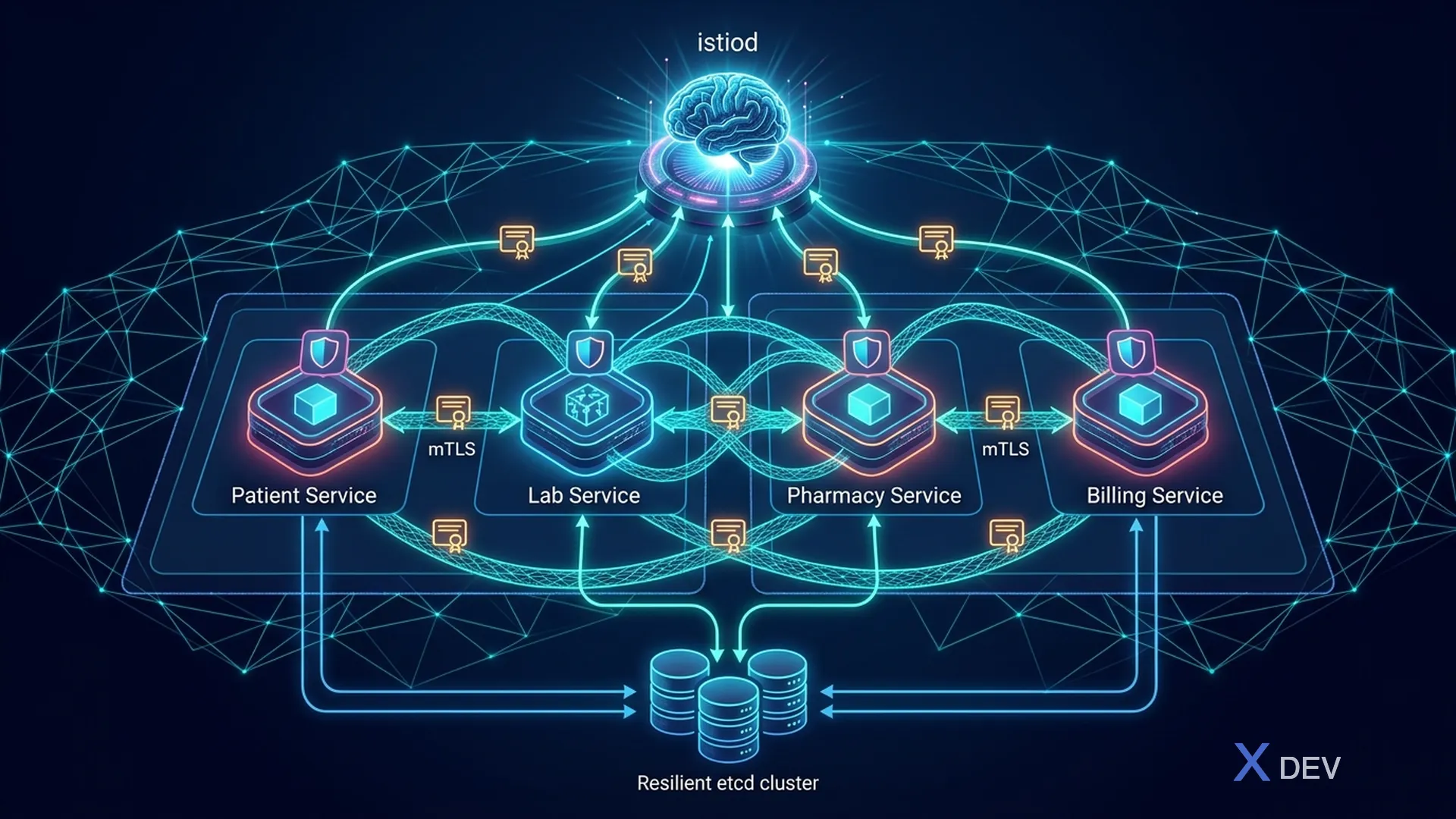
架構:
- istio-system:istiod 控制平面(Citadel CA、Pilot 配置、遙測)
- healthcare 命名空間:帶有 Envoy sidecar 代理的 Pod
- 病患服務 + Envoy(mTLS、身分驗證策略、遙測)
- 實驗室服務+特使
- 服務之間的所有流量都經過 Envoy → 自動 mTLS 加密
4.3。對等身份驗證 - 嚴格 mTLS
# istio/peer-authentication.yaml

# Namespace-level: STRICT mTLS cho toàn bộ healthcare namespace
apiVersion: security.istio.io/v1
kind: PeerAuthentication
metadata:
  name: healthcare-strict-mtls
  namespace: healthcare
spec:
  mtls:
    mode: STRICT    # STRICT = bắt buộc mTLS, từ chối plaintext

---
# Mesh-level: Default STRICT cho toàn cluster
apiVersion: security.istio.io/v1
kind: PeerAuthentication
metadata:
  name: default
  namespace: istio-system
spec:
  mtls:
    mode: STRICT

---
# Exception: cho health check endpoints từ Kubernetes
apiVersion: security.istio.io/v1
kind: PeerAuthentication
metadata:
  name: patient-service-health
  namespace: healthcare
spec:
  selector:
    matchLabels:
      app: patient-service
  mtls:
    mode: STRICT
  portLevelMtls:
    8080:
      mode: PERMISSIVE  # Health check port cho kubelet
4.4。 AuthorizationPolicy - 服務到服務的存取控制
# istio/authorization-policies.yaml

# === Default Deny All ===
apiVersion: security.istio.io/v1
kind: AuthorizationPolicy
metadata:
  name: deny-all
  namespace: healthcare
spec:
  {}  # Empty spec = deny all

---
# === Patient Service: cho phép Gateway + Lab Service ===
apiVersion: security.istio.io/v1
kind: AuthorizationPolicy
metadata:
  name: patient-service-policy
  namespace: healthcare
spec:
  selector:
    matchLabels:
      app: patient-service
  action: ALLOW
  rules:
    # Rule 1: API Gateway có thể gọi tất cả endpoints
    - from:
        - source:
            principals:
              - "cluster.local/ns/healthcare/sa/api-gateway-sa"
      to:
        - operation:
            methods: ["GET", "POST", "PUT", "DELETE"]
            paths: ["/api/v1/*"]

    # Rule 2: Lab Service chỉ được gọi patient lookup
    - from:
        - source:
            principals:
              - "cluster.local/ns/healthcare/sa/lab-service-sa"
      to:
        - operation:
            methods: ["GET"]
            paths: ["/api/v1/patients/*"]

    # Rule 3: Health checks từ Kubernetes
    - from:
        - source:
            namespaces: ["kube-system"]
      to:
        - operation:
            methods: ["GET"]
            paths: ["/q/health/*"]

---
# === Lab Service: chỉ Patient Service + Gateway ===
apiVersion: security.istio.io/v1
kind: AuthorizationPolicy
metadata:
  name: lab-service-policy
  namespace: healthcare
spec:
  selector:
    matchLabels:
      app: lab-service
  action: ALLOW
  rules:
    - from:
        - source:
            principals:
              - "cluster.local/ns/healthcare/sa/api-gateway-sa"
              - "cluster.local/ns/healthcare/sa/patient-service-sa"
      to:
        - operation:
            methods: ["GET", "POST"]
            paths: ["/api/v1/lab-results/*"]

---
# === Pharmacy Service: chỉ Gateway + Patient Service ===
apiVersion: security.istio.io/v1
kind: AuthorizationPolicy
metadata:
  name: pharmacy-service-policy
  namespace: healthcare
spec:
  selector:
    matchLabels:
      app: pharmacy-service
  action: ALLOW
  rules:
    - from:
        - source:
            principals:
              - "cluster.local/ns/healthcare/sa/api-gateway-sa"
              - "cluster.local/ns/healthcare/sa/patient-service-sa"
      to:
        - operation:
            methods: ["GET", "POST"]
            paths: ["/api/v1/prescriptions/*"]

---
# === Database: chỉ services trong healthcare namespace ===
apiVersion: security.istio.io/v1
kind: AuthorizationPolicy
metadata:
  name: database-policy
  namespace: healthcare
spec:
  selector:
    matchLabels:
      app: postgresql
  action: ALLOW
  rules:
    - from:
        - source:
            namespaces: ["healthcare"]
            principals:
              - "cluster.local/ns/healthcare/sa/patient-service-sa"
              - "cluster.local/ns/healthcare/sa/lab-service-sa"
              - "cluster.local/ns/healthcare/sa/pharmacy-service-sa"
      to:
        - operation:
            ports: ["5432"]
5. Istio 醫療保健流量管理
5.1。斷路器
# istio/destination-rules.yaml

apiVersion: networking.istio.io/v1beta1
kind: DestinationRule
metadata:
  name: patient-service-dr
  namespace: healthcare
spec:
  host: patient-service.healthcare.svc.cluster.local
  trafficPolicy:
    # mTLS settings
    tls:
      mode: ISTIO_MUTUAL

    # Connection pool
    connectionPool:
      tcp:
        maxConnections: 100
        connectTimeout: 5s
      http:
        h2UpgradePolicy: DEFAULT
        http1MaxPendingRequests: 100
        http2MaxRequests: 1000
        maxRequestsPerConnection: 10
        maxRetries: 3

    # Circuit breaker
    outlierDetection:
      consecutive5xxErrors: 5        # Trip after 5 consecutive 5xx
      interval: 10s                   # Check interval
      baseEjectionTime: 30s          # Eject for 30s
      maxEjectionPercent: 50         # Max 50% of hosts ejected
      minHealthPercent: 30           # Min healthy hosts

---
# === Canary deployment for patient-service ===
apiVersion: networking.istio.io/v1beta1
kind: DestinationRule
metadata:
  name: patient-service-versions
  namespace: healthcare
spec:
  host: patient-service
  trafficPolicy:
    tls:
      mode: ISTIO_MUTUAL
  subsets:
    - name: v1
      labels:
        version: v1
    - name: v2
      labels:
        version: v2

---
apiVersion: networking.istio.io/v1beta1
kind: VirtualService
metadata:
  name: patient-service-vs
  namespace: healthcare
spec:
  hosts:
    - patient-service
  http:
    - match:
        - headers:
            x-canary:
              exact: "true"
      route:
        - destination:
            host: patient-service
            subset: v2
    - route:
        - destination:
            host: patient-service
            subset: v1
          weight: 95
        - destination:
            host: patient-service
            subset: v2
          weight: 5
5.2。重試和超時策略
# istio/virtual-service-resilience.yaml
apiVersion: networking.istio.io/v1beta1
kind: VirtualService
metadata:
  name: lab-service-vs
  namespace: healthcare
spec:
  hosts:
    - lab-service
  http:
    - route:
        - destination:
            host: lab-service
      timeout: 30s
      retries:
        attempts: 3
        perTryTimeout: 10s
        retryOn: "5xx,reset,connect-failure,retriable-4xx"
6. 使用 Quarkus 保護 gRPC
6.1。用於醫療保健服務間通訊的 gRPC
由於二進位協定(協定緩衝區)和 HTTP/2 多路復用,gRPC 為服務間通訊提供了比 REST 更高的效能。
┌─────────────────────────────────────────────────────────┐
│  REST vs gRPC cho Healthcare                             │
│                                                          │
│  REST (JSON):                                            │
│    + Dễ debug (human-readable)                           │
│    + Phổ biến, tooling tốt                               │
│    - Verbose (JSON serialization overhead)               │
│    - No streaming                                        │
│                                                          │
│  gRPC (Protobuf):                                        │
│    + Binary format (nhỏ hơn 10x)                         │
│    + HTTP/2 (multiplexing, streaming)                    │
│    + Strong typing (schema contract)                     │
│    + Built-in deadline/timeout                           │
│    - Khó debug (binary)                                  │
│    - Browser support hạn chế                             │
│                                                          │
│  Dùng REST cho: External APIs, FHIR endpoints            │
│  Dùng gRPC cho: Internal service-to-service calls        │
└─────────────────────────────────────────────────────────┘
6.2。協定緩衝區定義
// src/main/proto/patient_service.proto
syntax = "proto3";

package vn.hospital.grpc;

option java_package = "vn.hospital.grpc";
option java_outer_classname = "PatientServiceProto";

service PatientGrpcService {
    // Unary RPC - Get patient by ID
    rpc GetPatient (GetPatientRequest) returns (PatientResponse);

    // Server streaming - Get patient's lab results
    rpc GetLabResults (GetLabResultsRequest) returns (stream LabResultResponse);

    // Unary - Verify patient exists (for other services)
    rpc VerifyPatient (VerifyPatientRequest) returns (VerifyPatientResponse);
}

message GetPatientRequest {
    string patient_id = 1;
    string hospital_id = 2;     // For tenant isolation
    string requester_id = 3;    // For audit
}

message PatientResponse {
    string id = 1;
    string mrn = 2;
    string full_name = 3;       // Encrypted if needed
    string department = 4;
    string hospital_id = 5;
    int64 created_at = 6;
}

message GetLabResultsRequest {
    string patient_id = 1;
    string department = 2;
    int32 limit = 3;
}

message LabResultResponse {
    string id = 1;
    string test_name = 2;
    string result_value = 3;
    string unit = 4;
    string status = 5;
    int64 result_date = 6;
}

message VerifyPatientRequest {
    string patient_id = 1;
    string hospital_id = 2;
}

message VerifyPatientResponse {
    bool exists = 1;
    string department = 2;
}
6.3。 Quarkus gRPC 服務實現
package vn.hospital.grpc;

import io.grpc.Status;
import io.quarkus.grpc.GrpcService;
import io.quarkus.security.identity.SecurityIdentity;
import io.smallrye.mutiny.Multi;
import io.smallrye.mutiny.Uni;
import jakarta.inject.Inject;
import org.jboss.logging.Logger;

@GrpcService
public class PatientGrpcServiceImpl implements PatientGrpcService {

    private static final Logger LOG = Logger.getLogger(PatientGrpcServiceImpl.class);

    @Inject
    SecurityIdentity identity;

    @Inject
    PatientRepository patientRepository;

    @Inject
    AuditService auditService;

    @Override
    public Uni<PatientServiceProto.PatientResponse> getPatient(
            PatientServiceProto.GetPatientRequest request) {

        String requesterId = request.getRequesterId();
        String hospitalId = request.getHospitalId();
        String patientId = request.getPatientId();

        // Audit log
        auditService.logAccess(requesterId, "GET_PATIENT", patientId);

        return patientRepository.findById(patientId, hospitalId)
            .onItem().ifNull().failWith(() ->
                Status.NOT_FOUND
                    .withDescription("Patient not found: " + patientId)
                    .asRuntimeException()
            )
            .map(patient -> PatientServiceProto.PatientResponse.newBuilder()
                .setId(patient.getId().toString())
                .setMrn(patient.getMrn())
                .setFullName(patient.getFullName())
                .setDepartment(patient.getDepartment())
                .setHospitalId(patient.getHospitalId())
                .build()
            );
    }

    @Override
    public Multi<PatientServiceProto.LabResultResponse> getLabResults(
            PatientServiceProto.GetLabResultsRequest request) {

        return patientRepository.findLabResults(
                request.getPatientId(),
                request.getDepartment(),
                request.getLimit())
            .map(result -> PatientServiceProto.LabResultResponse.newBuilder()
                .setId(result.getId().toString())
                .setTestName(result.getTestName())
                .setResultValue(result.getResultValue())
                .setUnit(result.getUnit())
                .setStatus(result.getStatus())
                .setResultDate(result.getResultDate().toEpochMilli())
                .build()
            );
    }

    @Override
    public Uni<PatientServiceProto.VerifyPatientResponse> verifyPatient(
            PatientServiceProto.VerifyPatientRequest request) {

        return patientRepository.exists(request.getPatientId(), request.getHospitalId())
            .map(result -> PatientServiceProto.VerifyPatientResponse.newBuilder()
                .setExists(result.exists())
                .setDepartment(result.department() != null ? result.department() : "")
                .build()
            );
    }
}
6.4。 gRPC 配置
# application.properties - gRPC Configuration

# gRPC Server
quarkus.grpc.server.port=9000
quarkus.grpc.server.use-separate-server=true

# TLS cho gRPC
quarkus.grpc.server.ssl.certificate=classpath:server-cert.pem
quarkus.grpc.server.ssl.key=classpath:server-key.pem
quarkus.grpc.server.ssl.trust-store=classpath:truststore.p12

# gRPC client (Lab Service calling Patient Service)
quarkus.grpc.clients.patient-service.host=patient-service.healthcare.svc.cluster.local
quarkus.grpc.clients.patient-service.port=9000
quarkus.grpc.clients.patient-service.ssl.trust-store=classpath:truststore.p12

# Maven dependency
# <dependency>
#     <groupId>io.quarkus</groupId>
#     <artifactId>quarkus-grpc</artifactId>
# </dependency>
7. Kubernetes 網路策略
7.1。用於命名空間隔離的網路策略
# k8s/network-policies.yaml

# === Default Deny All trong healthcare namespace ===
apiVersion: networking.k8s.io/v1
kind: NetworkPolicy
metadata:
  name: default-deny-all
  namespace: healthcare
spec:
  podSelector: {}  # Apply to all pods
  policyTypes:
    - Ingress
    - Egress

---
# === Allow DNS resolution ===
apiVersion: networking.k8s.io/v1
kind: NetworkPolicy
metadata:
  name: allow-dns
  namespace: healthcare
spec:
  podSelector: {}
  policyTypes:
    - Egress
  egress:
    - to: []
      ports:
        - port: 53
          protocol: UDP
        - port: 53
          protocol: TCP

---
# === Patient Service Network Policy ===
apiVersion: networking.k8s.io/v1
kind: NetworkPolicy
metadata:
  name: patient-service-netpol
  namespace: healthcare
spec:
  podSelector:
    matchLabels:
      app: patient-service
  policyTypes:
    - Ingress
    - Egress

  ingress:
    # Cho phép từ API Gateway
    - from:
        - podSelector:
            matchLabels:
              app: api-gateway
      ports:
        - port: 8443
          protocol: TCP
        - port: 9000  # gRPC
          protocol: TCP

    # Cho phép từ Lab Service (gRPC verify patient)
    - from:
        - podSelector:
            matchLabels:
              app: lab-service
      ports:
        - port: 9000  # gRPC only
          protocol: TCP

    # Istio sidecar communication
    - from:
        - podSelector:
            matchLabels:
              security.istio.io/tlsMode: istio
      ports:
        - port: 15090  # Envoy metrics
          protocol: TCP

  egress:
    # Cho phép tới PostgreSQL
    - to:
        - podSelector:
            matchLabels:
              app: postgresql
      ports:
        - port: 5432
          protocol: TCP

    # Cho phép tới Lab Service
    - to:
        - podSelector:
            matchLabels:
              app: lab-service
      ports:
        - port: 8443
          protocol: TCP

    # Cho phép tới Kafka
    - to:
        - podSelector:
            matchLabels:
              app: kafka
      ports:
        - port: 9093  # SSL
          protocol: TCP

    # Cho phép tới Vault
    - to:
        - namespaceSelector:
            matchLabels:
              name: vault
          podSelector:
            matchLabels:
              app: vault
      ports:
        - port: 8200
          protocol: TCP

    # Cho phép tới Keycloak
    - to:
        - namespaceSelector:
            matchLabels:
              name: auth
          podSelector:
            matchLabels:
              app: keycloak
      ports:
        - port: 8443
          protocol: TCP

---
# === Database Network Policy - Very Restrictive ===
apiVersion: networking.k8s.io/v1
kind: NetworkPolicy
metadata:
  name: postgresql-netpol
  namespace: healthcare
spec:
  podSelector:
    matchLabels:
      app: postgresql
  policyTypes:
    - Ingress
    - Egress

  ingress:
    # Chỉ cho phép từ service pods trong healthcare namespace
    - from:
        - podSelector:
            matchLabels:
              tier: service
      ports:
        - port: 5432
          protocol: TCP

  egress:
    # PostgreSQL chỉ cần egress cho replication
    - to:
        - podSelector:
            matchLabels:
              app: postgresql
      ports:
        - port: 5432
          protocol: TCP
8. mTLS 的可觀察性
8.1。凱利儀表板
# istio/kiali.yaml
apiVersion: v1
kind: ConfigMap
metadata:
  name: kiali
  namespace: istio-system
data:
  config.yaml: |
    auth:
      strategy: openid
      openid:
        client_id: kiali
        issuer_uri: https://keycloak.hospital.internal/realms/infrastructure
        scopes:
          - openid
          - profile
    deployment:
      accessible_namespaces:
        - healthcare
    external_services:
      prometheus:
        url: http://prometheus.monitoring:9090
      grafana:
        url: http://grafana.monitoring:3000
      tracing:
        url: http://jaeger-query.tracing:16686
8.2。 Jaeger 分散式追蹤
# istio/jaeger-deployment.yaml
apiVersion: apps/v1
kind: Deployment
metadata:
  name: jaeger
  namespace: tracing
spec:
  replicas: 1
  selector:
    matchLabels:
      app: jaeger
  template:
    metadata:
      labels:
        app: jaeger
    spec:
      containers:
        - name: jaeger
          image: jaegertracing/all-in-one:1.54
          ports:
            - containerPort: 16686  # UI
            - containerPort: 14268  # Collector
          env:
            - name: COLLECTOR_OTLP_ENABLED
              value: "true"
            - name: SPAN_STORAGE_TYPE
              value: "elasticsearch"
            - name: ES_SERVER_URLS
              value: "http://elasticsearch.monitoring:9200"
8.3。 Quarkus 追蹤配置
# application.properties - OpenTelemetry Tracing

# Enable OpenTelemetry
quarkus.otel.enabled=true
quarkus.otel.exporter.otlp.endpoint=http://jaeger-collector.tracing:4317
quarkus.otel.exporter.otlp.protocol=grpc

# Service name
quarkus.otel.resource.attributes=service.name=patient-service,\
  service.version=1.0.0,\
  deployment.environment=production

# Sampling (production: sample 10%)
quarkus.otel.traces.sampler=parentbased_traceidratio
quarkus.otel.traces.sampler.arg=0.1

# Propagation
quarkus.otel.propagators=tracecontext,baggage,b3multi
8.4。監控 mTLS 運作狀況
# prometheus/mtls-alerts.yaml
groups:
  - name: mtls-health
    rules:
      - alert: MtlsCertExpiringSoon
        expr: |
          (certmanager_certificate_expiration_timestamp_seconds -
           time()) / 86400 < 7
        for: 1h
        labels:
          severity: warning
        annotations:
          summary: "Certificate {{ $labels.name }} expires in < 7 days"

      - alert: MtlsConnectionFailed
        expr: |
          increase(istio_tcp_connections_closed_total{
            connection_security_policy="unknown"
          }[5m]) > 10
        for: 5m
        labels:
          severity: critical
        annotations:
          summary: "mTLS connection failures detected"

      - alert: UnauthorizedServiceAccess
        expr: |
          increase(istio_requests_total{
            response_code="403",
            reporter="destination"
          }[5m]) > 20
        for: 5m
        labels:
          severity: critical
        annotations:
          summary: "Multiple 403 responses - possible unauthorized access attempt"

      - alert: PlaintextTrafficDetected
        expr: |
          istio_tcp_received_bytes_total{
            connection_security_policy="none"
          } > 0
        for: 1m
        labels:
          severity: critical
        annotations:
          summary: "Plaintext (non-mTLS) traffic detected in healthcare namespace"
9. 用於開發的 Docker Compose
# docker-compose-mtls-dev.yml
version: '3.8'

services:
  # Patient Service
  patient-service:
    build: ./patient-service
    ports:
      - "8443:8443"
      - "9000:9000"
    environment:
      QUARKUS_HTTP_SSL_CERTIFICATE_KEY_STORE_FILE: /etc/tls/patient-service-keystore.p12
      QUARKUS_HTTP_SSL_CERTIFICATE_KEY_STORE_PASSWORD: patient-ks-password
      QUARKUS_HTTP_SSL_CERTIFICATE_TRUST_STORE_FILE: /etc/tls/truststore.p12
      QUARKUS_HTTP_SSL_CERTIFICATE_TRUST_STORE_PASSWORD: truststore-password
      QUARKUS_HTTP_SSL_CLIENT_AUTH: required
    volumes:
      - ./certs:/etc/tls:ro
    depends_on:
      - postgresql
      - keycloak

  # Lab Service
  lab-service:
    build: ./lab-service
    ports:
      - "8444:8443"
    environment:
      QUARKUS_HTTP_SSL_CERTIFICATE_KEY_STORE_FILE: /etc/tls/lab-service-keystore.p12
      QUARKUS_HTTP_SSL_CERTIFICATE_KEY_STORE_PASSWORD: lab-ks-password
      QUARKUS_HTTP_SSL_CERTIFICATE_TRUST_STORE_FILE: /etc/tls/truststore.p12
      QUARKUS_HTTP_SSL_CERTIFICATE_TRUST_STORE_PASSWORD: truststore-password
      QUARKUS_HTTP_SSL_CLIENT_AUTH: required
    volumes:
      - ./certs:/etc/tls:ro
    depends_on:
      - postgresql

  # PostgreSQL
  postgresql:
    image: postgres:16
    environment:
      POSTGRES_DB: healthcare_db
      POSTGRES_USER: healthcare_app
      POSTGRES_PASSWORD: healthcare_password
    ports:
      - "5432:5432"
    volumes:
      - pg_data:/var/lib/postgresql/data

  # Keycloak
  keycloak:
    image: quay.io/keycloak/keycloak:24.0
    command: start-dev --import-realm
    environment:
      KEYCLOAK_ADMIN: admin
      KEYCLOAK_ADMIN_PASSWORD: admin
    volumes:
      - ./src/main/resources/healthcare-realm.json:/opt/keycloak/data/import/healthcare-realm.json
    ports:
      - "8180:8080"

volumes:
  pg_data:
總結
在本課程中,我們為醫療保健微服務建立了全面的安全服務間通訊:
- Quarkus 中的 mTLS:使用客戶端憑證驗證、金鑰庫/信任庫管理設定 HTTPS 伺服器
- 憑證管理:cert-manager 使用內部 CA 或 Let's Encrypt 自動設定和輪替憑證
- Istio Service Mesh:Sidecar代理自動強制執行mTLS,將應用程式程式碼從TLS邏輯中解放出來
- PeerAuthentication:嚴格模式確保網格中的所有流量都經過加密
- AuthorizationPolicy:細粒度的服務到服務的存取控制-實驗室服務只能呼叫Patient GET
- 流量管理:斷路器、金絲雀部署、彈性重試策略
- 安全性 gRPC:具有 TLS、協定緩衝區、串流媒體的高效能服務間協議
- NetworkPolicy:Kubernetes等級的防火牆-預設拒絕,每個服務明確允許規則
- 可觀察性:Kiali(服務圖)、Jaeger(分散式追蹤)、Prometheus 證書健康狀況警報
整體安全模型:
NetworkPolicy (L3/L4) -> Istio mTLS (L4) -> AuthorizationPolicy (L7)
  -> JWT Validation (L7) -> RBAC (Application) -> Business Logic
練習
-
mTLS 設定:使用腳本建立 CA 憑證和服務憑證
generate-mtls-certs.sh。使用 mTLS 設定 2 個 Quarkus 服務(病患 + 實驗室)。測試:患者服務成功調用實驗室服務。測試:沒有客戶端憑證的請求被拒絕 (403)。 -
Istio Service Mesh:在 Minikube/Kind 上安裝 Istio。部署病患服務+實驗室服務
healthcare命名空間。啟用邊車注入。建立對等身份驗證 (STRICT)。驗證 mTLS 等於istioctl proxy-config和 Kiali 儀表板。 -
授權策略:建立預設拒絕所有策略。允許:網關 -> 病患服務(所有方法)、實驗室服務 -> 病患服務(僅限 GET)。測試:實驗室服務 POST 至病患服務 -> 403。測試:藥房服務(無政策)-> 403。
-
網路策略 + gRPC:為病患服務建立網路策略(僅從網關和實驗室接受)。部署 gRPC 服務以進行病患驗證。實驗室服務呼叫 gRPCVerifyPatient。驗證 Jaeger 追蹤中的流量。
| ◀ 上一篇 | 下一篇文章 ▶ |
|---|---|
| 第 15 課:微服務中的端對端資料加密 | 第 17 課:HIPAA 技術保障 - 完整實施清單 |