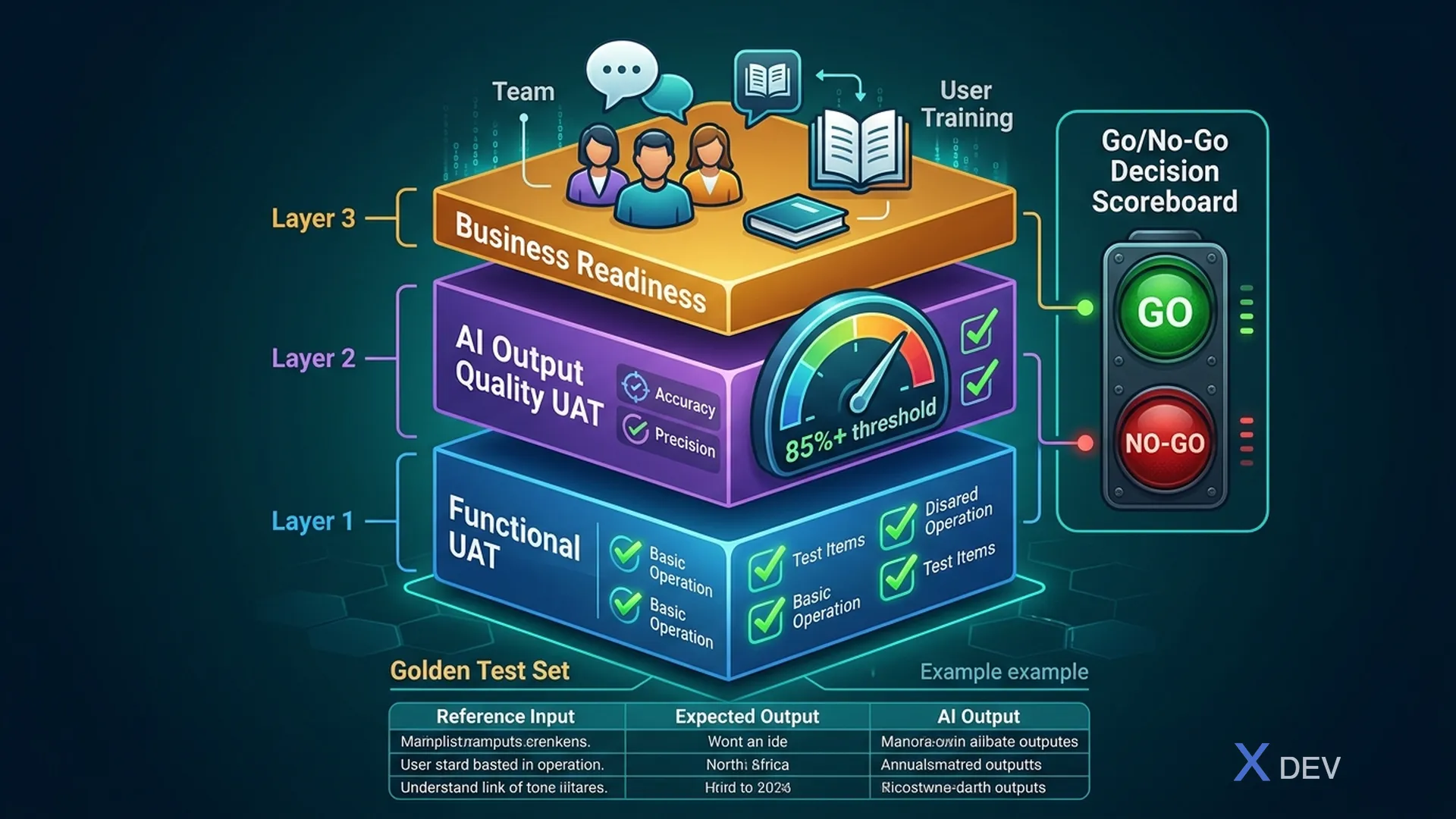
UAT is the final test round BA and business stakeholders run before release. With traditional features, pass/fail is clear. With AI features, it's more complex: AI might technically work but business still isn't ready to accept it.
1. Why UAT for AI is Different
| Aspect | Traditional Feature | AI Feature |
|---|---|---|
| Test case | Input X → Output Y fixed | Input X → Output Y variable |
| Pass/Fail | Binary | Can be "acceptable range" |
| Edge cases | Finite, list them all | Nearly infinite |
| Bias testing | Not needed | Essential |
| User trust | Less relevant | Critical — does user trust AI? |
| Rollback | Code revert | May need model version rollback |
2. Three Tiers of UAT for AI Feature
Tier 1: Functional UAT (traditional)
Test core business flows:
- Happy paths per acceptance criteria
- Error handling for invalid input
- Integration with other systems
Tier 2: AI Output Quality UAT
Test AI output quality in business context:
- Accuracy: How accurate is output on test set?
- Relevance: Answers address context correctly?
- Hallucination check: Is AI making things up?
- Tone & format: Does output match brand/policy?
How: BA + domain expert prepare Golden Test Set — 50–100 sample inputs with expected outputs. Run AI on this set and score.
Golden Test Set template:
| Test ID | Input | Expected | Actual | Pass/Fail | Notes |
|---------|-------|----------|--------|-----------|-------|
| TC-001  | "What is interest rate..." | "Current rate is..." | ... | ... | ... |
Tier 3: Business Readiness UAT
Test organizational readiness (not just system):
- Have users been trained?
- Does helpdesk/agent know how to handle AI mistakes?
- Is rollback procedure ready?
- Is monitoring dashboard live?
3. UAT Plan Template for AI Feature
# UAT PLAN: [Feature Name]

## 1. Scope & Objectives
- Feature: [description]
- UAT period: [start → end date]
- Environment: [UAT env URL, dataset]
- Objectives: Verify [list business objectives]

## 2. Participants
| Role | Person | Responsibility |
|------|--------|-----------------|
| UAT Lead (BA) | ... | Plan, coordinate, sign-off |
| Business Tester | ... | Execute test cases |
| Domain Expert | ... | Evaluate AI output quality |
| Product Owner | ... | Go/no-go decision |

## 3. Test Scenarios

### Group A: Functional (must-pass)
- [TC-F-001] Happy path: [description]
- [TC-F-002] Error path: [description]

### Group B: AI Quality (acceptance threshold)
- [TC-AI-001] Accuracy on golden test set ≥ [N]%
- [TC-AI-002] Hallucination rate ≤ [M]% on test set
- [TC-AI-003] Escalation trigger correct when confidence < threshold

### Group C: Business Readiness (must complete)
- [TC-BR-001] Training materials reviewed by [team]
- [TC-BR-002] Rollback procedure tested
- [TC-BR-003] Monitoring alerts configured

## 4. Entry/Exit Criteria
**Entry (UAT can start when):**
☐ Build deployed on UAT env
☐ QA signed off on SIT
☐ Test data prepared

**Exit (UAT completes when):**
☐ 100% Group A scenarios passed
☐ Group B accuracy ≥ threshold
☐ 0 Critical defects open
☐ Business stakeholder signed off
4. Go/No-Go Decision Framework
BA consolidates UAT results and proposes go/no-go:
| Category | Criteria | Status | Weight |
|---|---|---|---|
| Blocker | 0 critical defects | ✅/❌ | Must pass |
| Blocker | Accuracy ≥ threshold | ✅/❌ | Must pass |
| Blocker | Human override working | ✅/❌ | Must pass |
| Important | All happy paths pass | ✅/❌ | High |
| Important | Business tester sign-off | ✅/❌ | High |
| Nice-to-have | All edge cases pass | ✅/❌ | Medium |
| Nice-to-have | Performance within SLA | ✅/❌ | Medium |
Decision rule:
- ✅ All Blockers → GO
- ❌ Any Blocker → NO-GO (fix and re-test)
- GO with Important defects → GO with known issues (communicate clearly)
5. Business Readiness Checklist
Before launch, BA verifies:
USER TRAINING
☐ User guide / FAQ written and reviewed
☐ Training session scheduled
☐ Sandbox/demo env available for users
☐ Change management email drafted

SUPPORT READINESS
☐ Helpdesk/Agent trained that AI can fail and how to handle
☐ Escalation path AI → agent → supervisor clear
☐ FAQ about AI limitations ready for support team
☐ Known limitations document shared

TECHNICAL READINESS
☐ Monitoring dashboard live and tested
☐ Alerting rules set (accuracy drop, error rate spike)
☐ Rollback procedure documented and tested
☐ On-call schedule for launch day

COMMUNICATION
☐ Launch announcement drafted and approved
☐ Internal stakeholders notified [N] days pre-launch
☐ External communication (if any) approved
6. Rollout Strategy for AI Feature
Launching 100% immediately is risky. Common strategies:
| Strategy | When | Risk |
|---|---|---|
| Full launch | Low risk, high confidence | Highest |
| Canary (5% → 20% → 100%) | Medium risk, need monitoring | Lower, catch early issues |
| A/B test | Want to measure business impact | Requires large sample |
| Shadow mode | AI runs behind scenes, humans decide | Zero user impact, data collection |
Summary
Good UAT for AI = Functional test + AI quality test + Business readiness. BA connects all three, not just runs test cases.
Key mindset shift: Acceptance threshold, not absolute pass/fail. 85% AI accuracy might be "good enough" — but stakeholders must agree before, not after results.