Autoscaling in Kubernetes — From HPA to Karpenter
Autoscaling is one of the main reasons to run workloads on Kubernetes. Instead of having to manually adjust resources as traffic increases or decreases, Kubernetes provides many automatic scaling mechanisms at many different levels. This article will explore the entire autoscaling ecosystem — from traditional HPA to KEDA event-driven scaling, the latest In-Place Pod Resource Updates, and Karpenter for cluster-level scaling.
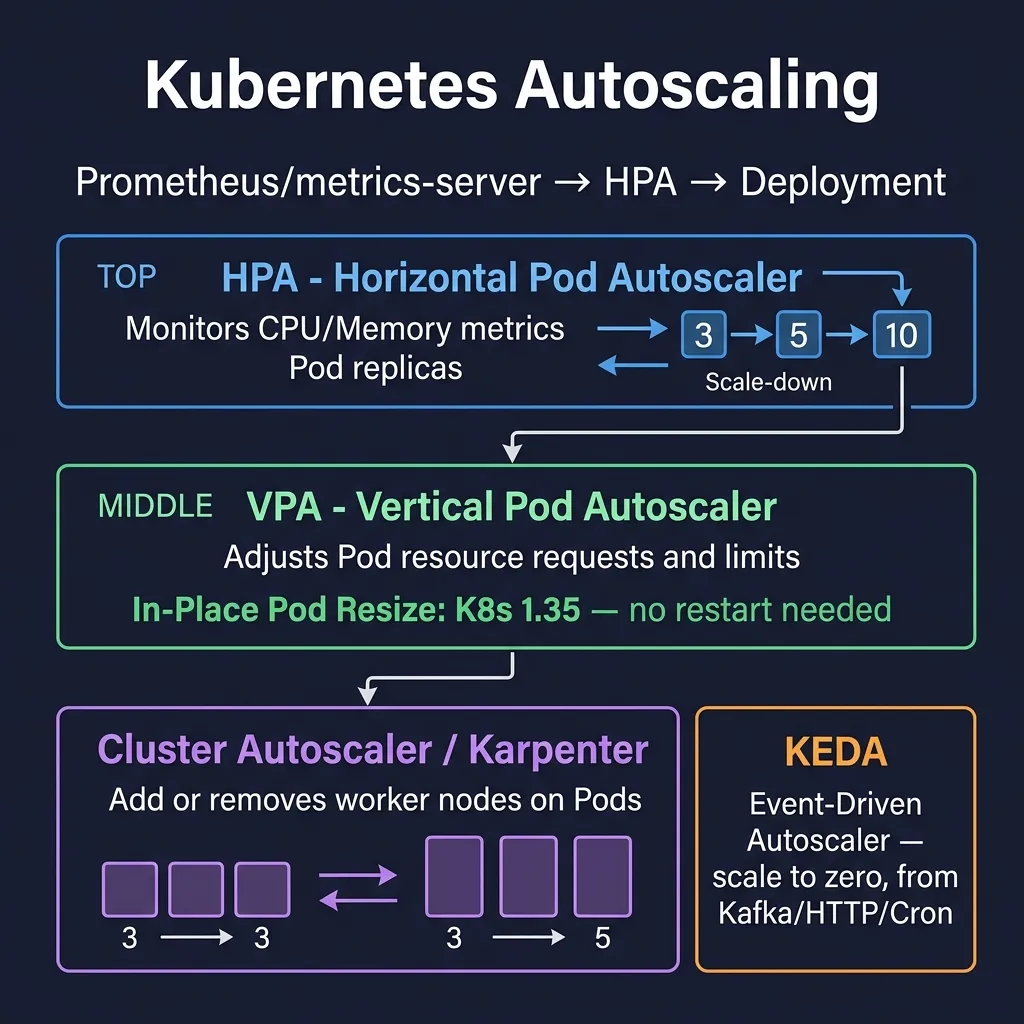
1. HorizontalPodAutoscaler (HPA)
HPA is the most popular horizontal scaling mechanism — it automatically increases/decreases the number of Pod replicas based on metrics.
1.1 HPA with CPU and Memory
apiVersion: autoscaling/v2
kind: HorizontalPodAutoscaler
metadata:
  name: api-server-hpa
  namespace: production
spec:
  scaleTargetRef:
    apiVersion: apps/v1
    kind: Deployment
    name: api-server
  minReplicas: 2
  maxReplicas: 20
  metrics:
  # Scale theo CPU utilization
  - type: Resource
    resource:
      name: cpu
      target:
        type: Utilization
        averageUtilization: 70   # Scale up khi avg CPU > 70%
  # Scale theo Memory utilization
  - type: Resource
    resource:
      name: memory
      target:
        type: Utilization
        averageUtilization: 80   # Scale up khi avg Memory > 80%
  behavior:
    scaleDown:
      stabilizationWindowSeconds: 300   # Chờ 5 phút trước khi scale down
      policies:
      - type: Percent
        value: 25
        periodSeconds: 60    # Scale down tối đa 25% mỗi phút
    scaleUp:
      stabilizationWindowSeconds: 0    # Scale up ngay lập tức
      policies:
      - type: Pods
        value: 4
        periodSeconds: 15    # Thêm tối đa 4 pods mỗi 15 giây
      - type: Percent
        value: 100
        periodSeconds: 15    # Hoặc tăng 100%
      selectPolicy: Max      # Chọn policy cho phép scale up nhiều nhất
Important note: HPA needs resources.requests to be set on the container to calculate utilization. If requests are not set, HPA does not know "70% of how many".
1.2 Custom Metrics API
HPA can scale to any metric via the Custom Metrics API (usually provided by Prometheus Adapter):
apiVersion: autoscaling/v2
kind: HorizontalPodAutoscaler
metadata:
  name: queue-processor-hpa
spec:
  scaleTargetRef:
    apiVersion: apps/v1
    kind: Deployment
    name: queue-processor
  minReplicas: 1
  maxReplicas: 50
  metrics:
  # Custom metric từ Prometheus via prometheus-adapter
  - type: Pods
    pods:
      metric:
        name: http_requests_per_second
      target:
        type: AverageValue
        averageValue: "100"    # 100 requests/second per pod
  # External metric (e.g., từ cloud provider)
  - type: External
    external:
      metric:
        name: sqs_queue_depth
        selector:
          matchLabels:
            queue: order-processing
      target:
        type: AverageValue
        averageValue: "30"     # 30 messages per pod
1.3 Scale Down Cooldown
stabilizationWindowSeconds for scale down is extremely important in production. If set too low, short traffic spikes will cause the cluster to scale up and then scale down continuously (flapping). Best practice:
- Scale up:
stabilizationWindowSeconds: 0to30— quick response to increased traffic__HTMLTAG_33___ - Scale down:
stabilizationWindowSeconds: 300to600— wait 5-10 minutes before reducing pods__HTMLTAG_39___
2. VerticalPodAutoscaler (VPA)
VPA automatically adjusts requests and limits of containers based on actual usage. Don't add Pods, but make each Pod "bigger" or "smaller".
apiVersion: autoscaling.k8s.io/v1
kind: VerticalPodAutoscaler
metadata:
  name: api-server-vpa
  namespace: production
spec:
  targetRef:
    apiVersion: apps/v1
    kind: Deployment
    name: api-server
  updatePolicy:
    updateMode: "Auto"    # VPA tự động update pods
  resourcePolicy:
    containerPolicies:
    - containerName: api
      minAllowed:
        cpu: "100m"
        memory: "128Mi"
      maxAllowed:
        cpu: "4"
        memory: "8Gi"
      controlledResources:
      - cpu
      - memory
      controlledValues: RequestsAndLimits
2.1 VPA Modes
- Off: VPA only calculates recommendations, does not change anything. Used to view suggestions from VPA Recommender.
- Initial: VPA sets resources when Pods are newly created, does not update running Pods.
- Recreate: VPA updates by evict and recreates Pod — causes short downtime.
- Auto: Now works like Recreate; In the future, In-Place updates will be used.
2.2 View VPA Recommendations
kubectl describe vpa api-server-vpa -n production

# Output sẽ có section:
# Recommendation:
#   Container Recommendations:
#     Container Name: api
#     Lower Bound:
#       Cpu:     100m
#       Memory:  256Mi
#     Target:
#       Cpu:     450m       # Đây là giá trị VPA recommend
#       Memory:  512Mi
#     Uncapped Target:
#       Cpu:     450m
#       Memory:  512Mi
#     Upper Bound:
#       Cpu:     2000m
#       Memory:  2Gi
2.3 VPA Limitations__HTMLTAG_74___
- Cannot co-exist with HPA with the same metric: If HPA scales by CPU, VPA cannot manage CPU of the same deployment. Solution: HPA scale according to custom metrics, VPA manage CPU/memory; Or use In-Place updates instead of VPA.
- Need to restart Pod: With Recreate/Auto mode, each VPA update is a Pod restart — not suitable for stateful apps.
- Need to install separately: VPA is not available in Kubernetes, need to install via Helm or manifests.
3. In-Place Pod Resource Updates (K8s 1.35 GA)
This is one of the most important recent Kubernetes features: the ability to change the resources.requests and resources.limits of a running Pod without restart.
3.1 Why Are In-Place Updates Important?
Previously, every resource change required a Pod restart — this was not acceptable for:
- Database pods: PostgreSQL, MySQL need to warm-up cache after restart
- Long-running ML jobs: Training jobs take hours, restart = lost all progress
- Stateful applications: Apps with in-memory state
- JVM applications: Java apps need JIT warm-up time
3.2 resizePolicy
apiVersion: v1
kind: Pod
metadata:
  name: database-pod
spec:
  containers:
  - name: postgres
    image: postgres:16
    resources:
      requests:
        cpu: "1"
        memory: "2Gi"
      limits:
        cpu: "2"
        memory: "4Gi"
    resizePolicy:
    - resourceName: cpu
      restartPolicy: NotRequired    # Thay đổi CPU không cần restart
    - resourceName: memory
      restartPolicy: RestartContainer  # Thay đổi memory CẦN restart container
Two values of restartPolicy:
- NotRequired: Resource can be changed in-place, no need to restart the container
- RestartContainer: Changing the resource will trigger the container to restart (still not restarting the entire Pod)
3.3 Performing In-Place Resize
# Tăng CPU request của pod đang chạy
kubectl patch pod database-pod --subresource resize --type merge -p '
{
  "spec": {
    "containers": [{
      "name": "postgres",
      "resources": {
        "requests": {"cpu": "2", "memory": "2Gi"},
        "limits": {"cpu": "4", "memory": "4Gi"}
      }
    }]
  }
}'

# Kiểm tra trạng thái resize
kubectl get pod database-pod -o jsonpath='{.status.resize}'
# Output: "Proposed" → "InProgress" → "Infeasible" hoặc thành công (field biến mất)

# Xem allocated resources thực tế
kubectl get pod database-pod -o jsonpath='{.status.containerStatuses[0].allocatedResources}'
3.4 In-Place Resize with Deployment__HTMLTAG_140___
apiVersion: apps/v1
kind: Deployment
metadata:
  name: ml-inference-server
spec:
  replicas: 3
  selector:
    matchLabels:
      app: ml-inference
  template:
    metadata:
      labels:
        app: ml-inference
    spec:
      containers:
      - name: inference
        image: my-ml-server:v2.1
        resources:
          requests:
            cpu: "2"
            memory: "4Gi"
          limits:
            cpu: "4"
            memory: "8Gi"
        resizePolicy:
        - resourceName: cpu
          restartPolicy: NotRequired
        - resourceName: memory
          restartPolicy: NotRequired
# Tăng resources cho tất cả pods trong deployment (rolling)
kubectl patch deployment ml-inference-server --type=json -p='[
  {"op": "replace", "path": "/spec/template/spec/containers/0/resources/requests/cpu", "value": "4"},
  {"op": "replace", "path": "/spec/template/spec/containers/0/resources/limits/cpu", "value": "8"}
]'
apiVersion: apps/v1
kind: Deployment
metadata:
name: ml-inference-server
spec:
replicas: 3
selector:
matchLabels:
app: ml-inference
template:
metadata:
labels:
app: ml-inference
spec:
containers:
- name: inference
image: my-ml-server:v2.1
resources:
requests:
cpu: "2"
memory: "4Gi"
limits:
cpu: "4"
memory: "8Gi"
resizePolicy:
- resourceName: cpu
restartPolicy: NotRequired
- resourceName: memory
restartPolicy: NotRequired
# Tăng resources cho tất cả pods trong deployment (rolling)
kubectl patch deployment ml-inference-server --type=json -p='[
{"op": "replace", "path": "/spec/template/spec/containers/0/resources/requests/cpu", "value": "4"},
{"op": "replace", "path": "/spec/template/spec/containers/0/resources/limits/cpu", "value": "8"}
]'
4. KEDA — Kubernetes Event-Driven Autoscaling
KEDA is a CNCF Graduated project that provides event-driven autoscaling for Kubernetes. Biggest difference compared to HPA: KEDA can scale to zero — without events, there are no Pods.
4.1 KEDA Installation
helm repo add kedacore https://kedacore.github.io/charts
helm repo update
helm install keda kedacore/keda \
  --namespace keda \
  --create-namespace \
  --version 2.14.0
4.2 ScaledObject — Scale Deployment
ScaledObject is KEDA's main CRD, replacing HPA for Deployments and StatefulSets:
apiVersion: keda.sh/v1alpha1
kind: ScaledObject
metadata:
  name: kafka-consumer-scaler
  namespace: production
spec:
  scaleTargetRef:
    apiVersion: apps/v1
    kind: Deployment
    name: order-processor
  minReplicaCount: 0     # Scale to zero khi không có messages
  maxReplicaCount: 50
  cooldownPeriod: 300    # Giây chờ trước khi scale down về 0
  pollingInterval: 15    # Check metrics mỗi 15 giây
  triggers:
  # Kafka topic lag trigger
  - type: kafka
    metadata:
      bootstrapServers: kafka.production.svc.cluster.local:9092
      consumerGroup: order-processors
      topic: orders
      lagThreshold: "100"         # 100 messages per replica
      offsetResetPolicy: latest
    authenticationRef:
      name: keda-kafka-credentials
4.3 ScaledJob — Scale Jobs
ScaledJob creates a new Job for each event batch, ideal for task queues:
apiVersion: keda.sh/v1alpha1
kind: ScaledJob
metadata:
  name: image-processing-job
  namespace: media
spec:
  jobTargetRef:
    template:
      spec:
        containers:
        - name: processor
          image: image-processor:v3
          command: ["./process-image"]
          resources:
            requests:
              cpu: "1"
              memory: "2Gi"
            limits:
              cpu: "2"
              memory: "4Gi"
        restartPolicy: Never
    backoffLimit: 2
  pollingInterval: 10
  maxReplicaCount: 20
  scalingStrategy:
    strategy: "accurate"    # Tạo 1 job per N items
  triggers:
  - type: rabbitmq
    metadata:
      host: amqp://rabbitmq.media.svc.cluster.local:5672
      queueName: image-processing-queue
      queueLength: "5"      # 1 job per 5 messages
4.4 Popular KEDA Scalers__HTMLTAG_164___
# Prometheus metrics scaler
- type: prometheus
  metadata:
    serverAddress: http://prometheus.monitoring.svc.cluster.local:9090
    metricName: http_requests_total
    query: sum(rate(http_requests_total{deployment="api"}[2m]))
    threshold: "100"

# HTTP request rate scaler (cần KEDA HTTP Add-on)
- type: http
  metadata:
    hosts:
    - api.production.example.com
    targetPendingRequests: "100"

# Cron-based scaling (scale up trước giờ cao điểm)
- type: cron
  metadata:
    timezone: "Asia/Ho_Chi_Minh"
    start: "0 8 * * 1-5"     # 8 giờ sáng thứ 2-6
    end: "0 22 * * 1-5"       # 10 giờ tối thứ 2-6
    desiredReplicas: "10"

# AWS SQS Queue
- type: aws-sqs-queue
  metadata:
    queueURL: https://sqs.ap-southeast-1.amazonaws.com/123456789/my-queue
    queueLength: "5"
    awsRegion: ap-southeast-1
# Prometheus metrics scaler
- type: prometheus
metadata:
serverAddress: http://prometheus.monitoring.svc.cluster.local:9090
metricName: http_requests_total
query: sum(rate(http_requests_total{deployment="api"}[2m]))
threshold: "100"
# HTTP request rate scaler (cần KEDA HTTP Add-on)
- type: http
metadata:
hosts:
- api.production.example.com
targetPendingRequests: "100"
# Cron-based scaling (scale up trước giờ cao điểm)
- type: cron
metadata:
timezone: "Asia/Ho_Chi_Minh"
start: "0 8 * * 1-5" # 8 giờ sáng thứ 2-6
end: "0 22 * * 1-5" # 10 giờ tối thứ 2-6
desiredReplicas: "10"
# AWS SQS Queue
- type: aws-sqs-queue
metadata:
queueURL: https://sqs.ap-southeast-1.amazonaws.com/123456789/my-queue
queueLength: "5"
awsRegion: ap-southeast-1
4.5 KEDA Scale to Zero and Scale Up from Zero
Scale to zero is KEDA's killer feature — significant cost savings for workloads that don't run 24/7:
apiVersion: keda.sh/v1alpha1
kind: ScaledObject
metadata:
  name: batch-worker-scaler
spec:
  scaleTargetRef:
    kind: Deployment
    name: batch-worker
  minReplicaCount: 0        # Scale về 0 hoàn toàn
  maxReplicaCount: 100
  cooldownPeriod: 120       # 2 phút không có messages → scale to 0
  triggers:
  - type: redis
    metadata:
      address: redis.cache.svc.cluster.local:6379
      listName: job-queue
      listLength: "1"       # Scale up khi có >= 1 item
When KEDA detects events (e.g. Kafka lag > 0), it scales from 0 to 1 in a few seconds. Then HPA (managed by KEDA) continues to scale higher based on load.
5. Cluster Autoscaler
Cluster Autoscaler (CA) automatically add/remove nodes when Pods cannot be scheduled (nodes full) or nodes are empty (waste of resources).
apiVersion: apps/v1
kind: Deployment
metadata:
  name: cluster-autoscaler
  namespace: kube-system
spec:
  template:
    spec:
      containers:
      - image: registry.k8s.io/autoscaling/cluster-autoscaler:v1.29.0
        name: cluster-autoscaler
        command:
        - ./cluster-autoscaler
        - --v=4
        - --stderrthreshold=info
        - --cloud-provider=aws
        - --skip-nodes-with-local-storage=false
        - --expander=least-waste
        - --node-group-auto-discovery=asg:tag=k8s.io/cluster-autoscaler/enabled,k8s.io/cluster-autoscaler/my-cluster
        - --balance-similar-node-groups
        - --skip-nodes-with-system-pods=false
        - --scale-down-delay-after-add=10m
        - --scale-down-unneeded-time=10m
6. Karpenter — The Next Generation of Cluster Scaling
Karpenter is an open-source node provisioner from AWS, currently also supporting Azure. It's much smarter than Cluster Autoscaler — instead of just scaling existing node groups, Karpenter itself decides the best instance type to launch.
6.1 NodePool — Replaces Node Group
apiVersion: karpenter.sh/v1
kind: NodePool
metadata:
  name: general-purpose
spec:
  template:
    spec:
      nodeClassRef:
        group: karpenter.k8s.aws
        kind: EC2NodeClass
        name: default
      requirements:
      - key: karpenter.sh/capacity-type
        operator: In
        values: ["spot", "on-demand"]   # Ưu tiên Spot
      - key: kubernetes.io/arch
        operator: In
        values: ["amd64", "arm64"]      # Hỗ trợ cả ARM
      - key: karpenter.k8s.aws/instance-category
        operator: In
        values: ["c", "m", "r"]         # Compute, Memory, RAM-optimized
      - key: karpenter.k8s.aws/instance-generation
        operator: Gt
        values: ["5"]                   # Chỉ dùng instance gen 5+
  limits:
    cpu: "1000"
    memory: 4000Gi
  disruption:
    consolidationPolicy: WhenEmptyOrUnderutilized
    consolidateAfter: 1m    # Consolidate nodes ngay khi có thể
    expireAfter: 720h       # Terminate và replace node sau 30 ngày
6.2 EC2NodeClass
apiVersion: karpenter.k8s.aws/v1
kind: EC2NodeClass
metadata:
  name: default
spec:
  amiSelectorTerms:
  - alias: al2023@latest    # Amazon Linux 2023, luôn dùng AMI mới nhất
  role: KarpenterNodeRole-my-cluster
  subnetSelectorTerms:
  - tags:
      karpenter.sh/discovery: my-cluster
  securityGroupSelectorTerms:
  - tags:
      karpenter.sh/discovery: my-cluster
  instanceStorePolicy: RAID0    # NVMe instance storage
  blockDeviceMappings:
  - deviceName: /dev/xvda
    ebs:
      volumeSize: 100Gi
      volumeType: gp3
      iops: 10000
      throughput: 500
      encrypted: true
6.3 Karpenter vs Cluster Autoscaler__HTMLTAG_188___
- Launch time: Karpenter ~60 seconds vs CA ~3-4 minutes (CA must scale ASG and then wait)
- Instance selection: Karpenter selects the best instance type for pending Pods; CA only scale existing groups
- Spot interruption handling: Built-in Karpenter, graceful drain before instance is terminated
- Node consolidation: Karpenter automatically consolidates empty/lightly loaded nodes by evicting Pods and terminating nodes__HTMLTAG_205___
- Cost optimization: Karpenter proactively chooses Spot when possible, fallback to On-Demand when Spot is not available
6.4 Spot Interruption Handling
# Karpenter tự động handle Spot interruption via EC2 interruption notices
# Cần install aws-node-termination-handler HOẶC để Karpenter tự handle

# Pod disruption budget để Karpenter biết không drain quá nhiều pods cùng lúc
apiVersion: policy/v1
kind: PodDisruptionBudget
metadata:
  name: api-server-pdb
  namespace: production
spec:
  minAvailable: 2
  selector:
    matchLabels:
      app: api-server
7. Combination Strategy: HPA + KEDA + Karpenter
In production, you often use scaling layers together:
- KEDA: Scale Pods from 0 to N based on events (Kafka lag, queue depth)
- HPA: Fine-tune scaling based on CPU/memory when KEDA has started Pods
- In-Place Updates: Adjust resources of running Pods without restart
- Karpenter: When Pods cannot be scheduled due to lack of nodes, Karpenter automatically provision the most suitable nodes__HTMLTAG_233___
# Xem trạng thái HPA
kubectl get hpa -n production

# Xem KEDA ScaledObjects
kubectl get scaledobjects -n production

# Xem Karpenter nodes
kubectl get nodes -l karpenter.sh/nodepool=general-purpose

# Xem Karpenter events
kubectl get events -n karpenter --sort-by='.lastTimestamp'

# Xem pending pods (waiting for node)
kubectl get pods --all-namespaces --field-selector=status.phase=Pending
Effective autoscaling is the right combination of many mechanisms. Understanding each tool — HPA for resource-based scaling, KEDA for event-driven scaling, In-Place Updates for zero-downtime resource adjustment, and Karpenter for intelligent node provisioning — helps you build systems that are both responsive and cost-effective.