Autoscaling trong Kubernetes — Từ HPA đến Karpenter
Autoscaling là một trong những lý do chính để chạy workloads trên Kubernetes. Thay vì phải manually điều chỉnh resources khi traffic tăng hoặc giảm, Kubernetes cung cấp nhiều cơ chế scaling tự động ở nhiều cấp độ khác nhau. Bài này sẽ khám phá toàn bộ autoscaling ecosystem — từ HPA truyền thống đến KEDA event-driven scaling, In-Place Pod Resource Updates mới nhất, và Karpenter cho cluster-level scaling.
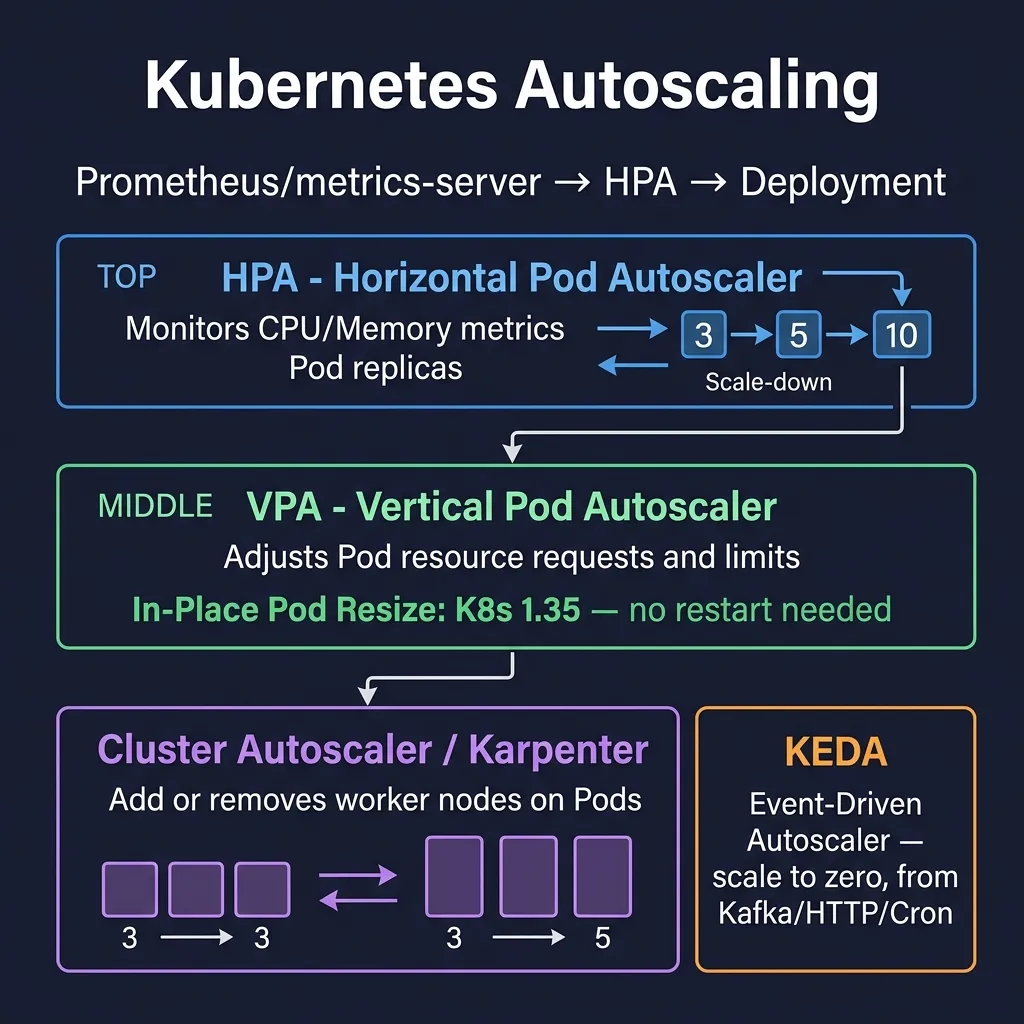
1. HorizontalPodAutoscaler (HPA)
HPA là cơ chế scaling ngang phổ biến nhất — nó tự động tăng/giảm số lượng Pod replicas dựa trên metrics.
1.1 HPA với CPU và Memory
apiVersion: autoscaling/v2
kind: HorizontalPodAutoscaler
metadata:
  name: api-server-hpa
  namespace: production
spec:
  scaleTargetRef:
    apiVersion: apps/v1
    kind: Deployment
    name: api-server
  minReplicas: 2
  maxReplicas: 20
  metrics:
  # Scale theo CPU utilization
  - type: Resource
    resource:
      name: cpu
      target:
        type: Utilization
        averageUtilization: 70   # Scale up khi avg CPU > 70%
  # Scale theo Memory utilization
  - type: Resource
    resource:
      name: memory
      target:
        type: Utilization
        averageUtilization: 80   # Scale up khi avg Memory > 80%
  behavior:
    scaleDown:
      stabilizationWindowSeconds: 300   # Chờ 5 phút trước khi scale down
      policies:
      - type: Percent
        value: 25
        periodSeconds: 60    # Scale down tối đa 25% mỗi phút
    scaleUp:
      stabilizationWindowSeconds: 0    # Scale up ngay lập tức
      policies:
      - type: Pods
        value: 4
        periodSeconds: 15    # Thêm tối đa 4 pods mỗi 15 giây
      - type: Percent
        value: 100
        periodSeconds: 15    # Hoặc tăng 100%
      selectPolicy: Max      # Chọn policy cho phép scale up nhiều nhất
Lưu ý quan trọng: HPA cần resources.requests được set trên container để tính utilization. Nếu không set requests, HPA không biết "70% của bao nhiêu".
1.2 Custom Metrics API
HPA có thể scale theo bất kỳ metric nào thông qua Custom Metrics API (thường được cung cấp bởi Prometheus Adapter):
apiVersion: autoscaling/v2
kind: HorizontalPodAutoscaler
metadata:
  name: queue-processor-hpa
spec:
  scaleTargetRef:
    apiVersion: apps/v1
    kind: Deployment
    name: queue-processor
  minReplicas: 1
  maxReplicas: 50
  metrics:
  # Custom metric từ Prometheus via prometheus-adapter
  - type: Pods
    pods:
      metric:
        name: http_requests_per_second
      target:
        type: AverageValue
        averageValue: "100"    # 100 requests/second per pod
  # External metric (e.g., từ cloud provider)
  - type: External
    external:
      metric:
        name: sqs_queue_depth
        selector:
          matchLabels:
            queue: order-processing
      target:
        type: AverageValue
        averageValue: "30"     # 30 messages per pod
1.3 Scale Down Cooldown
stabilizationWindowSeconds cho scale down là cực kỳ quan trọng trong production. Nếu set quá thấp, traffic spike ngắn sẽ khiến cluster scale up rồi scale down liên tục (flapping). Best practice:
- Scale up:
stabilizationWindowSeconds: 0đến30— phản ứng nhanh với traffic tăng - Scale down:
stabilizationWindowSeconds: 300đến600— chờ 5-10 phút trước khi giảm pods
2. VerticalPodAutoscaler (VPA)
VPA tự động điều chỉnh requests và limits của containers dựa trên actual usage. Không thêm Pod, mà làm mỗi Pod "to hơn" hoặc "nhỏ hơn".
apiVersion: autoscaling.k8s.io/v1
kind: VerticalPodAutoscaler
metadata:
  name: api-server-vpa
  namespace: production
spec:
  targetRef:
    apiVersion: apps/v1
    kind: Deployment
    name: api-server
  updatePolicy:
    updateMode: "Auto"    # VPA tự động update pods
  resourcePolicy:
    containerPolicies:
    - containerName: api
      minAllowed:
        cpu: "100m"
        memory: "128Mi"
      maxAllowed:
        cpu: "4"
        memory: "8Gi"
      controlledResources:
      - cpu
      - memory
      controlledValues: RequestsAndLimits
2.1 VPA Modes
- Off: VPA chỉ tính toán recommendations, không thay đổi gì. Dùng để xem gợi ý từ VPA Recommender.
- Initial: VPA set resources khi Pod được tạo mới, không update Pods đang chạy.
- Recreate: VPA cập nhật bằng cách evict và tạo lại Pod — gây downtime ngắn.
- Auto: Hiện tại hoạt động giống Recreate; trong tương lai sẽ dùng In-Place updates.
2.2 Xem VPA Recommendations
kubectl describe vpa api-server-vpa -n production

# Output sẽ có section:
# Recommendation:
#   Container Recommendations:
#     Container Name: api
#     Lower Bound:
#       Cpu:     100m
#       Memory:  256Mi
#     Target:
#       Cpu:     450m       # Đây là giá trị VPA recommend
#       Memory:  512Mi
#     Uncapped Target:
#       Cpu:     450m
#       Memory:  512Mi
#     Upper Bound:
#       Cpu:     2000m
#       Memory:  2Gi
2.3 VPA Limitations
- Không thể co-exist với HPA cùng metric: Nếu HPA scale theo CPU, VPA không được manage CPU của cùng deployment đó. Giải pháp: HPA scale theo custom metrics, VPA manage CPU/memory; hoặc dùng In-Place updates thay VPA.
- Cần restart Pod: Với mode Recreate/Auto, mỗi lần VPA update là một lần Pod restart — không phù hợp với stateful apps.
- Cần install riêng: VPA không có sẵn trong Kubernetes, cần install qua Helm hoặc manifests.
3. In-Place Pod Resource Updates (K8s 1.35 GA)
Đây là một trong những tính năng quan trọng nhất của Kubernetes gần đây: khả năng thay đổi resources.requests và resources.limits của một Pod đang chạy mà không cần restart.
3.1 Tại Sao In-Place Updates Quan Trọng?
Trước đây, mọi thay đổi resources đều cần Pod restart — điều này không chấp nhận được với:
- Database pods: PostgreSQL, MySQL cần warm-up cache sau restart
- Long-running ML jobs: Training jobs mất hàng giờ, restart = mất toàn bộ progress
- Stateful applications: Các apps với in-memory state
- JVM applications: Java apps cần thời gian JIT warm-up
3.2 resizePolicy
apiVersion: v1
kind: Pod
metadata:
  name: database-pod
spec:
  containers:
  - name: postgres
    image: postgres:16
    resources:
      requests:
        cpu: "1"
        memory: "2Gi"
      limits:
        cpu: "2"
        memory: "4Gi"
    resizePolicy:
    - resourceName: cpu
      restartPolicy: NotRequired    # Thay đổi CPU không cần restart
    - resourceName: memory
      restartPolicy: RestartContainer  # Thay đổi memory CẦN restart container
Hai giá trị của restartPolicy:
- NotRequired: Resource có thể thay đổi in-place, không cần restart container
- RestartContainer: Thay đổi resource sẽ trigger container restart (vẫn không restart toàn bộ Pod)
3.3 Thực Hiện In-Place Resize
# Tăng CPU request của pod đang chạy
kubectl patch pod database-pod --subresource resize --type merge -p '
{
  "spec": {
    "containers": [{
      "name": "postgres",
      "resources": {
        "requests": {"cpu": "2", "memory": "2Gi"},
        "limits": {"cpu": "4", "memory": "4Gi"}
      }
    }]
  }
}'

# Kiểm tra trạng thái resize
kubectl get pod database-pod -o jsonpath='{.status.resize}'
# Output: "Proposed" → "InProgress" → "Infeasible" hoặc thành công (field biến mất)

# Xem allocated resources thực tế
kubectl get pod database-pod -o jsonpath='{.status.containerStatuses[0].allocatedResources}'
3.4 In-Place Resize với Deployment
apiVersion: apps/v1
kind: Deployment
metadata:
  name: ml-inference-server
spec:
  replicas: 3
  selector:
    matchLabels:
      app: ml-inference
  template:
    metadata:
      labels:
        app: ml-inference
    spec:
      containers:
      - name: inference
        image: my-ml-server:v2.1
        resources:
          requests:
            cpu: "2"
            memory: "4Gi"
          limits:
            cpu: "4"
            memory: "8Gi"
        resizePolicy:
        - resourceName: cpu
          restartPolicy: NotRequired
        - resourceName: memory
          restartPolicy: NotRequired
# Tăng resources cho tất cả pods trong deployment (rolling)
kubectl patch deployment ml-inference-server --type=json -p='[
  {"op": "replace", "path": "/spec/template/spec/containers/0/resources/requests/cpu", "value": "4"},
  {"op": "replace", "path": "/spec/template/spec/containers/0/resources/limits/cpu", "value": "8"}
]'
4. KEDA — Kubernetes Event-Driven Autoscaling
KEDA là CNCF Graduated project cung cấp event-driven autoscaling cho Kubernetes. Điểm khác biệt lớn nhất so với HPA: KEDA có thể scale to zero — không có events thì không có Pods.
4.1 Cài Đặt KEDA
helm repo add kedacore https://kedacore.github.io/charts
helm repo update
helm install keda kedacore/keda \
  --namespace keda \
  --create-namespace \
  --version 2.14.0
4.2 ScaledObject — Scale Deployment
ScaledObject là CRD chính của KEDA, thay thế HPA cho Deployments và StatefulSets:
apiVersion: keda.sh/v1alpha1
kind: ScaledObject
metadata:
  name: kafka-consumer-scaler
  namespace: production
spec:
  scaleTargetRef:
    apiVersion: apps/v1
    kind: Deployment
    name: order-processor
  minReplicaCount: 0     # Scale to zero khi không có messages
  maxReplicaCount: 50
  cooldownPeriod: 300    # Giây chờ trước khi scale down về 0
  pollingInterval: 15    # Check metrics mỗi 15 giây
  triggers:
  # Kafka topic lag trigger
  - type: kafka
    metadata:
      bootstrapServers: kafka.production.svc.cluster.local:9092
      consumerGroup: order-processors
      topic: orders
      lagThreshold: "100"         # 100 messages per replica
      offsetResetPolicy: latest
    authenticationRef:
      name: keda-kafka-credentials
4.3 ScaledJob — Scale Jobs
ScaledJob tạo Job mới cho mỗi event batch, lý tưởng cho task queues:
apiVersion: keda.sh/v1alpha1
kind: ScaledJob
metadata:
  name: image-processing-job
  namespace: media
spec:
  jobTargetRef:
    template:
      spec:
        containers:
        - name: processor
          image: image-processor:v3
          command: ["./process-image"]
          resources:
            requests:
              cpu: "1"
              memory: "2Gi"
            limits:
              cpu: "2"
              memory: "4Gi"
        restartPolicy: Never
    backoffLimit: 2
  pollingInterval: 10
  maxReplicaCount: 20
  scalingStrategy:
    strategy: "accurate"    # Tạo 1 job per N items
  triggers:
  - type: rabbitmq
    metadata:
      host: amqp://rabbitmq.media.svc.cluster.local:5672
      queueName: image-processing-queue
      queueLength: "5"      # 1 job per 5 messages
4.4 Các KEDA Scalers Phổ Biến
# Prometheus metrics scaler
- type: prometheus
  metadata:
    serverAddress: http://prometheus.monitoring.svc.cluster.local:9090
    metricName: http_requests_total
    query: sum(rate(http_requests_total{deployment="api"}[2m]))
    threshold: "100"

# HTTP request rate scaler (cần KEDA HTTP Add-on)
- type: http
  metadata:
    hosts:
    - api.production.example.com
    targetPendingRequests: "100"

# Cron-based scaling (scale up trước giờ cao điểm)
- type: cron
  metadata:
    timezone: "Asia/Ho_Chi_Minh"
    start: "0 8 * * 1-5"     # 8 giờ sáng thứ 2-6
    end: "0 22 * * 1-5"       # 10 giờ tối thứ 2-6
    desiredReplicas: "10"

# AWS SQS Queue
- type: aws-sqs-queue
  metadata:
    queueURL: https://sqs.ap-southeast-1.amazonaws.com/123456789/my-queue
    queueLength: "5"
    awsRegion: ap-southeast-1
4.5 KEDA Scale to Zero và Scale Up từ Zero
Scale to zero là killer feature của KEDA — tiết kiệm đáng kể cost với workloads không chạy 24/7:
apiVersion: keda.sh/v1alpha1
kind: ScaledObject
metadata:
  name: batch-worker-scaler
spec:
  scaleTargetRef:
    kind: Deployment
    name: batch-worker
  minReplicaCount: 0        # Scale về 0 hoàn toàn
  maxReplicaCount: 100
  cooldownPeriod: 120       # 2 phút không có messages → scale to 0
  triggers:
  - type: redis
    metadata:
      address: redis.cache.svc.cluster.local:6379
      listName: job-queue
      listLength: "1"       # Scale up khi có >= 1 item
Khi KEDA phát hiện có events (ví dụ Kafka lag > 0), nó scale từ 0 lên 1 trong vài giây. Sau đó HPA (được KEDA quản lý) tiếp tục scale lên cao hơn dựa trên load.
5. Cluster Autoscaler
Cluster Autoscaler (CA) tự động thêm/xóa nodes khi Pods không thể schedule (node đầy) hoặc nodes rỗng (lãng phí resources).
apiVersion: apps/v1
kind: Deployment
metadata:
  name: cluster-autoscaler
  namespace: kube-system
spec:
  template:
    spec:
      containers:
      - image: registry.k8s.io/autoscaling/cluster-autoscaler:v1.29.0
        name: cluster-autoscaler
        command:
        - ./cluster-autoscaler
        - --v=4
        - --stderrthreshold=info
        - --cloud-provider=aws
        - --skip-nodes-with-local-storage=false
        - --expander=least-waste
        - --node-group-auto-discovery=asg:tag=k8s.io/cluster-autoscaler/enabled,k8s.io/cluster-autoscaler/my-cluster
        - --balance-similar-node-groups
        - --skip-nodes-with-system-pods=false
        - --scale-down-delay-after-add=10m
        - --scale-down-unneeded-time=10m
6. Karpenter — Thế Hệ Mới của Cluster Scaling
Karpenter là open-source node provisioner từ AWS, hiện cũng support Azure. Nó thông minh hơn Cluster Autoscaler nhiều — thay vì chỉ scale existing node groups, Karpenter tự quyết định loại instance tốt nhất để launch.
6.1 NodePool — Thay Thế Node Group
apiVersion: karpenter.sh/v1
kind: NodePool
metadata:
  name: general-purpose
spec:
  template:
    spec:
      nodeClassRef:
        group: karpenter.k8s.aws
        kind: EC2NodeClass
        name: default
      requirements:
      - key: karpenter.sh/capacity-type
        operator: In
        values: ["spot", "on-demand"]   # Ưu tiên Spot
      - key: kubernetes.io/arch
        operator: In
        values: ["amd64", "arm64"]      # Hỗ trợ cả ARM
      - key: karpenter.k8s.aws/instance-category
        operator: In
        values: ["c", "m", "r"]         # Compute, Memory, RAM-optimized
      - key: karpenter.k8s.aws/instance-generation
        operator: Gt
        values: ["5"]                   # Chỉ dùng instance gen 5+
  limits:
    cpu: "1000"
    memory: 4000Gi
  disruption:
    consolidationPolicy: WhenEmptyOrUnderutilized
    consolidateAfter: 1m    # Consolidate nodes ngay khi có thể
    expireAfter: 720h       # Terminate và replace node sau 30 ngày
6.2 EC2NodeClass
apiVersion: karpenter.k8s.aws/v1
kind: EC2NodeClass
metadata:
  name: default
spec:
  amiSelectorTerms:
  - alias: al2023@latest    # Amazon Linux 2023, luôn dùng AMI mới nhất
  role: KarpenterNodeRole-my-cluster
  subnetSelectorTerms:
  - tags:
      karpenter.sh/discovery: my-cluster
  securityGroupSelectorTerms:
  - tags:
      karpenter.sh/discovery: my-cluster
  instanceStorePolicy: RAID0    # NVMe instance storage
  blockDeviceMappings:
  - deviceName: /dev/xvda
    ebs:
      volumeSize: 100Gi
      volumeType: gp3
      iops: 10000
      throughput: 500
      encrypted: true
6.3 Karpenter vs Cluster Autoscaler
- Launch time: Karpenter ~60 giây vs CA ~3-4 phút (CA phải scale ASG rồi chờ)
- Instance selection: Karpenter chọn instance type tốt nhất cho Pods pending; CA chỉ scale existing groups
- Spot interruption handling: Karpenter tích hợp sẵn, graceful drain trước khi instance bị terminate
- Node consolidation: Karpenter tự động consolidate nodes rỗng/ít tải bằng cách evict Pods và terminate nodes
- Cost optimization: Karpenter chủ động chọn Spot khi có thể, fallback sang On-Demand khi Spot không available
6.4 Spot Interruption Handling
# Karpenter tự động handle Spot interruption via EC2 interruption notices
# Cần install aws-node-termination-handler HOẶC để Karpenter tự handle

# Pod disruption budget để Karpenter biết không drain quá nhiều pods cùng lúc
apiVersion: policy/v1
kind: PodDisruptionBudget
metadata:
  name: api-server-pdb
  namespace: production
spec:
  minAvailable: 2
  selector:
    matchLabels:
      app: api-server
7. Chiến Lược Kết Hợp: HPA + KEDA + Karpenter
Trong production, bạn thường dùng các layer scaling cùng nhau:
- KEDA: Scale Pods từ 0 đến N dựa trên events (Kafka lag, queue depth)
- HPA: Fine-tune scaling dựa trên CPU/memory khi KEDA đã khởi động Pods
- In-Place Updates: Adjust resources của Pods đang chạy mà không restart
- Karpenter: Khi Pods không thể schedule vì thiếu nodes, Karpenter tự động provision nodes phù hợp nhất
# Xem trạng thái HPA
kubectl get hpa -n production

# Xem KEDA ScaledObjects
kubectl get scaledobjects -n production

# Xem Karpenter nodes
kubectl get nodes -l karpenter.sh/nodepool=general-purpose

# Xem Karpenter events
kubectl get events -n karpenter --sort-by='.lastTimestamp'

# Xem pending pods (waiting for node)
kubectl get pods --all-namespaces --field-selector=status.phase=Pending
Autoscaling hiệu quả là sự kết hợp đúng đắn của nhiều cơ chế. Hiểu rõ từng công cụ — HPA cho resource-based scaling, KEDA cho event-driven scaling, In-Place Updates cho resource adjustment không downtime, và Karpenter cho intelligent node provisioning — giúp bạn xây dựng hệ thống vừa responsive vừa tiết kiệm chi phí.