🎯 Lesson Objective
Understand GitOps principles, how to setup ArgoCD and Flux, the difference between the two tools, CI/CD pipeline with GitOps, and secrets management in GitOps workflow.
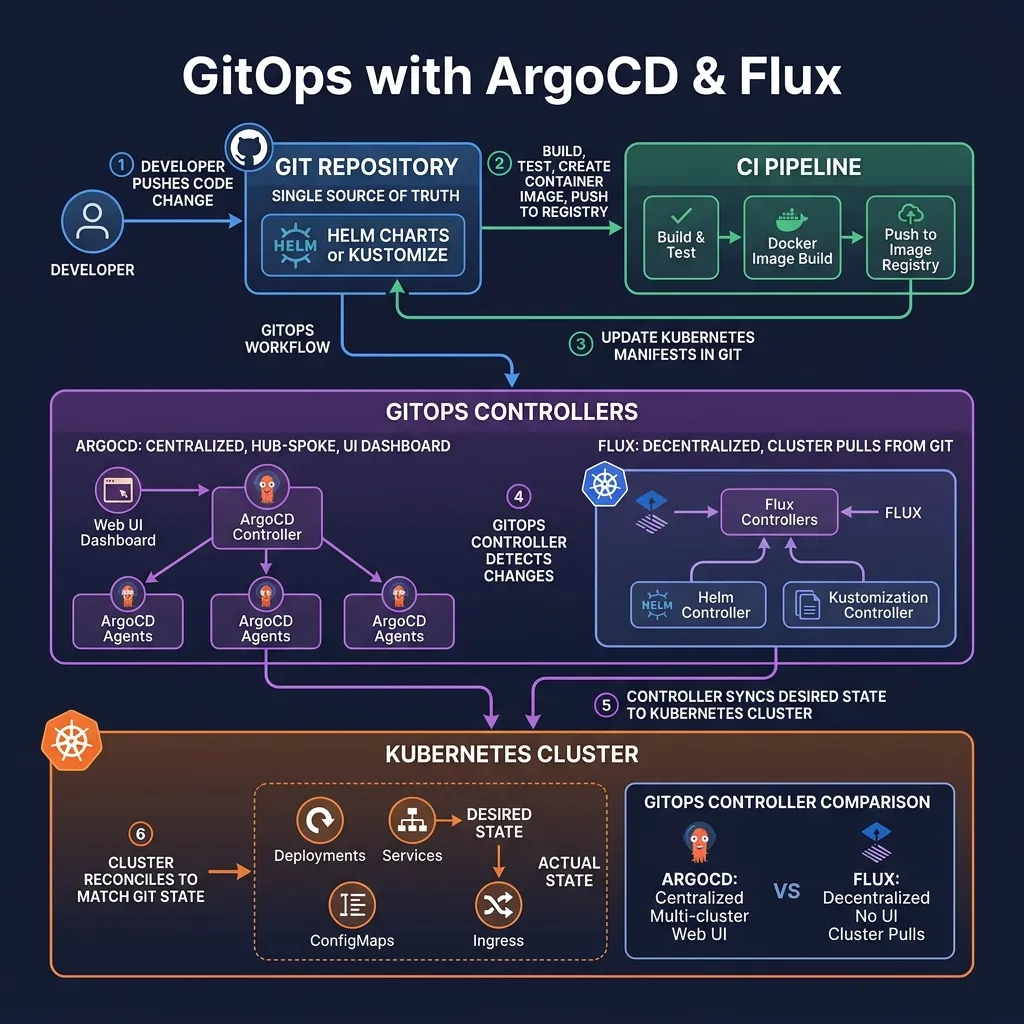
1. GitOps Principles (OpenGitOps)
GitOps is a method of deploying and operating applications that uses Git as the "single source of truth":
- Declarative: desired state is described as code in Git (Kubernetes manifests)
- Versioned and Immutable: Git history is the full audit trail
- Pulled Automatically: GitOps agent pulls changes from Git, not pushed from CI/CD
- Continuously Reconciled: agent continuously checks and corrects drift (someone changes directly in the cluster)
Benefits: security (cluster does not need CI/CD credentials), audit trail, simple rollback (git revert), drift detection.
2. ArgoCD 3.x
2.1 Architecture
- API Server: REST/gRPC API, Web UI, CLI
- Repo Server: clone and render Kubernetes manifests from Git
- Application Controller: watch K8s resources, detect drift, sync
2.2 Install ArgoCD
kubectl create namespace argocd kubectl apply -n argocd -f https://raw.githubusercontent.com/argoproj/argo-cd/stable/manifests/install.yamlHoặc với Helm
helm repo add argo https://argoproj.github.io/argo-helm helm install argocd argo/argo-cd -n argocd --create-namespace
Lấy initial admin password
kubectl -n argocd get secret argocd-initial-admin-secret
-o jsonpath="{.data.password}" | base64 -dPort-forward UI
kubectl port-forward svc/argocd-server -n argocd 8080:443
Mở https://localhost:8080
2.3 Application CRD
apiVersion: argoproj.io/v1alpha1
kind: Application
metadata:
  name: my-app
  namespace: argocd
spec:
  project: default
  source:
    repoURL: https://github.com/myorg/k8s-configs
    targetRevision: main
    path: apps/my-app/overlays/production    # Kustomize overlay
  destination:
    server: https://kubernetes.default.svc  # in-cluster
    namespace: production
  syncPolicy:
    automated:
      prune: true       # xóa resources đã bị xóa khỏi Git
      selfHeal: true    # tự sửa drift
    syncOptions:
    - CreateNamespace=true
    - ServerSideApply=true  # Helm 4 SSA support
  revisionHistoryLimit: 10
2.4 App of Apps Pattern
# Root application quản lý tất cả applications khác
apiVersion: argoproj.io/v1alpha1
kind: Application
metadata:
  name: root-app
  namespace: argocd
spec:
  source:
    repoURL: https://github.com/myorg/k8s-configs
    path: apps-of-apps/production   # thư mục chứa Application CRDs khác
    targetRevision: main
  destination:
    server: https://kubernetes.default.svc
    namespace: argocd
  syncPolicy:
    automated:
      prune: true
      selfHeal: true
2.5 ApplicationSet — Generate Applications Dynamically
apiVersion: argoproj.io/v1alpha1
kind: ApplicationSet
metadata:
  name: cluster-addons
  namespace: argocd
spec:
  generators:
  # Tạo Application cho mỗi cluster
  - clusters: {}
  template:
    metadata:
      name: '{{name}}-addons'
    spec:
      project: addons
      source:
        repoURL: https://github.com/myorg/cluster-addons
        path: 'clusters/{{name}}'
        targetRevision: main
      destination:
        server: '{{server}}'
        namespace: kube-system
      syncPolicy:
        automated: {}
3. Flux 2.x
3.1 Flux Architecture
Flux is decentralized GitOps — the cluster pulls itself from Git, without a central hub.
- Source Controller: watch Git repos, Helm repos, OCI artifacts
- Kustomize Controller: apply Kustomize resources
- Helm Controller: manage Helm releases via CRDs
- Notification Controller: send alerts to Slack, Teams, GitHub
- Image Automation Controller: auto-update image tags in Git
3.2 Install Flux
# Cài Flux CLI curl -s https://fluxcd.io/install.sh | sudo bashBootstrap Flux (tạo resources trong cluster và push configs lên GitHub)
flux bootstrap github
--owner=myorg
--repository=fleet-infra
--branch=main
--path=clusters/production
--personal # personal token, hoặc dùng --token-auth
3.3 GitRepository and Kustomization
# GitRepository: define source
apiVersion: source.toolkit.fluxcd.io/v1
kind: GitRepository
metadata:
  name: my-app
  namespace: flux-system
spec:
  interval: 5m     # check Git mỗi 5 phút
  url: https://github.com/myorg/k8s-configs
  ref:
    branch: main
  secretRef:
    name: github-token
---
# Kustomization: apply từ Git source
apiVersion: kustomize.toolkit.fluxcd.io/v1
kind: Kustomization
metadata:
  name: my-app
  namespace: flux-system
spec:
  interval: 10m
  sourceRef:
    kind: GitRepository
    name: my-app
  path: ./apps/my-app/overlays/production
  prune: true         # xóa resources đã xóa khỏi Git
  healthChecks:
  - apiVersion: apps/v1
    kind: Deployment
    name: my-app
    namespace: production
3.4 HelmRelease
apiVersion: helm.toolkit.fluxcd.io/v2
kind: HelmRelease
metadata:
  name: my-app
  namespace: production
spec:
  interval: 1h
  chart:
    spec:
      chart: my-app
      version: "0.2.x"    # semver range, auto-update minor/patch
      sourceRef:
        kind: HelmRepository
        name: my-helm-repo
        namespace: flux-system
  values:
    replicaCount: 3
    image:
      tag: "1.2.3"
  upgrade:
    remediation:
      retries: 3   # retry nếu upgrade fail
4. CI/CD Pipeline with GitOps
# .github/workflows/deploy.yaml name: Build and Deploy on: push: branches: [main]jobs: build: runs-on: ubuntu-latest steps: - uses: actions/checkout@v4
- name: Build and push image run: | docker build -t myregistry.io/myapp:${{ github.sha }} . docker push myregistry.io/myapp:${{ github.sha }} - name: Update manifests in GitOps repo run: | git clone https://myorg:${{ secrets.GITOPS_TOKEN }}@github.com/myorg/k8s-configs cd k8s-configs # Update image tag sed -i "s|tag:.*|tag: ${{ github.sha }}|" apps/my-app/values.yaml git config user.email "[email protected]" git commit -am "Update my-app to ${{ github.sha }}" git push # ArgoCD/Flux sẽ tự động detect và deploy thay đổi
5. Secrets in GitOps
Do not commit plaintext secrets to Git. Solutions:
- Sealed Secrets: encrypt with public key, only controllers in the cluster can decrypt
- SOPS: Mozilla SOPS + KMS (AWS KMS, GCP KMS, Azure Key Vault)
- External Secrets Operator: sync from external secret stores (recommended)
# Sealed Secrets kubeseal < my-secret.yaml > my-sealed-secret.yaml # my-sealed-secret.yaml an toàn để commit lên GitSOPS với AWS KMS
sops --encrypt --kms arn:aws:kms:us-east-1:123456789012:key/xxx secret.yaml > secret.enc.yaml
Commit secret.enc.yaml
Flux tự động decrypt với SOPS khi apply
6. ArgoCD vs Flux
Feature           ArgoCD 3.x              Flux 2.x
──────────────────────────────────────────────────────────
Architecture      Centralized hub         Decentralized per-cluster
UI                ✅ Web UI               ❌ CLI only (+ Weave GitOps)
Multi-cluster     ✅ Hub-and-spoke        ✅ Pull-based per cluster
Security model    Cluster connects to hub  Cluster only pulls from Git
RBAC              Fine-grained            Basic
Image automation  Argo Image Updater      ✅ Built-in (Image Automation)
Notifications     ✅ argocd-notifications  ✅ Notification Controller
Community         Large, CNCF Graduated   Active, CNCF Graduated
Best for          Centralized ops team    Distributed teams, security-first
Summary
- GitOps: Git = single source of truth, pull-based, drift detection
- ArgoCD: centralized, excellent UI, hub-and-spoke multi-cluster
- Flux: decentralized, cluster pulls from Git, image automation built-in
- App of Apps (ArgoCD): manage multiple apps with 1 root app
- Secrets: do not commit plaintext, use Sealed Secrets, SOPS, or ESO