🎯 課程目標
了解 GitOps 原理、如何設定 ArgoCD 和 Flux、兩種工具之間的差異、CI/CD 管道與 GitOps 以及 GitOps 工作流程中的秘密管理。
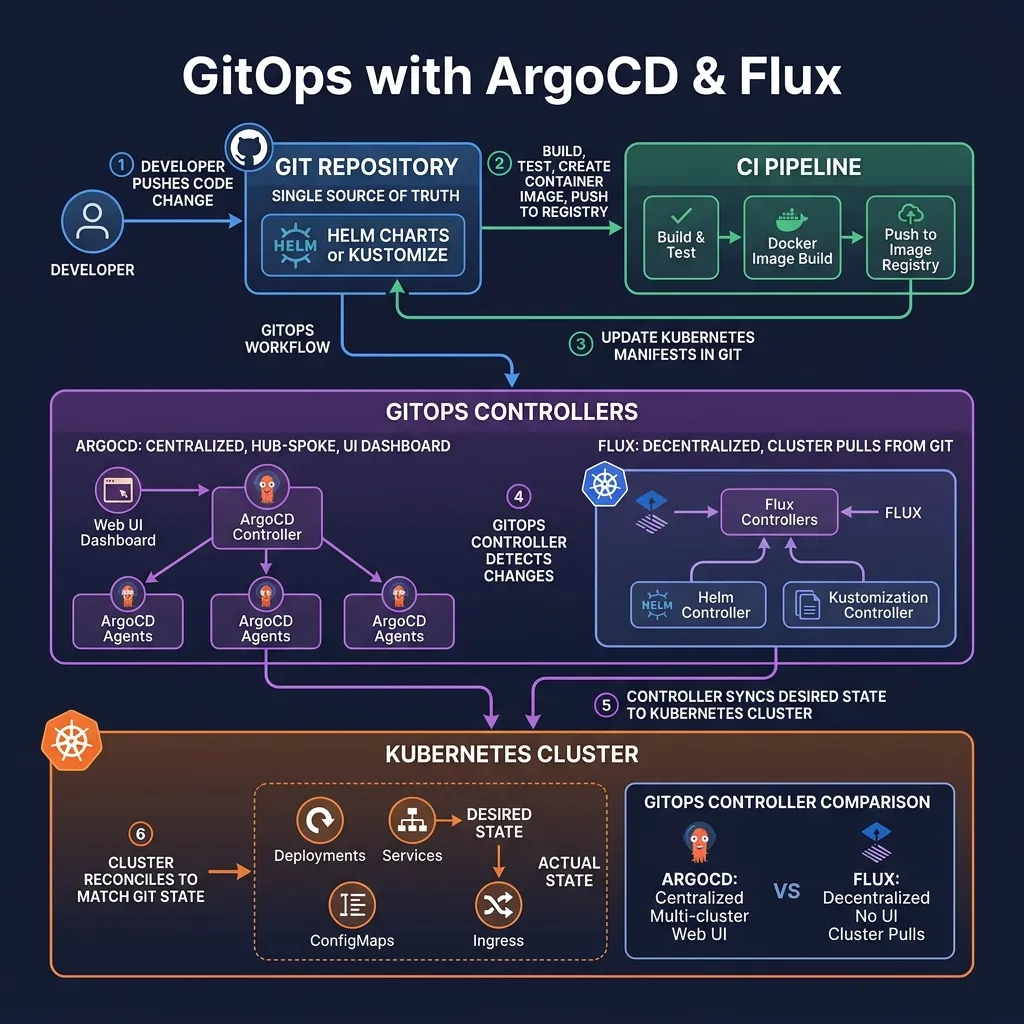
1.GitOps原則(OpenGitOps)
GitOps 是一種使用 Git 作為「單一事實來源」的部署和操作應用程式的方法:
- 聲明式:所需狀態被描述為 Git 中的程式碼(Kubernetes 清單)
- 版本化且不可變:Git 歷史記錄是完整的審計跟踪
- 自動拉動:GitOps 代理從 Git 提取更改,而不是從 CI/CD 推送
- 持續調和:agent不斷檢查並修正漂移(有人直接在叢集中更改)
好處:安全性(沒有 CI/CD 憑證的叢集)、稽核追蹤、簡單回溯(git revert)、偏差偵測。
2.ArgoCD 3.x
2.1 架構
- API伺服器:REST/gRPC API、Web UI、CLI
- 回購伺服器:從 Git 複製並渲染 Kubernetes 清單
- 應用控制器:觀察K8s資源,偵測漂移,同步
2.2 安裝ArgoCD
kubectl create namespace argocd kubectl apply -n argocd -f https://raw.githubusercontent.com/argoproj/argo-cd/stable/manifests/install.yamlHoặc với Helm
helm repo add argo https://argoproj.github.io/argo-helm helm install argocd argo/argo-cd -n argocd --create-namespace
Lấy initial admin password
kubectl -n argocd get secret argocd-initial-admin-secret
-o jsonpath="{.data.password}" | base64 -dPort-forward UI
kubectl port-forward svc/argocd-server -n argocd 8080:443
Mở https://localhost:8080
2.3 應用CRD
apiVersion: argoproj.io/v1alpha1
kind: Application
metadata:
  name: my-app
  namespace: argocd
spec:
  project: default
  source:
    repoURL: https://github.com/myorg/k8s-configs
    targetRevision: main
    path: apps/my-app/overlays/production    # Kustomize overlay
  destination:
    server: https://kubernetes.default.svc  # in-cluster
    namespace: production
  syncPolicy:
    automated:
      prune: true       # xóa resources đã bị xóa khỏi Git
      selfHeal: true    # tự sửa drift
    syncOptions:
    - CreateNamespace=true
    - ServerSideApply=true  # Helm 4 SSA support
  revisionHistoryLimit: 10
2.4 應用程式模式的應用程式
# Root application quản lý tất cả applications khác
apiVersion: argoproj.io/v1alpha1
kind: Application
metadata:
  name: root-app
  namespace: argocd
spec:
  source:
    repoURL: https://github.com/myorg/k8s-configs
    path: apps-of-apps/production   # thư mục chứa Application CRDs khác
    targetRevision: main
  destination:
    server: https://kubernetes.default.svc
    namespace: argocd
  syncPolicy:
    automated:
      prune: true
      selfHeal: true
2.5 ApplicationSet-動態產生應用程式
apiVersion: argoproj.io/v1alpha1
kind: ApplicationSet
metadata:
  name: cluster-addons
  namespace: argocd
spec:
  generators:
  # Tạo Application cho mỗi cluster
  - clusters: {}
  template:
    metadata:
      name: '{{name}}-addons'
    spec:
      project: addons
      source:
        repoURL: https://github.com/myorg/cluster-addons
        path: 'clusters/{{name}}'
        targetRevision: main
      destination:
        server: '{{server}}'
        namespace: kube-system
      syncPolicy:
        automated: {}
3.通量2.x
3.1 通量架構
Flux 是去中心化的 GitOps-叢集從 Git 自行拉取,沒有中央集線器。
- 來源控制器:觀看 Git 儲存庫、Helm 儲存庫、OCI 工件
- 客製化控制器:應用自訂資源
- 舵控制器:透過 CRD 管理 Helm 版本
- 通知控制器:向 Slack、Teams、GitHub 發送警報
- 影像自動化控制器:自動更新Git中的圖片標籤
3.2 安裝助焊劑
# Cài Flux CLI curl -s https://fluxcd.io/install.sh | sudo bashBootstrap Flux (tạo resources trong cluster và push configs lên GitHub)
flux bootstrap github
--owner=myorg
--repository=fleet-infra
--branch=main
--path=clusters/production
--personal # personal token, hoặc dùng --token-auth
3.3 GitRepository 和自訂
# GitRepository: define source
apiVersion: source.toolkit.fluxcd.io/v1
kind: GitRepository
metadata:
  name: my-app
  namespace: flux-system
spec:
  interval: 5m     # check Git mỗi 5 phút
  url: https://github.com/myorg/k8s-configs
  ref:
    branch: main
  secretRef:
    name: github-token
---
# Kustomization: apply từ Git source
apiVersion: kustomize.toolkit.fluxcd.io/v1
kind: Kustomization
metadata:
  name: my-app
  namespace: flux-system
spec:
  interval: 10m
  sourceRef:
    kind: GitRepository
    name: my-app
  path: ./apps/my-app/overlays/production
  prune: true         # xóa resources đã xóa khỏi Git
  healthChecks:
  - apiVersion: apps/v1
    kind: Deployment
    name: my-app
    namespace: production
3.4 頭盔釋放
apiVersion: helm.toolkit.fluxcd.io/v2
kind: HelmRelease
metadata:
  name: my-app
  namespace: production
spec:
  interval: 1h
  chart:
    spec:
      chart: my-app
      version: "0.2.x"    # semver range, auto-update minor/patch
      sourceRef:
        kind: HelmRepository
        name: my-helm-repo
        namespace: flux-system
  values:
    replicaCount: 3
    image:
      tag: "1.2.3"
  upgrade:
    remediation:
      retries: 3   # retry nếu upgrade fail
4. 使用 GitOps 的 CI/CD 管道
# .github/workflows/deploy.yaml name: Build and Deploy on: push: branches: [main]jobs: build: runs-on: ubuntu-latest steps: - uses: actions/checkout@v4
- name: Build and push image run: | docker build -t myregistry.io/myapp:${{ github.sha }} . docker push myregistry.io/myapp:${{ github.sha }} - name: Update manifests in GitOps repo run: | git clone https://myorg:${{ secrets.GITOPS_TOKEN }}@github.com/myorg/k8s-configs cd k8s-configs # Update image tag sed -i "s|tag:.*|tag: ${{ github.sha }}|" apps/my-app/values.yaml git config user.email "[email protected]" git commit -am "Update my-app to ${{ github.sha }}" git push # ArgoCD/Flux sẽ tự động detect và deploy thay đổi
5.GitOps 中的秘密
不要將明文機密提交給 Git。解決方案:
- 密封的秘密:使用公鑰加密,只有叢集內的控制器才能解密
- 特種作業程序:Mozilla SOPS + KMS(AWS KMS、GCP KMS、Azure Key Vault)
- 外部秘密運營商:從外部秘密儲存同步(建議)
# Sealed Secrets kubeseal < my-secret.yaml > my-sealed-secret.yaml # my-sealed-secret.yaml an toàn để commit lên GitSOPS với AWS KMS
sops --encrypt --kms arn:aws:kms:us-east-1:123456789012:key/xxx secret.yaml > secret.enc.yaml
Commit secret.enc.yaml
Flux tự động decrypt với SOPS khi apply
6.ArgoCD 與 Flux
Feature           ArgoCD 3.x              Flux 2.x
──────────────────────────────────────────────────────────
Architecture      Centralized hub         Decentralized per-cluster
UI                ✅ Web UI               ❌ CLI only (+ Weave GitOps)
Multi-cluster     ✅ Hub-and-spoke        ✅ Pull-based per cluster
Security model    Cluster connects to hub  Cluster only pulls from Git
RBAC              Fine-grained            Basic
Image automation  Argo Image Updater      ✅ Built-in (Image Automation)
Notifications     ✅ argocd-notifications  ✅ Notification Controller
Community         Large, CNCF Graduated   Active, CNCF Graduated
Best for          Centralized ops team    Distributed teams, security-first
總結
- GitOps:Git = 單一事實來源、基於拉動、偏差偵測
- ArgoCD:集中式、優秀的 UI、中心輻射型多集群
- Flux:去中心化、叢集從 Git 拉取、內建影像自動化
- 應用程式中的應用程式 (ArgoCD):使用 1 個根應用程式管理多個應用程式
- 秘密:不要提交明文,使用密封秘密、SOPS 或 ESO