🎯 Lesson Objective
After this lesson, you will understand that Pod is the most basic unit in Kubernetes, how Pod shares network namespace, how to use Sidecar containers (GA K8s 1.33), Init containers, Ephemeral containers for debugging, and manage the lifecycle and resources of Pod.
1. What is a Pod?
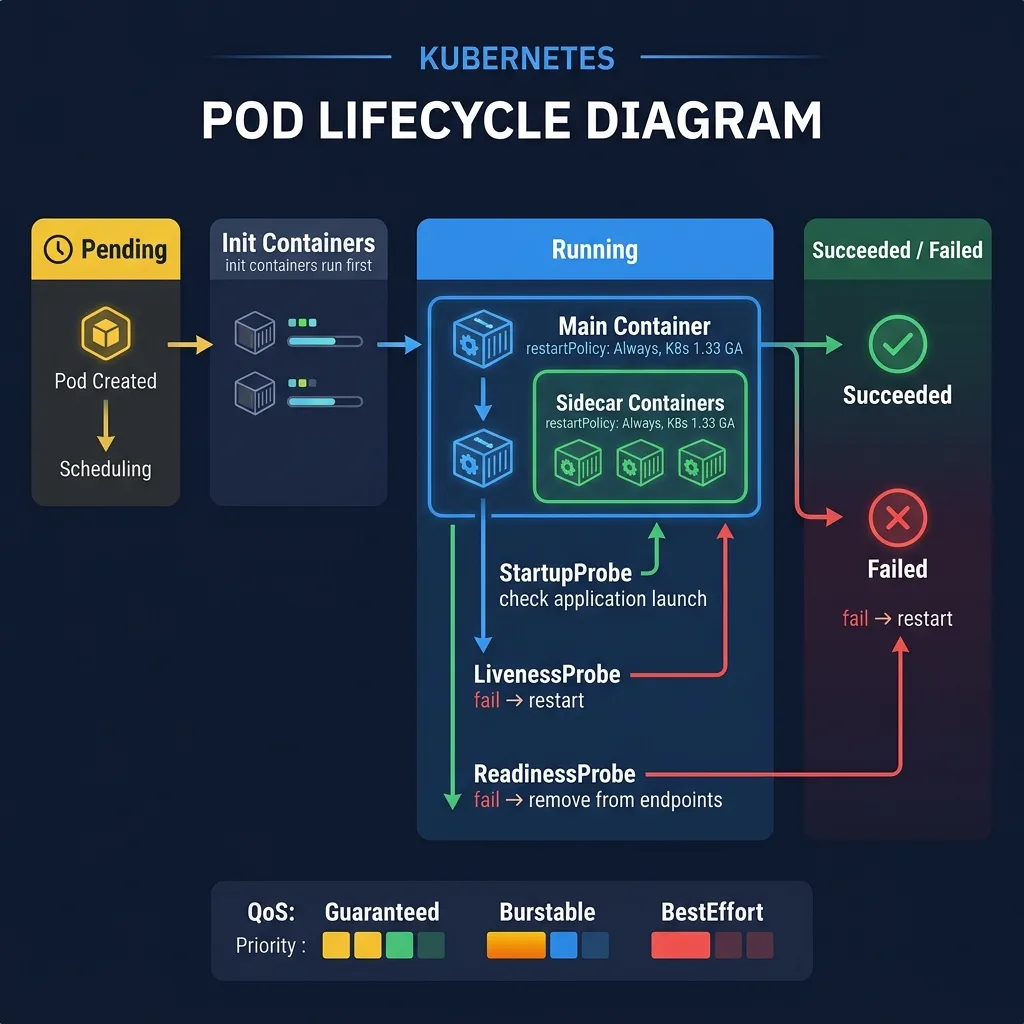
Pod is the smallest scheduling unit in Kubernetes. A Pod consists of one or more containers running on the same Node, shared in common:
- Network namespace: same IP address, same port space — containers communicate with each other via
localhost - Storage volumes: volumes mounted to Pod can be accessed by many containers
- Linux namespaces (depending on configuration): PID namespace, IPC namespace
Why not deploy the container directly? Kubernetes manages Pods, not containers. Pod is an abstraction layer that helps group closely related processes together.
2. Simple Pod Example
apiVersion: v1
kind: Pod
metadata:
  name: nginx-pod
  labels:
    app: nginx
spec:
  containers:
  - name: nginx
    image: nginx:1.27
    ports:
    - containerPort: 80
    resources:
      requests:
        cpu: "100m"
        memory: "128Mi"
      limits:
        cpu: "500m"
        memory: "256Mi"
kubectl apply -f pod.yaml
kubectl get pods
kubectl describe pod nginx-pod
kubectl logs nginx-pod
kubectl exec -it nginx-pod -- /bin/bash
3. Multi-container Pods
There are 3 common patterns for multi-container Pods:
3.1 Sidecar Pattern
The secondary container supports the main container (log forwarder, proxy, OTel collector).
3.2 Ambassador Pattern
The proxy container communicates with the outside world on behalf of the main container.
3.3 Adapter Pattern
Container normalizes output from the main container to a standard format.
4. Sidecar Containers GA — K8s 1.33
Before K8s 1.33, sidecar containers were implemented as regular init containers, causing a lifecycle problem: when the main container finished, the sidecar was still running and the Job never completed.
K8s Solution 1.33: The official sidecar container is initContainer with restartPolicy: Always. Kubernetes will:
- Start sidecar before main container__HTMLTAG_61___
- Restart sidecar if it crashes (independent of main container)
- Terminate sidecar after main container ends
- Sidecar does not block Job completion
apiVersion: v1
kind: Pod
metadata:
  name: app-with-sidecar
spec:
  initContainers:
  # Sidecar container (K8s 1.33+)
  - name: log-forwarder
    image: grafana/alloy:latest
    restartPolicy: Always       # Đây là key để biến init container thành sidecar
    volumeMounts:
    - name: logs
      mountPath: /var/log/app
    resources:
      requests:
        cpu: "50m"
        memory: "64Mi"
  containers:
  - name: app
    image: myapp:v1
    volumeMounts:
    - name: logs
      mountPath: /var/log/app
  volumes:
  - name: logs
    emptyDir: {}
Use cases for Sidecar containers: Grafana Alloy log agent, OpenTelemetry Collector, Envoy proxy (in service mesh), Vault agent injector.
5. Init Containers
Init containers run run-to-completion before main containers start. Used for:
- Wait for database to be ready before app starts
- Download config or secrets from external sources__HTMLTAG_81___
- Setup file permissions, database migrations
spec:
  initContainers:
  - name: wait-for-db
    image: busybox:1.36
    command: ['sh', '-c', 'until nc -z postgres-service 5432; do sleep 2; done']
  - name: run-migrations
    image: myapp:v1
    command: ['python', 'manage.py', 'migrate']
  containers:
  - name: app
    image: myapp:v1
6. Ephemeral Containers — Debug Pods
Ephemeral containers allow attaching a debug container to a running Pod without needing to restart Pod. Very useful when Pod uses distroless image without shell.
# Attach ephemeral container vào pod đang chạy kubectl debug -it nginx-pod --image=busybox:1.36 --target=nginxDebug từ node
kubectl debug node/worker-1 -it --image=ubuntu
Copy pod để debug (tạo pod mới với debug image)
kubectl debug nginx-pod -it --copy-to=nginx-debug --image=nginx:debug
7. Pod Lifecycle
Pod goes through the following phases:
- Pending: Pod created, waiting for scheduler to choose Node, or pulling image
- Running: Pod is bound to Node, at least 1 container is running
- Succeeded: All containers ended successfully (exit 0)
- Failed: At least 1 container ended with an error (exit non-0)
- Unknown: Unable to get Pod status (usually due to Node issue)
Pod conditions (from kubectl describe pod):
- PodScheduled: scheduler selected Node
- PodReadyToStartContainers: sandbox created and network configured
- Initialized: all init containers have run successfully
- ContainersReady: all containers are ready
- Ready: Pod is ready to receive traffic
8. Resource Requests and Limits
resources:
  requests:
    cpu: "250m"      # 0.25 CPU core — dùng cho scheduling
    memory: "256Mi"  # 256 MiB — dùng cho scheduling
  limits:
    cpu: "1000m"     # 1 CPU core — container bị throttle nếu vượt
    memory: "512Mi"  # container bị OOMKilled nếu vượt
Requests is the amount of resources the scheduler guarantees. Limits is the maximum ceiling. CPU exceeding limit is throttled (not killed), Memory exceeding limit is OOMKilled.
9. QoS Classes
- Guaranteed: requests == limits for all containers. Highest priority, no evict when Node has memory pressure.
- Burstable: requests < limits. limits. Can be evict when Node lacks memory.
- BestEffort: no requests/limits. evict first when Node lacks resources.
10. Probes — Health Check
livenessProbe: httpGet: path: /healthz port: 8080 initialDelaySeconds: 30 # chờ 30s sau khi container start periodSeconds: 10 # kiểm tra mỗi 10s failureThreshold: 3 # fail 3 lần liên tiếp → restart containerreadinessProbe: httpGet: path: /ready port: 8080 initialDelaySeconds: 5 periodSeconds: 5
fail → xóa Pod khỏi Service endpoints (không nhận traffic)
startupProbe: httpGet: path: /healthz port: 8080 failureThreshold: 30 periodSeconds: 10 # cho phép app 300s để khởi động
- livenessProbe: Pod will be restarted if it fails
- readinessProbe: Pod is removed from Service endpoints if it fails (does not receive traffic)
- startupProbe: used for slow-starting apps, turn off liveness/readiness probe while waiting
11. Static Pods
Static Pods are created by kubelet directly from the YAML file in /etc/kubernetes/manifests/, without going through the API server. Kubernetes control plane components (kube-apiserver, etcd, scheduler, controller-manager) run as Static Pods on the master node.
Summary
- Pod = group of containers sharing network and storage
- Sidecar containers (K8s 1.33 GA):
initContainerwithrestartPolicy: Always - Init containers: run-to-completion before main container
- Ephemeral containers: debug pod without restart__HTMLTAG_203___
- Always set resource requests/limits for production workloads__HTMLTAG_205___
- Use readinessProbe to control traffic, livenessProbe to auto-restart