🎯 Mục tiêu bài học
Sau bài học này bạn sẽ hiểu Pod là đơn vị cơ bản nhất trong Kubernetes, cách Pod chia sẻ network namespace, cách dùng Sidecar containers (GA K8s 1.33), Init containers, Ephemeral containers để debug, và quản lý lifecycle cũng như resources của Pod.
1. Pod là gì?
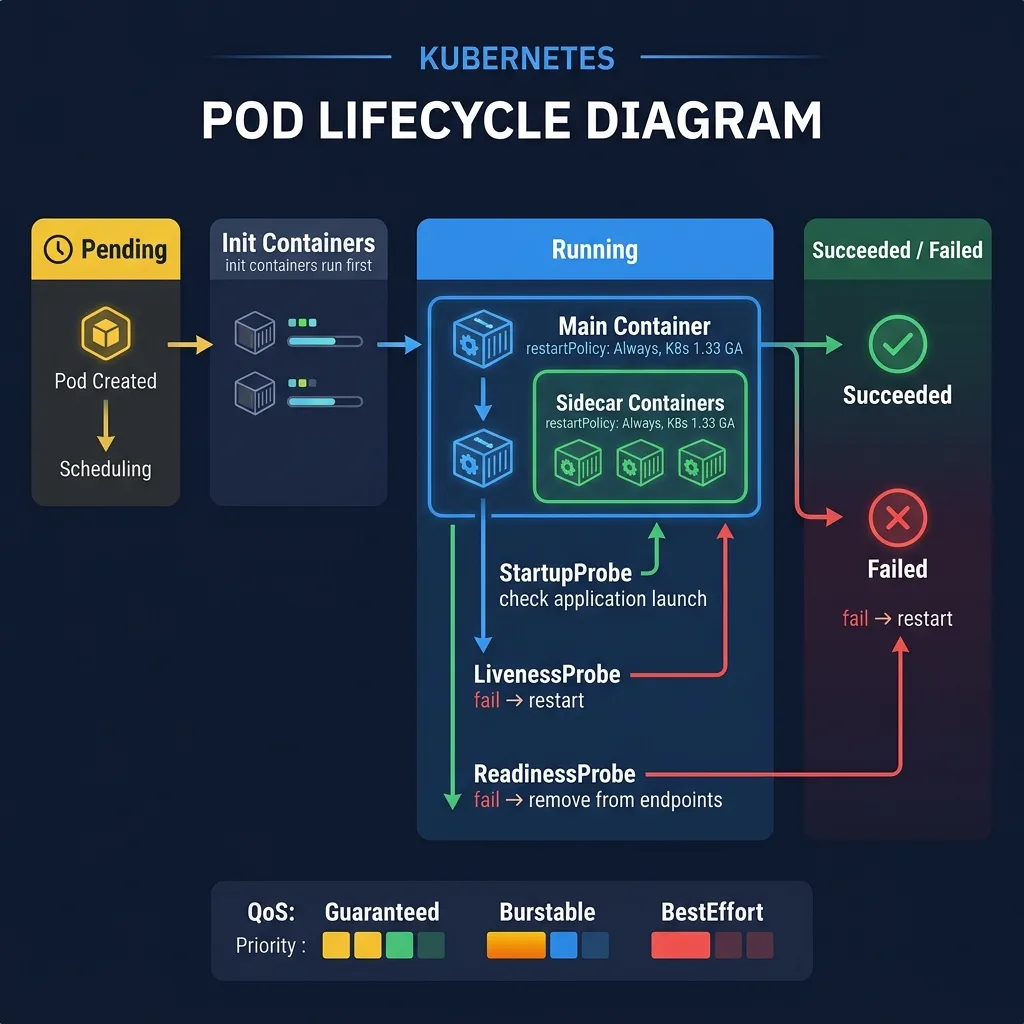
Pod là đơn vị scheduling nhỏ nhất trong Kubernetes. Một Pod bao gồm một hoặc nhiều containers chạy trên cùng một Node, chia sẻ chung:
- Network namespace: cùng IP address, cùng port space — containers giao tiếp với nhau qua
localhost - Storage volumes: volumes được mount vào Pod có thể được nhiều containers cùng truy cập
- Linux namespaces (tùy cấu hình): PID namespace, IPC namespace
Tại sao không deploy container trực tiếp? Kubernetes quản lý Pods, không phải containers. Pod là abstraction layer giúp nhóm các tiến trình liên quan chặt chẽ lại với nhau.
2. Ví dụ Pod đơn giản
apiVersion: v1
kind: Pod
metadata:
  name: nginx-pod
  labels:
    app: nginx
spec:
  containers:
  - name: nginx
    image: nginx:1.27
    ports:
    - containerPort: 80
    resources:
      requests:
        cpu: "100m"
        memory: "128Mi"
      limits:
        cpu: "500m"
        memory: "256Mi"
kubectl apply -f pod.yaml
kubectl get pods
kubectl describe pod nginx-pod
kubectl logs nginx-pod
kubectl exec -it nginx-pod -- /bin/bash
3. Multi-container Pods
Có 3 pattern phổ biến cho multi-container Pods:
3.1 Sidecar Pattern
Container phụ hỗ trợ container chính (log forwarder, proxy, OTel collector).
3.2 Ambassador Pattern
Container proxy thay mặt container chính giao tiếp với bên ngoài.
3.3 Adapter Pattern
Container chuẩn hóa output từ container chính sang format chuẩn.
4. Sidecar Containers GA — K8s 1.33
Trước K8s 1.33, sidecar containers được implement như init containers thông thường, gây ra vấn đề lifecycle: khi main container kết thúc, sidecar vẫn chạy và Job không bao giờ hoàn thành.
Giải pháp K8s 1.33: Sidecar container chính thức là initContainer với restartPolicy: Always. Kubernetes sẽ:
- Khởi động sidecar trước main container
- Restart sidecar nếu nó crash (không phụ thuộc main container)
- Terminate sidecar sau khi main container kết thúc
- Sidecar không block Job completion
apiVersion: v1
kind: Pod
metadata:
  name: app-with-sidecar
spec:
  initContainers:
  # Sidecar container (K8s 1.33+)
  - name: log-forwarder
    image: grafana/alloy:latest
    restartPolicy: Always       # Đây là key để biến init container thành sidecar
    volumeMounts:
    - name: logs
      mountPath: /var/log/app
    resources:
      requests:
        cpu: "50m"
        memory: "64Mi"
  containers:
  - name: app
    image: myapp:v1
    volumeMounts:
    - name: logs
      mountPath: /var/log/app
  volumes:
  - name: logs
    emptyDir: {}
Use cases cho Sidecar containers: Grafana Alloy log agent, OpenTelemetry Collector, Envoy proxy (trong service mesh), Vault agent injector.
5. Init Containers
Init containers chạy run-to-completion trước khi main containers bắt đầu. Dùng để:
- Chờ database sẵn sàng trước khi app start
- Tải config hoặc secrets từ external sources
- Setup file permissions, database migrations
spec:
  initContainers:
  - name: wait-for-db
    image: busybox:1.36
    command: ['sh', '-c', 'until nc -z postgres-service 5432; do sleep 2; done']
  - name: run-migrations
    image: myapp:v1
    command: ['python', 'manage.py', 'migrate']
  containers:
  - name: app
    image: myapp:v1
6. Ephemeral Containers — Debug Pods
Ephemeral containers cho phép attach một container debug vào Pod đang chạy mà không cần restart Pod. Rất hữu ích khi Pod dùng distroless image không có shell.
# Attach ephemeral container vào pod đang chạy kubectl debug -it nginx-pod --image=busybox:1.36 --target=nginxDebug từ node
kubectl debug node/worker-1 -it --image=ubuntu
Copy pod để debug (tạo pod mới với debug image)
kubectl debug nginx-pod -it --copy-to=nginx-debug --image=nginx:debug
7. Pod Lifecycle
Pod đi qua các phase sau:
- Pending: Pod được tạo, đang chờ scheduler chọn Node, hoặc đang pull image
- Running: Pod được bind vào Node, ít nhất 1 container đang chạy
- Succeeded: Tất cả containers kết thúc thành công (exit 0)
- Failed: Ít nhất 1 container kết thúc với lỗi (exit non-0)
- Unknown: Không thể lấy trạng thái Pod (thường do Node issue)
Pod conditions (từ kubectl describe pod):
- PodScheduled: scheduler đã chọn Node
- PodReadyToStartContainers: sandbox đã tạo và network đã cấu hình
- Initialized: tất cả init containers đã chạy thành công
- ContainersReady: tất cả containers đã ready
- Ready: Pod sẵn sàng nhận traffic
8. Resource Requests và Limits
resources:
  requests:
    cpu: "250m"      # 0.25 CPU core — dùng cho scheduling
    memory: "256Mi"  # 256 MiB — dùng cho scheduling
  limits:
    cpu: "1000m"     # 1 CPU core — container bị throttle nếu vượt
    memory: "512Mi"  # container bị OOMKilled nếu vượt
Requests là lượng tài nguyên scheduler đảm bảo. Limits là trần tối đa. CPU vượt limit bị throttle (không kill), Memory vượt limit bị OOMKilled.
9. QoS Classes
- Guaranteed: requests == limits cho mọi container. Ưu tiên cao nhất, không bị evict khi Node có memory pressure.
- Burstable: requests < limits. Có thể bị evict khi Node thiếu memory.
- BestEffort: không có requests/limits. Bị evict đầu tiên khi Node thiếu tài nguyên.
10. Probes — Kiểm tra sức khỏe
livenessProbe: httpGet: path: /healthz port: 8080 initialDelaySeconds: 30 # chờ 30s sau khi container start periodSeconds: 10 # kiểm tra mỗi 10s failureThreshold: 3 # fail 3 lần liên tiếp → restart containerreadinessProbe: httpGet: path: /ready port: 8080 initialDelaySeconds: 5 periodSeconds: 5
fail → xóa Pod khỏi Service endpoints (không nhận traffic)
startupProbe: httpGet: path: /healthz port: 8080 failureThreshold: 30 periodSeconds: 10 # cho phép app 300s để khởi động
- livenessProbe: Pod bị restart nếu fail
- readinessProbe: Pod bị xóa khỏi Service endpoints nếu fail (không nhận traffic)
- startupProbe: dùng cho slow-starting apps, tắt liveness/readiness probe trong khi chờ
11. Static Pods
Static Pods được kubelet tạo trực tiếp từ file YAML trong /etc/kubernetes/manifests/, không qua API server. Kubernetes control plane components (kube-apiserver, etcd, scheduler, controller-manager) chạy như Static Pods trên master node.
Tóm tắt
- Pod = nhóm containers chia sẻ network và storage
- Sidecar containers (K8s 1.33 GA):
initContainervớirestartPolicy: Always - Init containers: run-to-completion trước main container
- Ephemeral containers: debug pod không cần restart
- Luôn đặt resource requests/limits cho production workloads
- Dùng readinessProbe để kiểm soát traffic, livenessProbe để auto-restart