🎯 Lesson Objective
Understand why Services are needed in Kubernetes, types of Services and when to use each type, EndpointSlices is the new standard replacing Endpoints API, DNS-based service discovery with CoreDNS.
1. Why do we need Services?
Pods have Dynamic IP — every time the Pod is recreated (after crash, update, scaling), it gets a new IP. If Service A wants to call Service B, Service A cannot hardcode B's IP.
Service provides a stable endpoint__HTMLTAG_12___ (IP and DNS name) for a set of Pods. Traffic to the Service will be load balanced to healthy Pods.
2. Service Types
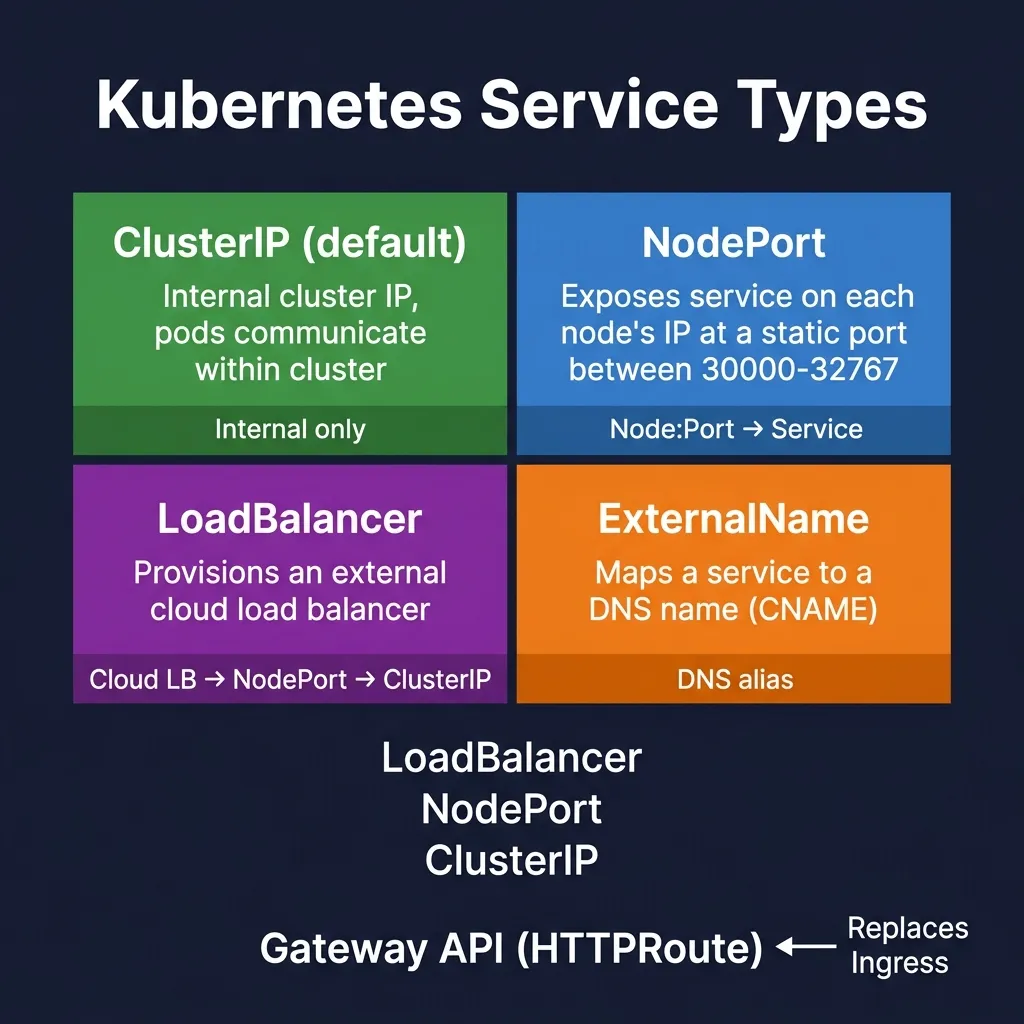
2.1 ClusterIP (default)
Expose service with internal IP in the cluster. Only accessible from within the cluster.
apiVersion: v1
kind: Service
metadata:
  name: backend-service
spec:
  type: ClusterIP   # mặc định, có thể bỏ qua
  selector:
    app: backend
  ports:
  - port: 80        # port của Service (clients dùng port này)
    targetPort: 8080 # port của Pods
2.2 NodePort
Expose service outside the cluster via Node's IP and a static port (30000-32767).
apiVersion: v1
kind: Service
metadata:
  name: frontend-service
spec:
  type: NodePort
  selector:
    app: frontend
  ports:
  - port: 80
    targetPort: 3000
    nodePort: 31000   # cố định port, hoặc để K8s tự chọn
Access: http://<any-node-ip>:31000
2.3 LoadBalancer
Create an external load balancer (on cloud providers: AWS ELB, GCP CLB, Azure LB). Used in production on the cloud.
apiVersion: v1
kind: Service
metadata:
  name: api-service
spec:
  type: LoadBalancer
  selector:
    app: api
  ports:
  - port: 80
    targetPort: 8080
Modern alternative: use Gateway API (see Module 4) — more expressive, no vendor lock-in.
2.4 ExternalName
Map service to DNS name outside the cluster. No load balancing, just CNAME.
apiVersion: v1
kind: Service
metadata:
  name: external-db
spec:
  type: ExternalName
  externalName: mydb.example.com
3. Service Discovery with DNS
CoreDNS creates DNS records for each Service. Format:
# Service trong cùng namespace http://backend-serviceService trong namespace khác
http://backend-service.production.svc.cluster.local
Format đầy đủ
{service-name}.{namespace}.svc.{cluster-domain}
# Kiểm tra DNS từ trong pod
kubectl exec -it debug-pod -- nslookup backend-service
kubectl exec -it debug-pod -- curl http://backend-service/api
4. EndpointSlices — New standard K8s 1.33+
Previously, Kubernetes used Endpoints resource to store the IP list of Pods. Problem: when the number of Pods is large (thousands), the Endpoints object is very large, causing network overhead when updating.
EndpointSlices divided into slices (default maximum 100 endpoints/slice), significantly improving scalability.
- Endpoints API: deprecated K8s 1.33
- EndpointSlices: current standard, introduced since K8s 1.21
# Xem EndpointSlices kubectl get endpointslices kubectl get endpointslices -l kubernetes.io/service-name=backend-service -o yamlXem Endpoints (deprecated, vẫn hoạt động nhưng tránh dùng)
kubectl get endpoints
apiVersion: discovery.k8s.io/v1
kind: EndpointSlice
metadata:
  name: backend-service-xyz
  labels:
    kubernetes.io/service-name: backend-service
addressType: IPv4
ports:
- name: http
  protocol: TCP
  port: 8080
endpoints:
- addresses:
  - 10.244.1.5
  conditions:
    ready: true
    serving: true
  targetRef:
    kind: Pod
    name: backend-pod-abc
5. Headless Services
Headless Service (clusterIP: None) does not have ClusterIP. DNS query returns IPs of Pods directly, without load balancing. Used for StatefulSets to have stable DNS names for each Pod.
apiVersion: v1
kind: Service
metadata:
  name: postgres-headless
spec:
  clusterIP: None     # Headless
  selector:
    app: postgres
  ports:
  - port: 5432
# DNS resolution cho headless service # Trả về danh sách Pod IPs nslookup postgres-headless.production.svc.cluster.localDNS resolution cho từng Pod trong StatefulSet
nslookup postgres-0.postgres-headless.production.svc.cluster.local nslookup postgres-1.postgres-headless.production.svc.cluster.local
6. Session Affinity
By default, each request is round-robin to a random Pod. If you need sticky sessions:
spec:
  sessionAffinity: ClientIP
  sessionAffinityConfig:
    clientIP:
      timeoutSeconds: 3600  # 1 giờ
7. kube-proxy and Service Implementation
kube-proxy runs on each Node, implementing Service load balancing by creating iptables/nftables rules.
- iptables mode: legacy, most popular
- nftables mode: recommended 2026 (IPVS deprecated K8s 1.35)
When packet arrives at ClusterIP, iptables/nftables rules redirect to a random IP Pod (DNAT).
8. Service Best Practices
- Always use
ClusterIPfor internal services - Use Gateway API instead of
LoadBalancertype for external exposure - Name the service clearly, use consistent labels
- Use
targetPort__HTMLTAG_104___ as the port name instead of the number (flexibility when changing ports in Pod) - Monitor EndpointSlices to debug connectivity issues__HTMLTAG_107___
Summary
- Service = stable endpoint for dynamic Pods__HTMLTAG_113___
- ClusterIP: internal; NodePort: dev/testing; LoadBalancer: cloud production (but prioritize API Gateway)
- EndpointSlices replaces Endpoints API (deprecated K8s 1.33)
- Headless Service: DNS returns Pod IPs directly, used for StatefulSets
- CoreDNS:
svc-name.namespace.svc.cluster.local