🎯 Mục tiêu bài học
Hiểu tại sao cần Service trong Kubernetes, các loại Service và khi nào dùng mỗi loại, EndpointSlices là chuẩn mới thay thế Endpoints API, DNS-based service discovery với CoreDNS.
1. Tại sao cần Services?
Pods có IP động — mỗi lần Pod được tạo lại (sau crash, update, scaling), nó nhận IP mới. Nếu Service A muốn gọi Service B, Service A không thể hardcode IP của B.
Service cung cấp một endpoint ổn định (IP và DNS name) cho một tập hợp Pods. Traffic đến Service sẽ được load balance tới các Pods khỏe mạnh.
2. Service Types
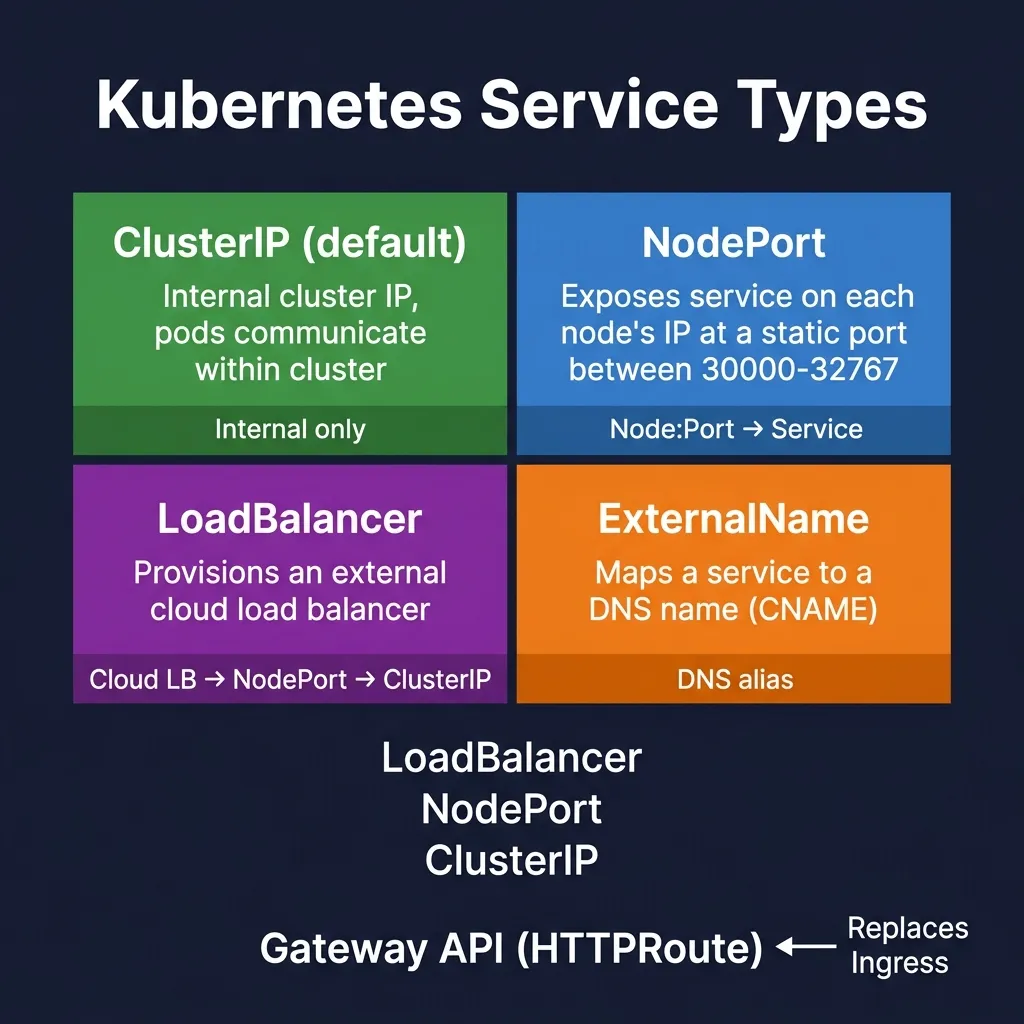
2.1 ClusterIP (mặc định)
Expose service với IP nội bộ trong cluster. Chỉ accessible từ trong cluster.
apiVersion: v1
kind: Service
metadata:
  name: backend-service
spec:
  type: ClusterIP   # mặc định, có thể bỏ qua
  selector:
    app: backend
  ports:
  - port: 80        # port của Service (clients dùng port này)
    targetPort: 8080 # port của Pods
2.2 NodePort
Expose service ra ngoài cluster qua IP của Node và một port tĩnh (30000-32767).
apiVersion: v1
kind: Service
metadata:
  name: frontend-service
spec:
  type: NodePort
  selector:
    app: frontend
  ports:
  - port: 80
    targetPort: 3000
    nodePort: 31000   # cố định port, hoặc để K8s tự chọn
Truy cập: http://<any-node-ip>:31000
2.3 LoadBalancer
Tạo external load balancer (trên cloud providers: AWS ELB, GCP CLB, Azure LB). Dùng trong production trên cloud.
apiVersion: v1
kind: Service
metadata:
  name: api-service
spec:
  type: LoadBalancer
  selector:
    app: api
  ports:
  - port: 80
    targetPort: 8080
Thay thế hiện đại: dùng Gateway API (xem Module 4) — expressive hơn, không vendor lock-in.
2.4 ExternalName
Map service đến DNS name bên ngoài cluster. Không tạo load balancing, chỉ là CNAME.
apiVersion: v1
kind: Service
metadata:
  name: external-db
spec:
  type: ExternalName
  externalName: mydb.example.com
3. Service Discovery với DNS
CoreDNS tạo DNS records cho mỗi Service. Format:
# Service trong cùng namespace http://backend-serviceService trong namespace khác
http://backend-service.production.svc.cluster.local
Format đầy đủ
{service-name}.{namespace}.svc.{cluster-domain}
# Kiểm tra DNS từ trong pod
kubectl exec -it debug-pod -- nslookup backend-service
kubectl exec -it debug-pod -- curl http://backend-service/api
4. EndpointSlices — Chuẩn mới K8s 1.33+
Trước đây, Kubernetes dùng Endpoints resource để lưu danh sách IP của Pods. Vấn đề: khi số lượng Pods lớn (hàng nghìn), Endpoints object rất lớn, gây network overhead khi update.
EndpointSlices chia nhỏ thành các slices (mặc định tối đa 100 endpoints/slice), cải thiện scalability đáng kể.
- Endpoints API: deprecated K8s 1.33
- EndpointSlices: chuẩn hiện tại, đã GA từ K8s 1.21
# Xem EndpointSlices kubectl get endpointslices kubectl get endpointslices -l kubernetes.io/service-name=backend-service -o yamlXem Endpoints (deprecated, vẫn hoạt động nhưng tránh dùng)
kubectl get endpoints
apiVersion: discovery.k8s.io/v1
kind: EndpointSlice
metadata:
  name: backend-service-xyz
  labels:
    kubernetes.io/service-name: backend-service
addressType: IPv4
ports:
- name: http
  protocol: TCP
  port: 8080
endpoints:
- addresses:
  - 10.244.1.5
  conditions:
    ready: true
    serving: true
  targetRef:
    kind: Pod
    name: backend-pod-abc
5. Headless Services
Headless Service (clusterIP: None) không có ClusterIP. DNS query trả về trực tiếp IPs của các Pods, không qua load balancing. Dùng cho StatefulSets để có stable DNS names cho từng Pod.
apiVersion: v1
kind: Service
metadata:
  name: postgres-headless
spec:
  clusterIP: None     # Headless
  selector:
    app: postgres
  ports:
  - port: 5432
# DNS resolution cho headless service # Trả về danh sách Pod IPs nslookup postgres-headless.production.svc.cluster.localDNS resolution cho từng Pod trong StatefulSet
nslookup postgres-0.postgres-headless.production.svc.cluster.local nslookup postgres-1.postgres-headless.production.svc.cluster.local
6. Session Affinity
Mặc định, mỗi request được round-robin đến một Pod ngẫu nhiên. Nếu cần sticky sessions:
spec:
  sessionAffinity: ClientIP
  sessionAffinityConfig:
    clientIP:
      timeoutSeconds: 3600  # 1 giờ
7. kube-proxy và Service Implementation
kube-proxy chạy trên mỗi Node, implement Service load balancing bằng cách tạo iptables/nftables rules.
- iptables mode: legacy, phổ biến nhất
- nftables mode: khuyến nghị 2026 (IPVS deprecated K8s 1.35)
Khi packet đến ClusterIP, iptables/nftables rules chuyển hướng đến một Pod IP ngẫu nhiên (DNAT).
8. Service Best Practices
- Luôn dùng
ClusterIPcho internal services - Dùng Gateway API thay vì
LoadBalancertype cho external exposure - Đặt tên service rõ ràng, dùng labels nhất quán
- Dùng
targetPortlà tên port thay vì số (flexibility khi thay đổi port trong Pod) - Theo dõi EndpointSlices để debug connectivity issues
Tóm tắt
- Service = stable endpoint cho dynamic Pods
- ClusterIP: internal; NodePort: dev/testing; LoadBalancer: cloud production (nhưng ưu tiên Gateway API)
- EndpointSlices thay thế Endpoints API (deprecated K8s 1.33)
- Headless Service: DNS trả về Pod IPs trực tiếp, dùng cho StatefulSets
- CoreDNS:
svc-name.namespace.svc.cluster.local