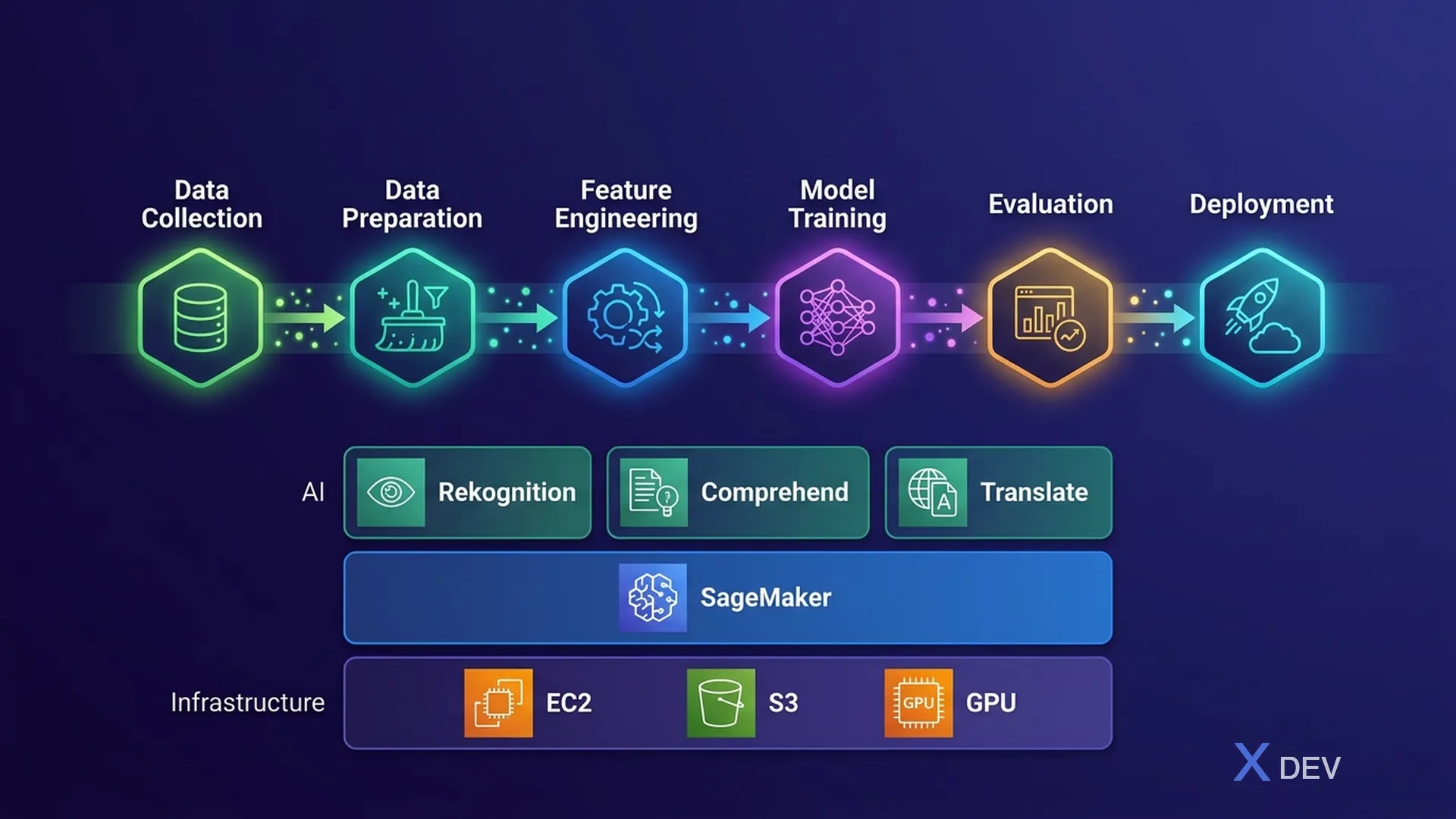
ML Development Lifecycle Pipeline and AWS AI/ML Service Stack
1. ML Development Lifecycle
The AIF-C01 exam requires you to understand the full ML development lifecycle — from problem definition to deployment and monitoring.
┌─────────────┐    ┌──────────────┐    ┌──────────────┐
│ 1. Business │───→│ 2. Data      │───→│ 3. Feature   │
│ Problem     │    │ Collection & │    │ Engineering  │
│ Definition  │    │ Preparation  │    │              │
└─────────────┘    └──────────────┘    └──────────────┘
                                              │
┌─────────────┐    ┌──────────────┐    ┌──────┴───────┐
│ 6. Monitor  │←───│ 5. Deploy    │←───│ 4. Model     │
│ & Retrain   │    │ & Inference  │    │ Training &   │
│             │    │              │    │ Evaluation   │
└─────────────┘    └──────────────┘    └──────────────┘
Step 1: Business Problem Definition
- Determine whether the problem actually requires ML (sometimes rule-based approaches are sufficient)
- Define success metrics (KPIs)
- Determine data availability
Exam tip: "Not every problem needs ML." If the question describes a simple problem, a rule-based approach or lookup table might be enough.
Step 2: Data Collection & Preparation
- Data Collection: Gather from databases, APIs, IoT, logs
- Data Cleaning: Handle missing values, remove duplicates, fix errors
- Data Labeling: Label data for supervised learning → Amazon SageMaker Ground Truth
- Exploratory Data Analysis (EDA): Visualize, understand distributions, correlations
Step 3: Feature Engineering
- Feature selection: Select important features, remove noise
- Feature transformation: Normalization, scaling, encoding
- Feature creation: Create new features from raw data
- AWS: SageMaker Data Wrangler, SageMaker Feature Store
Step 4: Model Training & Evaluation
- Choose algorithm appropriate for the problem
- Split data into training/validation/test sets
- Train model, tune hyperparameters
- Evaluate using appropriate metrics (accuracy, F1, RMSE...)
- AWS: Amazon SageMaker for full ML workflow
Step 5: Deployment & Inference
- Real-time inference: Endpoint for instant predictions
- Batch inference: Process large datasets offline
- Edge deployment: Run model on edge devices
- AWS: SageMaker Endpoints, Lambda, IoT Greengrass
Step 6: Monitoring & Retraining
- Model drift: Performance degrades over time as data changes
- Data drift: Input data distribution changes
- Concept drift: Relationship between input and output changes
- Solution: Monitor → detect drift → retrain with new data
- AWS: SageMaker Model Monitor
2. AWS AI/ML Service Stack
AWS provides 3 layers of AI/ML services — from high-level (no ML knowledge needed) to low-level (full control):
┌─────────────────────────────────────────────────────┐
│  Layer 3: AI Services (Pre-trained, API-based)      │
│  → Rekognition, Comprehend, Polly, Transcribe,      │
│    Translate, Textract, Lex, Personalize, Forecast   │
│  → NO ML expertise needed                           │
├─────────────────────────────────────────────────────┤
│  Layer 2: ML Services (Managed platform)            │
│  → Amazon SageMaker, SageMaker JumpStart            │
│  → Amazon Bedrock (GenAI)                           │
│  → SOME ML expertise needed                         │
├─────────────────────────────────────────────────────┤
│  Layer 1: ML Frameworks & Infrastructure            │
│  → EC2 with GPU/Inferentia, Deep Learning AMIs,     │
│    Deep Learning Containers                         │
│  → FULL ML expertise needed                         │
└─────────────────────────────────────────────────────┘
3. AWS AI Services — Summary Table
This section is very important for the exam — you need to know what each service does and when to use it.
3.1. Computer Vision
| Service | What it does | Use Cases |
|---|---|---|
| Amazon Rekognition | Image and video analysis | Face detection, object detection, content moderation, celebrity recognition, text in images (OCR) |
| Amazon Textract | Extract text & data from documents | Invoice processing, ID document extraction, form data, table extraction |
| Amazon Lookout for Vision | Visual inspection for manufacturing | Defect detection in products on assembly line |
3.2. Natural Language Processing (NLP)
| Service | What it does | Use Cases |
|---|---|---|
| Amazon Comprehend | NLP analysis | Sentiment analysis, entity extraction, key phrases, language detection, PII detection |
| Amazon Translate | Neural machine translation | Real-time translation, batch document translation |
| Amazon Kendra | Intelligent enterprise search | Internal knowledge search, FAQ, document search powered by NLP |
3.3. Speech
| Service | What it does | Direction |
|---|---|---|
| Amazon Polly | Text-to-Speech (TTS) | Text → Audio |
| Amazon Transcribe | Speech-to-Text (STT) | Audio → Text |
| Amazon Lex | Conversational AI (chatbot) | Build chatbots with voice & text (powers Alexa) |
Exam tip: Polly = text TO speech (Polly "speaks"). Transcribe = speech TO text (Transcribe "writes down").
3.4. Predictions & Recommendations
| Service | What it does | Use Cases |
|---|---|---|
| Amazon Personalize | Real-time personalization & recommendations | Product recommendations, personalized content |
| Amazon Forecast | Time-series forecasting | Demand planning, financial forecasting, resource planning |
| Amazon Fraud Detector | Detect online fraud | Payment fraud, fake accounts, account takeover |
4. Amazon SageMaker Overview
SageMaker is a fully managed ML platform — it provides everything needed for the entire ML lifecycle.
Key Components:
| Component | Purpose |
|---|---|
| SageMaker Studio | IDE for ML development (Jupyter-based) |
| SageMaker Ground Truth | Data labeling service (human + ML-assisted) |
| SageMaker Data Wrangler | Data preparation & transformation (no code) |
| SageMaker Feature Store | Store & share ML features |
| SageMaker Training | Managed training jobs with built-in algorithms |
| SageMaker Autopilot | AutoML — automatic model building |
| SageMaker JumpStart | Pre-trained models & solutions (model hub) |
| SageMaker Endpoints | Deploy models for real-time inference |
| SageMaker Model Monitor | Monitor deployed models for drift |
| SageMaker Clarify | Bias detection & model explainability |
| SageMaker Canvas | No-code ML for business users |
When to use SageMaker vs AI Services?
Need custom ML model? → SageMaker
Need pre-trained capability? → AI Services (Rekognition, Comprehend, etc.)
Need GenAI/Foundation Models? → Amazon Bedrock
Business user, no code? → SageMaker Canvas
5. Use Case → AWS Service Mapping
This is a very common question type on the exam:
| Use Case | AWS Service |
|---|---|
| Detect faces in photos | Amazon Rekognition |
| Extract data from invoices | Amazon Textract |
| Analyze customer review sentiment | Amazon Comprehend |
| Translate content to multiple languages | Amazon Translate |
| Build a customer service chatbot | Amazon Lex |
| Convert blog posts to audio | Amazon Polly |
| Transcribe meeting recordings | Amazon Transcribe |
| Product recommendations | Amazon Personalize |
| Demand forecasting | Amazon Forecast |
| Search internal documents | Amazon Kendra |
| Detect fraudulent transactions | Amazon Fraud Detector |
| Label training data | SageMaker Ground Truth |
| Build custom ML model | Amazon SageMaker |
| No-code ML for business analysts | SageMaker Canvas |
| Generate text with LLM | Amazon Bedrock |
6. Practice Questions
Q1: A company wants to automatically extract text and structured data from scanned invoices. Which AWS service should they use?
- A) Amazon Comprehend
- B) Amazon Rekognition
- C) Amazon Textract ✓
- D) Amazon Translate
Explanation: Textract is specifically designed to extract text, forms, and tables from scanned documents. Comprehend analyzes text meaning, not document extraction. Rekognition is for image/video analysis.
Q2: A data scientist notices that their deployed model's prediction accuracy has decreased over the past month. The input data patterns have changed. What is this called?
- A) Overfitting
- B) Underfitting
- C) Data drift ✓
- D) Feature engineering
Explanation: When the statistical properties of model input data change over time, causing performance degradation, this is called data drift.
Q3: Which AWS service allows business analysts with no ML experience to build ML models using a visual interface?
- A) SageMaker Studio
- B) SageMaker Autopilot
- C) SageMaker Canvas ✓
- D) SageMaker JumpStart
Explanation: SageMaker Canvas provides a no-code, visual point-and-click interface for business analysts. Autopilot automates model building but requires some ML knowledge. JumpStart provides pre-trained models. Studio is the full ML IDE.