1. Kubernetes Architecture Review (CKA Focus)
The CKA exam requires you to troubleshoot cluster components, not just know the theory.
Control Plane Node                 Worker Nodes
──────────────────                 ────────────
  kube-apiserver  ◄──────────────── kubelet
  etcd                               kube-proxy
  kube-scheduler                     container runtime
  controller-manager                 (containerd)
  cloud-controller-manager (opt)

All components communicate via kube-apiserver (only etcd talks directly to API server)| Component | Location | Config / Pod Path | Troubleshoot |
|---|---|---|---|
| kube-apiserver | Control plane | /etc/kubernetes/manifests/kube-apiserver.yaml | kubectl get pods -n kube-system |
| etcd | Control plane | /etc/kubernetes/manifests/etcd.yaml | etcdctl member list |
| kube-scheduler | Control plane | /etc/kubernetes/manifests/kube-scheduler.yaml | logs in kube-system |
| controller-manager | Control plane | /etc/kubernetes/manifests/kube-controller-manager.yaml | logs in kube-system |
| kubelet | Every node | /var/lib/kubelet/config.yaml, systemd service | systemctl status kubelet |
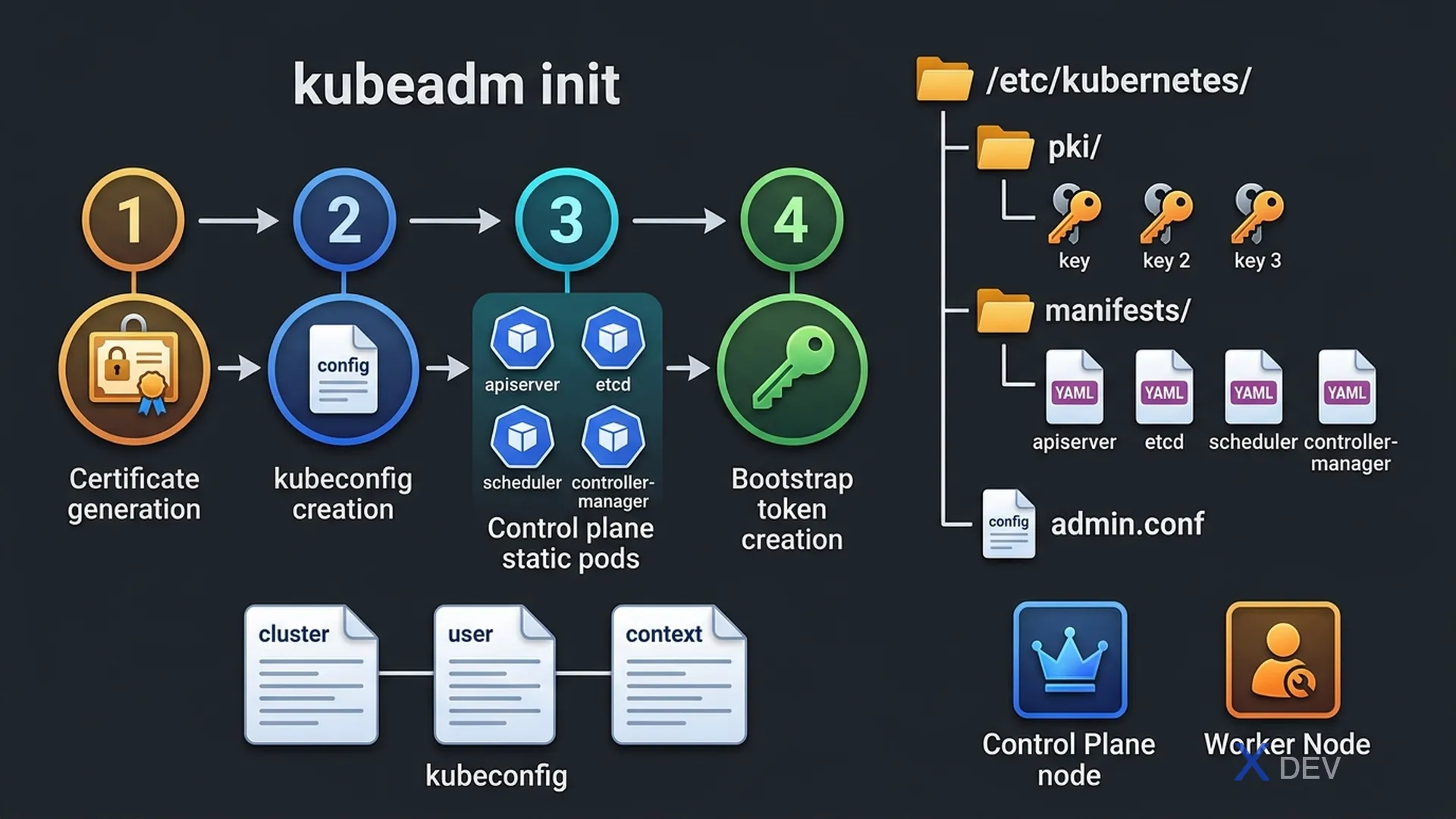
Exam tip: On a kubeadm cluster, control plane components run as static Pods (files in
/etc/kubernetes/manifests/). Kubelet automatically starts/restarts them. When you edit a manifest file, kubelet auto-reloads the Pod — no need for kubectl apply.
2. kubeadm — Cluster Bootstrap
# 1. Init control plane
kubeadm init --pod-network-cidr=10.244.0.0/16

# 2. Setup kubeconfig (after init)
mkdir -p $HOME/.kube
cp /etc/kubernetes/admin.conf $HOME/.kube/config

# 3. Install CNI plugin (required before nodes become Ready)
kubectl apply -f https://raw.githubusercontent.com/flannel-io/flannel/master/Documentation/kube-flannel.yml

# 4. Join worker nodes (token from kubeadm init output)
kubeadm join 192.168.1.10:6443 --token abc.xyz \
  --discovery-token-ca-cert-hash sha256:...
3. kubeconfig & Contexts
~/.kube/config structure:
  clusters:     → cluster API endpoints
  users:        → auth credentials (certificates, tokens)
  contexts:     → cluster + user + namespace combo
  current-context → active context

kubectl config commands:
  kubectl config get-contexts       # List contexts
  kubectl config use-context NAME   # Switch context
  kubectl config current-context    # Show active
  kubectl config set-context NAME --namespace=prod  # Set default ns
Exam tip: CKA uses multiple clusters. The first step for each question is always: "switch to the correct context before doing anything". Remember to check
kubectl config current-context.
4. Static Pods
Static Pods are managed directly by kubelet, not through the API server. Config files are in staticPodPath (usually /etc/kubernetes/manifests/).
| Static Pod | Differs from Regular Pod |
|---|---|
| Created directly by kubelet | No ReplicaSet, no Deployment |
| Cannot be deleted via kubectl delete | Must delete the manifest file |
| Mirror Pod appears on API server | Visible via kubectl get pods but read-only |
5. Cheat Sheet
| Task | Command |
|---|---|
| Check control plane health | kubectl get pods -n kube-system |
| View apiserver config | cat /etc/kubernetes/manifests/kube-apiserver.yaml |
| Kubelet status | systemctl status kubelet |
| Kubelet logs | journalctl -u kubelet -n 50 |
| Regenerate join token | kubeadm token create --print-join-command |
6. Practice Questions
Q1: A cluster's kube-apiserver Pod is not running. You check /etc/kubernetes/manifests/kube-apiserver.yaml and find a syntax error. After fixing it, what happens?
- A) You must run kubectl apply -f kube-apiserver.yaml
- B) kubelet automatically detects the file change and restarts the static Pod ✓
- C) kubeadm must be run to restart the control plane
- D) The API server restart requires a full node reboot
Explanation: Static Pods are managed by kubelet, which watches the manifest directory for changes. When the YAML file is fixed, kubelet automatically kills the old Pod and starts a new one.
Q2: After running kubeadm init, a cluster admin runs kubectl get nodes and sees the control plane node with status "NotReady". What is the most likely cause?
- A) kubeadm init failed to create etcd
- B) CNI plugin has not been installed ✓
- C) The kubelet service is not running
- D) The cluster lacks worker nodes
Explanation: After kubeadm init, nodes remain NotReady until a CNI (Container Network Interface) plugin is installed. Without CNI, Pod networking doesn't work and nodes cannot report Ready.
Q3: An administrator needs to run kubectl commands on a different cluster. What is the fastest way to switch without modifying the current kubeconfig permanently?
- A) Edit ~/.kube/config and change current-context
- B) Use --context flag or kubectl config use-context ✓
- C) Create a new kubeconfig file and delete the old one
- D) Re-run kubeadm init with the target cluster
Explanation: kubectl config use-context TARGET switches the active context. Alternatively, use --context=TARGET on individual commands for per-command switching without changing the default.