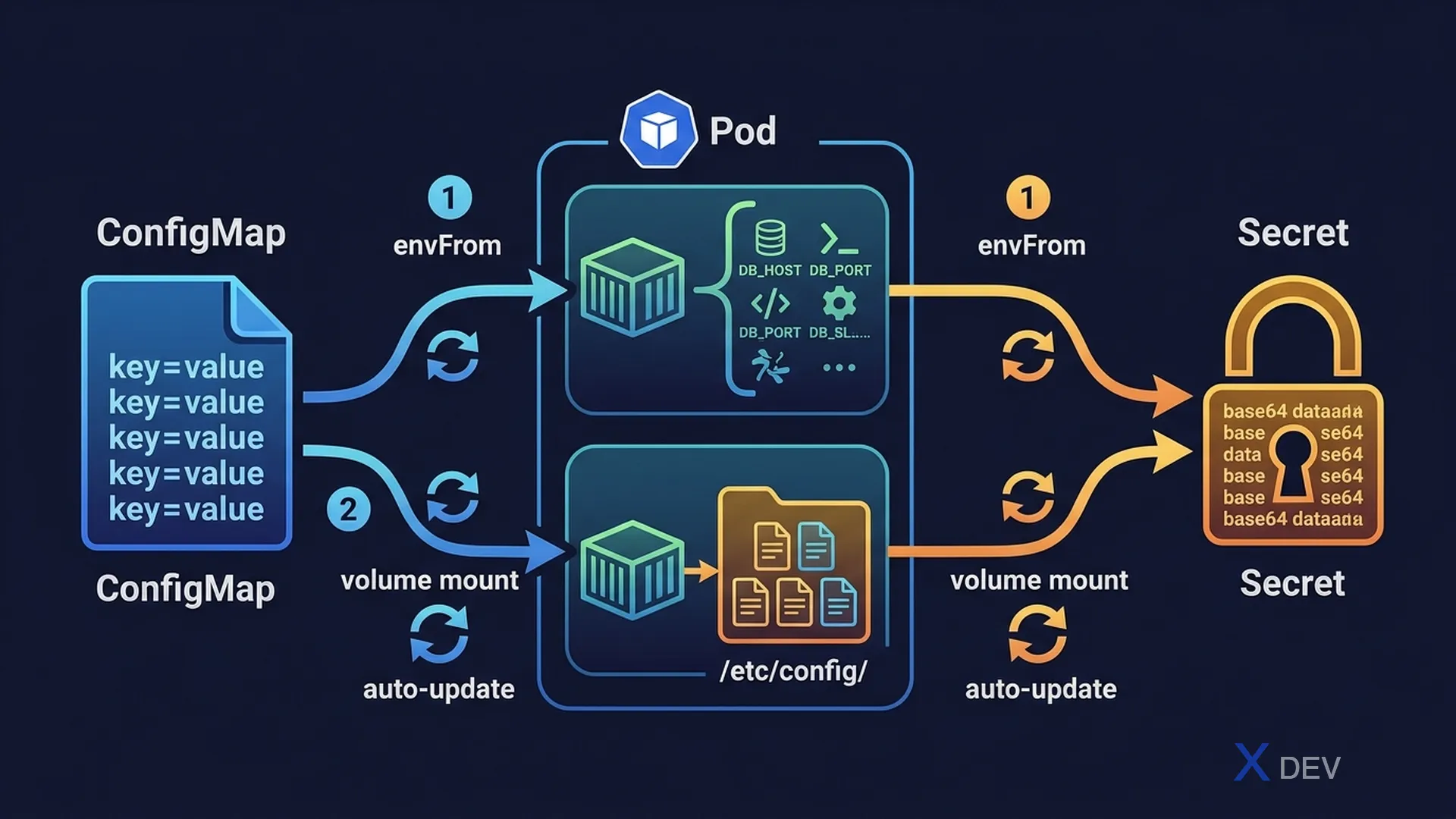
1. ConfigMap
ConfigMap stores non-sensitive key-value pairs. Not encrypted (plain text).
# Create ConfigMap — Imperative
kubectl create configmap app-config \
  --from-literal=DB_HOST=mysql \
  --from-literal=DB_PORT=3306

kubectl create configmap app-config --from-file=config.properties
kubectl create configmap app-config --from-env-file=.env

# Declarative YAML
apiVersion: v1
kind: ConfigMap
metadata:
  name: app-config
data:
  DB_HOST: mysql
  DB_PORT: "3306"
  config.properties: |
    server.port=8080
    debug=false
2. Secret
Secret stores sensitive data. It is base64 encoded (not encrypted — just encoded!).
# Create Secret — Imperative
kubectl create secret generic db-secret \
  --from-literal=username=admin \
  --from-literal=password=mypassword

kubectl create secret generic db-secret --from-file=credentials.txt

# Declarative (base64 encode first)
echo -n 'admin' | base64    # YWRtaW4=
echo -n 'mypassword' | base64  # bXlwYXNzd29yZA==

apiVersion: v1
kind: Secret
metadata:
  name: db-secret
type: Opaque
data:
  username: YWRtaW4=
password: bXlwYXNzd29yZA==| Secret Type | Purpose |
|---|---|
Opaque | Generic — default type, any key-value data |
kubernetes.io/dockerconfigjson | Docker registry credentials |
kubernetes.io/tls | TLS certificate and private key |
kubernetes.io/service-account-token | ServiceAccount token (auto-created) |
Exam tip: Secret data is base64 encoded, not encrypted. Anyone with permission to read a Secret can decode it:
echo 'YWRtaW4=' | base64 -d. To encrypt at rest, you must enable EncryptionConfiguration — but CKAD does not test this. The exam typically tests: creating a Secret and injecting it into a Pod.
3. Inject via Environment Variables
spec:
  containers:
  - name: app
    image: myapp

    # Method 1: envFrom — load ALL keys as env vars
    envFrom:
    - configMapRef:
        name: app-config
    - secretRef:
        name: db-secret

    # Method 2: valueFrom — load SPECIFIC key
    env:
    - name: DATABASE_HOST
      valueFrom:
        configMapKeyRef:
          name: app-config
          key: DB_HOST
    - name: DB_PASSWORD
      valueFrom:
        secretKeyRef:
          name: db-secret
          key: password
4. Inject via Volume Mount
spec:
  volumes:
  - name: config-vol
    configMap:
      name: app-config
  - name: secret-vol
    secret:
      secretName: db-secret

  containers:
  - name: app
    image: myapp
    volumeMounts:
    - name: config-vol
      mountPath: /etc/config    # Each key becomes a file
    - name: secret-vol
      mountPath: /etc/secrets
      readOnly: true

  # Result: /etc/config/DB_HOST contains "mysql"
# /etc/secrets/password contains "mypassword" (decoded)| Method | When to Use | Auto-update when CM/Secret changes? |
|---|---|---|
envFrom / env.valueFrom | App reads env vars | No (requires pod restart) |
| Volume mount | App reads from files, or needs auto-reload | Yes (after ~1-2 minutes) |
Exam tip: Volume-mounted ConfigMaps/Secrets auto-update when the source changes (after kubelet sync period ~1 minute). Env vars require a pod restart to reflect changes. CKAD often tests both methods — know the syntax for
configMapKeyRefvsconfigMapRef(the one with "Key" is for a single key).
5. Cheat Sheet
| Task | Command / YAML |
|---|---|
| Create CM from literals | kubectl create cm name --from-literal=k=v |
| Create Secret from literals | kubectl create secret generic n --from-literal=k=v |
| Load all CM keys as env | envFrom: - configMapRef: name: ... |
| Load a specific key | env: - valueFrom: configMapKeyRef: ... |
| Mount as files | volumes: configMap/secret + volumeMounts |
6. Practice Questions
Q1: A Pod needs to consume ALL key-value pairs from a ConfigMap named "app-settings" as environment variables. Which configuration is correct?
- A)
env: - name: APP_SETTINGS valueFrom: configMapRef: name: app-settings - B)
envFrom: - configMapRef: name: app-settings✓ - C)
volumes: - configMap: name: app-settings - D)
env: - configMapKeyRef: name: app-settings key: "*"
Explanation: envFrom with configMapRef loads ALL keys from the ConfigMap as environment variables. env with valueFrom configMapKeyRef only loads ONE specific key. The wildcard "*" syntax does not exist.
Q2: You create a Secret with the command: kubectl create secret generic mysecret --from-literal=password=secret123. How is the data stored in etcd?
- A) Plain text: "password=secret123"
- B) AES-256 encrypted
- C) Base64 encoded ✓
- D) SHA-256 hashed
Explanation: By default, Kubernetes stores Secret data as base64 encoded values in etcd — NOT encrypted. Base64 is encoding, not encryption. Anyone with etcd access can decode it. To encrypt at rest, an EncryptionConfiguration must be configured separately.
Q3: A ConfigMap is updated with new values. A Pod is using this ConfigMap mounted as a volume at /etc/config. What happens?
- A) The Pod fails immediately because the config changed
- B) The files in /etc/config are automatically updated (with a short delay) ✓
- C) Nothing happens — the Pod must be restarted to see changes
- D) The Pod is restarted automatically by Kubernetes
Explanation: Volume-mounted ConfigMaps are automatically updated when the ConfigMap changes, after the kubelet sync period (typically ~1 minute). Environment variables from ConfigMaps do NOT auto-update — the Pod must be recreated. Applications that watch for file changes can react to these updates without restarts.