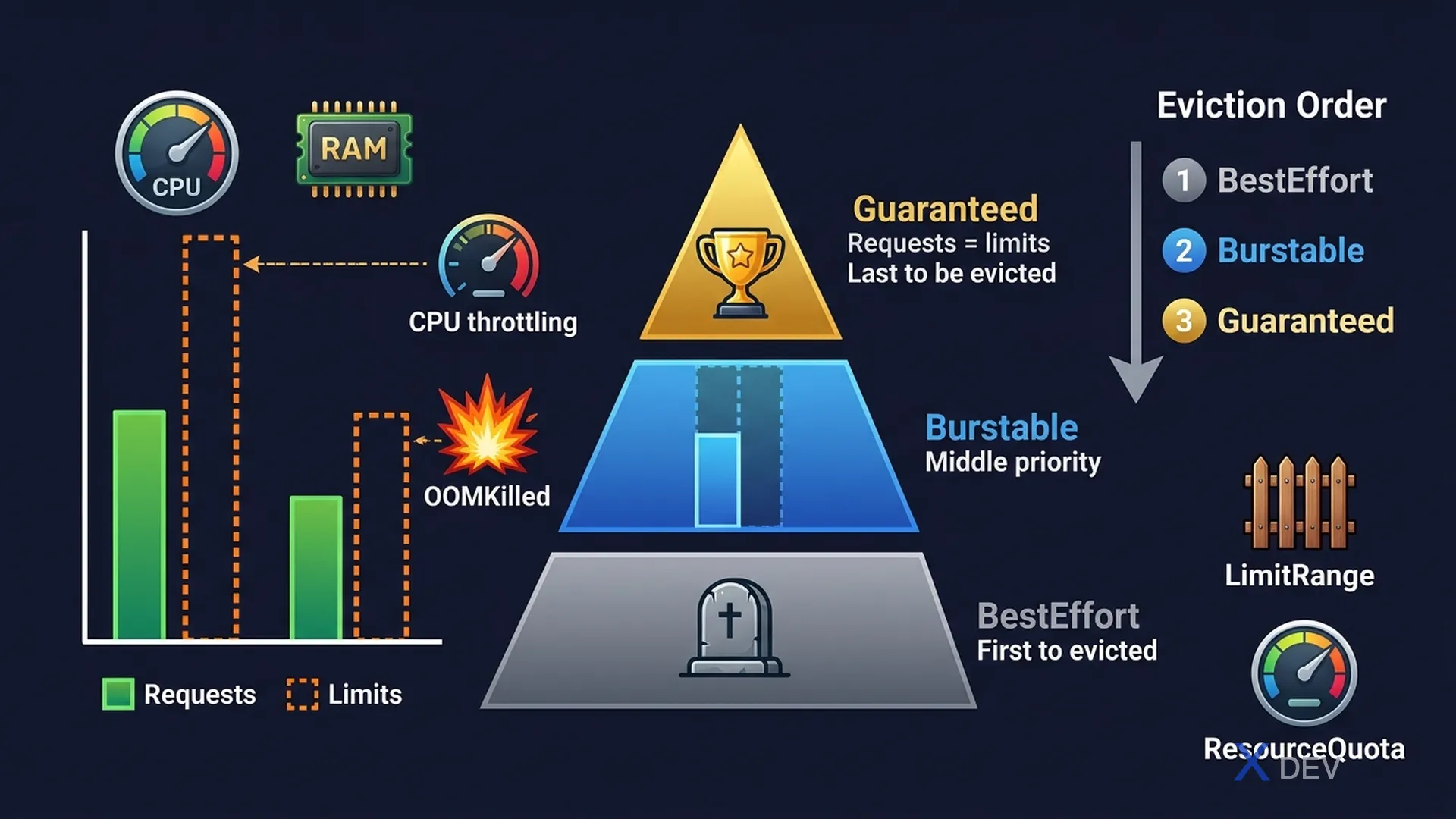
1. Requests vs Limits
resources:
  requests:
    cpu: "250m"      # 250 millicores = 0.25 CPU (scheduling)
    memory: "128Mi"  # Minimum guaranteed memory
  limits:
    cpu: "500m"      # Max CPU (throttled but not killed)
memory: "256Mi" # Max memory (killed if exceeded → OOMKilled)| Resource | When Exceeding Requests | When Exceeding Limits |
|---|---|---|
| CPU | Runs normally (burst) | Throttled (slowed down, not killed) |
| Memory | Runs normally | Container is killed → OOMKilled |
CPU units:
  1 CPU = 1000m (millicores)
  0.5 CPU = 500m
  100m = 0.1 CPU

Memory units:
  Ki (Kibibyte) = 1024 bytes
  Mi (Mebibyte) = 1024 Ki
  Gi (Gibibyte) = 1024 Mi
  (NOT KB/MB/GB which are decimal)
2. QoS Classes
QoS = Quality of Service (controls eviction priority)

┌─────────────────────────────────────────────────────────┐
│  GUARANTEED — Last to evict                             │
│  ✓ CPU requests == CPU limits                           │
│  ✓ Memory requests == Memory limits                     │
│  ✓ ALL containers in pod must satisfy                   │
├─────────────────────────────────────────────────────────┤
│  BURSTABLE — Middle priority                            │
│  ✓ At least one container has requests OR limits        │
│  ✗ Doesn't meet Guaranteed criteria                     │
├─────────────────────────────────────────────────────────┤
│  BESTEFFORT — First to evict                            │
│  ✗ NO requests, NO limits set at all                    │
└─────────────────────────────────────────────────────────┘| QoS Class | Condition | Eviction Priority |
|---|---|---|
| Guaranteed | requests == limits for both CPU and Memory (all containers) | Lowest (last evicted) |
| Burstable | At least one container has request/limit, doesn't meet Guaranteed | Medium |
| BestEffort | No requests or limits set at all | Highest (first evicted) |
Exam tip: Check a pod's QoS class with:
kubectl describe pod <name> | grep -i qosorkubectl get pod <name> -o jsonpath='{.status.qosClass}'. To achieve Guaranteed: set requests = limits for BOTH CPU and memory, in ALL containers (including init containers).
3. LimitRange
LimitRange sets default requests/limits for Pods in a namespace — applied when a Pod doesn't set its own.
apiVersion: v1
kind: LimitRange
metadata:
  name: mem-limit-range
  namespace: development
spec:
  limits:
  - type: Container
    default:          # Default limits (when container doesn't set limits)
      memory: 512Mi
      cpu: 500m
    defaultRequest:   # Default requests (when container doesn't set requests)
      memory: 256Mi
      cpu: 250m
    max:              # Maximum allowed limits
      memory: 1Gi
      cpu: "1"
    min:              # Minimum required requests
      memory: 64Mi
      cpu: 50m
4. ResourceQuota
apiVersion: v1
kind: ResourceQuota
metadata:
  name: production-quota
  namespace: production
spec:
  hard:
    # Compute resources
    requests.cpu: "10"
    requests.memory: 20Gi
    limits.cpu: "20"
    limits.memory: 40Gi
    # Object counts
    pods: "50"
    services: "20"
    persistentvolumeclaims: "10"
    secrets: "30"
    configmaps: "30"
Exam tip: If a namespace has a ResourceQuota requiring resource limits, then all Pods in that namespace MUST set resource requests and limits — or a LimitRange must provide defaults. If not set, the API server will reject Pod creation.
5. Cheat Sheet
| Scenario | Solution |
|---|---|
| Container is OOMKilled | Increase limits.memory |
| Container is throttled (slow) | Increase limits.cpu |
| Pod can't be scheduled | Reduce requests or scale the cluster |
| QoS is Guaranteed | requests == limits for CPU and Memory |
| Set default limits for a namespace | LimitRange |
| Limit total namespace resources | ResourceQuota |
6. Practice Questions
Q1: A container has cpu requests=200m, cpu limits=500m, memory requests=256Mi, memory limits=256Mi. What is the QoS class of this Pod (assuming it's the only container)?
- A) Guaranteed
- B) Burstable ✓
- C) BestEffort
- D) Critical
Explanation: For Guaranteed, all requests must equal limits. Here cpu requests (200m) ≠ cpu limits (500m). Memory requests do equal limits (256Mi). Since the criteria for Guaranteed is not fully met, but resources are set, the class is Burstable.
Q2: A container's memory usage exceeds its memory limit. What happens?
- A) The container is throttled (slowed down)
- B) The container is terminated and restarted (OOMKilled) ✓
- C) The container is evicted from the node
- D) The Pod is rescheduled to a different node
Explanation: Unlike CPU (which is compressible — throttled but not killed), memory is incompressible. When a container exceeds its memory limit, it receives an OOMKilled exit code and is restarted by the container runtime. Repeated OOMKills lead to CrashLoopBackOff.
Q3: A namespace has a ResourceQuota requiring limits.memory to be set on all Pods. A new Pod is created without any resource limits. What happens?
- A) The Pod starts with no limits (ResourceQuota applies only to running Pods)
- B) The Pod is rejected by the API server unless a LimitRange provides defaults ✓
- C) The Pod starts with default limits of 512Mi
- D) The ResourceQuota is automatically updated to exclude this Pod
Explanation: When a ResourceQuota exists in a namespace that covers memory limits, ALL Pods must specify memory limits. If no LimitRange provides defaults, the API server rejects the Pod. Solution: either set limits on the Pod, or create a LimitRange with defaultRequest/default values for the namespace.