Lesson Objectives_
After this lesson, you will:
Understand the Streaming Replication mechanism in PostgreSQL
Master Write-Ahead Logging (WAL) and its role_
Distinguish between Synchronous and Asynchronous Replication
Understanding and using Replication Slots
Practice manual replication setup (Primary-Standby)
1. Streaming Replication's operating mechanism
1.1. Overview
Streaming Replication is a method where PostgreSQL replicates data from Primary server to one or more Standby servers in real time.
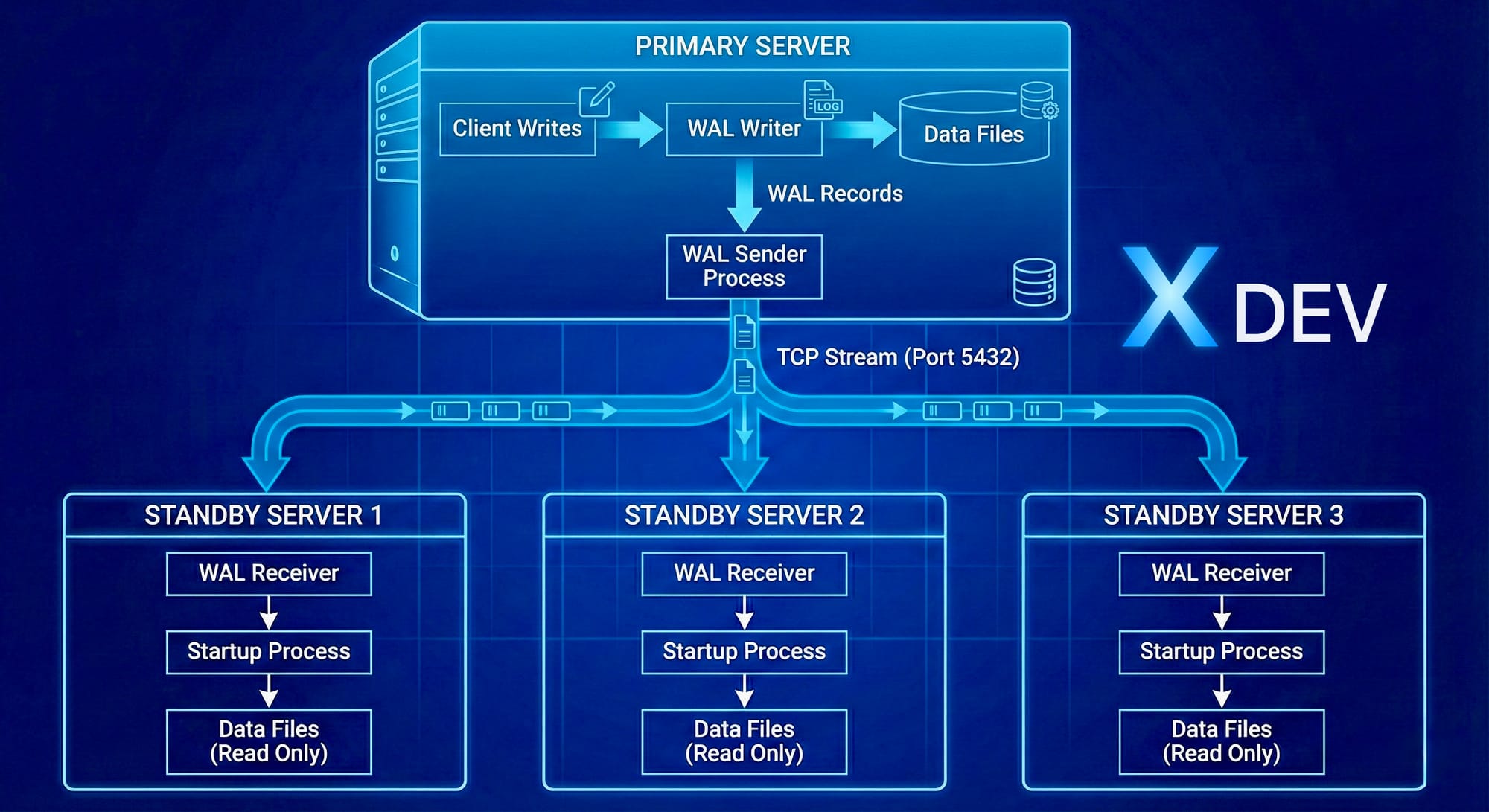
How Streaming Replication Works
1.2. Main components_
_WAL Sender (on Primary)_
_Process specializes in sending WAL records to Standby_
One WAL sender for each Standby connection_
Monitoring:
SELECT * FROM pg_stat_replication;
_WAL Receiver (on Standby)
Process receives WAL records from Primary_
Write WAL to local WAL files
Send feedback to Primary (LSN position, status)
Startup Process (on Standby)
Replay WAL records to data files_
Same as recovery process
Can serve read queries (Hot Standby)
1.3. Detailed data flow
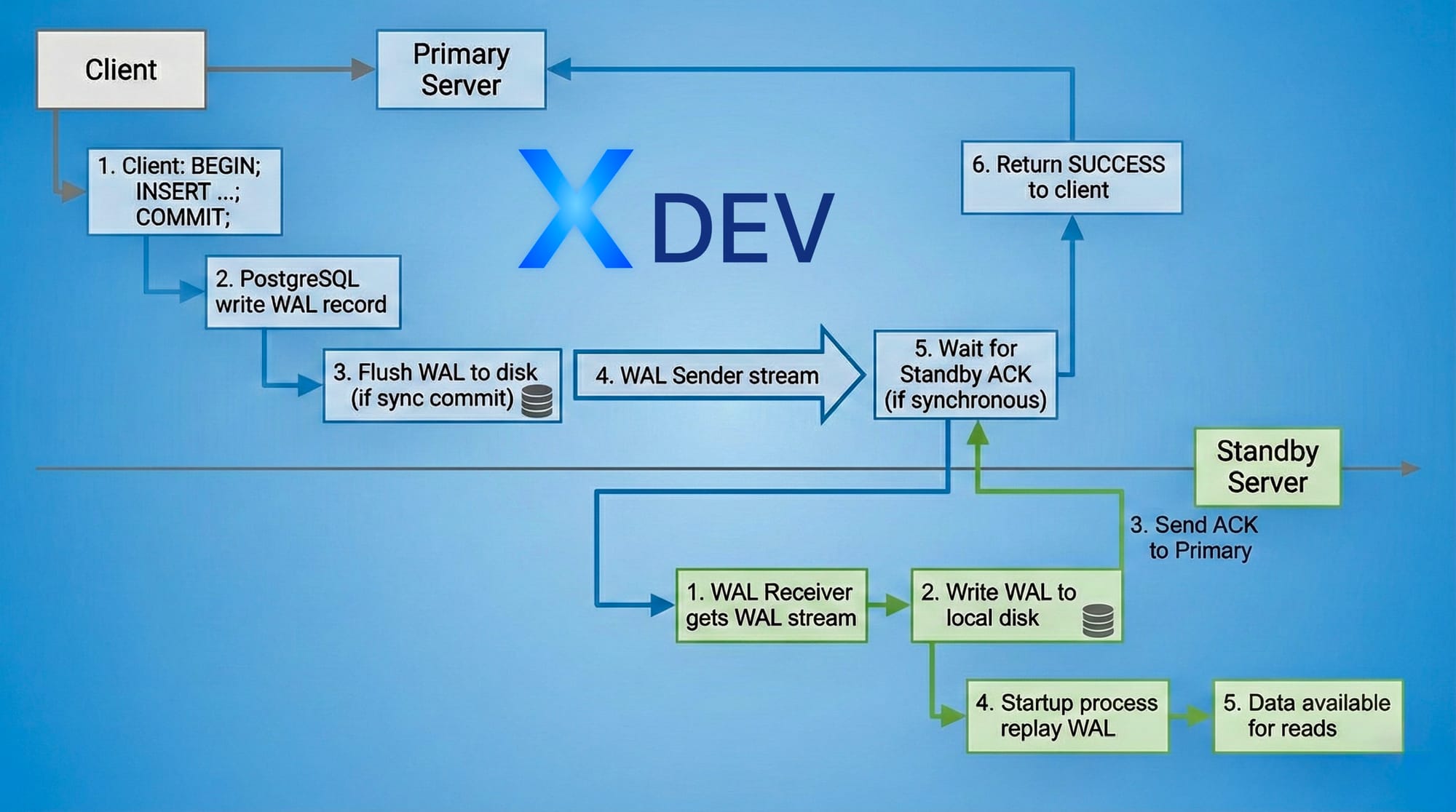
Transaction Commit Flow
Real time actual:
Asynchronous: ~0-100ms lag
Synchronous: ~1-10ms lag (depending on network latency)
2. Write-Ahead Logging (WAL)
2.1. What is WAL?
Write-Ahead Logging is a logging technique in which:
"Every change must be written to the log BEFORE writing to data files"
WAL Principle:
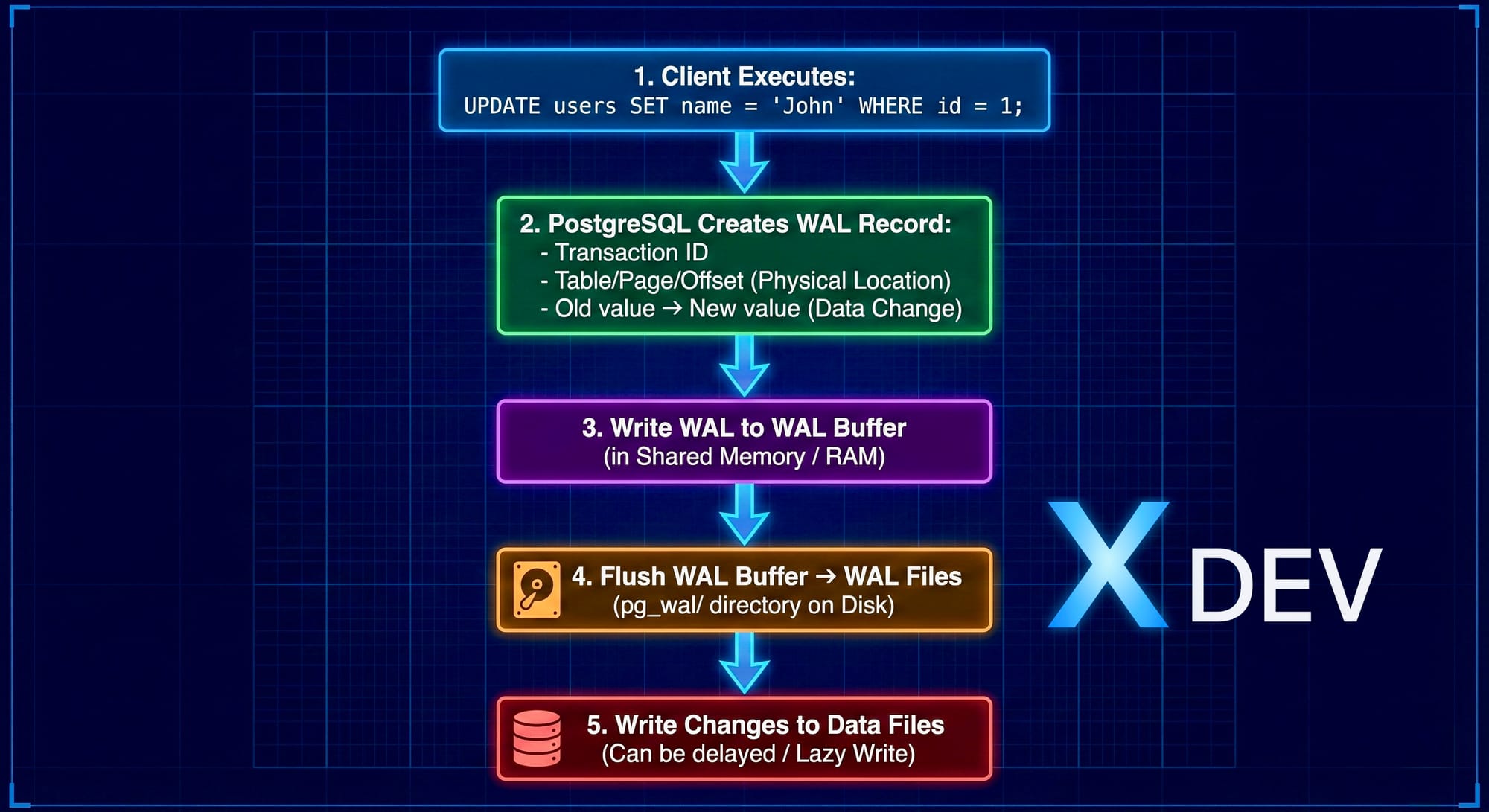
Write-Ahead Logging (WAL)
2.2. WAL Files Structure
Location: $PGDATA/pg_wal/
$ ls -lh $PGDATA/pg_wal/
-rw------- 1 postgres postgres 16M Nov 24 10:00 000000010000000000000001
-rw------- 1 postgres postgres 16M Nov 24 10:15 000000010000000000000002
-rw------- 1 postgres postgres 16M Nov 24 10:30 000000010000000000000003
Special Points:
Each file: 16MB (default)
File name: Timeline ID + Segment Number
Format:
TTTTTTTTXXXXXXXXYYYYYYYYTTTTTTTT: Timeline (8 hex digits)
XXXXXXXX: Log file number (8 hex)
YYYYYYYY: Segment number (8 hex)
2.3. LSN (Log Sequence Number)
LSN is the position in WAL stream, format: X/Y
X: WAL file number
Y: Offset in file
-- Kiểm tra LSN hiện tại
SELECT pg_current_wal_lsn();  -- Primary
-- Output: 0/3000060
SELECT pg_last_wal_receive_lsn();  -- Standby (received)
SELECT pg_last_wal_replay_lsn();   -- Standby (applied)
2.4. WAL Configuration Parameters
# postgresql.confWAL Settings
wal_level = replica # minimal, replica, or logical # replica: cho streaming replication
wal_log_hints = on # Cần thiết cho pg_rewind
WAL Writing
wal_buffers = 16MB # WAL buffer size trong shared memory wal_writer_delay = 200ms # WAL writer sleep time
WAL Files Management
min_wal_size = 80MB # Tối thiểu WAL files giữ lại max_wal_size = 1GB # Trigger checkpoint khi vượt
Checkpoints
checkpoint_timeout = 5min # Tối đa giữa 2 checkpoints checkpoint_completion_target = 0.9 # Spread checkpoint writes
2.5. WAL and Crash Recovery
When PostgreSQL crashes:
1. Server restart
2. PostgreSQL đọc last checkpoint location
3. Replay tất cả WAL records từ checkpoint → crash point
4. Khôi phục database về trạng thái consistent
5. Ready to accept connections
Wallet example:
Timeline:
10:00 ─── Checkpoint ─── 10:05 ─── 10:08 (CRASH)
(LSN: 0/1000)          (LSN: 0/3000)
Recovery:
- Bắt đầu từ LSN 0/1000
- Replay WAL → LSN 0/3000
Database consistent tại 10:08
3. Synchronous vs Asynchronous Replication
3.1. Asynchronous Replication (Default)
How it works:
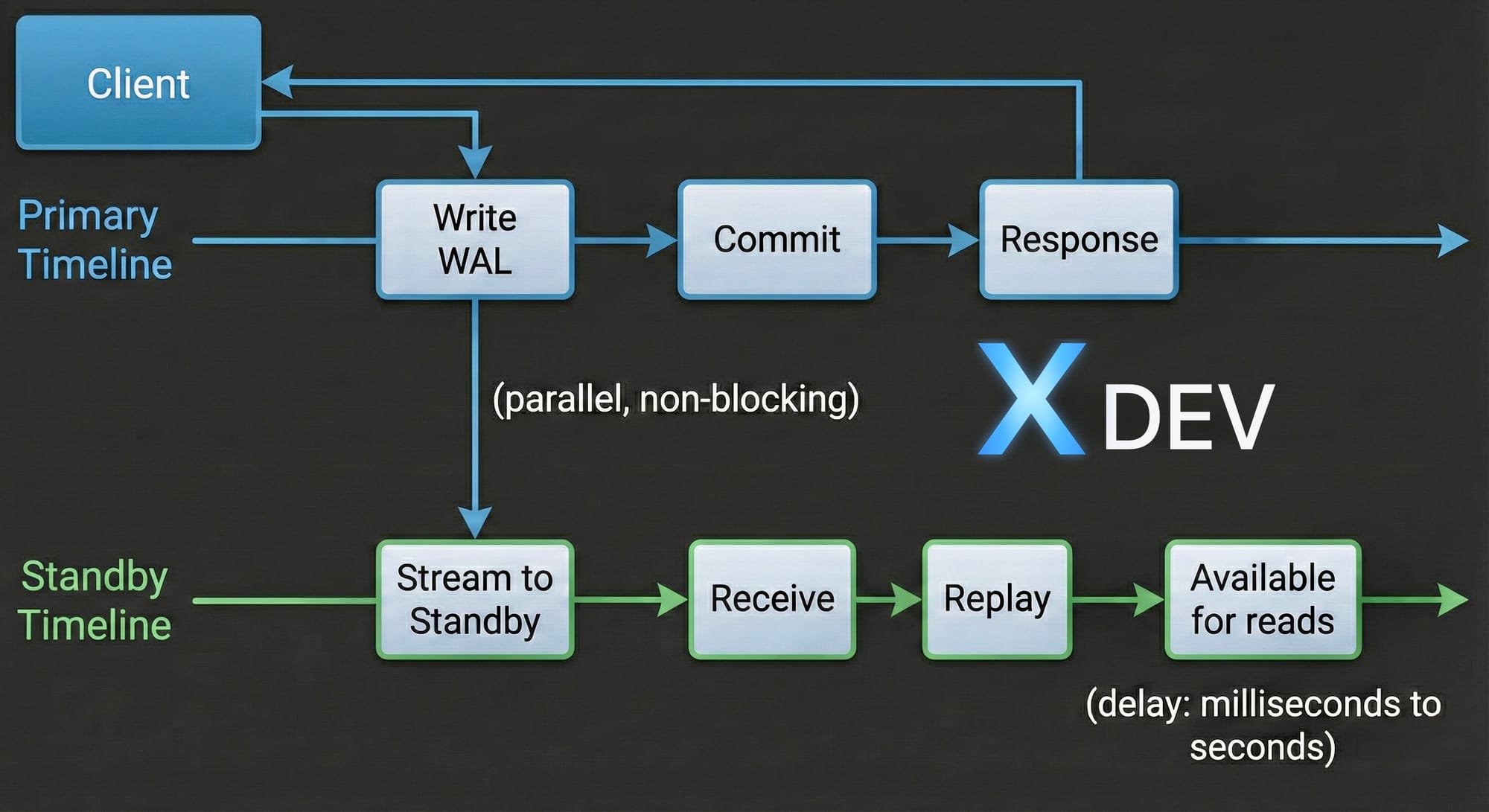
Asynchronous Replication (Default)
Features:
✅ Performance high: Primary does not wait Standby
✅ Low Latency: Commit time does not depend network
❌ May lose data: If Primary crashes before Standby receives WAL
❌ RPO > 0: Recovery Point Objective is not zero
Configuration:
# postgresql.conf (Primary)
synchronous_commit = off  # hoặc local
Use cases:
Standby in another datacenter (high latency)
Prioritize performance over data safety
Acceptable data loss (several seconds)
3.2. Synchronous Replication
How it works:
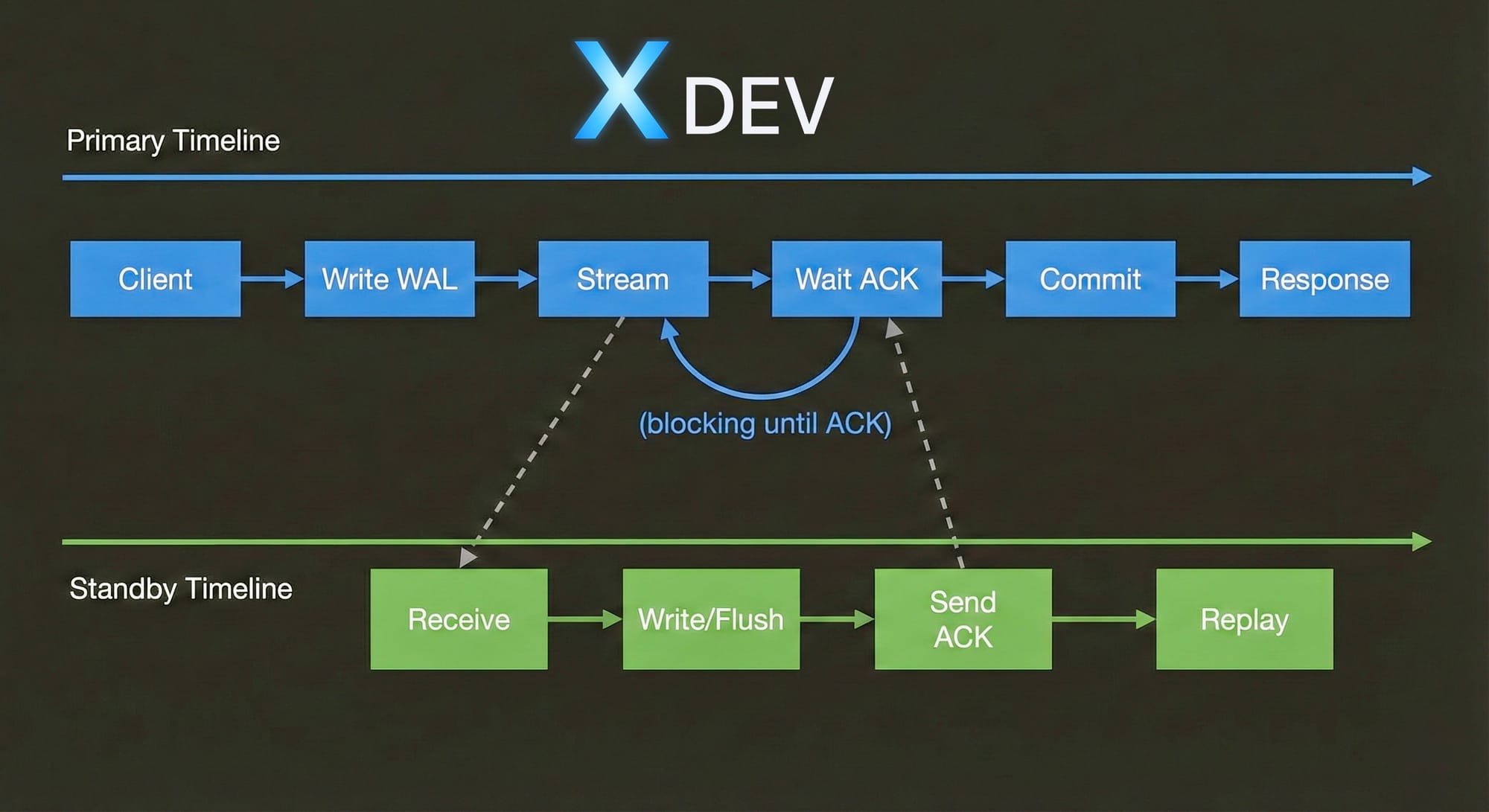
Synchronous Replication
Special point:
✅ Zero data loss_: Transaction only commits when Standby confirm
✅ RPO = 0: Perfect for critical data
❌ Performance impact: ~2-10ms overhead each commit
❌ Availability risk: Primary block if Standby fail
Configuration:_
# postgresql.conf (Primary) synchronous_commit = on # on, remote_write, remote_apply synchronous_standby_names = 'standby1,standby2' # Tên standbysrecovery.conf hoặc postgresql.auto.conf (Standby)
primary_conninfo = 'host=primary port=5432 user=replicator application_name=standby1'
Synchronous Commit Levels:
HTMLT AG_332HTMLTAG_3 52H TMLTAG_393remote_write
Level | Italy meaning | Data Safety | Performance |
|---|---|---|---|
| No wait Standby | Low | High most |
_ HTMLTAG_375___local | Only wait local disk | Central average | Cao |
Wait Standby write to OS cache | Pretty good_ | Central average | |
| Wait Standby flush to disk | Good | Slow more |
HTM LTAG_435___remote_apply | Wait Standby apply changes | Best | Slow most |
3.3. Quorum-based Synchronous Replication
PostgreSQL 9.6+: Flexible synchronous replication_
# Chờ ANY 1 trong 2 standbys synchronous_standby_names = 'ANY 1 (standby1, standby2)'Chờ FIRST 2 trong 3 standbys
synchronous_standby_names = 'FIRST 2 (standby1, standby2, standby3)'
Chờ ALL standbys (giống cũ)
synchronous_standby_names = 'standby1, standby2'
Example: ANY 1
3 Standbys: standby1 (DC1), standby2 (DC2), standby3 (DC3)Transaction commit khi: ✅ Primary committed + ANY 1 standby acknowledged
Scenario:
- standby1: ACK trong 5ms
- standby2: ACK trong 100ms (slow network)
- standby3: DOWN
→ Transaction commit sau 5ms (chờ standby1) → Performance tốt + Data safety
3.4. Compare Sync vs Async
_HTMLTAG_562 _95-98%
HTMLTAG_57 8High
Text will | Async | __HTMLTA G_483___Sync |
|---|---|---|
Commit latency | ~1ms | ~5-10ms |
Data loss risk | Yes (some seconds) | No |
_HTMLTAG_522 RPO | Seconds | Zero HTML AG_533 |
RTO | ~30-60s___HTM LTAG_544 | ~30-60s HTMLTAG 549 |
Primary performance | 100% | |
Network dependency | Low | |
Use case | Read replicas, Reporting | Critical data, Financial |
4. Replication Slots
4.1. Problem before Replication Slots
Scenario:
1. Primary generates WAL files
2. Checkpoint happens → Old WAL cleaned up
3. Standby offline vài giờ
4. Standby comes back online
5. ❌ WAL files needed đã bị xóa
6. ❌ Standby không thể catch up
7. ❌ Cần rebuild Standby từ đầu
4.2. Replication Slots solve the problem
Replication Slot ensures Primary keeps WAL files until Standby consumed.
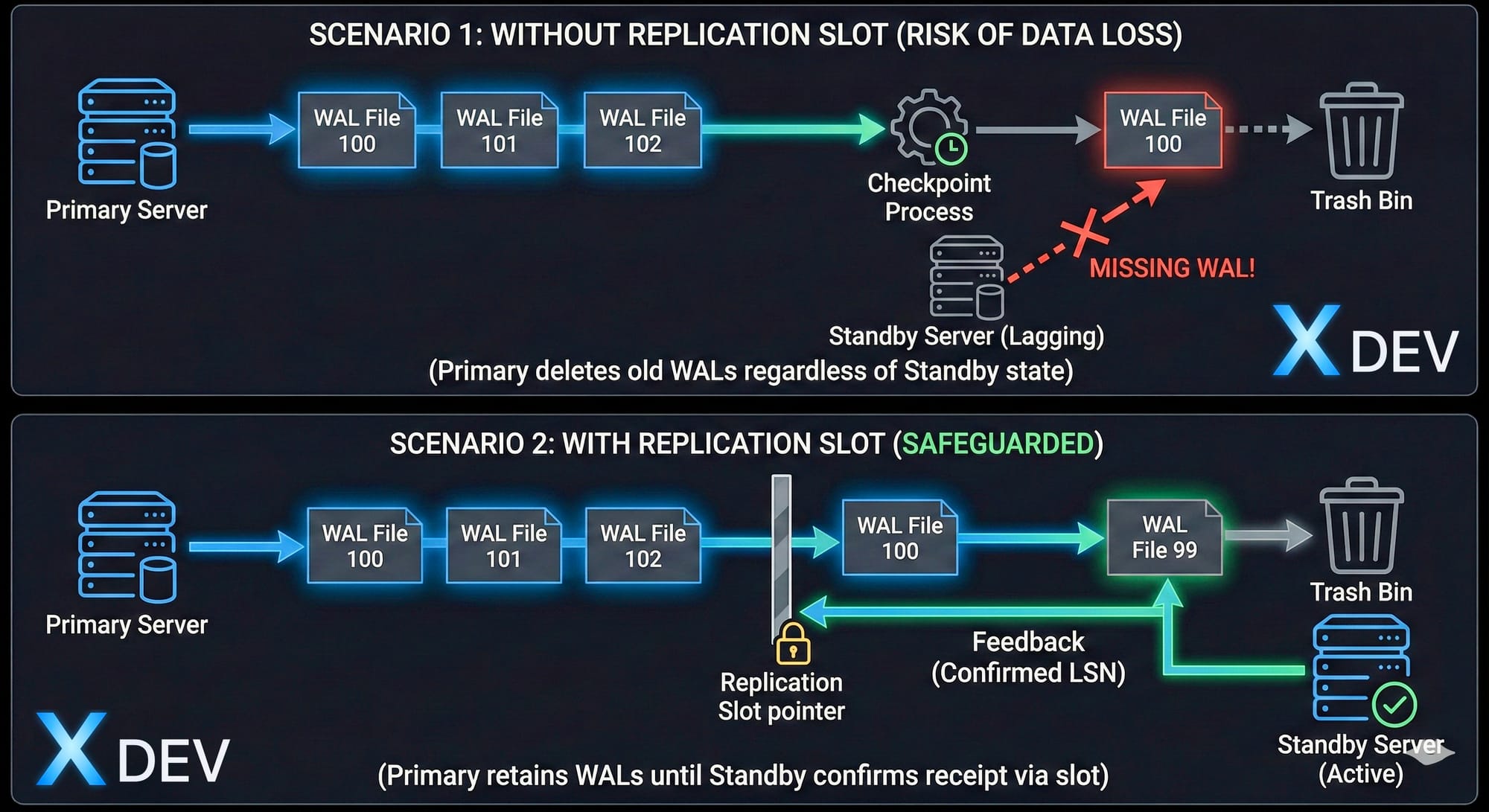
Replication Slot
4.3. Create and manage Replication Slots
Create slot on Primary:
-- Physical replication slot SELECT * FROM pg_create_physical_replication_slot('standby1_slot');-- Xem danh sách slots SELECT slot_name, slot_type, active, restart_lsn, confirmed_flush_lsn FROM pg_replication_slots;
-- Output: slot_name | slot_type | active | restart_lsn | confirmed_flush_lsn ---------------+-----------+--------+-------------+-------------------- standby1_slot | physical | t | 0/3000000 | NULL
Use the above slot Standby:
ini_
# postgresql.auto.conf (Standby)
primary_slot_name = 'standby1_slot'
Delete slot:
sql_
SELECT pg_drop_replication_slot('standby1_slot');4.4. Monitoring Replication Slots_
sql
-- Kiểm tra slot status
SELECT
slot_name,
active,
pg_size_pretty(pg_wal_lsn_diff(pg_current_wal_lsn(), restart_lsn)) as retained_wal
FROM pg_replication_slots;
-- Cảnh báo nếu retained_wal quá lớn (>10GB)
4.5. Important note
⚠️ Risks:
If Standby offline for a long time with slot → Primary keeps WAL forever
Can fill Primary's disk
Need monitoring and alert
Best practice:
sql
-- Set max WAL size để bảo vệ Primary
ALTER SYSTEM SET max_slot_wal_keep_size = '100GB';  -- PostgreSQL 13+
-- Hoặc tự động drop inactive slot sau 24h
SELECT pg_drop_replication_slot(slot_name)
FROM pg_replication_slots
WHERE NOT active
AND pg_current_wal_lsn() - restart_lsn > 10010241024*1024;  -- 100GB
5. Lab: Setup Streaming Replication manually
5.1. Lab Objective
Create PostgreSQL cluster with:
1 Primary server
1 Standby server
Streaming replication (asynchronous)
Hot standby (read queries)_
5.2. Environment
Primary:  192.168.1.101 (node1)
Standby:  192.168.1.102 (node2)
PostgreSQL: 14
OS: Ubuntu 22.04
5.3. Step 1: Install PostgreSQL (both nodes)
bash
# Install PostgreSQL 14 sudo apt update sudo apt install -y postgresql-14 postgresql-contrib-14Stop service
sudo systemctl stop postgresql
5.4. Step 2: Configure Primary (node1)
Create replication user:
bash
sudo -u postgres psql_sql
-- Tạo user cho replication
CREATE ROLE replicator WITH REPLICATION LOGIN PASSWORD 'repl_password';
-- Exit
\q
Configuration postgresql.conf:
_bash
sudo nano /etc/postgresql/14/main/postgresql.confini
# Connection listen_addresses = '*' port = 5432Replication
wal_level = replica max_wal_senders = 5 max_replication_slots = 5 wal_keep_size = 1GB
Hot Standby (không cần cho primary nhưng tốt để có sẵn)
hot_standby = on
Archive (optional, recommended)
archive_mode = on archive_command = 'test ! -f /var/lib/postgresql/14/archive/%f && cp %p /var/lib/postgresql/14/archive/%f'
Create archive directory:
bash
sudo mkdir -p /var/lib/postgresql/14/archive
sudo chown postgres:postgres /var/lib/postgresql/14/archive
Configuration pg_hba.conf:
bash
sudo nano /etc/postgresql/14/main/pg_hba.confini
# Replication connections
host    replication     replicator      192.168.1.102/32        md5
host    replication     replicator      127.0.0.1/32            md5
Start Primary:
bash
sudo systemctl start postgresql
sudo systemctl status postgresql
Create replication slot:_
bash
sudo -u postgres psqlsql
SELECT pg_create_physical_replication_slot('standby_slot');
SELECT * FROM pg_replication_slots;
\q
5.5. Step 3: Setup Standby (node2)
Stop PostgreSQL and backup data old:
bash
sudo systemctl stop postgresql
sudo mv /var/lib/postgresql/14/main /var/lib/postgresql/14/main.bak
Base backup from Primary:
bash
# Sử dụng pg_basebackup sudo -u postgres pg_basebackup
-h 192.168.1.101
-D /var/lib/postgresql/14/main
-U replicator
-P
-v
-R
-X stream
-C -S standby_slotOptions giải thích:
-h: Primary host
-D: Data directory
-U: Replication user
-P: Show progress
-v: Verbose
-R: Tạo standby.signal và postgresql.auto.conf
-X stream: Stream WAL during backup
-C: Create replication slot
-S: Slot name
Output sample:
pg_basebackup: initiating base backup, waiting for checkpoint to complete
pg_basebackup: checkpoint completed
pg_basebackup: write-ahead log start point: 0/2000028 on timeline 1
pg_basebackup: starting background WAL receiver
pg_basebackup: created replication slot "standby_slot"
24567/24567 kB (100%), 1/1 tablespace
pg_basebackup: write-ahead log end point: 0/2000100
pg_basebackup: syncing data to disk ...
pg_basebackup: base backup completed
Check standby.signal is enabled create:
bash
ls -l /var/lib/postgresql/14/main/standby.signal
File này đánh dấu đây là standby server
Check postgresql.auto.conf:
bash
sudo cat /var/lib/postgresql/14/main/postgresql.auto.confini
# Được tạo tự động bởi pg_basebackup -R
primary_conninfo = 'user=replicator password=repl_password host=192.168.1.101 port=5432 sslmode=prefer sslcompression=0 krbsrvname=postgres target_session_attrs=any'
primary_slot_name = 'standby_slot'
Start Standby:
bash
sudo systemctl start postgresql
sudo systemctl status postgresql
5.6. Step 4: Verify Replication_
On Primary (node1):
sql
sudo -u postgres psql-- Kiểm tra replication status SELECT client_addr, state, sync_state, replay_lsn, pg_size_pretty(pg_wal_lsn_diff(pg_current_wal_lsn(), replay_lsn)) as lag FROM pg_stat_replication;
-- Output: client_addr | state | sync_state | replay_lsn | lag ---------------+-----------+------------+-------------+------- 192.168.1.102 | streaming | async | 0/3000060 | 0 bytes
On Standby (node2):
sql
sudo -u postgres psql-- Kiểm tra standby status SELECT pg_is_in_recovery(); -- Should return 't' (true)
-- Kiểm tra replication lag SELECT pg_last_wal_receive_lsn() AS receive, pg_last_wal_replay_lsn() AS replay, pg_size_pretty(pg_wal_lsn_diff(pg_last_wal_receive_lsn(), pg_last_wal_replay_lsn())) AS lag;
-- Output: receive | replay | lag -------------+-------------+-------- 0/3000060 | 0/3000060 | 0 bytes
5.7. Step 5: Test Replication
On Primary - Create test data:
sql
-- Tạo database và table CREATE DATABASE testdb; \c testdbCREATE TABLE users ( id SERIAL PRIMARY KEY, name VARCHAR(100), created_at TIMESTAMP DEFAULT NOW() );
INSERT INTO users (name) VALUES ('Alice'), ('Bob'), ('Charlie');
SELECT * FROM users;
On Standby - Verify data:
sql
\c testdb-- Read queries hoạt động SELECT * FROM users;
-- Output: id | name | created_at ----+---------+------------------------ 1 | Alice | 2024-11-24 10:30:15 2 | Bob | 2024-11-24 10:30:15 3 | Charlie | 2024-11-24 10:30:15
-- Write queries bị reject INSERT INTO users (name) VALUES ('David'); -- ERROR: cannot execute INSERT in a read-only transaction
5.8. Step 6: Monitoring Queries
Replication delay monitoring:
sql
-- Trên Primary
CREATE OR REPLACE FUNCTION replication_lag_bytes()
RETURNS TABLE(client_addr INET, lag_bytes BIGINT) AS $$
BEGIN
RETURN QUERY
SELECT
c.client_addr,
pg_wal_lsn_diff(pg_current_wal_lsn(), c.replay_lsn)::BIGINT
FROM pg_stat_replication c;
END;
$$ LANGUAGE plpgsql;
-- Sử dụng
SELECT * FROM replication_lag_bytes();
Alert if lag > 10MB:
sql
SELECT client_addr,
pg_size_pretty(lag_bytes) as lag
FROM replication_lag_bytes()
WHERE lag_bytes > 1010241024;
5.9. Troubleshooting Common Issues
Issue 1: Standby cannot connect Primary
bash
# Check logs sudo tail -f /var/lib/postgresql/14/main/log/postgresql-*.logCommon errors:
- "FATAL: password authentication failed"
→ Check pg_hba.conf và password
- "FATAL: no pg_hba.conf entry for replication"
→ Add replication entry vào pg_hba.conf
- Connection refused
→ Check firewall, listen_addresses
Issue 2: Replication lag increases high
sql
-- Kiểm tra WAL sender busySELECT * FROM pg_stat_activity WHERE backend_type = 'walsender';
-- Kiểm tra I/O trên Standby SELECT * FROM pg_stat_bgwriter;
Issue 3: Slot is filled up disk
sql
-- Kiểm tra retained WAL
SELECT
slot_name,
pg_size_pretty(pg_wal_lsn_diff(pg_current_wal_lsn(), restart_lsn)) as retained
FROM pg_replication_slots;
-- Drop inactive slot nếu cần
SELECT pg_drop_replication_slot('standby_slot');
6. Best Practices
6.1. Configuration Tuning
ini
# Primary - postgresql.confNetwork buffer (nếu có nhiều standbys)
max_wal_senders = 10 # Tùy số standbys + 2 dự phòng
WAL retention
wal_keep_size = 2GB # Giữ đủ WAL cho standby catch up max_slot_wal_keep_size = 10GB # Limit slot retention (PG 13+)
Archive (backup strategy)
archive_mode = on archive_command = 'cp %p /backup/archive/%f'
Checkpoint tuning
checkpoint_timeout = 15min checkpoint_completion_target = 0.9
6.2. Monitoring Checklist_
✅ Replication lag (bytes and time) ✅ Standby connection status ✅ WAL sender processes ✅ Disk space (pg_wal/ and archive/) ✅ Replication slots (retained WAL) ✅ Checkpoint performance
6.3. Security Recommendations_
ini
# Use SSL for replication ssl = on ssl_cert_file = '/path/to/server.crt' ssl_key_file = '/path/to/server.key'Standby connection string
primary_conninfo = '... sslmode=require sslcompression=1'
ini
# pg_hba.conf - Use hostssl
hostssl replication replicator 192.168.1.0/24 md5
7. Summary
Key Takeaways_
Streaming Replication_ is the foundation of PostgreSQL HA:
Realtime WAL streaming
Hot Standby for read queries__HTMLTAG_893___
Basis for Patroni automated failover
WAL (Write-Ahead Logging):
Log before writing data_
Crash recovery mechanism
Replication transport format
Synchronous vs Asynchronous:
Async: High performance, may lose data
Sync: Zero data loss, performance impact
Quorum-based: Balance between 2 the
Replication Slots:
Ensure WAL is not deleted prematurely
Critical for standby stability
Need monitoring to avoid disk full