Mục tiêu bài học
Sau bài học này, bạn sẽ:
Hiểu sâu về cơ chế Streaming Replication trong PostgreSQL
Nắm vững Write-Ahead Logging (WAL) và vai trò của nó
Phân biệt Synchronous và Asynchronous Replication
Hiểu và sử dụng Replication Slots
Thực hành setup replication thủ công (Primary-Standby)
1. Cơ chế hoạt động của Streaming Replication
1.1. Tổng quan
Streaming Replication là phương pháp PostgreSQL replicate dữ liệu từ Primary server sang một hoặc nhiều Standby servers theo thời gian thực.
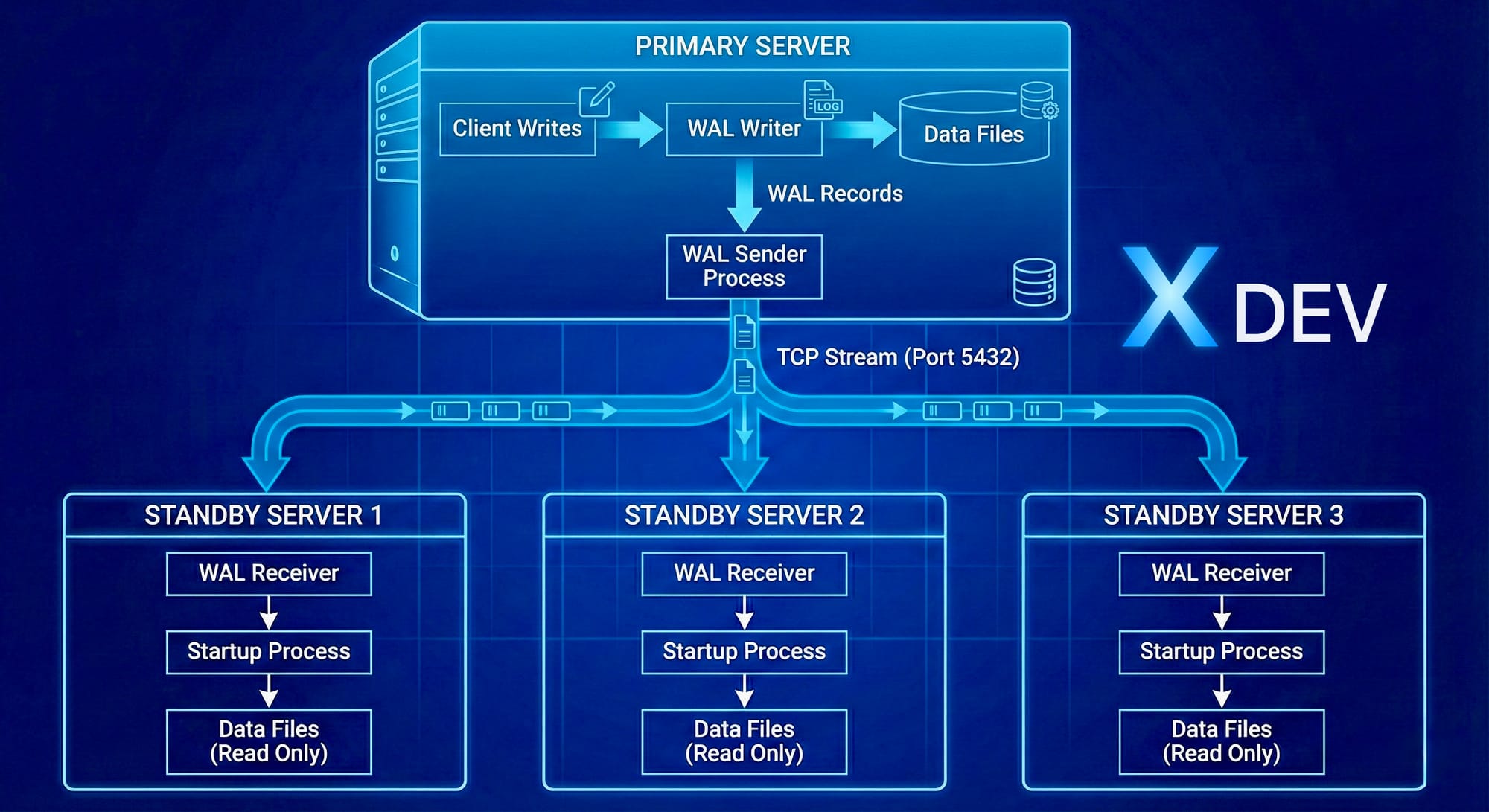
How Streaming Replication Works
1.2. Các thành phần chính
WAL Sender (trên Primary)
Process chuyên gửi WAL records đến Standby
Một WAL sender cho mỗi Standby connection
Monitoring:
SELECT * FROM pg_stat_replication;
WAL Receiver (trên Standby)
Process nhận WAL records từ Primary
Ghi WAL vào local WAL files
Gửi feedback về Primary (LSN position, status)
Startup Process (trên Standby)
Replay WAL records vào data files
Giống như recovery process
Có thể phục vụ read queries (Hot Standby)
1.3. Luồng dữ liệu chi tiết
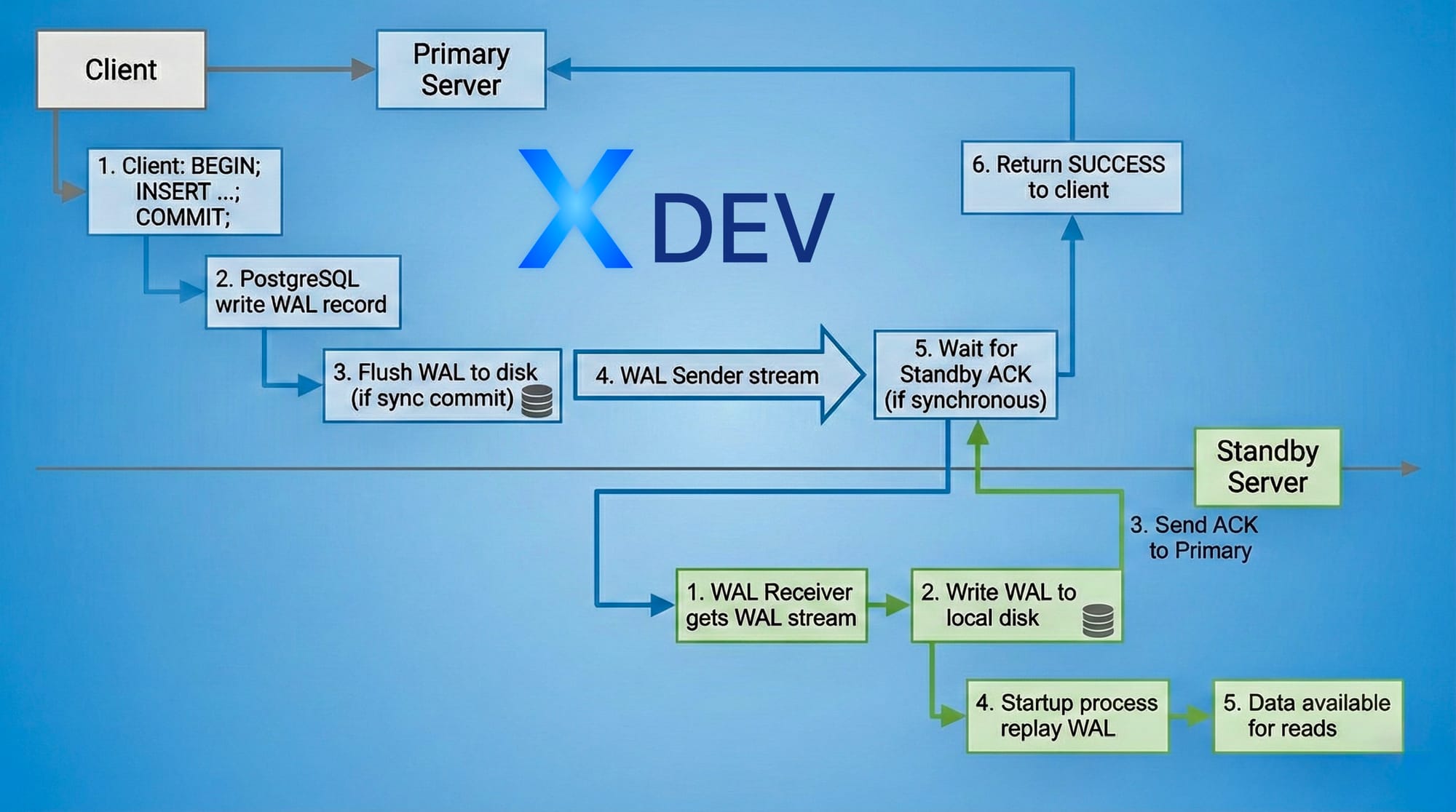
Transaction Commit Flow
Thời gian thực tế:
Asynchronous: ~0-100ms lag
Synchronous: ~1-10ms lag (tùy network latency)
2. Write-Ahead Logging (WAL)
2.1. WAL là gì?
Write-Ahead Logging là kỹ thuật logging trong đó:
"Mọi thay đổi phải được ghi vào log TRƯỚC KHI ghi vào data files"
Nguyên tắc WAL:
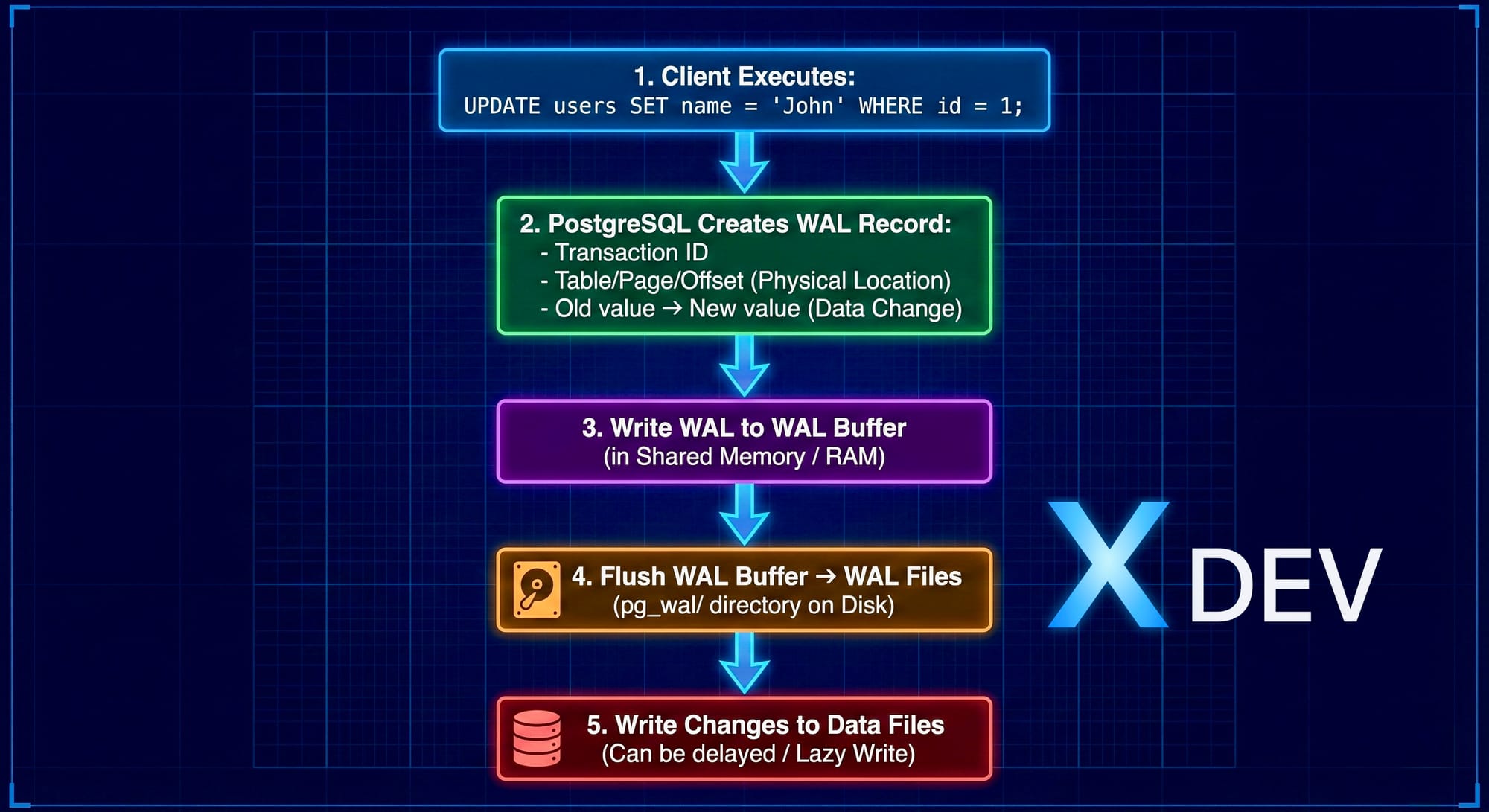
Write-Ahead Logging (WAL)
2.2. WAL Files Structure
Vị trí: $PGDATA/pg_wal/
$ ls -lh $PGDATA/pg_wal/
-rw------- 1 postgres postgres 16M Nov 24 10:00 000000010000000000000001
-rw------- 1 postgres postgres 16M Nov 24 10:15 000000010000000000000002
-rw------- 1 postgres postgres 16M Nov 24 10:30 000000010000000000000003
Đặc điểm:
Mỗi file: 16MB (default)
Tên file: Timeline ID + Segment Number
Format:
TTTTTTTTXXXXXXXXYYYYYYYYTTTTTTTT: Timeline (8 hex digits)
XXXXXXXX: Log file number (8 hex)
YYYYYYYY: Segment number (8 hex)
2.3. LSN (Log Sequence Number)
LSN là vị trí trong WAL stream, format: X/Y
X: WAL file number
Y: Offset trong file
-- Kiểm tra LSN hiện tại
SELECT pg_current_wal_lsn();  -- Primary
-- Output: 0/3000060
SELECT pg_last_wal_receive_lsn();  -- Standby (received)
SELECT pg_last_wal_replay_lsn();   -- Standby (applied)
2.4. WAL Configuration Parameters
# postgresql.confWAL Settings
wal_level = replica # minimal, replica, or logical # replica: cho streaming replication
wal_log_hints = on # Cần thiết cho pg_rewind
WAL Writing
wal_buffers = 16MB # WAL buffer size trong shared memory wal_writer_delay = 200ms # WAL writer sleep time
WAL Files Management
min_wal_size = 80MB # Tối thiểu WAL files giữ lại max_wal_size = 1GB # Trigger checkpoint khi vượt
Checkpoints
checkpoint_timeout = 5min # Tối đa giữa 2 checkpoints checkpoint_completion_target = 0.9 # Spread checkpoint writes
2.5. WAL và Crash Recovery
Khi PostgreSQL crash:
1. Server restart
2. PostgreSQL đọc last checkpoint location
3. Replay tất cả WAL records từ checkpoint → crash point
4. Khôi phục database về trạng thái consistent
5. Ready to accept connections
Ví dụ:
Timeline:
10:00 ─── Checkpoint ─── 10:05 ─── 10:08 (CRASH)
(LSN: 0/1000)          (LSN: 0/3000)
Recovery:
- Bắt đầu từ LSN 0/1000
- Replay WAL → LSN 0/3000
Database consistent tại 10:08
3. Synchronous vs Asynchronous Replication
3.1. Asynchronous Replication (Default)
Cách hoạt động:
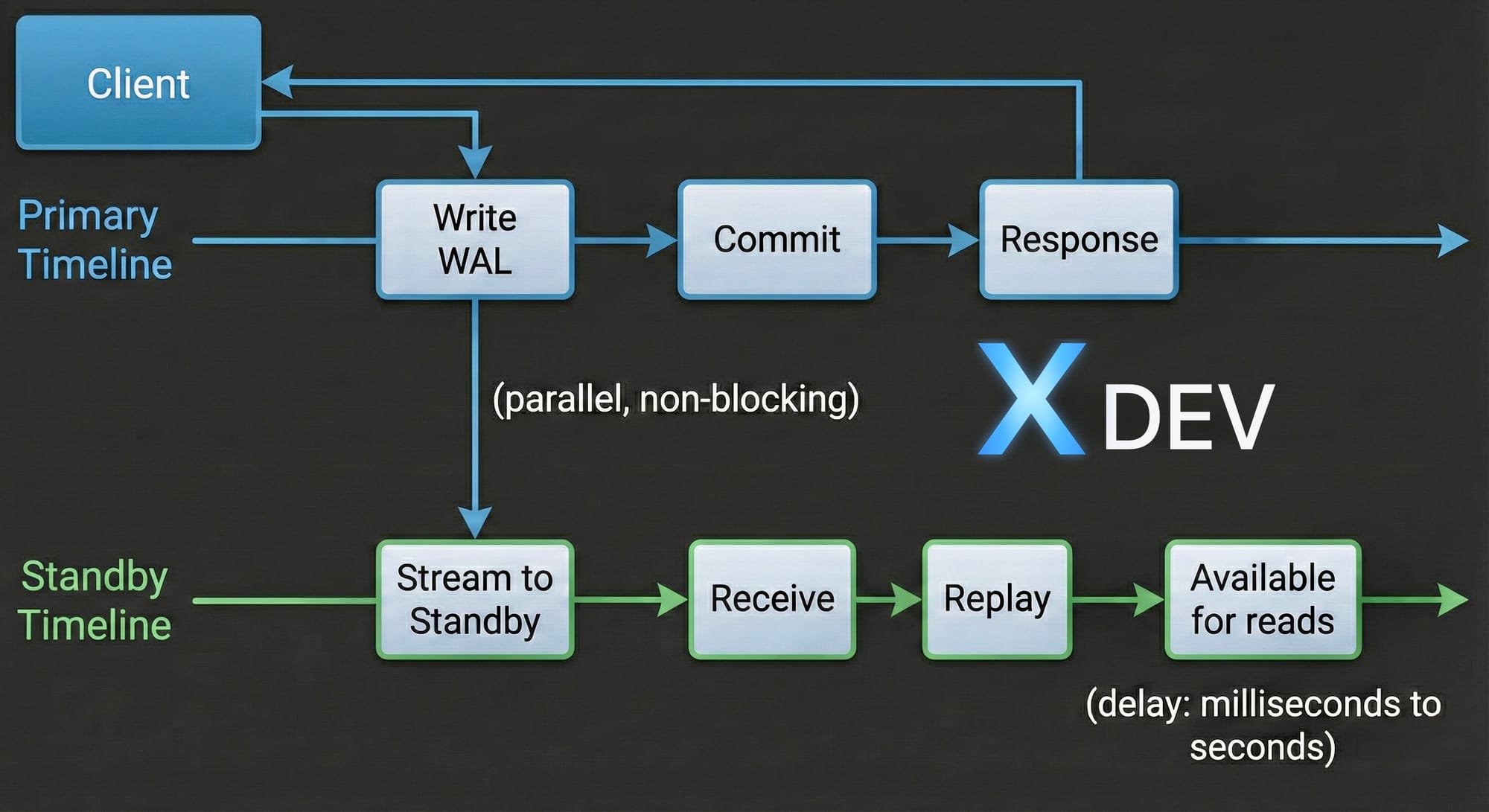
Asynchronous Replication (Default)
Đặc điểm:
✅ Performance cao: Primary không đợi Standby
✅ Latency thấp: Commit time không phụ thuộc network
❌ Có thể mất data: Nếu Primary crash trước khi Standby nhận WAL
❌ RPO > 0: Recovery Point Objective không phải zero
Configuration:
# postgresql.conf (Primary)
synchronous_commit = off  # hoặc local
Use cases:
Standby ở datacenter khác (high latency)
Ưu tiên performance hơn data safety
Acceptable data loss (vài giây)
3.2. Synchronous Replication
Cách hoạt động:
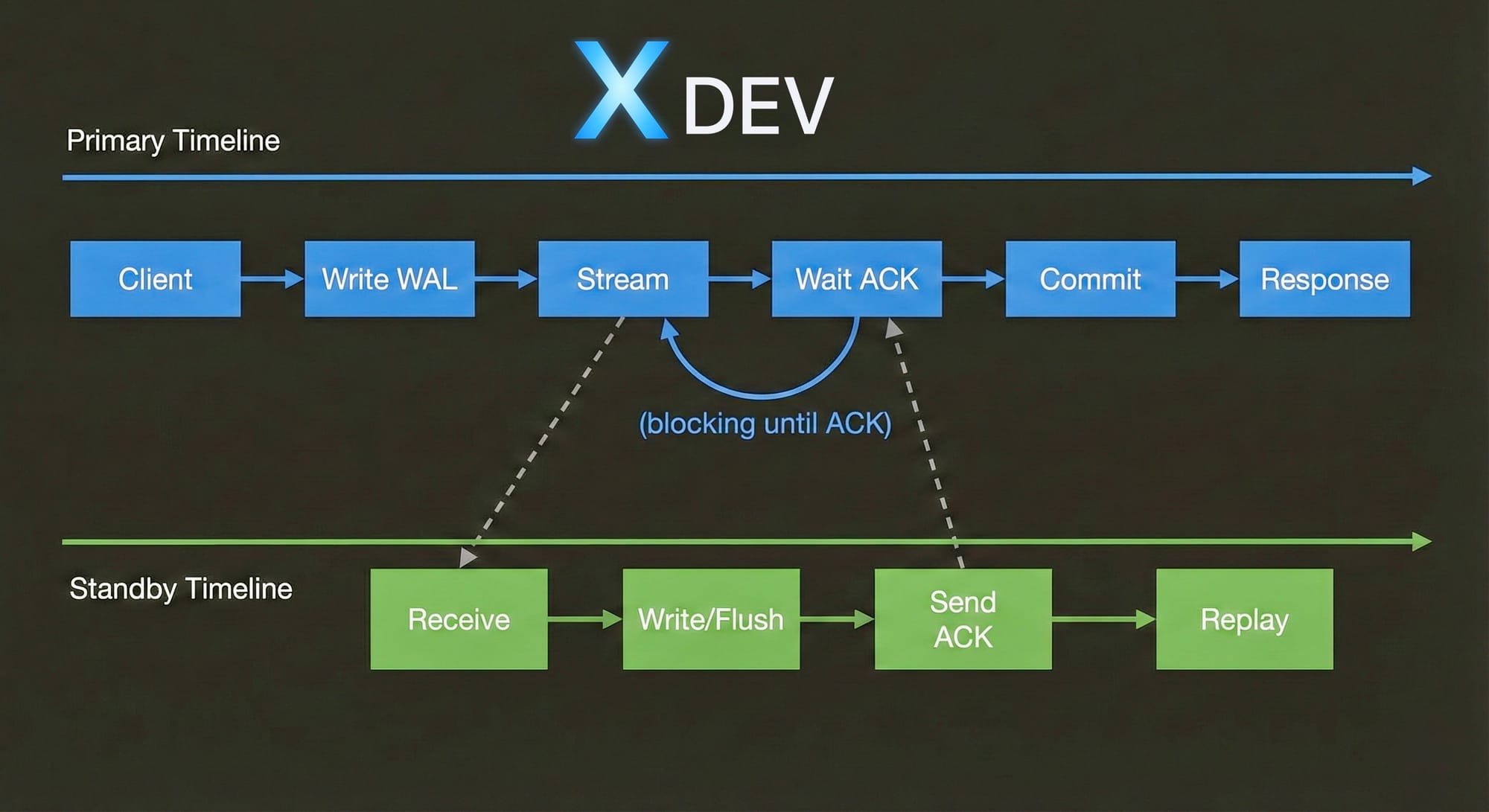
Synchronous Replication
Đặc điểm:
✅ Zero data loss: Transaction chỉ commit khi Standby confirm
✅ RPO = 0: Hoàn hảo cho critical data
❌ Performance impact: ~2-10ms overhead mỗi commit
❌ Availability risk: Primary block nếu Standby fail
Configuration:
# postgresql.conf (Primary) synchronous_commit = on # on, remote_write, remote_apply synchronous_standby_names = 'standby1,standby2' # Tên standbysrecovery.conf hoặc postgresql.auto.conf (Standby)
primary_conninfo = 'host=primary port=5432 user=replicator application_name=standby1'
Synchronous Commit Levels:
Level | Ý nghĩa | Data Safety | Performance |
|---|---|---|---|
| Không đợi Standby | Thấp | Cao nhất |
| Chỉ đợi local disk | Trung bình | Cao |
| Đợi Standby write vào OS cache | Khá tốt | Trung bình |
| Đợi Standby flush vào disk | Tốt | Chậm hơn |
| Đợi Standby apply changes | Tốt nhất | Chậm nhất |
3.3. Quorum-based Synchronous Replication
PostgreSQL 9.6+: Flexible synchronous replication
# Chờ ANY 1 trong 2 standbys synchronous_standby_names = 'ANY 1 (standby1, standby2)'Chờ FIRST 2 trong 3 standbys
synchronous_standby_names = 'FIRST 2 (standby1, standby2, standby3)'
Chờ ALL standbys (giống cũ)
synchronous_standby_names = 'standby1, standby2'
Ví dụ: ANY 1
3 Standbys: standby1 (DC1), standby2 (DC2), standby3 (DC3)Transaction commit khi: ✅ Primary committed + ANY 1 standby acknowledged
Scenario:
- standby1: ACK trong 5ms
- standby2: ACK trong 100ms (slow network)
- standby3: DOWN
→ Transaction commit sau 5ms (chờ standby1) → Performance tốt + Data safety
3.4. So sánh Sync vs Async
Tiêu chí | Async | Sync |
|---|---|---|
Commit latency | ~1ms | ~5-10ms |
Data loss risk | Có (vài giây) | Không |
RPO | Seconds | Zero |
RTO | ~30-60s | ~30-60s |
Primary performance | 100% | 95-98% |
Network dependency | Thấp | Cao |
Use case | Read replicas, Reporting | Critical data, Financial |
4. Replication Slots
4.1. Vấn đề trước khi có Replication Slots
Scenario:
1. Primary generates WAL files
2. Checkpoint happens → Old WAL cleaned up
3. Standby offline vài giờ
4. Standby comes back online
5. ❌ WAL files needed đã bị xóa
6. ❌ Standby không thể catch up
7. ❌ Cần rebuild Standby từ đầu
4.2. Replication Slots giải quyết vấn đề
Replication Slot đảm bảo Primary giữ WAL files cho đến khi Standby consume.
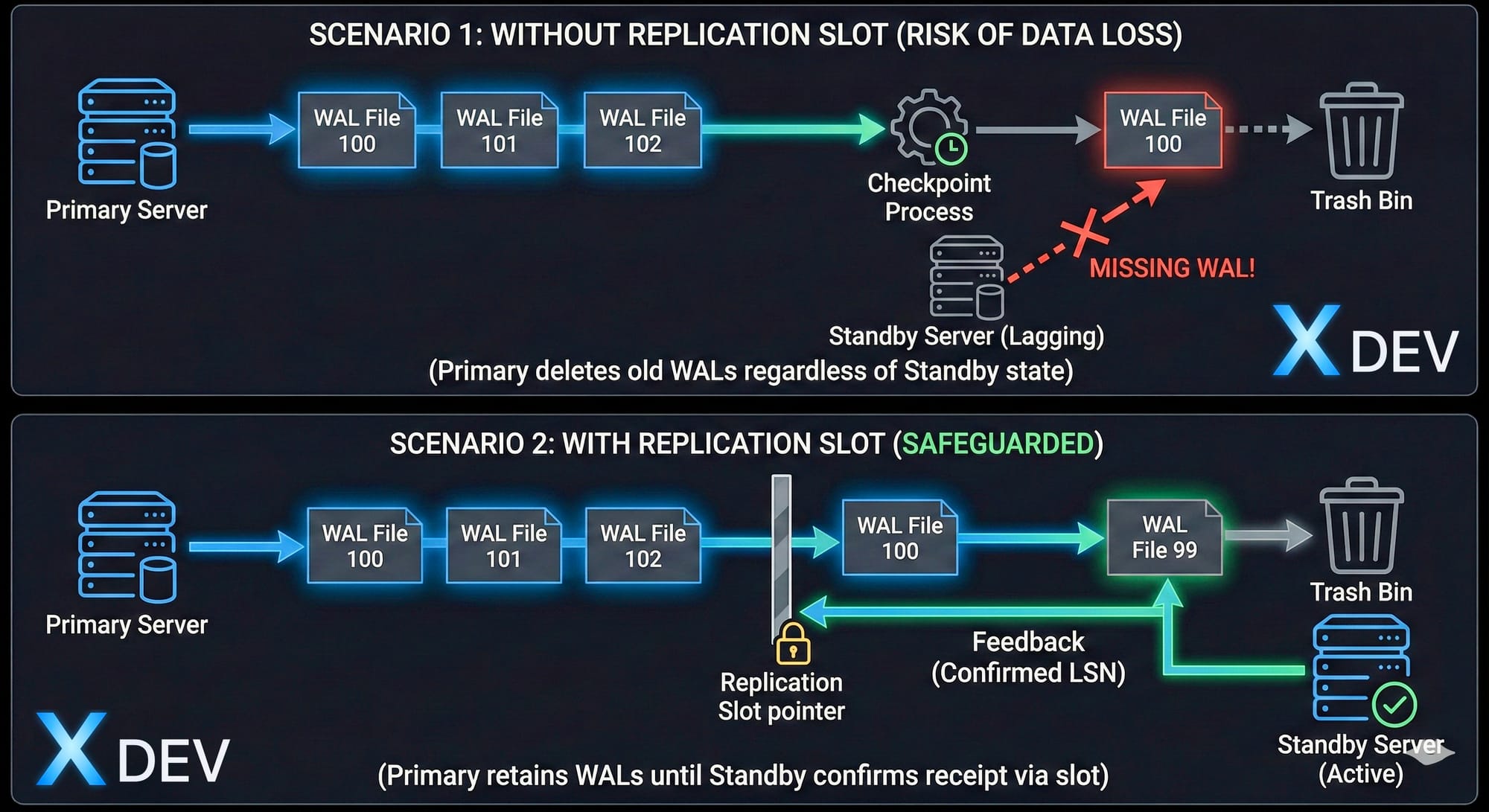
Replication Slot
4.3. Tạo và quản lý Replication Slots
Tạo slot trên Primary:
-- Physical replication slot SELECT * FROM pg_create_physical_replication_slot('standby1_slot');-- Xem danh sách slots SELECT slot_name, slot_type, active, restart_lsn, confirmed_flush_lsn FROM pg_replication_slots;
-- Output: slot_name | slot_type | active | restart_lsn | confirmed_flush_lsn ---------------+-----------+--------+-------------+-------------------- standby1_slot | physical | t | 0/3000000 | NULL
Sử dụng slot trên Standby:
ini
# postgresql.auto.conf (Standby)
primary_slot_name = 'standby1_slot'
Xóa slot:
sql
SELECT pg_drop_replication_slot('standby1_slot');4.4. Monitoring Replication Slots
sql
-- Kiểm tra slot status
SELECT
slot_name,
active,
pg_size_pretty(pg_wal_lsn_diff(pg_current_wal_lsn(), restart_lsn)) as retained_wal
FROM pg_replication_slots;
-- Cảnh báo nếu retained_wal quá lớn (>10GB)
4.5. Lưu ý quan trọng
⚠️ Rủi ro:
Nếu Standby offline lâu với slot → Primary giữ WAL mãi
Có thể lấp đầy disk của Primary
Cần monitoring và alert
Best practice:
sql
-- Set max WAL size để bảo vệ Primary
ALTER SYSTEM SET max_slot_wal_keep_size = '100GB';  -- PostgreSQL 13+
-- Hoặc tự động drop inactive slot sau 24h
SELECT pg_drop_replication_slot(slot_name)
FROM pg_replication_slots
WHERE NOT active
AND pg_current_wal_lsn() - restart_lsn > 10010241024*1024;  -- 100GB
5. Lab: Setup Streaming Replication thủ công
5.1. Mục tiêu Lab
Tạo PostgreSQL cluster với:
1 Primary server
1 Standby server
Streaming replication (asynchronous)
Hot standby (read queries)
5.2. Môi trường
Primary:  192.168.1.101 (node1)
Standby:  192.168.1.102 (node2)
PostgreSQL: 14
OS: Ubuntu 22.04
5.3. Bước 1: Cài đặt PostgreSQL (cả 2 nodes)
bash
# Install PostgreSQL 14 sudo apt update sudo apt install -y postgresql-14 postgresql-contrib-14Stop service
sudo systemctl stop postgresql
5.4. Bước 2: Cấu hình Primary (node1)
Tạo replication user:
bash
sudo -u postgres psqlsql
-- Tạo user cho replication
CREATE ROLE replicator WITH REPLICATION LOGIN PASSWORD 'repl_password';
-- Exit
\q
Cấu hình postgresql.conf:
bash
sudo nano /etc/postgresql/14/main/postgresql.confini
# Connection listen_addresses = '*' port = 5432Replication
wal_level = replica max_wal_senders = 5 max_replication_slots = 5 wal_keep_size = 1GB
Hot Standby (không cần cho primary nhưng tốt để có sẵn)
hot_standby = on
Archive (optional, recommended)
archive_mode = on archive_command = 'test ! -f /var/lib/postgresql/14/archive/%f && cp %p /var/lib/postgresql/14/archive/%f'
Tạo archive directory:
bash
sudo mkdir -p /var/lib/postgresql/14/archive
sudo chown postgres:postgres /var/lib/postgresql/14/archive
Cấu hình pg_hba.conf:
bash
sudo nano /etc/postgresql/14/main/pg_hba.confini
# Replication connections
host    replication     replicator      192.168.1.102/32        md5
host    replication     replicator      127.0.0.1/32            md5
Start Primary:
bash
sudo systemctl start postgresql
sudo systemctl status postgresql
Tạo replication slot:
bash
sudo -u postgres psqlsql
SELECT pg_create_physical_replication_slot('standby_slot');
SELECT * FROM pg_replication_slots;
\q
5.5. Bước 3: Setup Standby (node2)
Stop PostgreSQL và backup data cũ:
bash
sudo systemctl stop postgresql
sudo mv /var/lib/postgresql/14/main /var/lib/postgresql/14/main.bak
Base backup từ Primary:
bash
# Sử dụng pg_basebackup sudo -u postgres pg_basebackup
-h 192.168.1.101
-D /var/lib/postgresql/14/main
-U replicator
-P
-v
-R
-X stream
-C -S standby_slotOptions giải thích:
-h: Primary host
-D: Data directory
-U: Replication user
-P: Show progress
-v: Verbose
-R: Tạo standby.signal và postgresql.auto.conf
-X stream: Stream WAL during backup
-C: Create replication slot
-S: Slot name
Output mẫu:
pg_basebackup: initiating base backup, waiting for checkpoint to complete
pg_basebackup: checkpoint completed
pg_basebackup: write-ahead log start point: 0/2000028 on timeline 1
pg_basebackup: starting background WAL receiver
pg_basebackup: created replication slot "standby_slot"
24567/24567 kB (100%), 1/1 tablespace
pg_basebackup: write-ahead log end point: 0/2000100
pg_basebackup: syncing data to disk ...
pg_basebackup: base backup completed
Kiểm tra standby.signal đã được tạo:
bash
ls -l /var/lib/postgresql/14/main/standby.signal
File này đánh dấu đây là standby server
Kiểm tra postgresql.auto.conf:
bash
sudo cat /var/lib/postgresql/14/main/postgresql.auto.confini
# Được tạo tự động bởi pg_basebackup -R
primary_conninfo = 'user=replicator password=repl_password host=192.168.1.101 port=5432 sslmode=prefer sslcompression=0 krbsrvname=postgres target_session_attrs=any'
primary_slot_name = 'standby_slot'
Start Standby:
bash
sudo systemctl start postgresql
sudo systemctl status postgresql
5.6. Bước 4: Verify Replication
Trên Primary (node1):
sql
sudo -u postgres psql-- Kiểm tra replication status SELECT client_addr, state, sync_state, replay_lsn, pg_size_pretty(pg_wal_lsn_diff(pg_current_wal_lsn(), replay_lsn)) as lag FROM pg_stat_replication;
-- Output: client_addr | state | sync_state | replay_lsn | lag ---------------+-----------+------------+-------------+------- 192.168.1.102 | streaming | async | 0/3000060 | 0 bytes
Trên Standby (node2):
sql
sudo -u postgres psql-- Kiểm tra standby status SELECT pg_is_in_recovery(); -- Should return 't' (true)
-- Kiểm tra replication lag SELECT pg_last_wal_receive_lsn() AS receive, pg_last_wal_replay_lsn() AS replay, pg_size_pretty(pg_wal_lsn_diff(pg_last_wal_receive_lsn(), pg_last_wal_replay_lsn())) AS lag;
-- Output: receive | replay | lag -------------+-------------+-------- 0/3000060 | 0/3000060 | 0 bytes
5.7. Bước 5: Test Replication
Trên Primary - Tạo test data:
sql
-- Tạo database và table CREATE DATABASE testdb; \c testdbCREATE TABLE users ( id SERIAL PRIMARY KEY, name VARCHAR(100), created_at TIMESTAMP DEFAULT NOW() );
INSERT INTO users (name) VALUES ('Alice'), ('Bob'), ('Charlie');
SELECT * FROM users;
Trên Standby - Verify data:
sql
\c testdb-- Read queries hoạt động SELECT * FROM users;
-- Output: id | name | created_at ----+---------+------------------------ 1 | Alice | 2024-11-24 10:30:15 2 | Bob | 2024-11-24 10:30:15 3 | Charlie | 2024-11-24 10:30:15
-- Write queries bị reject INSERT INTO users (name) VALUES ('David'); -- ERROR: cannot execute INSERT in a read-only transaction
5.8. Bước 6: Monitoring Queries
Replication delay monitoring:
sql
-- Trên Primary
CREATE OR REPLACE FUNCTION replication_lag_bytes()
RETURNS TABLE(client_addr INET, lag_bytes BIGINT) AS $$
BEGIN
RETURN QUERY
SELECT
c.client_addr,
pg_wal_lsn_diff(pg_current_wal_lsn(), c.replay_lsn)::BIGINT
FROM pg_stat_replication c;
END;
$$ LANGUAGE plpgsql;
-- Sử dụng
SELECT * FROM replication_lag_bytes();
Alert nếu lag > 10MB:
sql
SELECT client_addr,
pg_size_pretty(lag_bytes) as lag
FROM replication_lag_bytes()
WHERE lag_bytes > 1010241024;
5.9. Troubleshooting Common Issues
Issue 1: Standby không connect được Primary
bash
# Check logs sudo tail -f /var/lib/postgresql/14/main/log/postgresql-*.logCommon errors:
- "FATAL: password authentication failed"
→ Check pg_hba.conf và password
- "FATAL: no pg_hba.conf entry for replication"
→ Add replication entry vào pg_hba.conf
- Connection refused
→ Check firewall, listen_addresses
Issue 2: Replication lag tăng cao
sql
-- Kiểm tra WAL sender busySELECT * FROM pg_stat_activity WHERE backend_type = 'walsender';
-- Kiểm tra I/O trên Standby SELECT * FROM pg_stat_bgwriter;
Issue 3: Slot bị fill up disk
sql
-- Kiểm tra retained WAL
SELECT
slot_name,
pg_size_pretty(pg_wal_lsn_diff(pg_current_wal_lsn(), restart_lsn)) as retained
FROM pg_replication_slots;
-- Drop inactive slot nếu cần
SELECT pg_drop_replication_slot('standby_slot');
6. Best Practices
6.1. Configuration Tuning
ini
# Primary - postgresql.confNetwork buffer (nếu có nhiều standbys)
max_wal_senders = 10 # Tùy số standbys + 2 dự phòng
WAL retention
wal_keep_size = 2GB # Giữ đủ WAL cho standby catch up max_slot_wal_keep_size = 10GB # Limit slot retention (PG 13+)
Archive (backup strategy)
archive_mode = on archive_command = 'cp %p /backup/archive/%f'
Checkpoint tuning
checkpoint_timeout = 15min checkpoint_completion_target = 0.9
6.2. Monitoring Checklist
✅ Replication lag (bytes và time) ✅ Standby connection status ✅ WAL sender processes ✅ Disk space (pg_wal/ và archive/) ✅ Replication slots (retained WAL) ✅ Checkpoint performance
6.3. Security Recommendations
ini
# Use SSL for replication ssl = on ssl_cert_file = '/path/to/server.crt' ssl_key_file = '/path/to/server.key'Standby connection string
primary_conninfo = '... sslmode=require sslcompression=1'
ini
# pg_hba.conf - Use hostssl
hostssl replication replicator 192.168.1.0/24 md5
7. Tổng kết
Key Takeaways
Streaming Replication là nền tảng của PostgreSQL HA:
Realtime WAL streaming
Hot Standby cho read queries
Basis cho Patroni automated failover
WAL (Write-Ahead Logging):
Ghi log trước khi ghi data
Crash recovery mechanism
Replication transport format
Synchronous vs Asynchronous:
Async: Performance cao, có thể mất data
Sync: Zero data loss, performance impact
Quorum-based: Balance giữa 2 cái
Replication Slots:
Đảm bảo WAL không bị xóa sớm
Critical cho standby stability
Cần monitoring để tránh disk full