Introduction
Module Federation is a game-changing feature of Webpack 5, allowing multiple builds to share code at runtime. This article hands-on configuration from zero.
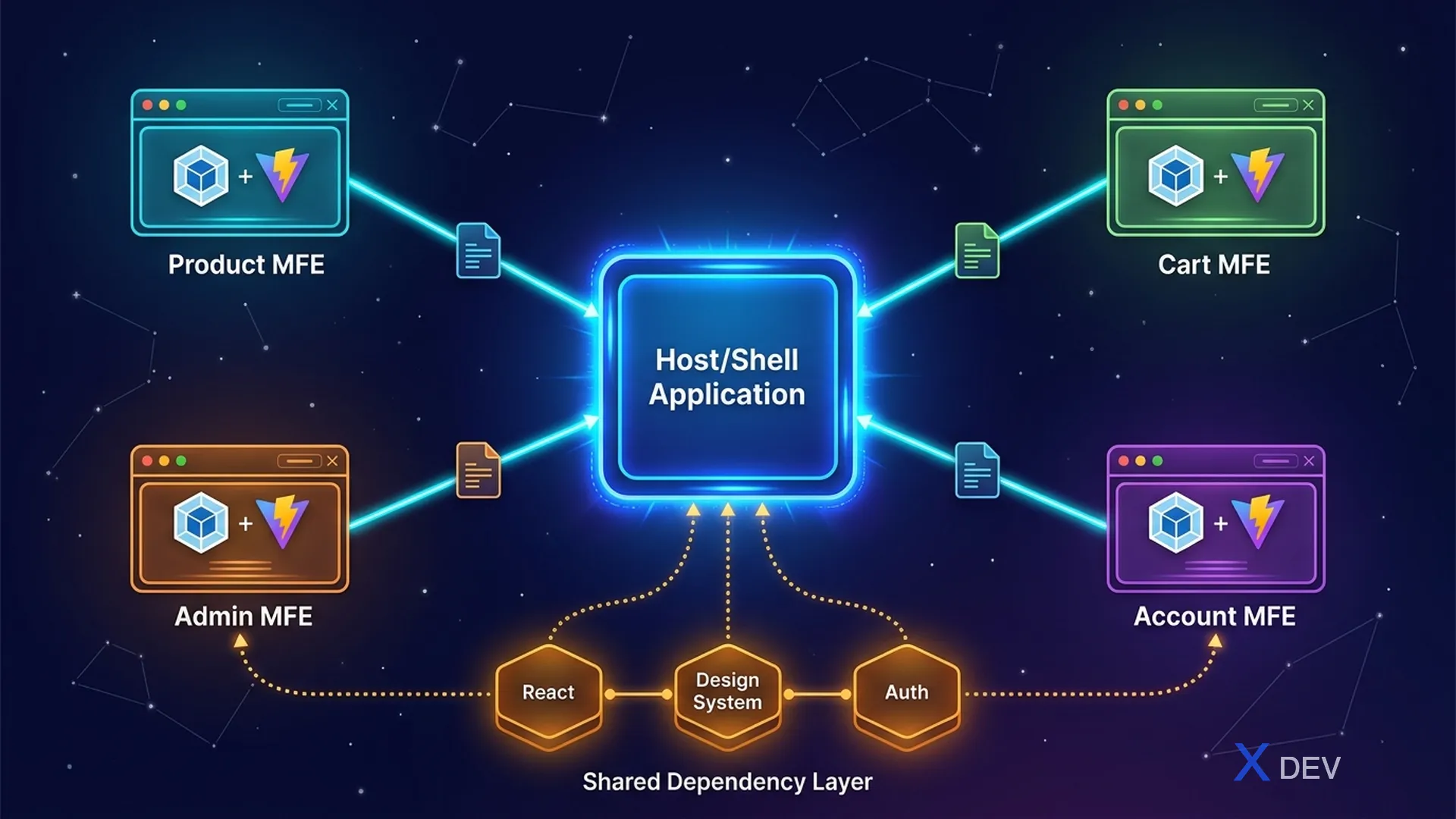
1. Core concepts
| Concepts | Description |
|---|---|
| Host | App load remote modules (Shell App) |
| Remote | App expose modules for hosts (MFE) |
| Shared | Dependencies shared between host & remote |
| remoteEntry.js | Manifest file contains information about remote modules |
┌─────────────────────────────┐
│ Browser                     │
│  Shell App (Host)           │
│  ┌─────────────────────┐    │
│  │ import('product/    │────────► remoteEntry.js (CDN)
│  │   ProductList')     │    │     → chunk-abc.js
│  └─────────────────────┘    │
│  Shared: React 18.2.0       │
│  (loaded ONCE)              │
└─────────────────────────────┘
2. Host Configuration (Shell App)
// webpack.config.js (Shell App)
const { ModuleFederationPlugin } = require('webpack').container;

module.exports = {
  plugins: [
    new ModuleFederationPlugin({
      name: 'shell',
      remotes: {
        product: 'product@https://product.cdn.com/remoteEntry.js',
        cart: 'cart@https://cart.cdn.com/remoteEntry.js',
      },
      shared: {
        react: { singleton: true, requiredVersion: '^18.2.0' },
        'react-dom': { singleton: true, requiredVersion: '^18.2.0' },
      },
    }),
  ],
};
3. Remote Configuration (Product MFE)
// webpack.config.js (Product MFE)
module.exports = {
  plugins: [
    new ModuleFederationPlugin({
      name: 'product',
      filename: 'remoteEntry.js',
      exposes: {
        './ProductList': './src/components/ProductList',
        './ProductDetail': './src/components/ProductDetail',
      },
      shared: {
        react: { singleton: true, requiredVersion: '^18.2.0' },
        'react-dom': { singleton: true, requiredVersion: '^18.2.0' },
      },
    }),
  ],
};
4. Use in Host
import React, { Suspense } from 'react';

const ProductList = React.lazy(() => import('product/ProductList'));
const MiniCart = React.lazy(() => import('cart/MiniCart'));

function App() {
  return (
    <div>
      <Header />
      <MFEErrorBoundary>
        <Suspense fallback={<div>Loading products...</div>}>
          <ProductList />
        </Suspense>
      </MFEErrorBoundary>
      <Footer />
    </div>
  );
}
5. Error Boundary for Remote MFE
class MFEErrorBoundary extends React.Component {
  state = { hasError: false };

  static getDerivedStateFromError() {
    return { hasError: true };
  }

  render() {
    if (this.state.hasError) {
      return <div>MFE unavailable. <button onClick={() =>
        this.setState({ hasError: false })}>Retry</button></div>;
    }
    return this.props.children;
  }
}
6. Shared Dependencies Management
shared: {
  react: {
    singleton: true,         // Chỉ load 1 version
    requiredVersion: '^18.2.0',
    eager: false,            // Lazy load (recommended)
    strictVersion: false,    // Cho phép minor version khác
  },
}
Version conflict resolution:
Host: [email protected]
Remote A: [email protected]  → Dùng shared (Host's version)
Remote B: [email protected]  → singleton → dùng 18.2.0 (warning)
Remote C: [email protected]  → strictVersion=true → ERROR
7. Vite Module Federation
// vite.config.js (Remote)
import federation from '@originjs/vite-plugin-federation';

export default defineConfig({
  plugins: [
    react(),
    federation({
      name: 'product',
      filename: 'remoteEntry.js',
      exposes: {
        './ProductList': './src/components/ProductList',
      },
      shared: ['react', 'react-dom'],
    }),
  ],
});
Summary
- Module Federation = runtime code sharing between independent builds
- Host loads Remote modules via
remoteEntry.js - Shared dependencies: singleton mode avoids duplicate React
- Error Boundary required for production
- Vite supports via plugin, similar syntax
Next article: Lesson 13: Shell Application — Routing, Layout & Orchestration