はじめに
モジュール フェデレーションは、Webpack 5 の革新的な機能であり、実行時に複数のビルドでコードを共有できるようになります。この記事ではゼロからの実践的な構成を紹介します。
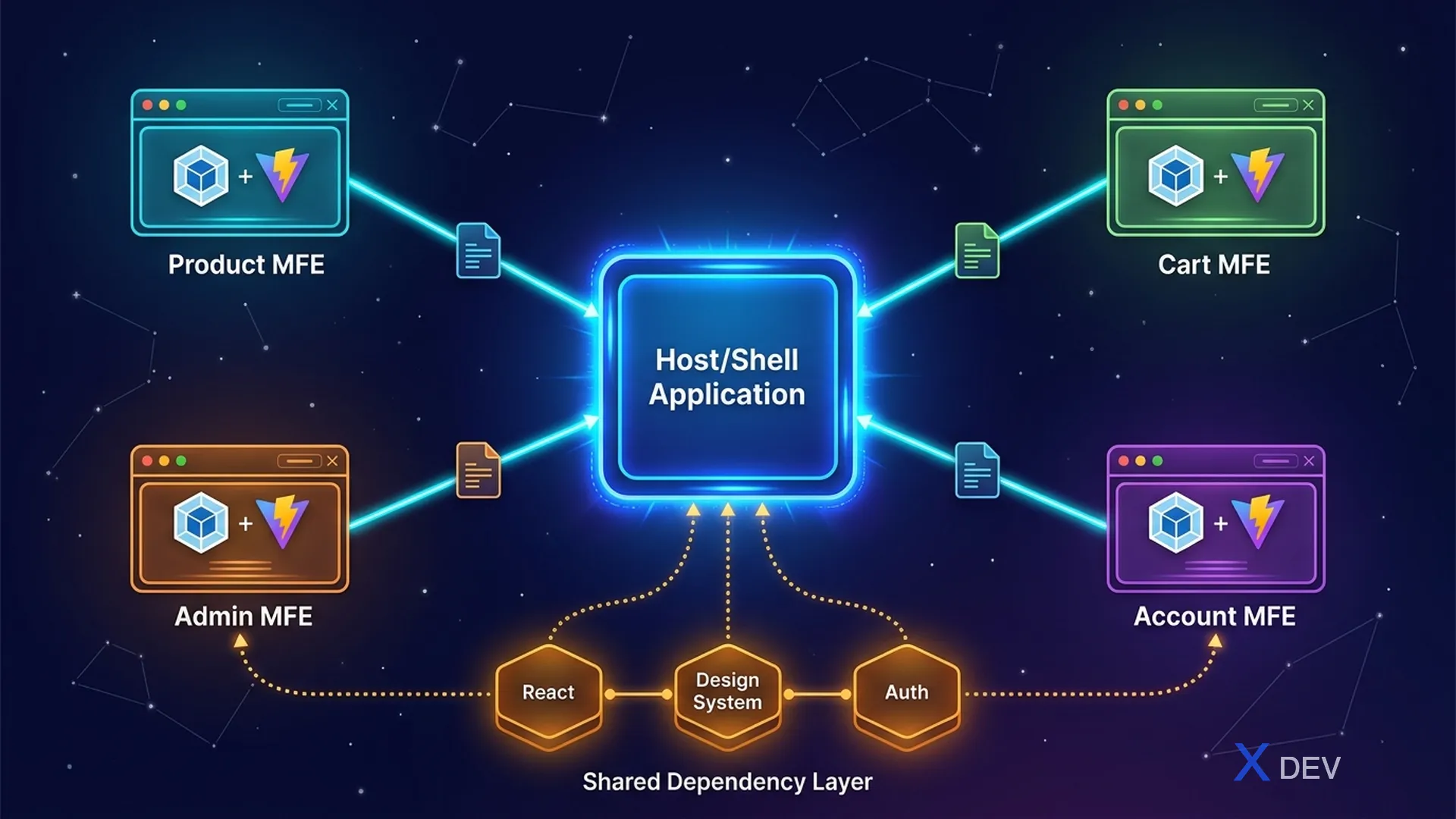
1. 中心となる概念
| コンセプト | 説明 |
|---|---|
| ホスト | アプリロードリモートモジュール (シェルアプリ) |
| リモート | アプリはホスト用モジュールを公開 (MFE) |
| 共有 | ホストとリモート間で共有される依存関係 |
| remoteEntry.js | マニフェスト ファイルにはリモート モジュールに関する情報が含まれています。 |
┌─────────────────────────────┐
│ Browser                     │
│  Shell App (Host)           │
│  ┌─────────────────────┐    │
│  │ import('product/    │────────► remoteEntry.js (CDN)
│  │   ProductList')     │    │     → chunk-abc.js
│  └─────────────────────┘    │
│  Shared: React 18.2.0       │
│  (loaded ONCE)              │
└─────────────────────────────┘
2. ホスト構成 (シェル アプリ)
// webpack.config.js (Shell App)
const { ModuleFederationPlugin } = require('webpack').container;

module.exports = {
  plugins: [
    new ModuleFederationPlugin({
      name: 'shell',
      remotes: {
        product: 'product@https://product.cdn.com/remoteEntry.js',
        cart: 'cart@https://cart.cdn.com/remoteEntry.js',
      },
      shared: {
        react: { singleton: true, requiredVersion: '^18.2.0' },
        'react-dom': { singleton: true, requiredVersion: '^18.2.0' },
      },
    }),
  ],
};
3. リモート構成 (製品 MFE)
// webpack.config.js (Product MFE)
module.exports = {
  plugins: [
    new ModuleFederationPlugin({
      name: 'product',
      filename: 'remoteEntry.js',
      exposes: {
        './ProductList': './src/components/ProductList',
        './ProductDetail': './src/components/ProductDetail',
      },
      shared: {
        react: { singleton: true, requiredVersion: '^18.2.0' },
        'react-dom': { singleton: true, requiredVersion: '^18.2.0' },
      },
    }),
  ],
};
4. ホストでの使用
import React, { Suspense } from 'react';

const ProductList = React.lazy(() => import('product/ProductList'));
const MiniCart = React.lazy(() => import('cart/MiniCart'));

function App() {
  return (
    <div>
      <Header />
      <MFEErrorBoundary>
        <Suspense fallback={<div>Loading products...</div>}>
          <ProductList />
        </Suspense>
      </MFEErrorBoundary>
      <Footer />
    </div>
  );
}
5. リモート MFE のエラー境界
class MFEErrorBoundary extends React.Component {
  state = { hasError: false };

  static getDerivedStateFromError() {
    return { hasError: true };
  }

  render() {
    if (this.state.hasError) {
      return <div>MFE unavailable. <button onClick={() =>
        this.setState({ hasError: false })}>Retry</button></div>;
    }
    return this.props.children;
  }
}
6. 共有依存関係の管理
shared: {
  react: {
    singleton: true,         // Chỉ load 1 version
    requiredVersion: '^18.2.0',
    eager: false,            // Lazy load (recommended)
    strictVersion: false,    // Cho phép minor version khác
  },
}
バージョン競合の解決:
Host: [email protected]
Remote A: [email protected]  → Dùng shared (Host's version)
Remote B: [email protected]  → singleton → dùng 18.2.0 (warning)
Remote C: [email protected]  → strictVersion=true → ERROR
7. Vite モジュール連合
// vite.config.js (Remote)
import federation from '@originjs/vite-plugin-federation';

export default defineConfig({
  plugins: [
    react(),
    federation({
      name: 'product',
      filename: 'remoteEntry.js',
      exposes: {
        './ProductList': './src/components/ProductList',
      },
      shared: ['react', 'react-dom'],
    }),
  ],
});
概要
- モジュール フェデレーション = 独立したビルド間の ランタイム コード共有
- ホストは、リモートモジュールを経由してロードします。
remoteEntry.js - 共有依存関係: シングルトン モードは React の重複を回避します
- エラー境界は本番環境に必要です
- Vite はプラグイン経由で同様の構文をサポートします