1. Overview of Quarkus Security Architecture
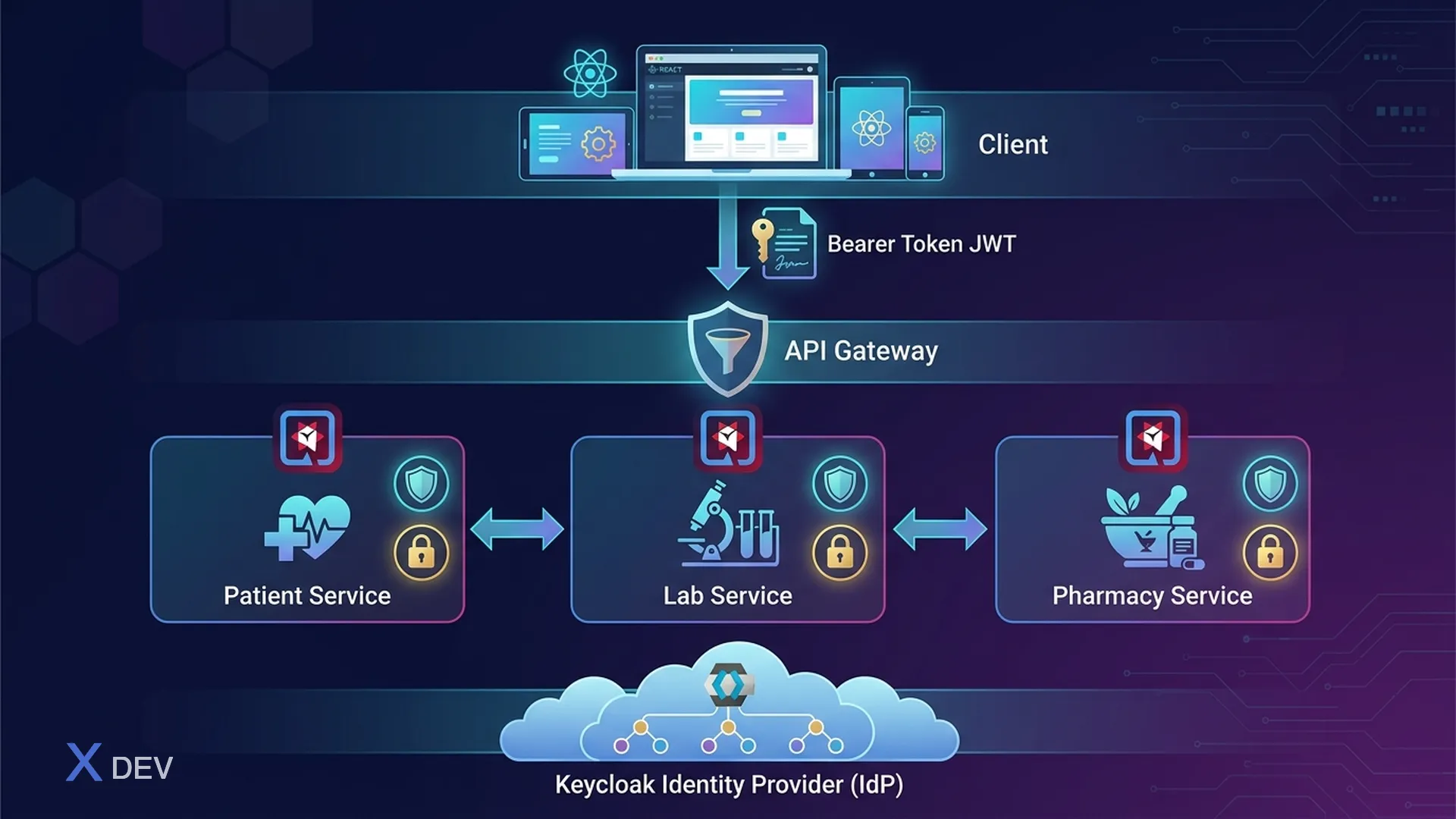
Quarkus provides an integrated security framework with many extensions supporting authentication, authorization, and identity management. In a healthcare microservices system, security is not an added feature — it is the foundation of every request.
1.1. Quarkus Security Stack for Healthcare
┌─────────────────────────────────────────────────────────┐
│              Healthcare Microservices Security            │
│                                                          │
│  ┌────────────────────────────────────────────────────┐  │
│  │              Client / Frontend                      │  │
│  │         (React, Mobile App, FHIR Client)           │  │
│  └──────────────────────┬─────────────────────────────┘  │
│                         │ Bearer Token (JWT)              │
│                         ▼                                 │
│  ┌──────────────────────────────────────────────────┐    │
│  │             API Gateway (Quarkus)                  │    │
│  │  ┌──────────┐  ┌──────────┐  ┌───────────────┐   │    │
│  │  │ OIDC     │  │ Rate     │  │ Request       │   │    │
│  │  │ Verify   │  │ Limiting │  │ Validation    │   │    │
│  │  └──────────┘  └──────────┘  └───────────────┘   │    │
│  └──────────────────────┬───────────────────────────┘    │
│                         │ JWT Propagation                  │
│              ┌──────────┼──────────┐                      │
│              ▼          ▼          ▼                       │
│  ┌──────────────┐ ┌──────────┐ ┌──────────────┐         │
│  │ Patient Svc  │ │ Lab Svc  │ │ Pharmacy Svc │         │
│  │ @RolesAllowed│ │ RBAC+RLS │ │ @Permissions │         │
│  └──────────────┘ └──────────┘ └──────────────┘         │
│                                                          │
│  ┌───────────────────────────────────────────────────┐   │
│  │                Keycloak (IdP)                      │   │
│  │  Realms: hospital-a, hospital-b, hospital-c       │   │
│  │  Clients: patient-svc, lab-svc, pharmacy-svc      │   │
│  │  Roles: doctor, nurse, lab_tech, pharmacist        │   │
│  └───────────────────────────────────────────────────┘   │
└─────────────────────────────────────────────────────────┘
1.2. Quarkus Security Extensions
| Extension | Artifact | Purpose |
|---|---|---|
| quarkus-oidc | io.quarkus:quarkus-oidc | OIDC authentication (Keycloak) |
| quarkus-oidc-token-propagation | io.quarkus:quarkus-oidc-token-propagation-reactive | JWT forwarding between services |
| quarkus-keycloak-authorization | io.quarkus:quarkus-keycloak-authorization | Keycloak policy enforcement |
| quarkus-smallrye-jwt | io.quarkus:quarkus-smallrye-jwt | MicroProfile JWT verification |
| quarkus-security | io.quarkus:quarkus-security | Core security annotations |
2. OIDC Extension Setup with Keycloak
2.1. Maven Dependencies
<!-- pom.xml -->
<dependencies>
    <!-- OIDC authentication -->
    <dependency>
        <groupId>io.quarkus</groupId>
        <artifactId>quarkus-oidc</artifactId>
    </dependency>

    <!-- Token propagation cho inter-service calls -->
    <dependency>
        <groupId>io.quarkus</groupId>
        <artifactId>quarkus-oidc-token-propagation-reactive</artifactId>
    </dependency>

    <!-- REST Client (reactive) -->
    <dependency>
        <groupId>io.quarkus</groupId>
        <artifactId>quarkus-rest-client-reactive</artifactId>
    </dependency>

    <!-- RESTEasy Reactive -->
    <dependency>
        <groupId>io.quarkus</groupId>
        <artifactId>quarkus-resteasy-reactive-jackson</artifactId>
    </dependency>

    <!-- Testing -->
    <dependency>
        <groupId>io.quarkus</groupId>
        <artifactId>quarkus-test-security-oidc</artifactId>
        <scope>test</scope>
    </dependency>
</dependencies>
2.2. application.properties - Bearer Token Flow (Service)
# =====================================================
# Patient Service - OIDC Configuration
# =====================================================

# --- Keycloak Connection ---
quarkus.oidc.auth-server-url=https://keycloak.hospital.internal/realms/healthcare
quarkus.oidc.client-id=patient-service
quarkus.oidc.credentials.secret=${OIDC_CLIENT_SECRET}

# --- Authentication Type ---
# service = Bearer token only (API backend)
# web-app = Authorization code flow (web frontend)
# hybrid  = Both bearer + code flow
quarkus.oidc.application-type=service

# --- Token Verification ---
quarkus.oidc.token.issuer=https://keycloak.hospital.internal/realms/healthcare
quarkus.oidc.token.audience=patient-service
quarkus.oidc.token.principal-claim=preferred_username

# --- TLS cho kết nối tới Keycloak ---
quarkus.oidc.tls.verification=required
quarkus.oidc.tls.trust-store-file=classpath:keycloak-truststore.p12
quarkus.oidc.tls.trust-store-password=${TRUSTSTORE_PASSWORD}

# --- Token Cache ---
quarkus.oidc.token-cache.max-size=1000
quarkus.oidc.token-cache.time-to-live=5M

# --- Logging ---
quarkus.log.category."io.quarkus.oidc".level=DEBUG
2.3. Bearer Token vs Authorization Code Flow
┌─────────────────────────────────────────────────────────┐
│  Bearer Token Flow (service application-type)            │
│                                                          │
│  Client ──► [Authorization: Bearer <JWT>] ──► Quarkus   │
│                                                          │
│  Quarkus verifies JWT:                                   │
│    1. Fetch JWKS from Keycloak (cached)                  │
│    2. Verify signature                                   │
│    3. Check expiry, issuer, audience                     │
│    4. Extract claims → SecurityIdentity                  │
│                                                          │
│  Dùng cho: REST APIs, Microservice-to-microservice      │
├─────────────────────────────────────────────────────────┤
│  Code Flow (web-app application-type)                    │
│                                                          │
│  Browser ──► Quarkus ──► Redirect to Keycloak login     │
│  User logs in ──► Redirect back with auth code           │
│  Quarkus exchanges code for tokens ──► Session cookie    │
│                                                          │
│  Dùng cho: Web dashboard, Admin portal                   │
└─────────────────────────────────────────────────────────┘
3. JWT Token Structure for Healthcare
3.1. Custom Claims Design
The JWT token for healthcare needs to contain domain-specific claims so the authorization logic has enough context:
{
  "iss": "https://keycloak.hospital.internal/realms/healthcare",
  "sub": "f47ac10b-58cc-4372-a567-0e02b2c3d479",
  "aud": "patient-service",
  "exp": 1735689600,
  "iat": 1735686000,
  "auth_time": 1735685900,
  "preferred_username": "dr.nguyen",
  "email": "[email protected]",
  "given_name": "Nguyễn Văn",
  "family_name": "A",

  "realm_access": {
    "roles": ["doctor", "phi_viewer"]
  },
  "resource_access": {
    "patient-service": {
      "roles": ["patient_read", "patient_write", "prescription_create"]
    },
    "lab-service": {
      "roles": ["lab_result_read"]
    }
  },

  "department": "cardiology",
  "hospital_id": "hospital-a",
  "fhir_practitioner_id": "Practitioner/12345",
  "license_number": "BS-HCM-2020-1234",
  "data_classification_level": "restricted",
  "consent_scope": ["treatment", "payment"]
}
3.2. Keycloak Protocol Mapper for Custom Claims
{
  "name": "department-mapper",
  "protocol": "openid-connect",
  "protocolMapper": "oidc-usermodel-attribute-mapper",
  "config": {
    "user.attribute": "department",
    "claim.name": "department",
    "jsonType.label": "String",
    "id.token.claim": "true",
    "access.token.claim": "true",
    "userinfo.token.claim": "true"
  }
}
Create mapper via Keycloak Admin CLI:
# Login admin
kcadm.sh config credentials --server https://keycloak.hospital.internal \
  --realm master --user admin --password "${KEYCLOAK_ADMIN_PASSWORD}"

# Tạo protocol mapper cho client patient-service
kcadm.sh create clients/${CLIENT_UUID}/protocol-mappers/models \
  -r healthcare \
  -s name=department-mapper \
  -s protocol=openid-connect \
  -s protocolMapper=oidc-usermodel-attribute-mapper \
  -s 'config."user.attribute"=department' \
  -s 'config."claim.name"=department' \
  -s 'config."jsonType.label"=String' \
  -s 'config."access.token.claim"=true'

# Mapper cho hospital_id
kcadm.sh create clients/${CLIENT_UUID}/protocol-mappers/models \
  -r healthcare \
  -s name=hospital-id-mapper \
  -s protocol=openid-connect \
  -s protocolMapper=oidc-usermodel-attribute-mapper \
  -s 'config."user.attribute"=hospital_id' \
  -s 'config."claim.name"=hospital_id' \
  -s 'config."jsonType.label"=String' \
  -s 'config."access.token.claim"=true'

# Mapper cho fhir_practitioner_id
kcadm.sh create clients/${CLIENT_UUID}/protocol-mappers/models \
  -r healthcare \
  -s name=fhir-practitioner-mapper \
  -s protocol=openid-connect \
  -s protocolMapper=oidc-usermodel-attribute-mapper \
  -s 'config."user.attribute"=fhir_practitioner_id' \
  -s 'config."claim.name"=fhir_practitioner_id' \
  -s 'config."jsonType.label"=String' \
  -s 'config."access.token.claim"=true'
4. SecurityIdentity and Custom Augmentor
4.1. SecurityIdentity Overview
SecurityIdentity is the central object in Quarkus Security — representing the authenticated principal with roles, credentials, and attributes. OIDC extension automatically creates SecurityIdentity from JWT token.
package vn.hospital.security;

import io.quarkus.security.identity.SecurityIdentity;
import jakarta.inject.Inject;
import jakarta.ws.rs.GET;
import jakarta.ws.rs.Path;

@Path("/api/v1/me")
public class UserInfoResource {

    @Inject
    SecurityIdentity identity;

    @GET
    public UserInfo getCurrentUser() {
        return new UserInfo(
            identity.getPrincipal().getName(),          // preferred_username
            identity.getRoles(),                        // realm_access.roles
            identity.getAttribute("department"),        // custom claim
            identity.getAttribute("hospital_id"),       // custom claim
            identity.getAttribute("fhir_practitioner_id")
        );
    }
}
4.2. SecurityIdentityAugmentor Implementation
SecurityIdentityAugmentor allows additional roles, permissions, attributes to SecurityIdentity after OIDC verification is complete. This is where we map business logic into the security context.
package vn.hospital.security;

import io.quarkus.security.identity.AuthenticationRequestContext;
import io.quarkus.security.identity.SecurityIdentity;
import io.quarkus.security.identity.SecurityIdentityAugmentor;
import io.quarkus.security.runtime.QuarkusSecurityIdentity;
import io.smallrye.mutiny.Uni;
import jakarta.enterprise.context.ApplicationScoped;
import jakarta.inject.Inject;
import org.eclipse.microprofile.jwt.JsonWebToken;

import java.util.Set;

@ApplicationScoped
public class HealthcareSecurityAugmentor implements SecurityIdentityAugmentor {

    @Inject
    JsonWebToken jwt;

    @Inject
    DepartmentPermissionService permissionService;

    @Override
    public Uni<SecurityIdentity> augment(SecurityIdentity identity,
                                          AuthenticationRequestContext context) {
        if (identity.isAnonymous()) {
            return Uni.createFrom().item(identity);
        }

        return context.runBlocking(() -> augmentIdentity(identity));
    }

    private SecurityIdentity augmentIdentity(SecurityIdentity identity) {
        QuarkusSecurityIdentity.Builder builder =
            QuarkusSecurityIdentity.builder(identity);

        // 1. Extract custom claims từ JWT
        String department = jwt.getClaim("department");
        String hospitalId = jwt.getClaim("hospital_id");
        String fhirPractitionerId = jwt.getClaim("fhir_practitioner_id");
        String dataClassification = jwt.getClaim("data_classification_level");

        // 2. Add attributes cho downstream access
        builder.addAttribute("department", department);
        builder.addAttribute("hospital_id", hospitalId);
        builder.addAttribute("fhir_practitioner_id", fhirPractitionerId);
        builder.addAttribute("data_classification_level", dataClassification);

        // 3. Add dynamic roles based on department + base role
        Set<String> departmentPermissions =
            permissionService.getPermissions(department, identity.getRoles());
        builder.addRoles(departmentPermissions);

        // 4. Add resource_access roles (client-specific)
        Object resourceAccess = jwt.getClaim("resource_access");
        if (resourceAccess instanceof jakarta.json.JsonObject jsonObj) {
            String clientId = jwt.getClaim("azp");
            if (jsonObj.containsKey(clientId)) {
                jsonObj.getJsonObject(clientId)
                    .getJsonArray("roles")
                    .forEach(role -> builder.addRole(((jakarta.json.JsonString) role).getString()));
            }
        }

        // 5. Permission check function
        builder.addPermissionChecker(permission -> {
            if (permission instanceof PatientDataPermission pdp) {
                return Uni.createFrom().item(
                    canAccessPatientData(identity, pdp, hospitalId, department)
                );
            }
            return Uni.createFrom().item(true);
        });

        return builder.build();
    }

    private boolean canAccessPatientData(SecurityIdentity identity,
                                          PatientDataPermission permission,
                                          String hospitalId,
                                          String department) {
        // Doctor chỉ truy cập patient trong cùng hospital
        if (permission.getHospitalId() != null &&
            !permission.getHospitalId().equals(hospitalId)) {
            return false;
        }

        // Emergency override
        if (identity.getRoles().contains("emergency_access")) {
            return true;
        }

        // Department-based restriction
        return permission.getAllowedDepartments().contains(department);
    }
}
4.3. Custom Permission Class
package vn.hospital.security;

import io.quarkus.security.StringPermission;

import java.util.Set;

public class PatientDataPermission extends StringPermission {

    private final String hospitalId;
    private final String patientId;
    private final Set<String> allowedDepartments;

    public PatientDataPermission(String name, String hospitalId,
                                  String patientId, Set<String> allowedDepartments) {
        super(name);
        this.hospitalId = hospitalId;
        this.patientId = patientId;
        this.allowedDepartments = allowedDepartments;
    }

    public String getHospitalId() { return hospitalId; }
    public String getPatientId() { return patientId; }
    public Set<String> getAllowedDepartments() { return allowedDepartments; }
}
5. @RolesAllowed and @PermissionsAllowed Annotations
5.1. @RolesAllowed - Role-Based Access Control
package vn.hospital.resource;

import jakarta.annotation.security.DenyAll;
import jakarta.annotation.security.PermitAll;
import jakarta.annotation.security.RolesAllowed;
import jakarta.inject.Inject;
import jakarta.ws.rs.*;
import jakarta.ws.rs.core.MediaType;
import jakarta.ws.rs.core.Response;
import io.quarkus.security.identity.SecurityIdentity;

import java.util.List;
import java.util.UUID;

@Path("/api/v1/patients")
@Produces(MediaType.APPLICATION_JSON)
@Consumes(MediaType.APPLICATION_JSON)
@DenyAll  // Deny by default - mỗi method phải khai báo roles
public class PatientResource {

    @Inject
    SecurityIdentity identity;

    @Inject
    PatientService patientService;

    // --- Chỉ doctor và nurse được xem danh sách patients ---
    @GET
    @RolesAllowed({"doctor", "nurse", "admin"})
    public List<PatientSummaryDTO> listPatients(
            @QueryParam("department") String department,
            @QueryParam("page") @DefaultValue("0") int page) {

        String userHospital = identity.getAttribute("hospital_id");
        String userDepartment = identity.getAttribute("department");

        // Filter theo hospital_id của user (data isolation)
        return patientService.findByHospital(userHospital, userDepartment, page);
    }

    // --- Xem chi tiết patient - cần role patient_read ---
    @GET
    @Path("/{patientId}")
    @RolesAllowed({"doctor", "nurse"})
    public Response getPatient(@PathParam("patientId") UUID patientId) {
        String userHospital = identity.getAttribute("hospital_id");

        return patientService.findById(patientId, userHospital)
            .map(p -> Response.ok(p).build())
            .orElse(Response.status(Response.Status.NOT_FOUND).build());
    }

    // --- Tạo patient mới - chỉ doctor ---
    @POST
    @RolesAllowed("doctor")
    public Response createPatient(CreatePatientRequest request) {
        String userHospital = identity.getAttribute("hospital_id");
        String practitionerId = identity.getAttribute("fhir_practitioner_id");

        PatientDTO created = patientService.create(request, userHospital, practitionerId);
        return Response.status(Response.Status.CREATED).entity(created).build();
    }

    // --- Xem medical records - cần doctor role + department match ---
    @GET
    @Path("/{patientId}/medical-records")
    @RolesAllowed("doctor")
    public List<MedicalRecordDTO> getMedicalRecords(
            @PathParam("patientId") UUID patientId) {

        String department = identity.getAttribute("department");
        return patientService.getMedicalRecords(patientId, department);
    }

    // --- Delete patient - chỉ admin, và cần additional check ---
    @DELETE
    @Path("/{patientId}")
    @RolesAllowed("admin")
    public Response deletePatient(@PathParam("patientId") UUID patientId) {
        // Soft delete only - HIPAA requires data retention
        patientService.softDelete(patientId);
        return Response.noContent().build();
    }

    // --- Public endpoint - health check ---
    @GET
    @Path("/health")
    @PermitAll
    public Response healthCheck() {
        return Response.ok().build();
    }
}
5.2. @PermissionsAllowed - Fine-grained Permission Control
package vn.hospital.resource;

import io.quarkus.security.PermissionsAllowed;
import jakarta.inject.Inject;
import jakarta.ws.rs.*;
import jakarta.ws.rs.core.MediaType;
import jakarta.ws.rs.core.Response;

import java.util.UUID;

@Path("/api/v1/prescriptions")
@Produces(MediaType.APPLICATION_JSON)
@Consumes(MediaType.APPLICATION_JSON)
public class PrescriptionResource {

    @Inject
    PrescriptionService prescriptionService;

    // Permission-based: cần "prescription:create" permission
    @POST
    @PermissionsAllowed("prescription:create")
    public Response createPrescription(PrescriptionRequest request) {
        return Response.status(Response.Status.CREATED)
            .entity(prescriptionService.create(request))
            .build();
    }

    // Multiple permissions: cần CẢ HAI permissions
    @PUT
    @Path("/{id}")
    @PermissionsAllowed(value = {"prescription:update", "patient:read"},
                        inclusive = true)  // inclusive=true = AND logic
    public Response updatePrescription(@PathParam("id") UUID id,
                                        PrescriptionRequest request) {
        return Response.ok(prescriptionService.update(id, request)).build();
    }

    // Parameterized permission check
    @DELETE
    @Path("/{id}")
    @PermissionsAllowed("prescription:delete")
    public Response cancelPrescription(@PathParam("id") UUID id) {
        prescriptionService.cancel(id);
        return Response.noContent().build();
    }
}
6. Programmatic Security with SecurityContext
6.1. Complex Authorization Logic
When annotation-based security is not flexible enough, use programmatic checks:
package vn.hospital.service;

import io.quarkus.security.ForbiddenException;
import io.quarkus.security.UnauthorizedException;
import io.quarkus.security.identity.SecurityIdentity;
import jakarta.enterprise.context.ApplicationScoped;
import jakarta.inject.Inject;
import org.jboss.logging.Logger;

import java.util.List;
import java.util.Optional;
import java.util.Set;
import java.util.UUID;

@ApplicationScoped
public class PatientService {

    private static final Logger LOG = Logger.getLogger(PatientService.class);

    @Inject
    SecurityIdentity identity;

    @Inject
    PatientRepository patientRepository;

    @Inject
    AuditService auditService;

    public Optional<PatientDTO> findById(UUID patientId, String hospitalId) {
        // 1. Verify hospital access
        String userHospital = identity.getAttribute("hospital_id");
        if (!hospitalId.equals(userHospital)) {
            auditService.logUnauthorizedAccess(
                identity.getPrincipal().getName(),
                "CROSS_HOSPITAL_ACCESS",
                patientId.toString()
            );
            throw new ForbiddenException("Cross-hospital access denied");
        }

        // 2. Fetch patient
        Optional<PatientEntity> patient = patientRepository.findByIdAndHospital(
            patientId, hospitalId);

        if (patient.isEmpty()) {
            return Optional.empty();
        }

        // 3. Department-level access check
        PatientEntity entity = patient.get();
        String userDepartment = identity.getAttribute("department");

        if (!canAccessPatientDepartment(entity.getDepartment(), userDepartment)) {
            // Check for emergency access
            if (identity.getRoles().contains("emergency_access")) {
                auditService.logEmergencyAccess(
                    identity.getPrincipal().getName(),
                    patientId.toString(),
                    "Emergency access override"
                );
            } else {
                throw new ForbiddenException(
                    "Department access denied: " + userDepartment +
                    " cannot access " + entity.getDepartment());
            }
        }

        // 4. Log PHI access
        auditService.logPHIAccess(
            identity.getPrincipal().getName(),
            patientId.toString(),
            "patient_record_view",
            Set.of("name", "dob", "mrn")
        );

        return Optional.of(toDTO(entity));
    }

    private boolean canAccessPatientDepartment(String patientDept,
                                                String userDept) {
        // Same department → allow
        if (patientDept.equals(userDept)) return true;

        // Emergency department can access all
        if ("emergency".equals(userDept)) return true;

        // Cross-department referral check
        return hasActiveReferral(patientDept, userDept);
    }

    private boolean hasActiveReferral(String fromDept, String toDept) {
        // Query referral table for active cross-department referrals
        return patientRepository.hasActiveReferral(fromDept, toDept);
    }

    public List<PatientSummaryDTO> findByHospital(String hospitalId,
                                                    String department,
                                                    int page) {
        // Lọc theo hospital_id và department
        return patientRepository.findByHospitalAndDepartment(
                hospitalId, department, page, 20)
            .stream()
            .map(this::toSummaryDTO)
            .toList();
    }

    private PatientDTO toDTO(PatientEntity entity) {
        // Map entity to DTO, masking sensitive fields based on role
        PatientDTO dto = new PatientDTO();
        dto.setId(entity.getId());
        dto.setFullName(entity.getFullName());
        dto.setMrn(entity.getMrn());

        // Show SSN only for admin
        if (identity.getRoles().contains("admin")) {
            dto.setSsn(entity.getSsn());
        } else {
            dto.setSsn(maskSSN(entity.getSsn()));
        }

        return dto;
    }

    private String maskSSN(String ssn) {
        if (ssn == null || ssn.length() < 4) return "***";
        return "***-**-" + ssn.substring(ssn.length() - 4);
    }

    private PatientSummaryDTO toSummaryDTO(PatientEntity entity) {
        return new PatientSummaryDTO(entity.getId(), entity.getFullName(), entity.getMrn());
    }

    public PatientDTO create(CreatePatientRequest request, String hospitalId,
                              String practitionerId) {
        // Implementation
        return null;
    }

    public void softDelete(UUID patientId) {
        // Soft delete - mark as deleted, don't remove data
    }

    public List<MedicalRecordDTO> getMedicalRecords(UUID patientId, String department) {
        // Implementation
        return List.of();
    }
}
7. JWT Token Propagation between Microservices
7.1. Architecture - Token Propagation Flow
┌─────────────────────────────────────────────────────────┐
│                 Token Propagation Flow                    │
│                                                          │
│  Client ──[JWT]──► Patient Service ──[same JWT]──►      │
│                                     Lab Service          │
│                                                          │
│  1. Client gửi JWT tới Patient Service                   │
│  2. Patient Service verify JWT (OIDC)                    │
│  3. Patient Service gọi Lab Service                      │
│     → Forward CÙNG JWT token (no token exchange)         │
│  4. Lab Service verify JWT                               │
│  5. Lab Service trả kết quả → Patient Service → Client   │
│                                                          │
│  Khi cần token exchange (service-to-service):            │
│  Patient Service ──[client_credentials]──► Keycloak      │
│  Keycloak returns service token                          │
│  Patient Service ──[service JWT]──► Audit Service        │
└─────────────────────────────────────────────────────────┘
7.2. REST Client with Token Propagation
package vn.hospital.client;

import io.quarkus.oidc.token.propagation.reactive.AccessTokenRequestReactiveFilter;
import jakarta.ws.rs.*;
import jakarta.ws.rs.core.MediaType;
import org.eclipse.microprofile.rest.client.annotation.RegisterProvider;
import org.eclipse.microprofile.rest.client.inject.RegisterRestClient;

import java.util.List;
import java.util.UUID;

@RegisterRestClient(configKey = "lab-service")
@RegisterProvider(AccessTokenRequestReactiveFilter.class)  // Propagate JWT
@Path("/api/v1/lab-results")
@Produces(MediaType.APPLICATION_JSON)
@Consumes(MediaType.APPLICATION_JSON)
public interface LabServiceClient {

    @GET
    @Path("/patient/{patientId}")
    List<LabResultDTO> getLabResults(@PathParam("patientId") UUID patientId);

    @GET
    @Path("/{resultId}")
    LabResultDTO getLabResult(@PathParam("resultId") UUID resultId);

    @POST
    LabResultDTO createLabOrder(CreateLabOrderRequest request);
}
7.3. application.properties for REST Client
# === Lab Service REST Client ===
quarkus.rest-client.lab-service.url=https://lab-service.hospital.internal:8443
quarkus.rest-client.lab-service.scope=jakarta.inject.Singleton

# TLS cho inter-service communication
quarkus.rest-client.lab-service.trust-store=classpath:lab-service-truststore.p12
quarkus.rest-client.lab-service.trust-store-password=${LAB_TRUSTSTORE_PASSWORD}

# Connection pool
quarkus.rest-client.lab-service.connect-timeout=5000
quarkus.rest-client.lab-service.read-timeout=30000

# === Pharmacy Service REST Client ===
quarkus.rest-client.pharmacy-service.url=https://pharmacy-service.hospital.internal:8443
quarkus.rest-client.pharmacy-service.scope=jakarta.inject.Singleton
7.4. Client Credentials Grant (Service-to-Service)
When Patient Service needs to call Audit Service without using user token** (background job, scheduled task):
package vn.hospital.client;

import io.quarkus.oidc.client.OidcClient;
import io.quarkus.oidc.client.Tokens;
import jakarta.enterprise.context.ApplicationScoped;
import jakarta.inject.Inject;

@ApplicationScoped
public class ServiceTokenProvider {

    @Inject
    OidcClient oidcClient;

    public String getServiceToken() {
        Tokens tokens = oidcClient.getTokens().await().indefinitely();
        return tokens.getAccessToken();
    }
}
# Client credentials cho service-to-service
quarkus.oidc-client.auth-server-url=https://keycloak.hospital.internal/realms/healthcare
quarkus.oidc-client.client-id=patient-service
quarkus.oidc-client.credentials.secret=${OIDC_CLIENT_SECRET}
quarkus.oidc-client.grant.type=client
quarkus.oidc-client.grant-options.client.scope=openid service-account
8. Multi-Tenant OIDC Configuration
8.1. Multi-Hospital Scenario
When the system serves multiple hospitals, each hospital has its own Keycloak realm:
┌─────────────────────────────────────────────────────────┐
│              Multi-Tenant OIDC Architecture               │
│                                                          │
│  Hospital A ──► Realm: hospital-a                        │
│  Hospital B ──► Realm: hospital-b                        │
│  Hospital C ──► Realm: hospital-c                        │
│                                                          │
│  Patient Service nhận request từ cả 3 hospitals          │
│  → TenantResolver xác định realm dựa trên request       │
│  → OIDC extension verify token với đúng realm           │
└─────────────────────────────────────────────────────────┘
8.2. TenantResolver Implementation
package vn.hospital.security;

import io.quarkus.oidc.OidcRequestContext;
import io.quarkus.oidc.OidcTenantConfig;
import io.quarkus.oidc.TenantConfigResolver;
import io.smallrye.mutiny.Uni;
import jakarta.enterprise.context.ApplicationScoped;
import io.vertx.ext.web.RoutingContext;

@ApplicationScoped
public class HospitalTenantConfigResolver implements TenantConfigResolver {

    @Override
    public Uni<OidcTenantConfig> resolve(RoutingContext routingContext,
                                          OidcRequestContext<OidcTenantConfig> requestContext) {
        // Xác định tenant từ header hoặc subdomain
        String tenantId = resolveTenantId(routingContext);

        if (tenantId == null) {
            // Fallback to default tenant
            return Uni.createFrom().nullItem();
        }

        OidcTenantConfig config = new OidcTenantConfig();
        config.setTenantId(tenantId);
        config.setAuthServerUrl(
            "https://keycloak.hospital.internal/realms/" + tenantId);
        config.setClientId("patient-service");
        config.setApplicationType(OidcTenantConfig.ApplicationType.SERVICE);

        // Token verification
        OidcTenantConfig.Token tokenConfig = config.getToken();
        tokenConfig.setIssuer(
            "https://keycloak.hospital.internal/realms/" + tenantId);
        tokenConfig.setAudience(java.util.Optional.of(
            java.util.List.of("patient-service")));

        return Uni.createFrom().item(config);
    }

    private String resolveTenantId(RoutingContext context) {
        // Strategy 1: X-Tenant-ID header
        String tenantHeader = context.request().getHeader("X-Tenant-ID");
        if (tenantHeader != null && isValidTenant(tenantHeader)) {
            return tenantHeader;
        }

        // Strategy 2: Subdomain (hospital-a.api.hospital.internal)
        String host = context.request().host();
        if (host != null && host.contains(".api.hospital.internal")) {
            String subdomain = host.split("\\.")[0];
            if (isValidTenant(subdomain)) {
                return subdomain;
            }
        }

        // Strategy 3: Path prefix (/hospital-a/api/v1/patients)
        String path = context.request().path();
        if (path != null) {
            String[] segments = path.split("/");
            if (segments.length > 1 && isValidTenant(segments[1])) {
                return segments[1];
            }
        }

        return null;
    }

    private boolean isValidTenant(String tenantId) {
        // Validate against known tenants to prevent injection
        return tenantId != null && tenantId.matches("^hospital-[a-z]$");
    }
}
8.3. application.properties for Multi-Tenant
# === Default OIDC (fallback) ===
quarkus.oidc.auth-server-url=https://keycloak.hospital.internal/realms/healthcare
quarkus.oidc.client-id=patient-service
quarkus.oidc.application-type=service

# === Named tenants (static configuration) ===
quarkus.oidc.hospital-a.auth-server-url=https://keycloak.hospital.internal/realms/hospital-a
quarkus.oidc.hospital-a.client-id=patient-service
quarkus.oidc.hospital-a.application-type=service

quarkus.oidc.hospital-b.auth-server-url=https://keycloak.hospital.internal/realms/hospital-b
quarkus.oidc.hospital-b.client-id=patient-service
quarkus.oidc.hospital-b.application-type=service

quarkus.oidc.hospital-c.auth-server-url=https://keycloak.hospital.internal/realms/hospital-c
quarkus.oidc.hospital-c.client-id=patient-service
quarkus.oidc.hospital-c.application-type=service
9. Security Testing with @TestSecurity
9.1. Unit Test with @TestSecurity
package vn.hospital.resource;

import io.quarkus.test.junit.QuarkusTest;
import io.quarkus.test.security.TestSecurity;
import io.quarkus.test.security.oidc.Claim;
import io.quarkus.test.security.oidc.OidcSecurity;
import io.restassured.RestAssured;
import org.junit.jupiter.api.Test;

import static io.restassured.RestAssured.given;
import static org.hamcrest.Matchers.*;

@QuarkusTest
public class PatientResourceTest {

    // Test: Doctor can access patient list
    @Test
    @TestSecurity(user = "dr.nguyen", roles = {"doctor"})
    @OidcSecurity(claims = {
        @Claim(key = "department", value = "cardiology"),
        @Claim(key = "hospital_id", value = "hospital-a"),
        @Claim(key = "fhir_practitioner_id", value = "Practitioner/12345")
    })
    void testDoctorCanListPatients() {
        given()
            .when().get("/api/v1/patients?department=cardiology")
            .then()
            .statusCode(200)
            .body("$", hasSize(greaterThanOrEqualTo(0)));
    }

    // Test: Nurse can access patient list
    @Test
    @TestSecurity(user = "nurse.tran", roles = {"nurse"})
    @OidcSecurity(claims = {
        @Claim(key = "department", value = "cardiology"),
        @Claim(key = "hospital_id", value = "hospital-a")
    })
    void testNurseCanListPatients() {
        given()
            .when().get("/api/v1/patients")
            .then()
            .statusCode(200);
    }

    // Test: Lab tech CANNOT access patient list
    @Test
    @TestSecurity(user = "tech.le", roles = {"lab_tech"})
    @OidcSecurity(claims = {
        @Claim(key = "department", value = "laboratory"),
        @Claim(key = "hospital_id", value = "hospital-a")
    })
    void testLabTechCannotListPatients() {
        given()
            .when().get("/api/v1/patients")
            .then()
            .statusCode(403);
    }

    // Test: Unauthenticated request
    @Test
    void testUnauthenticatedAccess() {
        given()
            .when().get("/api/v1/patients")
            .then()
            .statusCode(401);
    }

    // Test: Cross-hospital access denied
    @Test
    @TestSecurity(user = "dr.pham", roles = {"doctor"})
    @OidcSecurity(claims = {
        @Claim(key = "department", value = "surgery"),
        @Claim(key = "hospital_id", value = "hospital-b")
    })
    void testCrossHospitalAccessDenied() {
        // Patient belongs to hospital-a, doctor belongs to hospital-b
        given()
            .when().get("/api/v1/patients/550e8400-e29b-41d4-a716-446655440000")
            .then()
            .statusCode(403);
    }

    // Test: Doctor cannot delete patients
    @Test
    @TestSecurity(user = "dr.nguyen", roles = {"doctor"})
    @OidcSecurity(claims = {
        @Claim(key = "hospital_id", value = "hospital-a")
    })
    void testDoctorCannotDeletePatient() {
        given()
            .when().delete("/api/v1/patients/550e8400-e29b-41d4-a716-446655440000")
            .then()
            .statusCode(403);
    }
}
9.2. Integration Test with Keycloak DevServices
package vn.hospital.resource;

import io.quarkus.test.junit.QuarkusIntegrationTest;
import io.quarkus.test.keycloak.client.KeycloakTestClient;
import org.junit.jupiter.api.Test;

import static io.restassured.RestAssured.given;

@QuarkusIntegrationTest
public class PatientResourceIT {

    KeycloakTestClient keycloakClient = new KeycloakTestClient();

    @Test
    void testWithRealKeycloakToken() {
        // Get real token from Keycloak DevServices
        String token = keycloakClient.getAccessToken("dr.nguyen");

        given()
            .auth().oauth2(token)
            .when().get("/api/v1/patients")
            .then()
            .statusCode(200);
    }
}
9.3. application.properties for Test
# === Dev/Test Profile ===
%dev.quarkus.oidc.auth-server-url=http://localhost:8180/realms/healthcare
%dev.quarkus.oidc.client-id=patient-service
%dev.quarkus.oidc.credentials.secret=test-secret

# Keycloak Dev Services (auto-start Keycloak container)
%dev.quarkus.keycloak.devservices.enabled=true
%dev.quarkus.keycloak.devservices.realm-path=test-realm.json
%dev.quarkus.keycloak.devservices.port=8180

# Test profile
%test.quarkus.keycloak.devservices.enabled=true
10. Quarkus Dev Services for Keycloak
10.1. Dev Services Overview
Quarkus Dev Services automatically starts Keycloak container when running quarkus dev or tests:
# application.properties
quarkus.keycloak.devservices.enabled=true
quarkus.keycloak.devservices.realm-path=healthcare-realm.json
quarkus.keycloak.devservices.port=0  # Random port
quarkus.keycloak.devservices.image-name=quay.io/keycloak/keycloak:24.0
quarkus.keycloak.devservices.shared=true  # Share container across services
quarkus.keycloak.devservices.service-name=keycloak
10.2. Test Realm Configuration
{
  "realm": "healthcare",
  "enabled": true,
  "sslRequired": "none",
  "roles": {
    "realm": [
      { "name": "doctor", "description": "Medical doctor" },
      { "name": "nurse", "description": "Registered nurse" },
      { "name": "lab_tech", "description": "Laboratory technician" },
      { "name": "pharmacist", "description": "Licensed pharmacist" },
      { "name": "admin", "description": "System administrator" },
      { "name": "phi_viewer", "description": "Can view PHI data" },
      { "name": "emergency_access", "description": "Emergency access override" }
    ]
  },
  "clients": [
    {
      "clientId": "patient-service",
      "enabled": true,
      "publicClient": false,
      "secret": "test-secret",
      "directAccessGrantsEnabled": true,
      "serviceAccountsEnabled": true,
      "protocolMappers": [
        {
          "name": "department",
          "protocol": "openid-connect",
          "protocolMapper": "oidc-usermodel-attribute-mapper",
          "config": {
            "user.attribute": "department",
            "claim.name": "department",
            "jsonType.label": "String",
            "access.token.claim": "true"
          }
        },
        {
          "name": "hospital_id",
          "protocol": "openid-connect",
          "protocolMapper": "oidc-usermodel-attribute-mapper",
          "config": {
            "user.attribute": "hospital_id",
            "claim.name": "hospital_id",
            "jsonType.label": "String",
            "access.token.claim": "true"
          }
        }
      ]
    }
  ],
  "users": [
    {
      "username": "dr.nguyen",
      "enabled": true,
      "credentials": [{ "type": "password", "value": "test" }],
      "realmRoles": ["doctor", "phi_viewer"],
      "attributes": {
        "department": ["cardiology"],
        "hospital_id": ["hospital-a"],
        "fhir_practitioner_id": ["Practitioner/12345"]
      }
    },
    {
      "username": "nurse.tran",
      "enabled": true,
      "credentials": [{ "type": "password", "value": "test" }],
      "realmRoles": ["nurse", "phi_viewer"],
      "attributes": {
        "department": ["cardiology"],
        "hospital_id": ["hospital-a"]
      }
    },
    {
      "username": "tech.le",
      "enabled": true,
      "credentials": [{ "type": "password", "value": "test" }],
      "realmRoles": ["lab_tech"],
      "attributes": {
        "department": ["laboratory"],
        "hospital_id": ["hospital-a"]
      }
    }
  ]
}
10.3. Docker Compose for Development
# docker-compose-dev.yml
version: '3.8'

services:
  keycloak:
    image: quay.io/keycloak/keycloak:24.0
    command: start-dev --import-realm
    environment:
      KEYCLOAK_ADMIN: admin
      KEYCLOAK_ADMIN_PASSWORD: admin
      KC_DB: postgres
      KC_DB_URL: jdbc:postgresql://keycloak-db:5432/keycloak
      KC_DB_USERNAME: keycloak
      KC_DB_PASSWORD: keycloak_password
    volumes:
      - ./src/main/resources/healthcare-realm.json:/opt/keycloak/data/import/healthcare-realm.json
    ports:
      - "8180:8080"
    depends_on:
      - keycloak-db

  keycloak-db:
    image: postgres:16
    environment:
      POSTGRES_DB: keycloak
      POSTGRES_USER: keycloak
      POSTGRES_PASSWORD: keycloak_password
    volumes:
      - keycloak_data:/var/lib/postgresql/data

  healthcare-db:
    image: postgres:16
    environment:
      POSTGRES_DB: healthcare_db
      POSTGRES_USER: healthcare_app
      POSTGRES_PASSWORD: healthcare_password
    ports:
      - "5432:5432"
    volumes:
      - healthcare_data:/var/lib/postgresql/data

volumes:
  keycloak_data:
  healthcare_data:
Summary
In this lesson, we built a comprehensive Quarkus Security Architecture for healthcare microservices:
- OIDC Extension: Connect Quarkus with Keycloak, support bearer token flow for APIs and code flow for web apps
- JWT Token Structure: Design custom claims containing healthcare-specific context (department, hospital_id, fhir_practitioner_id)
- SecurityIdentityAugmentor: Adds dynamic roles and permissions to SecurityIdentity based on business logic
- @RolesAllowed / @PermissionsAllowed: Declarative authorization on REST endpoints with granular permission control
- Programmatic Security: Complex authorization logic for department-based access, cross-hospital isolation, emergency access
- Token Propagation: Forward JWT between microservices and
AccessTokenRequestReactiveFilter, client credentials for service accounts - Multi-Tenant OIDC: TenantConfigResolver for multi-hospital deployment, each hospital has its own Keycloak realm
- Security Testing:
@TestSecurityannotation, Keycloak Dev Services, integration tests with real token flow
Overall Security Model:
Request ──► OIDC Verify ──► SecurityIdentity ──► Augmentor ──►
  ──► @RolesAllowed ──► Programmatic Check ──► Data Access ──►
  ──► Audit Log ──► Response
Exercises
-
OIDC Setup: Create a new Quarkus project with
quarkus-oidc,quarkus-resteasy-reactive-jackson. Configure the Keycloak Dev Services connection. Create a REST endpoint/api/v1/meReturns user information from SecurityIdentity. Test with@TestSecurityannotation. -
Custom SecurityIdentityAugmentor: Implement HealthcareSecurityAugmentor added
department,hospital_idGo to SecurityIdentity attributes. Write PatientResource with@RolesAllowedand programmatic check: doctor only accesses patients and hospitals. Write 5 test cases covering scenarios: same hospital, cross-hospital, emergency access, wrong role, unauthenticated. -
Token Propagation: Create 2 Quarkus services (Patient Service + Lab Service). Configuration
@RegisterRestClientwithAccessTokenRequestReactiveFilter. Patient Service calls Lab Service with JWT propagation. Verify Lab Service receives the correct user context. Test end-to-end flow. -
Multi-Tenant OIDC: Implement TenantConfigResolver to differentiate tenants via
X-Tenant-IDheader. header. Create 2 Keycloak realms (hospital-a, hospital-b) in test realm JSON. Write a verify test: user hospital-a cannot access endpoint hospital-b.
| ◀ Previous article | Next article ▶ |
|---|---|
| Lesson 12: Audit Logging & Change Data Capture with pgAudit | Lesson 14: API Gateway Security - Rate Limiting, Input Validation & WAF |