1. Tổng quan Quarkus Security Architecture
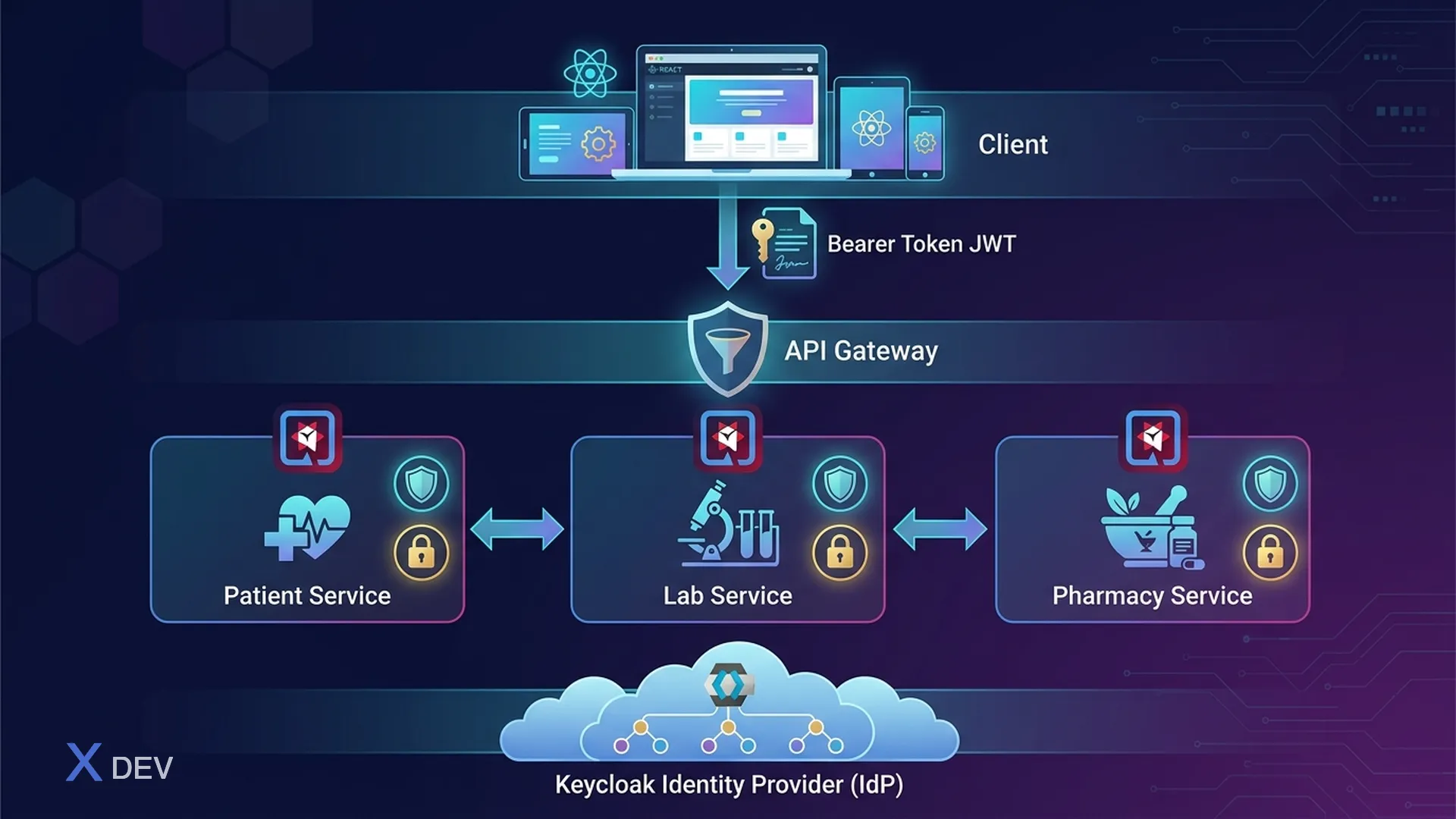
Quarkus cung cấp một security framework tích hợp với nhiều extension hỗ trợ authentication, authorization, và identity management. Trong hệ thống healthcare microservices, security không phải là tính năng thêm vào — nó là foundation của mọi request.
1.1. Quarkus Security Stack cho Healthcare
┌─────────────────────────────────────────────────────────┐
│              Healthcare Microservices Security            │
│                                                          │
│  ┌────────────────────────────────────────────────────┐  │
│  │              Client / Frontend                      │  │
│  │         (React, Mobile App, FHIR Client)           │  │
│  └──────────────────────┬─────────────────────────────┘  │
│                         │ Bearer Token (JWT)              │
│                         ▼                                 │
│  ┌──────────────────────────────────────────────────┐    │
│  │             API Gateway (Quarkus)                  │    │
│  │  ┌──────────┐  ┌──────────┐  ┌───────────────┐   │    │
│  │  │ OIDC     │  │ Rate     │  │ Request       │   │    │
│  │  │ Verify   │  │ Limiting │  │ Validation    │   │    │
│  │  └──────────┘  └──────────┘  └───────────────┘   │    │
│  └──────────────────────┬───────────────────────────┘    │
│                         │ JWT Propagation                  │
│              ┌──────────┼──────────┐                      │
│              ▼          ▼          ▼                       │
│  ┌──────────────┐ ┌──────────┐ ┌──────────────┐         │
│  │ Patient Svc  │ │ Lab Svc  │ │ Pharmacy Svc │         │
│  │ @RolesAllowed│ │ RBAC+RLS │ │ @Permissions │         │
│  └──────────────┘ └──────────┘ └──────────────┘         │
│                                                          │
│  ┌───────────────────────────────────────────────────┐   │
│  │                Keycloak (IdP)                      │   │
│  │  Realms: hospital-a, hospital-b, hospital-c       │   │
│  │  Clients: patient-svc, lab-svc, pharmacy-svc      │   │
│  │  Roles: doctor, nurse, lab_tech, pharmacist        │   │
│  └───────────────────────────────────────────────────┘   │
└─────────────────────────────────────────────────────────┘
1.2. Quarkus Security Extensions
| Extension | Artifact | Mục đích |
|---|---|---|
| quarkus-oidc | io.quarkus:quarkus-oidc | OIDC authentication (Keycloak) |
| quarkus-oidc-token-propagation | io.quarkus:quarkus-oidc-token-propagation-reactive | JWT forwarding giữa services |
| quarkus-keycloak-authorization | io.quarkus:quarkus-keycloak-authorization | Keycloak policy enforcement |
| quarkus-smallrye-jwt | io.quarkus:quarkus-smallrye-jwt | MicroProfile JWT verification |
| quarkus-security | io.quarkus:quarkus-security | Core security annotations |
2. OIDC Extension Setup với Keycloak
2.1. Maven Dependencies
<!-- pom.xml -->
<dependencies>
    <!-- OIDC authentication -->
    <dependency>
        <groupId>io.quarkus</groupId>
        <artifactId>quarkus-oidc</artifactId>
    </dependency>

    <!-- Token propagation cho inter-service calls -->
    <dependency>
        <groupId>io.quarkus</groupId>
        <artifactId>quarkus-oidc-token-propagation-reactive</artifactId>
    </dependency>

    <!-- REST Client (reactive) -->
    <dependency>
        <groupId>io.quarkus</groupId>
        <artifactId>quarkus-rest-client-reactive</artifactId>
    </dependency>

    <!-- RESTEasy Reactive -->
    <dependency>
        <groupId>io.quarkus</groupId>
        <artifactId>quarkus-resteasy-reactive-jackson</artifactId>
    </dependency>

    <!-- Testing -->
    <dependency>
        <groupId>io.quarkus</groupId>
        <artifactId>quarkus-test-security-oidc</artifactId>
        <scope>test</scope>
    </dependency>
</dependencies>
2.2. application.properties - Bearer Token Flow (Service)
# =====================================================
# Patient Service - OIDC Configuration
# =====================================================

# --- Keycloak Connection ---
quarkus.oidc.auth-server-url=https://keycloak.hospital.internal/realms/healthcare
quarkus.oidc.client-id=patient-service
quarkus.oidc.credentials.secret=${OIDC_CLIENT_SECRET}

# --- Authentication Type ---
# service = Bearer token only (API backend)
# web-app = Authorization code flow (web frontend)
# hybrid  = Both bearer + code flow
quarkus.oidc.application-type=service

# --- Token Verification ---
quarkus.oidc.token.issuer=https://keycloak.hospital.internal/realms/healthcare
quarkus.oidc.token.audience=patient-service
quarkus.oidc.token.principal-claim=preferred_username

# --- TLS cho kết nối tới Keycloak ---
quarkus.oidc.tls.verification=required
quarkus.oidc.tls.trust-store-file=classpath:keycloak-truststore.p12
quarkus.oidc.tls.trust-store-password=${TRUSTSTORE_PASSWORD}

# --- Token Cache ---
quarkus.oidc.token-cache.max-size=1000
quarkus.oidc.token-cache.time-to-live=5M

# --- Logging ---
quarkus.log.category."io.quarkus.oidc".level=DEBUG
2.3. Bearer Token vs Authorization Code Flow
┌─────────────────────────────────────────────────────────┐
│  Bearer Token Flow (service application-type)            │
│                                                          │
│  Client ──► [Authorization: Bearer <JWT>] ──► Quarkus   │
│                                                          │
│  Quarkus verifies JWT:                                   │
│    1. Fetch JWKS from Keycloak (cached)                  │
│    2. Verify signature                                   │
│    3. Check expiry, issuer, audience                     │
│    4. Extract claims → SecurityIdentity                  │
│                                                          │
│  Dùng cho: REST APIs, Microservice-to-microservice      │
├─────────────────────────────────────────────────────────┤
│  Code Flow (web-app application-type)                    │
│                                                          │
│  Browser ──► Quarkus ──► Redirect to Keycloak login     │
│  User logs in ──► Redirect back with auth code           │
│  Quarkus exchanges code for tokens ──► Session cookie    │
│                                                          │
│  Dùng cho: Web dashboard, Admin portal                   │
└─────────────────────────────────────────────────────────┘
3. JWT Token Structure cho Healthcare
3.1. Custom Claims Design
Token JWT cho healthcare cần chứa domain-specific claims để authorization logic có đủ context:
{
  "iss": "https://keycloak.hospital.internal/realms/healthcare",
  "sub": "f47ac10b-58cc-4372-a567-0e02b2c3d479",
  "aud": "patient-service",
  "exp": 1735689600,
  "iat": 1735686000,
  "auth_time": 1735685900,
  "preferred_username": "dr.nguyen",
  "email": "[email protected]",
  "given_name": "Nguyễn Văn",
  "family_name": "A",

  "realm_access": {
    "roles": ["doctor", "phi_viewer"]
  },
  "resource_access": {
    "patient-service": {
      "roles": ["patient_read", "patient_write", "prescription_create"]
    },
    "lab-service": {
      "roles": ["lab_result_read"]
    }
  },

  "department": "cardiology",
  "hospital_id": "hospital-a",
  "fhir_practitioner_id": "Practitioner/12345",
  "license_number": "BS-HCM-2020-1234",
  "data_classification_level": "restricted",
  "consent_scope": ["treatment", "payment"]
}
3.2. Keycloak Protocol Mapper cho Custom Claims
{
  "name": "department-mapper",
  "protocol": "openid-connect",
  "protocolMapper": "oidc-usermodel-attribute-mapper",
  "config": {
    "user.attribute": "department",
    "claim.name": "department",
    "jsonType.label": "String",
    "id.token.claim": "true",
    "access.token.claim": "true",
    "userinfo.token.claim": "true"
  }
}
Tạo mapper qua Keycloak Admin CLI:
# Login admin
kcadm.sh config credentials --server https://keycloak.hospital.internal \
  --realm master --user admin --password "${KEYCLOAK_ADMIN_PASSWORD}"

# Tạo protocol mapper cho client patient-service
kcadm.sh create clients/${CLIENT_UUID}/protocol-mappers/models \
  -r healthcare \
  -s name=department-mapper \
  -s protocol=openid-connect \
  -s protocolMapper=oidc-usermodel-attribute-mapper \
  -s 'config."user.attribute"=department' \
  -s 'config."claim.name"=department' \
  -s 'config."jsonType.label"=String' \
  -s 'config."access.token.claim"=true'

# Mapper cho hospital_id
kcadm.sh create clients/${CLIENT_UUID}/protocol-mappers/models \
  -r healthcare \
  -s name=hospital-id-mapper \
  -s protocol=openid-connect \
  -s protocolMapper=oidc-usermodel-attribute-mapper \
  -s 'config."user.attribute"=hospital_id' \
  -s 'config."claim.name"=hospital_id' \
  -s 'config."jsonType.label"=String' \
  -s 'config."access.token.claim"=true'

# Mapper cho fhir_practitioner_id
kcadm.sh create clients/${CLIENT_UUID}/protocol-mappers/models \
  -r healthcare \
  -s name=fhir-practitioner-mapper \
  -s protocol=openid-connect \
  -s protocolMapper=oidc-usermodel-attribute-mapper \
  -s 'config."user.attribute"=fhir_practitioner_id' \
  -s 'config."claim.name"=fhir_practitioner_id' \
  -s 'config."jsonType.label"=String' \
  -s 'config."access.token.claim"=true'
4. SecurityIdentity và Custom Augmentor
4.1. SecurityIdentity Overview
SecurityIdentity là đối tượng trung tâm trong Quarkus Security — đại diện cho authenticated principal với roles, credentials, và attributes. OIDC extension tự động tạo SecurityIdentity từ JWT token.
package vn.hospital.security;

import io.quarkus.security.identity.SecurityIdentity;
import jakarta.inject.Inject;
import jakarta.ws.rs.GET;
import jakarta.ws.rs.Path;

@Path("/api/v1/me")
public class UserInfoResource {

    @Inject
    SecurityIdentity identity;

    @GET
    public UserInfo getCurrentUser() {
        return new UserInfo(
            identity.getPrincipal().getName(),          // preferred_username
            identity.getRoles(),                        // realm_access.roles
            identity.getAttribute("department"),        // custom claim
            identity.getAttribute("hospital_id"),       // custom claim
            identity.getAttribute("fhir_practitioner_id")
        );
    }
}
4.2. SecurityIdentityAugmentor Implementation
SecurityIdentityAugmentor cho phép bổ sung thêm roles, permissions, attributes vào SecurityIdentity sau khi OIDC verification hoàn tất. Đây là nơi ta map business logic vào security context.
package vn.hospital.security;

import io.quarkus.security.identity.AuthenticationRequestContext;
import io.quarkus.security.identity.SecurityIdentity;
import io.quarkus.security.identity.SecurityIdentityAugmentor;
import io.quarkus.security.runtime.QuarkusSecurityIdentity;
import io.smallrye.mutiny.Uni;
import jakarta.enterprise.context.ApplicationScoped;
import jakarta.inject.Inject;
import org.eclipse.microprofile.jwt.JsonWebToken;

import java.util.Set;

@ApplicationScoped
public class HealthcareSecurityAugmentor implements SecurityIdentityAugmentor {

    @Inject
    JsonWebToken jwt;

    @Inject
    DepartmentPermissionService permissionService;

    @Override
    public Uni<SecurityIdentity> augment(SecurityIdentity identity,
                                          AuthenticationRequestContext context) {
        if (identity.isAnonymous()) {
            return Uni.createFrom().item(identity);
        }

        return context.runBlocking(() -> augmentIdentity(identity));
    }

    private SecurityIdentity augmentIdentity(SecurityIdentity identity) {
        QuarkusSecurityIdentity.Builder builder =
            QuarkusSecurityIdentity.builder(identity);

        // 1. Extract custom claims từ JWT
        String department = jwt.getClaim("department");
        String hospitalId = jwt.getClaim("hospital_id");
        String fhirPractitionerId = jwt.getClaim("fhir_practitioner_id");
        String dataClassification = jwt.getClaim("data_classification_level");

        // 2. Add attributes cho downstream access
        builder.addAttribute("department", department);
        builder.addAttribute("hospital_id", hospitalId);
        builder.addAttribute("fhir_practitioner_id", fhirPractitionerId);
        builder.addAttribute("data_classification_level", dataClassification);

        // 3. Add dynamic roles based on department + base role
        Set<String> departmentPermissions =
            permissionService.getPermissions(department, identity.getRoles());
        builder.addRoles(departmentPermissions);

        // 4. Add resource_access roles (client-specific)
        Object resourceAccess = jwt.getClaim("resource_access");
        if (resourceAccess instanceof jakarta.json.JsonObject jsonObj) {
            String clientId = jwt.getClaim("azp");
            if (jsonObj.containsKey(clientId)) {
                jsonObj.getJsonObject(clientId)
                    .getJsonArray("roles")
                    .forEach(role -> builder.addRole(((jakarta.json.JsonString) role).getString()));
            }
        }

        // 5. Permission check function
        builder.addPermissionChecker(permission -> {
            if (permission instanceof PatientDataPermission pdp) {
                return Uni.createFrom().item(
                    canAccessPatientData(identity, pdp, hospitalId, department)
                );
            }
            return Uni.createFrom().item(true);
        });

        return builder.build();
    }

    private boolean canAccessPatientData(SecurityIdentity identity,
                                          PatientDataPermission permission,
                                          String hospitalId,
                                          String department) {
        // Doctor chỉ truy cập patient trong cùng hospital
        if (permission.getHospitalId() != null &&
            !permission.getHospitalId().equals(hospitalId)) {
            return false;
        }

        // Emergency override
        if (identity.getRoles().contains("emergency_access")) {
            return true;
        }

        // Department-based restriction
        return permission.getAllowedDepartments().contains(department);
    }
}
4.3. Custom Permission Class
package vn.hospital.security;

import io.quarkus.security.StringPermission;

import java.util.Set;

public class PatientDataPermission extends StringPermission {

    private final String hospitalId;
    private final String patientId;
    private final Set<String> allowedDepartments;

    public PatientDataPermission(String name, String hospitalId,
                                  String patientId, Set<String> allowedDepartments) {
        super(name);
        this.hospitalId = hospitalId;
        this.patientId = patientId;
        this.allowedDepartments = allowedDepartments;
    }

    public String getHospitalId() { return hospitalId; }
    public String getPatientId() { return patientId; }
    public Set<String> getAllowedDepartments() { return allowedDepartments; }
}
5. @RolesAllowed và @PermissionsAllowed Annotations
5.1. @RolesAllowed - Role-Based Access Control
package vn.hospital.resource;

import jakarta.annotation.security.DenyAll;
import jakarta.annotation.security.PermitAll;
import jakarta.annotation.security.RolesAllowed;
import jakarta.inject.Inject;
import jakarta.ws.rs.*;
import jakarta.ws.rs.core.MediaType;
import jakarta.ws.rs.core.Response;
import io.quarkus.security.identity.SecurityIdentity;

import java.util.List;
import java.util.UUID;

@Path("/api/v1/patients")
@Produces(MediaType.APPLICATION_JSON)
@Consumes(MediaType.APPLICATION_JSON)
@DenyAll  // Deny by default - mỗi method phải khai báo roles
public class PatientResource {

    @Inject
    SecurityIdentity identity;

    @Inject
    PatientService patientService;

    // --- Chỉ doctor và nurse được xem danh sách patients ---
    @GET
    @RolesAllowed({"doctor", "nurse", "admin"})
    public List<PatientSummaryDTO> listPatients(
            @QueryParam("department") String department,
            @QueryParam("page") @DefaultValue("0") int page) {

        String userHospital = identity.getAttribute("hospital_id");
        String userDepartment = identity.getAttribute("department");

        // Filter theo hospital_id của user (data isolation)
        return patientService.findByHospital(userHospital, userDepartment, page);
    }

    // --- Xem chi tiết patient - cần role patient_read ---
    @GET
    @Path("/{patientId}")
    @RolesAllowed({"doctor", "nurse"})
    public Response getPatient(@PathParam("patientId") UUID patientId) {
        String userHospital = identity.getAttribute("hospital_id");

        return patientService.findById(patientId, userHospital)
            .map(p -> Response.ok(p).build())
            .orElse(Response.status(Response.Status.NOT_FOUND).build());
    }

    // --- Tạo patient mới - chỉ doctor ---
    @POST
    @RolesAllowed("doctor")
    public Response createPatient(CreatePatientRequest request) {
        String userHospital = identity.getAttribute("hospital_id");
        String practitionerId = identity.getAttribute("fhir_practitioner_id");

        PatientDTO created = patientService.create(request, userHospital, practitionerId);
        return Response.status(Response.Status.CREATED).entity(created).build();
    }

    // --- Xem medical records - cần doctor role + department match ---
    @GET
    @Path("/{patientId}/medical-records")
    @RolesAllowed("doctor")
    public List<MedicalRecordDTO> getMedicalRecords(
            @PathParam("patientId") UUID patientId) {

        String department = identity.getAttribute("department");
        return patientService.getMedicalRecords(patientId, department);
    }

    // --- Delete patient - chỉ admin, và cần additional check ---
    @DELETE
    @Path("/{patientId}")
    @RolesAllowed("admin")
    public Response deletePatient(@PathParam("patientId") UUID patientId) {
        // Soft delete only - HIPAA requires data retention
        patientService.softDelete(patientId);
        return Response.noContent().build();
    }

    // --- Public endpoint - health check ---
    @GET
    @Path("/health")
    @PermitAll
    public Response healthCheck() {
        return Response.ok().build();
    }
}
5.2. @PermissionsAllowed - Fine-grained Permission Control
package vn.hospital.resource;

import io.quarkus.security.PermissionsAllowed;
import jakarta.inject.Inject;
import jakarta.ws.rs.*;
import jakarta.ws.rs.core.MediaType;
import jakarta.ws.rs.core.Response;

import java.util.UUID;

@Path("/api/v1/prescriptions")
@Produces(MediaType.APPLICATION_JSON)
@Consumes(MediaType.APPLICATION_JSON)
public class PrescriptionResource {

    @Inject
    PrescriptionService prescriptionService;

    // Permission-based: cần "prescription:create" permission
    @POST
    @PermissionsAllowed("prescription:create")
    public Response createPrescription(PrescriptionRequest request) {
        return Response.status(Response.Status.CREATED)
            .entity(prescriptionService.create(request))
            .build();
    }

    // Multiple permissions: cần CẢ HAI permissions
    @PUT
    @Path("/{id}")
    @PermissionsAllowed(value = {"prescription:update", "patient:read"},
                        inclusive = true)  // inclusive=true = AND logic
    public Response updatePrescription(@PathParam("id") UUID id,
                                        PrescriptionRequest request) {
        return Response.ok(prescriptionService.update(id, request)).build();
    }

    // Parameterized permission check
    @DELETE
    @Path("/{id}")
    @PermissionsAllowed("prescription:delete")
    public Response cancelPrescription(@PathParam("id") UUID id) {
        prescriptionService.cancel(id);
        return Response.noContent().build();
    }
}
6. Programmatic Security với SecurityContext
6.1. Complex Authorization Logic
Khi annotation-based security không đủ linh hoạt, sử dụng programmatic checks:
package vn.hospital.service;

import io.quarkus.security.ForbiddenException;
import io.quarkus.security.UnauthorizedException;
import io.quarkus.security.identity.SecurityIdentity;
import jakarta.enterprise.context.ApplicationScoped;
import jakarta.inject.Inject;
import org.jboss.logging.Logger;

import java.util.List;
import java.util.Optional;
import java.util.Set;
import java.util.UUID;

@ApplicationScoped
public class PatientService {

    private static final Logger LOG = Logger.getLogger(PatientService.class);

    @Inject
    SecurityIdentity identity;

    @Inject
    PatientRepository patientRepository;

    @Inject
    AuditService auditService;

    public Optional<PatientDTO> findById(UUID patientId, String hospitalId) {
        // 1. Verify hospital access
        String userHospital = identity.getAttribute("hospital_id");
        if (!hospitalId.equals(userHospital)) {
            auditService.logUnauthorizedAccess(
                identity.getPrincipal().getName(),
                "CROSS_HOSPITAL_ACCESS",
                patientId.toString()
            );
            throw new ForbiddenException("Cross-hospital access denied");
        }

        // 2. Fetch patient
        Optional<PatientEntity> patient = patientRepository.findByIdAndHospital(
            patientId, hospitalId);

        if (patient.isEmpty()) {
            return Optional.empty();
        }

        // 3. Department-level access check
        PatientEntity entity = patient.get();
        String userDepartment = identity.getAttribute("department");

        if (!canAccessPatientDepartment(entity.getDepartment(), userDepartment)) {
            // Check for emergency access
            if (identity.getRoles().contains("emergency_access")) {
                auditService.logEmergencyAccess(
                    identity.getPrincipal().getName(),
                    patientId.toString(),
                    "Emergency access override"
                );
            } else {
                throw new ForbiddenException(
                    "Department access denied: " + userDepartment +
                    " cannot access " + entity.getDepartment());
            }
        }

        // 4. Log PHI access
        auditService.logPHIAccess(
            identity.getPrincipal().getName(),
            patientId.toString(),
            "patient_record_view",
            Set.of("name", "dob", "mrn")
        );

        return Optional.of(toDTO(entity));
    }

    private boolean canAccessPatientDepartment(String patientDept,
                                                String userDept) {
        // Same department → allow
        if (patientDept.equals(userDept)) return true;

        // Emergency department can access all
        if ("emergency".equals(userDept)) return true;

        // Cross-department referral check
        return hasActiveReferral(patientDept, userDept);
    }

    private boolean hasActiveReferral(String fromDept, String toDept) {
        // Query referral table for active cross-department referrals
        return patientRepository.hasActiveReferral(fromDept, toDept);
    }

    public List<PatientSummaryDTO> findByHospital(String hospitalId,
                                                    String department,
                                                    int page) {
        // Lọc theo hospital_id và department
        return patientRepository.findByHospitalAndDepartment(
                hospitalId, department, page, 20)
            .stream()
            .map(this::toSummaryDTO)
            .toList();
    }

    private PatientDTO toDTO(PatientEntity entity) {
        // Map entity to DTO, masking sensitive fields based on role
        PatientDTO dto = new PatientDTO();
        dto.setId(entity.getId());
        dto.setFullName(entity.getFullName());
        dto.setMrn(entity.getMrn());

        // Show SSN only for admin
        if (identity.getRoles().contains("admin")) {
            dto.setSsn(entity.getSsn());
        } else {
            dto.setSsn(maskSSN(entity.getSsn()));
        }

        return dto;
    }

    private String maskSSN(String ssn) {
        if (ssn == null || ssn.length() < 4) return "***";
        return "***-**-" + ssn.substring(ssn.length() - 4);
    }

    private PatientSummaryDTO toSummaryDTO(PatientEntity entity) {
        return new PatientSummaryDTO(entity.getId(), entity.getFullName(), entity.getMrn());
    }

    public PatientDTO create(CreatePatientRequest request, String hospitalId,
                              String practitionerId) {
        // Implementation
        return null;
    }

    public void softDelete(UUID patientId) {
        // Soft delete - mark as deleted, don't remove data
    }

    public List<MedicalRecordDTO> getMedicalRecords(UUID patientId, String department) {
        // Implementation
        return List.of();
    }
}
7. JWT Token Propagation giữa Microservices
7.1. Architecture - Token Propagation Flow
┌─────────────────────────────────────────────────────────┐
│                 Token Propagation Flow                    │
│                                                          │
│  Client ──[JWT]──► Patient Service ──[same JWT]──►      │
│                                     Lab Service          │
│                                                          │
│  1. Client gửi JWT tới Patient Service                   │
│  2. Patient Service verify JWT (OIDC)                    │
│  3. Patient Service gọi Lab Service                      │
│     → Forward CÙNG JWT token (no token exchange)         │
│  4. Lab Service verify JWT                               │
│  5. Lab Service trả kết quả → Patient Service → Client   │
│                                                          │
│  Khi cần token exchange (service-to-service):            │
│  Patient Service ──[client_credentials]──► Keycloak      │
│  Keycloak returns service token                          │
│  Patient Service ──[service JWT]──► Audit Service        │
└─────────────────────────────────────────────────────────┘
7.2. REST Client với Token Propagation
package vn.hospital.client;

import io.quarkus.oidc.token.propagation.reactive.AccessTokenRequestReactiveFilter;
import jakarta.ws.rs.*;
import jakarta.ws.rs.core.MediaType;
import org.eclipse.microprofile.rest.client.annotation.RegisterProvider;
import org.eclipse.microprofile.rest.client.inject.RegisterRestClient;

import java.util.List;
import java.util.UUID;

@RegisterRestClient(configKey = "lab-service")
@RegisterProvider(AccessTokenRequestReactiveFilter.class)  // Propagate JWT
@Path("/api/v1/lab-results")
@Produces(MediaType.APPLICATION_JSON)
@Consumes(MediaType.APPLICATION_JSON)
public interface LabServiceClient {

    @GET
    @Path("/patient/{patientId}")
    List<LabResultDTO> getLabResults(@PathParam("patientId") UUID patientId);

    @GET
    @Path("/{resultId}")
    LabResultDTO getLabResult(@PathParam("resultId") UUID resultId);

    @POST
    LabResultDTO createLabOrder(CreateLabOrderRequest request);
}
7.3. application.properties cho REST Client
# === Lab Service REST Client ===
quarkus.rest-client.lab-service.url=https://lab-service.hospital.internal:8443
quarkus.rest-client.lab-service.scope=jakarta.inject.Singleton

# TLS cho inter-service communication
quarkus.rest-client.lab-service.trust-store=classpath:lab-service-truststore.p12
quarkus.rest-client.lab-service.trust-store-password=${LAB_TRUSTSTORE_PASSWORD}

# Connection pool
quarkus.rest-client.lab-service.connect-timeout=5000
quarkus.rest-client.lab-service.read-timeout=30000

# === Pharmacy Service REST Client ===
quarkus.rest-client.pharmacy-service.url=https://pharmacy-service.hospital.internal:8443
quarkus.rest-client.pharmacy-service.scope=jakarta.inject.Singleton
7.4. Client Credentials Grant (Service-to-Service)
Khi Patient Service cần gọi Audit Service mà không dùng user token (background job, scheduled task):
package vn.hospital.client;

import io.quarkus.oidc.client.OidcClient;
import io.quarkus.oidc.client.Tokens;
import jakarta.enterprise.context.ApplicationScoped;
import jakarta.inject.Inject;

@ApplicationScoped
public class ServiceTokenProvider {

    @Inject
    OidcClient oidcClient;

    public String getServiceToken() {
        Tokens tokens = oidcClient.getTokens().await().indefinitely();
        return tokens.getAccessToken();
    }
}
# Client credentials cho service-to-service
quarkus.oidc-client.auth-server-url=https://keycloak.hospital.internal/realms/healthcare
quarkus.oidc-client.client-id=patient-service
quarkus.oidc-client.credentials.secret=${OIDC_CLIENT_SECRET}
quarkus.oidc-client.grant.type=client
quarkus.oidc-client.grant-options.client.scope=openid service-account
8. Multi-Tenant OIDC Configuration
8.1. Multi-Hospital Scenario
Khi hệ thống phục vụ nhiều bệnh viện, mỗi hospital có Keycloak realm riêng:
┌─────────────────────────────────────────────────────────┐
│              Multi-Tenant OIDC Architecture               │
│                                                          │
│  Hospital A ──► Realm: hospital-a                        │
│  Hospital B ──► Realm: hospital-b                        │
│  Hospital C ──► Realm: hospital-c                        │
│                                                          │
│  Patient Service nhận request từ cả 3 hospitals          │
│  → TenantResolver xác định realm dựa trên request       │
│  → OIDC extension verify token với đúng realm           │
└─────────────────────────────────────────────────────────┘
8.2. TenantResolver Implementation
package vn.hospital.security;

import io.quarkus.oidc.OidcRequestContext;
import io.quarkus.oidc.OidcTenantConfig;
import io.quarkus.oidc.TenantConfigResolver;
import io.smallrye.mutiny.Uni;
import jakarta.enterprise.context.ApplicationScoped;
import io.vertx.ext.web.RoutingContext;

@ApplicationScoped
public class HospitalTenantConfigResolver implements TenantConfigResolver {

    @Override
    public Uni<OidcTenantConfig> resolve(RoutingContext routingContext,
                                          OidcRequestContext<OidcTenantConfig> requestContext) {
        // Xác định tenant từ header hoặc subdomain
        String tenantId = resolveTenantId(routingContext);

        if (tenantId == null) {
            // Fallback to default tenant
            return Uni.createFrom().nullItem();
        }

        OidcTenantConfig config = new OidcTenantConfig();
        config.setTenantId(tenantId);
        config.setAuthServerUrl(
            "https://keycloak.hospital.internal/realms/" + tenantId);
        config.setClientId("patient-service");
        config.setApplicationType(OidcTenantConfig.ApplicationType.SERVICE);

        // Token verification
        OidcTenantConfig.Token tokenConfig = config.getToken();
        tokenConfig.setIssuer(
            "https://keycloak.hospital.internal/realms/" + tenantId);
        tokenConfig.setAudience(java.util.Optional.of(
            java.util.List.of("patient-service")));

        return Uni.createFrom().item(config);
    }

    private String resolveTenantId(RoutingContext context) {
        // Strategy 1: X-Tenant-ID header
        String tenantHeader = context.request().getHeader("X-Tenant-ID");
        if (tenantHeader != null && isValidTenant(tenantHeader)) {
            return tenantHeader;
        }

        // Strategy 2: Subdomain (hospital-a.api.hospital.internal)
        String host = context.request().host();
        if (host != null && host.contains(".api.hospital.internal")) {
            String subdomain = host.split("\\.")[0];
            if (isValidTenant(subdomain)) {
                return subdomain;
            }
        }

        // Strategy 3: Path prefix (/hospital-a/api/v1/patients)
        String path = context.request().path();
        if (path != null) {
            String[] segments = path.split("/");
            if (segments.length > 1 && isValidTenant(segments[1])) {
                return segments[1];
            }
        }

        return null;
    }

    private boolean isValidTenant(String tenantId) {
        // Validate against known tenants to prevent injection
        return tenantId != null && tenantId.matches("^hospital-[a-z]$");
    }
}
8.3. application.properties cho Multi-Tenant
# === Default OIDC (fallback) ===
quarkus.oidc.auth-server-url=https://keycloak.hospital.internal/realms/healthcare
quarkus.oidc.client-id=patient-service
quarkus.oidc.application-type=service

# === Named tenants (static configuration) ===
quarkus.oidc.hospital-a.auth-server-url=https://keycloak.hospital.internal/realms/hospital-a
quarkus.oidc.hospital-a.client-id=patient-service
quarkus.oidc.hospital-a.application-type=service

quarkus.oidc.hospital-b.auth-server-url=https://keycloak.hospital.internal/realms/hospital-b
quarkus.oidc.hospital-b.client-id=patient-service
quarkus.oidc.hospital-b.application-type=service

quarkus.oidc.hospital-c.auth-server-url=https://keycloak.hospital.internal/realms/hospital-c
quarkus.oidc.hospital-c.client-id=patient-service
quarkus.oidc.hospital-c.application-type=service
9. Security Testing với @TestSecurity
9.1. Unit Test với @TestSecurity
package vn.hospital.resource;

import io.quarkus.test.junit.QuarkusTest;
import io.quarkus.test.security.TestSecurity;
import io.quarkus.test.security.oidc.Claim;
import io.quarkus.test.security.oidc.OidcSecurity;
import io.restassured.RestAssured;
import org.junit.jupiter.api.Test;

import static io.restassured.RestAssured.given;
import static org.hamcrest.Matchers.*;

@QuarkusTest
public class PatientResourceTest {

    // Test: Doctor can access patient list
    @Test
    @TestSecurity(user = "dr.nguyen", roles = {"doctor"})
    @OidcSecurity(claims = {
        @Claim(key = "department", value = "cardiology"),
        @Claim(key = "hospital_id", value = "hospital-a"),
        @Claim(key = "fhir_practitioner_id", value = "Practitioner/12345")
    })
    void testDoctorCanListPatients() {
        given()
            .when().get("/api/v1/patients?department=cardiology")
            .then()
            .statusCode(200)
            .body("$", hasSize(greaterThanOrEqualTo(0)));
    }

    // Test: Nurse can access patient list
    @Test
    @TestSecurity(user = "nurse.tran", roles = {"nurse"})
    @OidcSecurity(claims = {
        @Claim(key = "department", value = "cardiology"),
        @Claim(key = "hospital_id", value = "hospital-a")
    })
    void testNurseCanListPatients() {
        given()
            .when().get("/api/v1/patients")
            .then()
            .statusCode(200);
    }

    // Test: Lab tech CANNOT access patient list
    @Test
    @TestSecurity(user = "tech.le", roles = {"lab_tech"})
    @OidcSecurity(claims = {
        @Claim(key = "department", value = "laboratory"),
        @Claim(key = "hospital_id", value = "hospital-a")
    })
    void testLabTechCannotListPatients() {
        given()
            .when().get("/api/v1/patients")
            .then()
            .statusCode(403);
    }

    // Test: Unauthenticated request
    @Test
    void testUnauthenticatedAccess() {
        given()
            .when().get("/api/v1/patients")
            .then()
            .statusCode(401);
    }

    // Test: Cross-hospital access denied
    @Test
    @TestSecurity(user = "dr.pham", roles = {"doctor"})
    @OidcSecurity(claims = {
        @Claim(key = "department", value = "surgery"),
        @Claim(key = "hospital_id", value = "hospital-b")
    })
    void testCrossHospitalAccessDenied() {
        // Patient belongs to hospital-a, doctor belongs to hospital-b
        given()
            .when().get("/api/v1/patients/550e8400-e29b-41d4-a716-446655440000")
            .then()
            .statusCode(403);
    }

    // Test: Doctor cannot delete patients
    @Test
    @TestSecurity(user = "dr.nguyen", roles = {"doctor"})
    @OidcSecurity(claims = {
        @Claim(key = "hospital_id", value = "hospital-a")
    })
    void testDoctorCannotDeletePatient() {
        given()
            .when().delete("/api/v1/patients/550e8400-e29b-41d4-a716-446655440000")
            .then()
            .statusCode(403);
    }
}
9.2. Integration Test với Keycloak DevServices
package vn.hospital.resource;

import io.quarkus.test.junit.QuarkusIntegrationTest;
import io.quarkus.test.keycloak.client.KeycloakTestClient;
import org.junit.jupiter.api.Test;

import static io.restassured.RestAssured.given;

@QuarkusIntegrationTest
public class PatientResourceIT {

    KeycloakTestClient keycloakClient = new KeycloakTestClient();

    @Test
    void testWithRealKeycloakToken() {
        // Get real token from Keycloak DevServices
        String token = keycloakClient.getAccessToken("dr.nguyen");

        given()
            .auth().oauth2(token)
            .when().get("/api/v1/patients")
            .then()
            .statusCode(200);
    }
}
9.3. application.properties cho Test
# === Dev/Test Profile ===
%dev.quarkus.oidc.auth-server-url=http://localhost:8180/realms/healthcare
%dev.quarkus.oidc.client-id=patient-service
%dev.quarkus.oidc.credentials.secret=test-secret

# Keycloak Dev Services (auto-start Keycloak container)
%dev.quarkus.keycloak.devservices.enabled=true
%dev.quarkus.keycloak.devservices.realm-path=test-realm.json
%dev.quarkus.keycloak.devservices.port=8180

# Test profile
%test.quarkus.keycloak.devservices.enabled=true
10. Quarkus Dev Services cho Keycloak
10.1. Dev Services Overview
Quarkus Dev Services tự động start Keycloak container khi chạy quarkus dev hoặc tests:
# application.properties
quarkus.keycloak.devservices.enabled=true
quarkus.keycloak.devservices.realm-path=healthcare-realm.json
quarkus.keycloak.devservices.port=0  # Random port
quarkus.keycloak.devservices.image-name=quay.io/keycloak/keycloak:24.0
quarkus.keycloak.devservices.shared=true  # Share container across services
quarkus.keycloak.devservices.service-name=keycloak
10.2. Test Realm Configuration
{
  "realm": "healthcare",
  "enabled": true,
  "sslRequired": "none",
  "roles": {
    "realm": [
      { "name": "doctor", "description": "Medical doctor" },
      { "name": "nurse", "description": "Registered nurse" },
      { "name": "lab_tech", "description": "Laboratory technician" },
      { "name": "pharmacist", "description": "Licensed pharmacist" },
      { "name": "admin", "description": "System administrator" },
      { "name": "phi_viewer", "description": "Can view PHI data" },
      { "name": "emergency_access", "description": "Emergency access override" }
    ]
  },
  "clients": [
    {
      "clientId": "patient-service",
      "enabled": true,
      "publicClient": false,
      "secret": "test-secret",
      "directAccessGrantsEnabled": true,
      "serviceAccountsEnabled": true,
      "protocolMappers": [
        {
          "name": "department",
          "protocol": "openid-connect",
          "protocolMapper": "oidc-usermodel-attribute-mapper",
          "config": {
            "user.attribute": "department",
            "claim.name": "department",
            "jsonType.label": "String",
            "access.token.claim": "true"
          }
        },
        {
          "name": "hospital_id",
          "protocol": "openid-connect",
          "protocolMapper": "oidc-usermodel-attribute-mapper",
          "config": {
            "user.attribute": "hospital_id",
            "claim.name": "hospital_id",
            "jsonType.label": "String",
            "access.token.claim": "true"
          }
        }
      ]
    }
  ],
  "users": [
    {
      "username": "dr.nguyen",
      "enabled": true,
      "credentials": [{ "type": "password", "value": "test" }],
      "realmRoles": ["doctor", "phi_viewer"],
      "attributes": {
        "department": ["cardiology"],
        "hospital_id": ["hospital-a"],
        "fhir_practitioner_id": ["Practitioner/12345"]
      }
    },
    {
      "username": "nurse.tran",
      "enabled": true,
      "credentials": [{ "type": "password", "value": "test" }],
      "realmRoles": ["nurse", "phi_viewer"],
      "attributes": {
        "department": ["cardiology"],
        "hospital_id": ["hospital-a"]
      }
    },
    {
      "username": "tech.le",
      "enabled": true,
      "credentials": [{ "type": "password", "value": "test" }],
      "realmRoles": ["lab_tech"],
      "attributes": {
        "department": ["laboratory"],
        "hospital_id": ["hospital-a"]
      }
    }
  ]
}
10.3. Docker Compose cho Development
# docker-compose-dev.yml
version: '3.8'

services:
  keycloak:
    image: quay.io/keycloak/keycloak:24.0
    command: start-dev --import-realm
    environment:
      KEYCLOAK_ADMIN: admin
      KEYCLOAK_ADMIN_PASSWORD: admin
      KC_DB: postgres
      KC_DB_URL: jdbc:postgresql://keycloak-db:5432/keycloak
      KC_DB_USERNAME: keycloak
      KC_DB_PASSWORD: keycloak_password
    volumes:
      - ./src/main/resources/healthcare-realm.json:/opt/keycloak/data/import/healthcare-realm.json
    ports:
      - "8180:8080"
    depends_on:
      - keycloak-db

  keycloak-db:
    image: postgres:16
    environment:
      POSTGRES_DB: keycloak
      POSTGRES_USER: keycloak
      POSTGRES_PASSWORD: keycloak_password
    volumes:
      - keycloak_data:/var/lib/postgresql/data

  healthcare-db:
    image: postgres:16
    environment:
      POSTGRES_DB: healthcare_db
      POSTGRES_USER: healthcare_app
      POSTGRES_PASSWORD: healthcare_password
    ports:
      - "5432:5432"
    volumes:
      - healthcare_data:/var/lib/postgresql/data

volumes:
  keycloak_data:
  healthcare_data:
Tổng kết
Trong bài học này, chúng ta đã xây dựng Quarkus Security Architecture toàn diện cho healthcare microservices:
- OIDC Extension: Kết nối Quarkus với Keycloak, hỗ trợ bearer token flow cho APIs và code flow cho web apps
- JWT Token Structure: Design custom claims chứa healthcare-specific context (department, hospital_id, fhir_practitioner_id)
- SecurityIdentityAugmentor: Bổ sung dynamic roles và permissions vào SecurityIdentity dựa trên business logic
- @RolesAllowed / @PermissionsAllowed: Declarative authorization trên REST endpoints với granular permission control
- Programmatic Security: Complex authorization logic cho department-based access, cross-hospital isolation, emergency access
- Token Propagation: Forward JWT giữa microservices với
AccessTokenRequestReactiveFilter, client credentials cho service accounts - Multi-Tenant OIDC: TenantConfigResolver cho multi-hospital deployment, mỗi hospital có Keycloak realm riêng
- Security Testing:
@TestSecurityannotation, Keycloak Dev Services, integration tests với real token flow
Security Model tổng thể:
Request ──► OIDC Verify ──► SecurityIdentity ──► Augmentor ──►
  ──► @RolesAllowed ──► Programmatic Check ──► Data Access ──►
  ──► Audit Log ──► Response
Bài tập
-
OIDC Setup: Tạo Quarkus project mới với
quarkus-oidc,quarkus-resteasy-reactive-jackson. Cấu hình kết nối Keycloak Dev Services. Tạo REST endpoint/api/v1/metrả về thông tin user từ SecurityIdentity. Test với@TestSecurityannotation. -
Custom SecurityIdentityAugmentor: Implement HealthcareSecurityAugmentor thêm
department,hospital_idvào SecurityIdentity attributes. Viết PatientResource với@RolesAllowedvà programmatic check: doctor chỉ truy cập patient cùng hospital. Viết 5 test cases cover các scenarios: same hospital, cross-hospital, emergency access, wrong role, unauthenticated. -
Token Propagation: Tạo 2 Quarkus services (Patient Service + Lab Service). Cấu hình
@RegisterRestClientvớiAccessTokenRequestReactiveFilter. Patient Service gọi Lab Service với JWT propagation. Verify Lab Service nhận đúng user context. Test end-to-end flow. -
Multi-Tenant OIDC: Implement TenantConfigResolver phân biệt tenant qua
X-Tenant-IDheader. Tạo 2 Keycloak realms (hospital-a, hospital-b) trong test realm JSON. Viết test verify: user hospital-a không thể access endpoint hospital-b.
| ◀ Bài trước | Bài tiếp theo ▶ |
|---|---|
| Bài 12: Audit Logging & Change Data Capture với pgAudit | Bài 14: API Gateway Security - Rate Limiting, Input Validation & WAF |