1. Multi-tenancy Strategy for Healthcare Systems
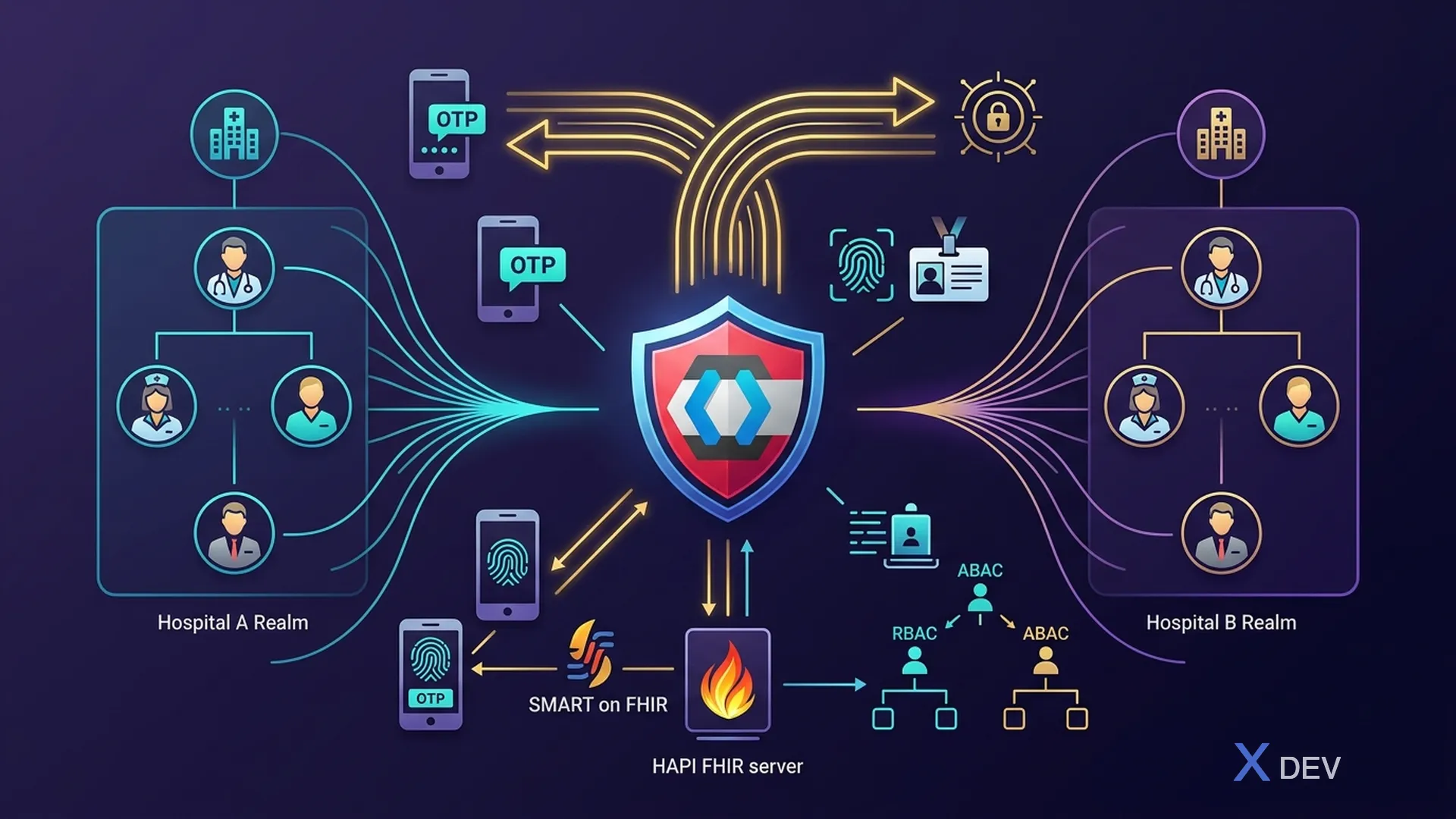
1.1. Multi-tenancy models with Keycloak
When building a medical system for many hospitals/clinics, there are 3 strategies:
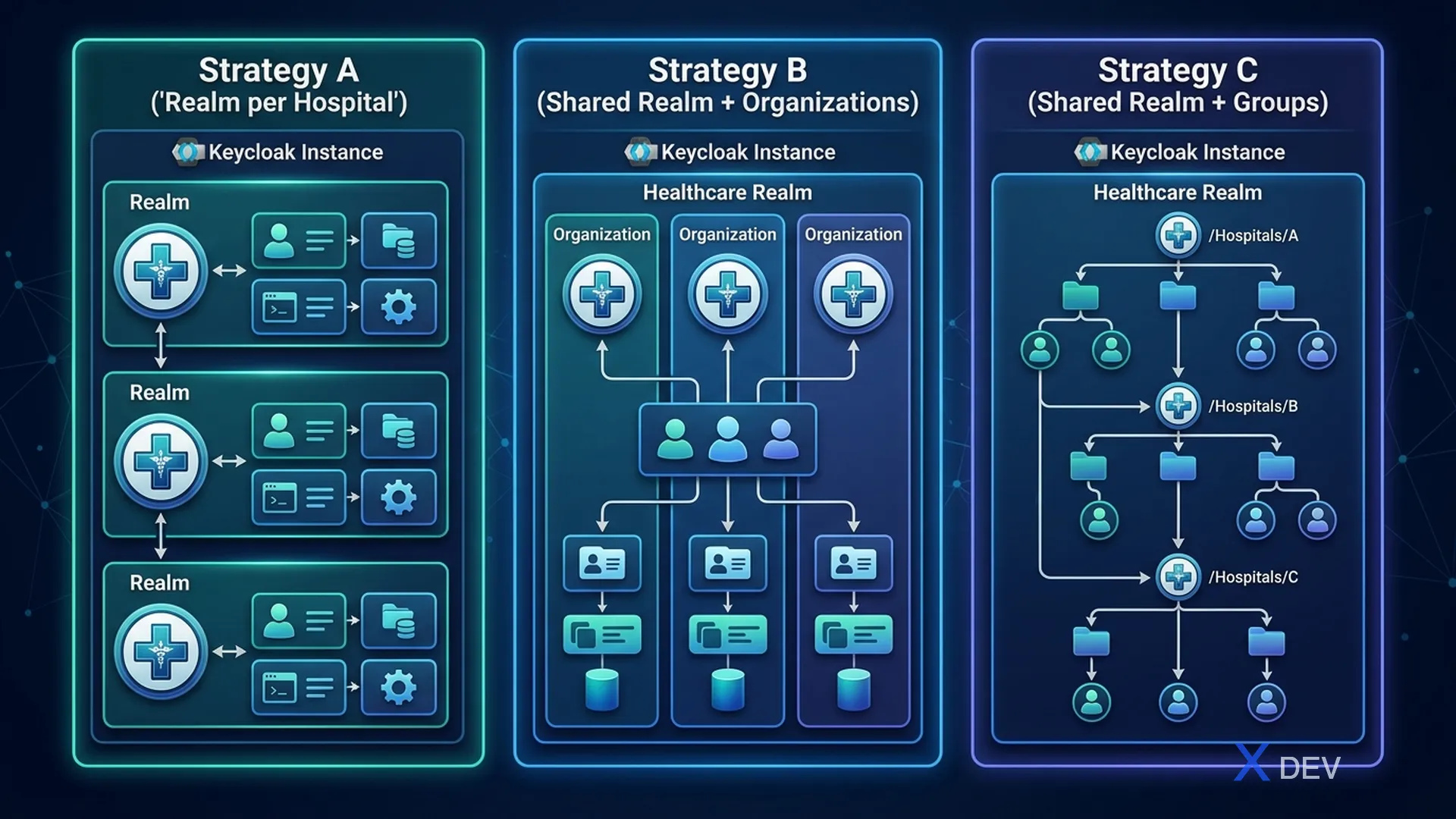
| Strategy | Model | Isolation | Suitable |
|---|---|---|---|
| A: Realm per Hospital | Each hospital has its own Realm | Highest — isolated users, roles, clients | Independent Hospital |
| B: Shared Realm + Organizations | 1 Healthcare Realm, each hospital is 1 Organization | Medium — shared identity + org isolation | Hospital chain, Department of Health |
| C: Shared Realm + Groups | 1 Realm, divided by Groups | Low — simple, less isolation | Small clinic |
1.2. Recommendations for Vietnamese Health
| Scenario | Recommended Strategy | Reason |
|---|---|---|
| Private hospital chain | Strategy B (Organizations) | Shared patient identity, org-level isolation |
| Independent public hospital | Strategy A (Realm per Hospital) | Maximum isolation, independent management |
| Small polyclinic | Strategy C (Groups) | Simple, easy to manage |
| The Department of Health manages many facilities | Strategy B (Organizations) | Central management, org delegation |
2. Healthcare Realm Design
2.1. Realm Configuration
{
  "realm": "healthcare",
  "displayName": "Healthcare Platform",
  "enabled": true,
  "sslRequired": "all",
  "registrationAllowed": false,
  "loginWithEmailAllowed": true,
  "duplicateEmailsAllowed": false,
  "resetPasswordAllowed": true,
  "editUsernameAllowed": false,
  "bruteForceProtected": true,
  "permanentLockout": false,
  "maxFailureWaitSeconds": 900,
  "minimumQuickLoginWaitSeconds": 60,
  "waitIncrementSeconds": 300,
  "quickLoginCheckMilliSeconds": 1000,
  "maxDeltaTimeSeconds": 43200,
  "failureFactor": 5,

  "passwordPolicy": "length(12) and upperCase(1) and lowerCase(1) and digits(1) and specialChars(1) and notUsername and passwordHistory(5) and maxLength(128)",

  "ssoSessionIdleTimeout": 900,
  "ssoSessionMaxLifespan": 28800,
  "accessTokenLifespan": 300,
  "accessTokenLifespanForImplicitFlow": 300,
  "offlineSessionIdleTimeout": 2592000,

  "actionTokenGeneratedByAdminLifespan": 43200,
  "actionTokenGeneratedByUserLifespan": 300,

  "organizationsEnabled": true,

  "attributes": {
    "cibaBackchannelTokenDeliveryMode": "poll",
    "cibaExpiresIn": "120",
    "cibaAuthRequestedUserHint": "login_hint",
    "parRequestUriLifespan": "60"
  }
}
2.2. Security Defenses Configuration
{
  "browserSecurityHeaders": {
    "contentSecurityPolicy": "default-src 'self'; frame-src 'self'; frame-ancestors 'self'; object-src 'none'; script-src 'self' 'unsafe-inline';",
    "contentSecurityPolicyReportOnly": "",
    "xContentTypeOptions": "nosniff",
    "xRobotsTag": "none",
    "xFrameOptions": "SAMEORIGIN",
    "strictTransportSecurity": "max-age=31536000; includeSubDomains",
    "xXSSProtection": "1; mode=block",
    "referrerPolicy": "no-referrer"
  }
}
3. Client Configuration for Healthcare
3.1. Clients Overview
| Clients | Type | Description |
|---|---|---|
| his-web-app | Public | HIS Web Frontend |
| emr-web-app | Public | EMR Web Frontend |
| patient-portal | Public | Patient Portal |
| mobile-doctor-app | Public | Doctor Mobile App |
| patient-service | Confidential | Patient API |
| clinical-service | Confidential | Clinical API |
| lab-service | Confidential | Lab Results API |
| pharmacy-service | Confidential | Pharmacy API |
| scheduling-service | Confidential | Scheduling API |
| billing-service | Confidential | Billing API |
| notification-service | Confidential | Notifications |
| audit-service | Confidential | Audit/Logging |
| api-gateway | Confidential | Kong/APISIX |
| admin-cli | Confidential | Admin Operations |
| fhir-server | Confidential | HAPI FHIR Server |
3.2. Patient Portal Client (Public)
{
  "clientId": "patient-portal",
  "name": "Patient Portal",
  "description": "Patient self-service portal for viewing medical records",
  "enabled": true,
  "publicClient": true,
  "standardFlowEnabled": true,
  "directAccessGrantsEnabled": false,
  "implicitFlowEnabled": false,
  "serviceAccountsEnabled": false,
  "authorizationServicesEnabled": false,

  "rootUrl": "https://portal.hospital.vn",
  "baseUrl": "/",
  "redirectUris": [
    "https://portal.hospital.vn/*"
  ],
  "webOrigins": [
    "https://portal.hospital.vn"
  ],

  "defaultClientScopes": [
    "openid", "profile", "email", "patient-scope"
  ],
  "optionalClientScopes": [
    "offline_access"
  ],

  "attributes": {
    "pkce.code.challenge.method": "S256",
    "post.logout.redirect.uris": "https://portal.hospital.vn/*",
    "access.token.lifespan": "300",
    "client.session.idle.timeout": "600"
  }
}
3.3. Microservice Client (Confidential)
{
  "clientId": "patient-service",
  "name": "Patient Microservice",
  "description": "Backend service managing patient demographics",
  "enabled": true,
  "publicClient": false,
  "standardFlowEnabled": false,
  "directAccessGrantsEnabled": false,
  "serviceAccountsEnabled": true,
  "authorizationServicesEnabled": true,

  "secret": "${PATIENT_SERVICE_SECRET}",

  "defaultClientScopes": [
    "openid", "microprofile-jwt"
  ],

  "attributes": {
    "use.jwks.url": "true",
    "token.endpoint.auth.signing.alg": "RS256"
  },

  "authorizationSettings": {
    "policyEnforcementMode": "ENFORCING",
    "decisionStrategy": "AFFIRMATIVE",
    "resources": [
      {
        "name": "Patient Record",
        "type": "urn:patient-service:resources:patient",
        "uris": ["/api/v1/patients/*"],
        "scopes": [
          {"name": "read"},
          {"name": "write"},
          {"name": "delete"}
        ]
      }
    ]
  }
}
4. User Profile Schema for Healthcare
4.1. Healthcare User Attributes
{
  "attributes": [
    {
      "name": "employeeId",
      "displayName": "Mã nhân viên",
      "required": { "roles": ["user"] },
      "permissions": { "edit": ["admin"], "view": ["admin", "user"] },
      "validations": { "pattern": { "pattern": "^NV-\\d{6}$" } }
    },
    {
      "name": "medicalLicenseNumber",
      "displayName": "Số giấy phép hành nghề",
      "required": { "roles": ["doctor"] },
      "permissions": { "edit": ["admin"], "view": ["admin", "user"] },
      "validations": { "length": { "min": 5, "max": 20 } }
    },
    {
      "name": "department",
      "displayName": "Khoa/Phòng",
      "required": { "roles": ["user"] },
      "permissions": { "edit": ["admin"], "view": ["admin", "user"] },
      "validations": {
        "options": {
          "options": [
            "KHOA_NOI", "KHOA_NGOAI", "KHOA_SAN", "KHOA_NHI",
            "KHOA_UNG_BUOU", "KHOA_TIM_MACH", "KHOA_THAN_KINH",
            "KHOA_XET_NGHIEM", "KHOA_CHAN_DOAN_HINH_ANH",
            "KHOA_DUOC", "KHOA_CAP_CUU", "PHONG_HANH_CHINH"
          ]
        }
      }
    },
    {
      "name": "hospitalCode",
      "displayName": "Mã bệnh viện",
      "required": { "roles": ["user"] },
      "permissions": { "edit": ["admin"], "view": ["admin"] }
    },
    {
      "name": "specialization",
      "displayName": "Chuyên khoa",
      "permissions": { "edit": ["admin"], "view": ["admin", "user"] }
    }
  ]
}
4.2. Custom Token Mapper for Healthcare Claims
{
  "name": "healthcare-claims-mapper",
  "protocol": "openid-connect",
  "protocolMapper": "oidc-usermodel-attribute-mapper",
  "config": {
    "user.attribute": "department",
    "claim.name": "department",
    "jsonType.label": "String",
    "id.token.claim": "true",
    "access.token.claim": "true",
    "userinfo.token.claim": "true"
  }
}
JWT Token will contain healthcare-specific claims:
{
  "sub": "019e1a40-user-0001-d001-f0a1b2c30001",
  "name": "BS. Nguyễn Văn A",
  "preferred_username": "bs.nguyen.a",
  "email": "[email protected]",
  "realm_access": {
    "roles": ["doctor", "department_head"]
  },
  "resource_access": {
    "patient-service": { "roles": ["patient_read", "patient_write"] },
    "lab-service": { "roles": ["lab_read", "lab_order"] },
    "pharmacy-service": { "roles": ["prescription_write"] }
  },
  "department": "KHOA_NOI",
  "hospitalCode": "BV-CR-001",
  "medicalLicenseNumber": "GPHN-12345",
  "employeeId": "NV-001234",
  "org_id": "bv-cho-ray"
}
5. Role Hierarchy for Healthcare
5.1. Realm Roles
Realm Roles:
├── super_admin          (Quản trị hệ thống toàn cục)
├── hospital_admin       (Quản trị bệnh viện)
├── department_head      (Trưởng khoa)
├── doctor              (Bác sĩ)
├── senior_nurse         (Điều dưỡng trưởng)
├── nurse               (Điều dưỡng)
├── lab_technician       (Kỹ thuật viên xét nghiệm)
├── pharmacist           (Dược sĩ)
├── radiologist          (Bác sĩ chẩn đoán hình ảnh)
├── receptionist         (Lễ tân)
├── billing_staff        (Nhân viên thanh toán)
├── patient              (Bệnh nhân - Patient Portal)
└── auditor              (Kiểm toán viên - read-only)
5.2. Composite Roles
{
  "name": "doctor",
  "composite": true,
  "composites": {
    "realm": [],
    "client": {
      "patient-service": ["patient_read", "patient_write"],
      "clinical-service": ["encounter_read", "encounter_write", "diagnosis_write"],
      "lab-service": ["lab_read", "lab_order"],
      "pharmacy-service": ["prescription_read", "prescription_write"],
      "scheduling-service": ["appointment_read", "appointment_write"],
      "imaging-service": ["imaging_read", "imaging_order"]
    }
  }
}
6. Session Management for Hospitals
6.1. Session Policies
| User Type | Session Idle | Session Max | Reason |
|---|---|---|---|
| Doctor | 15 min | 8 hours | Shared workstations, frequent auto-logoff |
| Nurse | 10 min | 8 hours | Mobile carts, quick access needed |
| Patient Portal | 15 min | 2 hours | Public internet access |
| Admin | 30 min | 8 hours | Administrative tasks, less PHI exposure |
| Service Account | N/A | N/A | Token-based, no interactive session |
6.2. Shared Workstation Support
Hospitals often have shared workstations — many doctors/nurses share one computer. Solution:
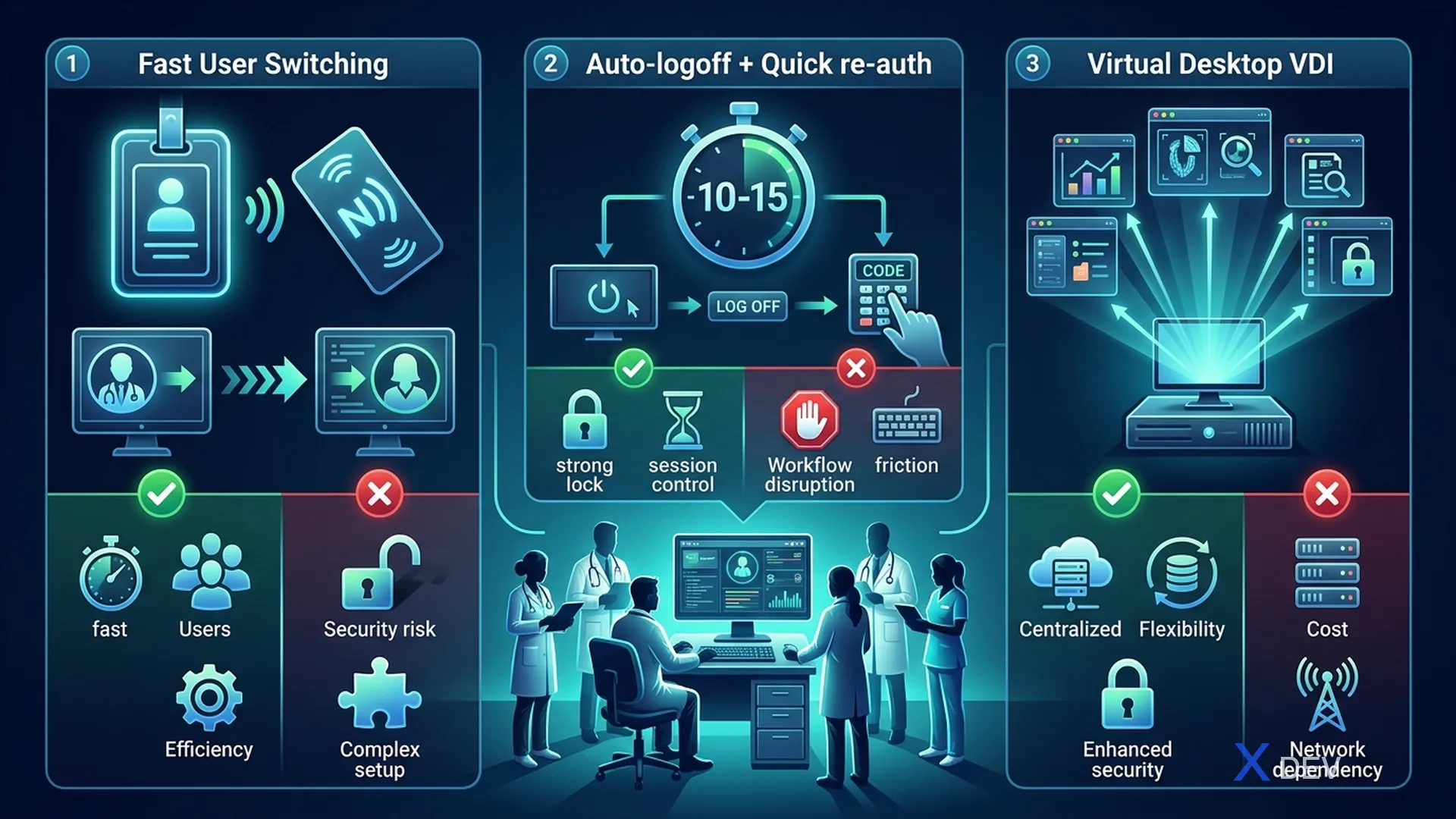
| Options | Mechanism | Advantages | Limitations |
|---|---|---|---|
| 1. Fast User Switching | Keycloak short session + badge login | Fast, convenient | Need infrastructure (badge reader) |
| 2. Auto-logoff + Quick re-auth | Session timeout 10-15 min + PIN | Simple, no hardware needed | Slower than badge |
| 3. Virtual Desktop (VDI) | Each user has their own virtual desktop | Full isolation | Expensive, higher latency |
7. Realm Export/Import Automation
7.1. Infrastructure as Code for Keycloak
#!/bin/bash
# export-realm.sh - Export healthcare realm for version control

KEYCLOAK_URL="https://keycloak.hospital.internal"
ADMIN_TOKEN=$(curl -s -X POST "${KEYCLOAK_URL}/realms/master/protocol/openid-connect/token" \
  -H "Content-Type: application/x-www-form-urlencoded" \
  -d "username=admin" \
  -d "password=${KC_ADMIN_PASSWORD}" \
  -d "grant_type=password" \
  -d "client_id=admin-cli" | jq -r '.access_token')

# Export realm (excluding users for security)
curl -s -X GET "${KEYCLOAK_URL}/admin/realms/healthcare" \
  -H "Authorization: Bearer ${ADMIN_TOKEN}" \
  -H "Accept: application/json" | jq '.' > realm-healthcare-export.json

echo "Realm exported successfully"
7.2. Terraform for Keycloak (Optional)
# keycloak.tf - Keycloak Realm as Code
resource "keycloak_realm" "healthcare" {
  realm   = "healthcare"
  enabled = true

  login_theme = "healthcare-theme"

  security_defenses {
    brute_force_detection {
      permanent_lockout                = false
      max_login_failures               = 5
      wait_increment_seconds           = 300
      quick_login_check_milli_seconds  = 1000
      minimum_quick_login_wait_seconds = 60
      max_failure_wait_seconds         = 900
    }
  }

  ssl_required    = "all"
  password_policy = "length(12) and upperCase(1) and lowerCase(1) and digits(1) and specialChars(1)"

  sso_session_idle_timeout = "15m"
  sso_session_max_lifespan = "8h"
  access_token_lifespan    = "5m"
}

resource "keycloak_role" "doctor" {
  realm_id    = keycloak_realm.healthcare.id
  name        = "doctor"
  description = "Bác sĩ - Full clinical access"
  composite_roles = [
    keycloak_role.patient_read.id,
    keycloak_role.patient_write.id,
    keycloak_role.prescription_write.id,
  ]
}
8. Summary
In this lesson, we have:
- Compare 3 multi-tenancy strategies for multi-hospital systems
- Healthcare Realm design with security hardening
- Configure Clients for patient portal, microservices, and admin
- Build User Profile schema with healthcare-specific attributes
- Design Role hierarchy to suit the hospital organization
- Configure Session management for shared workstations
- Automate Realm export/import with Infrastructure as Code
Exercises
- Create a "healthcare" Keycloak Realm with all the security configurations from the lesson
- Register 5 clients: patient-portal, patient-service, lab-service, pharmacy-service, api-gateway
- Create a role hierarchy and assign it to test users: 1 doctor, 1 nurse, 1 patient
- Export realm configuration and commit to Git repository
| ◀ Previous article | Next article ▶ |
|---|---|
| Lesson 4: Threat Modeling STRIDE/DREAD for Health Information System | Lesson 6: RBAC & ABAC - Decentralization of Doctors, Nurses, and Patients |