1. 醫療保健系統的多租戶策略
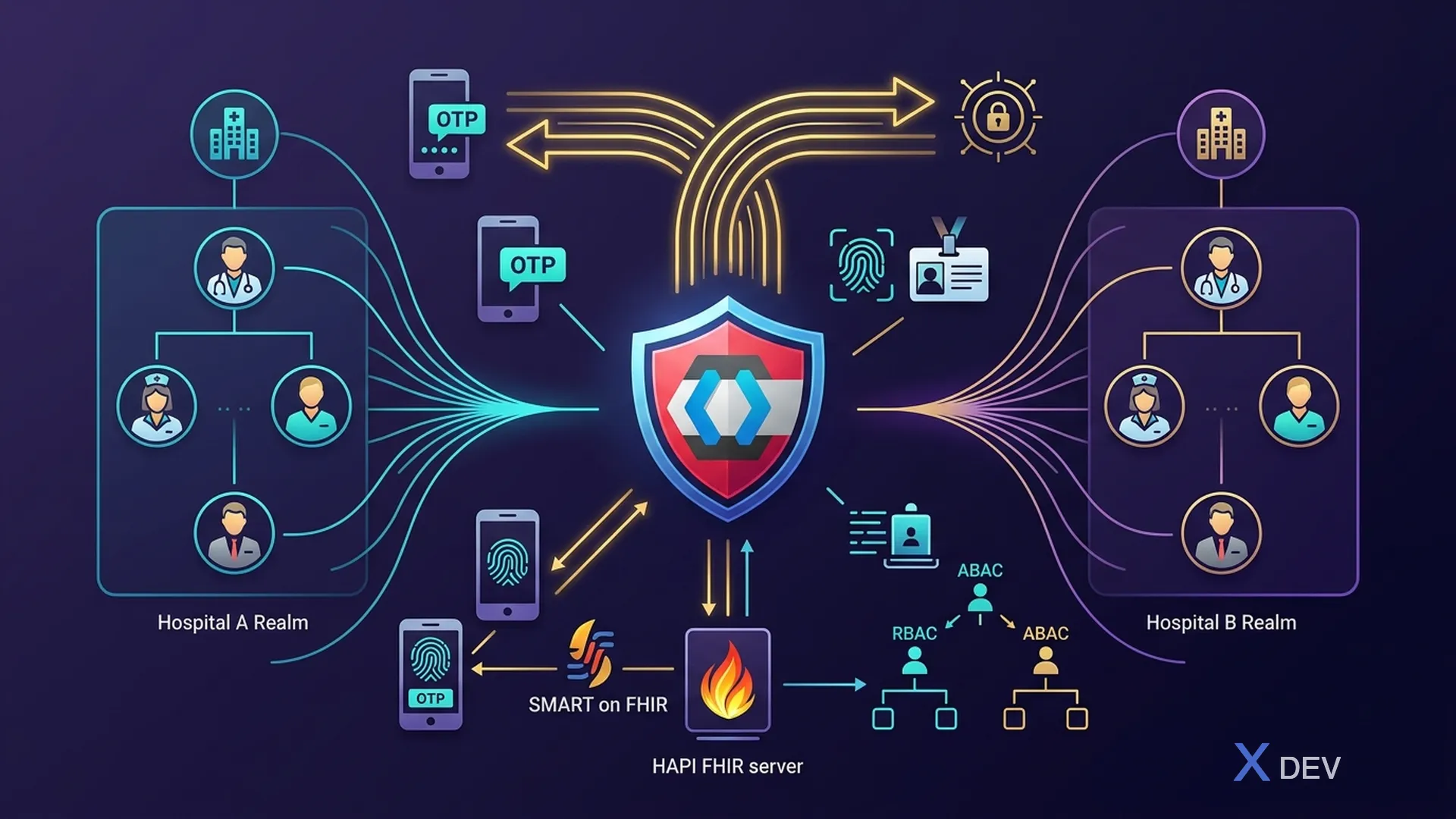
1.1。帶有 Keycloak 的多租戶模型
在為許多醫院/診所建立醫療系統時,有3種策略:
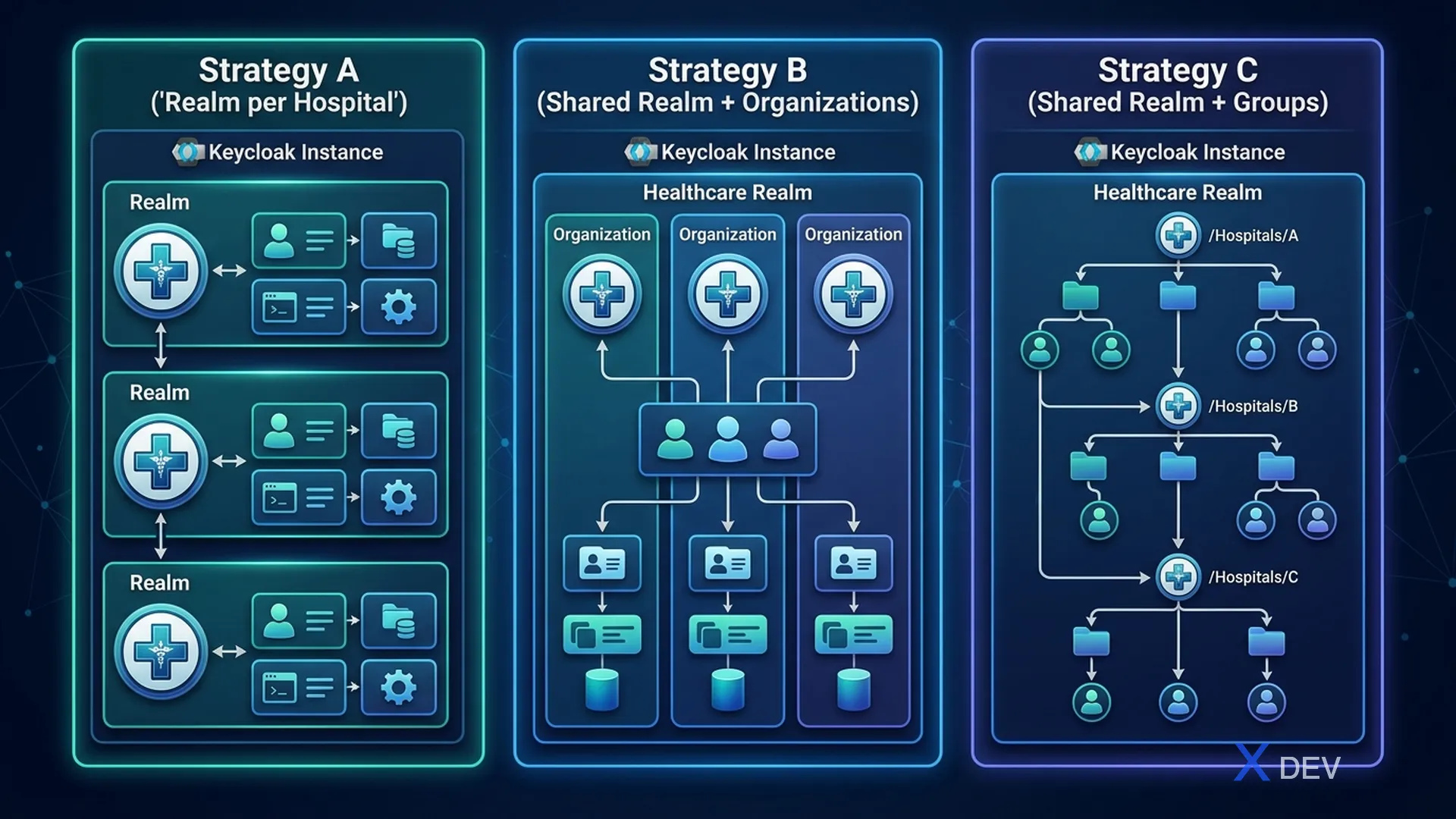
| 戰略 | 型號 | 隔離 | 適合 |
|---|---|---|---|
| A:每家醫院的領域 | 每家醫院都有自己的Realm | 最高 — 隔離的使用者、角色、客戶 | 獨立醫院 |
| B:共享領域+組織 | 1個醫療領域,每家醫院是1個組織 | 中 — 共享身分 + 組織隔離 | 衛生部連鎖醫院 |
| C:共享領域+群組 | 1 個領域,按組別劃分 | 低-簡單,隔離程度低 | 小診所 |
1.2。對越南人健康的建議
| 場景 | 推薦策略 | 原因 |
|---|---|---|
| 私立連鎖醫院 | 策略 B(組織) | 共享病患身分、組織級隔離 |
| 獨立公立醫院 | 策略 A(每家醫院領域) | 最大限度隔離,獨立管理 |
| 小型綜合診所 | 策略C(團體) | 簡單、易管理 |
| 衛生部管理許多設施 | 策略 B(組織) | 集中管理、組織授權 |
2. 醫療保健領域設計
2.1。領域配置
{
  "realm": "healthcare",
  "displayName": "Healthcare Platform",
  "enabled": true,
  "sslRequired": "all",
  "registrationAllowed": false,
  "loginWithEmailAllowed": true,
  "duplicateEmailsAllowed": false,
  "resetPasswordAllowed": true,
  "editUsernameAllowed": false,
  "bruteForceProtected": true,
  "permanentLockout": false,
  "maxFailureWaitSeconds": 900,
  "minimumQuickLoginWaitSeconds": 60,
  "waitIncrementSeconds": 300,
  "quickLoginCheckMilliSeconds": 1000,
  "maxDeltaTimeSeconds": 43200,
  "failureFactor": 5,

  "passwordPolicy": "length(12) and upperCase(1) and lowerCase(1) and digits(1) and specialChars(1) and notUsername and passwordHistory(5) and maxLength(128)",

  "ssoSessionIdleTimeout": 900,
  "ssoSessionMaxLifespan": 28800,
  "accessTokenLifespan": 300,
  "accessTokenLifespanForImplicitFlow": 300,
  "offlineSessionIdleTimeout": 2592000,

  "actionTokenGeneratedByAdminLifespan": 43200,
  "actionTokenGeneratedByUserLifespan": 300,

  "organizationsEnabled": true,

  "attributes": {
    "cibaBackchannelTokenDeliveryMode": "poll",
    "cibaExpiresIn": "120",
    "cibaAuthRequestedUserHint": "login_hint",
    "parRequestUriLifespan": "60"
  }
}
2.2。安全防禦配置
{
  "browserSecurityHeaders": {
    "contentSecurityPolicy": "default-src 'self'; frame-src 'self'; frame-ancestors 'self'; object-src 'none'; script-src 'self' 'unsafe-inline';",
    "contentSecurityPolicyReportOnly": "",
    "xContentTypeOptions": "nosniff",
    "xRobotsTag": "none",
    "xFrameOptions": "SAMEORIGIN",
    "strictTransportSecurity": "max-age=31536000; includeSubDomains",
    "xXSSProtection": "1; mode=block",
    "referrerPolicy": "no-referrer"
  }
}
3. 醫療保健客戶端配置
3.1。客戶概覽
| 客戶 | 類型 | 說明 |
|---|---|---|
| 他的網路應用程式 | 公共 | HIS 網路前端 |
| emr-網路應用程式 | 公共 | EMR Web 前端 |
| 病患入口網站 | 公共 | 病患入口網站 |
| 行動醫生應用程式 | 公共 | 醫生行動應用程式 |
| 病人服務 | 保密 | 病人 API |
| 臨床服務 | 保密 | 臨床原料藥 |
| 實驗室服務 | 保密 | 實驗室結果 API |
| 藥局服務 | 保密 | 藥局API |
| 調度服務 | 保密 | 調度API |
| 計費服務 | 保密 | 計費API |
| 通知服務 | 保密 | 通知 |
| 審計服務 | 保密 | 審計/記錄 |
| api 閘道 | 保密 | Kong/APISIX |
| 管理-cli | 保密 | 管理操作 |
| fhir 伺服器 | 保密 | HAPI FHIR 伺服器 |
3.2。患者入口網站用戶端(公共)
{
  "clientId": "patient-portal",
  "name": "Patient Portal",
  "description": "Patient self-service portal for viewing medical records",
  "enabled": true,
  "publicClient": true,
  "standardFlowEnabled": true,
  "directAccessGrantsEnabled": false,
  "implicitFlowEnabled": false,
  "serviceAccountsEnabled": false,
  "authorizationServicesEnabled": false,

  "rootUrl": "https://portal.hospital.vn",
  "baseUrl": "/",
  "redirectUris": [
    "https://portal.hospital.vn/*"
  ],
  "webOrigins": [
    "https://portal.hospital.vn"
  ],

  "defaultClientScopes": [
    "openid", "profile", "email", "patient-scope"
  ],
  "optionalClientScopes": [
    "offline_access"
  ],

  "attributes": {
    "pkce.code.challenge.method": "S256",
    "post.logout.redirect.uris": "https://portal.hospital.vn/*",
    "access.token.lifespan": "300",
    "client.session.idle.timeout": "600"
  }
}
3.3。微服務客戶端(保密)
{
  "clientId": "patient-service",
  "name": "Patient Microservice",
  "description": "Backend service managing patient demographics",
  "enabled": true,
  "publicClient": false,
  "standardFlowEnabled": false,
  "directAccessGrantsEnabled": false,
  "serviceAccountsEnabled": true,
  "authorizationServicesEnabled": true,

  "secret": "${PATIENT_SERVICE_SECRET}",

  "defaultClientScopes": [
    "openid", "microprofile-jwt"
  ],

  "attributes": {
    "use.jwks.url": "true",
    "token.endpoint.auth.signing.alg": "RS256"
  },

  "authorizationSettings": {
    "policyEnforcementMode": "ENFORCING",
    "decisionStrategy": "AFFIRMATIVE",
    "resources": [
      {
        "name": "Patient Record",
        "type": "urn:patient-service:resources:patient",
        "uris": ["/api/v1/patients/*"],
        "scopes": [
          {"name": "read"},
          {"name": "write"},
          {"name": "delete"}
        ]
      }
    ]
  }
}
4. 醫療保健使用者設定檔架構
4.1。醫療保健使用者屬性
{
  "attributes": [
    {
      "name": "employeeId",
      "displayName": "Mã nhân viên",
      "required": { "roles": ["user"] },
      "permissions": { "edit": ["admin"], "view": ["admin", "user"] },
      "validations": { "pattern": { "pattern": "^NV-\\d{6}$" } }
    },
    {
      "name": "medicalLicenseNumber",
      "displayName": "Số giấy phép hành nghề",
      "required": { "roles": ["doctor"] },
      "permissions": { "edit": ["admin"], "view": ["admin", "user"] },
      "validations": { "length": { "min": 5, "max": 20 } }
    },
    {
      "name": "department",
      "displayName": "Khoa/Phòng",
      "required": { "roles": ["user"] },
      "permissions": { "edit": ["admin"], "view": ["admin", "user"] },
      "validations": {
        "options": {
          "options": [
            "KHOA_NOI", "KHOA_NGOAI", "KHOA_SAN", "KHOA_NHI",
            "KHOA_UNG_BUOU", "KHOA_TIM_MACH", "KHOA_THAN_KINH",
            "KHOA_XET_NGHIEM", "KHOA_CHAN_DOAN_HINH_ANH",
            "KHOA_DUOC", "KHOA_CAP_CUU", "PHONG_HANH_CHINH"
          ]
        }
      }
    },
    {
      "name": "hospitalCode",
      "displayName": "Mã bệnh viện",
      "required": { "roles": ["user"] },
      "permissions": { "edit": ["admin"], "view": ["admin"] }
    },
    {
      "name": "specialization",
      "displayName": "Chuyên khoa",
      "permissions": { "edit": ["admin"], "view": ["admin", "user"] }
    }
  ]
}
4.2。用於醫療保健索賠的自訂令牌映射器
{
  "name": "healthcare-claims-mapper",
  "protocol": "openid-connect",
  "protocolMapper": "oidc-usermodel-attribute-mapper",
  "config": {
    "user.attribute": "department",
    "claim.name": "department",
    "jsonType.label": "String",
    "id.token.claim": "true",
    "access.token.claim": "true",
    "userinfo.token.claim": "true"
  }
}
JWT 令牌將包含特定於醫療保健的聲明:
{
  "sub": "019e1a40-user-0001-d001-f0a1b2c30001",
  "name": "BS. Nguyễn Văn A",
  "preferred_username": "bs.nguyen.a",
  "email": "[email protected]",
  "realm_access": {
    "roles": ["doctor", "department_head"]
  },
  "resource_access": {
    "patient-service": { "roles": ["patient_read", "patient_write"] },
    "lab-service": { "roles": ["lab_read", "lab_order"] },
    "pharmacy-service": { "roles": ["prescription_write"] }
  },
  "department": "KHOA_NOI",
  "hospitalCode": "BV-CR-001",
  "medicalLicenseNumber": "GPHN-12345",
  "employeeId": "NV-001234",
  "org_id": "bv-cho-ray"
}
5. 醫療保健的角色層次結構
5.1。領域角色
Realm Roles:
├── super_admin          (Quản trị hệ thống toàn cục)
├── hospital_admin       (Quản trị bệnh viện)
├── department_head      (Trưởng khoa)
├── doctor              (Bác sĩ)
├── senior_nurse         (Điều dưỡng trưởng)
├── nurse               (Điều dưỡng)
├── lab_technician       (Kỹ thuật viên xét nghiệm)
├── pharmacist           (Dược sĩ)
├── radiologist          (Bác sĩ chẩn đoán hình ảnh)
├── receptionist         (Lễ tân)
├── billing_staff        (Nhân viên thanh toán)
├── patient              (Bệnh nhân - Patient Portal)
└── auditor              (Kiểm toán viên - read-only)
5.2。複合角色
{
  "name": "doctor",
  "composite": true,
  "composites": {
    "realm": [],
    "client": {
      "patient-service": ["patient_read", "patient_write"],
      "clinical-service": ["encounter_read", "encounter_write", "diagnosis_write"],
      "lab-service": ["lab_read", "lab_order"],
      "pharmacy-service": ["prescription_read", "prescription_write"],
      "scheduling-service": ["appointment_read", "appointment_write"],
      "imaging-service": ["imaging_read", "imaging_order"]
    }
  }
}
6. 醫院的會話管理
6.1。會話策略
| 使用者類型 | 會話空閒 | 最大會話數 | 原因 |
|---|---|---|---|
| 醫生 | 15 分鐘 | 8小時 | 共享工作站、頻繁自動登出 |
| 護理師 | 10 分鐘 | 8小時 | 行動推車,需快速存取 |
| 病患入口網站 | 15 分鐘 | 2小時 | 公共網路存取 |
| 管理員 | 30 分鐘 | 8小時 | 管理任務,減少 PHI 曝光 |
| 服務帳戶 | 不適用 | 不適用 | 基於令牌,無互動會話 |
6.2。共享工作站支持
醫院通常有共享工作站—許多醫生/護士共用一台電腦。解決方案:
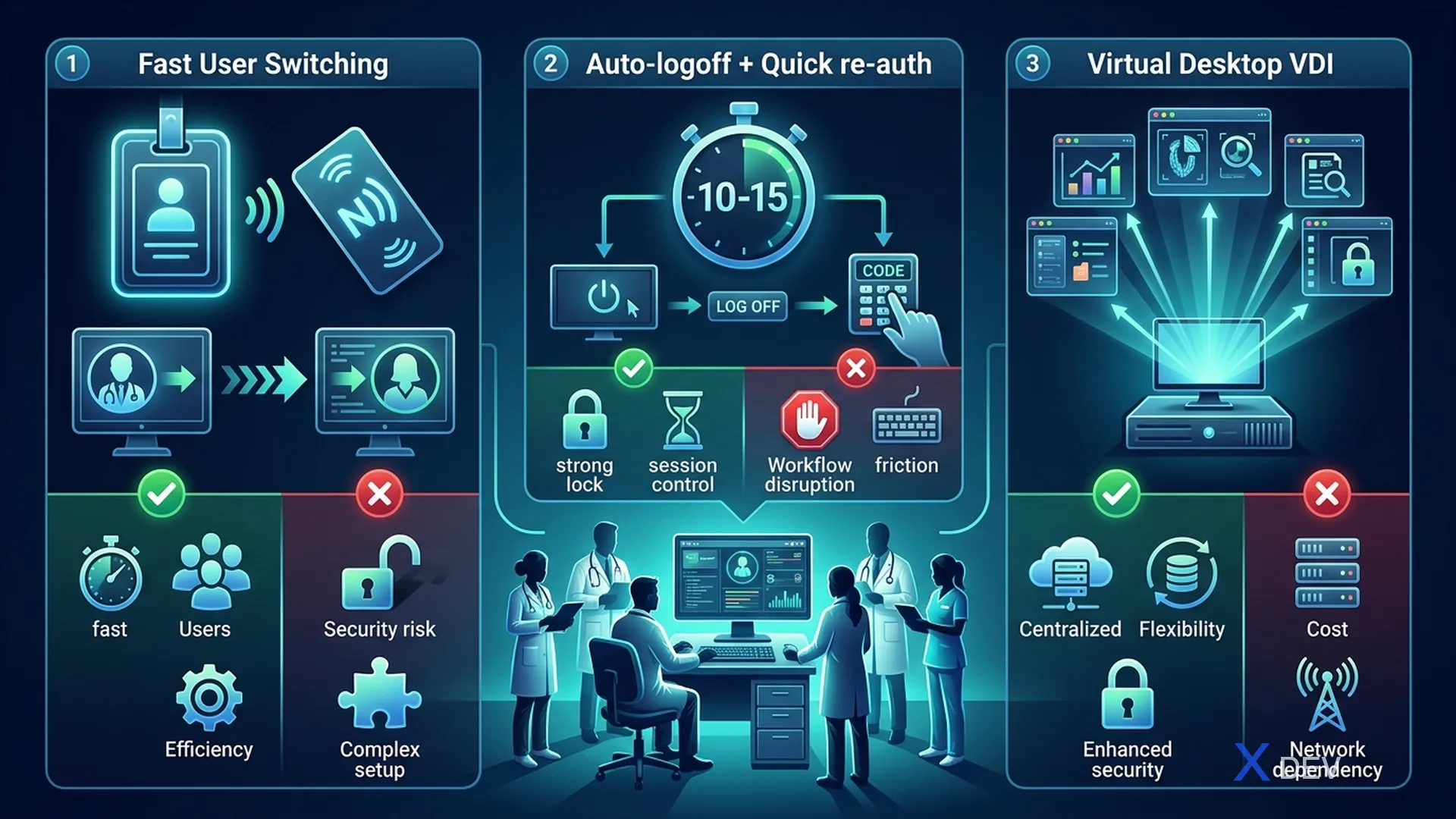
| 選項 | 機制 | 優點 | 限制 |
|---|---|---|---|
| 1.快速使用者切換 | Keycloak 短會話 + 徽章登入 | 快速、方便 | 需要基礎設施(徽章閱讀器) |
| 2.自動登出+快速重新驗證 | 會話逾時 10-15 分鐘 + PIN | 簡單,無需硬體 | 比徽章慢 |
| 3.虛擬桌面 (VDI) | 每個使用者都有自己的虛擬桌面 | 全面隔離 | 昂貴、延遲較高 |
7. 領域匯出/匯入自動化
7.1。 Keycloak 的基礎設施即程式碼
#!/bin/bash
# export-realm.sh - Export healthcare realm for version control

KEYCLOAK_URL="https://keycloak.hospital.internal"
ADMIN_TOKEN=$(curl -s -X POST "${KEYCLOAK_URL}/realms/master/protocol/openid-connect/token" \
  -H "Content-Type: application/x-www-form-urlencoded" \
  -d "username=admin" \
  -d "password=${KC_ADMIN_PASSWORD}" \
  -d "grant_type=password" \
  -d "client_id=admin-cli" | jq -r '.access_token')

# Export realm (excluding users for security)
curl -s -X GET "${KEYCLOAK_URL}/admin/realms/healthcare" \
  -H "Authorization: Bearer ${ADMIN_TOKEN}" \
  -H "Accept: application/json" | jq '.' > realm-healthcare-export.json

echo "Realm exported successfully"
7.2。 Keycloak 的 Terraform(可選)
# keycloak.tf - Keycloak Realm as Code
resource "keycloak_realm" "healthcare" {
  realm   = "healthcare"
  enabled = true

  login_theme = "healthcare-theme"

  security_defenses {
    brute_force_detection {
      permanent_lockout                = false
      max_login_failures               = 5
      wait_increment_seconds           = 300
      quick_login_check_milli_seconds  = 1000
      minimum_quick_login_wait_seconds = 60
      max_failure_wait_seconds         = 900
    }
  }

  ssl_required    = "all"
  password_policy = "length(12) and upperCase(1) and lowerCase(1) and digits(1) and specialChars(1)"

  sso_session_idle_timeout = "15m"
  sso_session_max_lifespan = "8h"
  access_token_lifespan    = "5m"
}

resource "keycloak_role" "doctor" {
  realm_id    = keycloak_realm.healthcare.id
  name        = "doctor"
  description = "Bác sĩ - Full clinical access"
  composite_roles = [
    keycloak_role.patient_read.id,
    keycloak_role.patient_write.id,
    keycloak_role.prescription_write.id,
  ]
}
8. 總結
在本課中,我們有:
- 比較多醫院系統的 3 種多租戶策略
- 醫療領域設計與安全強化
- 為病患入口網站、微服務和管理配置客戶端
- 使用特定於醫療保健的屬性建立使用者設定檔架構
- 設計角色層次結構以適應醫院組織
- 為共用工作站設定會話管理
- 使用基礎架構即程式碼自動化領域匯出/匯入
練習
- 使用課程中的所有安全配置來建立一個「醫療保健」Keycloak Realm
- 註冊 5 個客戶端:病患入口網站、病患服務、實驗室服務、藥局服務、API 網關 3.建立角色層次結構並指派給測試使用者:1名醫生、1名護理師、1名患者 4.匯出realm配置並提交到Git儲存庫
| ◀ 上一篇 | 下一篇文章 ▶ |
|---|---|
| 第 4 課:健康資訊系統的威脅建模 STRIDE/DREAD | 第 6 課:RBAC 和 ABAC - 醫生、護士和病人的權力下放 |