はじめに
シェル アプリケーション (コンテナ アプリ) は、マイクロ フロントエンド全体の 調整頭脳 です。これにより、レイアウト、ルーティング、認証、および MFE が相互に通信する方法が決まります。
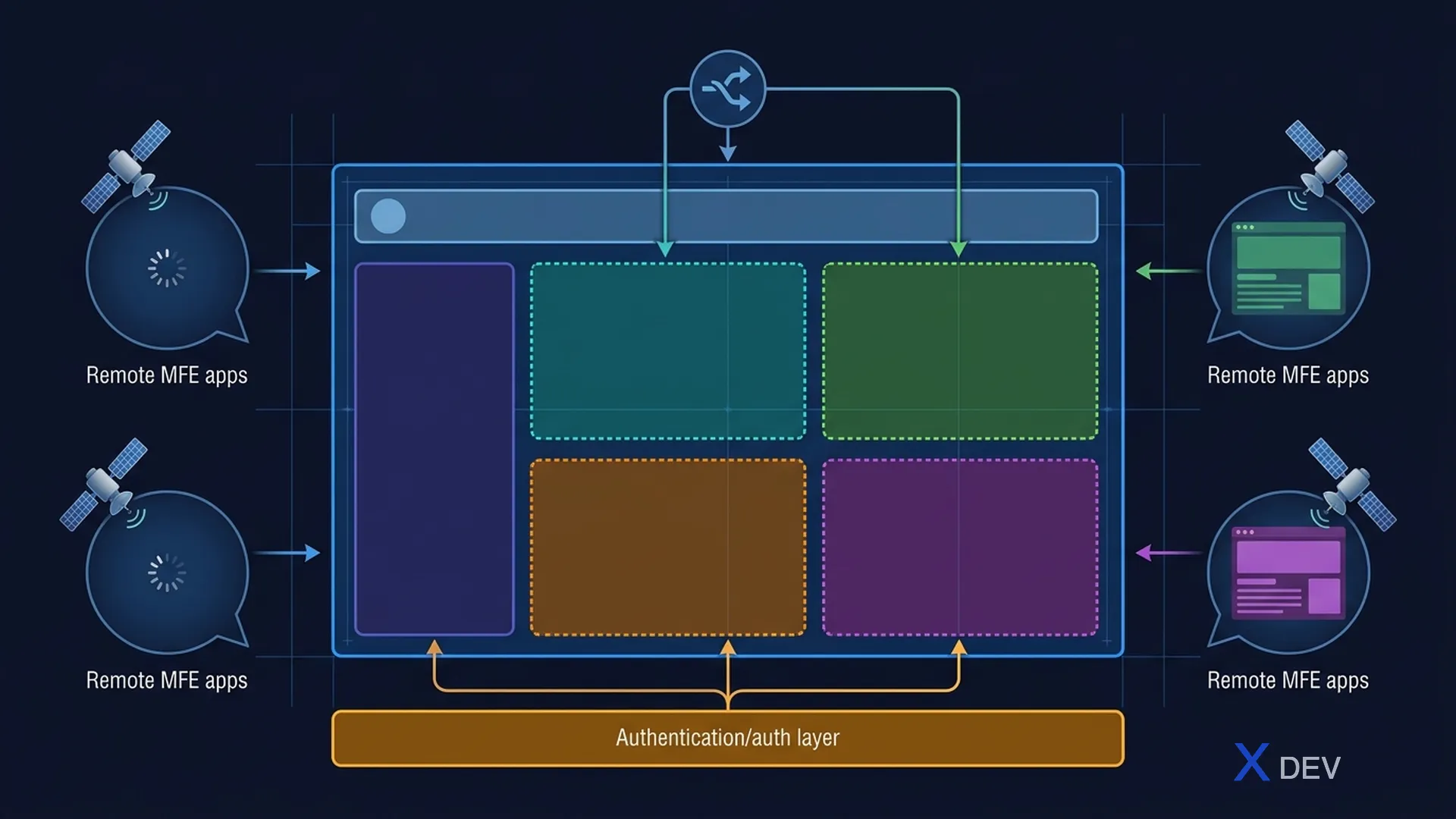
1. シェル アプリケーションの責任
Shell Application:
├── Layout Management (Header, Footer, Sidebar)
├── Routing Orchestration (top-level routes → MFE)
├── Authentication (Login/Logout, token management)
├── Shared Services (Event Bus, Error Boundary)
└── Performance (Lazy loading, prefetching)
2. ルーティングアーキテクチャ
2.1 ルートの所有権
各 MFE は独自のルートを所有し、シェルは以下を委任するだけです。
function ShellRoutes() {
  return (
    <Routes>
      <Route path="/" element={<HomePage />} />
      <Route path="/products/*" element={
        <MFELoader name="product" module="./ProductRoutes" />
      } />
      <Route path="/cart/*" element={
        <MFELoader name="cart" module="./CartRoutes" />
      } />
      <Route path="/orders/*" element={
        <MFELoader name="order" module="./OrderRoutes" />
      } />
      <Route path="*" element={<NotFound />} />
    </Routes>
  );
}
2.2 MFE 内部ルート
// Product MFE - own routes
function ProductRoutes() {
  return (
    <Routes>
      <Route index element={<ProductList />} />
      <Route path=":id" element={<ProductDetail />} />
      <Route path="category/:slug" element={<CategoryPage />} />
    </Routes>
  );
}
3. レイアウト アーキテクチャ
┌─────────────────────────────────────────────┐
│ Shell App                                   │
│ ┌─────────────────────────────────────────┐ │
│ │ Header (Shell-owned)                    │ │
│ │ Logo │ Nav │ Search │ Cart │ User │     │ │
│ ├─────┬───────────────────────────────────┤ │
│ │Side │  ┌─────────────────────────────┐  │ │
│ │bar  │  │  MFE Content Area           │  │ │
│ │     │  │  (dynamic, loaded by route) │  │ │
│ │     │  └─────────────────────────────┘  │ │
│ ├─────┴───────────────────────────────────┤ │
│ │ Footer (Shell-owned)                    │ │
│ └─────────────────────────────────────────┘ │
└─────────────────────────────────────────────┘
シェル管理: ヘッダー、フッター、サイドバー、読み込み、エラー境界 MFE は、コンテンツ領域、内部ルーティング、ローカル状態を管理します。
4. 認証の統合
Shell handles login → broadcasts auth state to MFEs:

Shell App ──login──► Keycloak (OIDC)
Shell App ◄──tokens── Keycloak
Shell App ═══broadcast══► MFE A (useAuth())
Shell App ═══broadcast══► MFE B (useAuth())
function Shell() {
  const auth = useKeycloakAuth();
  return (
    <AuthContext.Provider value={auth}>
      <Header user={auth.user} />
      <Suspense fallback={<Loading />}>
        <Outlet />
      </Suspense>
    </AuthContext.Provider>
  );
}
5. パフォーマンス戦略
5.1 遅延ロード + プリフェッチ
function NavLink({ to, mfeName, children }) {
  const handleMouseEnter = () => {
    import(/* webpackPrefetch: true */ `${mfeName}/Routes`);
  };
  return <Link to={to} onMouseEnter={handleMouseEnter}>{children}</Link>;
}
5.2 パフォーマンスの予算
Per MFE limits:
├── JavaScript: max 250KB gzipped
├── CSS: max 50KB gzipped
├── First Contentful Paint: < 1.5s
├── Time to Interactive: < 3s
└── Lighthouse Score: > 80
概要
- シェル = オーケストレーター — レイアウト、ルーティング、認証を所有します
- 各 MFE は コンテンツ エリア と 内部ルート を所有します
- 認証はシェルによって処理され、MFE にブロードキャストされます
- シェルは 薄い 必要があります — ビジネス ロジックは含まれません