はじめに
10 個以上のマイクロサービスと 5 個以上のマイクロ フロントエンドを備えた CI/CD パイプラインは、独立したデプロイメントの バックボーン です。この記事では、コミットから本番までのエンドツーエンドのパイプラインを設計します。
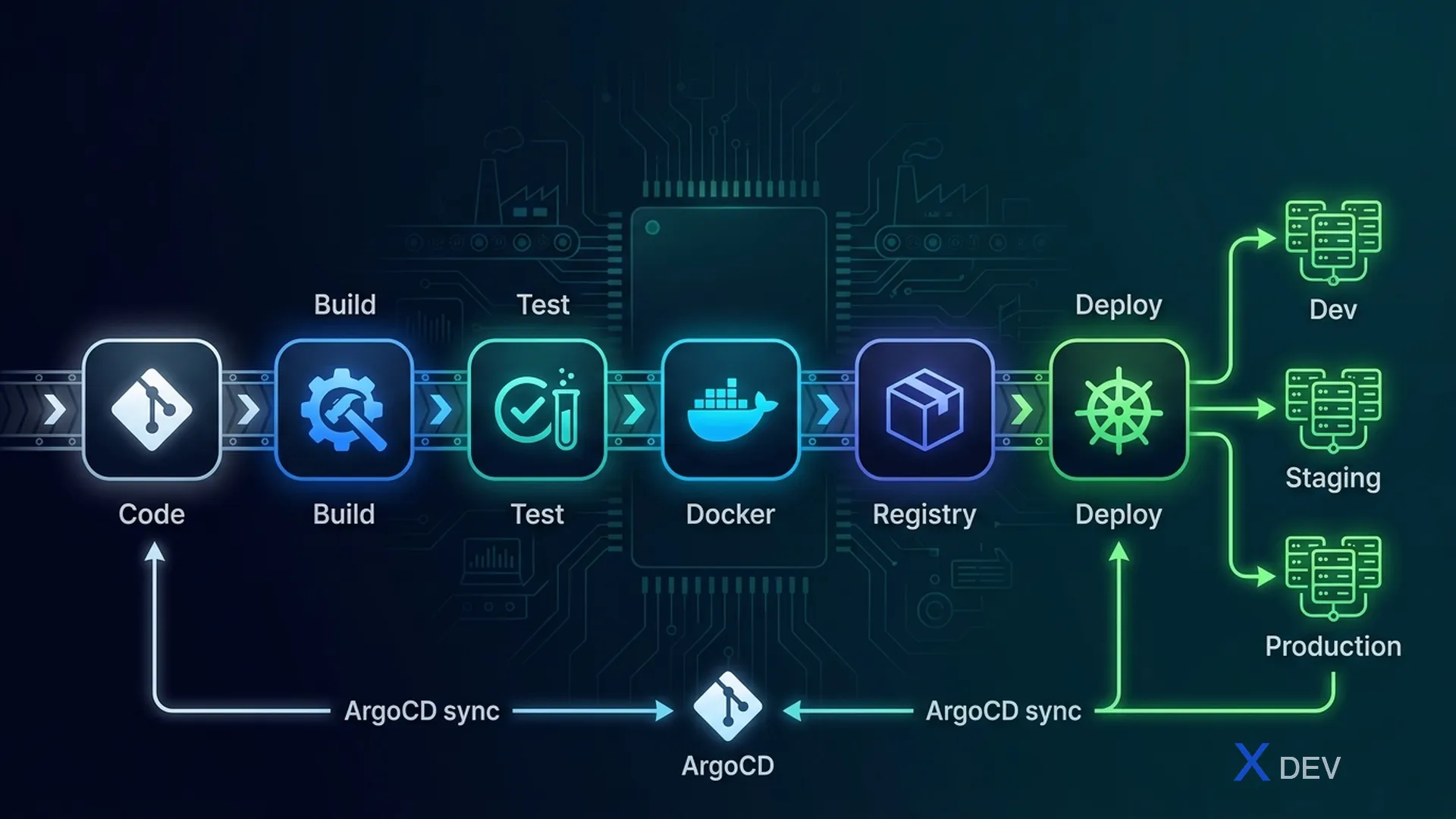
1. CI/CD アーキテクチャ
┌─────────────────────────────────────────────────┐
│ Developer pushes code                           │
└──────────────────────┬──────────────────────────┘
                       │
┌──────────────────────┴──────────────────────────┐
│ CI Pipeline (GitHub Actions)                    │
│ ┌─────────┐ ┌──────────┐ ┌───────────────────┐ │
│ │  Lint   │ │  Build   │ │  Test             │ │
│ │  & Type │→│  & Compile│→│  Unit + Integration│ │
│ │  Check  │ │          │ │  + Contract       │ │
│ └─────────┘ └──────────┘ └───────────────────┘ │
│                                    │            │
│                     ┌──────────────┴──────────┐ │
│                     │ Docker Build & Push     │ │
│                     │ → Container Registry    │ │
│                     └──────────────┬──────────┘ │
└────────────────────────────────────┼────────────┘
                                     │
┌────────────────────────────────────┴────────────┐
│ CD Pipeline (ArgoCD - GitOps)                   │
│                                                 │
│ ┌──────────┐  ┌──────────┐  ┌────────────────┐ │
│ │ Staging  │→ │  Smoke   │→ │  Production    │ │
│ │ Deploy   │  │  Tests   │  │  Deploy        │ │
│ │          │  │          │  │  (Progressive) │ │
│ └──────────┘  └──────────┘  └────────────────┘ │
└─────────────────────────────────────────────────┘
2. CI パイプライン (GitHub アクション)
2.1 マイクロサービス パイプライン
# .github/workflows/service-ci.yml
name: Service CI

on:
  push:
    paths:
      - 'services/product-service/**'
      - 'packages/shared-types/**'

jobs:
  ci:
    runs-on: ubuntu-latest
    steps:
      - uses: actions/checkout@v4

      - name: Lint & Type Check
        run: turbo lint typecheck --filter=product-service

      - name: Unit Tests
        run: turbo test --filter=product-service

      - name: Integration Tests
        run: turbo test:integration --filter=product-service
        services:
          postgres:
            image: postgres:16
            env:
              POSTGRES_DB: test

      - name: Contract Verification
        run: turbo test:pact --filter=product-service

      - name: Docker Build & Push
        run: |
          docker build -t ghcr.io/company/product-service:${{ github.sha }} \
            -f services/product-service/Dockerfile .
          docker push ghcr.io/company/product-service:${{ github.sha }}
2.2 マイクロ フロントエンド パイプライン
# .github/workflows/mfe-ci.yml
name: MFE CI

on:
  push:
    paths:
      - 'apps/product-mfe/**'
      - 'packages/shared-ui/**'

jobs:
  ci:
    runs-on: ubuntu-latest
    steps:
      - uses: actions/checkout@v4

      - name: Install & Build
        run: turbo build --filter=product-mfe...

      - name: Test
        run: turbo test --filter=product-mfe

      - name: Visual Regression
        uses: chromatic/action@v1
        with:
          projectToken: ${{ secrets.CHROMATIC_TOKEN }}

      - name: Deploy to CDN
        run: |
          aws s3 sync apps/product-mfe/dist/ \
            s3://mfe-cdn/product-mfe/${{ github.sha }}/
          aws cloudfront create-invalidation \
            --distribution-id $CF_ID \
            --paths "/product-mfe/*"
3. Docker のマルチステージビルド
# services/product-service/Dockerfile
# Stage 1: Build
FROM node:20-alpine AS builder
WORKDIR /app
COPY package*.json ./
RUN npm ci --production=false
COPY . .
RUN npm run build

# Stage 2: Production
FROM node:20-alpine AS runner
WORKDIR /app
RUN addgroup -S appgroup && adduser -S appuser -G appgroup
COPY --from=builder /app/dist ./dist
COPY --from=builder /app/node_modules ./node_modules
COPY --from=builder /app/package.json ./
USER appuser
EXPOSE 8080
CMD ["node", "dist/main.js"]
4. ArgoCD を使用した GitOps
4.1 GitOps ワークフロー
Developer pushes code → CI builds image → CI updates manifests repo
                                                    │
ArgoCD watches manifests repo ──────────────────────┘
ArgoCD syncs K8s cluster to match manifests
4.2 オーバーレイのカスタマイズ
# k8s/overlays/production/product-service.yaml
apiVersion: apps/v1
kind: Deployment
metadata:
  name: product-service
spec:
  replicas: 3
  template:
    spec:
      containers:
        - name: product-service
          image: ghcr.io/company/product-service:abc123
          resources:
            requests:
              cpu: 100m
              memory: 256Mi
            limits:
              cpu: 500m
              memory: 512Mi
5. 並列パイプライン
Commit changes to:
├── services/product-service/ → Product Service Pipeline
├── apps/product-mfe/         → Product MFE Pipeline
└── packages/shared-ui/       → Shared UI Pipeline
                                  ↓
                              Triggers dependent:
                              → Product MFE Pipeline
                              → Cart MFE Pipeline
                              → All MFE consumers
ターボレポ --filter=...[origin/main] 影響を受けるパッケージを自動的に検出します。
6. パイプラインのベストプラクティス
| 練習 | 説明 |
|---|---|
| 早く失敗してください | Lint → ユニット → 統合 (最初は少し時間がかかります) |
| パラレルジョブ | Lint + テストを並行して実行 |
| キャッシング | npm キャッシュ、Docker レイヤー キャッシュ、Turborepo リモート キャッシュ |
| 影響を受けるのみ | ビルド/テスト パッケージのみが変更されます |
| 不変のアーティファクト | git SHA を使用してイメージにタグを付ける |
| GitOps | 個別の構成リポジトリ、ArgoCD 同期 |
概要
- CI: Lint → ビルド → テスト → Docker → プッシュ (サービス/MFE ごと)
- CD: ArgoCD を使用した GitOps、宣言型 K8s マニフェスト
- Turborepo: 影響を受けた検出、ビルド パッケージのみが変更されました
- Docker マルチステージ: 小規模で安全な運用イメージ
- 並列パイプライン: 各サービス/MFE には独自のパイプラインがあります。