1. ヘルスケアにおける RBAC と ABAC
###1.1.役割ベースのアクセス制御 (RBAC)
RBAC は、組織内のユーザーの役割に基づいて権限を割り当てます。
User ──▶ Role ──▶ Permission

Ví dụ:
BS. Nguyễn ──▶ doctor ──▶ patient_read, patient_write, prescription_write
ĐD. Trần   ──▶ nurse  ──▶ patient_read, vital_signs_write
BN. Lê     ──▶ patient ──▶ own_record_read
利点: シンプル、管理、監査が簡単 制限事項: 複雑なルールには対応できません (例: 内科の患者は内科の医師のみが診察可能)
###1.2.属性ベースのアクセス制御 (ABAC)
ABAC は、ユーザー、リソース、アクション、環境の 属性 に基づいて決定を行います。
Policy: ALLOW if
  user.role == "doctor" AND
  user.department == resource.department AND
  resource.classification_level <= 3 AND
  environment.time BETWEEN "06:00" AND "22:00" AND
  environment.network == "INTERNAL"
利点: 柔軟、きめ細かく、コンテキストを認識できる 制限事項: より複雑でデバッグが難しく、多くのメタデータが必要です
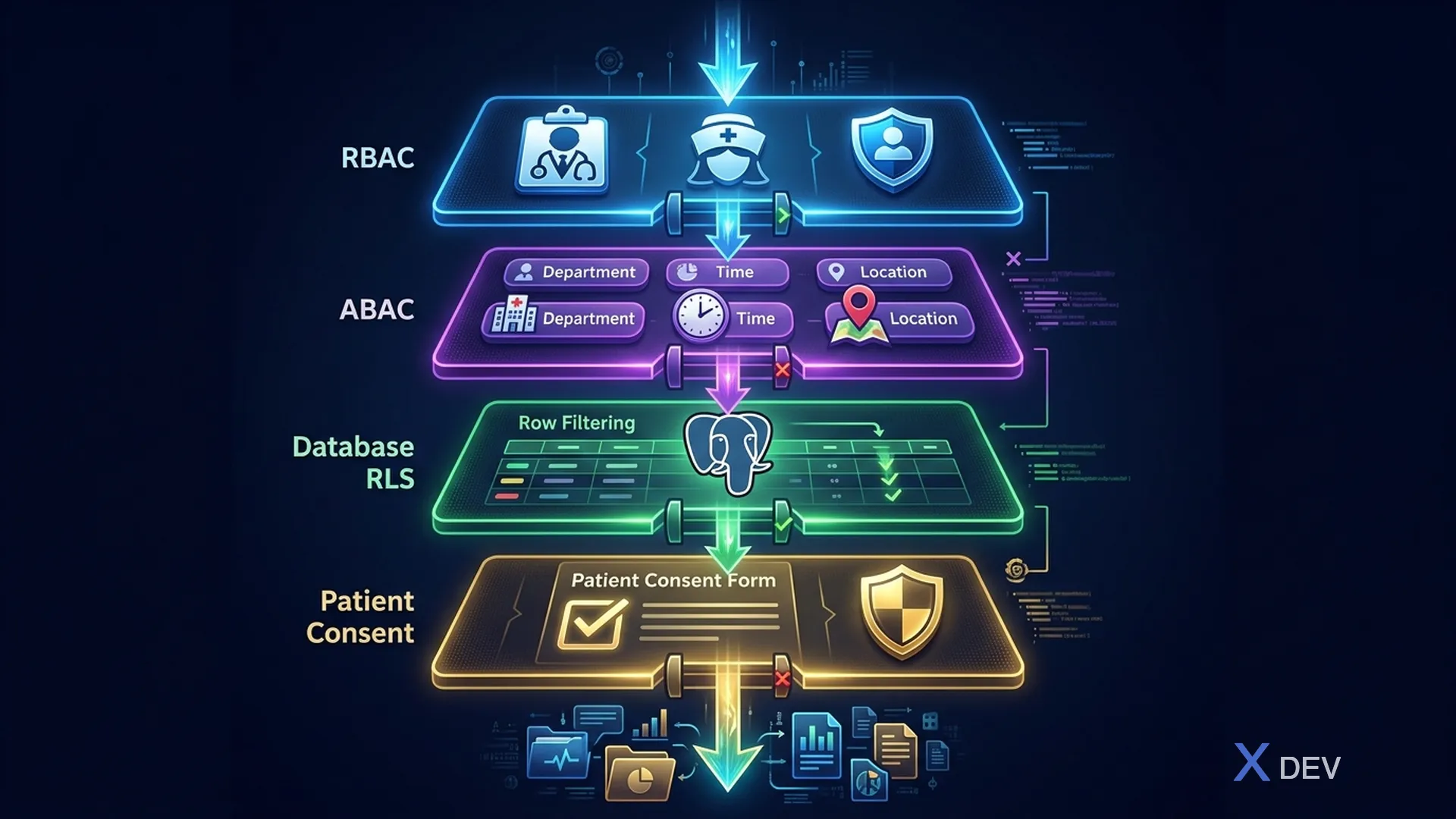
###1.3. RBAC + ABAC を組み合わせて健康を実現
| レイヤー | 名前 | メカニズム | 例 |
|---|---|---|---|
| レイヤー 1 | RBAC (Keycloak ロール) | ユーザーは医師ですか? → 臨床データにアクセスできる。ユーザーは看護師ですか? → バイタルサインにアクセスできる。ユーザーは患者ですか? → 自分の記録にアクセスできる。 | @RolesAllowed("doctor") |
| レイヤー 2 | ABAC (Keycloak認可サービス) | 学科対抗? →自部門データのみ。治療関係? → 割り当てられた患者のみ。時間ベースですか? → 時間外にはMFAが必要です。位置情報ベースですか? → 外部にはVPNが必要です。 | カスタムポリシー |
| レイヤー 3 | RLS (PostgreSQL 行レベル セキュリティ) | データベースは JWT クレームに基づいて行ごとのアクセスを強制します。 CREATE POLICY | |
| レイヤー 4 | 同意(患者同意確認) | 患者はこの目的でアクセスを許可しましたか? | FHIR 同意リソース |
2. Keycloak認可サービス
###2.1.コンセプト
Resources      → What is being protected? (Patient Record, Lab Result)
Scopes         → What actions? (read, write, delete, export, print)
Policies       → Who can access? (role, user, time, script)
Permissions    → Connect Resources + Scopes + Policies
###2.2.リソースの定義
{
  "resources": [
    {
      "name": "Patient Record",
      "type": "urn:healthcare:resources:patient",
      "uris": ["/api/v1/patients/*"],
      "ownerManagedAccess": false,
      "scopes": [
        {"name": "read"},
        {"name": "write"},
        {"name": "delete"},
        {"name": "export"},
        {"name": "print"}
      ],
      "attributes": {
        "classification": ["3"],
        "contains_phi": ["true"]
      }
    },
    {
      "name": "Lab Result",
      "type": "urn:healthcare:resources:lab-result",
      "uris": ["/api/v1/lab-results/*"],
      "scopes": [
        {"name": "read"},
        {"name": "write"},
        {"name": "verify"},
        {"name": "print"}
      ]
    },
    {
      "name": "Prescription",
      "type": "urn:healthcare:resources:prescription",
      "uris": ["/api/v1/prescriptions/*"],
      "scopes": [
        {"name": "read"},
        {"name": "write"},
        {"name": "dispense"},
        {"name": "cancel"}
      ]
    }
  ]
}
###2.3.ポリシーの定義
{
  "policies": [
    {
      "name": "Doctor Role Policy",
      "type": "role",
      "logic": "POSITIVE",
      "config": {
        "roles": [
          {"id": "doctor", "required": true}
        ]
      }
    },
    {
      "name": "Same Department Policy",
      "type": "script-js",
      "logic": "POSITIVE",
      "config": {
        "code": "var context = $evaluation.getContext(); var identity = context.getIdentity(); var userDept = identity.getAttributes().getValue('department').asString(0); var resourceDept = $evaluation.getPermission().getResource().getAttribute('department')[0]; if (userDept === resourceDept) { $evaluation.grant(); }"
      }
    },
    {
      "name": "Working Hours Policy",
      "type": "time",
      "logic": "POSITIVE",
      "config": {
        "notBefore": "06:00",
        "notOnOrAfter": "22:00"
      }
    },
    {
      "name": "Emergency Access Policy",
      "type": "role",
      "logic": "POSITIVE",
      "config": {
        "roles": [
          {"id": "emergency_access", "required": true}
        ]
      }
    }
  ]
}
###2.4.権限
{
  "permissions": [
    {
      "name": "Doctor Read Patient",
      "type": "scope",
      "resources": ["Patient Record"],
      "scopes": ["read"],
      "policies": ["Doctor Role Policy", "Same Department Policy"],
      "decisionStrategy": "AFFIRMATIVE"
    },
    {
      "name": "Doctor Write Prescription",
      "type": "scope",
      "resources": ["Prescription"],
      "scopes": ["write"],
      "policies": ["Doctor Role Policy"],
      "decisionStrategy": "UNANIMOUS"
    },
    {
      "name": "Emergency Override",
      "type": "scope",
      "resources": ["Patient Record", "Lab Result", "Prescription"],
      "scopes": ["read"],
      "policies": ["Emergency Access Policy"],
      "decisionStrategy": "AFFIRMATIVE"
    }
  ]
}
3. Quarkus での実装
###3.1. @RolesAllowed を使用した RBAC
@Path("/api/v1/patients")
@Authenticated
public class PatientResource {

    @GET
    @RolesAllowed({"doctor", "nurse", "admin"})
    public List<PatientSummaryDTO> listPatients(
            @QueryParam("department") String department) {
        // Role check passed — now apply ABAC
        return patientService.findByDepartment(department);
    }

    @GET
    @Path("/{id}")
    @RolesAllowed({"doctor", "nurse", "patient"})
    public PatientDetailDTO getPatient(@PathParam("id") UUID id) {
        return patientService.findById(id);
    }

    @PUT
    @Path("/{id}")
    @RolesAllowed({"doctor", "admin"})
    public Response updatePatient(
            @PathParam("id") UUID id,
            PatientUpdateRequest request) {
        return patientService.update(id, request);
    }

    @DELETE
    @Path("/{id}")
    @RolesAllowed({"admin"})
    public Response deletePatient(@PathParam("id") UUID id) {
        // Soft delete only — PHI retention requirements
        return patientService.softDelete(id);
    }
}
###3.2. ABAC とカスタム SecurityIdentityAugmentor
@ApplicationScoped
public class HealthcareSecurityAugmentor implements SecurityIdentityAugmentor {

    @Inject
    TreatmentRelationshipService treatmentService;

    @Override
    public Uni<SecurityIdentity> augment(SecurityIdentity identity,
            AuthenticationRequestContext context) {

        return Uni.createFrom().item(() -> {
            QuarkusSecurityIdentity.Builder builder =
                QuarkusSecurityIdentity.builder(identity);

            // Add department attribute from JWT
            String department = identity.getAttribute("department");
            if (department != null) {
                builder.addAttribute("department", department);
            }

            // Add hospital code
            String hospitalCode = identity.getAttribute("hospitalCode");
            if (hospitalCode != null) {
                builder.addAttribute("hospitalCode", hospitalCode);
            }

            return builder.build();
        });
    }
}
###3.3. ABAC認可インターセプター
@Interceptor
@HealthcareAuthorization
@Priority(Interceptor.Priority.APPLICATION)
public class HealthcareAuthorizationInterceptor {

    @Inject
    SecurityIdentity identity;

    @Inject
    AuditService auditService;

    @AroundInvoke
    public Object authorize(InvocationContext ctx) throws Exception {
        HealthcareAuthorization annotation =
            ctx.getMethod().getAnnotation(HealthcareAuthorization.class);

        if (annotation == null) {
            return ctx.proceed();
        }

        // Check department access
        if (annotation.requireSameDepartment()) {
            String userDept = identity.getAttribute("department");
            UUID resourceId = extractResourceId(ctx);
            String resourceDept = getResourceDepartment(resourceId);

            if (!userDept.equals(resourceDept) &&
                !identity.hasRole("emergency_access")) {
                auditService.logAccessDenied(identity,
                    annotation.resource(), resourceId.toString(),
                    "Department mismatch: user=" + userDept +
                    " resource=" + resourceDept);
                throw new ForbiddenException(
                    "Access denied: department mismatch");
            }
        }

        // Check treatment relationship
        if (annotation.requireTreatmentRelationship()) {
            UUID patientId = extractPatientId(ctx);
            String doctorId = identity.getPrincipal().getName();

            if (!treatmentService.hasRelationship(doctorId, patientId)) {
                auditService.logAccessDenied(identity,
                    annotation.resource(), patientId.toString(),
                    "No treatment relationship");
                throw new ForbiddenException(
                    "No treatment relationship with patient");
            }
        }

        return ctx.proceed();
    }
}
###3.4.カスタム認可アノテーション
@InterceptorBinding
@Retention(RetentionPolicy.RUNTIME)
@Target({ElementType.METHOD, ElementType.TYPE})
public @interface HealthcareAuthorization {
    String resource() default "";
    boolean requireSameDepartment() default false;
    boolean requireTreatmentRelationship() default false;
    int maxClassificationLevel() default 3;
}

// Usage
@GET
@Path("/{patientId}/clinical-notes")
@RolesAllowed("doctor")
@HealthcareAuthorization(
    resource = "ClinicalNote",
    requireSameDepartment = true,
    requireTreatmentRelationship = true
)
public List<ClinicalNoteDTO> getClinicalNotes(
        @PathParam("patientId") UUID patientId) {
    return clinicalNoteService.findByPatient(patientId);
}
4. ガラスを割った時の緊急アクセス
###4.1.コンセプト
Tình huống: Bệnh nhân cấp cứu, bác sĩ trực KHÔNG phải bác sĩ
điều trị → cần truy cập hồ sơ bệnh án NGAY LẬP TỨC

Normal Flow:        Emergency Flow:
Doctor ──▶ Check    Doctor ──▶ Break-the-Glass
           Role ✓              ▶ Log reason
           Dept ✓              ▶ Grant temporary access
           Rel. ✓              ▶ Alert security team
           ──▶ Access          ▶ Time-limited (2 hours)
                               ──▶ Access
                               ──▶ Post-review required
###4.2.実装
@Path("/api/v1/emergency-access")
@Authenticated
public class EmergencyAccessResource {

    @Inject
    SecurityIdentity identity;

    @Inject
    EmergencyAccessService emergencyService;

    @Inject
    NotificationService notificationService;

    @POST
    @RolesAllowed({"doctor", "nurse"})
    public Response requestEmergencyAccess(EmergencyAccessRequest request) {

        // Validate and log emergency access
        EmergencyAccess access = emergencyService.create(
            EmergencyAccess.builder()
                .requesterId(identity.getPrincipal().getName())
                .requesterRole(identity.getRoles().toString())
                .patientId(request.patientId())
                .reason(request.reason())  // Required: why emergency access?
                .expiresAt(Instant.now().plus(2, ChronoUnit.HOURS))
                .status(EmergencyAccessStatus.ACTIVE)
                .build()
        );

        // Alert security team and department head
        notificationService.alertEmergencyAccess(access);

        // Grant temporary role via Keycloak Admin API
        keycloakAdminService.grantTemporaryRole(
            identity.getPrincipal().getName(),
            "emergency_access",
            Duration.ofHours(2)
        );

        return Response.ok(Map.of(
            "accessId", access.getId(),
            "expiresAt", access.getExpiresAt(),
            "message", "Emergency access granted. This access will be reviewed."
        )).build();
    }
}
5. アクセス制御マトリックス
###5.1.ヘルスケアの許可マトリックス
| リソース | 医師 | 看護師 | ラボテック | 薬剤師 | 患者 | 管理者 |
|---|---|---|---|---|---|---|
| 患者の人口統計 | R/W | R | R | R | 自分:R | R/W |
| 臨床ノート | R/W | R | - | - | 自分:R | - |
| バイタルサイン | R/W | R/W | - | - | 自分:R | - |
| ラボの注文 | R/W | R | R/W | R | 自分:R | R |
| ラボの結果 | R | R | R/W/V | R | 自分:R | R |
| 処方箋 | R/W | R | - | 研究開発 | 自分:R | R |
| 請求 | R | - | - | - | 自分:R | R/W |
| 監査ログ | - | - | - | - | - | R |
R=読み取り、W=書き込み、D=ディスペンス、V=検証、Own=自分のレコードのみ
6. まとめ
このレッスンでは次のことを行います。
- RBAC と ABAC およびヘルスケアの 4 つのレイヤーを組み合わせた戦略を比較します
- Keycloak認可サービスの構成(リソース、ポリシー、権限)
- Quarkus で RBAC を実装する
@RolesAllowed - ABAC をカスタムで実装する
SecurityIdentityAugmentorおよび認可インターセプター - ガラス破りの緊急アクセス手順を設計する
演習
- 検査結果へのアクセスに完全な ABAC を実装します。同じ科の医師のみが閲覧できます。
- 監査証跡と通知を備えたガラス破りワークフローを作成する
- 権限マトリックス (医師、看護師、患者のアクセス) の統合テストを作成する
| ◀ 前の記事 | 次の記事 ▶ |
|---|---|
| レッスン 5: 医療標準に合わせた Keycloak レルムの設計 - 病院向けのマルチテナント | レッスン 7: FHIR の SMART - ヘルスケア API 用の OAuth2/OIDC |