1. RBAC vs ABAC trong Y Tế
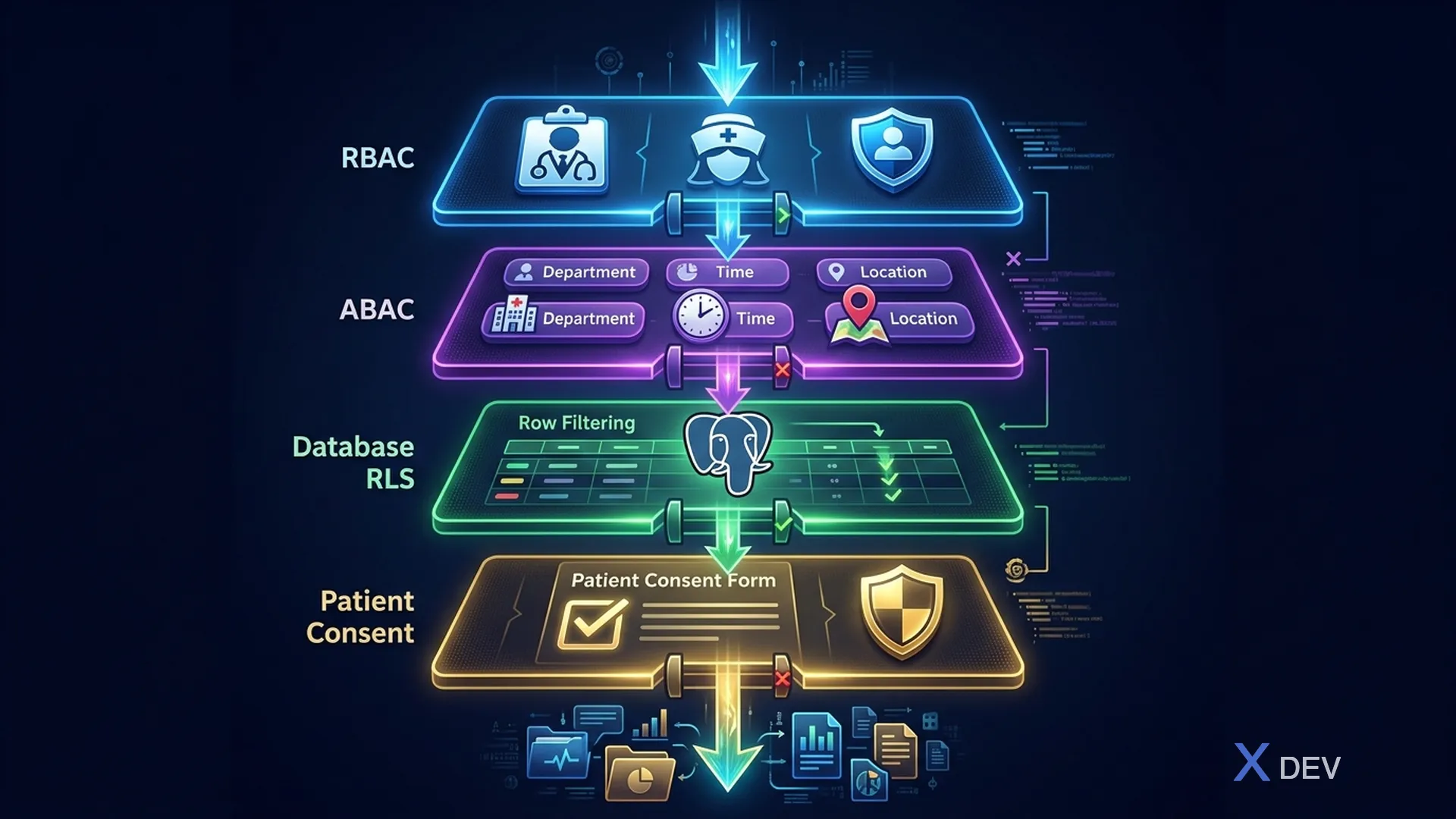
1.1. Role-Based Access Control (RBAC)
RBAC gán quyền dựa trên vai trò của người dùng trong tổ chức:
User ──▶ Role ──▶ Permission

Ví dụ:
BS. Nguyễn ──▶ doctor ──▶ patient_read, patient_write, prescription_write
ĐD. Trần   ──▶ nurse  ──▶ patient_read, vital_signs_write
BN. Lê     ──▶ patient ──▶ own_record_read
Ưu điểm: Đơn giản, dễ quản lý, dễ audit Hạn chế: Không xử lý được các rule phức tạp (ví dụ: chỉ bác sĩ KHOA NỘI mới xem được bệnh nhân khoa nội)
1.2. Attribute-Based Access Control (ABAC)
ABAC ra quyết định dựa trên attributes của user, resource, action, và environment:
Policy: ALLOW if
  user.role == "doctor" AND
  user.department == resource.department AND
  resource.classification_level <= 3 AND
  environment.time BETWEEN "06:00" AND "22:00" AND
  environment.network == "INTERNAL"
Ưu điểm: Flexible, fine-grained, context-aware Hạn chế: Phức tạp hơn, khó debug, cần nhiều metadata
1.3. Kết hợp RBAC + ABAC cho Y Tế
| Layer | Tên | Cơ chế | Ví dụ |
|---|---|---|---|
| Layer 1 | RBAC (Keycloak Roles) | Is user a doctor? → Can access clinical data. Is user a nurse? → Can access vital signs. Is user a patient? → Can access own records. | @RolesAllowed("doctor") |
| Layer 2 | ABAC (Keycloak Authorization Services) | Department match? → Only own department data. Treatment relationship? → Assigned patients only. Time-based? → After-hours requires MFA. Location-based? → External requires VPN. | Custom policies |
| Layer 3 | RLS (PostgreSQL Row-Level Security) | Database enforces per-row access based on JWT claims | CREATE POLICY |
| Layer 4 | Consent (Patient consent check) | Patient has granted access for this purpose? | FHIR Consent resource |
2. Keycloak Authorization Services
2.1. Concepts
Resources      → What is being protected? (Patient Record, Lab Result)
Scopes         → What actions? (read, write, delete, export, print)
Policies       → Who can access? (role, user, time, script)
Permissions    → Connect Resources + Scopes + Policies
2.2. Resource Definition
{
  "resources": [
    {
      "name": "Patient Record",
      "type": "urn:healthcare:resources:patient",
      "uris": ["/api/v1/patients/*"],
      "ownerManagedAccess": false,
      "scopes": [
        {"name": "read"},
        {"name": "write"},
        {"name": "delete"},
        {"name": "export"},
        {"name": "print"}
      ],
      "attributes": {
        "classification": ["3"],
        "contains_phi": ["true"]
      }
    },
    {
      "name": "Lab Result",
      "type": "urn:healthcare:resources:lab-result",
      "uris": ["/api/v1/lab-results/*"],
      "scopes": [
        {"name": "read"},
        {"name": "write"},
        {"name": "verify"},
        {"name": "print"}
      ]
    },
    {
      "name": "Prescription",
      "type": "urn:healthcare:resources:prescription",
      "uris": ["/api/v1/prescriptions/*"],
      "scopes": [
        {"name": "read"},
        {"name": "write"},
        {"name": "dispense"},
        {"name": "cancel"}
      ]
    }
  ]
}
2.3. Policy Definition
{
  "policies": [
    {
      "name": "Doctor Role Policy",
      "type": "role",
      "logic": "POSITIVE",
      "config": {
        "roles": [
          {"id": "doctor", "required": true}
        ]
      }
    },
    {
      "name": "Same Department Policy",
      "type": "script-js",
      "logic": "POSITIVE",
      "config": {
        "code": "var context = $evaluation.getContext(); var identity = context.getIdentity(); var userDept = identity.getAttributes().getValue('department').asString(0); var resourceDept = $evaluation.getPermission().getResource().getAttribute('department')[0]; if (userDept === resourceDept) { $evaluation.grant(); }"
      }
    },
    {
      "name": "Working Hours Policy",
      "type": "time",
      "logic": "POSITIVE",
      "config": {
        "notBefore": "06:00",
        "notOnOrAfter": "22:00"
      }
    },
    {
      "name": "Emergency Access Policy",
      "type": "role",
      "logic": "POSITIVE",
      "config": {
        "roles": [
          {"id": "emergency_access", "required": true}
        ]
      }
    }
  ]
}
2.4. Permissions
{
  "permissions": [
    {
      "name": "Doctor Read Patient",
      "type": "scope",
      "resources": ["Patient Record"],
      "scopes": ["read"],
      "policies": ["Doctor Role Policy", "Same Department Policy"],
      "decisionStrategy": "AFFIRMATIVE"
    },
    {
      "name": "Doctor Write Prescription",
      "type": "scope",
      "resources": ["Prescription"],
      "scopes": ["write"],
      "policies": ["Doctor Role Policy"],
      "decisionStrategy": "UNANIMOUS"
    },
    {
      "name": "Emergency Override",
      "type": "scope",
      "resources": ["Patient Record", "Lab Result", "Prescription"],
      "scopes": ["read"],
      "policies": ["Emergency Access Policy"],
      "decisionStrategy": "AFFIRMATIVE"
    }
  ]
}
3. Implementation trong Quarkus
3.1. RBAC với @RolesAllowed
@Path("/api/v1/patients")
@Authenticated
public class PatientResource {

    @GET
    @RolesAllowed({"doctor", "nurse", "admin"})
    public List<PatientSummaryDTO> listPatients(
            @QueryParam("department") String department) {
        // Role check passed — now apply ABAC
        return patientService.findByDepartment(department);
    }

    @GET
    @Path("/{id}")
    @RolesAllowed({"doctor", "nurse", "patient"})
    public PatientDetailDTO getPatient(@PathParam("id") UUID id) {
        return patientService.findById(id);
    }

    @PUT
    @Path("/{id}")
    @RolesAllowed({"doctor", "admin"})
    public Response updatePatient(
            @PathParam("id") UUID id,
            PatientUpdateRequest request) {
        return patientService.update(id, request);
    }

    @DELETE
    @Path("/{id}")
    @RolesAllowed({"admin"})
    public Response deletePatient(@PathParam("id") UUID id) {
        // Soft delete only — PHI retention requirements
        return patientService.softDelete(id);
    }
}
3.2. ABAC với Custom SecurityIdentityAugmentor
@ApplicationScoped
public class HealthcareSecurityAugmentor implements SecurityIdentityAugmentor {

    @Inject
    TreatmentRelationshipService treatmentService;

    @Override
    public Uni<SecurityIdentity> augment(SecurityIdentity identity,
            AuthenticationRequestContext context) {

        return Uni.createFrom().item(() -> {
            QuarkusSecurityIdentity.Builder builder =
                QuarkusSecurityIdentity.builder(identity);

            // Add department attribute from JWT
            String department = identity.getAttribute("department");
            if (department != null) {
                builder.addAttribute("department", department);
            }

            // Add hospital code
            String hospitalCode = identity.getAttribute("hospitalCode");
            if (hospitalCode != null) {
                builder.addAttribute("hospitalCode", hospitalCode);
            }

            return builder.build();
        });
    }
}
3.3. ABAC Authorization Interceptor
@Interceptor
@HealthcareAuthorization
@Priority(Interceptor.Priority.APPLICATION)
public class HealthcareAuthorizationInterceptor {

    @Inject
    SecurityIdentity identity;

    @Inject
    AuditService auditService;

    @AroundInvoke
    public Object authorize(InvocationContext ctx) throws Exception {
        HealthcareAuthorization annotation =
            ctx.getMethod().getAnnotation(HealthcareAuthorization.class);

        if (annotation == null) {
            return ctx.proceed();
        }

        // Check department access
        if (annotation.requireSameDepartment()) {
            String userDept = identity.getAttribute("department");
            UUID resourceId = extractResourceId(ctx);
            String resourceDept = getResourceDepartment(resourceId);

            if (!userDept.equals(resourceDept) &&
                !identity.hasRole("emergency_access")) {
                auditService.logAccessDenied(identity,
                    annotation.resource(), resourceId.toString(),
                    "Department mismatch: user=" + userDept +
                    " resource=" + resourceDept);
                throw new ForbiddenException(
                    "Access denied: department mismatch");
            }
        }

        // Check treatment relationship
        if (annotation.requireTreatmentRelationship()) {
            UUID patientId = extractPatientId(ctx);
            String doctorId = identity.getPrincipal().getName();

            if (!treatmentService.hasRelationship(doctorId, patientId)) {
                auditService.logAccessDenied(identity,
                    annotation.resource(), patientId.toString(),
                    "No treatment relationship");
                throw new ForbiddenException(
                    "No treatment relationship with patient");
            }
        }

        return ctx.proceed();
    }
}
3.4. Custom Authorization Annotation
@InterceptorBinding
@Retention(RetentionPolicy.RUNTIME)
@Target({ElementType.METHOD, ElementType.TYPE})
public @interface HealthcareAuthorization {
    String resource() default "";
    boolean requireSameDepartment() default false;
    boolean requireTreatmentRelationship() default false;
    int maxClassificationLevel() default 3;
}

// Usage
@GET
@Path("/{patientId}/clinical-notes")
@RolesAllowed("doctor")
@HealthcareAuthorization(
    resource = "ClinicalNote",
    requireSameDepartment = true,
    requireTreatmentRelationship = true
)
public List<ClinicalNoteDTO> getClinicalNotes(
        @PathParam("patientId") UUID patientId) {
    return clinicalNoteService.findByPatient(patientId);
}
4. Break-the-Glass Emergency Access
4.1. Concept
Tình huống: Bệnh nhân cấp cứu, bác sĩ trực KHÔNG phải bác sĩ
điều trị → cần truy cập hồ sơ bệnh án NGAY LẬP TỨC

Normal Flow:        Emergency Flow:
Doctor ──▶ Check    Doctor ──▶ Break-the-Glass
           Role ✓              ▶ Log reason
           Dept ✓              ▶ Grant temporary access
           Rel. ✓              ▶ Alert security team
           ──▶ Access          ▶ Time-limited (2 hours)
                               ──▶ Access
                               ──▶ Post-review required
4.2. Implementation
@Path("/api/v1/emergency-access")
@Authenticated
public class EmergencyAccessResource {

    @Inject
    SecurityIdentity identity;

    @Inject
    EmergencyAccessService emergencyService;

    @Inject
    NotificationService notificationService;

    @POST
    @RolesAllowed({"doctor", "nurse"})
    public Response requestEmergencyAccess(EmergencyAccessRequest request) {

        // Validate and log emergency access
        EmergencyAccess access = emergencyService.create(
            EmergencyAccess.builder()
                .requesterId(identity.getPrincipal().getName())
                .requesterRole(identity.getRoles().toString())
                .patientId(request.patientId())
                .reason(request.reason())  // Required: why emergency access?
                .expiresAt(Instant.now().plus(2, ChronoUnit.HOURS))
                .status(EmergencyAccessStatus.ACTIVE)
                .build()
        );

        // Alert security team and department head
        notificationService.alertEmergencyAccess(access);

        // Grant temporary role via Keycloak Admin API
        keycloakAdminService.grantTemporaryRole(
            identity.getPrincipal().getName(),
            "emergency_access",
            Duration.ofHours(2)
        );

        return Response.ok(Map.of(
            "accessId", access.getId(),
            "expiresAt", access.getExpiresAt(),
            "message", "Emergency access granted. This access will be reviewed."
        )).build();
    }
}
5. Access Control Matrix
5.1. Permission Matrix cho Healthcare
| Resource | Doctor | Nurse | Lab Tech | Pharmacist | Patient | Admin |
|---|---|---|---|---|---|---|
| Patient Demographics | R/W | R | R | R | Own:R | R/W |
| Clinical Notes | R/W | R | - | - | Own:R | - |
| Vital Signs | R/W | R/W | - | - | Own:R | - |
| Lab Orders | R/W | R | R/W | R | Own:R | R |
| Lab Results | R | R | R/W/V | R | Own:R | R |
| Prescriptions | R/W | R | - | R/D | Own:R | R |
| Billing | R | - | - | - | Own:R | R/W |
| Audit Logs | - | - | - | - | - | R |
R=Read, W=Write, D=Dispense, V=Verify, Own=Only own records
6. Tổng kết
Trong bài học này, chúng ta đã:
- So sánh RBAC vs ABAC và strategy kết hợp 4 layers cho y tế
- Cấu hình Keycloak Authorization Services (Resources, Policies, Permissions)
- Implement RBAC trong Quarkus với
@RolesAllowed - Implement ABAC với custom
SecurityIdentityAugmentorvà authorization interceptor - Thiết kế Break-the-Glass emergency access procedure
Bài tập
- Implement full ABAC cho Lab Result access: chỉ bác sĩ cùng khoa mới xem được
- Tạo Break-the-Glass workflow với audit trail và notification
- Viết integration test cho permission matrix (doctor vs nurse vs patient access)
| ◀ Bài trước | Bài tiếp theo ▶ |
|---|---|
| Bài 5: Thiết kế Keycloak Realm chuẩn Y Tế - Multi-tenancy cho Bệnh viện | Bài 7: SMART on FHIR - OAuth2/OIDC cho Healthcare APIs |