1. 医療環境のための MFA 戦略
###1.1.病院における MFA チャレンジ
病院は通常の企業と比較して特殊な運営環境を持っています。
| チャレンジ | 説明 | ソリューション |
|---|---|---|
| 共有ワークステーション | 複数の医師/看護師がコンピューターを共有する | 素早い切り替え、タップアンドゴー |
| 応答時間 | 応急処置には数秒以内にアクセスする必要があります | 条件付き MFA、近接バッジ |
| 医療用手袋 | 指紋は使用できません | WebAuthn セキュリティ キー、PIN |
| 1 日あたりの複数ログイン | 医師は 1 日に 30 ~ 50 回ログインします | SSO + ショート MFA メモリ |
| 個人用装備は限られています | 誰もがスマートフォンを持っているわけではありません | ハードウェア トークンのオプション |
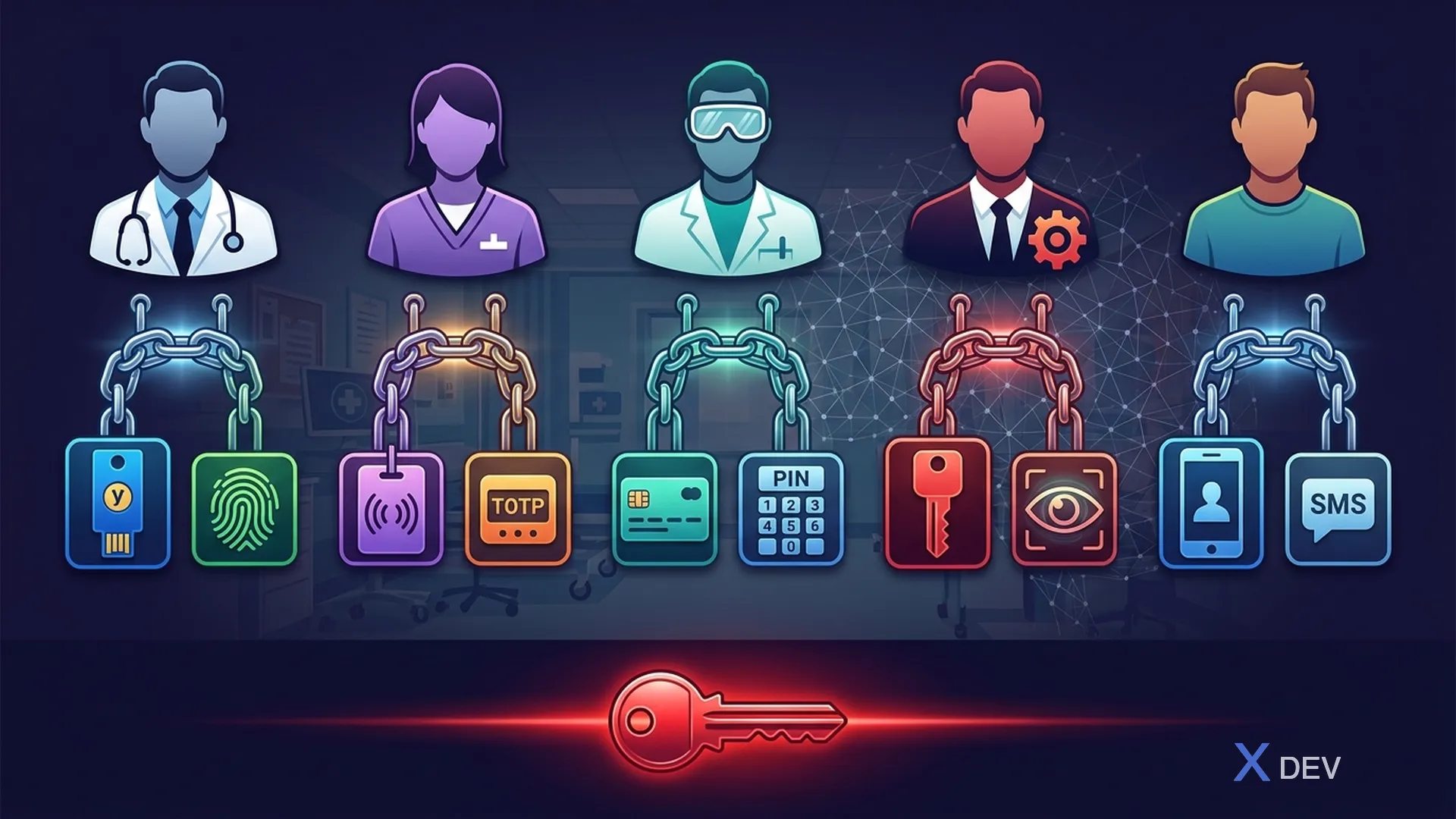
###1.2. MFA 係数マトリックス
| ユーザータイプ | プライマリー | 二次 | フォールバック |
|---|---|---|---|
| 医師 | パスキー/WebAuthn | TOTPアプリ | リカバリーコード |
| 看護師 | 近接バッジ | 暗証番号(6桁) | TOTPアプリ |
| ラボテック | TOTPアプリ | セキュリティキー | リカバリーコード |
| 管理者 | セキュリティキー | TOTPアプリ | 管理者の回復手順 |
| 患者ポータル | SMS OTP | EメールOTP | サポートコール |
2. 医療向けの Keycloak 認証フロー
###2.1.条件付き認証フロー
{
  "alias": "healthcare-browser-flow",
  "description": "Healthcare-specific authentication flow with conditional MFA",
  "providerId": "basic-flow",
  "topLevel": true,
  "builtIn": false,
  "authenticationExecutions": [
    {
      "authenticator": "auth-cookie",
      "requirement": "ALTERNATIVE",
      "priority": 10
    },
    {
      "authenticator": "identity-provider-redirector",
      "requirement": "ALTERNATIVE",
      "priority": 20
    },
    {
      "flowAlias": "healthcare-forms",
      "requirement": "ALTERNATIVE",
      "priority": 30
    }
  ]
}
###2.2.ヘルスケアフォームのサブフロー
healthcare-forms (ALTERNATIVE)
├── Username/Password Form (REQUIRED)
│
├── healthcare-mfa-conditional (CONDITIONAL)
│   ├── Condition: User Role = "patient"
│   │   → SMS OTP Authenticator (REQUIRED)
│   │
│   ├── Condition: IP NOT in 10.0.0.0/8 (external access)
│   │   → WebAuthn Authenticator (REQUIRED)
│   │
│   ├── Condition: User has configured WebAuthn
│   │   → WebAuthn Passwordless (ALTERNATIVE)
│   │
│   └── Condition: Default (internal network)
│       → OTP Form (CONDITIONAL - only if configured)
│
└── healthcare-session-note (REQUIRED)
    → Set session attributes (department, hospital)
###2.3. Keycloakの条件付きOTP構成
{
  "alias": "conditional-mfa-healthcare",
  "description": "MFA required for external access, optional for internal",
  "authenticationExecutions": [
    {
      "authenticator": "conditional-user-configured",
      "requirement": "REQUIRED",
      "priority": 10
    },
    {
      "authenticator": "auth-conditional-otp-form",
      "requirement": "REQUIRED",
      "priority": 20,
      "authenticatorConfig": {
        "alias": "healthcare-otp-config",
        "config": {
          "forceOtpRole": "require_mfa",
          "skipOtpRole": "skip_internal_mfa",
          "noOtpRequiredForHeaderPattern": "",
          "otpControlAttribute": "mfa_required",
          "defaultOtpOutcome": "force"
        }
      }
    }
  ]
}
3. 医療用の WebAuthn / パスキー
###3.1. Keycloak WebAuthn 設定
{
  "webAuthnPolicyRpEntityName": "Healthcare Platform",
  "webAuthnPolicyRpId": "hospital.vn",
  "webAuthnPolicySignatureAlgorithms": ["ES256", "RS256"],
  "webAuthnPolicyAttestationConveyancePreference": "direct",
  "webAuthnPolicyAuthenticatorAttachment": "cross-platform",
  "webAuthnPolicyRequireResidentKey": "Yes",
  "webAuthnPolicyUserVerificationRequirement": "preferred",
  "webAuthnPolicyCreateTimeout": 60,
  "webAuthnPolicyAvoidSameAuthenticatorRegister": true,

  "webAuthnPolicyPasswordlessRpEntityName": "Healthcare Platform",
  "webAuthnPolicyPasswordlessRpId": "hospital.vn",
  "webAuthnPolicyPasswordlessSignatureAlgorithms": ["ES256"],
  "webAuthnPolicyPasswordlessAuthenticatorAttachment": "platform",
  "webAuthnPolicyPasswordlessRequireResidentKey": "Yes",
  "webAuthnPolicyPasswordlessUserVerificationRequirement": "required"
}
###3.2.病院向けにサポートされている認証システム
┌─────────────────────────────────────────────────────┐
│           Recommended Security Keys                  │
├─────────────────────┬───────────────────────────────┤
│ YubiKey 5 NFC       │ • USB-A/C + NFC              │
│                     │ • FIDO2/WebAuthn + TOTP       │
│                     │ • Ideal for doctors (mobile)  │
├─────────────────────┼───────────────────────────────┤
│ YubiKey 5C Nano     │ • Ultra-compact USB-C         │
│                     │ • Leave in workstation         │
│                     │ • Ideal for nurse stations    │
├─────────────────────┼───────────────────────────────┤
│ Feitian BioPass     │ • Built-in fingerprint        │
│                     │ • USB-A                        │
│                     │ • Ideal for admin              │
├─────────────────────┼───────────────────────────────┤
│ Platform Passkeys   │ • Windows Hello / Touch ID     │
│                     │ • No hardware needed           │
│                     │ • Ideal for personal devices   │
└─────────────────────┴───────────────────────────────┘
4. 共有ワークステーションのセッション管理
###4.1.高速セッション切り替え
// Quarkus endpoint for fast user switching
@Path("/api/v1/session")
public class SessionResource {

    @Inject
    SecurityIdentity identity;

    @POST
    @Path("/switch")
    @PermitAll
    public Response switchUser(@HeaderParam("X-Smart-Card-ID") String smartCardId) {
        // Validate smart card / proximity badge
        if (smartCardId == null || smartCardId.isEmpty()) {
            return Response.status(400)
                .entity(Map.of("error", "Smart card ID required"))
                .build();
        }

        // Redirect to Keycloak with kc_idp_hint for smart card IDP
        URI redirectUri = UriBuilder
            .fromUri("https://keycloak.hospital.vn/realms/healthcare/protocol/openid-connect/auth")
            .queryParam("client_id", "his-web-app")
            .queryParam("response_type", "code")
            .queryParam("scope", "openid")
            .queryParam("kc_idp_hint", "smart-card")
            .queryParam("login_hint", smartCardId)
            .queryParam("prompt", "login")  // Force re-auth
            .build();

        return Response.temporaryRedirect(redirectUri).build();
    }

    @POST
    @Path("/lock")
    @Authenticated
    public Response lockSession() {
        // Lock current session (require re-auth on next access)
        // Audit log: session locked
        auditService.log("SESSION_LOCK", identity.getPrincipal().getName());

        return Response.ok(Map.of(
            "status", "locked",
            "message", "Session locked. Re-authentication required."
        )).build();
    }
}
###4.2.自動ログオフ構成
# application.properties - Session timeouts for healthcare
# Clinical workstations: short idle timeout
quarkus.oidc.token.age=300
quarkus.oidc.token.refresh-token-time-skew=30

# Force re-authentication for sensitive operations
quarkus.oidc.authentication.session-age-extension=0

# Session cookie settings
quarkus.http.auth.session.cookie-name=__Host-healthcare_session
quarkus.http.auth.session.cookie-secure=true
quarkus.http.auth.session.cookie-http-only=true
quarkus.http.auth.session.cookie-same-site=Strict
5. 近接バッジ認証
###5.1.建築
┌──────────┐    BLE/NFC    ┌──────────────┐    HTTPS    ┌──────────┐
│ Badge    │ ────────────▶ │  Badge       │ ──────────▶ │ Keycloak │
│ Reader   │               │  Auth Service│              │          │
└──────────┘               └──────────────┘              └──────────┘
                                  │
                           ┌──────▼──────┐
                           │ Map badge   │
                           │ ID to user  │
                           │ account     │
                           └──────┬──────┘
                                  │
                           ┌──────▼──────┐
                           │ Issue       │
                           │ auth token  │
                           │ (time-      │
                           │ limited)    │
                           └─────────────┘
###5.2.バッジ認証SPI
// Custom Keycloak Authenticator SPI for proximity badge
public class BadgeAuthenticator implements Authenticator {

    @Override
    public void authenticate(AuthenticationFlowContext context) {
        String badgeId = context.getHttpRequest()
            .getHttpHeaders()
            .getHeaderString("X-Badge-ID");

        if (badgeId == null) {
            // Show badge scan prompt
            context.challenge(
                context.form()
                    .setAttribute("realm", context.getRealm())
                    .createForm("badge-scan.ftl")
            );
            return;
        }

        // Look up user by badge ID attribute
        UserModel user = context.getSession().users()
            .searchForUserByUserAttributeStream(
                context.getRealm(), "badgeId", badgeId)
            .findFirst()
            .orElse(null);

        if (user == null) {
            context.failureChallenge(
                AuthenticationFlowError.INVALID_CREDENTIALS,
                context.form().setError("Badge not recognized")
                    .createForm("badge-scan.ftl")
            );
            return;
        }

        // Badge alone is first factor — require PIN as second factor
        context.setUser(user);
        context.success();
    }

    @Override
    public void action(AuthenticationFlowContext context) {
        // Handle badge ID from form submission
        MultivaluedMap<String, String> formData =
            context.getHttpRequest().getDecodedFormParameters();
        String badgeId = formData.getFirst("badgeId");

        if (badgeId != null) {
            context.getHttpRequest().getHttpHeaders()
                .getRequestHeaders().putSingle("X-Badge-ID", badgeId);
            authenticate(context);
        }
    }

    @Override
    public boolean requiresUser() { return false; }

    @Override
    public boolean configuredFor(KeycloakSession session,
            RealmModel realm, UserModel user) { return true; }
}
6. 回復手順
###6.1.ヘルスケアのアカウント回復フロー
Scenario 1: Bác sĩ quên password + mất phone (TOTP)
─────────────────────────────────────────────────────
1. Bác sĩ contact IT Help Desk (phone + employee ID verify)
2. Help Desk officer verifies identity (employee ID, department, manager confirm)
3. Help Desk issues temporary password via sealed envelope / secure channel
4. Doctor logs in → forced password change + MFA re-enrollment
5. Audit: recovery event logged, previous MFA devices revoked

Scenario 2: Emergency access khi Keycloak down
────────────────────────────────────────────────
1. Activate emergency access mode (requires 2 admin approvals)
2. Local authentication fallback (pre-provisioned local accounts)
3. All actions logged to local file → synced when Keycloak recovers
4. Emergency period limited to 4 hours
5. Post-incident: full audit review required
7. まとめ
このレッスンでは次のことを行います。
- 病院環境における特定の MFA の課題を分析する
- 医療スタッフの種類ごとに適切な MFA 戦略を設計する
- Keycloak で 条件付き認証フロー を設定する (内部ネットワークで MFA をスキップ)
- WebAuthn/パスキーを臨床ワークステーションに導入する
- 共有ワークステーション用の 高速セッション切り替え を構築する
- 近接バッジ認証 SPI を実装する
- 医療向けの回復手順を設計する
演習
- 条件付き MFA を使用して Keycloak 認証フローを構成する (内部ネットワークと外部ネットワーク)
- WebAuthnセキュリティキーを登録し、ログインパスキーをテストする
- 臨床ワークステーションのアイドル時間の 10 分後に自動ログオフを実装する
- 緊急アクセス手順の文書を作成する
| ◀ 前の記事 | 次の記事 ▶ |
|---|---|
| レッスン 7: FHIR の SMART - ヘルスケア API 用の OAuth2/OIDC | レッスン 9: PostgreSQL のセキュリティ強化 - 包括的なセキュリティ構成 |