簡介
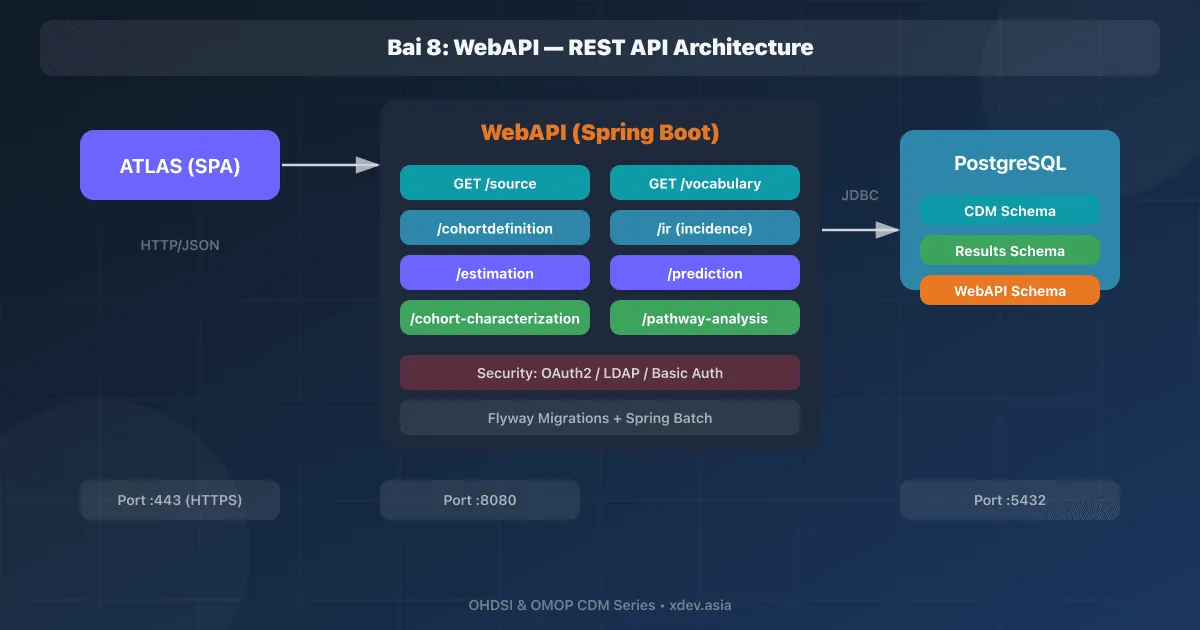
WebAPI 是 ATLAS 的 REST API 後端——用 Java/Spring Boot 編寫,為 OHDSI 生態系統提供所有分析服務。 ATLAS(前端)完全透過WebAPI與CDM資料庫通訊。
ATLAS (JavaScript) ──HTTP──→ WebAPI (Spring Boot) ──JDBC──→ CDM Database
1.WebAPI架構
1.1 元件
┌──────────────────────────────────────────────────────┐
│                   OHDSI WebAPI                       │
│                                                      │
│  ┌────────────────────────────────────────────────┐  │
│  │              REST Controllers                  │  │
│  │  /source  /vocabulary  /cohortdefinition       │  │
│  │  /ir  /estimation  /prediction  /pathway       │  │
│  └────────────────────────────────────────────────┘  │
│                       │                              │
│  ┌────────────────────┴───────────────────────────┐  │
│  │              Service Layer                     │  │
│  │  CohortService, VocabularyService,             │  │
│  │  IRAnalysisService, EstimationService          │  │
│  └────────────────────────────────────────────────┘  │
│                       │                              │
│  ┌────────────────────┴───────────────────────────┐  │
│  │              Data Access Layer                 │  │
│  │  Spring JDBC + SQL templates                   │  │
│  │  Multi-dialect: PostgreSQL, SQL Server, Oracle  │  │
│  └────────────────────────────────────────────────┘  │
│                       │                              │
│  ┌────────────────────┼───────────────────────────┐  │
│  │           Database Connections                 │  │
│  │  ┌─────────┐  ┌──────────┐  ┌──────────────┐  │  │
│  │  │WebAPI DB│  │CDM Source│  │CDM Source    │  │  │
│  │  │(config) │  │    #1    │  │    #2        │  │  │
│  │  └─────────┘  └──────────┘  └──────────────┘  │  │
│  └────────────────────────────────────────────────┘  │
└──────────────────────────────────────────────────────┘
1.2 兩個資料庫
1. WebAPI Database (ohdsi_webapi)
   → Lưu cấu hình: source definitions, cohort definitions,
     analysis settings, user preferences
   → Được WebAPI tự tạo schema khi khởi động

2. CDM Database (ohdsi hoặc tên tuỳ chọn)
   → Chứa dữ liệu bệnh nhân đã chuẩn hóa OMOP CDM
   → WebAPI chỉ READ từ CDM schema
   → WebAPI WRITE vào Results schema (cohort tables)
2.安裝WebAPI
2.1 Docker(推薦)
# docker-compose.yml
services:
  webapi-db:
    image: postgres:16-alpine
    environment:
      POSTGRES_DB: ohdsi_webapi
      POSTGRES_USER: ohdsi
      POSTGRES_PASSWORD: ${WEBAPI_DB_PASS}
    volumes:
      - webapi-db-data:/var/lib/postgresql/data
    healthcheck:
      test: pg_isready -U ohdsi
      interval: 10s
      retries: 5

  webapi:
    image: ohdsi/webapi:latest
    depends_on:
      webapi-db:
        condition: service_healthy
    ports:
      - "8080:8080"
    environment:
      # WebAPI internal database
      DATASOURCE_URL: jdbc:postgresql://webapi-db:5432/ohdsi_webapi
      DATASOURCE_USERNAME: ohdsi
      DATASOURCE_PASSWORD: ${WEBAPI_DB_PASS}
      DATASOURCE_OHDSI_SCHEMA: webapi
      SPRING_JPA_PROPERTIES_HIBERNATE_DEFAULT_SCHEMA: webapi

      # Flyway migration
      FLYWAY_DATASOURCE_URL: jdbc:postgresql://webapi-db:5432/ohdsi_webapi
      FLYWAY_DATASOURCE_USERNAME: ohdsi
      FLYWAY_DATASOURCE_PASSWORD: ${WEBAPI_DB_PASS}
      FLYWAY_SCHEMAS: webapi
      FLYWAY_BASELINE_ON_MIGRATE: "true"

      # Security (disable for development)
      SECURITY_ORIGIN: "*"
      SECURITY_PROVIDER: DisabledSecurity
    healthcheck:
      test: curl -f http://localhost:8080/WebAPI/info || exit 1
      interval: 30s
      retries: 10

volumes:
  webapi-db-data:
# Khởi chạy
docker compose up -d

# Verify
curl http://localhost:8080/WebAPI/info
# {"version":"2.14.0","buildInfo":...}
2.2 從原始碼構建
# Clone repository
git clone https://github.com/OHDSI/WebAPI.git
cd WebAPI

# Build với Maven
mvn clean package -DskipTests \
  -P webapi-postgresql

# Output: target/WebAPI.war

# Deploy trên Tomcat hoặc chạy standalone
java -jar target/WebAPI.war \
  --datasource.url=jdbc:postgresql://localhost:5432/ohdsi_webapi \
  --datasource.username=ohdsi \
  --datasource.password=password \
  --flyway.datasource.url=jdbc:postgresql://localhost:5432/ohdsi_webapi
3.配置CDM來源
3.1 透過 REST API 新增 CDM 來源
# Đăng ký CDM database source
curl -X POST http://localhost:8080/WebAPI/source \
  -H "Content-Type: application/json" \
  -d '{
    "sourceKey": "HOSPITAL_XYZ",
    "sourceName": "Hospital XYZ Vietnam",
    "sourceDialect": "postgresql",
    "connectionString": "jdbc:postgresql://cdm-db:5432/ohdsi",
    "username": "ohdsi_app",
    "password": "app_password",
    "daimons": [
      {
        "daimonType": "CDM",
        "tableQualifier": "cdm",
        "priority": 1
      },
      {
        "daimonType": "Vocabulary",
        "tableQualifier": "cdm",
        "priority": 1
      },
      {
        "daimonType": "Results",
        "tableQualifier": "results",
        "priority": 1
      },
      {
        "daimonType": "Temp",
        "tableQualifier": "temp",
        "priority": 0
      }
    ]
  }'
3.2 魔鬼類型
CDM Daimon:
  → Schema chứa clinical data (person, visit, condition, drug, measurement...)
  → READ ONLY

Vocabulary Daimon:
  → Schema chứa vocabulary tables (concept, concept_relationship...)
  → Thường cùng schema với CDM
  → READ ONLY

Results Daimon:
  → Schema chứa cohort, cohort_definition
  → WebAPI WRITE cohort results vào đây
  → READ/WRITE

Temp Daimon:
  → Schema cho temporary tables trong analysis
  → READ/WRITE
3.3 多源配置
WebAPI hỗ trợ kết nối nhiều CDM databases:

┌───────────┐     ┌──────────────┐     ┌───────────────┐
│  WebAPI   │ ←→  │ CDM Source 1 │     │ Hospital A    │
│           │     │ (HOSPITAL_A) │     │ PostgreSQL    │
│           │     └──────────────┘     └───────────────┘
│           │
│           │     ┌──────────────┐     ┌───────────────┐
│           │ ←→  │ CDM Source 2 │     │ Hospital B    │
│           │     │ (HOSPITAL_B) │     │ SQL Server    │
│           │     └──────────────┘     └───────────────┘
│           │
│           │     ┌──────────────┐     ┌───────────────┐
│           │ ←→  │ CDM Source 3 │     │ Insurance     │
│           │     │ (INSURANCE)  │     │ Oracle        │
└───────────┘     └──────────────┘     └───────────────┘

→ ATLAS UI cho phép chuyển đổi giữa các sources
→ Chạy analysis trên cùng cohort definition, khác data sources
4.WebAPI REST 端點
4.1 主要端點
GET  /WebAPI/info                          → Thông tin version
GET  /WebAPI/source                        → Danh sách CDM sources

Vocabulary:
GET  /WebAPI/vocabulary/{sourceKey}/concept/{id}     → Chi tiết concept
GET  /WebAPI/vocabulary/{sourceKey}/search            → Tìm concepts

Cohort Definition:
GET  /WebAPI/cohortdefinition                        → List tất cả cohorts
POST /WebAPI/cohortdefinition                        → Tạo cohort mới
GET  /WebAPI/cohortdefinition/{id}                   → Chi tiết cohort
POST /WebAPI/cohortdefinition/{id}/generate/{sourceKey} → Execute cohort

Incidence Rate:
GET  /WebAPI/ir                                      → List IR analyses
POST /WebAPI/ir                                      → Tạo IR analysis
POST /WebAPI/ir/{id}/execute/{sourceKey}             → Execute IR

Estimation:
GET  /WebAPI/estimation                              → List estimations
POST /WebAPI/estimation                              → Tạo estimation

Characterization:
GET  /WebAPI/cohort-characterization                 → List characterizations

Pathway:
GET  /WebAPI/pathway-analysis                        → List pathway analyses
4.2 呼叫API範例
# List CDM Sources
curl http://localhost:8080/WebAPI/source
# [{"sourceId":1,"sourceName":"Hospital XYZ","sourceKey":"HOSPITAL_XYZ",...}]

# Search Vocabulary
curl "http://localhost:8080/WebAPI/vocabulary/HOSPITAL_XYZ/search" \
  -H "Content-Type: application/json" \
  -d '{"QUERY":"hypertension","DOMAIN_ID":["Condition"]}'

# Get Concept Details
curl http://localhost:8080/WebAPI/vocabulary/HOSPITAL_XYZ/concept/320128

# List Cohort Definitions
curl http://localhost:8080/WebAPI/cohortdefinition

# Generate Cohort
curl -X POST \
  http://localhost:8080/WebAPI/cohortdefinition/1/generate/HOSPITAL_XYZ
5. 安全性配置
5.1 驗證提供程序
# application.properties hoặc environment variables

# Option 1: Disabled (development only)
SECURITY_PROVIDER: DisabledSecurity

# Option 2: Database authentication
SECURITY_PROVIDER: AtlasRegularSecurity
SECURITY_DB_DATASOURCE_URL: jdbc:postgresql://webapi-db:5432/ohdsi_webapi
SECURITY_DB_DATASOURCE_SCHEMA: webapi_security

# Option 3: LDAP/Active Directory
SECURITY_PROVIDER: AtlasRegularSecurity
SECURITY_LDAP_URL: ldap://ldap.hospital.local:389
SECURITY_LDAP_SEARCHBASE: dc=hospital,dc=local
SECURITY_LDAP_DN: cn=admin,dc=hospital,dc=local

# Option 4: OAuth2 (Google, GitHub)
SECURITY_PROVIDER: AtlasRegularSecurity
SECURITY_OAUTH_GOOGLE_APIKEY: your-google-client-id
SECURITY_OAUTH_GOOGLE_APISECRET: your-google-secret
5.2 基於角色的訪問
WebAPI Roles:
- public    → Read-only access (xem cohort definitions)
- atlas     → Create/edit cohort definitions, run analyses
- admin     → Manage sources, users, permissions
6. 故障排除
Lỗi phổ biến:

1. "Source not found"
   → Kiểm tra source đã được đăng ký: GET /WebAPI/source
   → Kiểm tra connection string đúng chưa

2. "Schema 'cdm' does not exist"
   → Kiểm tra tableQualifier trong daimon configuration
   → Đảm bảo user có quyền access schema

3. "Vocabulary tables empty"
   → Vocabulary chưa được load vào CDM database
   → Chạy lại vocabulary import script

4. WebAPI khởi động chậm (~2-5 phút)
   → Bình thường: Flyway migration chạy lần đầu
   → Check logs: docker logs webapi -f

5. Cohort generation timeout
   → Tăng timeout: spring.mvc.async.request-timeout=600000
   → Kiểm tra indexes trên CDM tables
總結
| 概念 | 說明 |
|---|---|
| 網頁API | ATLAS 的後端 REST API(Spring Boot/Java) |
| WebAPI 資料庫 | 資料庫儲存配置、群組定義、分析設定 |
| CDM 大門 | 架構包含臨床資料(唯讀) |
| 結果大門 | 架構包含佇列結果(讀/寫) |
| 來源 | 1個CDM資料庫連線(支援多來源) |
| 飛行路線 | 資料庫遷移工具(自建WebAPI schema) |
下一篇文章:ATLAS — 安裝、WebAPI 整合與介面概述