簡介
將微服務部署到生產中是風險最大的時候。部署策略決定出現錯誤時的影響範圍 — 影響 100% 的使用者還是僅影響 5%?本文比較了策略並提供了選擇正確策略的指導。
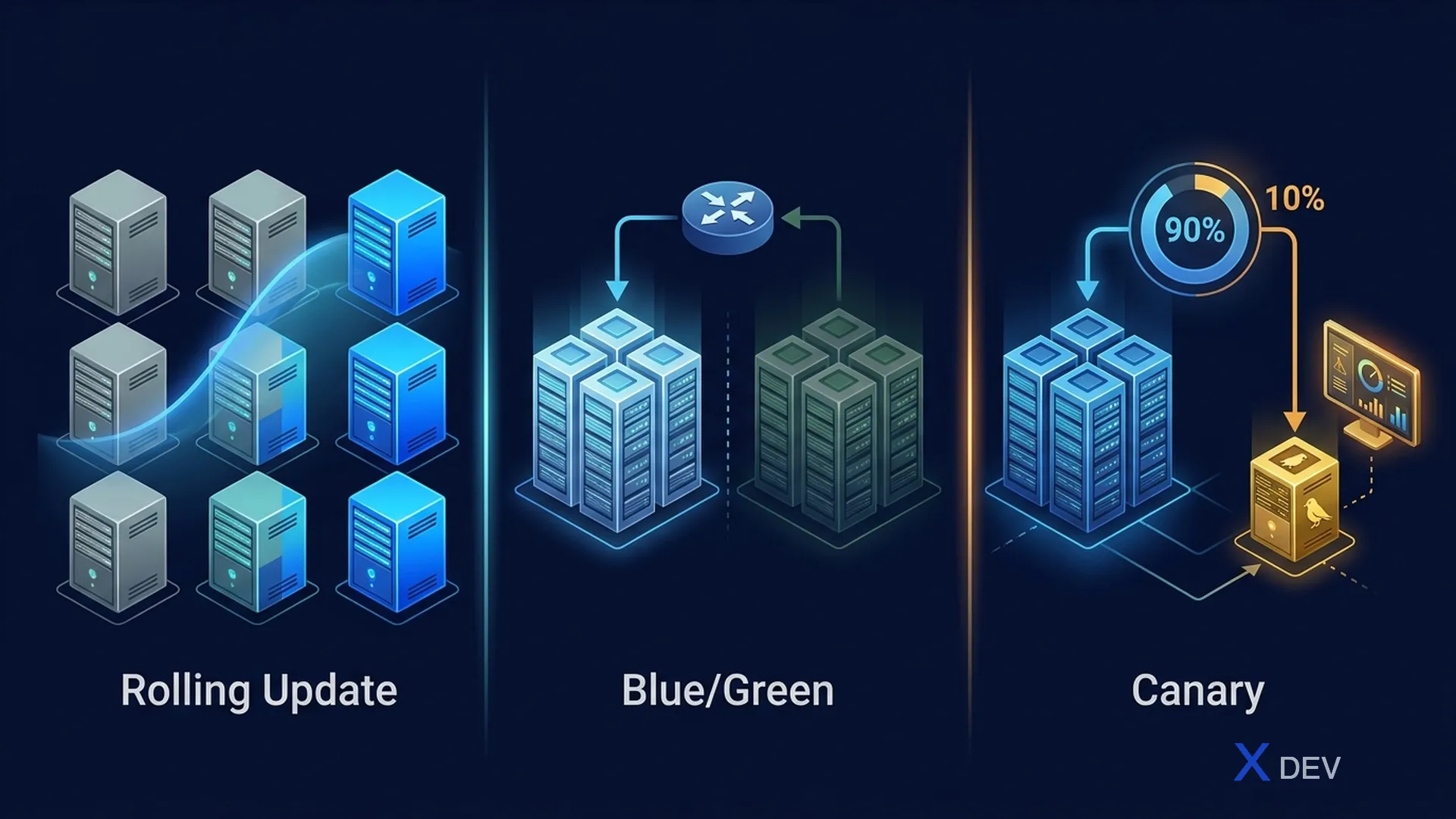
1. 滾動更新
Kubernetes mặc định:

Pod v1 ●●●●●  (5 replicas)

Deploy v2:
Step 1: ●●●●● + ○     (1 new pod v2 starting)
Step 2: ●●●● + ○○      (2 v2 ready, 1 v1 terminated)
Step 3: ●●● + ○○○      (3 v2 ready)
Step 4: ●● + ○○○○
Step 5: ○○○○○           (all v2)

● = v1, ○ = v2
優點: 零停機、漸進、K8s原生 缺點: 上線時版本混雜,回滾速度慢 用例: 低風險變更、無狀態服務
2. 藍/綠部署
Blue (current, live):  ●●●●●  ← traffic
Green (new, staging):  ○○○○○  ← no traffic

Test Green thoroughly, then switch:

Blue:  ●●●●●  ← no traffic (standby)
Green: ○○○○○  ← ALL traffic switched instantly
**優點:**即時回滾(切換回藍色),上線前全面測試 **缺點:**需要2x資源,資料庫遷移必須向後相容 用例: 關鍵服務,需要即時回滾時
3. 金絲雀部署 ⭐
Step 1: ●●●●● (100% v1)
Step 2: ●●●●○ (90% v1, 10% v2) ← canary
Step 3: Monitor metrics (error rate, latency, CPU)
Step 4a: Metrics OK → ●●●○○ → ●●○○○ → ○○○○○ (promote)
Step 4b: Metrics BAD → ●●●●● (rollback, remove canary)
**優點:**最小爆炸半徑,數據驅動推廣 缺點: 設定複雜,需要良好的監控 用例: 大多數生產部署 - 建議的預設值
4. Argo 推出(漸進式交付)
# rollout.yaml
apiVersion: argoproj.io/v1alpha1
kind: Rollout
metadata:
  name: product-service
spec:
  replicas: 5
  strategy:
    canary:
      canaryService: product-service-canary
      stableService: product-service-stable
      steps:
        - setWeight: 5
        - pause: { duration: 5m }
        - setWeight: 20
        - pause: { duration: 10m }
        - setWeight: 50
        - pause: { duration: 15m }
        - setWeight: 100
      analysis:
        templates:
          - templateName: success-rate
        startingStep: 2
        args:
          - name: service-name
            value: product-service

---
apiVersion: argoproj.io/v1alpha1
kind: AnalysisTemplate
metadata:
  name: success-rate
spec:
  metrics:
    - name: success-rate
      interval: 1m
      successCondition: result[0] >= 0.99
      provider:
        prometheus:
          address: http://prometheus:9090
          query: |
            sum(rate(http_requests_total{service="{{args.service-name}}",code=~"2.."}[5m]))
            /
            sum(rate(http_requests_total{service="{{args.service-name}}"}[5m]))
5. 功能標誌
將程式碼部署到生產而不為使用者啟用:
// Feature flag check
const unleash = require('unleash-client');

app.get('/api/products', (req, res) => {
  const products = getProducts();

  if (unleash.isEnabled('new-recommendation-engine', {
    userId: req.user.id
  })) {
    // New feature, enabled for specific users
    products.forEach(p => {
      p.recommendations = newEngine.getRecommendations(p.id);
    });
  }

  res.json(products);
});
功能標誌 + 金絲雀
1. Deploy v2 with feature flag OFF → 100% users get old behavior
2. Enable flag for 5% users → monitor
3. Gradually increase → 20% → 50% → 100%
4. Remove flag from code after full rollout
6. 決策矩陣
| 戰略 | 風險 | 速度 | 成本 | 回滾 | 最適合 |
|---|---|---|---|---|---|
| 滾動 | 中 | 慢 | 低 | 慢 | 低風險變更 |
| 藍色/綠色 | 低 | 快 | 高 (2x) | 即時 | 關鍵服務 |
| 金絲雀 | 極低 | 中 | 低 | 快 | 預設選擇 |
| 功能標誌 | 極低 | 即時 | 低 | 即時 | 使用者體驗變更 |
推薦
E-Commerce Platform:
├── Backend services: Canary (Argo Rollouts) + Auto analysis
├── Micro Frontends: Canary via CDN traffic splitting
├── Database changes: Blue/Green (backward compatible)
└── UI features: Feature flags (Unleash)
7.回滾策略
| 組件 | 回滾方法 |
|---|---|
| K8s 部署 | kubectl rollout undo |
| Argo 推出 | 分析失敗時自動回滾 |
| CDN 上的 MFE | 指向先前的版本 |
| 資料庫 | 正向遷移(永不回滾架構) |
| 功能標誌 | 立即停用標誌 |
總結
- 滾動更新:K8s默認,簡單,適合低風險
- 藍/綠:即時回滾,2倍成本
- 金絲雀:最小爆炸半徑 — 建議預設值
- Argo 推出:自動漸進式交付與分析
- 功能標誌:部署≠發布,即時啟用/停用
下一篇文章: 第 26 課:全端可觀察性 — 日誌、指標與追蹤