1. FHIR 上的 SMART 概述
1.1。什麼是智能?
FHIR 上的 SMART(可替代醫療應用程式、可重複使用技術) 是一個開放標準,允許第三方應用程式透過 FHIR API 安全地存取醫療資料。智能定義:
- 應用程式啟動框架:如何從 EHR 或獨立啟動應用程式
- 授權範圍:FHIR 資源的細化權限
- 啟動上下文:傳遞給應用程式的患者、遭遇、位置上下文
- 後端服務:服務到服務的授權不需要使用者交互
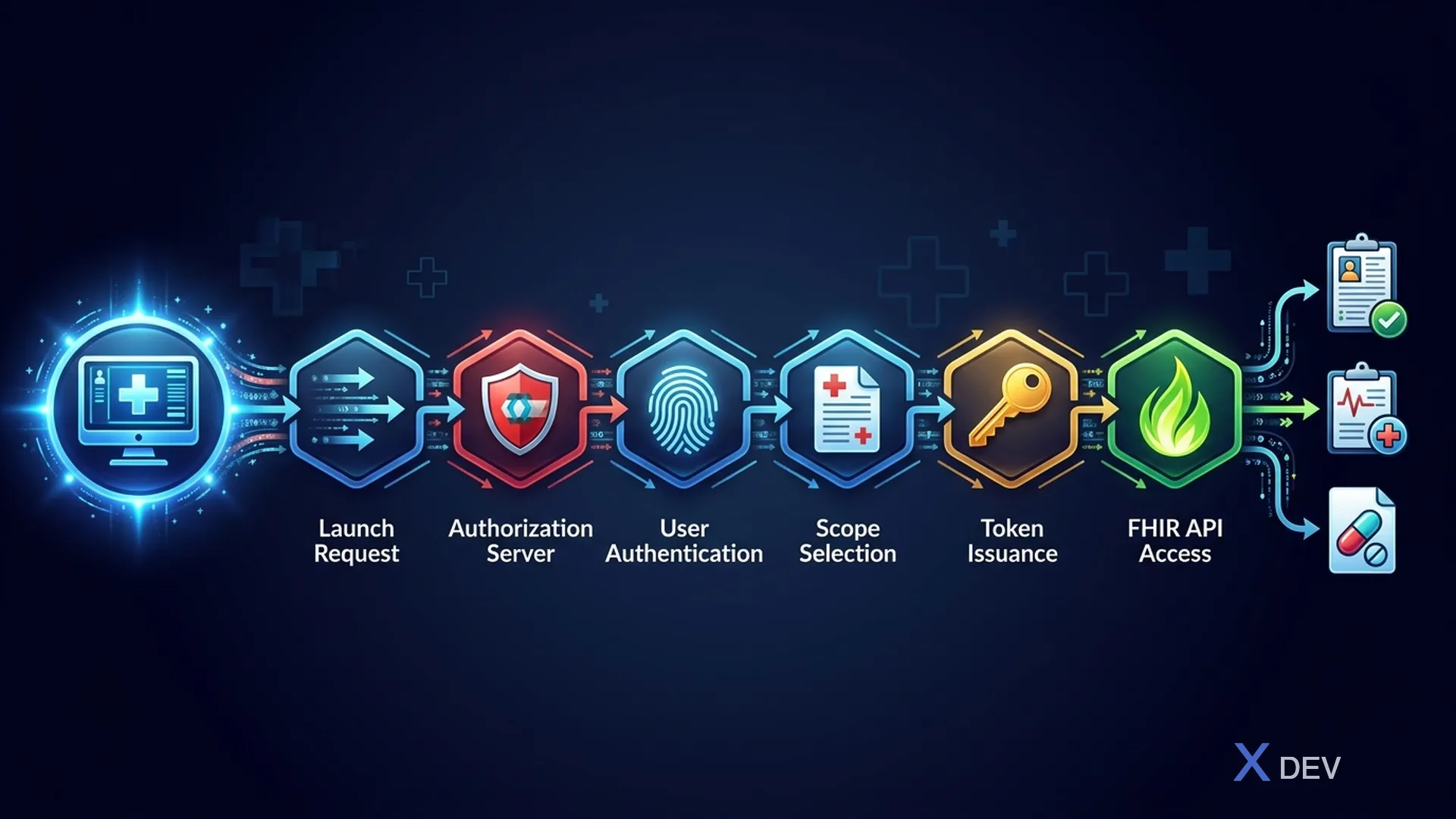
1.2。 SMART 應用程式啟動流程
EHR 啟動流程:
- 使用者在 EHR 中點選“啟動應用程式”
- EHR 發送帶有上下文的啟動請求(病患 ID、遭遇 ID) 3.應用程式重定向到授權伺服器(Keycloak)
- 使用者身份驗證(或 SSO)
- Keycloak 使用 SMART 範圍頒發存取權令牌
- App使用token存取FHIR資源
獨立啟動流程:
- 使用者直接開啟應用程式(例如行動應用程式)
- App重定向到Keycloak進行身份驗證
- 使用者使用憑證+MFA進行身份驗證
- 應用程式請求 SMART 範圍
- 如果需要患者背景 → 患者選擇器 6.Keycloak頒發存取權令牌
- App訪問FHIR資源
後端服務授權:
- 服務使用簽署的 JWT 斷言進行身份驗證 2.Keycloak驗證JWT並頒發存取令牌 3.服務存取FHIR資源 → 無需使用者互動。用於:資料同步、分析、報告。
2. 智慧型示波器
2.1。 FHIR 資源範圍
Format: <context>/<resource>.<permission>

Context:
  patient  → Access linked to a specific patient
  user     → Access linked to the current user
  system   → Full system-level access (backend services)

Resource:
  Patient, Observation, MedicationRequest, DiagnosticReport,
  Condition, Encounter, AllergyIntolerance, Immunization, etc.

Permission:
  read     → Search and read resources
  write    → Create, update, delete resources
  *        → All permissions
2.2。醫療保健範圍範例
# Bác sĩ: Truy cập hồ sơ bệnh nhân trong context đang khám
user/Patient.read
user/Observation.read
user/Observation.write          # Vital signs, clinical observations
user/Condition.read
user/Condition.write            # Diagnoses
user/MedicationRequest.write    # Prescriptions
user/DiagnosticReport.read      # Lab results
user/AllergyIntolerance.read

# Bệnh nhân: Truy cập hồ sơ của chính mình
patient/Patient.read
patient/Observation.read
patient/MedicationRequest.read
patient/DiagnosticReport.read
patient/AllergyIntolerance.read
patient/Immunization.read

# Backend Service: Sync lab results
system/DiagnosticReport.write
system/Observation.write
system/ServiceRequest.read

# Ứng dụng nghiên cứu (de-identified data)
system/Patient.read?_elements=gender,birthDate,address.state
system/Condition.read
system/Observation.read
2.3。 SMART 的 Keycloak 用戶端範圍
{
  "clientScopes": [
    {
      "name": "patient/*.read",
      "description": "Read all FHIR resources for a specific patient",
      "protocol": "openid-connect",
      "attributes": {
        "include.in.token.scope": "true",
        "display.on.consent.screen": "true",
        "consent.screen.text": "Đọc hồ sơ bệnh án của bạn"
      },
      "protocolMappers": [
        {
          "name": "smart-patient-scope",
          "protocol": "openid-connect",
          "protocolMapper": "oidc-hardcoded-claim-mapper",
          "config": {
            "claim.name": "scope",
            "claim.value": "patient/*.read",
            "access.token.claim": "true"
          }
        }
      ]
    },
    {
      "name": "launch/patient",
      "description": "EHR launch with patient context",
      "protocol": "openid-connect",
      "attributes": {
        "include.in.token.scope": "true"
      },
      "protocolMappers": [
        {
          "name": "patient-launch-context",
          "protocol": "openid-connect",
          "protocolMapper": "oidc-usersessionmodel-note-mapper",
          "config": {
            "user.session.note": "patient_id",
            "claim.name": "patient",
            "access.token.claim": "true"
          }
        }
      ]
    },
    {
      "name": "fhirUser",
      "description": "FHIR User identity claim",
      "protocol": "openid-connect",
      "protocolMappers": [
        {
          "name": "fhir-user-mapper",
          "protocol": "openid-connect",
          "protocolMapper": "oidc-hardcoded-claim-mapper",
          "config": {
            "claim.name": "fhirUser",
            "claim.value": "",
            "access.token.claim": "true",
            "id.token.claim": "true"
          }
        }
      ]
    }
  ]
}
3. 使用 Quarkus 在 FHIR 上實現 SMART
3.1。 FHIR資源伺服器實施
@Path("/fhir/r4")
@Authenticated
@Produces("application/fhir+json")
public class FhirPatientResource {

    @Inject
    SecurityIdentity identity;

    @Inject
    PatientRepository patientRepository;

    @Inject
    SmartScopeValidator scopeValidator;

    @GET
    @Path("/Patient/{id}")
    public Response readPatient(@PathParam("id") String id) {
        // Validate SMART scopes
        scopeValidator.requireScope(identity, "patient/Patient.read",
                                    "user/Patient.read");

        // If patient context → verify patient match
        String launchPatient = identity.getAttribute("patient");
        if (launchPatient != null && !launchPatient.equals(id)) {
            if (scopeValidator.hasOnlyPatientScopes(identity)) {
                throw new ForbiddenException(
                    "Patient scope restricted to patient: " + launchPatient);
            }
        }

        Patient patient = patientRepository.findById(id);
        if (patient == null) {
            return Response.status(404).entity(
                createOperationOutcome("Patient not found")).build();
        }

        return Response.ok(patient.toFhirJson()).build();
    }

    @GET
    @Path("/Patient")
    public Response searchPatients(
            @QueryParam("name") String name,
            @QueryParam("birthdate") String birthdate,
            @QueryParam("identifier") String identifier,
            @QueryParam("_count") @DefaultValue("20") int count) {

        scopeValidator.requireScope(identity,
            "patient/Patient.read", "user/Patient.read", "system/Patient.read");

        // Apply patient context restriction
        SearchParams params = SearchParams.builder()
            .name(name)
            .birthdate(birthdate)
            .identifier(identifier)
            .count(Math.min(count, 100))  // Cap results
            .patientContext(identity.getAttribute("patient"))
            .build();

        Bundle bundle = patientRepository.search(params);
        return Response.ok(bundle.toFhirJson()).build();
    }
}
3.2。智慧範圍驗證器
@ApplicationScoped
public class SmartScopeValidator {

    public void requireScope(SecurityIdentity identity, String... anyOfScopes) {
        Set<String> grantedScopes = getSmartScopes(identity);

        boolean hasScope = Arrays.stream(anyOfScopes)
            .anyMatch(scope -> matchScope(grantedScopes, scope));

        if (!hasScope) {
            throw new ForbiddenException(
                "Insufficient SMART scope. Required one of: " +
                String.join(", ", anyOfScopes));
        }
    }

    public boolean hasOnlyPatientScopes(SecurityIdentity identity) {
        return getSmartScopes(identity).stream()
            .allMatch(s -> s.startsWith("patient/") || s.equals("openid") ||
                          s.equals("fhirUser") || s.startsWith("launch/"));
    }

    private boolean matchScope(Set<String> granted, String required) {
        // Direct match
        if (granted.contains(required)) return true;

        // Wildcard match: patient/*.read matches patient/Patient.read
        String[] parts = required.split("[/.]");
        if (parts.length == 3) {
            String wildcardScope = parts[0] + "/*." + parts[2];
            return granted.contains(wildcardScope);
        }

        return false;
    }

    private Set<String> getSmartScopes(SecurityIdentity identity) {
        // Extract scopes from JWT claim
        JsonArray scopeClaim = identity.getAttribute("scope");
        if (scopeClaim != null) {
            return scopeClaim.stream()
                .map(JsonValue::toString)
                .collect(Collectors.toSet());
        }
        return Set.of();
    }
}
3.3。 SMART 眾所周知的配置
@Path("/.well-known/smart-configuration")
public class SmartConfigurationResource {

    @GET
    @Produces(MediaType.APPLICATION_JSON)
    public Response getSmartConfiguration() {
        return Response.ok(Map.of(
            "authorization_endpoint",
                "https://keycloak.hospital.vn/realms/healthcare/protocol/openid-connect/auth",
            "token_endpoint",
                "https://keycloak.hospital.vn/realms/healthcare/protocol/openid-connect/token",
            "introspection_endpoint",
                "https://keycloak.hospital.vn/realms/healthcare/protocol/openid-connect/token/introspect",
            "revocation_endpoint",
                "https://keycloak.hospital.vn/realms/healthcare/protocol/openid-connect/revoke",
            "capabilities", List.of(
                "launch-ehr",
                "launch-standalone",
                "client-public",
                "client-confidential-symmetric",
                "sso-openid-connect",
                "context-passthrough-banner",
                "context-passthrough-style",
                "context-ehr-patient",
                "context-ehr-encounter",
                "context-standalone-patient",
                "permission-offline",
                "permission-patient",
                "permission-user",
                "authorize-post"
            ),
            "scopes_supported", List.of(
                "openid", "fhirUser", "launch", "launch/patient",
                "patient/*.read", "patient/*.write",
                "user/*.read", "user/*.write",
                "system/*.read", "system/*.write"
            ),
            "response_types_supported", List.of("code"),
            "code_challenge_methods_supported", List.of("S256"),
            "token_endpoint_auth_methods_supported", List.of(
                "client_secret_basic", "client_secret_post", "private_key_jwt"
            )
        )).build();
    }
}
4.FHIR 同意資源
4.1。患者同意管理
{
  "resourceType": "Consent",
  "id": "consent-001",
  "status": "active",
  "scope": {
    "coding": [{
      "system": "http://terminology.hl7.org/CodeSystem/consentscope",
      "code": "patient-privacy"
    }]
  },
  "category": [{
    "coding": [{
      "system": "http://loinc.org",
      "code": "59284-0",
      "display": "Patient Consent"
    }]
  }],
  "patient": {
    "reference": "Patient/P-001"
  },
  "dateTime": "2026-04-01T10:00:00+07:00",
  "provision": {
    "type": "permit",
    "period": {
      "start": "2026-04-01",
      "end": "2027-04-01"
    },
    "actor": [{
      "role": {
        "coding": [{
          "system": "http://terminology.hl7.org/CodeSystem/v3-ParticipationType",
          "code": "PRCP",
          "display": "Primary Care Provider"
        }]
      },
      "reference": {
        "reference": "Organization/BV-cho-ray"
      }
    }],
    "action": [{
      "coding": [{
        "system": "http://terminology.hl7.org/CodeSystem/consentaction",
        "code": "access"
      }]
    }],
    "purpose": [{
      "system": "http://terminology.hl7.org/CodeSystem/v3-ActReason",
      "code": "TREAT",
      "display": "Treatment"
    }]
  }
}
5.後端服務授權
5.1。使用簽名 JWT 進行服務身份驗證
// Backend service authenticates with JWT assertion
@ApplicationScoped
public class FhirBackendServiceClient {

    @ConfigProperty(name = "fhir.service.private-key-path")
    String privateKeyPath;

    @ConfigProperty(name = "fhir.service.client-id")
    String clientId;

    @ConfigProperty(name = "fhir.keycloak.token-url")
    String tokenUrl;

    public String getAccessToken() {
        // Create signed JWT assertion (RFC 7523)
        PrivateKey key = loadPrivateKey(privateKeyPath);

        String jwt = Jwt.issuer(clientId)
            .subject(clientId)
            .audience(tokenUrl)
            .expiresIn(Duration.ofMinutes(5))
            .jws().keyId("service-key-1")
            .sign(key);

        // Exchange JWT for access token
        return WebClient.create(tokenUrl)
            .post()
            .sendForm(MultiMap.caseInsensitiveMultiMap()
                .add("grant_type", "client_credentials")
                .add("client_assertion_type",
                    "urn:ietf:params:oauth:client-assertion-type:jwt-bearer")
                .add("client_assertion", jwt)
                .add("scope", "system/*.read system/*.write"))
            .await()
            .bodyAsJsonObject()
            .getString("access_token");
    }
}
6. 總結
在本課中,我們有:
- 了解 SMART on FHIR 框架和 3 個啟動流程
- 為醫療保健資源設計 SMART 示波器
- 為 SMART 設定 Keycloak 用戶端範圍
- 在 Quarkus 上實作 FHIR 資源伺服器 並進行範圍驗證
- 建構 SMART 眾所周知的配置 端點
- 使用 FHIR 同意資源實施 病患同意 管理
- 使用簽署的 JWT 實作後端服務授權
練習
- 使用患者上下文為 SMART EHR Launch 配置 Keycloak 用戶端
- 實施具有 SMART 範圍驗證的 FHIR 觀察資源伺服器
- 建立 SMART Well-Known 設定端點
- 為 EHR 啟動流程編寫整合測試
| ◀ 上一篇 | 下一篇文章 ▶ |
|---|---|
| 第 6 課:RBAC 和 ABAC - 醫生、護士和病人的權力下放 | 第 8 課:MFA、萬能鑰匙和醫務人員的緊急通道 |