Repo for your reference code here
Key Takeaways:
- ❌ AES-GCM with random IV → Unable to search
- ✅ Searchable Hash Index → Exact search (exact match)
- ✅ Tokenization + Hashing → Partial match
1. Challenge: Encryption vs Searchability
1.1 Problem
Healthcare applications need storage PII (Personally Identifiable Information):
- ID card/CCCD (National ID)
- Phone number
- Full name
- Address
This is group sensitive information PHI (Protected Health Information) according to HIPAA standards.
Conflicting requirements:
- 🔒 Security: Data must be encrypted at-rest (HIPAA, GDPR compliance)
- 🔍 Usability: User needs to search "Nguyen Van A", "Tran", etc.
1.2 Why doesn't Standard Encryption work?
// AES-256-GCM với random IV
encrypt("Nguyễn Văn A") → "xK9L2m..."  // Lần 1
encrypt("Nguyễn Văn A") → "pQ3N7r..."  // Lần 2 - KHÁC!
// SQL query không hoạt động
WHERE encrypted_name = encrypt("Nguyễn Văn A")  // ❌ Fail!
Random IV = high security but impossible to search. Each time encoding the same value will give a different result, ensuring semantic security but not directly comparable.
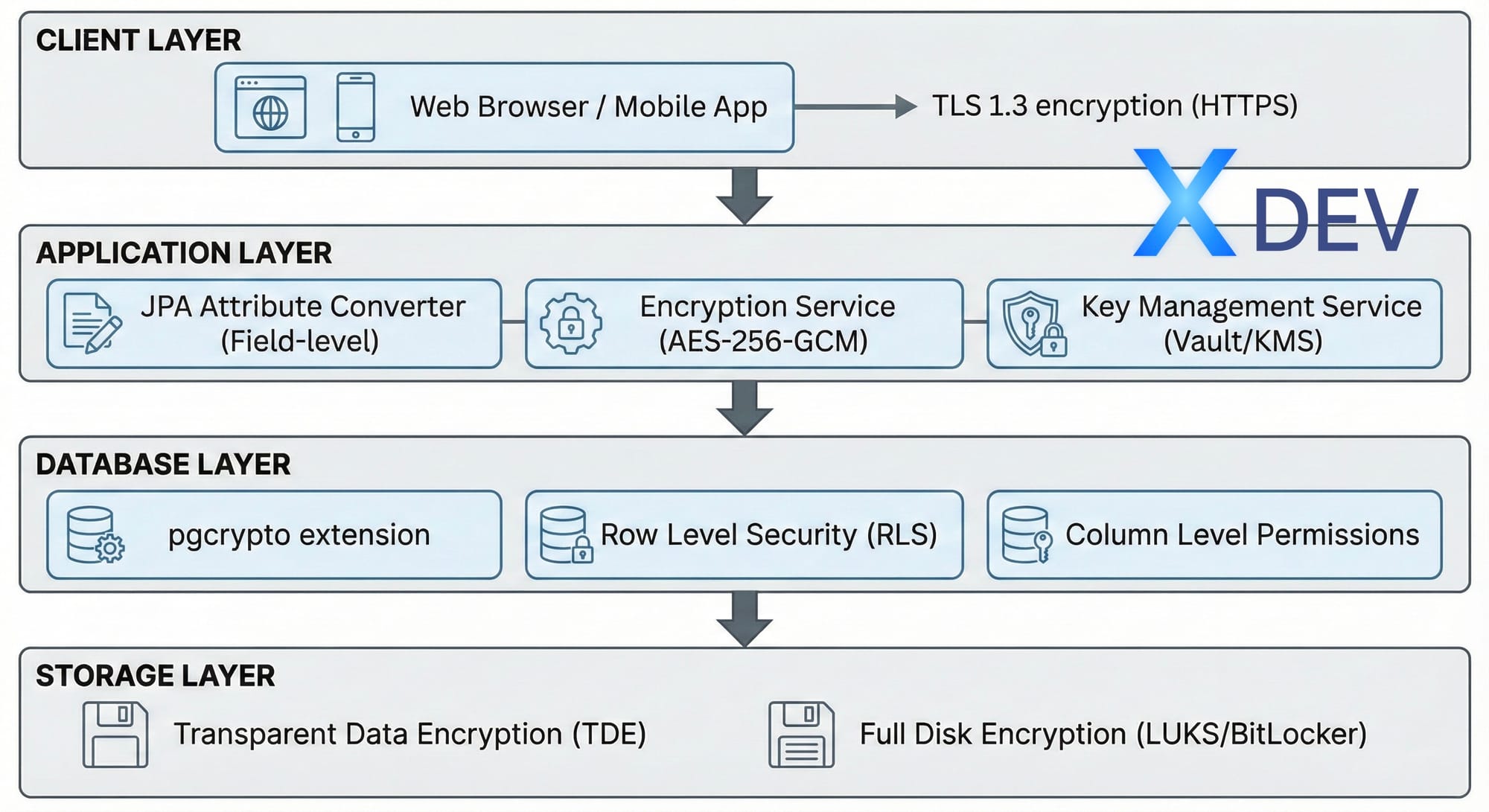
2. Multi-layer Security Architecture
A healthcare system needs to protect data at many levels:
| Layer | Technology | Purpose |
|---|---|---|
| Client Layer | TLS 1.3 (HTTPS) | Encryption during transmission |
| Application Layer | AES-256-GCM, JPA Converter | Field-level encryption |
| Database Layer | pgcrypto, RLS | Row Level Security |
| Storage Layer | TDE, LUKS | Full disk encryption |
3. Solution 1: Searchable Hash Index
3.1 Ideas
- Encrypt data with AES-256-GCM (secure with random IV)
- Create deterministic hash for search (HMAC-SHA256)
- Save both: encrypted value + search hash
3.2 Database Schema
CREATE TABLE patients ( id UUID PRIMARY KEY DEFAULT gen_random_uuid(), patient_code VARCHAR(20) UNIQUE NOT NULL,-- PII (mã hóa ở Application Layer) encrypted_national_id BYTEA NOT NULL, encrypted_phone BYTEA, encrypted_full_name BYTEA NOT NULL, -- Hash để tìm kiếm (HMAC-SHA256) national_id_hash VARCHAR(64) UNIQUE NOT NULL, phone_hash VARCHAR(64), created_at TIMESTAMP WITH TIME ZONE DEFAULT NOW());
CREATE INDEX idx_national_id_hash ON patients(national_id_hash);
3.3 Spring Boot Entities
@Entity @Table(name = "patients") public class Patient { @Id @GeneratedValue(strategy = GenerationType.UUID) private UUID id;@Convert(converter = EncryptedStringConverter.class) @Column(name = "national_id") private String nationalId; // Search hash (deterministic) @Column(name = "national_id_hash", unique = true) private String nationalIdHash;
}
3.4 AES-256-GCM Encryption Service
@Service public class AesEncryptionService { private static final String ALGORITHM = "AES/GCM/NoPadding"; private static final int GCM_IV_LENGTH = 12; private static final int GCM_TAG_LENGTH = 128;private final SecretKey secretKey; public AesEncryptionService(@Value("${app.encryption.key}") String key) { byte[] keyBytes = Base64.getDecoder().decode(key); this.secretKey = new SecretKeySpec(keyBytes, "AES"); } public String encrypt(String plaintext) { try { byte[] iv = new byte[GCM_IV_LENGTH]; new SecureRandom().nextBytes(iv); Cipher cipher = Cipher.getInstance(ALGORITHM); cipher.init(Cipher.ENCRYPT_MODE, secretKey, new GCMParameterSpec(GCM_TAG_LENGTH, iv)); byte[] encrypted = cipher.doFinal( plaintext.getBytes(StandardCharsets.UTF_8)); byte[] combined = new byte[iv.length + encrypted.length]; System.arraycopy(iv, 0, combined, 0, iv.length); System.arraycopy(encrypted, 0, combined, iv.length, encrypted.length); return Base64.getEncoder().encodeToString(combined); } catch (Exception e) { throw new EncryptionException("Encryption failed", e); } } public String decrypt(String ciphertext) { try { byte[] combined = Base64.getDecoder().decode(ciphertext); byte[] iv = Arrays.copyOfRange(combined, 0, GCM_IV_LENGTH); byte[] encrypted = Arrays.copyOfRange(combined, GCM_IV_LENGTH, combined.length); Cipher cipher = Cipher.getInstance(ALGORITHM); cipher.init(Cipher.DECRYPT_MODE, secretKey, new GCMParameterSpec(GCM_TAG_LENGTH, iv)); return new String(cipher.doFinal(encrypted), StandardCharsets.UTF_8); } catch (Exception e) { throw new EncryptionException("Decryption failed", e); } }
}
3.5 JPA AttributeConverter
@Converter public class EncryptedStringConverter implements AttributeConverter<String, String> {private static AesEncryptionService encryptionService; @Autowired public void setEncryptionService(AesEncryptionService service) { EncryptedStringConverter.encryptionService = service; } @Override public String convertToDatabaseColumn(String attribute) { if (attribute == null) return null; return encryptionService.encrypt(attribute); } @Override public String convertToEntityAttribute(String dbData) { if (dbData == null) return null; return encryptionService.decrypt(dbData); }
}
3.6 Advantages and Disadvantages
✅ Advantages:
- Very secure (encrypted + hashed)
- Fast lookup (indexed hash)
- Simple implementation
❌ Disadvantages:
- Exact match only (don't search "079*")
- Need separate hash column for each searchable field
4. Solution 2: Tokenization + Search Index
4.1 Problems with Names
Cannot use exact hash for full name because user can search:
- "Tran" (family name - partial)
- "Van" (middle name)
- "Nguyen Van A" (full name)
4.2 Solution: Tokenized Hashing
Hash each word separately and save it to PostgreSQL array:
Input: "Nguyễn Văn A"
↓ 1. Remove diacritics
"nguyen van a"
↓ 2. Tokenize
["nguyen", "van", "a", "nguyenvana"]
↓ 3. Hash each token
[hash("nguyen"), hash("van"), hash("a"), hash("nguyenvana")]
↓ 4. Store in PostgreSQL array
fullNameTokens: TEXT[]
4.3 Vietnamese Text Processing
public class VietnameseTextUtils { public static String removeDiacritics(String text) { String normalized = text.toLowerCase();// Replace đ/Đ normalized = normalized.replace('đ', 'd') .replace('Đ', 'd'); // Remove diacritical marks normalized = Normalizer.normalize( normalized, Normalizer.Form.NFD); normalized = normalized.replaceAll("\\p{M}", ""); return normalized.trim(); }
}
4.4 Token Generation Service
@Service public class SearchableEncryptionService {private final String hmacKey; public String[] generateSearchTokens(String text) { // 1. Normalize String normalized = VietnameseTextUtils.removeDiacritics(text); // 2. Split into words String[] words = normalized.split("\\s+"); // 3. Create token set Set<String> tokens = new HashSet<>(Arrays.asList(words)); // 4. Add full string (for exact match) tokens.add(normalized.replace(" ", "")); // 5. Hash each token return tokens.stream() .map(this::hmacSha256) .toArray(String[]::new); } private String hmacSha256(String data) { try { Mac mac = Mac.getInstance("HmacSHA256"); SecretKeySpec keySpec = new SecretKeySpec( hmacKey.getBytes(StandardCharsets.UTF_8), "HmacSHA256"); mac.init(keySpec); byte[] hash = mac.doFinal( data.getBytes(StandardCharsets.UTF_8)); return Base64.getEncoder().encodeToString(hash); } catch (Exception e) { throw new RuntimeException("HMAC failed", e); } }
}
4.5 Database Schema with GIN Index
CREATE TABLE patients (
id UUID PRIMARY KEY,
full_name TEXT,           -- AES-256-GCM encrypted
full_name_tokens TEXT[],  -- Hashed search tokens
...
);
-- GIN index for array search
CREATE INDEX idx_full_name_tokens
ON patients USING GIN(full_name_tokens);
4.6 Search Query
@Repository public interface PatientRepository extends JpaRepository<Patient, UUID> {@Query("SELECT p FROM Patient p WHERE :token = ANY(p.fullNameTokens)") Page<Patient> findByFullNameTokensContaining( @Param("token") String hashedToken, Pageable pageable );
}
4.7 Search Service
@Service public class PatientSearchService {@Autowired private SearchableEncryptionService searchableService; @Autowired private PatientRepository patientRepository; public Page<Patient> searchPatients(String query, int page, int size) { // 1. Normalize search query String normalized = VietnameseTextUtils.removeDiacritics(query); // 2. Hash the normalized query String hashedToken = searchableService.hmacSha256(normalized); // 3. Search using hashed token return patientRepository.findByFullNameTokensContaining( hashedToken, PageRequest.of(page, size) ); }
}
5. PostgreSQL 17/18 - New Features
PostgreSQL 18 (released September 25, 2025) brings many important security improvements:
5.1 Improvements to pgcrypto
-- PostgreSQL 18 hỗ trợ SHA-2 cho password hashing
SELECT sha256crypt('password', gen_salt('sha256'));
SELECT sha512crypt('password', gen_salt('sha512'));
-- Hỗ trợ CFB mode cho AES
SELECT encrypt('sensitive data'::bytea, 'key'::bytea, 'aes-cfb');
5.2 OAuth 2.0 Native Support
PostgreSQL 18 supports OAuth 2.0 in core, integrating with Keycloak, Okta, Azure AD:
# pg_hba.conf - PostgreSQL 18
host all all 0.0.0.0/0 oauth

issuer="https://keycloak.example.com/realms/myrealm"

scope="openid"
5.3 MD5 Deprecation
⚠️ Warning: MD5 authentication has been deprecated in PostgreSQL 18.
-- Chuyển sang SCRAM-SHA-256
ALTER ROLE myuser PASSWORD 'newpassword';
-- Password nên bắt đầu với 'SCRAM-SHA-256$'
# pg_hba.conf - Sử dụng SCRAM thay MD5
host all all 0.0.0.0/0 scram-sha-256
5.4 Version Comparison
| Features | PG 15 | PG 17 | PG 18 |
|---|---|---|---|
| pgcrypto SHA-2 | ❌ | ⚠️ | ✅ |
| OAuth 2.0 native | ❌ | ❌ | ✅ |
| FIPS mode function | ❌ | ⚠️ | ✅ |
| TLS 1.3 cipher config | ❌ | ❌ | ✅ |
| SCRAM for dblink | ❌ | ✅ | ✅ |
| Direct TLS | ❌ | ✅ | ✅ |
| Incremental backup | ❌ | ✅ | ✅ |
| MD5 deprecated | ❌ | ❌ | ✅ |
6. Trade-offs Analysis
| Approach | Searchability | Security | Performance | Complexity |
|---|---|---|---|---|
| Standard Encryption | ❌ None | ⭐⭐⭐⭐⭐ | ⭐⭐⭐⭐⭐ | ⭐ Simple |
| HashIndex | ⚠️ Exact only | ⭐⭐⭐⭐ | ⭐⭐⭐⭐⭐ | ⭐⭐ Easy |
| Tokenization | ✅ Partial match | ⭐⭐⭐ | ⭐⭐⭐⭐ | ⭐⭐⭐⭐ Complex |
6.1 When to use Hash Index?
- National ID, SSN, Tax ID
- Credit card numbers
- Existing exact identifiers
6.2 When to use Tokenization?
- Names (full name, first/last)
- Addresses
- Free-text fields
7. Real-World Results
7.1 Test Setup
- Dataset: 10,000 Vietnamese patients
- Database: PostgreSQL 18
- Encryption: AES-256-GCM
- Backend: Spring Boot 3.4
7.2 Performance Metrics
| Operation | Time | Notes |
|---|---|---|
| Create patient | ~6ms | Including encryption + tokenization |
| Search "Tran" | ~300ms | 6,092 matches from 10K records |
| Search "Literature" | ~250ms | ~7K matches |
| Exact ID lookup | ~2ms | Using hash index |
7.3 Security Summary
| Aspect | Implementation | Benefits |
|---|---|---|
| Encryption at Rest | AES-256-GCM + random IV | FIPS 140-2 compliant |
| Searchability | HMAC-SHA256 hash index | Fast O(1) lookup |
| Transparency | JPA AttributeConverter | Zero code changes |
| Compliance | HIPAA, GDPR ready | Audit trail, crypto shredding |
7.4 Performance Characteristics
- Encryption overhead: ~2-5% CPU
- Search speed: Same as plaintext (indexed hash)
- Storage overhead: ~30% (Base64 encoding)
- Throughput: 10K+ ops/sec
8. Production Checklist
- ☐ Key management (use KMS, not hardcoded)
- ☐ Separate encryption & hashing keys
- ☐ Audit logging for all PHI access
- ☐ Index performance monitoring
- ☐ Backup encryption keys securely
- ☐ Document search limitations for users
- ☐ Migrate MD5 → SCRAM-SHA-256 (PostgreSQL 18)
- ☐ Enable TLS 1.3 for database connections
8.1 Configuration Example
# application.yml
spring:
  datasource:
    url: jdbc:postgresql://localhost:5432/healthcare?sslmode=require
    hikari:
      ssl-mode: require
app:
encryption:
key: ${ENCRYPTION_KEY}      # From KMS/Vault
algorithm: AES/GCM/NoPadding
hashing:
key: ${HMAC_KEY}            # Separate key for hashing
8.2 Key Management with AWS KMS
@Configuration public class KmsConfig { @Bean public KmsClient kmsClient() { return KmsClient.builder() .region(Region.AP_SOUTHEAST_1) .build(); }@Bean public SecretKey dataEncryptionKey(KmsClient kmsClient, @Value("${aws.kms.key-id}") String keyId) { GenerateDataKeyRequest request = GenerateDataKeyRequest.builder() .keyId(keyId) .keySpec(DataKeySpec.AES_256) .build(); GenerateDataKeyResponse response = kmsClient.generateDataKey(request); return new SecretKeySpec( response.plaintext().asByteArray(), "AES"); }
}
9. Conclusion
Key Insights
- No silver bullet: Encryption vs search is the fundamental tradeoff
- Hybrid approach works best:
- High-risk fields → encrypted + hash
- Names → tokenization
- Metadata → plaintext with access control
- Complexity has cost: Only add if truly needed
When to use tokenization?
- ✅ Healthcare (patient names)
- ✅ Finance (customer search)
- ✅ E-commerce (user profiles)
When to skip?
- ❌ Internal tools (use access control)
- ❌ Public data
- ❌ Non-production environments
Best Practices
- ✅ Use hybrid approach for searchable fields
- ✅ Index hash columns for performance
- ✅ Separate keys for encryption vs hashing
- ✅ Rotate keys sometimes
- ✅ Audit all decryption operations
- ✅ Never log decrypted PII/PHI