回購供您參考 代碼在這裡
要點:
- ❌ 具有隨機 IV 的 AES-GCM → 無法搜尋
- ✅ 可搜尋的雜湊索引→精確搜尋(精確匹配)
- ✅ 標記化+哈希→部分匹配
1. 挑戰:加密與可搜尋性
1.1 問題
醫療保健應用程式需要存儲 PII(個人識別資訊):
- 身分證/CCCD(國民身分證)
- 電話號碼
- 全名
- 地址
這是群組敏感訊息 PHI(受保護的健康資訊) 根據 HIPAA 標準。
衝突的要求:
- 🔒 安全性:資料必須靜態加密(HIPAA、GDPR 合規性)
- 🔍 可用性:用戶需要搜尋「Nguyen Van A」、「Tran」等。
1.2 為什麼標準加密不起作用?
// AES-256-GCM với random IV
encrypt("Nguyễn Văn A") → "xK9L2m..."  // Lần 1
encrypt("Nguyễn Văn A") → "pQ3N7r..."  // Lần 2 - KHÁC!
// SQL query không hoạt động
WHERE encrypted_name = encrypt("Nguyễn Văn A")  // ❌ Fail!
隨機IV = 高安全性但是 無法搜尋。每次編碼相同的值都會給出不同的結果,保證了語意安全,但不能直接比較。
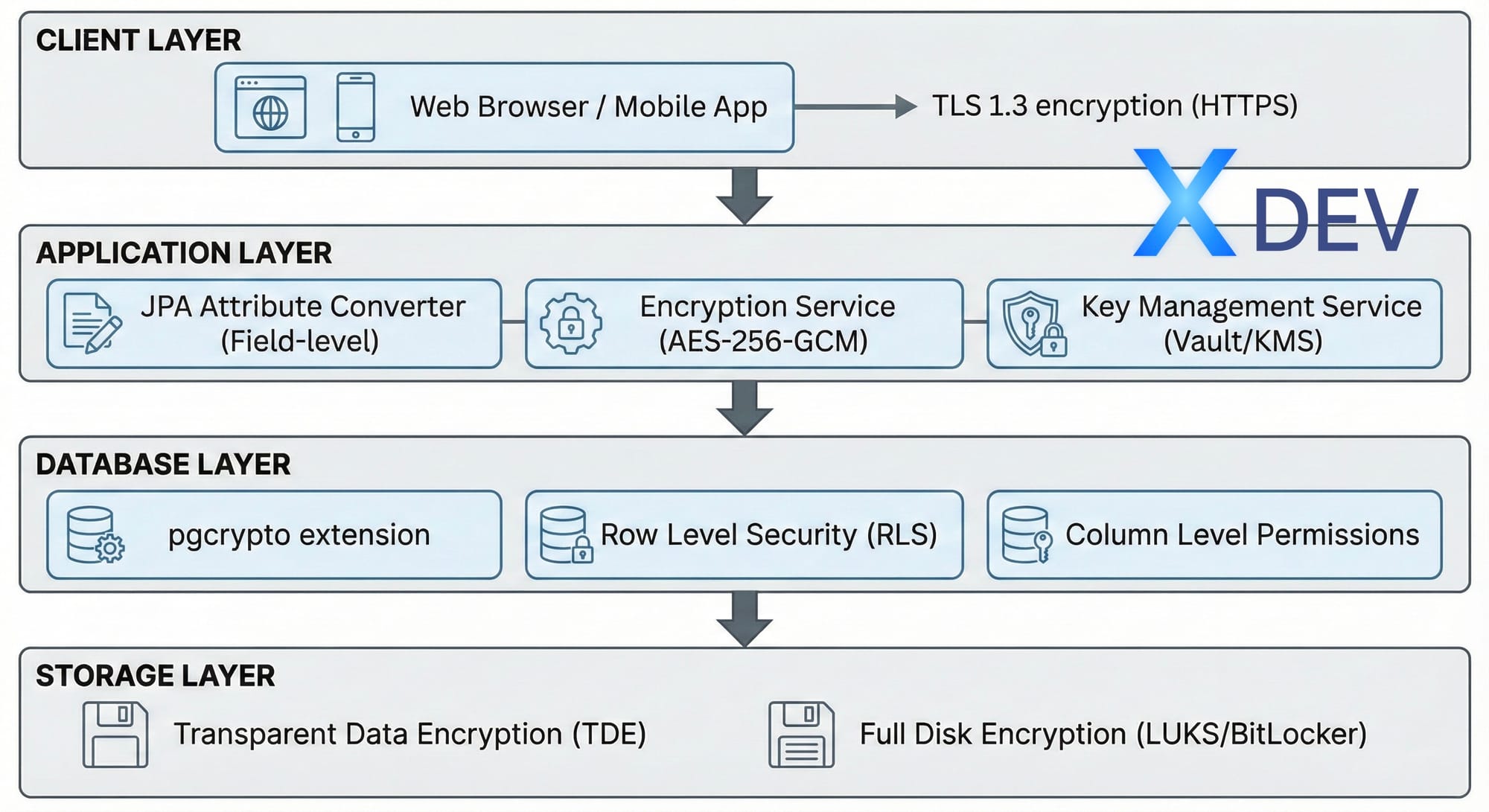
2. 多層安全架構
醫療保健系統需要在多個層面上保護資料:
| 圖層 | 科技 | 目的 |
|---|---|---|
| 客戶端層 | TLS 1.3 (HTTPS) | 傳輸過程中加密 |
| 應用層 | AES-256-GCM、JPA 轉換器 | 字段級加密 |
| 資料庫層 | pgcrypto、RLS | 行級安全性 |
| 儲存層 | TDE、盧克斯 | 全碟加密 |
3.方案一:可搜尋哈希索引
3.1 思路
- 加密 使用 AES-256-GCM 的資料(透過隨機 IV 進行安全保護)
- 創建 確定性哈希 用於搜尋(HMAC-SHA256)
- 保存兩者:加密值+搜尋哈希
3.2 資料庫架構
CREATE TABLE patients ( id UUID PRIMARY KEY DEFAULT gen_random_uuid(), patient_code VARCHAR(20) UNIQUE NOT NULL,-- PII (mã hóa ở Application Layer) encrypted_national_id BYTEA NOT NULL, encrypted_phone BYTEA, encrypted_full_name BYTEA NOT NULL, -- Hash để tìm kiếm (HMAC-SHA256) national_id_hash VARCHAR(64) UNIQUE NOT NULL, phone_hash VARCHAR(64), created_at TIMESTAMP WITH TIME ZONE DEFAULT NOW());
CREATE INDEX idx_national_id_hash ON patients(national_id_hash);
3.3 Spring Boot實體
@Entity @Table(name = "patients") public class Patient { @Id @GeneratedValue(strategy = GenerationType.UUID) private UUID id;@Convert(converter = EncryptedStringConverter.class) @Column(name = "national_id") private String nationalId; // Search hash (deterministic) @Column(name = "national_id_hash", unique = true) private String nationalIdHash;
}
3.4 AES-256-GCM 加密服務
@Service public class AesEncryptionService { private static final String ALGORITHM = "AES/GCM/NoPadding"; private static final int GCM_IV_LENGTH = 12; private static final int GCM_TAG_LENGTH = 128;private final SecretKey secretKey; public AesEncryptionService(@Value("${app.encryption.key}") String key) { byte[] keyBytes = Base64.getDecoder().decode(key); this.secretKey = new SecretKeySpec(keyBytes, "AES"); } public String encrypt(String plaintext) { try { byte[] iv = new byte[GCM_IV_LENGTH]; new SecureRandom().nextBytes(iv); Cipher cipher = Cipher.getInstance(ALGORITHM); cipher.init(Cipher.ENCRYPT_MODE, secretKey, new GCMParameterSpec(GCM_TAG_LENGTH, iv)); byte[] encrypted = cipher.doFinal( plaintext.getBytes(StandardCharsets.UTF_8)); byte[] combined = new byte[iv.length + encrypted.length]; System.arraycopy(iv, 0, combined, 0, iv.length); System.arraycopy(encrypted, 0, combined, iv.length, encrypted.length); return Base64.getEncoder().encodeToString(combined); } catch (Exception e) { throw new EncryptionException("Encryption failed", e); } } public String decrypt(String ciphertext) { try { byte[] combined = Base64.getDecoder().decode(ciphertext); byte[] iv = Arrays.copyOfRange(combined, 0, GCM_IV_LENGTH); byte[] encrypted = Arrays.copyOfRange(combined, GCM_IV_LENGTH, combined.length); Cipher cipher = Cipher.getInstance(ALGORITHM); cipher.init(Cipher.DECRYPT_MODE, secretKey, new GCMParameterSpec(GCM_TAG_LENGTH, iv)); return new String(cipher.doFinal(encrypted), StandardCharsets.UTF_8); } catch (Exception e) { throw new EncryptionException("Decryption failed", e); } }
}
3.5 JPA屬性轉換器
@Converter public class EncryptedStringConverter implements AttributeConverter<String, String> {private static AesEncryptionService encryptionService; @Autowired public void setEncryptionService(AesEncryptionService service) { EncryptedStringConverter.encryptionService = service; } @Override public String convertToDatabaseColumn(String attribute) { if (attribute == null) return null; return encryptionService.encrypt(attribute); } @Override public String convertToEntityAttribute(String dbData) { if (dbData == null) return null; return encryptionService.decrypt(dbData); }
}
3.6 優點和缺點
✅ 優點:
- 非常安全(加密+雜湊)
- 快速尋找(索引哈希)
- 實施簡單
❌缺點:
- 僅精確匹配(不搜尋“079*”)
- 每個可搜尋字段需要單獨的哈希列
4. 方案二:通證化+搜尋索引
4.1 名稱問題
無法對全名使用精確的雜湊值,因為使用者可以搜尋:
- 「Tran」(姓 - 部分)
- 「範」(中間名)
- 「阮文A」(全名)
4.2 解決方案:代幣化哈希
分別對每個單字進行雜湊處理並將其儲存到 PostgreSQL 陣列中:
Input: "Nguyễn Văn A"
↓ 1. Remove diacritics
"nguyen van a"
↓ 2. Tokenize
["nguyen", "van", "a", "nguyenvana"]
↓ 3. Hash each token
[hash("nguyen"), hash("van"), hash("a"), hash("nguyenvana")]
↓ 4. Store in PostgreSQL array
fullNameTokens: TEXT[]
4.3 越南文處理
public class VietnameseTextUtils { public static String removeDiacritics(String text) { String normalized = text.toLowerCase();// Replace đ/Đ normalized = normalized.replace('đ', 'd') .replace('Đ', 'd'); // Remove diacritical marks normalized = Normalizer.normalize( normalized, Normalizer.Form.NFD); normalized = normalized.replaceAll("\\p{M}", ""); return normalized.trim(); }
}
4.4 代幣生成服務
@Service public class SearchableEncryptionService {private final String hmacKey; public String[] generateSearchTokens(String text) { // 1. Normalize String normalized = VietnameseTextUtils.removeDiacritics(text); // 2. Split into words String[] words = normalized.split("\\s+"); // 3. Create token set Set<String> tokens = new HashSet<>(Arrays.asList(words)); // 4. Add full string (for exact match) tokens.add(normalized.replace(" ", "")); // 5. Hash each token return tokens.stream() .map(this::hmacSha256) .toArray(String[]::new); } private String hmacSha256(String data) { try { Mac mac = Mac.getInstance("HmacSHA256"); SecretKeySpec keySpec = new SecretKeySpec( hmacKey.getBytes(StandardCharsets.UTF_8), "HmacSHA256"); mac.init(keySpec); byte[] hash = mac.doFinal( data.getBytes(StandardCharsets.UTF_8)); return Base64.getEncoder().encodeToString(hash); } catch (Exception e) { throw new RuntimeException("HMAC failed", e); } }
}
4.5 帶有 GIN 索引的資料庫模式
CREATE TABLE patients (
id UUID PRIMARY KEY,
full_name TEXT,           -- AES-256-GCM encrypted
full_name_tokens TEXT[],  -- Hashed search tokens
...
);
-- GIN index for array search
CREATE INDEX idx_full_name_tokens
ON patients USING GIN(full_name_tokens);
4.6 搜尋查詢
@Repository public interface PatientRepository extends JpaRepository<Patient, UUID> {@Query("SELECT p FROM Patient p WHERE :token = ANY(p.fullNameTokens)") Page<Patient> findByFullNameTokensContaining( @Param("token") String hashedToken, Pageable pageable );
}
4.7 搜尋服務
@Service public class PatientSearchService {@Autowired private SearchableEncryptionService searchableService; @Autowired private PatientRepository patientRepository; public Page<Patient> searchPatients(String query, int page, int size) { // 1. Normalize search query String normalized = VietnameseTextUtils.removeDiacritics(query); // 2. Hash the normalized query String hashedToken = searchableService.hmacSha256(normalized); // 3. Search using hashed token return patientRepository.findByFullNameTokensContaining( hashedToken, PageRequest.of(page, size) ); }
}
5.PostgreSQL 17/18 - 新功能
PostgreSQL 18(2025 年 9 月 25 日發布)帶來了許多重要的安全性改進:
5.1 pgcrypto 的改進
-- PostgreSQL 18 hỗ trợ SHA-2 cho password hashing
SELECT sha256crypt('password', gen_salt('sha256'));
SELECT sha512crypt('password', gen_salt('sha512'));
-- Hỗ trợ CFB mode cho AES
SELECT encrypt('sensitive data'::bytea, 'key'::bytea, 'aes-cfb');
5.2 OAuth 2.0 原生支持
PostgreSQL 18 核心支援 OAuth 2.0,與 Keycloak、Okta、Azure AD 整合:
# pg_hba.conf - PostgreSQL 18
host all all 0.0.0.0/0 oauth

issuer="https://keycloak.example.com/realms/myrealm"

scope="openid"
5.3 MD5 棄用
⚠️ 警告: MD5 驗證已在 PostgreSQL 18 中棄用。
-- Chuyển sang SCRAM-SHA-256
ALTER ROLE myuser PASSWORD 'newpassword';
-- Password nên bắt đầu với 'SCRAM-SHA-256$'
# pg_hba.conf - Sử dụng SCRAM thay MD5
host all all 0.0.0.0/0 scram-sha-256
5.4 版本對比
| 特點 | PG 15 | PG 17 | PG 18 |
|---|---|---|---|
| pgcrypto SHA-2 | ❌ | ⚠️ | ✅ |
| OAuth 2.0 本機 | ❌ | ❌ | ✅ |
| FIPS模式功能 | ❌ | ⚠️ | ✅ |
| TLS 1.3 密碼配置 | ❌ | ❌ | ✅ |
| dblink 的 SCRAM | ❌ | ✅ | ✅ |
| 直接傳輸層安全 | ❌ | ✅ | ✅ |
| 增量備份 | ❌ | ✅ | ✅ |
| MD5 已棄用 | ❌ | ❌ | ✅ |
6. 權衡分析
| 方法 | 可搜尋性 | 安全性 | 效能 | 複雜性 |
|---|---|---|---|---|
| 標準加密 | ❌無 | ⭐⭐⭐⭐⭐ | ⭐⭐⭐⭐⭐ | ⭐ 簡單 |
| 哈希索引 | ⚠️僅準確 | ⭐⭐⭐⭐ | ⭐⭐⭐⭐⭐ | ⭐⭐ 簡單 |
| 代幣化 | ✅ 部分匹配 | ⭐⭐⭐ | ⭐⭐⭐⭐ | ⭐⭐⭐⭐ 綜合體 |
6.1 什麼時候使用哈希索引?
- 國民身分證、社會安全號碼、稅號
- 信用卡號碼
- 現有的確切標識符
6.2 何時使用標記化?
- 姓名(全名、名字/姓氏)
- 地址
- 自由文字字段
7. 實際結果
7.1 測試設置
- 數據集: 10,000 名越南患者
- 資料庫: PostgreSQL 18
- 加密:AES-256-GCM
- 後端:春季啟動3.4
7.2 性能指標
| 操作 | 時間 | 註解 |
|---|---|---|
| 創建病人 | 〜6毫秒 | 包括加密+標記化 |
| 搜尋“特蘭” | 〜300毫秒 | 10K 筆記錄中的 6,092 筆匹配項 |
| 搜尋“文學” | 〜250毫秒 | ~7K 場比賽 |
| 精確ID查找 | 〜2毫秒 | 使用哈希索引 |
7.3 安全總結
| 方面 | 實施 | 好處 |
|---|---|---|
| 靜態加密 | AES-256-GCM + 隨機 IV | 符合 FIPS 140-2 標準 |
| 可搜尋性 | HMAC-SHA256 哈希索引 | 快速 O(1) 查找 |
| 透明度 | JPA 屬性轉換器 | 零程式碼更改 |
| 合規性 | HIPAA、GDPR 就緒 | 審計追蹤、加密粉碎 |
7.4 性能特點
- 加密開銷:~2-5% CPU
- 搜尋速度:與明文相同(索引哈希)
- 儲存開銷:~30%(Base64 編碼)
- 吞吐量:10K+ 操作/秒
8. 生產清單
- 密鑰管理(使用KMS,而不是硬編碼)
- ☐ 單獨的加密和雜湊金鑰
- 所有 PHI 存取的審核日誌記錄
- ☐ 指數表現監控
- 安全備份加密金鑰
- ☐ 使用者的文件搜尋限制
- 遷移 MD5 → SCRAM-SHA-256 (PostgreSQL 18)
- 為資料庫連線啟用 TLS 1.3
8.1 設定範例
# application.yml
spring:
  datasource:
    url: jdbc:postgresql://localhost:5432/healthcare?sslmode=require
    hikari:
      ssl-mode: require
app:
encryption:
key: ${ENCRYPTION_KEY}      # From KMS/Vault
algorithm: AES/GCM/NoPadding
hashing:
key: ${HMAC_KEY}            # Separate key for hashing
8.2 使用 AWS KMS 進行金鑰管理
@Configuration public class KmsConfig { @Bean public KmsClient kmsClient() { return KmsClient.builder() .region(Region.AP_SOUTHEAST_1) .build(); }@Bean public SecretKey dataEncryptionKey(KmsClient kmsClient, @Value("${aws.kms.key-id}") String keyId) { GenerateDataKeyRequest request = GenerateDataKeyRequest.builder() .keyId(keyId) .keySpec(DataKeySpec.AES_256) .build(); GenerateDataKeyResponse response = kmsClient.generateDataKey(request); return new SecretKeySpec( response.plaintext().asByteArray(), "AES"); }
}
9. 結論
主要見解
- 沒有銀彈:加密與搜尋是基本的權衡
- 混合方法效果最好:
- 高風險欄位→加密+哈希
- 名稱 → 標記化
- 元資料→有存取控制的明文
- 複雜性是有代價的:僅在確實需要時添加
何時使用標記化?
- ✅ 醫療保健(病人姓名)
- ✅ 金融(客戶搜尋)
- ✅ 電子商務(使用者資料)
什麼時候跳過?
- ❌ 內部工具(使用存取控制)
- ❌ 公開數據
- ❌ 非生產環境
最佳實踐
- ✅ 使用混合方法 對於可搜尋字段
- ✅ 索引哈希列 為了表現
- ✅ 單獨的按鍵 加密與雜湊
- ✅ 輪換鑰匙 有時
- ✅ 審計 所有解密操作
- ✅ 從不記錄 解密的 PII/PHI