
Repo cho các bạn tham khảo code tại đây
Key Takeaways:
- ❌ AES-GCM với random IV → Không search được
- ✅ Searchable Hash Index → Search chính xác (exact match)
- ✅ Tokenization + Hashing → Search từng phần (partial match)
1. Thách Thức: Encryption vs Searchability
1.1 Vấn đề
Healthcare applications cần lưu trữ PII (Personally Identifiable Information):
- CMND/CCCD (National ID)
- Số điện thoại
- Họ tên
- Địa chỉ
Đây là những thông tin nhạy cảm thuộc nhóm PHI (Protected Health Information) theo tiêu chuẩn HIPAA.
Yêu cầu mâu thuẫn:
- 🔒 Security: Data phải encrypted at-rest (HIPAA, GDPR compliance)
- 🔍 Usability: User cần search "Nguyễn Văn A", "Trần", etc.
1.2 Tại sao Standard Encryption không hoạt động?
// AES-256-GCM với random IV
encrypt("Nguyễn Văn A") → "xK9L2m..."  // Lần 1
encrypt("Nguyễn Văn A") → "pQ3N7r..."  // Lần 2 - KHÁC!
// SQL query không hoạt động
WHERE encrypted_name = encrypt("Nguyễn Văn A")  // ❌ Fail!
Random IV = high security nhưng impossible to search. Mỗi lần mã hóa cùng một giá trị sẽ cho kết quả khác nhau, đảm bảo semantic security nhưng không thể so sánh trực tiếp.
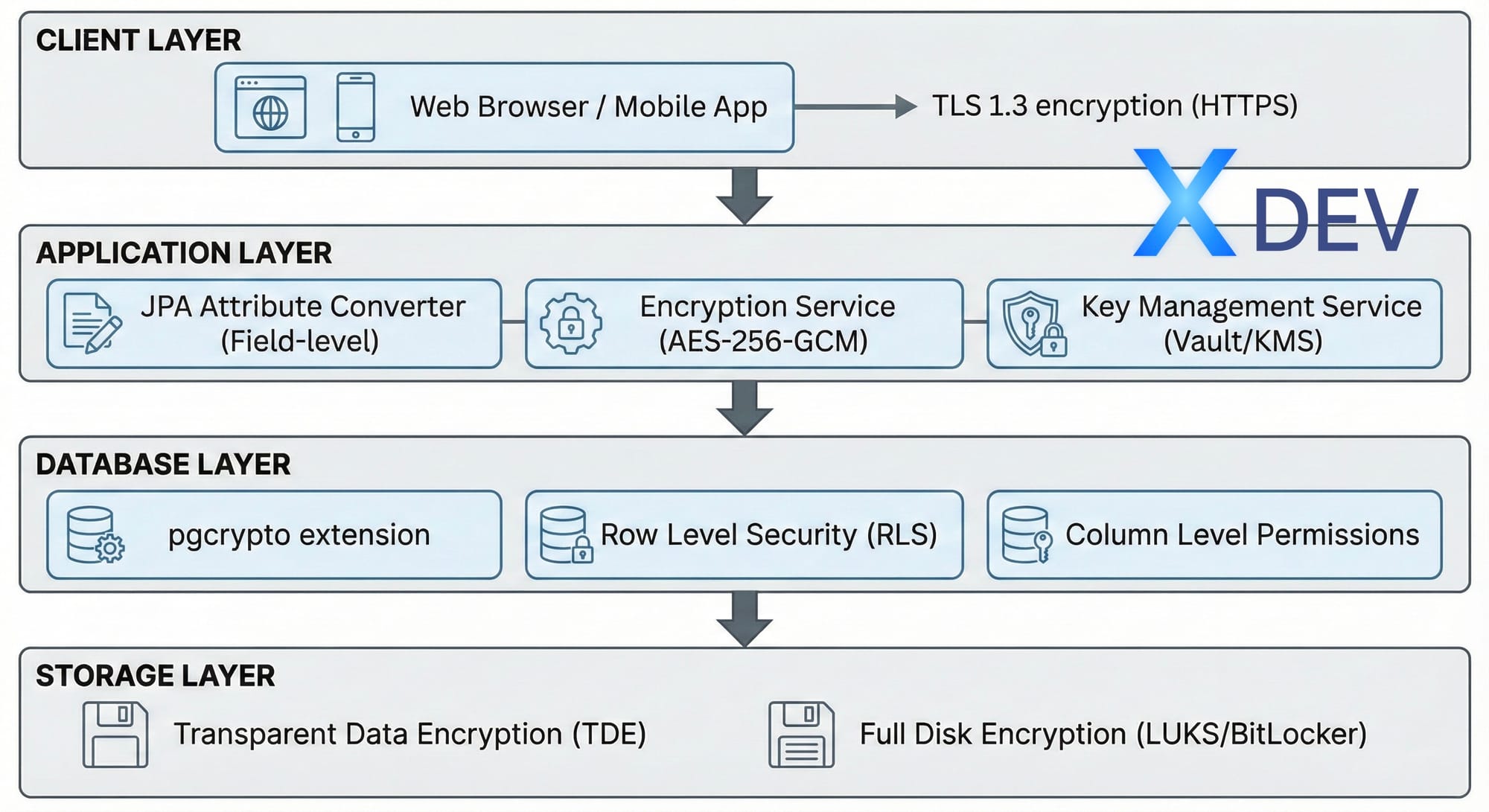
2. Kiến Trúc Bảo Mật Nhiều Lớp
Một hệ thống healthcare cần bảo vệ dữ liệu ở nhiều tầng:
| Layer | Công nghệ | Mục đích |
|---|---|---|
| Client Layer | TLS 1.3 (HTTPS) | Mã hóa khi truyền tải |
| Application Layer | AES-256-GCM, JPA Converter | Mã hóa field-level |
| Database Layer | pgcrypto, RLS | Row Level Security |
| Storage Layer | TDE, LUKS | Full disk encryption |
3. Solution 1: Searchable Hash Index
3.1 Ý tưởng
- Encrypt data với AES-256-GCM (secure với random IV)
- Tạo deterministic hash cho search (HMAC-SHA256)
- Lưu cả hai: encrypted value + search hash
3.2 Database Schema
CREATE TABLE patients ( id UUID PRIMARY KEY DEFAULT gen_random_uuid(), patient_code VARCHAR(20) UNIQUE NOT NULL,-- PII (mã hóa ở Application Layer) encrypted_national_id BYTEA NOT NULL, encrypted_phone BYTEA, encrypted_full_name BYTEA NOT NULL, -- Hash để tìm kiếm (HMAC-SHA256) national_id_hash VARCHAR(64) UNIQUE NOT NULL, phone_hash VARCHAR(64), created_at TIMESTAMP WITH TIME ZONE DEFAULT NOW());
CREATE INDEX idx_national_id_hash ON patients(national_id_hash);
3.3 Spring Boot Entity
@Entity @Table(name = "patients") public class Patient { @Id @GeneratedValue(strategy = GenerationType.UUID) private UUID id;@Convert(converter = EncryptedStringConverter.class) @Column(name = "national_id") private String nationalId; // Search hash (deterministic) @Column(name = "national_id_hash", unique = true) private String nationalIdHash;
}
3.4 AES-256-GCM Encryption Service
@Service public class AesEncryptionService { private static final String ALGORITHM = "AES/GCM/NoPadding"; private static final int GCM_IV_LENGTH = 12; private static final int GCM_TAG_LENGTH = 128;private final SecretKey secretKey; public AesEncryptionService(@Value("${app.encryption.key}") String key) { byte[] keyBytes = Base64.getDecoder().decode(key); this.secretKey = new SecretKeySpec(keyBytes, "AES"); } public String encrypt(String plaintext) { try { byte[] iv = new byte[GCM_IV_LENGTH]; new SecureRandom().nextBytes(iv); Cipher cipher = Cipher.getInstance(ALGORITHM); cipher.init(Cipher.ENCRYPT_MODE, secretKey, new GCMParameterSpec(GCM_TAG_LENGTH, iv)); byte[] encrypted = cipher.doFinal( plaintext.getBytes(StandardCharsets.UTF_8)); byte[] combined = new byte[iv.length + encrypted.length]; System.arraycopy(iv, 0, combined, 0, iv.length); System.arraycopy(encrypted, 0, combined, iv.length, encrypted.length); return Base64.getEncoder().encodeToString(combined); } catch (Exception e) { throw new EncryptionException("Encryption failed", e); } } public String decrypt(String ciphertext) { try { byte[] combined = Base64.getDecoder().decode(ciphertext); byte[] iv = Arrays.copyOfRange(combined, 0, GCM_IV_LENGTH); byte[] encrypted = Arrays.copyOfRange(combined, GCM_IV_LENGTH, combined.length); Cipher cipher = Cipher.getInstance(ALGORITHM); cipher.init(Cipher.DECRYPT_MODE, secretKey, new GCMParameterSpec(GCM_TAG_LENGTH, iv)); return new String(cipher.doFinal(encrypted), StandardCharsets.UTF_8); } catch (Exception e) { throw new EncryptionException("Decryption failed", e); } }
}
3.5 JPA AttributeConverter
@Converter public class EncryptedStringConverter implements AttributeConverter<String, String> {private static AesEncryptionService encryptionService; @Autowired public void setEncryptionService(AesEncryptionService service) { EncryptedStringConverter.encryptionService = service; } @Override public String convertToDatabaseColumn(String attribute) { if (attribute == null) return null; return encryptionService.encrypt(attribute); } @Override public String convertToEntityAttribute(String dbData) { if (dbData == null) return null; return encryptionService.decrypt(dbData); }
}
3.6 Ưu và Nhược điểm
✅ Ưu điểm:
- Very secure (encrypted + hashed)
- Fast lookup (indexed hash)
- Simple implementation
❌ Nhược điểm:
- Chỉ exact match (không search "079*")
- Cần separate hash column cho mỗi searchable field
4. Solution 2: Tokenization + Search Index
4.1 Vấn đề với Names
Không thể dùng exact hash cho họ tên vì user có thể search:
- "Trần" (họ - partial)
- "Van" (tên đệm)
- "Nguyen Van A" (full name)
4.2 Giải pháp: Tokenized Hashing
Hash từng word riêng biệt và lưu vào PostgreSQL array:
Input: "Nguyễn Văn A"
↓ 1. Remove diacritics
"nguyen van a"
↓ 2. Tokenize
["nguyen", "van", "a", "nguyenvana"]
↓ 3. Hash each token
[hash("nguyen"), hash("van"), hash("a"), hash("nguyenvana")]
↓ 4. Store in PostgreSQL array
fullNameTokens: TEXT[]
4.3 Vietnamese Text Processing
public class VietnameseTextUtils { public static String removeDiacritics(String text) { String normalized = text.toLowerCase();// Replace đ/Đ normalized = normalized.replace('đ', 'd') .replace('Đ', 'd'); // Remove diacritical marks normalized = Normalizer.normalize( normalized, Normalizer.Form.NFD); normalized = normalized.replaceAll("\\p{M}", ""); return normalized.trim(); }
}
4.4 Token Generation Service
@Service public class SearchableEncryptionService {private final String hmacKey; public String[] generateSearchTokens(String text) { // 1. Normalize String normalized = VietnameseTextUtils.removeDiacritics(text); // 2. Split into words String[] words = normalized.split("\\s+"); // 3. Create token set Set<String> tokens = new HashSet<>(Arrays.asList(words)); // 4. Add full string (for exact match) tokens.add(normalized.replace(" ", "")); // 5. Hash each token return tokens.stream() .map(this::hmacSha256) .toArray(String[]::new); } private String hmacSha256(String data) { try { Mac mac = Mac.getInstance("HmacSHA256"); SecretKeySpec keySpec = new SecretKeySpec( hmacKey.getBytes(StandardCharsets.UTF_8), "HmacSHA256"); mac.init(keySpec); byte[] hash = mac.doFinal( data.getBytes(StandardCharsets.UTF_8)); return Base64.getEncoder().encodeToString(hash); } catch (Exception e) { throw new RuntimeException("HMAC failed", e); } }
}
4.5 Database Schema với GIN Index
CREATE TABLE patients (
id UUID PRIMARY KEY,
full_name TEXT,           -- AES-256-GCM encrypted
full_name_tokens TEXT[],  -- Hashed search tokens
...
);
-- GIN index for array search
CREATE INDEX idx_full_name_tokens
ON patients USING GIN(full_name_tokens);
4.6 Search Query
@Repository public interface PatientRepository extends JpaRepository<Patient, UUID> {@Query("SELECT p FROM Patient p WHERE :token = ANY(p.fullNameTokens)") Page<Patient> findByFullNameTokensContaining( @Param("token") String hashedToken, Pageable pageable );
}
4.7 Search Service
@Service public class PatientSearchService {@Autowired private SearchableEncryptionService searchableService; @Autowired private PatientRepository patientRepository; public Page<Patient> searchPatients(String query, int page, int size) { // 1. Normalize search query String normalized = VietnameseTextUtils.removeDiacritics(query); // 2. Hash the normalized query String hashedToken = searchableService.hmacSha256(normalized); // 3. Search using hashed token return patientRepository.findByFullNameTokensContaining( hashedToken, PageRequest.of(page, size) ); }
}
5. PostgreSQL 17/18 - Tính năng Mới
PostgreSQL 18 (phát hành 25/09/2025) mang đến nhiều cải tiến quan trọng về bảo mật:
5.1 Cải tiến pgcrypto
-- PostgreSQL 18 hỗ trợ SHA-2 cho password hashing
SELECT sha256crypt('password', gen_salt('sha256'));
SELECT sha512crypt('password', gen_salt('sha512'));
-- Hỗ trợ CFB mode cho AES
SELECT encrypt('sensitive data'::bytea, 'key'::bytea, 'aes-cfb');
5.2 OAuth 2.0 Native Support
PostgreSQL 18 hỗ trợ OAuth 2.0 trong core, tích hợp với Keycloak, Okta, Azure AD:
# pg_hba.conf - PostgreSQL 18
host all all 0.0.0.0/0 oauth

issuer="https://keycloak.example.com/realms/myrealm"

scope="openid"
5.3 MD5 Deprecation
⚠️ Cảnh báo: MD5 authentication đã bị deprecated trong PostgreSQL 18.
-- Chuyển sang SCRAM-SHA-256
ALTER ROLE myuser PASSWORD 'newpassword';
-- Password nên bắt đầu với 'SCRAM-SHA-256$'
# pg_hba.conf - Sử dụng SCRAM thay MD5
host all all 0.0.0.0/0 scram-sha-256
5.4 So sánh Phiên bản
| Feature | PG 15 | PG 17 | PG 18 |
|---|---|---|---|
| pgcrypto SHA-2 | ❌ | ⚠️ | ✅ |
| OAuth 2.0 native | ❌ | ❌ | ✅ |
| FIPS mode function | ❌ | ⚠️ | ✅ |
| TLS 1.3 cipher config | ❌ | ❌ | ✅ |
| SCRAM for dblink | ❌ | ✅ | ✅ |
| Direct TLS | ❌ | ✅ | ✅ |
| Incremental backup | ❌ | ✅ | ✅ |
| MD5 deprecated | ❌ | ❌ | ✅ |
6. Trade-offs Analysis
| Approach | Searchability | Security | Performance | Complexity |
|---|---|---|---|---|
| Standard Encryption | ❌ None | ⭐⭐⭐⭐⭐ | ⭐⭐⭐⭐⭐ | ⭐ Simple |
| Hash Index | ⚠️ Exact only | ⭐⭐⭐⭐ | ⭐⭐⭐⭐⭐ | ⭐⭐ Easy |
| Tokenization | ✅ Partial match | ⭐⭐⭐ | ⭐⭐⭐⭐ | ⭐⭐⭐⭐ Complex |
6.1 Khi nào dùng Hash Index?
- National ID, SSN, Tax ID
- Credit card numbers
- Existing exact identifiers
6.2 Khi nào dùng Tokenization?
- Names (full name, first/last)
- Addresses
- Free-text fields
7. Real-World Results
7.1 Test Setup
- Dataset: 10,000 Vietnamese patients
- Database: PostgreSQL 18
- Encryption: AES-256-GCM
- Backend: Spring Boot 3.4
7.2 Performance Metrics
| Operation | Time | Notes |
|---|---|---|
| Create patient | ~6ms | Including encryption + tokenization |
| Search "Trần" | ~300ms | 6,092 matches from 10K records |
| Search "Văn" | ~250ms | ~7K matches |
| Exact ID lookup | ~2ms | Using hash index |
7.3 Security Summary
| Aspect | Implementation | Benefits |
|---|---|---|
| Encryption at Rest | AES-256-GCM + random IV | FIPS 140-2 compliant |
| Searchability | HMAC-SHA256 hash index | Fast O(1) lookup |
| Transparency | JPA AttributeConverter | Zero code change |
| Compliance | HIPAA, GDPR ready | Audit trail, crypto shredding |
7.4 Performance Characteristics
- Encryption overhead: ~2-5% CPU
- Search speed: Same as plaintext (indexed hash)
- Storage overhead: ~30% (Base64 encoding)
- Throughput: 10K+ ops/sec
8. Production Checklist
- ☐ Key management (use KMS, not hardcoded)
- ☐ Separate encryption & hashing keys
- ☐ Audit logging for all PHI access
- ☐ Index performance monitoring
- ☐ Backup encryption keys securely
- ☐ Document search limitations for users
- ☐ Migrate MD5 → SCRAM-SHA-256 (PostgreSQL 18)
- ☐ Enable TLS 1.3 for database connections
8.1 Configuration Example
# application.yml
spring:
  datasource:
    url: jdbc:postgresql://localhost:5432/healthcare?sslmode=require
    hikari:
      ssl-mode: require
app:
encryption:
key: ${ENCRYPTION_KEY}      # From KMS/Vault
algorithm: AES/GCM/NoPadding
hashing:
key: ${HMAC_KEY}            # Separate key for hashing
8.2 Key Management với AWS KMS
@Configuration public class KmsConfig { @Bean public KmsClient kmsClient() { return KmsClient.builder() .region(Region.AP_SOUTHEAST_1) .build(); }@Bean public SecretKey dataEncryptionKey(KmsClient kmsClient, @Value("${aws.kms.key-id}") String keyId) { GenerateDataKeyRequest request = GenerateDataKeyRequest.builder() .keyId(keyId) .keySpec(DataKeySpec.AES_256) .build(); GenerateDataKeyResponse response = kmsClient.generateDataKey(request); return new SecretKeySpec( response.plaintext().asByteArray(), "AES"); }
}
9. Kết Luận
Key Insights
- No silver bullet: Encryption vs search là fundamental tradeoff
- Hybrid approach works best:
- High-risk fields → encrypted + hash
- Names → tokenization
- Metadata → plaintext with access control
- Complexity has cost: Only add if truly needed
Khi nào dùng tokenization?
- ✅ Healthcare (patient names)
- ✅ Finance (customer search)
- ✅ E-commerce (user profiles)
Khi nào skip?
- ❌ Internal tools (use access control)
- ❌ Public data
- ❌ Non-production environments
Best Practices
- ✅ Use hybrid approach cho searchable fields
- ✅ Index hash columns for performance
- ✅ Separate keys cho encryption vs hashing
- ✅ Rotate keys periodically
- ✅ Audit all decryption operations
- ✅ Never log decrypted PII/PHI