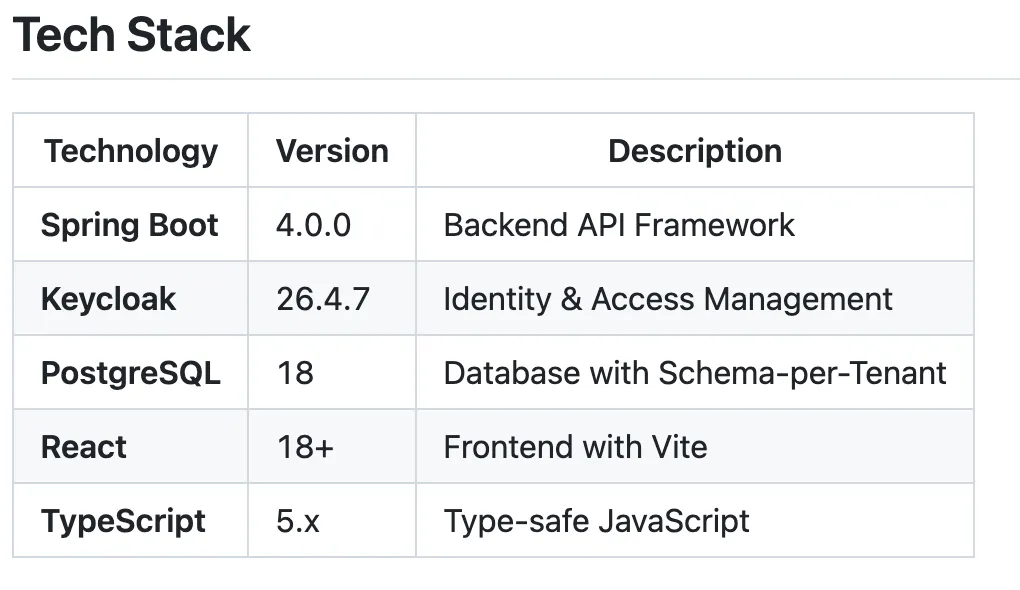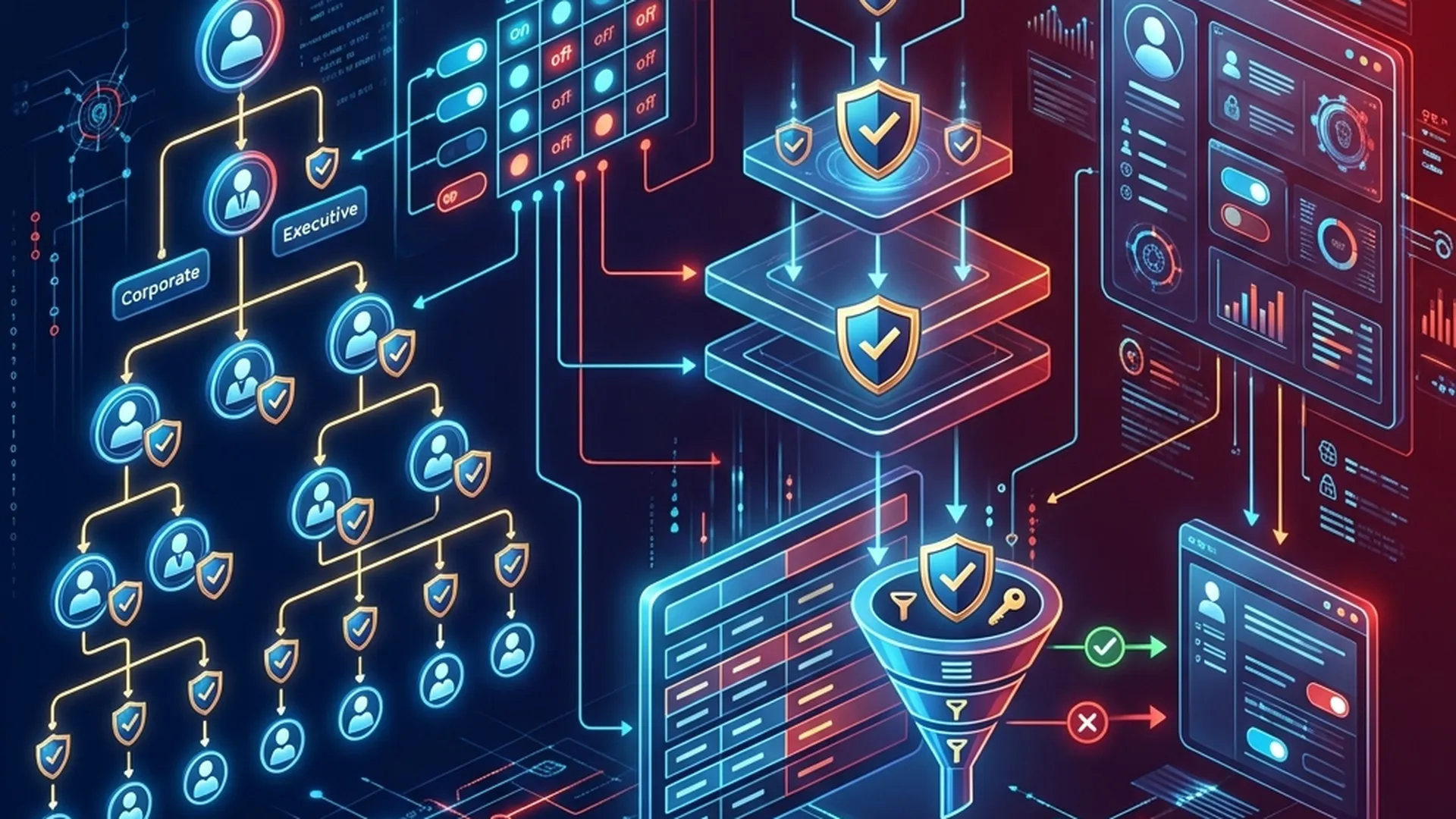
How to build a system where superiors can monitor all subordinate data, while peer units are completely isolated from each other? This article analyzes in detail the data decentralization architecture for hierarchically structured systems — from governments, to multinational corporations, to retail chains with thousands of branches.
Part 1: The Problem of Decentralization
1.1. Characteristics of hierarchy
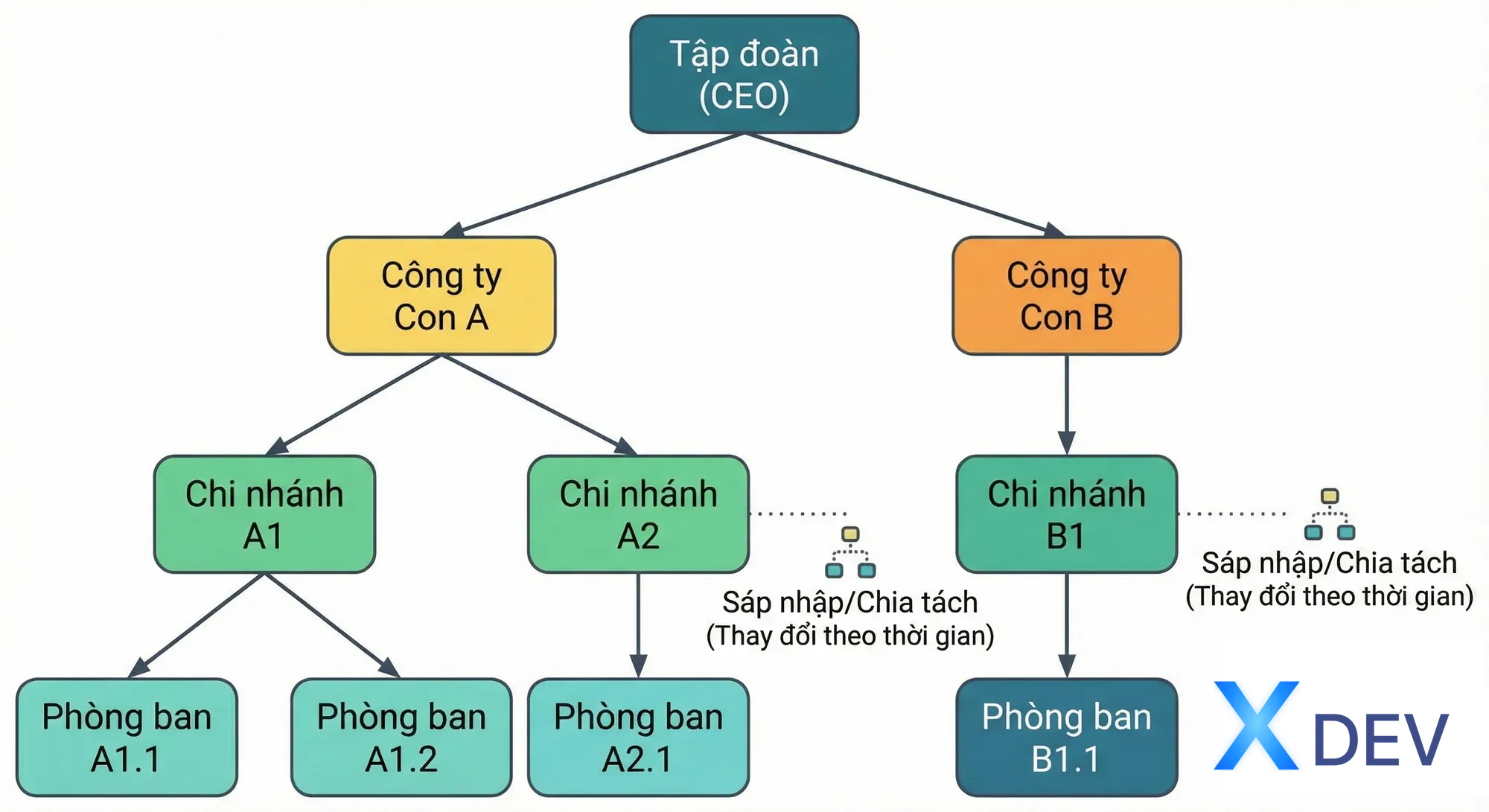
Many organizations operate according to a hierarchical structure: corporations have subsidiaries, subsidiaries have branches, branches have departments. The government has ministries, provinces, districts, wards and communes. Retail chains have regions, regions, and stores.
What these structures have in common is relationships parent-child between units, forming a tree with the following characteristics:
- Each unit (except root) has exactly one parent unit
- Each unit can have many sub-units
- The depth of the tree may vary across branches
- Structure can change over time (merger, split, restructuring)
1.2. Requires specific authorization
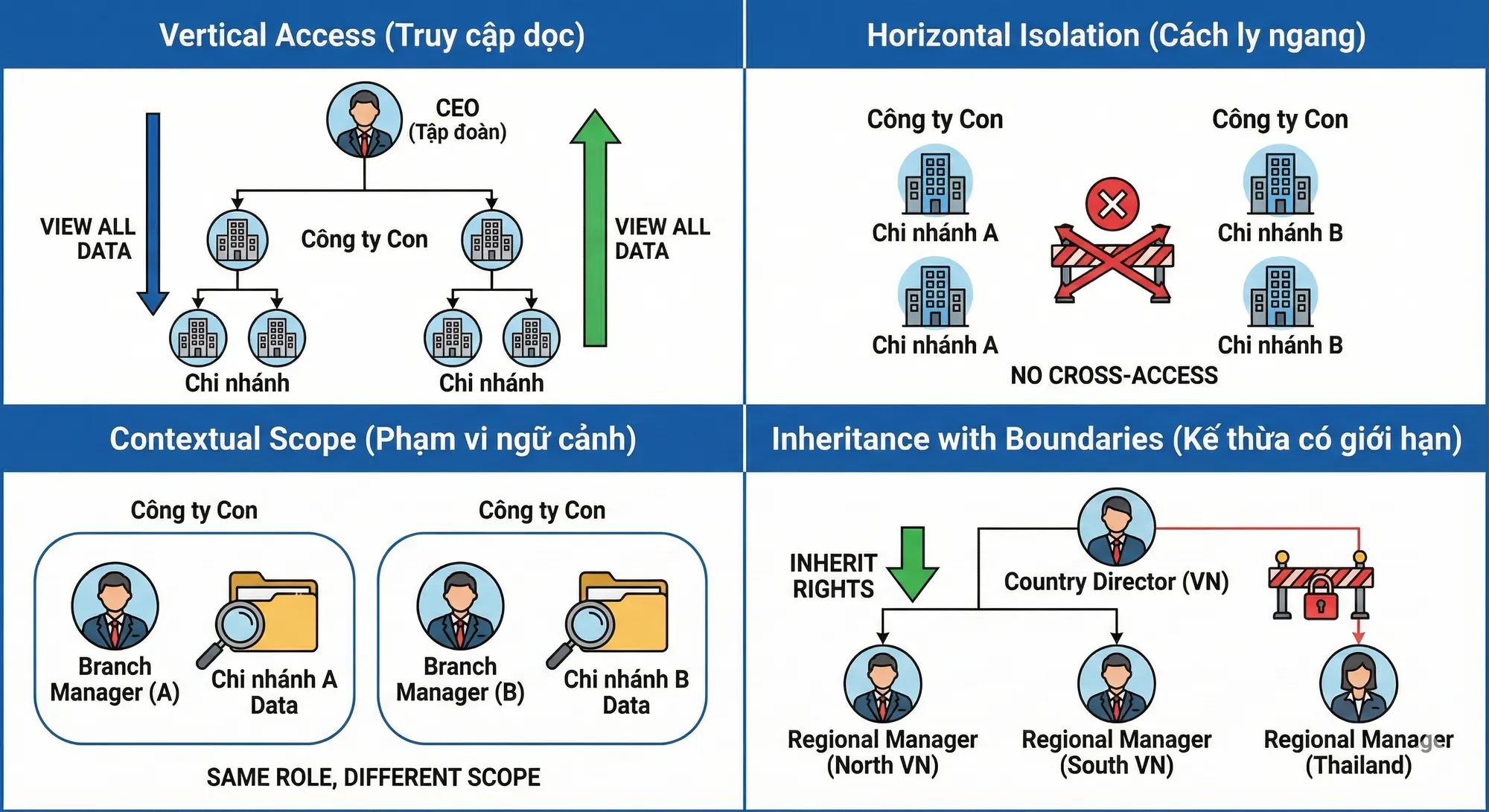
The decentralized system imposes special permission requirements that the flat permission model cannot meet:
Vertical Access: Superiors need to be able to see data of all subordinates. The CEO needs to see reports for the entire corporation, including all subsidiaries and affiliates. Regional Manager needs to see data for all stores in the region.
Horizontal Isolation: Units at the same level are not allowed to view each other's data. Branch A cannot see Branch B's revenue, even though both belong to the same subsidiary. This ensures fair competition and business information security.
Contextual Scope: Same role but different scope. "Branch Manager" in Branch A only manages Branch A; "Branch Manager" in Branch B only manages Branch B. The roles are the same, the powers are the same, but the data allowed to be accessed is completely different.
Inheritance with Boundaries: Permissions are inherited vertically but not horizontally. The Country Director inherits all of the Regional Manager's rights within that country, but none in other countries.
1.3. Why flat decentralization fails
The flat decentralization model directly assigns permissions to users or roles, without the concept of hierarchy. When applied to hierarchies, it faces many problems:
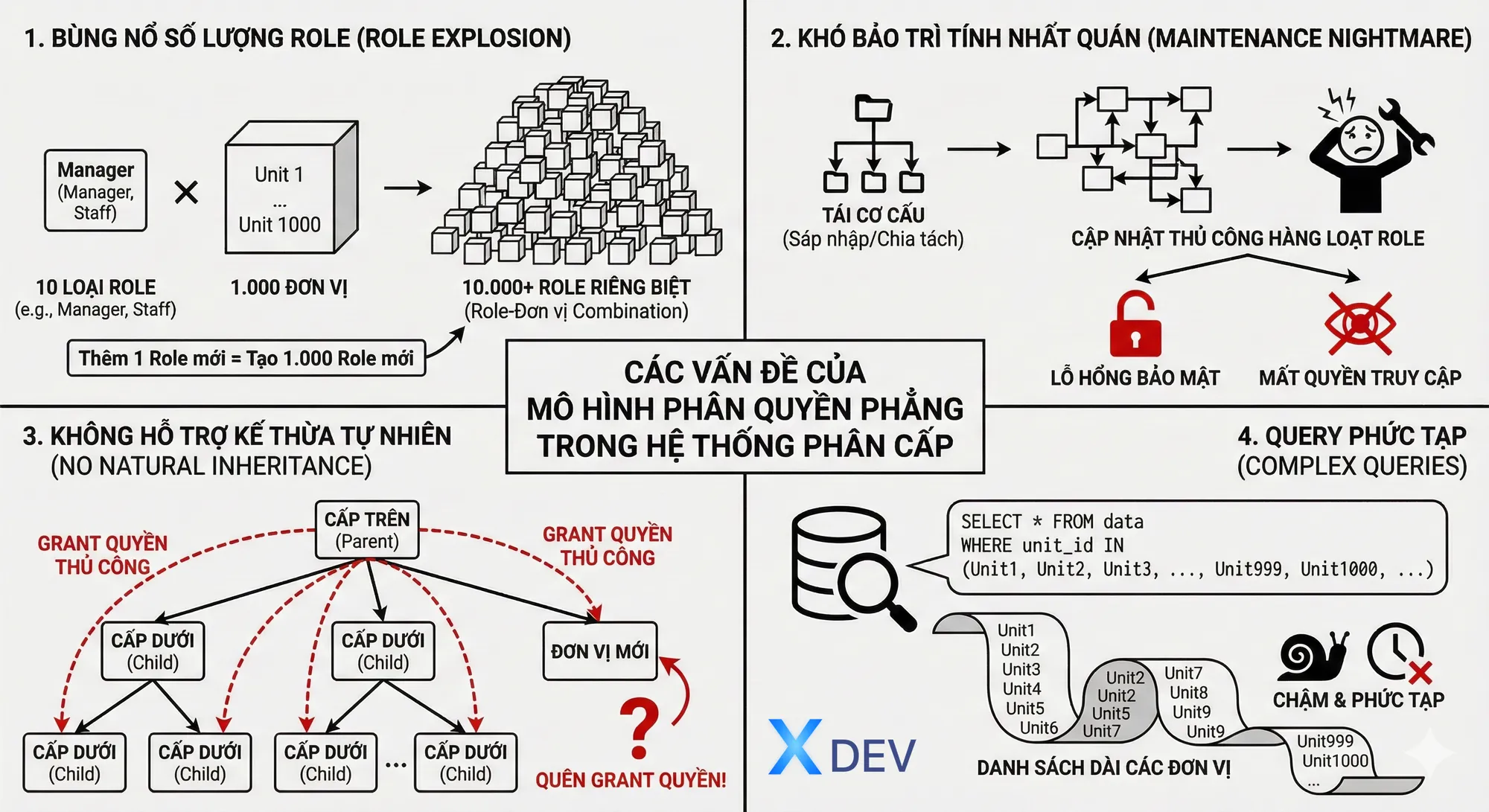
Explosion in the number of roles: If there are 10 types of roles and 1,000 units, theoretically 10,000 separate roles are needed (each role-unit is a combination). Adding a new role type means creating 1,000 new roles.
Difficult to maintain consistency: When a unit restructures (mergers, splits), all related roles need to be updated manually. Errors lead to security breaches or loss of valid access rights.
Does not support natural inheritance: In order for superiors to view subordinate data, permissions to each subordinate unit must be granted manually. When adding a new unit, it's easy to forget to grant permissions to superiors.
Complex queries: Each data query needs to include a long list of allowed units, making the query complex and slow.
1.4. Scale and complexity
The complexity of the problem increases with:
- Number of units: From a few dozen to tens of thousands
- Tree depth: From 2-3 levels to 5-6 levels or more
- Dynamics of structure: Fixed structure vs frequently changing
- Number of users: From a few hundred to millions
- Latency requirements: Milliseconds for realtime applications
- Compliance requirements: Audit trail, data residency, encryption
Part 2: Theoretical Foundation
2.1. RBAC and variants according to NIST standards
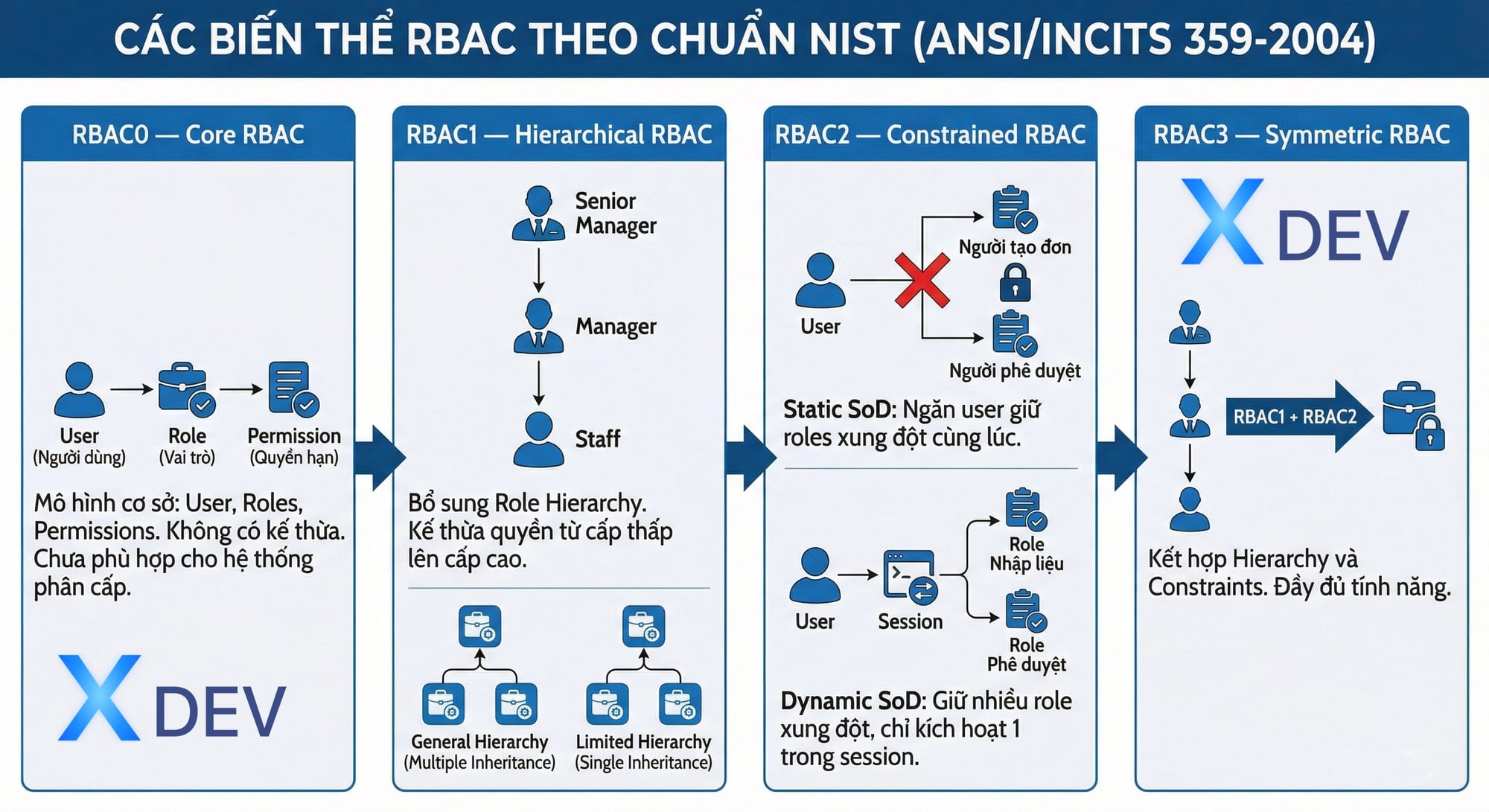
Role-Based Access Control (RBAC) is standardized by NIST in the ANSI/INCITS 359-2004 standard, divided into 4 levels:
RBAC0 — Core RBAC: Base model with three components: Users, Roles, and Permissions. User is assigned to Role, Role is assigned Permission. This is the foundation but lacks the concept of inheritance and is not suitable for a hierarchical system.
RBAC1 — Hierarchical RBAC: Added Role Hierarchy, allowing high-level roles to inherit all permissions of low-level roles. For example: Senior Manager inherits permission from Manager, Manager inherits permission from Staff. This is the most suitable model for a hierarchical organizational structure.
There are two types of hierarchy:
- General Hierarchy: Allows multiple inheritance — one role can inherit from many other roles
- Limited Hierarchy: Only single inheritance is allowed — each role only inherits from a single role, creating a simple tree
RBAC2 — Constrained RBAC: Add constraints, the most important being Separation of Duties (SoD):
- Static SoD: Prevent a user from simultaneously holding conflicting roles. For example, it is not possible to be both an "Order Creator" and an "Order Approver".
- Dynamic SoD: Allows multiple conflicting roles to be kept but not activated at the same time in a session. Users can have both "Data Entry" and "Approval" roles but must select one when logged in.
RBAC3 — Symmetric RBAC: Combines RBAC1 and RBAC2, providing full hierarchy and constraints.
2.2. ABAC — Attribute-Based Access Control
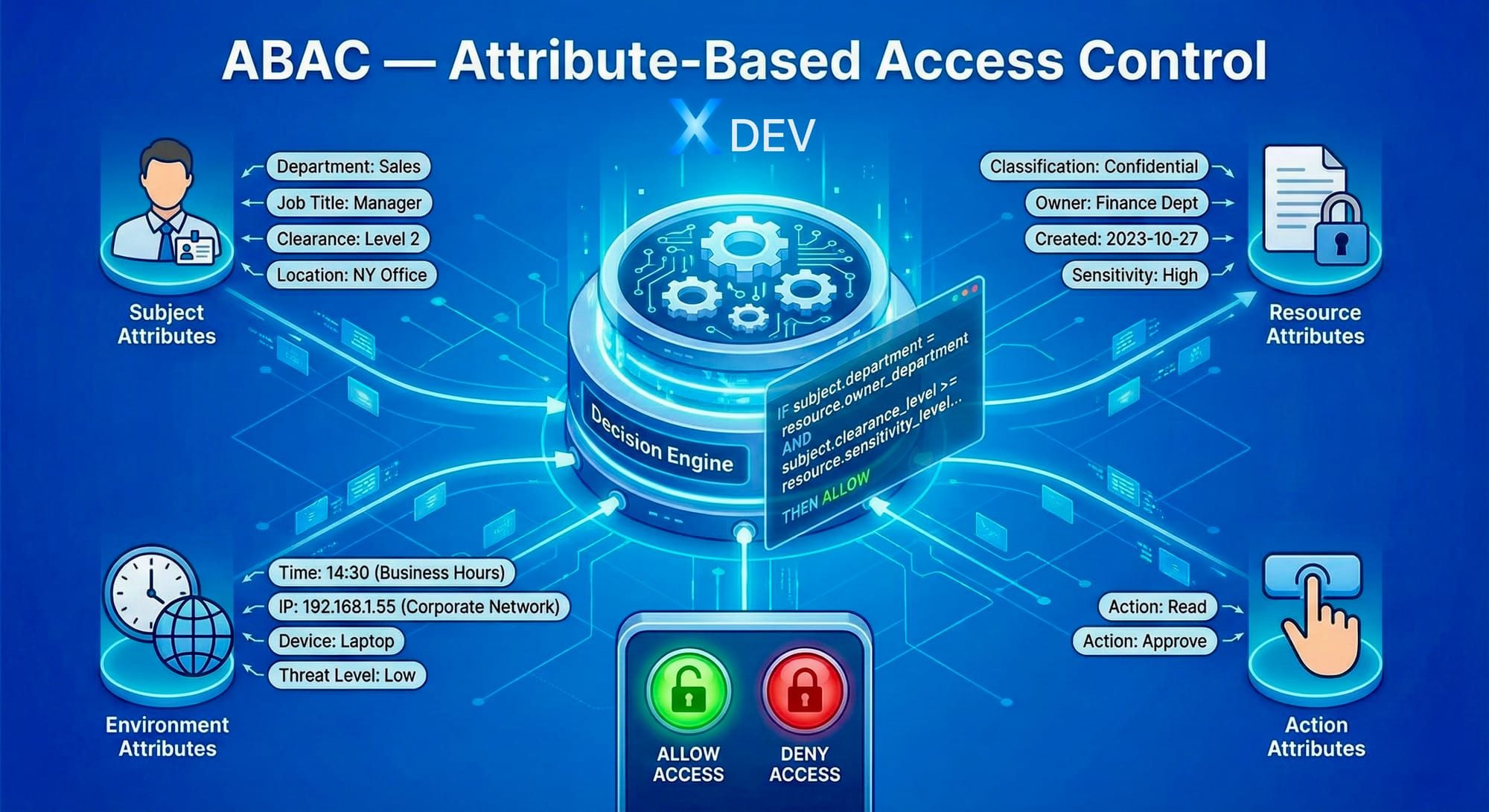
ABAC extends RBAC by evaluating multiple attributes when making authorization decisions:
- Subject Attributes: User properties — department, job title, clearance level, location
- Resource Attributes: Resource properties — classification, owner, creation date, sensitivity level
- Environment Attributes: Context properties — time of day, IP address, device type, threat level
- Action Attributes: Action type — read, write, delete, approve
Policy ABAC is written as rules. For example:
IF subject.department = resource.owner_department
AND subject.clearance_level >= resource.sensitivity_level
AND environment.time IN business_hours
AND environment.ip_range IN corporate_network
THEN ALLOW action
ABAC is powerful and flexible but is complex to deploy, difficult to debug, and can affect performance if the policy is complex. It is recommended to use ABAC in addition to RBAC in cases where detailed control is required, not as a complete replacement.
2.3. Multi-tenancy and models
Multi-tenancy is an architecture that allows a system to serve multiple independent tenants (units/organizations) with isolated data:
Siloed Model — Database per Tenant: Each tenant has a separate database. Absolute isolation, easy to customize per tenant, easy to comply with data residency requirements. Disadvantages: high infrastructure costs, difficult to maintain when the number of tenants is large, complex cross-tenant reporting.
Bridge Model — Schema per Tenant: Tenants share the same database instance, but each tenant has its own schema. Balance between isolation and efficiency. Disadvantages: limited number of schemas in one database, complicated migration.
Pooled Model — Shared Everything: All tenants share the same database and schema, differentiated by the tenant_id column. Lowest cost, easy to scale, easy to maintain. Disadvantage: needs strong isolation mechanism at application and database layer, one bug can affect all tenants.
Recommendation: Pooled Model with Row-Level Security (RLS) for most cases. Only use Siloed Model when there are special requirements for data residency or the tenant needs deep customization.
2.4. Hierarchical Multi-tenancy
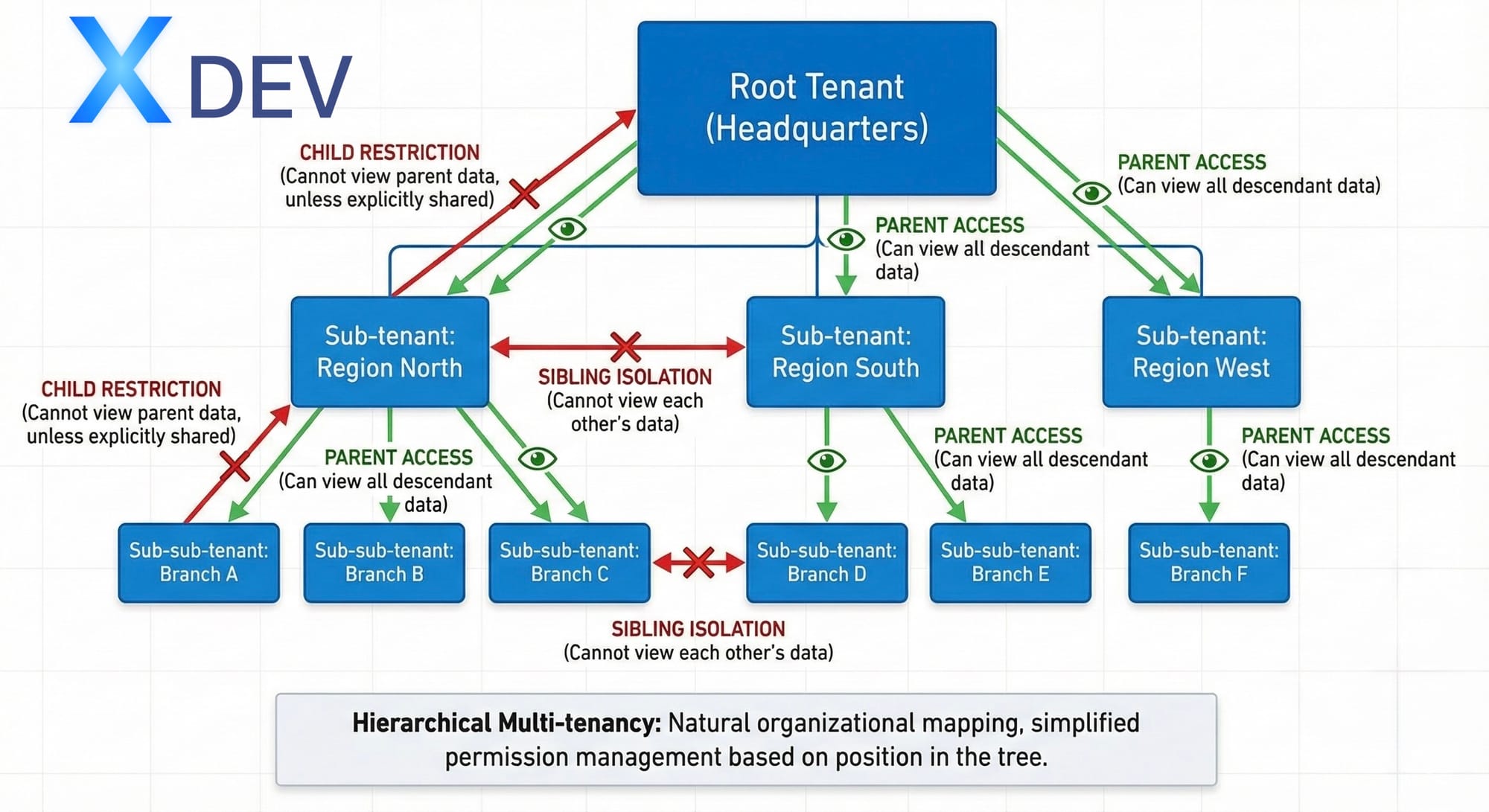
Here's an extension of multi-tenancy to a hierarchical structure, where tenants are organized into trees instead of flat lists:
Root Tenant (Headquarters)
├── Sub-tenant: Region North
│   ├── Sub-sub-tenant: Branch A
│   ├── Sub-sub-tenant: Branch B
│   └── Sub-sub-tenant: Branch C
├── Sub-tenant: Region South
│   ├── Sub-sub-tenant: Branch D
│   └── Sub-sub-tenant: Branch E
└── Sub-tenant: Region West
    └── Sub-sub-tenant: Branch F
Access rules:
- Parent tenant can view data of all descendant tenants
- Sibling tenants (same level, same parent) cannot view each other's data
- Child tenant cannot view parent's data (except data shared explicitly)
This model maps naturally into the organizational structure and simplifies permission management: instead of granting permissions to each unit, just determine the user's position in the tree.
Part 3: Designing Data Model for Hierarchy
3.1. Ways to represent trees in databases
Representing tree structures in relational databases has many approaches, each with its own trade-offs:
Adjacency List: Each node stores the ID of its parent directly. This is the simplest and most natural way.
Advantages: Easy to understand, easy to implement, simple insert/update/delete, integrity easy to enforce with foreign key.
Disadvantages: Querying to retrieve all descendants or ancestors requires a recursive query (WITH RECURSIVE in SQL), which can be slow with deep or large trees.
Suitable when: The tree is not too deep (< 10 levels), mainly queries parent-child directly, the structure changes frequently.
Nested Set: Each node stores two values: left and right. All descendants of a node have left/right in the range (parent.left, parent.right).
Advantages: Query descendants extremely fast (only needs BETWEEN condition), no recursion required.
Disadvantages: Insert/update/delete is very slow because it has to update the left/right of many other nodes. Concurrent modification is complex.
Suitable when: The tree rarely changes, queries descendants very often, can accept write performance trade-off.
Closure Table: Store all ancestor-descendant pairs in a separate table, with depth. For example, if A → B → C, the closure table contains (A,A,0), (A,B,1), (A,C,2), (B,B,0), (B,C,1), (C,C,0).
Advantages: Query ancestors and descendants are both fast, no need for recursion. Good support for complex queries like "all nodes at depth 2 from node X".
Disadvantages: Consumes storage space (O(n²) in worst case). Insert/delete needs to update many rows in the closure table.
Suitable when: Need to query both ancestors and descendants regularly, the tree is not too large, can accept trade-off storage.
Materialized Path: Each node stores the path from the root to itself, usually as a string (e.g. "/1/5/12/") or array (e.g. [1, 5, 12]).
Advantages: Query descendants easily (LIKE '/1/5/%' or array contains). Insert is simple (just need to know the parent's path). Can index effectively.
Disadvantages: Moving subtree requires updating the path of all descendants. Paths can be long with deep trees.
Suitable when: Tree structure changes rarely (move/reparent is rare), query descendants frequently, need balance between read and write performance.
3.2. Recommended: Materialized Path with Array
For administrative/organizational hierarchy, Materialized Path uses array is the optimal choice because:
- Organizational structure changes infrequently (several times/year)
- The query "all sub-units of X" is very common (for delegation)
- PostgreSQL and modern databases support arrays with efficient GIN indexes
- Easy to combine with RLS policies
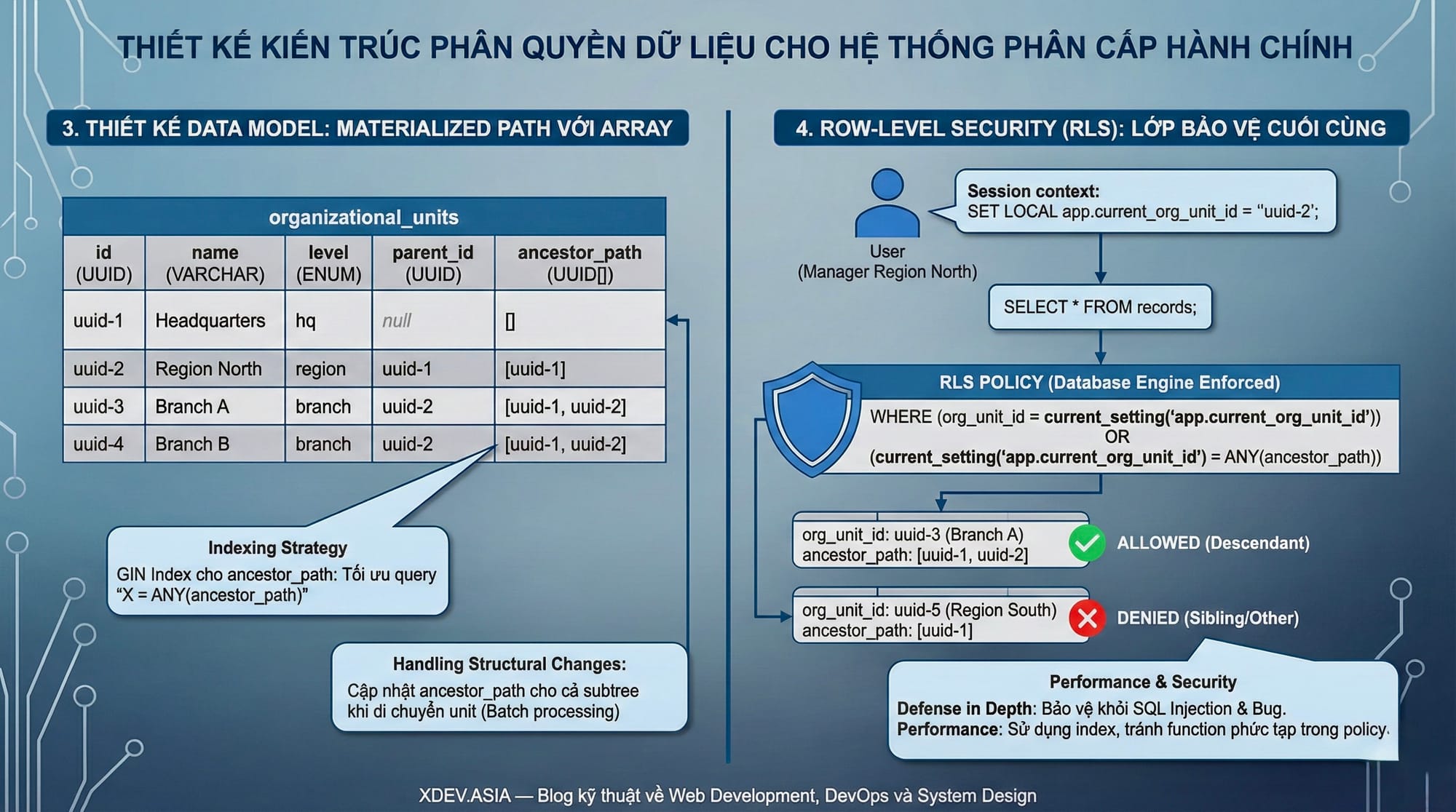
Design the organizational_units table:
| Column | Type | Description |
|---|---|---|
| id | UUID | Primary key |
| code | VARCHAR | Unit code (unique) |
| name | VARCHAR | Unit name |
| level | ENUM | Level (headquarters, region, branch, ...) |
| parent_id | UUID | FK to parent (nullable for root) |
| ancestor_path | UUID[] | Array of IDs from root to parent |
| created_at | TIMESTAMP | Creation time |
| updated_at | TIMESTAMP | Update time |
Data example:
| id | name | level | parent_id | ancestor_path |
|---|---|---|---|---|
| uuid-1 | Headquarters | hq | null | [] |
| uuid-2 | Region North | region. region | uuid-1 | [uuid-1] |
| uuid-3 | Branch A | branch. branch | uuid-2 | [uuid-1, uuid-2] |
| uuid-4 | Branch B | branch. branch | uuid-2 | [uuid-1, uuid-2] |
Query all descendants of Region North (uuid-2):
SELECT * FROM organizational_units
WHERE uuid-2 = ANY(ancestor_path);
This query returns Branch A and Branch B — all units with uuid-2 in the ancestor_path.
3.3. Indexing Strategy
To ensure performance with large datasets:
GIN Index for ancestor_path: Allows query "X = ANY(ancestor_path)" to run quickly.
B-tree Index for parent_id: Let query parent-child directly.
Composite Index for (level, parent_id): Given query "all branches belonging to region X".
Partial Index for active records: If there is soft-delete, index only active records.
3.4. Handling Structural Changes
When the structure changes (moving a unit from one parent to another), it is necessary to update the ancestor_path of that unit and all descendants:
Step 1: Calculate new ancestor_path = [new_parent.ancestor_path, new_parent.id]
Step 2: For each descendant, replace the old prefix with the new prefix in the ancestor_path
Note: This is a heavy operation if the subtree is large. Should be done during off-peak hours, may require batch processing and progress tracking.
Part 4: Row-Level Security — The Final Layer of Protection
4.1. Why is RLS needed?
Application-level authorization checks permissions in the application code. This is a popular way but has weaknesses:
- Bugs in code: A developer forgot to add permission checks to the new API
- SQL Injection: Attacker bypass application layer, access database directly
- Direct Database Access: DBA, BI tools, or hackers have database access credentials
- Microservices Complexity: Many services access the same database, making it difficult to ensure that they all check the correct permissions
Row-Level Security (RLS) is a feature of databases (PostgreSQL, SQL Server, Oracle) that allows defining access control policies at the row level. Policy is enforced by the database engine and cannot be bypassed from the application.
Defense in Depth: Even if the application has bugs, even if the attacker has SQL injection, the database still only returns rows that the current user is allowed to see. RLS is the final layer of protection, not replacing application-level checks but adding an additional layer of security.
4.2. How RLS works
Step 1 — Enable RLS on the board: By default RLS is off. When enabled, all queries on that table will be filtered through policies.
Step 2 — Policy Definition: Policy is a boolean expression that determines which rows are allowed to access. Policy can apply to SELECT, INSERT, UPDATE, DELETE separately or all.
Step 3 — Set Session Context: Application sets session variables (eg current_user_id, current_org_unit_id) before executing queries. Policy uses these variables to filter.
Step 4 — Query Execution: The database automatically adds conditions from the policy to the WHERE clause of every query. The user does not need (and cannot) change this.
4.3. Policy design for Hierarchical Access
With the designed ancestor_path model, the policy allows hierarchical access:
Logic: Users belonging to unit X are allowed to access records if:
- Record belongs to the unit X, OR
- Unit X is in the ancestor_path of the unit that owns the record (ie X is the ancestor of that unit)
Interpretation:
- Branch A staff (uuid-3) can only view records with org_unit_id = uuid-3
- Manager Region North (uuid-2) can view records with org_unit_id = uuid-2, uuid-3, uuid-4 (region and all branches belonging to the region)
- Executive Headquarters (uuid-1) can view all records
4.4. Session Context Management
RLS policy needs to know "which unit the current user belongs to". This information is passed through session variables:
In PostgreSQL: Use SET and current_setting():
-- Application set context sau khi xác thực user
SET LOCAL app.current_user_id = 'user-uuid';
SET LOCAL app.current_org_unit_id = 'uuid-3';
-- Policy đọc context
current_setting('app.current_org_unit_id', true)
Important note:
- Use
SET LOCAL(only valid in transactions) insteadSET(valid during session) to avoid context leaks between requests - Always set context at the beginning of each transaction
- Handling cases where context has not been set (default deny)
4.5. Performance Considerations
RLS policy is evaluated for each row, which may affect performance:
Make sure the policy uses indexed columns: If policy checks org_unit_id = ANY(...), need index on org_unit_id.
Avoid complicated function calls in policies: Each row calls that function. If the function queries the database, there will be N+1 problems.
Use STABLE/IMMUTABLE functions: Allows PostgreSQL to cache results in a query.
Consider materialized permissions: Instead of calculating realtime permissions, it can be pre-computed and saved in a separate table, the policy only needs to be looked up.
4.6. Bypass RLS for Admin Operations
Some cases need to bypass RLS:
- System migrations
- Batch processing jobs
- Reporting across all tenants
- Emergency access
Safe way:
- Create separate database role with BYPASSRLS privilege
- This role is only used by specific service accounts
- All access using this role is logged in detail
- Regular audit to ensure roles are not abused
Part 5: Role Hierarchy and Permission Design
5.1. Separate Role and Scope
A common mistake is to combine roles and scopes into the same entity. For example, create roles "Branch_A_Manager", "Branch_B_Manager", "Region_North_Manager". This leads to an explosion in the number of roles.
Better design: Separating role (function) and scope (scope):
| User | Role | Scope (Org Unit) |
|---|---|---|
| Alice | Manager | Branch A |
| Bob | Manager | Branch B |
| Carol | Manager | Region North |
| Dave | Analyst | Headquarters |
Same role "Manager" but different scope. Manager's permission is defined once, the scope determines what data is allowed to access.
5.2. Role Hierarchy Design
Functional Roles (by function):
| Role | Description | Typical Permissions |
|---|---|---|
| Viewer | View data and reports | Read |
| Operator | Handling daily operations | Read, Create, Update |
| Manager | Team management, approval | Read, Create, Update, Approve |
| Administrator | Configuration management | Read, Create, Update, Delete, Configure |
| Auditor | Auditing | Read (including audit logs) |
Role Inheritance:
Administrator
    ↓ inherits
Manager
    ↓ inherits
Operator
    ↓ inherits
Viewer
Administrator automatically has all permissions of Manager, Operator, and Viewer.
Auditor Usually not in this hierarchy because it has special permissions (see audit logs) but does not have modify permissions.
5.3. Permission Granularity
Permissions can be defined at many levels of detail:
Coarse-grained (coarse):
records:read— read all types of recordsrecords:write— create/edit all types of records
Fine-grained (details):
customer_records:readcustomer_records:createcustomer_records:updatecustomer_records:deletefinancial_records:readfinancial_records:approve
Recommendation: Start with coarse-grained, refine when there is actual need. Over-engineering permissions from the beginning leads to a complex, difficult-to-manage system.
5.4. Separation of Duties Implementation
SoD prevents fraud and errors by requiring multiple people to participate in a process.
Static SoD — Conflicting Roles:
| Role A | Role B | Reason |
|---|---|---|
| Requester | Approver | Do not self-approve your request |
| Data Entry | Auditor | Auditor must be independent |
| Developer | Deployer | Separate dev and ops |
When assigning roles to users, check to see if the user already has a conflicting role. If yes, refuse assignment.
Dynamic SoD — Conflicting Activations:
Allows users to hold multiple roles but only active one role at a time. For example, a User can have the roles "Data Entry" and "Reviewer", but when logging in, they must choose one. This allows flexibility (the same person can do multiple things) while still ensuring that a particular transaction is not completely controlled by one person.
Transaction-based SoD:
Check each transaction. For example: Order has a field created_by and approved_by. System enforcement approved_by != created_by. The person who created the application cannot be the person who approved the application itself.
Part 6: Handling Sensitive Data
6.1. Data Classification
Not all data needs the same level of protection. Data classification is the first step:
| Classification | Examples | Protection Level |
|---|---|---|
| Public | Company name, public announcements | Minimal |
| Internal | Internal memos, org charts | Standard access controls |
| Confidential | Financial reports, customer lists | Restricted access, audit logging |
| Sensitive | PII, health records, salary info | Encryption, strict access, detailed audit |
| Restricted | Trade secrets, M&A plans | Need-to-know basis, special approval |
6.2. Field-Level Access Control
RLS controls at the row level. But sometimes control is needed at the field (column) level:
For example: Table employees. employees has columns: id, name, email, department, salary, ssn. HR can see it all. Manager can see his team's id, name, email, department but not salary and ssn.
Implementation approaches:
View-based: Create views with subset of columns for each role. Manager query view does not have salary/ssn.
Application-level projection: Application only SELECT columns that the role is allowed to view.
Column-level encryption: Encrypt sensitive columns, only decrypt roles that have keys.
Dynamic data masking: The database returns masked values (e.g. xxx-xx-1234 for SSN) for roles that do not have full access.
6.3. Encryption Strategies
Encryption at Rest: Encrypt all database files on disk. Protection from physical access (theft, improper disposal). Transparent to the application — no need to change code.
Transparent Data Encryption (TDE): Database automatically encrypts when writing, decrypts when reading. Protect data files and backups. Does not protect against authorized database users.
Application-Level Encryption: Application encrypt before sending to database, decrypt after receiving. Protection from database admins and anyone with database access. Disadvantage: cannot query on encrypted data (unless using searchable encryption).
Column-Level Encryption: Only encrypt specific columns. Balance between security and usability. Can query on non-encrypted columns.
Recommendations for sensitive data:
- Encryption at Rest: Always on (baseline protection)
- Application-Level Encryption: For highly sensitive fields (SSN, health data)
- Column-Level Encryption: For moderately sensitive fields that require occasional search
6.4. Key Management
Encryption is only as strong as key management:
Key Storage: Never store keys in code, config files, or in the same database as encrypted data. Use dedicated Key Management System (KMS) such as AWS KMS, HashiCorp Vault, Azure Key Vault.
Key Rotation: Change keys periodically (for example, annually) and when there is a problem (keys may be exposed). Re-encrypt data with new key.
Key Hierarchy: Master Key encrypts Data Keys. Data Keys encrypt actual data. If you need to rotate, just re-encrypt the Data Keys with the new Master Key, no need to re-encrypt all data.
Access to Keys: Principle of least privilege. Only services that need to be decrypted will have access to keys. Audit all access keys.
Part 7: Audit Trail and Compliance
7.1. What to Log
Audit logging needs to capture enough information to answer: Who did What to Which resource, When, from Where, and Why (if available).
Authentication Events:
- Login success/failure
- Logout
- Password change/reset
- MFA events
- Session timeout
Authorization Events:
- Access granted
- Access denied
- Privilege escalation attempts
- Role/permission changes
Data Access Events:
- Read sensitive data (mandatory)
- Read normal data (optional, based on requirements)
- Create records
- Update records (with before/after values)
- Delete records
Configuration Changes:
- System settings modified
- User/role management
- Policy changes
- Integration configurations
Anomalies:
- Unusual access patterns
- Multiple failed attempts
- Access from new location/device
- Bulk data access
7.2. Log Entry Structure
Each log entry needs to contain:
| Field | Description | Example |
|---|---|---|
| timestamp | Time (with timezone) | 2025-01-15T14:30:00Z |
| event_id | Unique identifier | uuid |
| event_type | Event type | DATA_ACCESS |
| action. action | Specific actions | READ |
| actor_id | User does it | user-uuid |
| actor_role | Current role | manager |
| actor_org_unit | Unit of user | branch-uuid |
| resource_type | Resource type | customer_record |
| resource_id | Resource ID | record-uuid |
| resource_org_unit | Owning unit | branch-uuid |
| result. result | Results | SUCCESS/DENIED |
| ip_address | Source IP | 192.168.1.100 |
| user_agent | Client info | Mozilla/5.0... |
| session_id | Session identifier | session-uuid |
| details. details | Additional information | JSON objects |
7.3. Log Integrity and Retention
Immutability: Audit logs must be immutable — no one is allowed to modify or delete them. Use:
- Write-once storage (WORM)
- Append-only tables with triggers prevent update/delete
- Blockchain-based verification
- Regular hash chains to detect tampering
Retention Policy:
- Active storage: 90 days (quick access for investigations)
- Archive storage: 1-7 years (depending on compliance requirements)
- Define clear policy and automate archiving/purging
Access Control for Logs:
- Separate permission for audit log access
- Only the security/compliance team has access
- Log access to audit logs (meta-auditing)
7.4. Monitoring and Alerting
Logs have no value if no one sees them. Implement:
Real-time Alerts:
- Multiple failed login attempts → Possible brute force
- Access denied spikes → Possible unauthorized access attempt
- Bulk data access → Possible data exfiltration
- Access from unusual location → Possible compromised account
- Off-hours access to sensitive data → Needs investigation
Periodic Reviews:
- Weekly: Review access denied patterns
- Monthly: Review role assignments, look for over-privileged accounts
- Quarterly: Full access review, remove unused permissions
- Annually: Policy review, updated based on organizational changes
Part 8: Integration Patterns
8.1. Identity Provider Integration
Most organizations already have an Identity Provider (IdP) such as Active Directory, Okta, Auth0, Keycloak. Decentralized systems need to integrate:
SAML 2.0: Standard for enterprise SSO. IdP authenticates user, sends SAML Assertion containing user identity and attributes. Service Provider (application) trust assertion and create session.
OAuth 2.0 / OpenID Connect: Modern standard, popular for web and mobile. IdP issue JWT tokens contain claims about the user. Application validate token and extract claims.
Claims to Include in Token:
- sub: User identifier
- roles: Array of role names
- org_unit_id: Primary organizational unit
- org_unit_path: Full path from root to org unit
- permissions: (Optional) Explicit permissions if not derived from roles
8.2. API Gateway and Authorization
API Gateway is the entry point for all API requests. This is the ideal place to implement the first authorization layer:
Token Validation: Verify JWT signature, check expiration, validate issuer.
Coarse-grained Authorization: Check if the user has permission to call this API (based on roles in token).
Rate Limiting: Prevent abuse, can be differentiated limits by role.
Context Injection: Extract claims from token, inject into request headers for downstream services to use.
Note: API Gateway should only do coarse-grained checks. Fine-grained authorization (for example, does the user have permission to access this specific record) should be handled by the application and database (RLS).
8.3. Service-to-Service Authorization
In microservices architecture, services call each other. Need to authorize these calls:
Service Accounts: Each service has its own identity (service account). When Service A calls Service B, Service B verifies A's identity and checks whether A has permission.
Token Propagation: User's token is forwarded from one service to another. Downstream service authorization based on original user's permissions.
Hybrid Approach: Combine both. Service A calls Service B with both: Service A's identity (for service-level auth) and User's token (for user-level auth). Service B checks both.
8.4. Caching Authorization Decisions
Authorization checks can be expensive, especially with complex ABAC. Caching helps improve performance:
Permission Cache: Cache the result "does user X have permission Y" in short TTL (a few minutes). Invalidate when role/permission changes.
Policy Decision Cache: Cache the results of complex ABAC policies. Key = hash of all attributes involved.
Negative Caching: Cache all "denied" results. But be careful with false negatives if permission has just been granted.
Cache Invalidation Strategy:
- Time-based: Short TTL (1-5 minutes)
- Event-based: Invalidate when role assignment changes
- Hybrid: TTL + event-based invalidation
Part 9: Testing and Validation
9.1. Authorization Testing Pyramid
Unit Tests: Test individual permission check functions. Given user with role X, can they perform action Y? Test edge cases: null inputs, invalid roles, expired sessions.
Integration Tests: Test end-to-end from API to database. Verify RLS policies work correctly. Test with real database, not mocks.
Negative Tests: Equally important as positive tests. Verify user CANNOT access what they shouldn't. Easily overlooked but critical for security.
Cross-tenant Tests: Verify data isolation. User of Tenant A query → should never return Tenant B data.
Privilege Escalation Tests: Attempt to bypass authorization. Try direct database access, manipulate tokens, forge session context.
9.2. Test Scenarios for Hierarchical Access
Scenario 1: Vertical Access
- User in Region level query → Should return Region data + all Branch data under that Region
- User in Branch level query → Should return only that Branch's data
Scenario 2: Horizontal Isolation
- User in Branch A query → Should NOT return Branch B data
- User in Region North query → Should NOT return Region South data
Scenario 3: Move Operations
- Branch moved from Region North to Region South
- User in Region North query → Should NOT return moved Branch data anymore
- User in Region South query → Should return moved Branch data
Scenario 4: Multi-org Users
- User belongs to multiple org units (rare but possible)
- Query should return union of data from all assigned units
9.3. Security Testing
Penetration Testing:
- Hire external team or use tools like OWASP ZAP, Burp Suite
- Focus on authorization bypass vulnerabilities
- Test token manipulation, parameter tampering, direct object references
Code Review:
- Review all authorization-related code
- Check for missing authorization checks in new endpoints
- Verify RLS policies cover all tables with sensitive data
Configuration Audit:
- Review role definitions and assignments
- Look for over-privileged accounts
- Check for orphaned permissions (assigned but not used)
Part 10: Operational Considerations
10.1. Deployment Strategy
Phased Rollout:
Phase 1 — Foundation (Month 1-2):
- Deploy org unit hierarchy model
- Implement basic RBAC with role inheritance
- Enable RLS on critical tables
Phase 2 — Hardening (Month 3-4):
- Comprehensive audit logging
- SoD constraints
- Encryption for sensitive data
- Security testing
Phase 3 — Advanced (Month 5-6):
- ABAC for complex scenarios
- Field-level access control
- Self-service permission requests
- Analytics and anomaly detection
10.2. Handling Edge Cases
User with No Org Unit: Default deny. User must be assigned org unit before accessing data.
User with Multiple Org Units: Union of accessible data. Need careful design to avoid confusion.
Org Unit Restructuring: Plan downtime or implement gradual migration. Communicate changes.
Emergency Access: "Break glass" procedure for emergencies. Heavily logged, requires justification, auto-expires.
Orphaned Data: Data belonging to the org unit has been deleted. Define policy: archive, migrate, or delete.
10.3. Monitoring and Health Checks
Metrics to Track:
- Authorization decision latency (P50, P95, P99)
- Cache hit rate
- Number of access denied events
- RLS policy execution time
- Session context set fails
Health Checks:
- RLS policies enabled on all required tables
- Session context properly set for all requests
- IdP connectivity
- Audit log ingestion rate
Alerting Thresholds:
- Authorization latency > 100ms (P95)
- Access denied rate spike > 200% baseline
- RLS policy evaluation errors
- Audit log gaps
10.4. Disaster Recovery
Backup Requirements:
- Database with RLS policies
- IdP configuration (roles, groups, mappings)
- Application authorization configuration
- Audit logs (critical for compliance)
Recovery Procedures:
- Restore database and verify RLS policies intact
- Verify IdP sync
- Test authorization with known scenarios
- Review audit logs for gaps
Emergency Procedures:
- Procedure to revoke all access quickly (in case of breach)
- Procedure to restore specific user's access
- Escalation contacts
Conclusion: Principles to Remember
Building a decentralized system for a hierarchical structure is a complex problem but can be solved with the right principles:
Defense in Depth: Do not trust any layer completely. API Gateway + Application + Database RLS creates multiple layers of protection.
Least Privilege: Grant the minimum necessary permissions. It's easier to add permissions than to revoke granted permissions.
Separation of Concerns: Separate role (function) and scope (scope). Role defines "what can be done", scope defines "where to do it".
Hierarchical Inheritance: Leverage the tree structure to automatically derive permissions. The superior inherits the view rights of the subordinate.
Horizontal Isolation: Peer units must be completely isolated. There is no access path to sibling.
Audit Everything: The log is detailed enough to reconstruct "who did what, when, where". This is a requirement for compliance and investigation.
Test Negative Cases: Verify not only "accessible" but also "inaccessible". Negative tests are often overlooked but are critical.
Plan for Change: Organizational structures will change. Design for flexibility: easy to add units, move units, restructure hierarchy.
With these principles and the proposed architecture (Hierarchical RBAC + Sub-tenant + RLS + Comprehensive Audit), you can build a robust, scalable, and secure decentralized system for any decentralized organization.
Code Demo here https://github.com/xdev-asia-labs/spring-multitenant-rbac