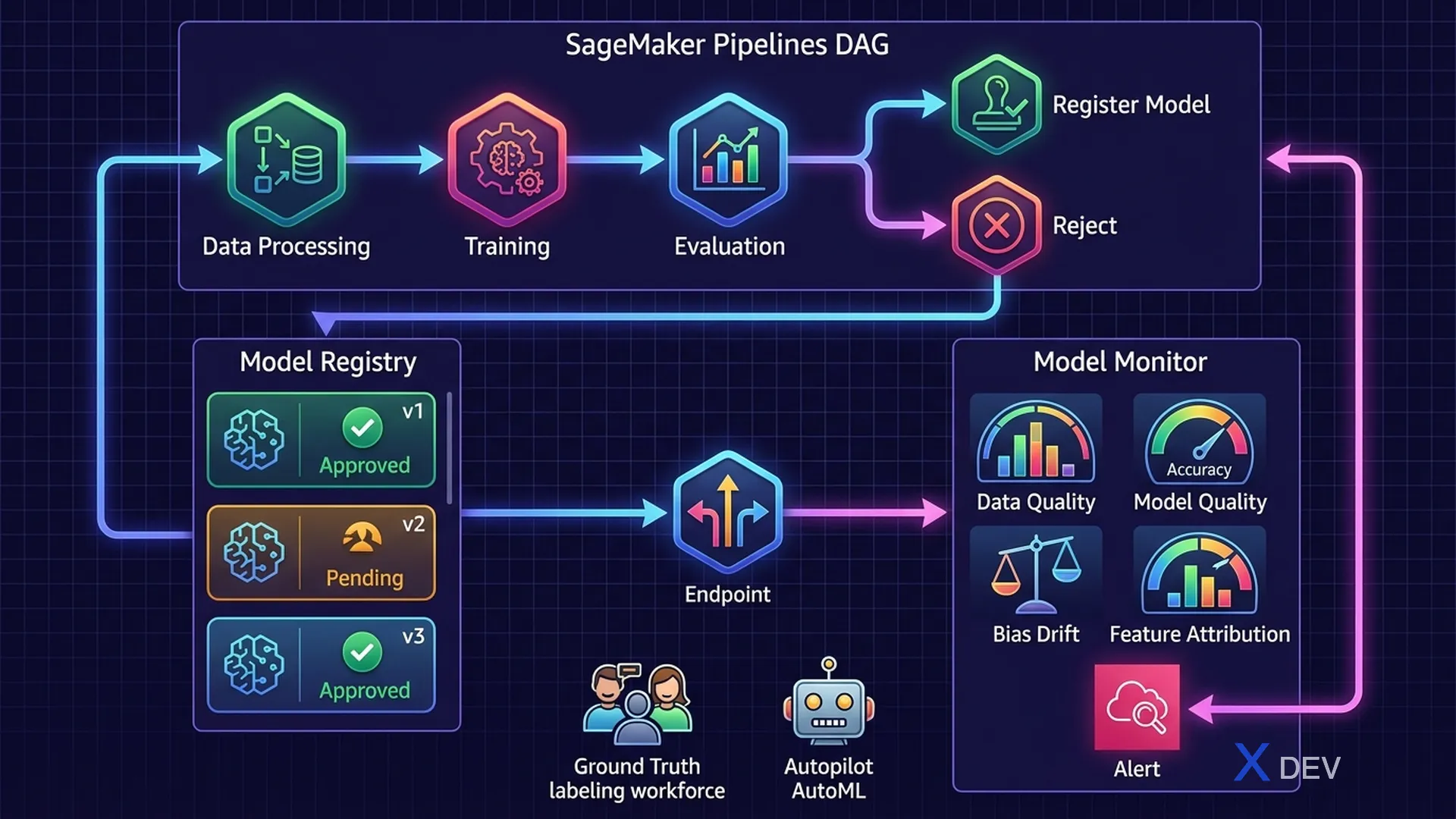
SageMaker MLOps: Model Monitor, SageMaker Pipelines, and CI/CD for ML workflows
1. SageMaker Model Monitor
SageMaker Model Monitor automatically monitors deployed models to detect quality issues in production. This is one of the most important MLOps topics.
| Monitor Type | What It Detects | Baseline From |
|---|---|---|
| Data Quality Monitor | Statistical drift in input features (mean, std, completeness) | Training data statistics |
| Model Quality Monitor | Model performance degradation (accuracy, F1 drop) | Ground truth labels |
| Bias Drift Monitor | Fairness metric shifts in predictions | Clarify baseline |
| Feature Attribution Drift | SHAP value changes — features changing importance | Clarify baseline |
Exam tip: Model Monitor needs a baseline to compare against. The baseline is created from training data at deployment time. Monitor runs on a schedule (hourly/daily), compares incoming data with the baseline, and alerts if drift exceeds the threshold.
1.1. Types of Drift
Data Drift Types:

┌─────────────────────────────────────────────────────┐
│  Covariate Shift (Input Drift):                     │
│  Input distribution P(X) changes                   │
│  Example: model trained on summer data,             │
│  production gets winter data                        │
│                                                     │
│  Concept Drift (Label Drift):                       │
│  Relationship P(Y|X) changes                        │
│  Example: fraud patterns evolve over time          │
│                                                     │
│  Prior Probability Shift:                           │
│  P(Y) class distribution changes                    │
│  Example: seasonal products change target balance   │
└─────────────────────────────────────────────────────┘
2. SageMaker Pipelines — MLOps CI/CD
SageMaker Pipelines is the MLOps workflow orchestration tool — creates reproducible, automatable ML pipelines.
SageMaker Pipeline Example:

  ProcessingStep ──→ TrainingStep ──→ EvaluationStep ──→ ConditionStep
       ↓                  ↓                ↓                   ↓
   Clean Data         Train Model      Compute Metrics    If accuracy > 0.85
   Feature Eng        Save Artifact    to S3              ↓           ↓
                                                     Register    Fail Pipeline
                                                      Model
| Step Type | What It Does |
|---|---|
| ProcessingStep | Data preprocessing via Processing Jobs |
| TrainingStep | Model training via Training Jobs |
| EvaluationStep | Model evaluation, compute metrics |
| ConditionStep | Branching logic based on metrics |
| RegisterModelStep | Register approved model to Model Registry |
| TransformStep | Batch Transform inference |
3. SageMaker Model Registry
Model Registry is a centralized catalog for tracking and governing ML models throughout their lifecycle.
| Feature | Description |
|---|---|
| Model Groups | Logical grouping of versions of the same model |
| Approval Status | PendingManualApproval → Approved → Rejected |
| Model Lineage | Track training job, data, artifacts for each version |
| Deployment | Deploy directly from Registry to endpoint |
4. SageMaker Ground Truth
Ground Truth helps create high-quality labeled training datasets combining human labelers and automated labeling.
Ground Truth Workflow:

Raw Data (S3) ──→ Labeling Job
                       ↓
             ┌─── Auto Labeling ───┐
             │   (ML model labels  │
             │   easy examples)    │
             │                     │
             └─── Human Labeling ──┘
                   (Mechanical Turk
                    or private team
                    for hard examples)
                       ↓
               Labeled Dataset (S3)
5. SageMaker Autopilot — AutoML
Autopilot automatically trains and tunes ML models — full AutoML with explainability.
| What Autopilot Does | Detail |
|---|---|
| Auto feature engineering | Detects data types, handles missing values, encoding |
| Algorithm selection | Tries multiple algorithms (XGBoost, Deep Learning, Linear) |
| Hyperparameter tuning | Bayesian optimization per algorithm |
| Explainability | SageMaker Clarify integration — SHAP values |
| Leaderboard | Ranked models by target metric |
Exam tip: Autopilot only supports tabular data. When the question asks "automate model building for non-technical users" → Autopilot. Different from SageMaker JumpStart (pre-built models) and Canvas (no-code for business users).
6. Cheat Sheet — MLOps Services
| Scenario | Service |
|---|---|
| Detect data drift in production | SageMaker Model Monitor (Data Quality) |
| Automated ML pipeline CI/CD | SageMaker Pipelines |
| Track and govern model versions | SageMaker Model Registry |
| Label training data at scale | SageMaker Ground Truth |
| AutoML without coding | SageMaker Autopilot |
| Track experiments (metrics, params) | SageMaker Experiments |
| Model performance drop alert | Model Monitor + CloudWatch Alarms |
7. Practice Questions
Q1: A deployed fraud detection model's accuracy dropped significantly after 3 months. Investigation shows the input feature distributions have changed. What tool should be used to automatically detect this going forward?
- A) SageMaker Clarify
- B) SageMaker Experiments
- C) SageMaker Model Monitor — Data Quality Monitor ✓
- D) SageMaker Ground Truth
Explanation: SageMaker Model Monitor's Data Quality Monitor continuously compares incoming inference data statistics against a baseline from training data. It detects feature drift (changed distributions) and sends CloudWatch alerts when thresholds are exceeded.
Q2: A team wants to create a reproducible ML pipeline that automatically retrains and deploys a model when new data arrives, with a human approval step before production deployment. Which service provides this?
- A) SageMaker Autopilot
- B) SageMaker Pipelines + Model Registry ✓
- C) AWS Step Functions only
- D) SageMaker Ground Truth
Explanation: SageMaker Pipelines orchestrates the ML workflow (data prep → train → evaluate → register). Model Registry provides the approval workflow (PendingManualApproval → Approved) with human gate before deployment — the combination is the standard MLOps solution on AWS.
Q3: A company needs to label 100,000 images for object detection training. They want to minimize labeling cost by using ML to automatically label easy examples. Which service should they use?
- A) SageMaker Autopilot
- B) Amazon Rekognition Custom Labels
- C) SageMaker Ground Truth with auto-labeling ✓
- D) AWS Glue DataBrew
Explanation: SageMaker Ground Truth uses automated labeling where an ML model labels high-confidence examples automatically, and only uncertain examples are sent to human workers. This can reduce labeling costs by up to 70%.