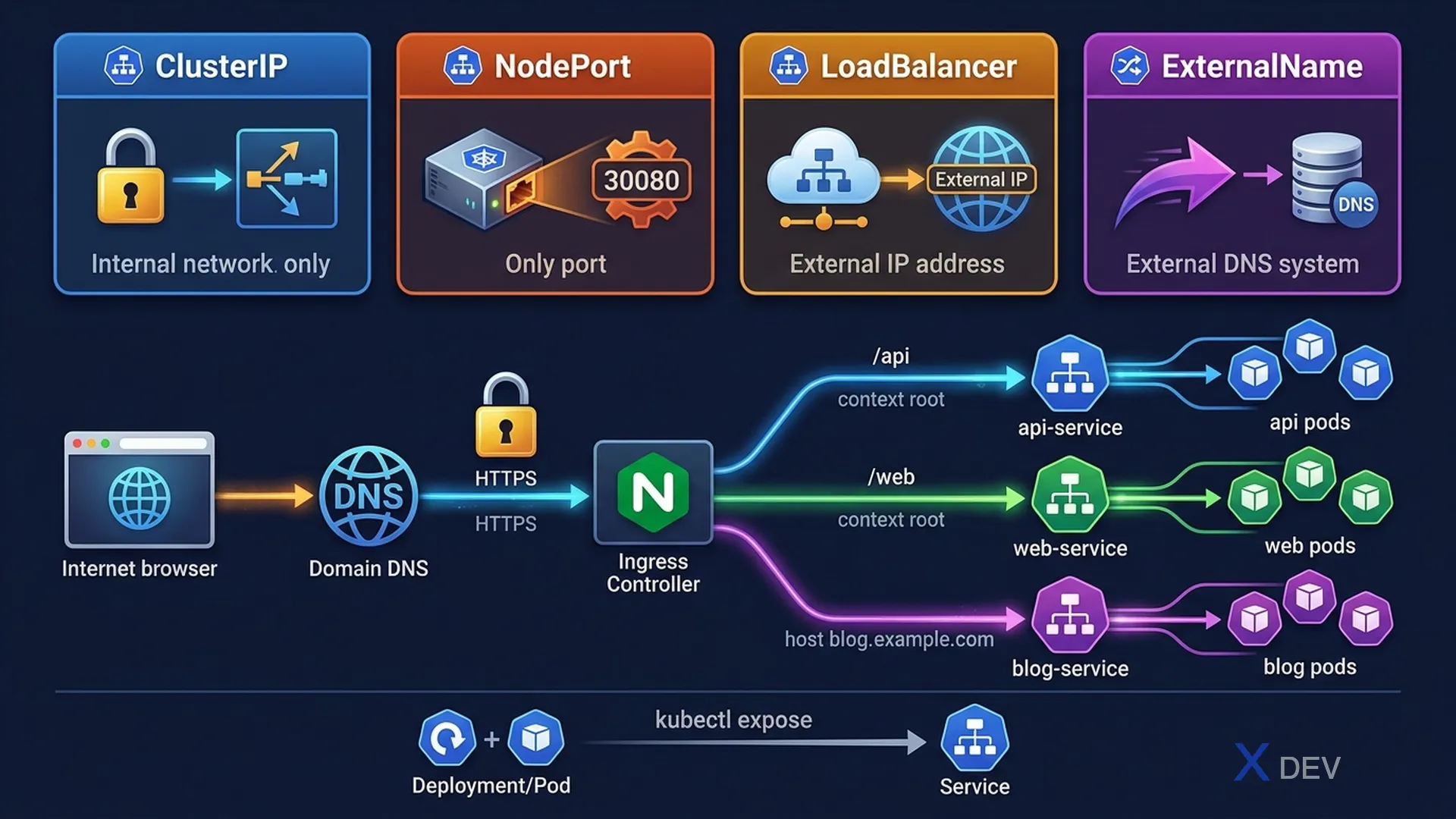
1. Service Types
| Type | Access | When to Use |
|---|---|---|
| ClusterIP | Internal only (cluster DNS) | Service-to-service communication (default) |
| NodePort | NodeIP:30000-32767 | Dev/test external access |
| LoadBalancer | Cloud LB external IP | Production external access (cloud) |
| ExternalName | CNAME DNS alias | Route to external DNS name |
ClusterIP (default):
apiVersion: v1
kind: Service
metadata:
  name: myapp-svc
spec:
  type: ClusterIP     # Can omit — default
  selector:
    app: myapp
  ports:
  - port: 80          # Service port (what clients connect to)
    targetPort: 8080  # Container port (where app listens)

NodePort:
spec:
  type: NodePort
  ports:
  - port: 80
    targetPort: 8080
    nodePort: 30080   # Optional: 30000-32767 range (auto-assigned if omitted)
2. kubectl expose
# Expose Deployment as ClusterIP (default)
kubectl expose deployment myapp --port=80 --target-port=8080

# Expose as NodePort
kubectl expose deployment myapp --port=80 --target-port=8080 --type=NodePort

# Expose a Pod
kubectl expose pod mypod --port=80 --name=mypod-svc

# Expose existing service quickly and redirect traffic
kubectl run nginx --image=nginx --port=80 --expose
# This creates both the Pod AND the ClusterIP Service
Exam tip:
kubectl exposerequires a selector that matches Pod labels. If a Deployment usesapp: myapp, the Service selector must beapp: myapp. The--exposeflag withkubectl runcreates both the Pod and the Service at once — very fast during the exam.
3. Ingress
Ingress provides L7 HTTP/HTTPS routing — a single entry point that routes to multiple Services based on host/path.
                     ┌─────────────────────────────────┐
Internet ──────────►│   Ingress Controller (nginx)     │
                     │                                  │
                     │  /api  ──────────► api-service   │
                     │  /web  ──────────► web-service   │
                     │  blog.example.com → blog-service │
                     └─────────────────────────────────┘
apiVersion: networking.k8s.io/v1
kind: Ingress
metadata:
name: myapp-ingress
annotations:
nginx.ingress.kubernetes.io/rewrite-target: /
spec:
ingressClassName: nginx # Which IngressClass to use
tls:
- hosts:
- myapp.example.com
secretName: myapp-tls # TLS cert stored as Secret
rules:
- host: myapp.example.com
http:
paths:
- path: /api
pathType: Prefix # Prefix or Exact
backend:
service:
name: api-service
port:
number: 80
- path: /web
pathType: Prefix
backend:
service:
name: web-service
port:
number: 80| pathType | Behavior | Example |
|---|---|---|
| Exact | Matches the path exactly | /api only matches /api |
| Prefix | Matches the path prefix | /api matches /api, /api/v1, /api/users |
| ImplementationSpecific | Depends on IngressClass | Depends on controller |
Exam tip: Ingress requires an Ingress Controller (like nginx, traefik) to function — the Ingress resource is just configuration. IngressClass specifies which controller handles requests. In the exam, the IngressClass is usually pre-configured. Remember to check
kubectl get ingressclassfor the name.
4. Debug Service Connectivity
# Check service exists and endpoints
kubectl get services
kubectl get endpoints myapp-svc

# Test connectivity from inside the cluster (create temp pod)
kubectl run test --image=busybox --rm -it -- wget -qO- http://myapp-svc
kubectl run test --image=curlimages/curl --rm -it -- curl http://myapp-svc:80

# Check if selector matches pods
kubectl get pods -l app=myapp  # Should match service selector
kubectl describe service myapp-svc  # Shows Endpoints section

# If Endpoints is empty: selector mismatch!
# Check: kubectl get pods --show-labels
5. Cheat Sheet
| Task | Command |
|---|---|
| Expose Deployment | kubectl expose deploy/app --port=80 --type=NodePort |
| Create Pod + Service | kubectl run nginx --image=nginx --port=80 --expose |
| Check service endpoints | kubectl get endpoints svc-name |
| Test service from inside cluster | kubectl run tmp --image=busybox --rm -it -- wget -O- http://svc |
| Ingress with TLS | tls: secretName + hosts in rules |
6. Practice Questions
Q1: A Deployment named "webapp" with selector app=webapp runs on port 8080. You need to create a Service that makes it accessible within the cluster on port 80. Which command creates this correctly?
- A)
kubectl expose deployment webapp --port=8080 - B)
kubectl expose deployment webapp --port=80 --target-port=8080✓ - C)
kubectl create service clusterip webapp --port=8080:80 - D)
kubectl expose deployment webapp --type=ClusterIP --port=80
Explanation: --port=80 is the Service port (what clients use), --target-port=8080 is the container port (where the app listens). Without --target-port, Kubernetes assumes target-port equals port. Option D would work but uses same port 80 for both.
Q2: An Ingress resource exists but traffic doesn't reach the backend Services. kubectl get endpoints shows the correct Pod IPs. What is the most likely cause?
- A) The Service type should be LoadBalancer instead of ClusterIP
- B) No Ingress Controller is installed or the ingressClassName is wrong ✓
- C) The Ingress needs TLS configured
- D) The pathType should be Exact instead of Prefix
Explanation: Ingress resources are just configuration objects. Without an Ingress Controller, nothing processes the rules. If the ingressClassName doesn't match an IngressClass connected to a running controller, the Ingress is effectively ignored. Always verify kubectl get ingressclass and that the controller Pod is running.
Q3: Which Service type provides external access using a port in the range 30000-32767 on every cluster node?
- A) ClusterIP
- B) ExternalName
- C) NodePort ✓
- D) LoadBalancer
Explanation: NodePort opens a port in the 30000-32767 range on every Node in the cluster. External traffic can reach the Service via NodeIP:NodePort. This is typically used for development and testing. LoadBalancer provides a cloud load balancer with a stable external IP, which is preferred for production.