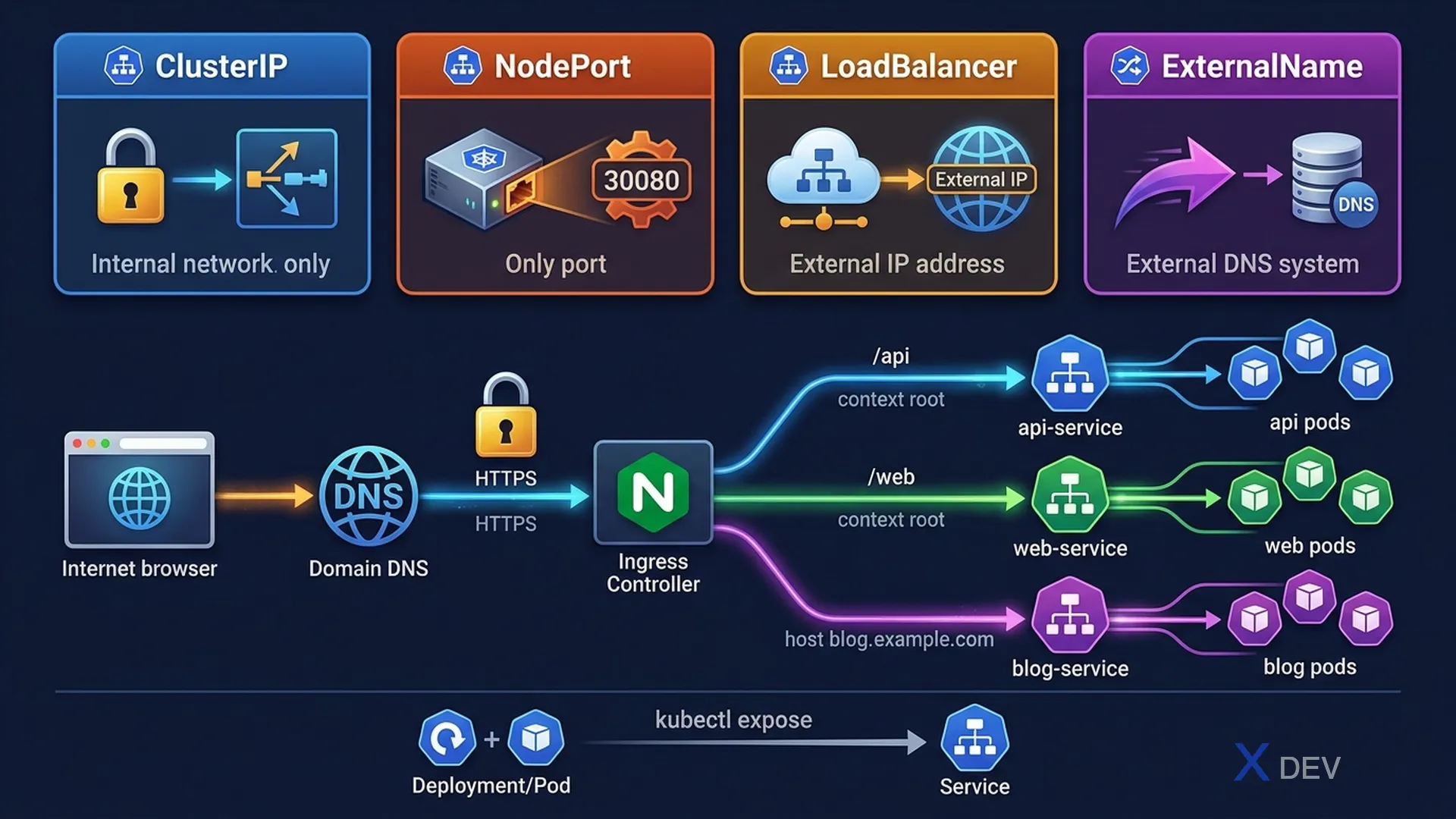
1. Service Types
| Type | Access | Dùng khi nào |
|---|---|---|
| ClusterIP | Internal only (cluster DNS) | Service-to-service communication (default) |
| NodePort | NodeIP:30000-32767 | Dev/test external access |
| LoadBalancer | Cloud LB external IP | Production external access (cloud) |
| ExternalName | CNAME DNS alias | Route to external DNS name |
ClusterIP (default):
apiVersion: v1
kind: Service
metadata:
  name: myapp-svc
spec:
  type: ClusterIP     # Can omit — default
  selector:
    app: myapp
  ports:
  - port: 80          # Service port (what clients connect to)
    targetPort: 8080  # Container port (where app listens)

NodePort:
spec:
  type: NodePort
  ports:
  - port: 80
    targetPort: 8080
    nodePort: 30080   # Optional: 30000-32767 range (auto-assigned if omitted)
2. kubectl expose
# Expose Deployment as ClusterIP (default)
kubectl expose deployment myapp --port=80 --target-port=8080

# Expose as NodePort
kubectl expose deployment myapp --port=80 --target-port=8080 --type=NodePort

# Expose a Pod
kubectl expose pod mypod --port=80 --name=mypod-svc

# Expose existing service quickly and redirect traffic
kubectl run nginx --image=nginx --port=80 --expose
# This creates both the Pod AND the ClusterIP Service
Exam tip:
kubectl exposecần selector match với Pod labels. Nếu Deployment đang dùngapp: myapp, Service selector phải làapp: myapp. Flag--exposekhi dùng vớikubectl runtạo cả Pod lẫn Service cùng lúc — rất nhanh trong exam.
3. Ingress
Ingress là L7 HTTP/HTTPS routing — một điểm vào, route đến nhiều Services dựa trên host/path.
                     ┌─────────────────────────────────┐
Internet ──────────►│   Ingress Controller (nginx)     │
                     │                                  │
                     │  /api  ──────────► api-service   │
                     │  /web  ──────────► web-service   │
                     │  blog.example.com → blog-service │
                     └─────────────────────────────────┘
apiVersion: networking.k8s.io/v1
kind: Ingress
metadata:
name: myapp-ingress
annotations:
nginx.ingress.kubernetes.io/rewrite-target: /
spec:
ingressClassName: nginx # Which IngressClass to use
tls:
- hosts:
- myapp.example.com
secretName: myapp-tls # TLS cert stored as Secret
rules:
- host: myapp.example.com
http:
paths:
- path: /api
pathType: Prefix # Prefix or Exact
backend:
service:
name: api-service
port:
number: 80
- path: /web
pathType: Prefix
backend:
service:
name: web-service
port:
number: 80| pathType | Hành vi | Ví dụ |
|---|---|---|
| Exact | Match chính xác path | /api chỉ match /api |
| Prefix | Match path prefix | /api match /api, /api/v1, /api/users |
| ImplementationSpecific | Tùy IngressClass | Depends on controller |
Exam tip: Ingress cần Ingress Controller (như nginx, traefik) mới hoạt động — Ingress resource chỉ là config. IngressClass chỉ định controller nào xử lý. Trong exam, IngressClass thường đã được setup sẵn. Nhớ check
kubectl get ingressclassđể biết tên.
4. Debug Service Connectivity
# Check service exists và endpoints
kubectl get services
kubectl get endpoints myapp-svc

# Test connectivity từ trong cluster (create temp pod)
kubectl run test --image=busybox --rm -it -- wget -qO- http://myapp-svc
kubectl run test --image=curlimages/curl --rm -it -- curl http://myapp-svc:80

# Check if selector matches pods
kubectl get pods -l app=myapp  # Should match service selector
kubectl describe service myapp-svc  # Shows Endpoints section

# If Endpoints is empty: selector mismatch!
# Check: kubectl get pods --show-labels
5. Cheat Sheet
| Task | Command |
|---|---|
| Expose Deployment | kubectl expose deploy/app --port=80 --type=NodePort |
| Create Pod + Service | kubectl run nginx --image=nginx --port=80 --expose |
| Check service endpoints | kubectl get endpoints svc-name |
| Test service từ trong cluster | kubectl run tmp --image=busybox --rm -it -- wget -O- http://svc |
| Ingress với TLS | tls: secretName + hosts trong rules |
6. Practice Questions
Q1: A Deployment named "webapp" with selector app=webapp runs on port 8080. You need to create a Service that makes it accessible within the cluster on port 80. Which command creates this correctly?
- A)
kubectl expose deployment webapp --port=8080 - B)
kubectl expose deployment webapp --port=80 --target-port=8080✓ - C)
kubectl create service clusterip webapp --port=8080:80 - D)
kubectl expose deployment webapp --type=ClusterIP --port=80
Explanation: --port=80 is the Service port (what clients use), --target-port=8080 is the container port (where the app listens). Without --target-port, Kubernetes assumes target-port equals port. Option D would work but uses same port 80 for both.
Q2: An Ingress resource exists but traffic doesn't reach the backend Services. kubectl get endpoints shows the correct Pod IPs. What is the most likely cause?
- A) The Service type should be LoadBalancer instead of ClusterIP
- B) No Ingress Controller is installed or the ingressClassName is wrong ✓
- C) The Ingress needs TLS configured
- D) The pathType should be Exact instead of Prefix
Explanation: Ingress resources are just configuration objects. Without an Ingress Controller, nothing processes the rules. If the ingressClassName doesn't match an IngressClass connected to a running controller, the Ingress is effectively ignored. Always verify kubectl get ingressclass and that the controller Pod is running.
Q3: Which Service type provides external access using a port in the range 30000-32767 on every cluster node?
- A) ClusterIP
- B) ExternalName
- C) NodePort ✓
- D) LoadBalancer
Explanation: NodePort opens a port in the 30000-32767 range on every Node in the cluster. External traffic can reach the Service via NodeIP:NodePort. This is typically used for development and testing. LoadBalancer provides a cloud load balancer with a stable external IP, which is preferred for production.