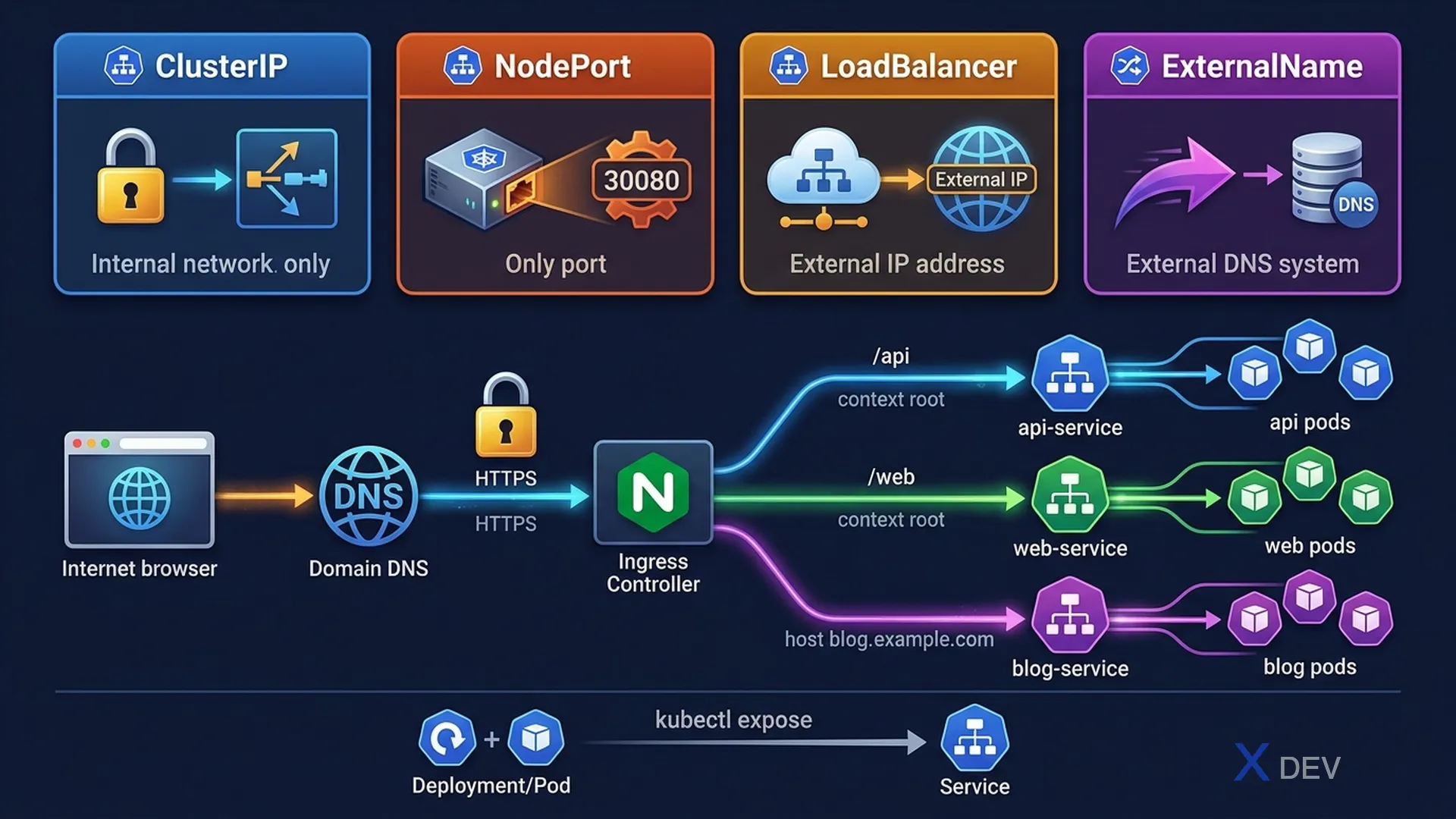
1. 四種 Service 類型
| 類型 | 說明 | 使用場景 |
|---|---|---|
| ClusterIP(預設) | 內部 Cluster IP,僅叢集內可存取 | 微服務間通訊 |
| NodePort | 在每個節點的 IP:PORT 上開放 | 開發/測試環境的外部存取 |
| LoadBalancer | 透過雲端 LB 的外部 IP | 生產環境的外部流量 |
| ExternalName | 將 Service 對應到外部 DNS 名稱 | 存取叢集外部的服務 |
2. Service YAML
# ClusterIP(預設)
apiVersion: v1
kind: Service
metadata:
  name: backend-svc
spec:
  type: ClusterIP
  selector:
    app: backend         # 將流量導向 label 為 app=backend 的 Pod
  ports:
  - port: 80             # Service 暴露的 port
    targetPort: 8080     # Pod 中容器的 port
    protocol: TCP

# NodePort
apiVersion: v1
kind: Service
metadata:
  name: web-svc
spec:
  type: NodePort
  selector:
    app: web
  ports:
  - port: 80
    targetPort: 8080
    nodePort: 30080      # 可選: 範圍 30000-32767
# 快速建立 Service
kubectl expose deployment myapp --port=80 --target-port=8080 --type=ClusterIP
kubectl expose deployment myapp --port=80 --target-port=8080 --type=NodePort
# 叢集內 DNS 存取
# <service-name>.<namespace>.svc.cluster.local
# 同 namespace: curl http://backend-svc
# 跨 namespace: curl http://backend-svc.production.svc.cluster.local3. Ingress
Ingress 提供 L7(HTTP/HTTPS)路由,將外部流量導向叢集內的 Service。
外部流量 → Ingress Controller → Ingress 規則 → Service → Pod

┌──────────────────── Ingress ──────────────────────┐
│                                                   │
│  shop.example.com/api  → api-svc:80               │
│  shop.example.com/web  → web-svc:80               │
│  blog.example.com      → blog-svc:80              │
│                                                   │
└───────────────────────────────────────────────────┘
apiVersion: networking.k8s.io/v1
kind: Ingress
metadata:
name: app-ingress
annotations:
nginx.ingress.kubernetes.io/rewrite-target: /
spec:
ingressClassName: nginx
tls: # TLS 設定
- hosts:
- shop.example.com
secretName: tls-secret # 包含 tls.crt 和 tls.key 的 Secret
rules:
- host: shop.example.com
http:
paths:
- path: /api
pathType: Prefix
backend:
service:
name: api-svc
port:
number: 80
- path: /web
pathType: Prefix
backend:
service:
name: web-svc
port:
number: 80
- host: blog.example.com # 多域名
http:
paths:
- path: /
pathType: Prefix
backend:
service:
name: blog-svc
port:
number: 80| pathType | 行為 | 範例 |
|---|---|---|
| Exact | 完全匹配 URL 路徑 | /api 僅匹配 /api |
| Prefix | 前綴匹配 | /api 匹配 /api、/api/v1、/api/users |
| ImplementationSpecific | 由 Ingress Controller 決定 | 依實作而定 |
考試重點: Ingress 需要先安裝 Ingress Controller(如 nginx、traefik)。CKAD 考試環境通常已安裝。建立 Ingress 時注意:
spec.ingressClassName指定使用的 controller。TLS Secret 必須包含tls.crt和tls.key。
4. Service 連線除錯
# 確認 Service 存在且有 Endpoints
kubectl get svc
kubectl describe svc myservice    # 檢查 Endpoints 不為空
kubectl get endpoints myservice

# 確認 selector 符合 Pod labels
kubectl get pods --show-labels

# 從叢集內測試連線
kubectl run test --image=busybox --rm -it -- wget -O- http://backend-svc:80

# 常見問題:
# - Endpoints 為空 → selector 不匹配 Pod labels
# - Connection refused → targetPort 錯誤或容器沒有監聽
# - Pod 未在 endpoints → readinessProbe 失敗
5. 速查表
| 任務 | 指令 |
|---|---|
| 建立 ClusterIP Service | kubectl expose deploy app --port=80 --target-port=8080 |
| 建立 NodePort Service | kubectl expose deploy app --port=80 --type=NodePort |
| 檢查 Endpoints | kubectl get endpoints svc-name |
| 建立 Ingress | kubectl create ingress name --rule="host/path=svc:port" |
| 叢集內測試 | kubectl run test --image=busybox --rm -it -- wget -O- url |
6. 練習題
Q1: 要讓叢集內的其他 Pod 透過穩定的 DNS 名稱存取 Deployment,最適合的 Service 類型是什麼?
- A) NodePort
- B) LoadBalancer
- C) ClusterIP ✓
- D) ExternalName
解析: ClusterIP(預設)為叢集內部通訊提供穩定的虛擬 IP 和 DNS 名稱(service-name.namespace.svc.cluster.local)。NodePort 和 LoadBalancer 會暴露外部存取,ExternalName 用於指向外部服務。
Q2: 建立了 Service 但 Endpoints 為空。最可能的原因是什麼?
- A) Pod 還沒有啟動
- B) Service 的 selector 與 Pod 的 labels 不匹配 ✓
- C) Service 的 type 設定錯誤
- D) Namespace 權限不足
解析: Service 的 selector 必須匹配至少一個 Pod 的 labels 才能產生 Endpoints。可用 kubectl get pods --show-labels 確認,並與 kubectl describe svc 的 selector 比對。
Q3: Ingress 規則使用 pathType: Prefix 設定路徑 /api。以下哪個請求會匹配?
- A) 僅 /api
- B) /api、/api/、/api/v1/users ✓
- C) /api 和 /apiVersion
- D) 所有以 /a 開頭的路徑
解析: Prefix pathType 按 URL 路徑元素匹配。/api 匹配 /api、/api/、/api/v1 等以 /api 路徑元素為前綴的路徑。不會匹配 /apiVersion,因為路徑元素不同。Exact 類型則只匹配 /api。